Local Restaurant Software Professional Website Template
Subscribe is a bento grid landing page template built for restaurant subscription management platforms. It uses a Data Command visual theme and Acid Digital color system to present a live dashboard experience. The layout guides multi-location restaurant operators and independent chefs toward a two-step lead generation form, converting visitors into qualified demo requests.
by Rocket studio
Quick summary
Subscribe is a single-page bento grid landing page template designed for restaurant subscription management platforms. It combines a dark, data-forward visual identity with a spec sheet creative direction. Every section builds buyer confidence through precise user interface mockups, real metrics, and a frictionless two-step form that qualifies leads without slowing them down.
Who this template is for
This template is built for software platforms that help restaurants manage recurring revenue programs. It speaks directly to the operators who need those tools and to the teams selling them.
- Multi-location restaurant groups running prepaid dinner series or meal plan subscriptions
- Fast-casual chains experimenting with monthly lunch passes or tiered loyalty programs
- Independent chefs and small operators managing wine clubs or weekly box programs from a spreadsheet
What problem this template solves
Running restaurant subscriptions across multiple locations without a unified tool creates real operational chaos. Renewal gaps, missed churn signals, and payment failures pile up when the only system is a shared spreadsheet.
- Subscribers renew, pause, or cancel without any centralized visibility for the operator
- Payment retry logic and renewal communications happen manually or not at all
- Multi-location roll-up reporting is impossible when data lives in disconnected files
What you get with this template
You get a fully structured, dark-themed bento grid landing page ready to represent a restaurant subscription management platform. The layout is built around lead generation from the first pixel to the final call to action.
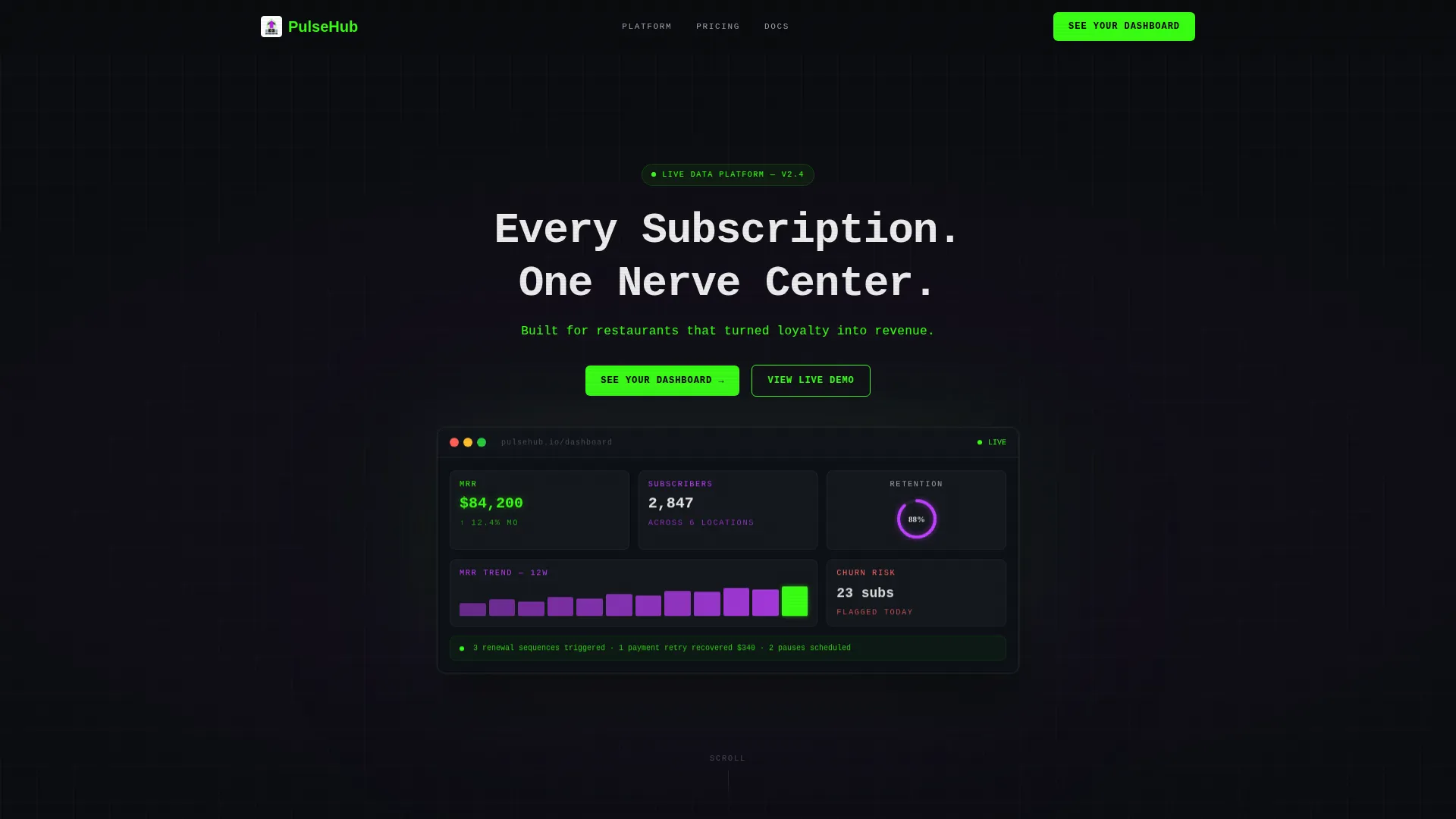
- A dark full-bleed header with a glowing animated dashboard mockup and micro-animated live metrics
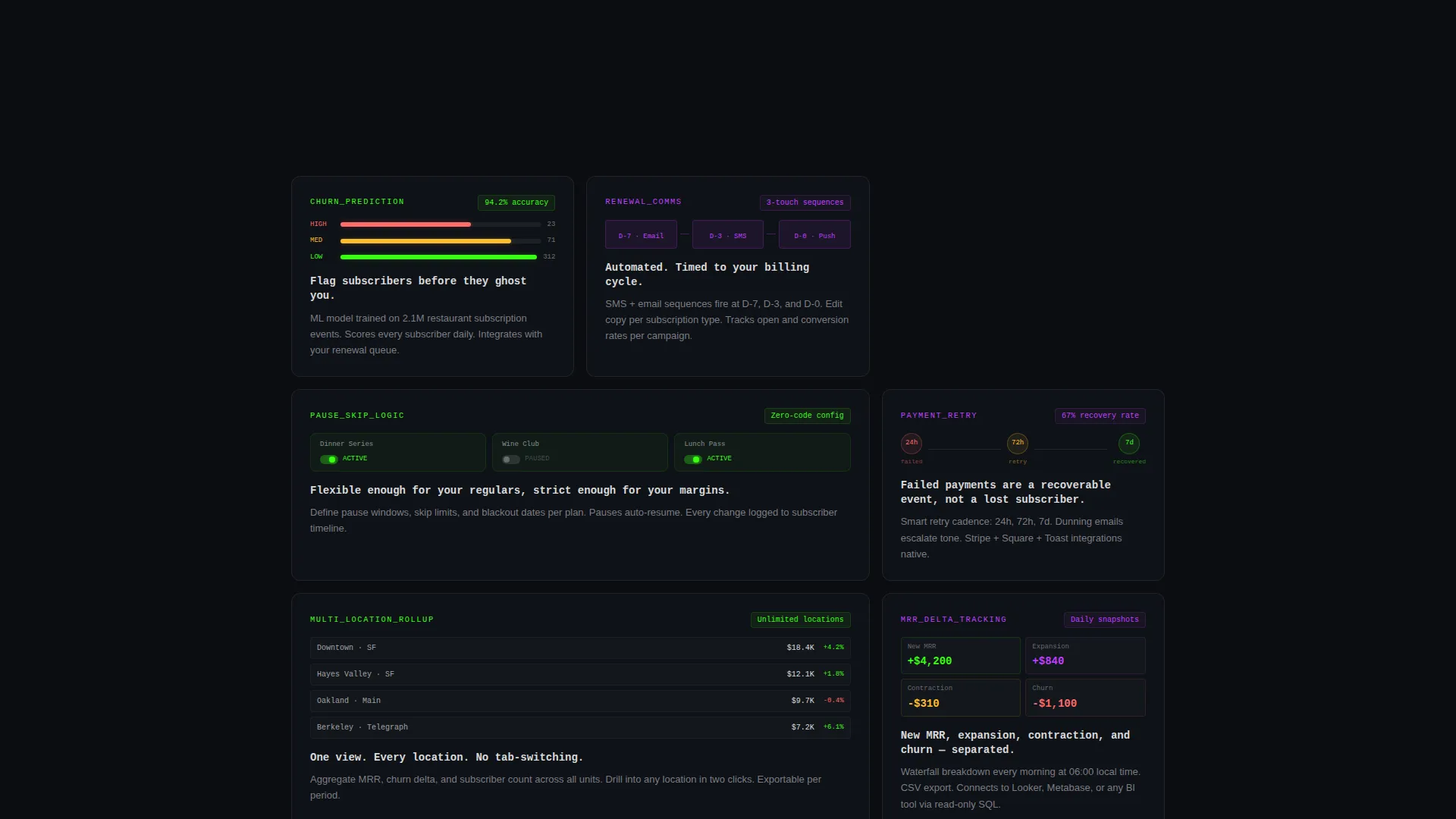
- A bento grid of spec sheet tiles covering churn prediction, pause logic, payment retry, renewal comms, and roll-up reporting
- A two-step lead generation form that collects restaurant name, location count, subscriber range, subscription type, and preferred demo format
Feature list
This template delivers a focused set of layout capabilities drawn directly from its brief. Each feature is designed to build trust and move visitors toward a demo request.
Glowing Dashboard Header Mockup
The header spans full width in void black with a single floating dashboard mockup at its center. Cards and graphs radiate terminal green and electric violet light. Micro-animated numbers tick upward showing active subscribers, monthly recurring revenue, and retention rate in real time.
Bento Grid Spec Sheet Layout
Below the fold, the page breaks into a grid of discrete capability tiles. Each tile presents a feature name in monospace type, a single metric or data visualization, and a two-line technical explanation. The format reads like documentation and builds confidence card by card.
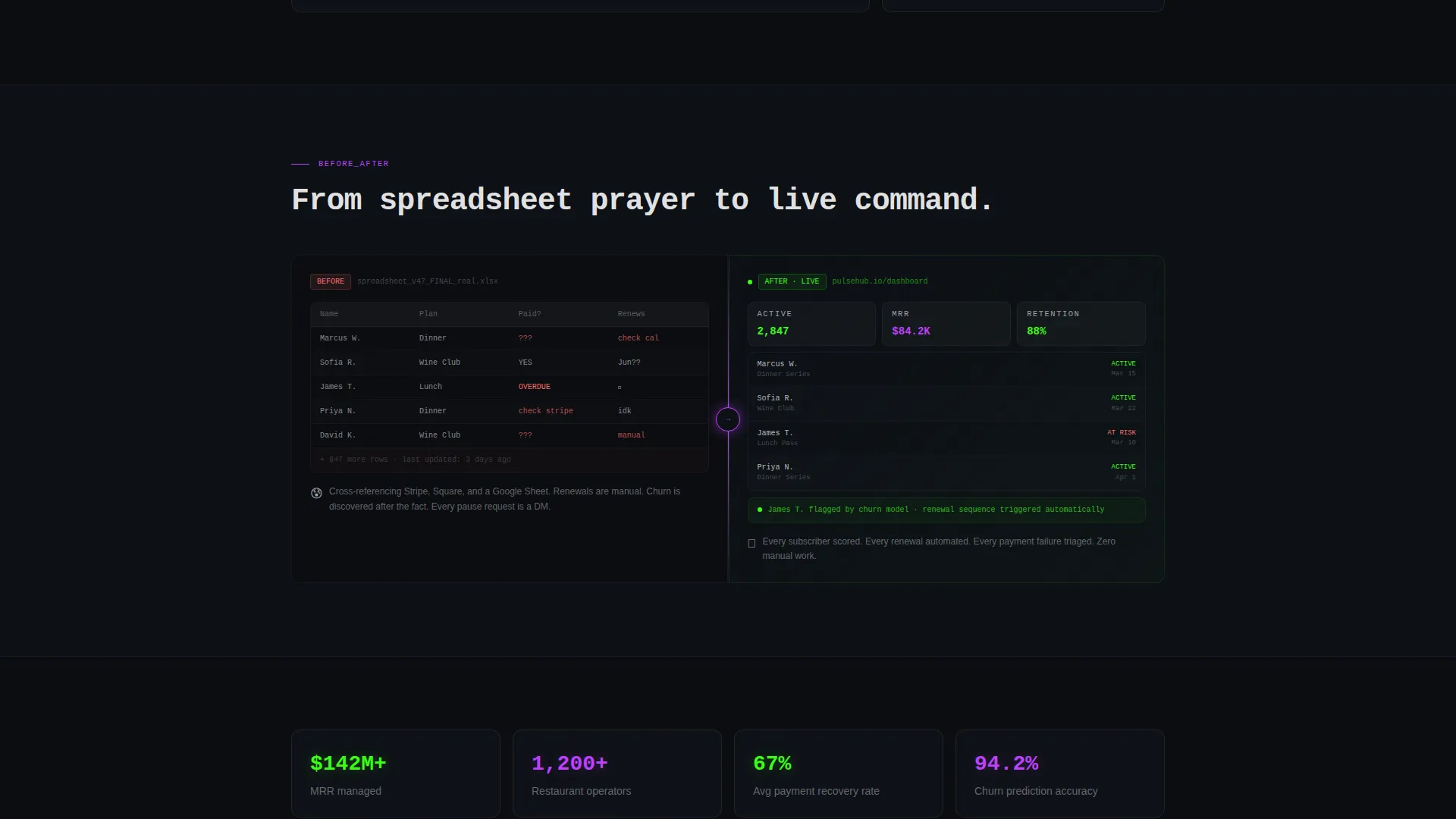
Before and After Full-Width Tiles
Occasional full-width tiles interrupt the grid to contrast the spreadsheet approach with the live dashboard view. A glowing violet dividing line separates the two states. These tiles make the platform's value concrete without relying on marketing language.
Fixed and Repeated Primary Call to Action
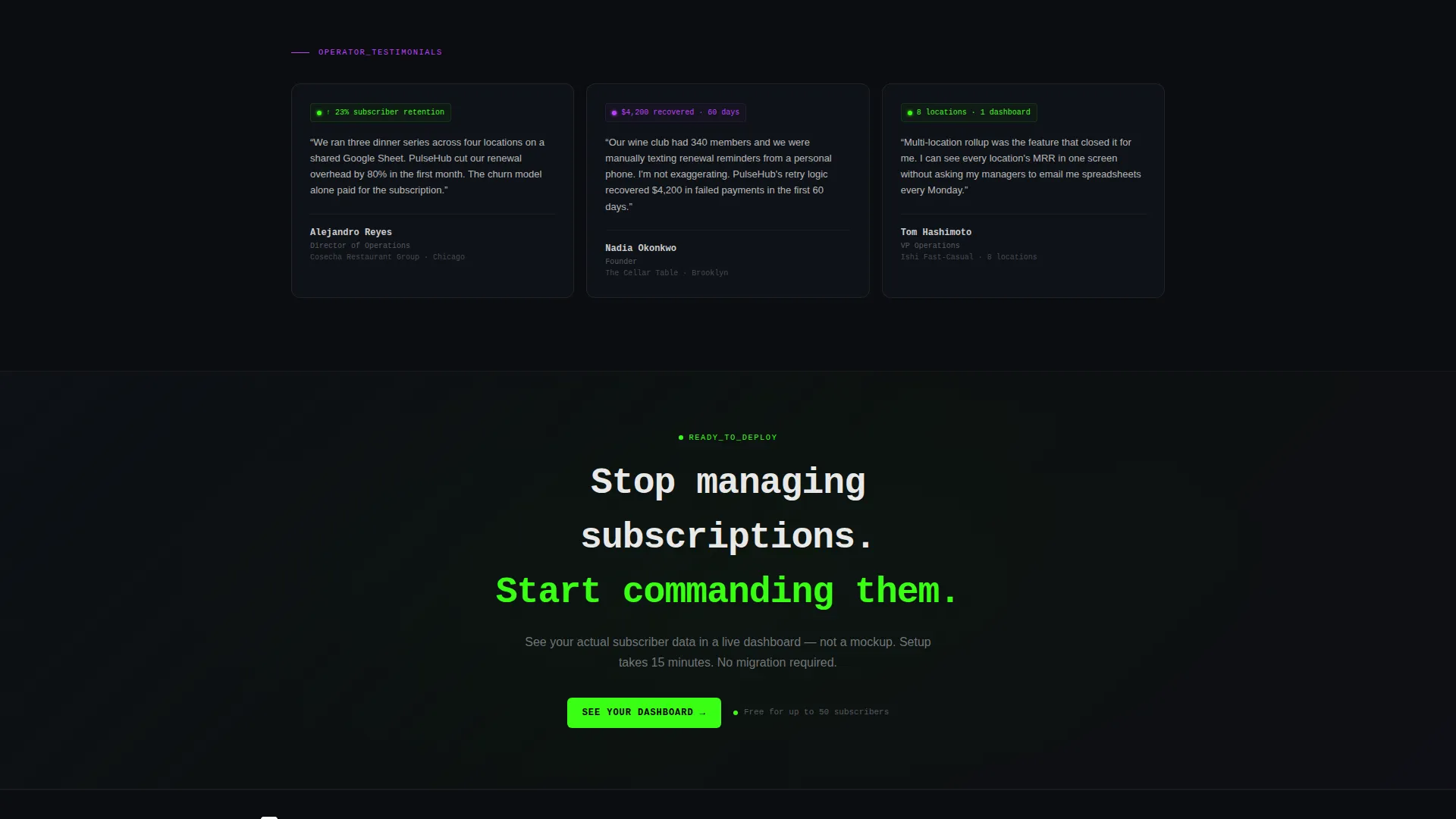
The "See Your Dashboard" call to action appears in the fixed navigation bar and repeats at the grid midpoint and page base. Consistent placement means the action is always within reach regardless of scroll depth.
Two-Step Qualification Form
Clicking any call to action opens a two-step form. Step one collects restaurant name, number of locations, and subscriber count using dropdown ranges. Step two asks for subscription type and preferred demo format, offering a live call, a recorded walkthrough, or a self-serve sandbox.
Acid Digital Color System
The entire template is built on a four-color palette: void black for backgrounds, terminal green for live data accents and hover states, electric violet for secondary highlights and graph lines, and cool zinc for body text and borders. Every color choice is intentional and functional.
Page sections overview
| Section | Purpose |
|---|---|
| Fixed Navigation Bar | Anchors the primary call to action at all scroll depths |
| Full-Bleed Header | Introduces the platform with a glowing animated dashboard mockup |
| Bento Grid Tiles | Presents each platform capability as a discrete spec sheet card |
| Churn Prediction Tile | Highlights real-time churn signal visibility as a key capability |
| Renewal Comms Tile | Shows automated renewal communication as a built-in feature |
| Pause and Skip Tile | Covers subscriber pause and skip logic within the platform |
| Payment Retry Tile | Explains how failed payment retry cycles are handled |
| Multi-Location Reporting | Demonstrates roll-up reporting across multiple restaurant locations |
| Before and After Tile | Contrasts the spreadsheet chaos with the unified live dashboard |
| Midpoint Call to Action | Repeats the primary form trigger at the grid's halfway point |
| Two-Step Lead Form | Qualifies visitors with restaurant context and demo preferences |
| Base Call to Action | Closes the page with a final invitation to request a dashboard demo |
Design & branding system
The template follows a Data Command theme built entirely on the Acid Digital color system. Every visual decision reinforces the idea that the platform is precise, always on, and built for operators who cannot afford gaps.
- Void black (#0B0D10) as the primary background with near-black card tiles and faint 1px cool zinc (#A1A1AA) borders
- Terminal green (#39FF14) for live data accents, hover states, and the subheadline beneath the primary heading
- Electric violet (#BF40FF) for graph lines, secondary highlights, and the dividing line in before-and-after tiles
Mobile & speed optimization
The bento grid layout is structured to reflow cleanly across screen sizes. The spec sheet tile format keeps each card self-contained, which makes stacking on smaller viewports straightforward without losing hierarchy.
- Bento grid tiles are designed as self-contained units that stack naturally on narrower screens
- Fixed navigation with the primary call to action remains accessible regardless of device size
- The two-step form uses dropdown ranges instead of open text fields to reduce friction on mobile input
How this template helps you convert
Every structural decision in this template is aimed at one outcome: getting a qualified restaurant operator to request a demo. The page earns that click before the form ever appears.
- The animated dashboard mockup in the header shows enough real interface detail that visitors trust the product exists and works before they scroll further.
- The spec sheet bento tiles remove doubt one capability at a time, so by the midpoint call to action the visitor already understands what they are signing up to see.
- The two-step form reduces friction by using dropdown ranges instead of exact numbers, making it fast to complete even for operators who are browsing quickly.
Other information about this template
This template is categorized under Technology, specifically within the Restaurant Software subcategory and the Restaurant Subscription Management niche. It is a strong fit for platforms addressing the growing demand for structured recurring revenue tools in the food and beverage industry.
- Template style: Bento Grid landing page with a single-page, section-led scroll flow
- Theme: Data Command with a Spec Sheet creative direction
- Header concept: Dark Full-Bleed with a Glow treatment on the central dashboard mockup
- Landing page direction: Lead Generation with a two-step qualification form as the primary conversion mechanism
- Color system: Acid Digital, using void black, terminal green, electric violet, and cool zinc throughout
Theme
Data Command
Creative direction
Spec Sheet
Color system
Acid Digital
Style
Bento Grid
Direction
Lead Generation
Page Sections
Animated Dashboard Header with Live Metrics
Bento Grid Spec Sheet Tile System
Before and After Full-width Contrast Tiles
Fixed Navigation with Persistent Call to Action
Two-step Frictionless Lead Form
Acid Digital Four-color Visual System
Related questions
Who is this landing page template designed for?
What does the two-step lead generation form collect?
What makes the bento grid layout effective for this type of platform?
Can the template messaging cover different subscription types?
Is this template suitable for a platform in its early stages?



