K-12 AI Voice Assistant Landing Page Template
Syllabus is a scroll-reveal landing page template built for K-12 AI voice assistant products. It opens with an interactive tutoring simulator, then guides visitors through live usage counters, teacher workload comparisons, and district case studies. The design uses a Slate and Sky color system with spring-physics animations, guiding district coordinators and school leaders toward a pilot signup with zero friction.
by Rocket studio
Quick summary
Syllabus is a single-page, scroll-reveal landing page template for K-12 AI voice assistant products. It leads with a live interactive simulator so visitors experience the product before reading any marketing copy. Progressive scroll animations, a persistent call-to-action bar, and a frosted-glass header work together to move school decision-makers from curiosity to a pilot signup click.
Who this template is for
This template is built for teams bringing AI-powered voice assistant tools into K-12 classrooms. It speaks directly to the people who evaluate, approve, and implement those tools at the district level.
- District technology coordinators assessing AI tools for pilot programs
- Principals managing large classrooms with limited instructional aide budgets
- Curriculum leads who need differentiated instruction support at scale
What problem this template solves
School technology buyers are skeptical. They need proof before they trust a pitch. Most landing pages lead with features and ask visitors to imagine a benefit. This template flips that order entirely.
- Visitors interact with the AI simulator before they read a single marketing claim
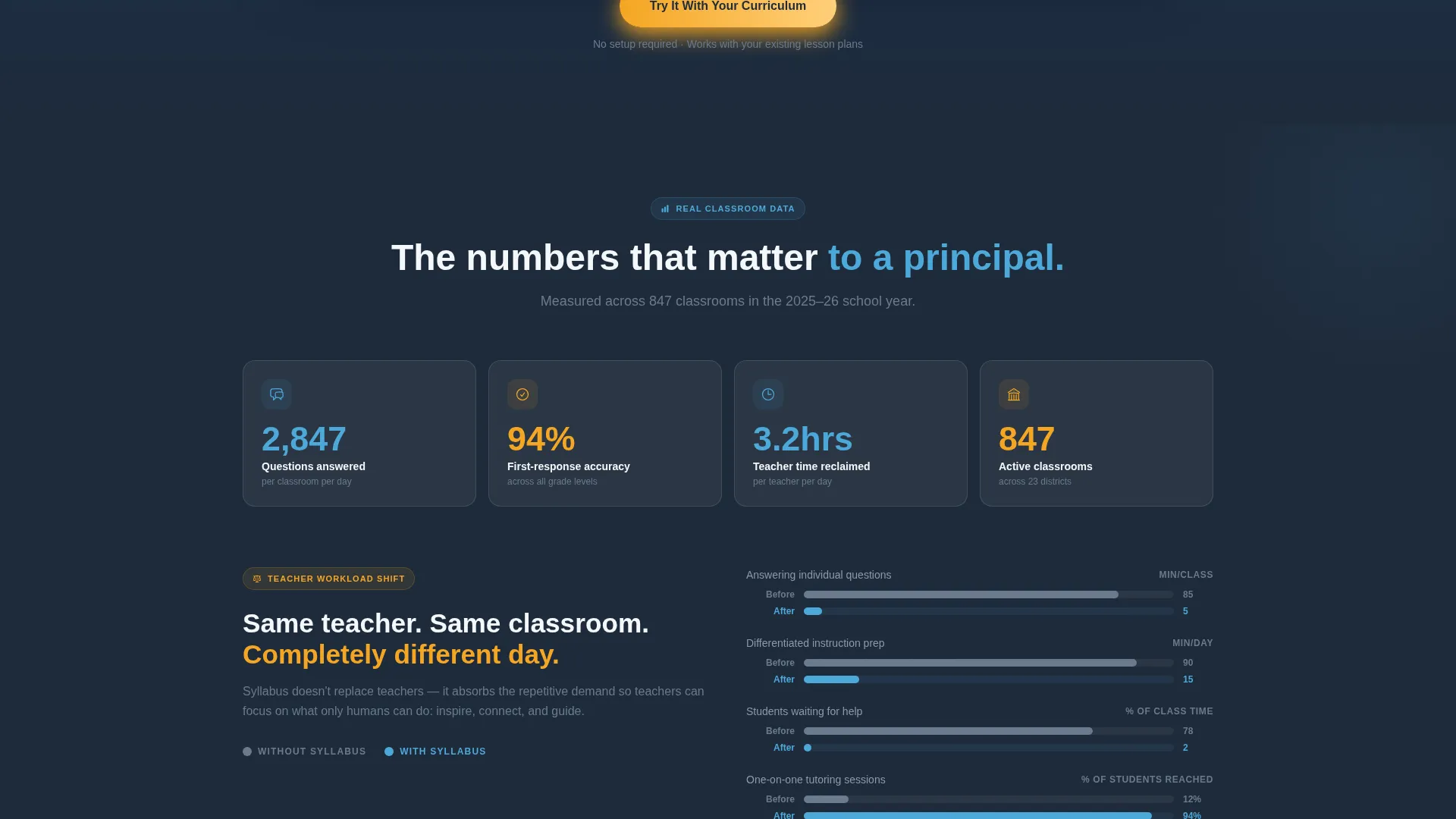
- Decision-makers can compare teacher workload data side by side in a dedicated section
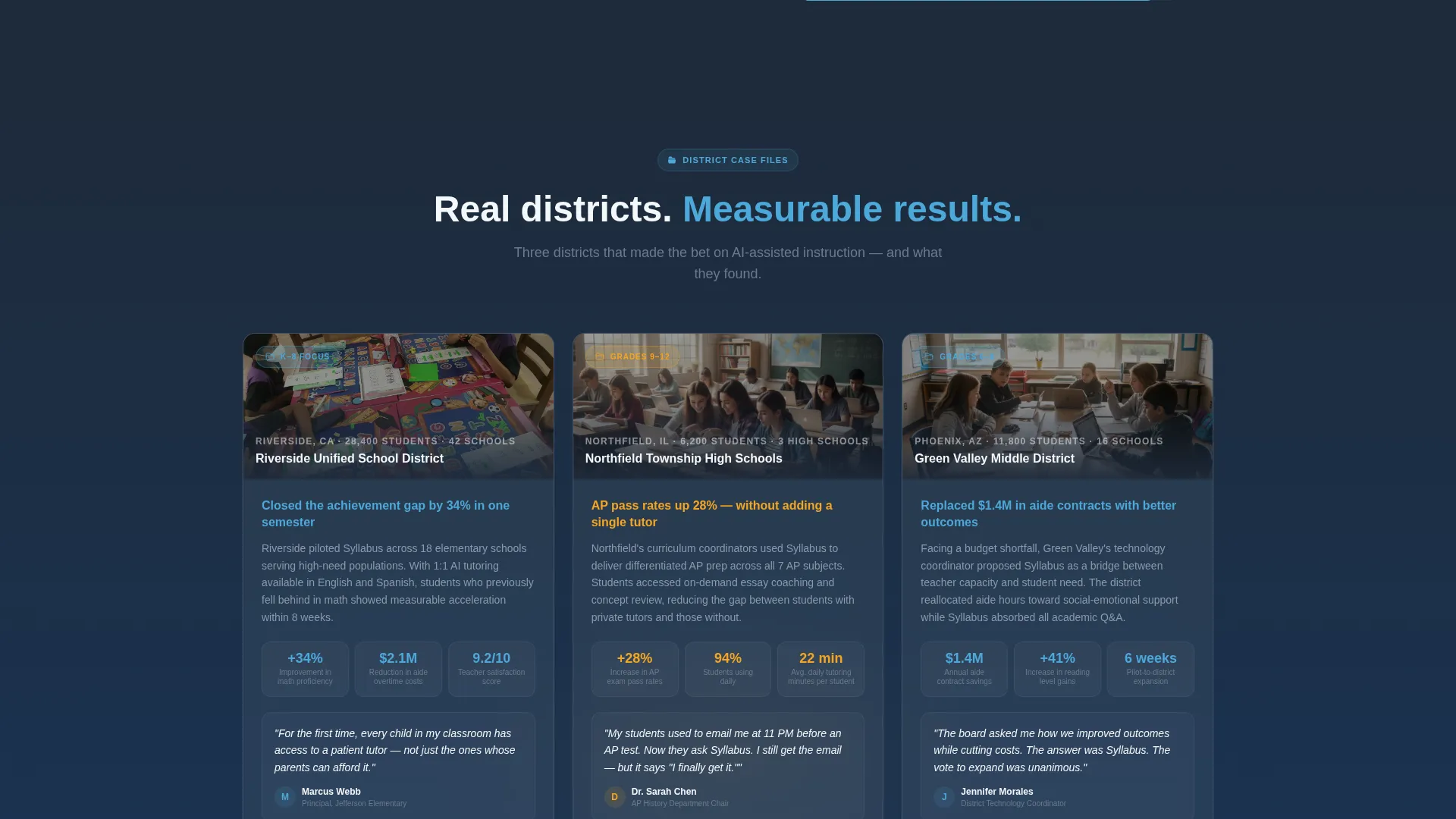
- Case studies materialize progressively, giving evidence at the moment trust is forming
What you get with this template
You get a fully structured, single-page layout designed around one conversion goal: routing qualified visitors to a pilot signup page. Every section is sequenced to build confidence and reduce hesitation.
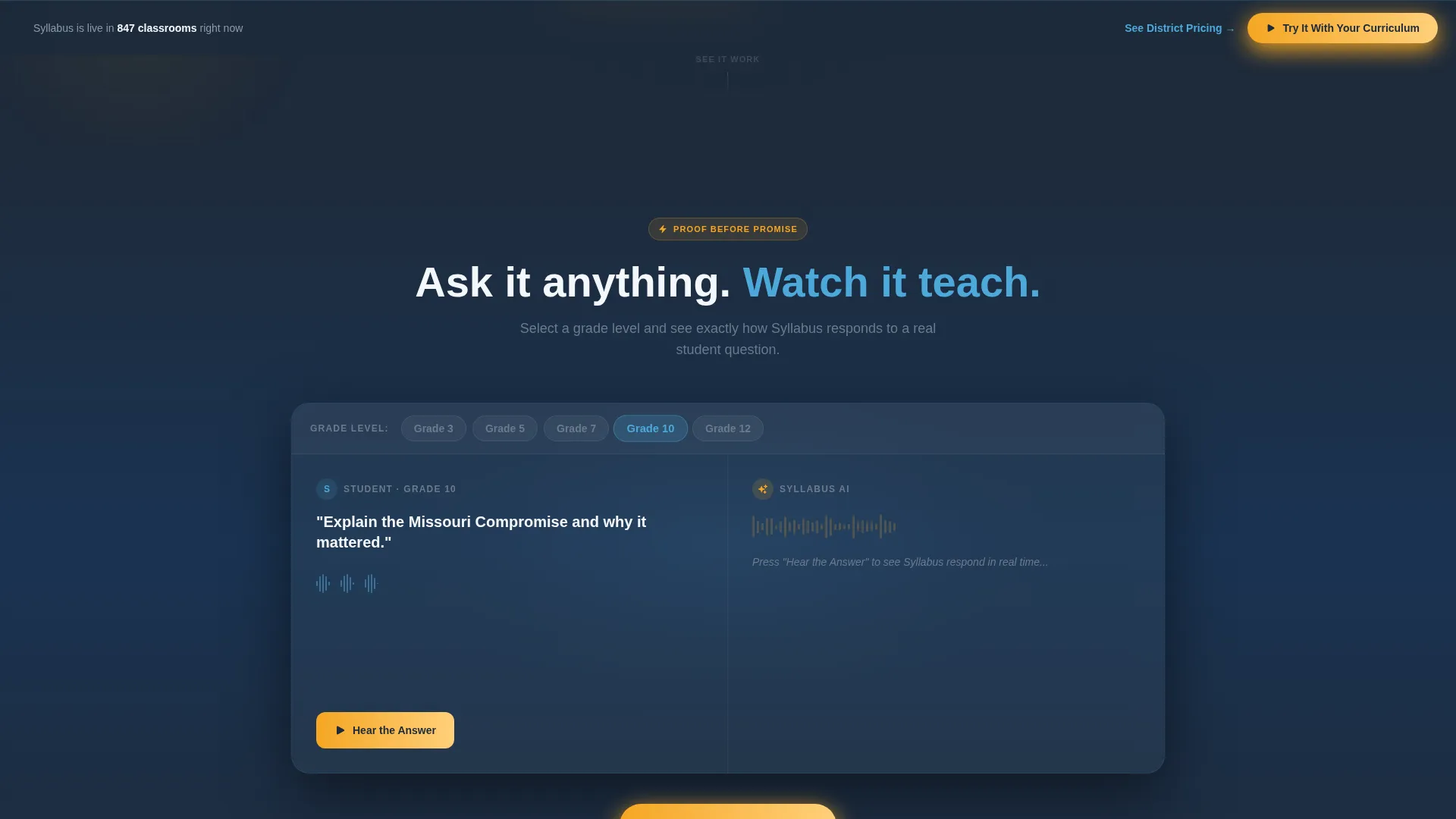
- A live interactive tutoring simulator with animated voice waveform and real-time transcript
- A scroll-triggered layout with spring-physics animations, usage counters, and slide-in case study panels
- A persistent bottom call-to-action bar and a secondary pricing text link for coordinators at different decision stages
Feature list
This template includes purpose-built sections and interaction patterns drawn from the source brief. Each feature serves a specific role in the visitor journey.
Live Interactive Simulator
Before any marketing copy appears, visitors type or speak a grade level and subject. The AI generates a sample tutoring exchange with an animated voice waveform and a live transcript. Proof arrives before the promise.
Frosted Glass Header Panels
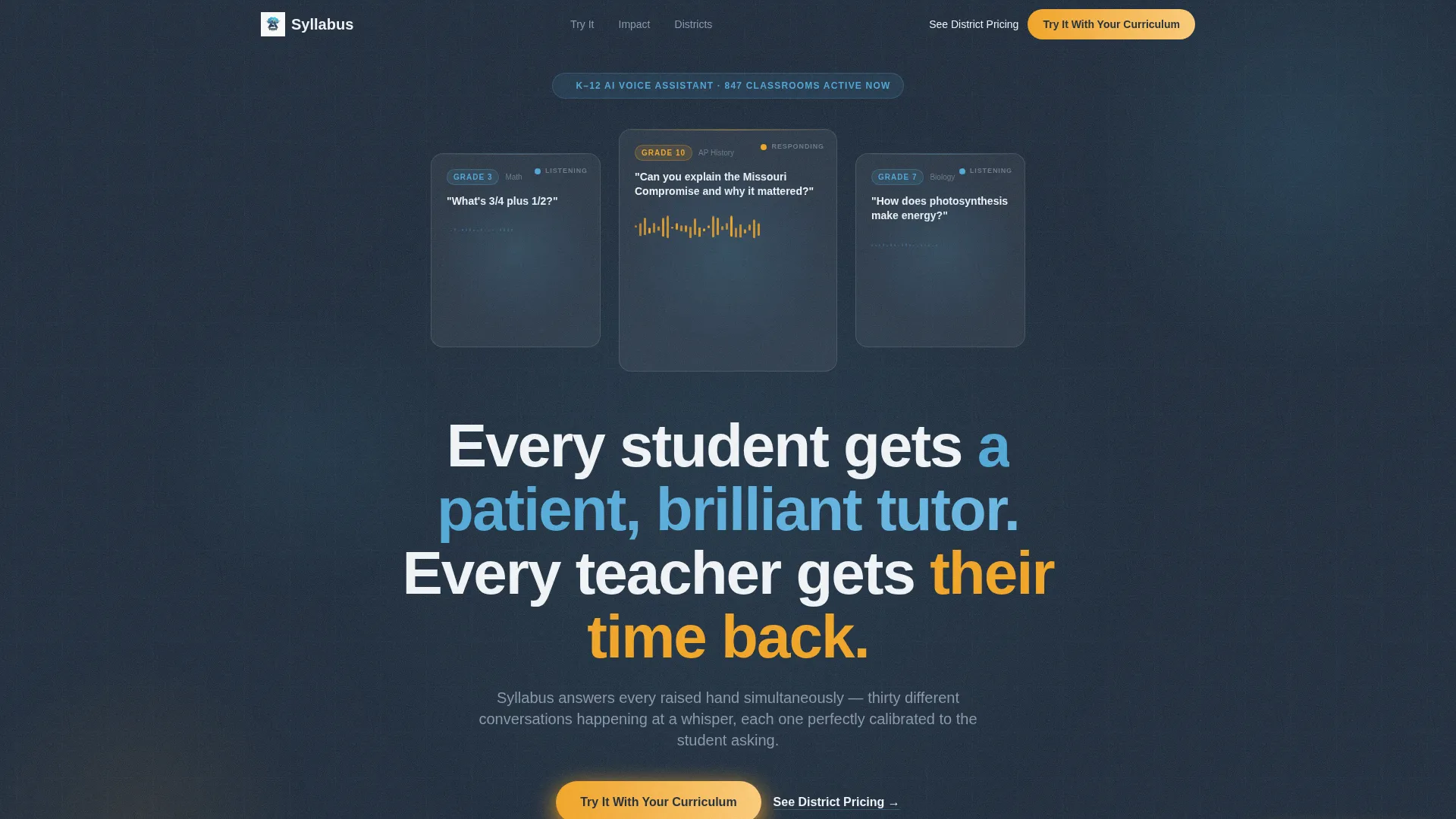
The header uses three translucent dark glass cards floating over a deep slate background. Each panel shows a live voice waveform mid-conversation, representing a different student interaction. The center panel is the largest and anchors the headline below it.
Scroll-Triggered Progressive Reveal
Every section below the simulator eases in as the visitor scrolls. Spring-physics timing keeps motion smooth and purposeful. Usage-hours counters count up, comparison panels slide in, and case study file folders open in sequence.
Teacher Workload Comparison
A dedicated side-by-side section shows classroom conditions with and without the AI assistant. This gives principals and curriculum leads a fast, visual way to quantify the value before they reach the case studies.
District Case Study Panels
Three case studies materialize like file folders sliding open as the visitor scrolls into that section. Each one provides real-context evidence for coordinators evaluating district-wide adoption.
Persistent Call-to-Action Bar
The primary call-to-action button appears first beneath the simulator and then again as a fixed bottom bar after the second scroll section. A secondary text link for district pricing floats beside it, serving visitors who are already past the discovery phase.
Page sections overview
| Section | Purpose |
|---|---|
| Dark Glass Header | Establish voice-first product feel with three frosted waveform panels and the main headline |
| Interactive AI Simulator | Let visitors experience a live tutoring exchange before any marketing copy appears |
| Usage Hours Counter | Show how many questions the AI handles per classroom per day with animated number counts |
| Workload Comparison | Present a side-by-side view of teacher workload with and without the assistant |
| District Case Studies | Reveal three real-context case study panels that slide open on scroll |
| Persistent call to action Bar | Keep the pilot signup action visible after the second scroll section throughout the page |
Design & branding system
The visual identity follows a Dynamic Motion theme anchored in the Slate and Sky color system. The palette is described as institutional bones made breathable by light. Slate dominates backgrounds and text, sky blue draws the eye to interactive components, and morning-bell gold appears only where a tap or click is expected.
- Core palette: deep chalkboard slate (#1E2A3A), worn-eraser gray (#6B7B8D), open-window sky (#4DA8DA), bright-idea white (#F4F7FA), and morning-bell gold (#F5A623) for calls to action
- Header style: Dark Glass Panels with frosted translucent cards, subtle light refractions on cursor movement, and live sine-wave animations
- Motion system: spring-physics easing on scroll reveals, breathing waveforms, and counting number animations throughout
Mobile & speed optimization
The scroll-reveal structure and spring-physics animations are designed to feel alive without becoming heavy. The layout is built as a single-page flow, which keeps navigation simple on smaller screens.
- Single-page structure removes multi-page load overhead and keeps the visitor path linear on mobile
- Spring-physics animations ease in progressively, so content appears smoothly as the user scrolls rather than all at once
- No form fields live on the landing page, reducing input friction on touch devices and keeping the conversion path to a single tap
How this template helps you convert
The conversion strategy is built around one principle: let the visitor experience the product before asking for a commitment. Every design and layout decision supports that goal.
- The interactive simulator is the first thing visitors encounter, so they form a personal impression of the AI before reading any claims. By the time they reach the case studies, they have already had a conversation with the product.
- The persistent call-to-action bar stays visible after the second scroll section, keeping the pilot signup action accessible without interrupting the reading flow. The secondary pricing link serves coordinators who are already comparing options.
Other information about this template
This template is built for the K-12 education technology market, where buying decisions involve multiple stakeholders and long evaluation cycles. The layout accounts for that by layering evidence progressively rather than front-loading a pitch.
- The template style is Scroll Reveal (Progressive), meaning sections animate into view in a specific sequence designed to mirror a discovery journey
- The creative direction is Calculator and Tool First, a pattern where an interactive proof-of-concept precedes all explanatory copy
- The landing page direction is Click-Through, meaning no form fields appear on the page itself and the sole goal is routing visitors to a dedicated pilot signup page
- The theme is Dynamic Motion, applied through spring-physics easing, live waveform animations, and scroll-triggered count-up numbers
- The header concept is Dark Glass Panels, a frosted-card composition that signals a modern, technology-forward product identity
Theme
Dynamic Motion
Creative direction
Calculator/Tool First
Color system
Slate & Sky
Style
Scroll Reveal (Progressive)
Direction
Click-Through
Page Sections
Live AI Tutoring Simulator
Frosted Glass Header Panels
Spring-physics Scroll Reveals
Teacher Workload Comparison Panel
District Case Study Panels
Persistent Click-through Call to Action Bar
Related questions
What type of product is this template designed for?
Does the landing page include any form fields?
Who are the intended buyers for a product using this template?
How does the interactive simulator section work within the layout?
Can a non-technical team customize this template?



