Syllabus - Powerful Educationmanagement Landing Page Template
Syllabus is an education project management landing page template built for district coordinators, university PMO leads, and charter-school founders. It pairs an interactive Gantt-style project board with a scroll-reveal spec-sheet layout, a Monochrome Steel palette, and a three-step freemium sign-up flow that puts visitors inside a pre-populated workspace from the very first click.
by Rocket studio
Quick summary
Syllabus is a scroll-reveal landing page template for education project management platforms. It opens with a live, draggable project board showing a real campus scenario, then walks visitors through platform capabilities one spec at a time. The design uses a Monochrome Steel palette and drives toward a freemium conversion through a progressive, three-step sign-up form.
Who this template is for
This template is built for teams that manage complex, multi-track education initiatives where timelines, budgets, and accountability all overlap. It speaks directly to people whose work spans buildings, semesters, and funding sources at the same time.
- District project coordinators managing Title I deadlines and facilities schedules
- University project management office leads migrating departments to new learning management systems
- Charter-school founders tracking construction punch lists alongside accreditation narratives
What problem this template solves
Education project teams often juggle tasks across multiple systems: sticky notes, spreadsheets, shared drives, and email threads. Nothing ties a task to a budget line, a building, and a semester simultaneously. This template presents a platform that closes that gap clearly and immediately.
- Scattered task tracking across tools with no unified view of budgets or deadlines
- Difficulty showing funders, accreditors, or boards a clear project status at a glance
- No easy entry point for new users who land on an empty dashboard and disengage
What you get with this template
The template delivers a fully structured, single-page layout that showcases an education project management platform from first impression to sign-up. Every section is purposeful and tied to a specific conversion moment.
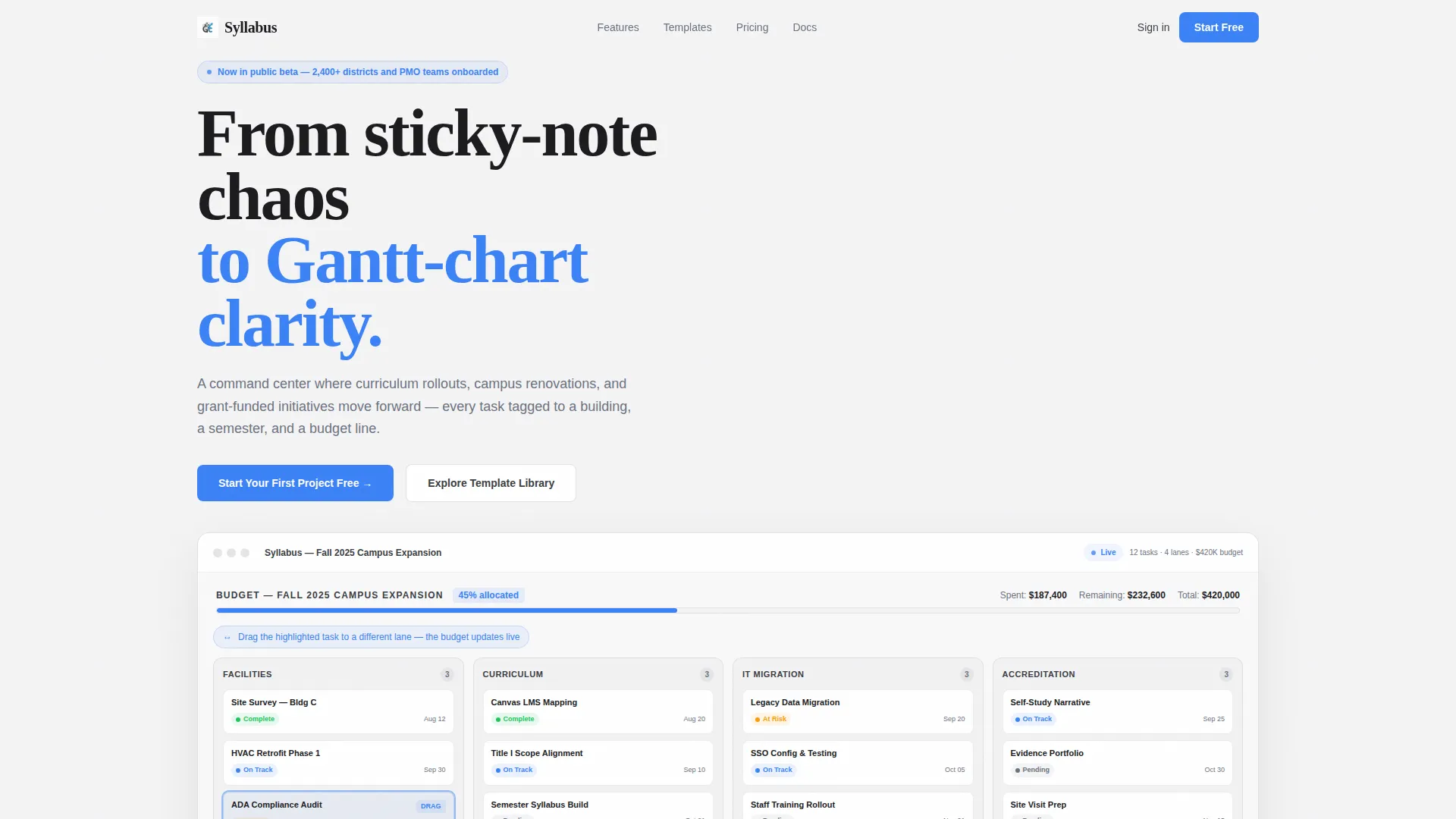
- A full-viewport interactive project board in the header with draggable tasks and a live budget bar
- Scroll-triggered spec-sheet sections that reveal one platform capability at a time, each with a live micro-animation
- A three-step progressive sign-up form ending with a pre-populated starter workspace
Feature list
This template covers every layer of the platform story, from first interaction to final conversion step. Each capability below maps directly to a section or component described in the source brief.
Interactive Header Project Board
The header renders a full-viewport project board showing a realistic "Fall 2025 Campus Expansion" scenario. Swim lanes cover Facilities, Curriculum, IT Migration, and Accreditation. Visitors can drag one task and feel the interface snap into place, while a budget bar at the top updates in real time as the task moves.
Scroll-Reveal Spec Sheet Layout
Each section enters the viewport at 40 percent opacity and snaps to full contrast as it scrolls into view, creating a "lights turning on" effect down the page. Bold statistics appear on the left, functional explanations sit on the right, and a live micro-animation plays in the center to prove each capability as it loads.
Live Micro-Animations per Section
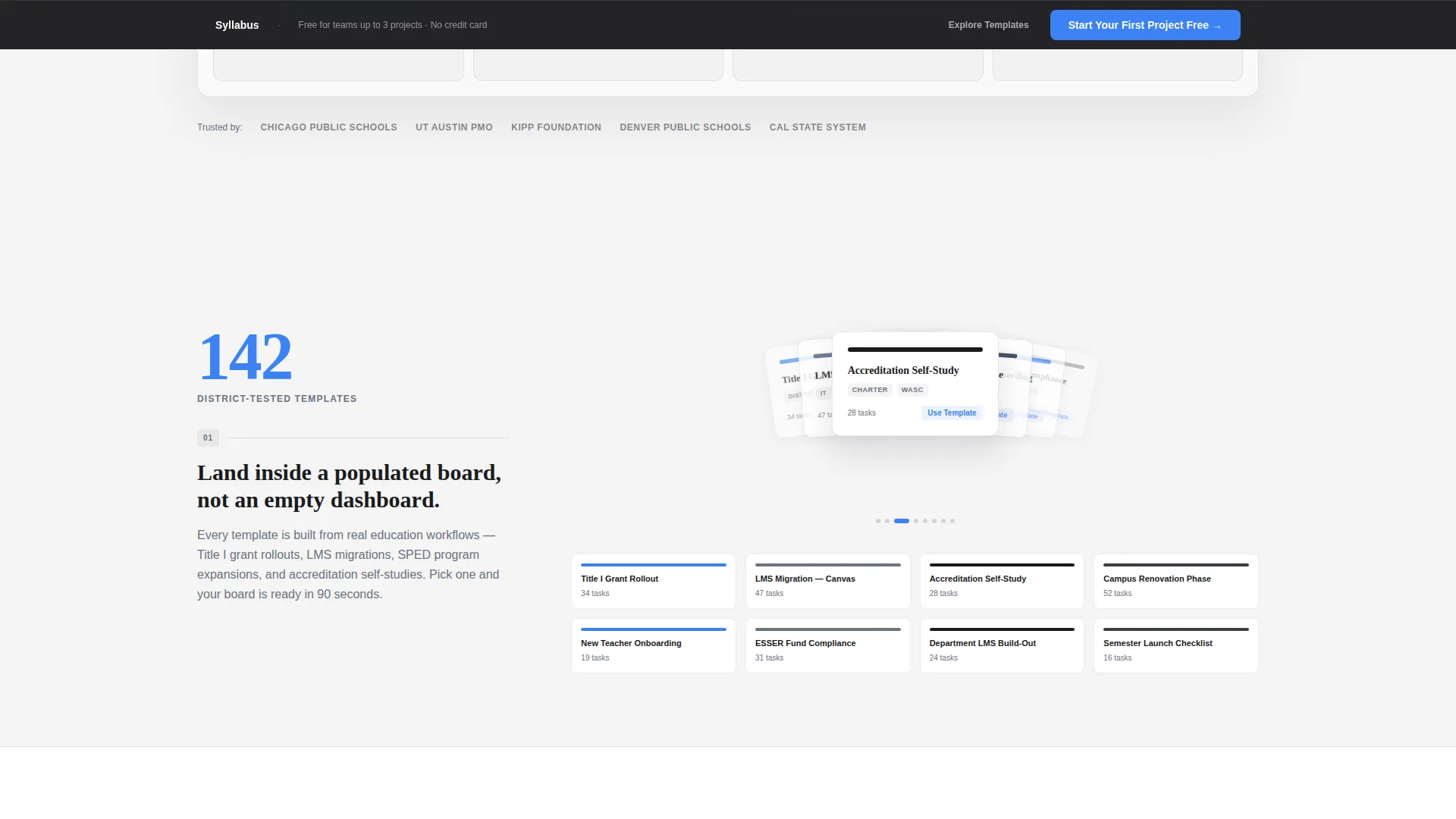
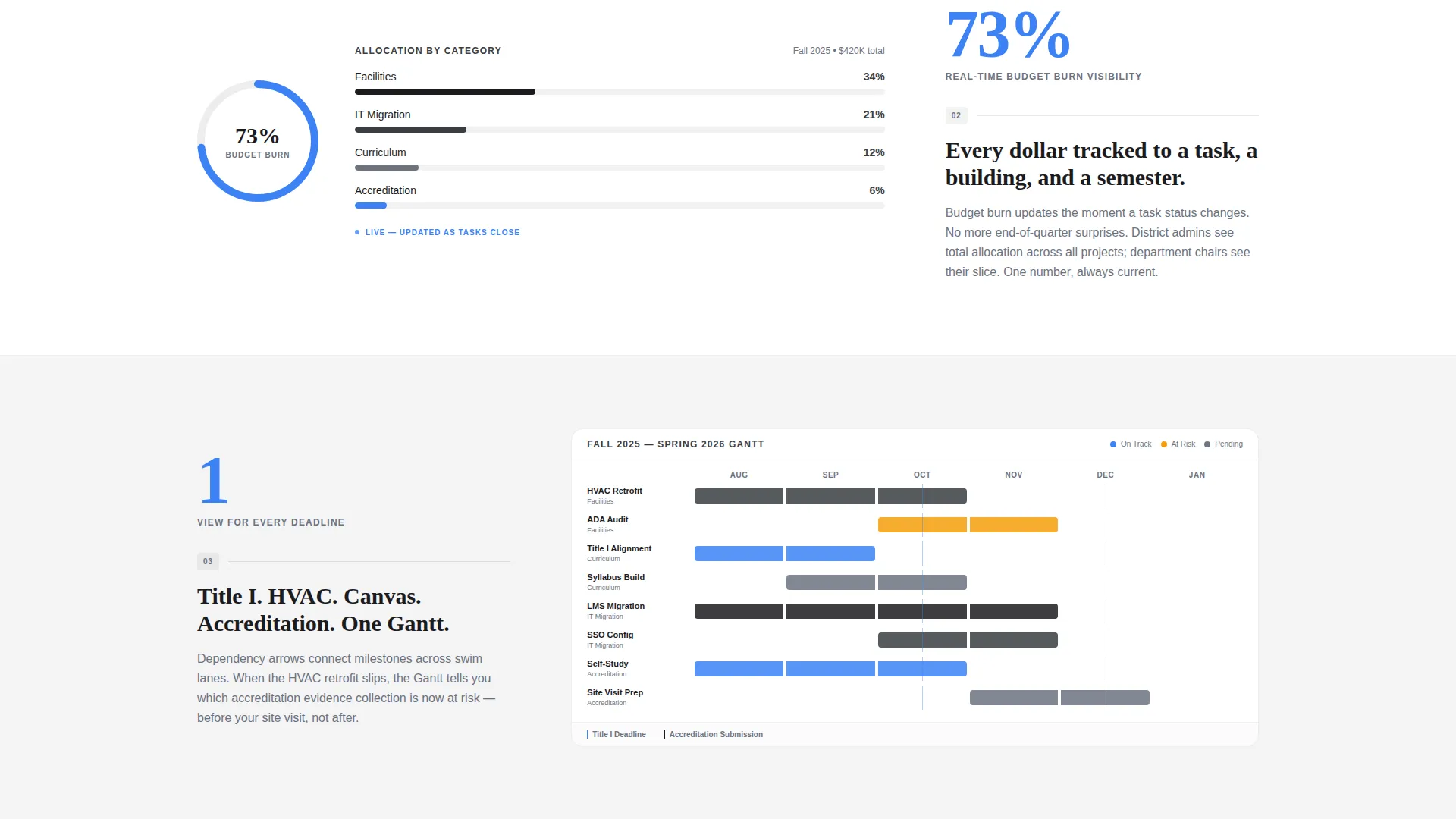
Animations are tied directly to platform specs. A carousel of template thumbnails fans out like index cards when "142 district templates" appears. A progress ring fills to 73 percent when the real-time budget burn stat loads. Each animation is a functional proof point, not decoration.
Progressive Three-Step Sign-Up Form
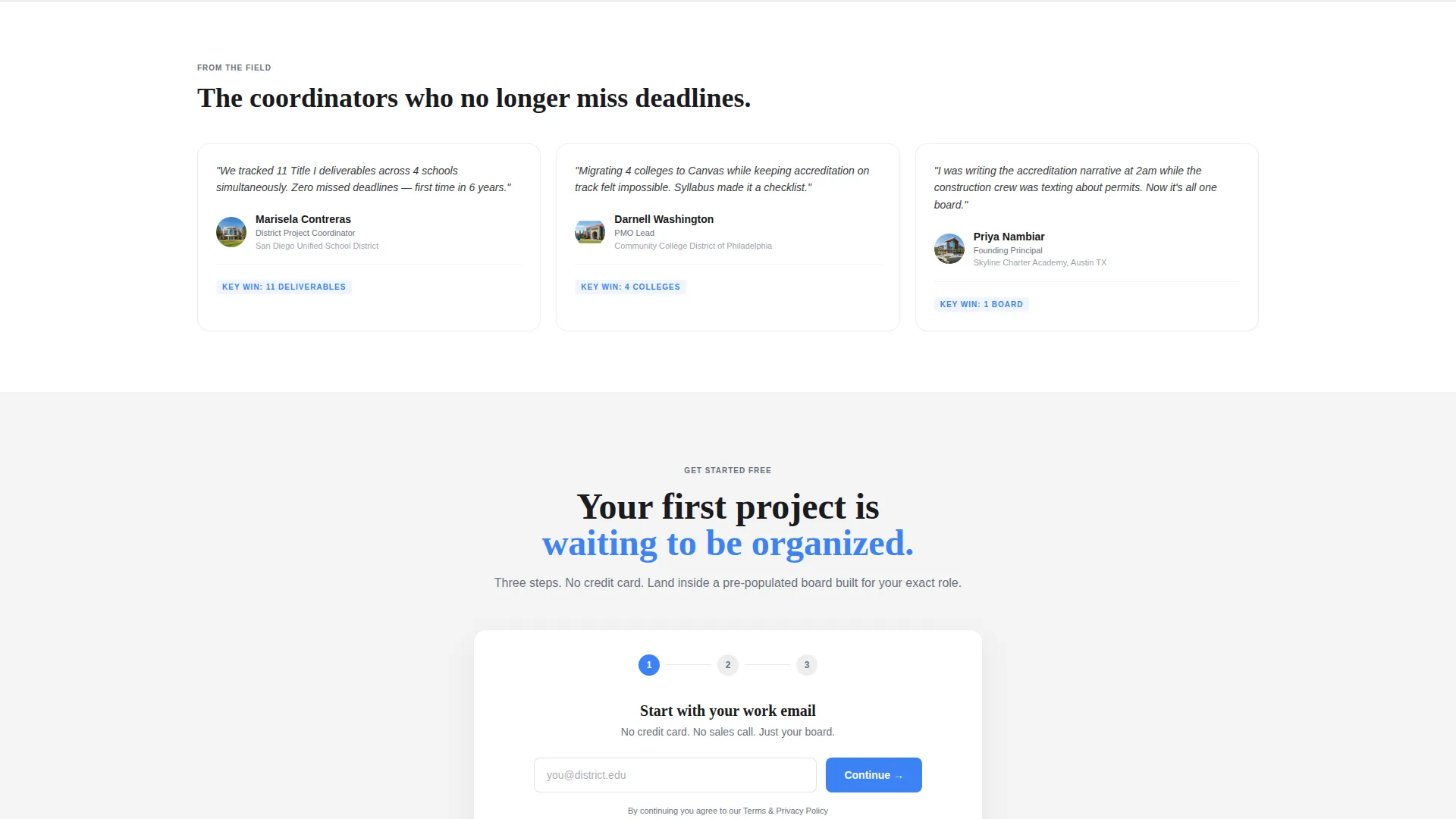
The sign-up flow removes friction by asking for only one thing at a time. Step one collects a work email. Step two offers a role selector with options including District Admin, PMO Lead, Department Chair, and Other. Step three lets the visitor choose a starter template so they enter a pre-populated workspace, never a blank screen.
Persistent Conversion Bar
After the visitor passes the third section, a sticky bottom bar appears with the primary call to action rendered in academic blue on chalk white. This keeps the sign-up path visible without interrupting the reading flow of the spec-sheet sections above it.
Filterable Template Library Overlay
A secondary conversion path labeled "Explore the Template Library" opens a directory overlay where visitors can browse and filter available templates. The overlay captures a visitor's email on download, giving the platform a secondary lead path for users still in discovery mode.
Page sections overview
| Section | Purpose |
|---|---|
| Interactive Header Board | Lets visitors drag a task and feel the platform before scrolling |
| Budget Bar Display | Shows real-time budget movement tied to task interaction |
| Spec Sheet Row 1 | Introduces template volume with a stat and animated thumbnail carousel |
| Spec Sheet Row 2 | Demonstrates budget tracking with an animated progress ring |
| Additional Spec Rows | Stacks further capability proof points with matching micro-animations |
| Primary call to action Block | Presents "Start Your First Project Free" after the interactive header moment |
| Persistent Bottom Bar | Keeps the primary call to action visible after the visitor passes the third section |
| Sign-Up Step One | Collects work email as the only first-step requirement |
| Sign-Up Step Two | Offers a role selector to personalize the onboarding path |
| Sign-Up Step Three | Lets the visitor pick a starter template before entering the workspace |
| Template Library Overlay | Provides a filterable directory for discovery-mode visitors with email capture |
Design & branding system
The visual identity follows a Directory and Discovery theme built on a Monochrome Steel color system. The palette removes warmth and noise entirely, giving the page the quiet authority of a well-organized system that needs no decoration to earn trust.
- Core colors: forge black (#1B1B1E), brushed graphite (#3A3D42), cool slate (#6B7280), chalk white (#F4F4F5)
- Single signal accent: academic blue (#3B82F6) reserved exclusively for interactive elements, live data indicators, and calls to action
- Overall aesthetic: clinical, additive, and precise, like a steel filing cabinet inside a modernist library
Mobile & speed optimization
The scroll-reveal structure and section-by-section reveal pattern are designed to remain legible and functional across screen sizes. The progressive layout means each section is self-contained, which supports clean rendering on smaller displays.
- Scroll-triggered opacity transitions keep visual load focused on the active viewport section
- The progressive sign-up form presents one step at a time, reducing cognitive load on mobile screens
- The persistent bottom bar stays accessible without obscuring content on narrow viewports
How this template helps you convert
The page is engineered so that every interaction moves a visitor one step closer to starting a project. Friction is removed at each stage rather than deferred to the end.
- The interactive header lets visitors touch the product before they read a single line of copy, building confidence through direct experience rather than claims.
- The spec-sheet scroll rhythm stacks one proof point at a time, so each section adds weight to the decision without overwhelming the visitor with a wall of features.
- The three-step sign-up form and pre-populated starter workspace mean the first session ends with a real project board, not an empty prompt to "get started."
Other information about this template
This template is part of the broader education software category and is specifically designed for the education project management niche. It suits platforms serving K-12 districts, higher education institutions, and charter networks of varying sizes.
- The template style is Scroll Reveal (Progressive), meaning sections animate into view as the visitor scrolls rather than loading all at once
- The header concept is an Interactive Preview, which is a distinct design pattern that places a working product demo at the very top of the page
- The creative direction is Spec Sheet, a layout strategy where each section introduces one capability with a supporting stat and live proof element
- The freemium and trial conversion direction shapes every call to action, form step, and secondary path on the page
Theme
Directory & Discovery
Creative direction
Spec Sheet
Color system
Monochrome Steel
Style
Scroll Reveal (Progressive)
Direction
Freemium/Trial
Page Sections
Interactive Header Project Board
Scroll-reveal Spec Sheet Sections
Live Section Micro-animations
Progressive Three-step Sign-up
Persistent Bottom Conversion Bar
Filterable Template Library Overlay
Related questions
Who is this template designed for?
Can I customize the swim lane labels and project scenario in the header?
How does the three-step sign-up form reduce drop-off?
What is the purpose of the secondary template library path?
Is this a single-page template or a multi-page website?



