K-12 AI Chatbot Landing Page Template
Tutor is a modular card grid landing page built for K-12 AI education chatbot products. It follows a Problem-to-Solution visual arc, opening with frosted dark glass panels and scrolling down through illuminated solution cards. The page is designed to convert district technology coordinators, principals, and curriculum directors into pilot program leads.
by Rocket studio
Quick summary
Tutor is a single-page lead generation template for K-12 AI chatbot products. It uses a glassmorphic card grid layout to walk district decision-makers from classroom pain points to measurable solutions. The design pairs deep obsidian backgrounds with frosted glass panels and electric violet accents, creating a focused, high-trust environment for education technology buyers.
Who this template is for
This template is built for teams selling or piloting AI-powered classroom assistant tools at the district or school level. It speaks directly to the people who evaluate and approve education technology purchases.
- District technology coordinators managing pilot programs across multiple schools
- Principals and curriculum directors reviewing edtech tools to reduce teacher workload
- Education technology vendors who need a polished, conversion-ready landing page fast
What problem this template solves
Education technology buyers are fatigued. They have sat through dozens of demos and seen countless product pages that lead with features instead of outcomes. This template leads with the classroom reality first, then shows the solution in context.
- Generic edtech pages fail to connect with the real pressures teachers and administrators face daily
- Decision-makers need to see the product working, not read about it in abstract marketing language
- A poorly structured page buries the call to action, losing qualified leads who never reach the form
What you get with this template
You get a fully structured, single-page layout ready to present your K-12 AI chatbot to district buyers. Every section is purposefully sequenced to move a skeptical administrator toward a pilot program conversation.
- A modular card grid that visually transitions from classroom problem cards to AI solution cards as the visitor scrolls
- A primary lead form requesting district name, enrollment size, and role, anchored to the "Bring It to Your District" call to action
- A secondary demo path labeled "See It Answer Live" that links to a sandboxed chatbot, warming up leads before the form
Feature list
This section covers the core components built into the Tutor template.
Dark Glass Panel Header
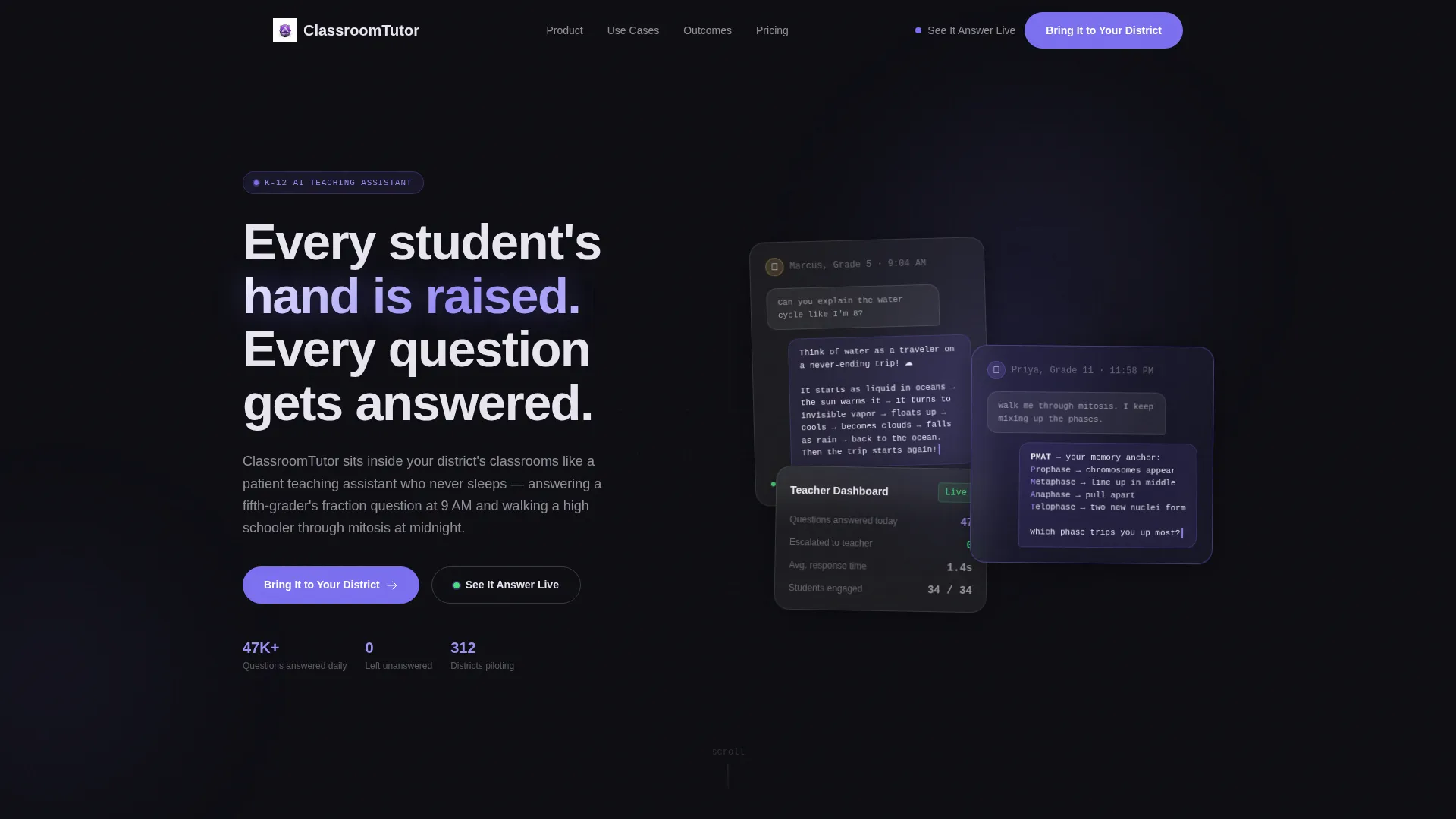
Three translucent cards open the page over a near-black background. Each panel shows a live chat snippet: a student question, an AI response using a simple analogy, and a teacher dashboard card reading "47 questions answered today, 0 escalated." No stock photography of children is used. The product speaks for itself from the first scroll position.
Problem-to-Solution Card Arc
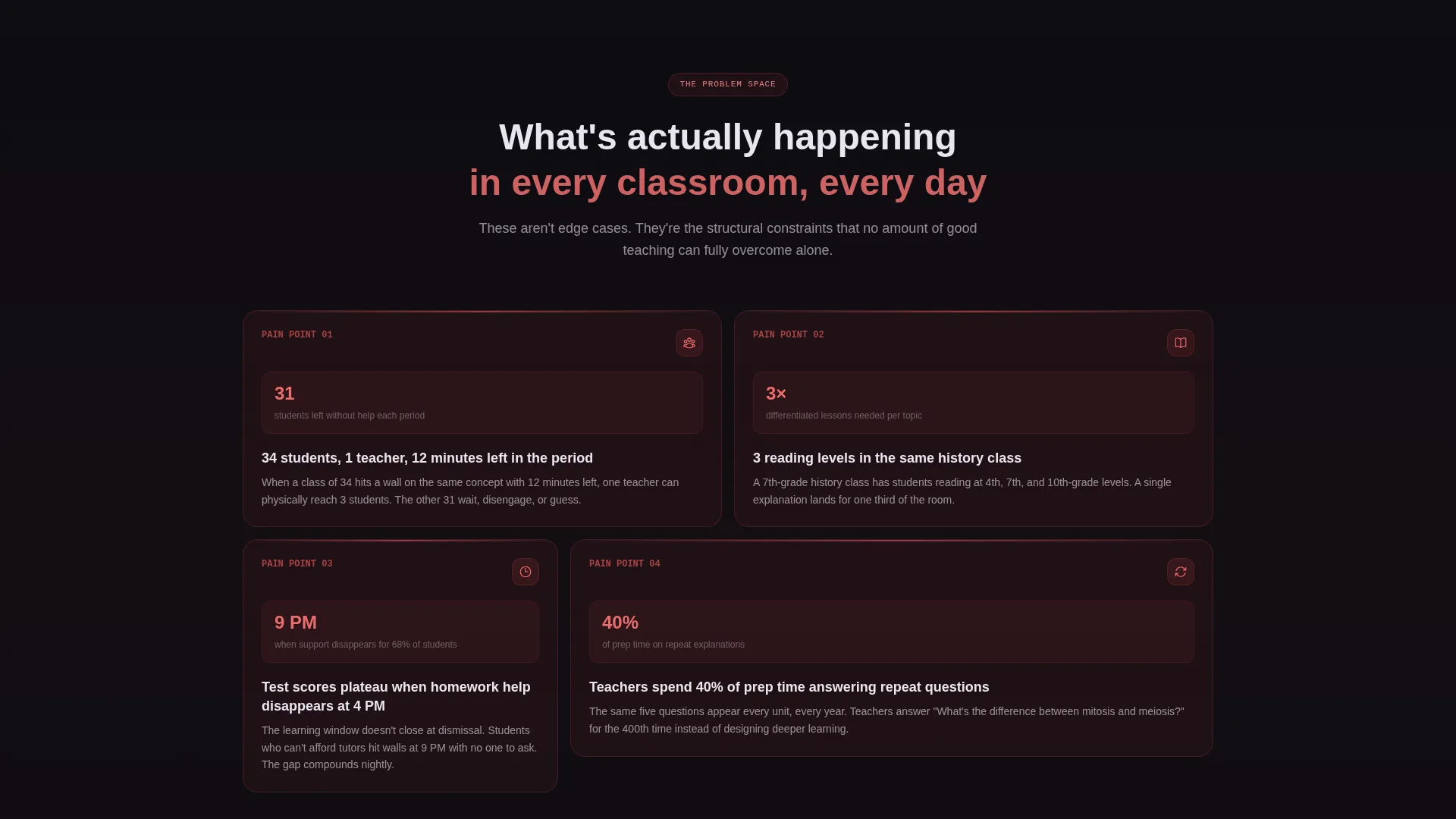
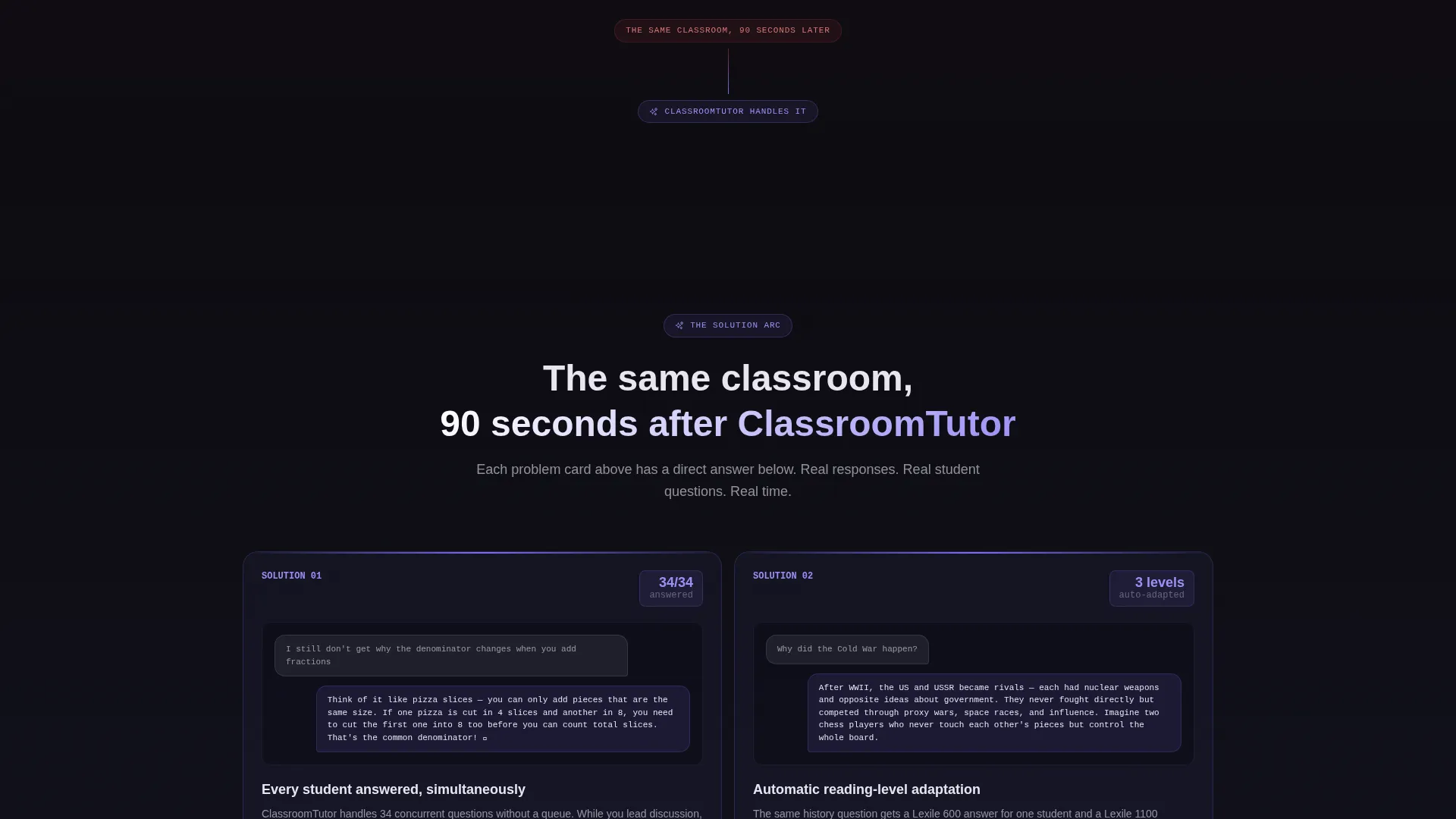
The card grid begins with dark, static problem cards describing real classroom scenarios. Cards like "34 students, 1 teacher, 12 minutes left in the period" anchor the visitor in a familiar frustration. As the page scrolls down, those cards illuminate and become interactive solution cards, each showing the chatbot handling that exact scenario.
Outcome Row at Page Bottom
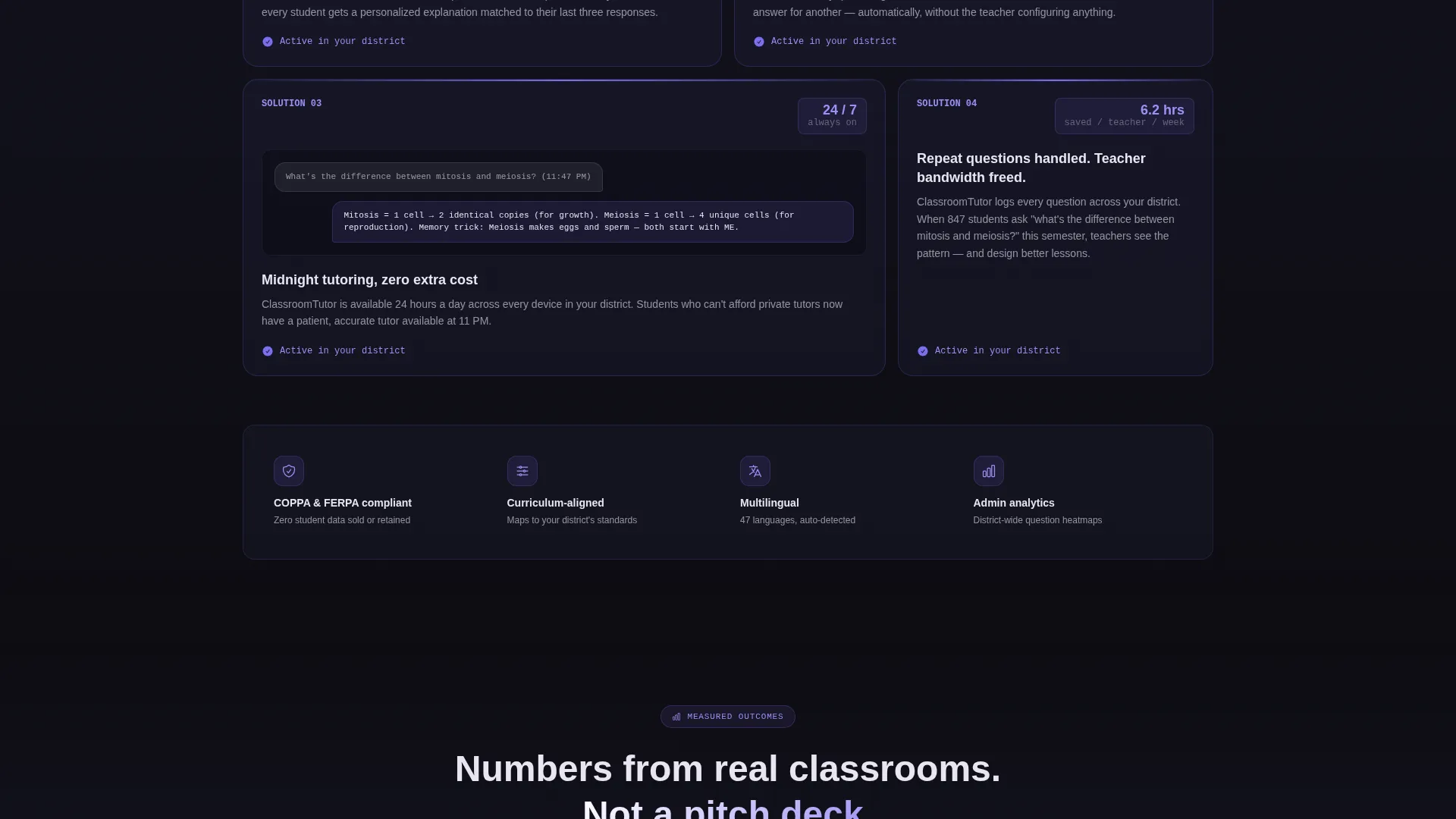
The final row of cards presents measurable results: response times, comprehension gains, and teacher hours saved. This grounds the product in concrete outcomes rather than promises, giving data-minded administrators something specific to take back to their teams.
Dual Conversion Path
The page offers two ways to engage. The primary call to action, "Bring It to Your District," anchors to a short lead form. The secondary path, "See It Answer Live," routes visitors to a sandboxed demo. The demo interaction earns the form fill, and a single-field email capture at the bottom reads "Send Me the Pilot Program Guide."
Glassmorphic Visual System
The layout uses frosted panel overlays at 8% white opacity with backdrop blur, electric iris violet on active states and buttons, and soft chalk body text on a deep obsidian base. The effect is a floating, weightless information structure that feels modern without distracting from the content.
Modular Card Grid Layout
The page is built on a modular card structure that organizes content into scannable, reusable blocks. Each card is self-contained, making it straightforward to update copy, swap scenarios, or reorder sections to match a specific product pitch or audience.
Page sections overview
| Section | Purpose |
|---|---|
| Dark Glass Header | Opens with live chat panel previews to establish product credibility immediately |
| Problem Card Row | Surfaces real classroom pain points to create instant audience recognition |
| Solution Card Row | Shows the AI chatbot resolving each problem scenario in context |
| Outcome Results Row | Presents measurable data points to satisfy data-driven district buyers |
| Primary Lead Form | Captures district name, enrollment size, and role for pilot program outreach |
| Live Demo Path | Routes visitors to a sandboxed chatbot before they reach the main form |
| Email Capture Footer | Collects a single email in exchange for the Pilot Program Guide |
Design & branding system
The visual identity follows a Tech Glass theme built on a glassmorphic color system. Every design choice reinforces the idea that the product is precise, modern, and made for serious institutional buyers.
- Deep obsidian (#0D0D12) base layer, frosted panel white (#FFFFFF at 8% opacity with backdrop blur), electric iris (#7B6FF0) for active states and primary buttons, and soft chalk (#E8E6F0) for body text
- Frosted card edges catch a subtle violet light bloom, giving the layout depth without visual noise
- Dark, static styling on problem cards transitions to illuminated, interactive styling on solution cards as the visitor scrolls, reinforcing the problem-to-solution narrative visually
Mobile & speed optimization
The modular card grid is structured to reflow cleanly across screen sizes. District administrators often review tools on tablets during meetings or on mobile between sessions, so the layout needs to hold up outside a desktop browser.
- Card grid columns collapse responsively so each problem and solution card remains fully readable on smaller screens
- The dual conversion path keeps both the lead form and the demo link accessible without excessive scrolling on mobile
- Frosted glass styling uses CSS backdrop blur, keeping the visual system intact without adding heavy image assets
How this template helps you convert
The page is engineered to move a skeptical, time-pressed education buyer through a clear decision path. Every section earns the next click.
- The problem card arc creates immediate recognition, making district decision-makers feel understood before they have read a single feature claim.
- The sandboxed demo interaction builds hands-on trust, so visitors arrive at the lead form already convinced the product works rather than still skeptical.
- The tiered call-to-action structure captures leads at two commitment levels: a full pilot inquiry form and a low-friction single-field email capture, maximizing total conversion opportunities on one page.
Other information about this template
This template is part of a broader library of education technology landing page designs suited to modern AI product launches. It is particularly well matched to teams navigating district procurement cycles where multiple stakeholders must align before a pilot is approved.
- The template style is Card Grid (Modular), making it straightforward to extend with additional scenario cards as the product evolves
- The lead generation direction prioritizes qualified institutional leads over raw traffic volume, which suits longer edtech sales cycles
- The "Tech Glass" theme and glassmorphic aesthetic position the product visually alongside premium enterprise software, helping it stand apart from typical school-facing edtech pages
- This template can support product launches targeting both individual school pilots and full district rollouts without requiring layout changes
Theme
Tech Glass
Creative direction
Problem→Solution Arc
Color system
Glassmorphic
Style
Card Grid (Modular)
Direction
Lead Generation
Page Sections
Dark Glass Panel Header
Problem-to-solution Card Arc
Outcome Results Card Row
Dual Conversion Path Design
Glassmorphic Visual System
Modular Card Grid Layout
Related questions
Who is the primary audience for this landing page template?
Can I update the problem and solution card scenarios to match my product?
What does the lead form on this template collect?
Does the template include the sandboxed demo chatbot?
Is this template suitable for a single school, or only for district-level campaigns?



