Training Platform Landing Page Template
Upskill is a scroll-reveal landing page template built for live skill simulation platforms. It opens with an animated stats dashboard, moves straight into an interactive skill gap assessment, and progressively reveals platform features tied to the visitor's results. The freemium conversion flow asks only for an email and a skill goal, making the first yes easy.
by Rocket studio
Quick summary
Upskill is a single-page, scroll-reveal template designed for education training platforms that put learners inside live, timed skill simulations. The page opens with a live stats dashboard, leads with an interactive gap analysis tool, and progressively reveals platform features as the visitor scrolls. Every section feels personally addressed rather than generically broadcast.
Who this template is for
This template is built for ambitious education platforms that need more than a brochure page. It suits teams who know their product earns trust through demonstration, not description.
- Mid-career professionals offering skill-building programs to people stuck in roles that have outgrown them
- Corporate learning and development managers who need to show engagement proof to internal stakeholders
- Bootcamp operators and training platforms whose graduates can pass a quiz but struggle in a live interview setting
What problem this template solves
Most education platform pages lead with a pitch. Visitors scroll past promises they have heard before and leave without converting. This template flips that sequence entirely.
- Visitors receive a personalized skill gap analysis before seeing any sales content, so they feel understood rather than sold to
- Generic hero sections and stock photography get replaced by a live, animated stats wall that signals real platform activity
- The freemium call to action removes friction by asking only for an email and a primary skill goal, no credit card required
What you get with this template
You get a complete scroll-reveal landing page layout engineered around one idea: earn the click by giving value first. Every section is sequenced to build trust progressively.
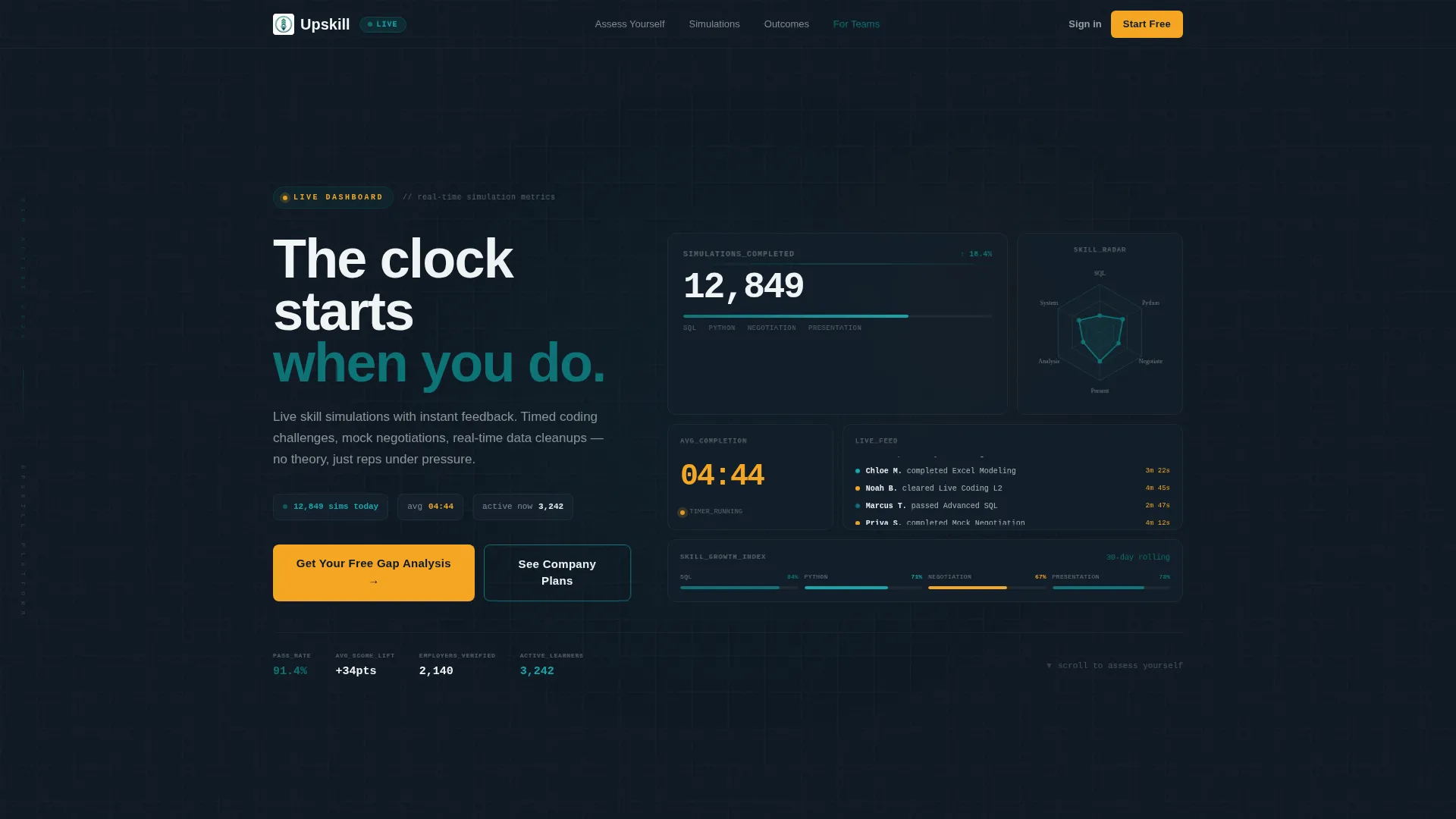
- An animated header dashboard simulating live platform metrics, including a ticking completion timer, climbing simulation counts, and a scrolling micro-achievement feed
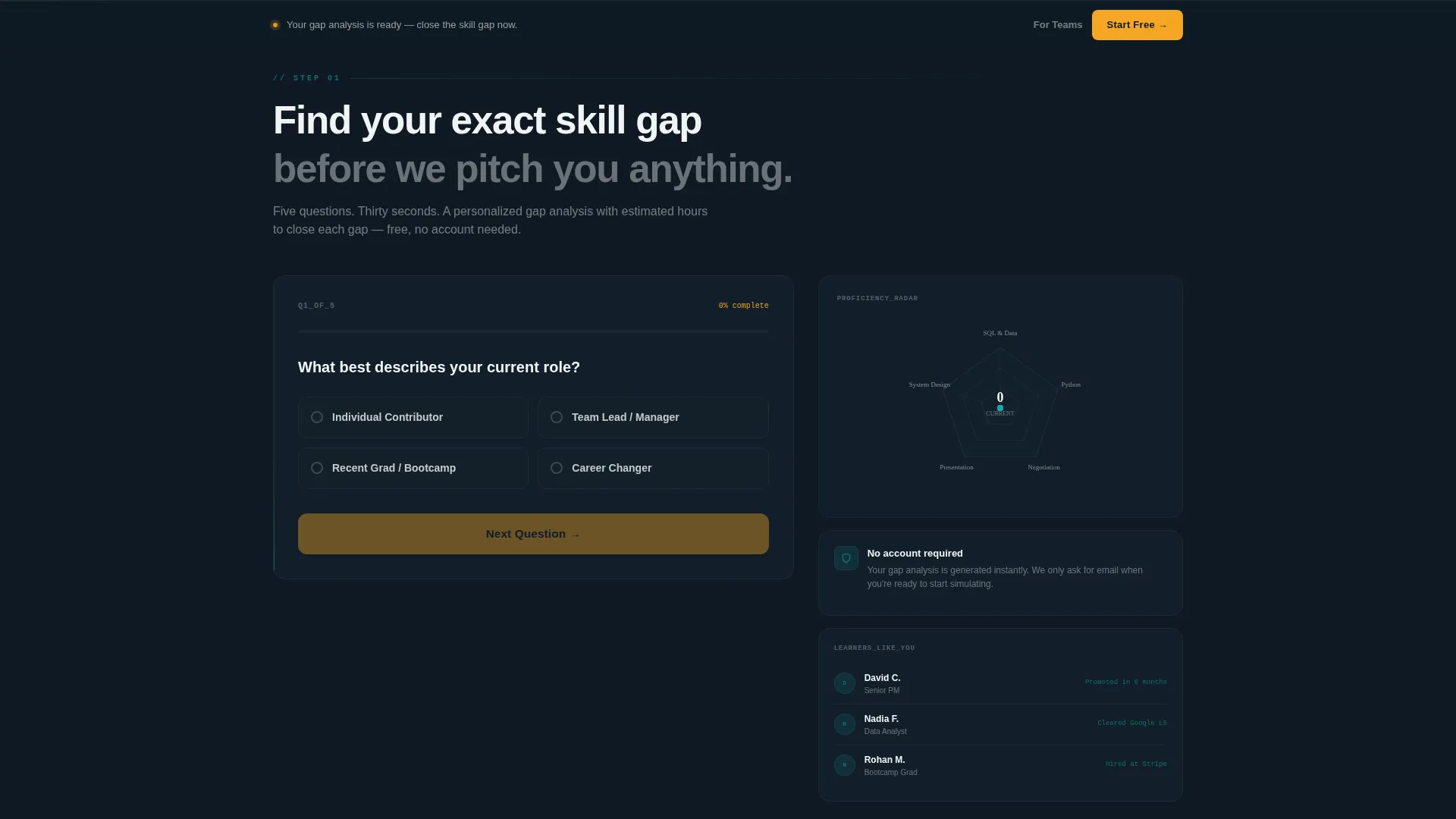
- A five-question interactive skill assessment that returns a radial gap chart and estimated hours to close each identified skill gap
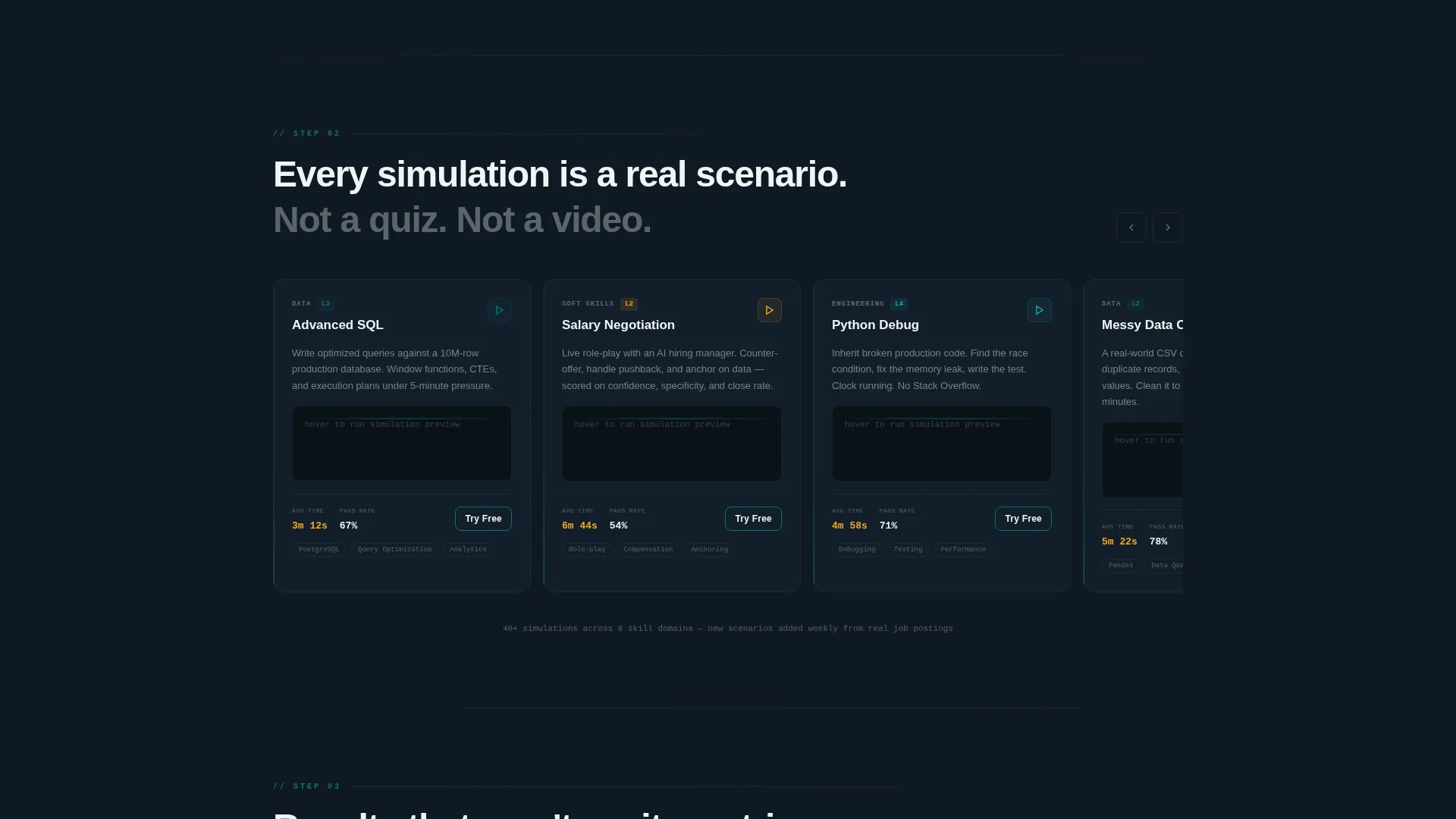
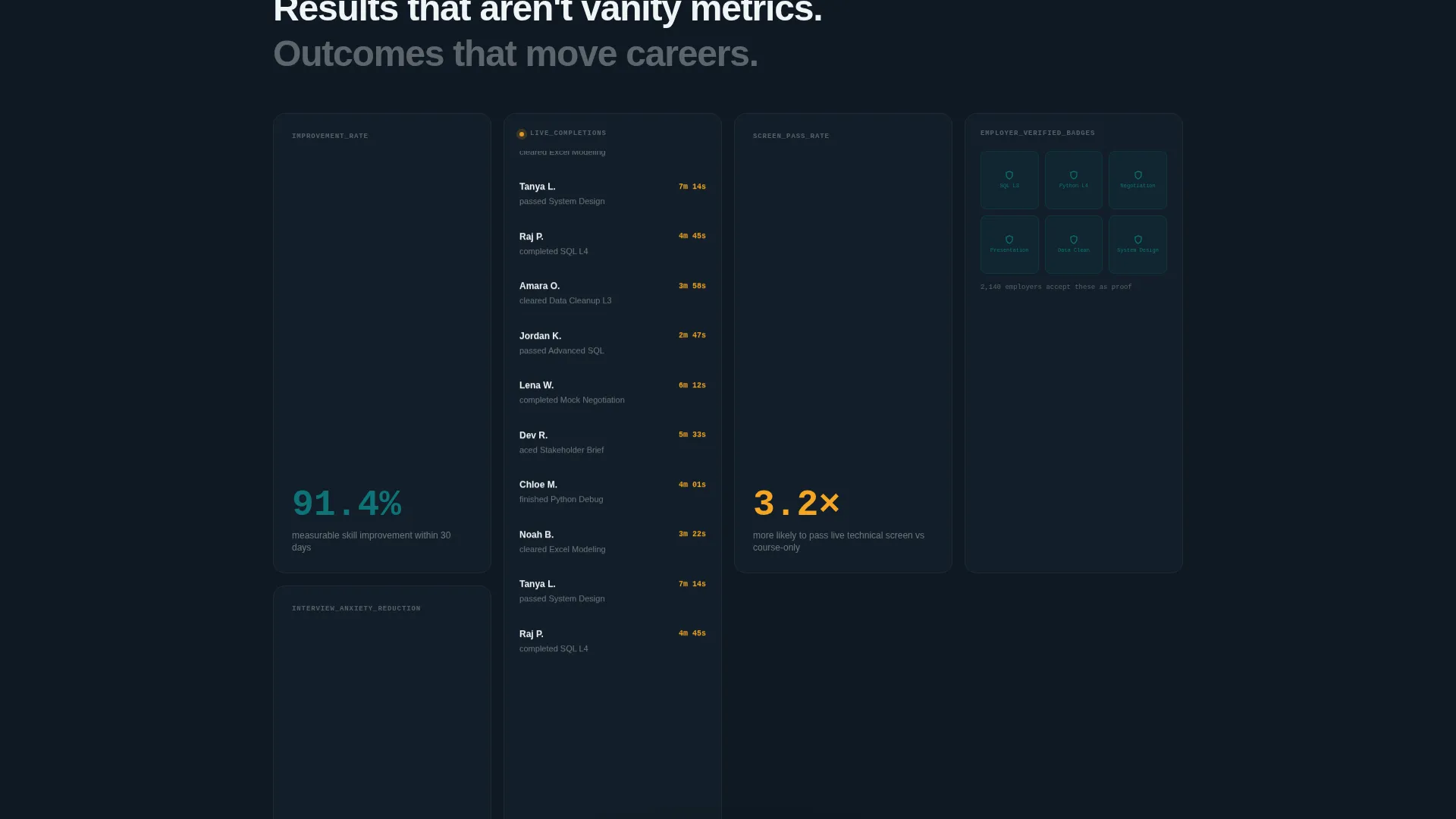
- A progressive scroll structure that reveals simulation recordings, mentor matching details, and employer-verified badge information only after the visitor has engaged with their personal results
Feature list
This section details the core built-in components that make the Upskill template function as a high-trust, high-conversion landing page.
Animated Live Stats Header
The header simulates a real-time metrics dashboard. Numbers climb at varied speeds: fast-ticking simulation counts, slow-building averages, and a scrolling feed of micro-achievements like named learner completions. No static hero image is used. The data itself is the visual.
Interactive Skill Gap Assessment
Before any pitch appears, visitors answer five rapid-fire questions about their current role, target role, and weakest skill area. The template returns a personalized radial chart with a gap analysis and estimated hours to close each gap, giving the visitor something genuinely useful before asking for anything in return.
Progressive Scroll Reveal Structure
Each platform feature section unmasks as the visitor scrolls. Simulation recordings, mentor matching, and employer-verified badges are revealed in sequence. Each section is visually tied back to the visitor's gap results, making the content feel relevant rather than generic.
Dual Conversion Path Design
The primary call to action, "Start Your First Simulation Free," appears twice: once embedded inside the skill assessment results and once as a persistent bottom bar that activates after sixty percent scroll depth. A secondary path, "See Your Company Plan," routes corporate learning and development visitors to a separate enterprise flow.
Teal Catalyst Color System
The visual identity uses a focused four-color palette. Deep command teal handles interactive states and hover animations. Midnight classroom provides the dark background. Kinetic white covers text and card surfaces. Catalyst amber appears exclusively on progress indicators, timers, and call-to-action pulses, keeping the palette disciplined and meaningful.
Minimal Sign-Up Form
The sign-up form captures only two fields: email address and primary skill goal. There is no credit card requirement and no onboarding quiz. This intentional reduction in friction makes the freemium entry point feel low-risk and fast.
Page sections overview
| Section | Purpose |
|---|---|
| Animated Stats Dashboard | Opens the page with live, simulated platform metrics to establish immediate credibility |
| Skill Gap Assessment | Delivers a personalized radial gap chart before any platform pitch begins |
| Gap Analysis Results | Shows the visitor their estimated hours per skill gap and anchors every following section |
| Simulation Recordings | Reveals recorded live simulations tied to the visitor's identified gap areas |
| Mentor Matching | Introduces mentor pairing as a direct solution to the visitor's specific weak skill area |
| Employer Verified Badges | Presents credentialing tied back to the gap analysis results |
| Primary call to action Block | Embeds "Start Your First Simulation Free" inside the results for a natural conversion moment |
| Persistent Bottom Bar | Activates at sixty percent scroll depth with a persistent freemium call to action |
| Enterprise Path Section | Offers a secondary "See Your Company Plan" route for corporate learning and development buyers |
Design & branding system
The Teal Catalyst color system is built for focus and momentum. It draws on the visual language of a dark development environment at peak concentration, sharp, electric, and purposeful without distraction.
- Four-color palette: deep command teal (#0D7377) for primary actions and hover states, midnight classroom (#0F1923) for backgrounds, kinetic white (#F0F4F5) for text and card surfaces, and catalyst amber (#F5A623) reserved for progress indicators, timers, and call-to-action pulses
- Teal dominates all interactive and animated states; amber appears sparingly, only where momentum lives in the layout
- The Dynamic Motion theme drives scroll-reveal transitions, number-climbing animations, and radar chart morphing, giving the page a sense of live, kinetic energy throughout
Mobile & speed optimization
The scroll-reveal structure and animated components are designed with a progressive disclosure approach, meaning content loads in stages as the visitor engages rather than all at once.
- Animated dashboard elements are built to render fluidly within the scroll sequence, keeping the motion purposeful rather than decorative
- The persistent bottom bar and dual call-to-action placements are positioned to remain accessible on smaller screens without obscuring content
- The minimal two-field sign-up form reduces input friction on mobile, where long forms consistently lower completion rates
How this template helps you convert
The conversion strategy is built on a single principle: give real value before asking for anything. Every layout decision reinforces that principle.
- The skill gap assessment runs before any sales content appears, so the visitor arrives at the first call to action already holding a personalized result they want to act on
- The "Start Your First Simulation Free" call to action requires only an email and a skill goal, removing every common barrier that causes visitors to abandon freemium sign-ups
- The persistent bottom bar activates at sixty percent scroll depth, catching high-intent visitors who have read through the platform features but have not yet converted
Other information about this template
This template is suited for teams building on modern no-code or low-code platforms where scroll-reveal and animation primitives are available. It is category-matched to the education training platform space within the broader education software and software-as-a-service (SaaS) technology niche.
- The template style is Scroll Reveal (Progressive), meaning sections animate into view as the user scrolls rather than loading all at once
- The header concept follows a Stats and Metrics pattern, a strong visual signal for platforms that want to lead with proof of activity rather than marketing language
- The landing page direction is Freemium and Trial, designed to convert visitors through a low-commitment free entry point rather than a hard sell
- The creative direction is Calculator and Tool First, where an interactive assessment tool anchors the page experience before any feature content is shown
- This template is part of the Dynamic Motion theme family, which uses kinetic transitions and data-driven visuals as the primary design language
Theme
Dynamic Motion
Creative direction
Calculator/Tool First
Color system
Teal Catalyst
Style
Scroll Reveal (Progressive)
Direction
Freemium/Trial
Page Sections
Animated Live Stats Dashboard Header
Interactive Five-question Skill Assessment
Progressive Scroll Reveal Sections
Dual Conversion Path Layout
Minimal Two-field Sign-up Form
Related questions
Who is this landing page template best suited for?
Does the skill gap assessment require a backend integration to work?
Can I change the color palette to match my own brand?
How does the dual call-to-action setup work?
Is there a separate path for corporate buyers?



