Winback - Powerful Reengagement Landing Page Template
Winback is a dashboard-style landing page template built for e-commerce re-engagement email platforms. It opens with a live Revenue Recovery Calculator, escalates through animated campaign data grids, and drives visitors toward a free app install. The glassmorphic dark design creates a mission-control feel that turns personalized revenue numbers into immediate conviction.
by Rocket studio
Quick summary
Winback is a single-page, dark-mode dashboard template designed to sell an e-commerce re-engagement email platform. A personalized revenue calculator anchors the header, frosted-glass campaign cards stack proof on scroll, and a glowing mint call-to-action button pushes toward app installation. Every section is engineered to make the visitor feel the cost of inaction before they read a single headline.
Who this template is for
This template is built for teams that already have an email list and want to monetize it harder. It speaks directly to operators who measure success in recovered revenue, not open rates alone.
- Shopify store owners running seven-figure businesses who watch revenue leak through unopened emails
- Direct-to-consumer brand managers managing re-engagement flows late at night with limited bandwidth
- Retention marketers who know their acquisition costs have tripled and want to unlock the list they already own
What problem this template solves
Most re-engagement platforms struggle to prove their value before asking for a commitment. Visitors arrive skeptical and leave without converting because they never see their own numbers. This template flips that dynamic immediately.
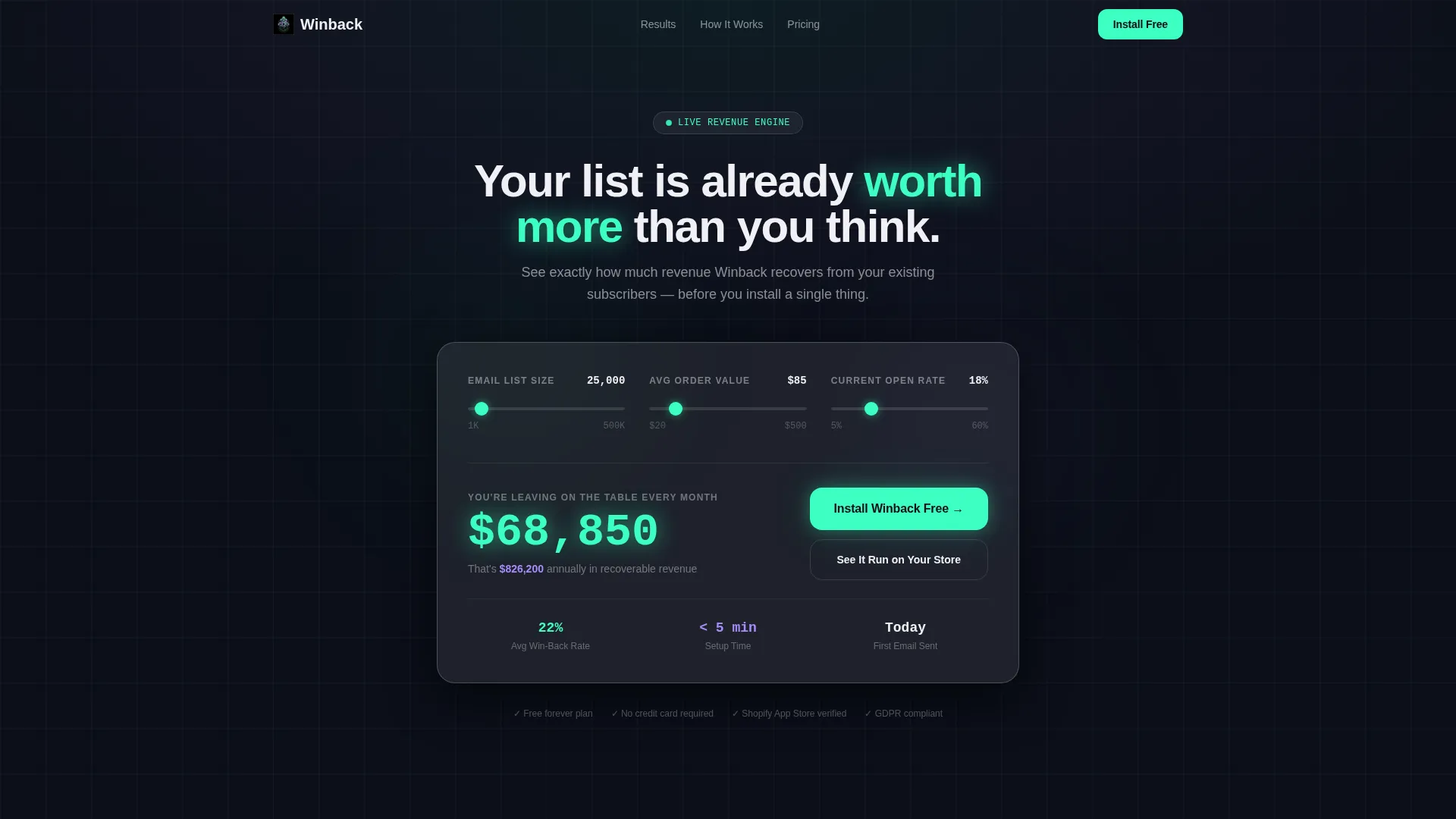
- Visitors calculate their own recoverable revenue in the header before scrolling past the fold
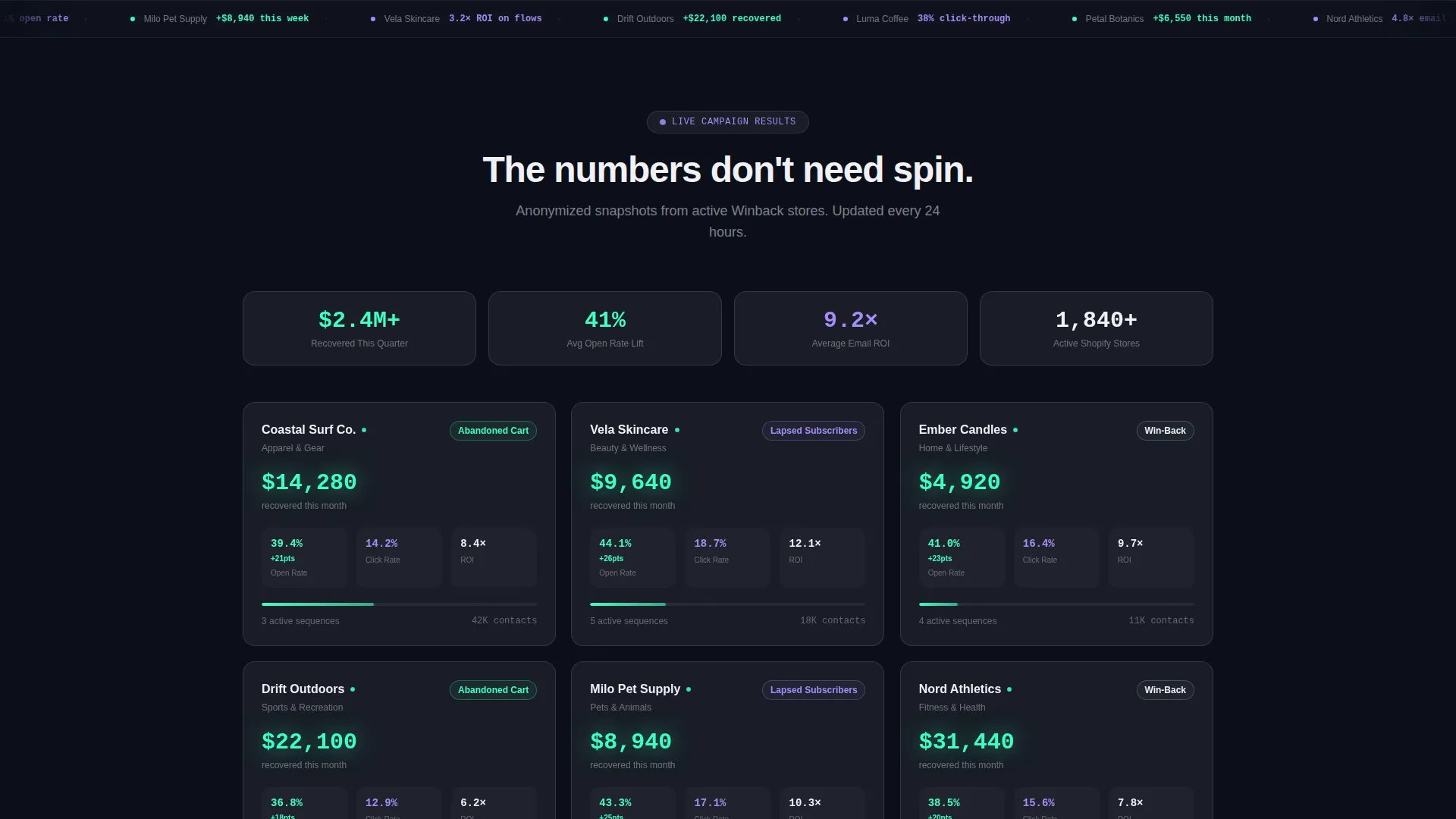
- Campaign data grids show real anonymized client results, removing doubt through proof rather than promises
- A persistent install button stays visible after the second scroll section so the conversion path is never out of reach
What you get with this template
You get a fully structured single-page layout with a clear visual hierarchy, a live calculator component, and a data-driven proof sequence that escalates in persuasive intensity as the visitor scrolls.
- A Revenue Recovery Calculator with animated mint output and a personalized "money on the table" line
- A scrollable campaign data grid of frosted-glass result cards showing open rates, click-throughs, and revenue recovered
- A sticky mint call-to-action bar, a sandboxed demo link, and a minimal one-field install flow
Feature list
This section covers the core components built into the Winback template and what each one delivers for your page.
Live Revenue Recovery Calculator
The header card presents three sliders: monthly email list size, average order value, and current open rate. As visitors adjust each input, the estimated recovered revenue animates upward in electric mint. The personalized output line reads "You're leaving $____ on the table every month," making the cost of inaction impossible to dismiss.
Animated Campaign Data Grid
Below the calculator, a grid of frosted-glass cards displays anonymized real-world campaign results. Each card surfaces on scroll with a subtle scale-up animation. Open rates, click-through rates, and recovered revenue figures are displayed in crisp anti-flash white and mint, letting the numbers speak for themselves.
Escalating Proof Sequence
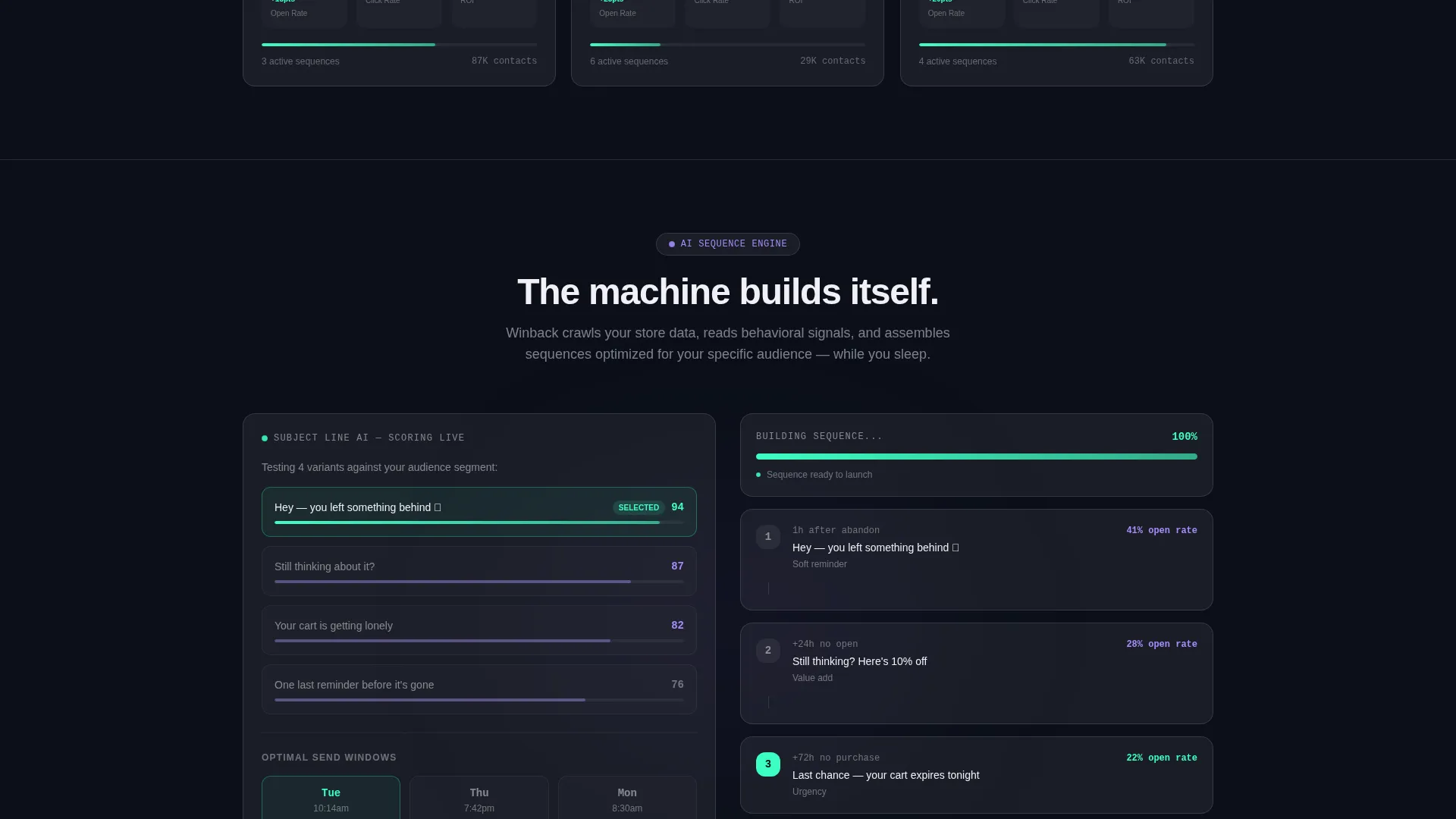
The page follows a countdown-style content flow. Visitors move from raw results, to the email flows that generated them, to the send-time and subject-line logic, and finally to a live sequence simulation building itself in real time. Each stage adds a layer of credibility before the next one loads.
Persistent Sticky Install Bar
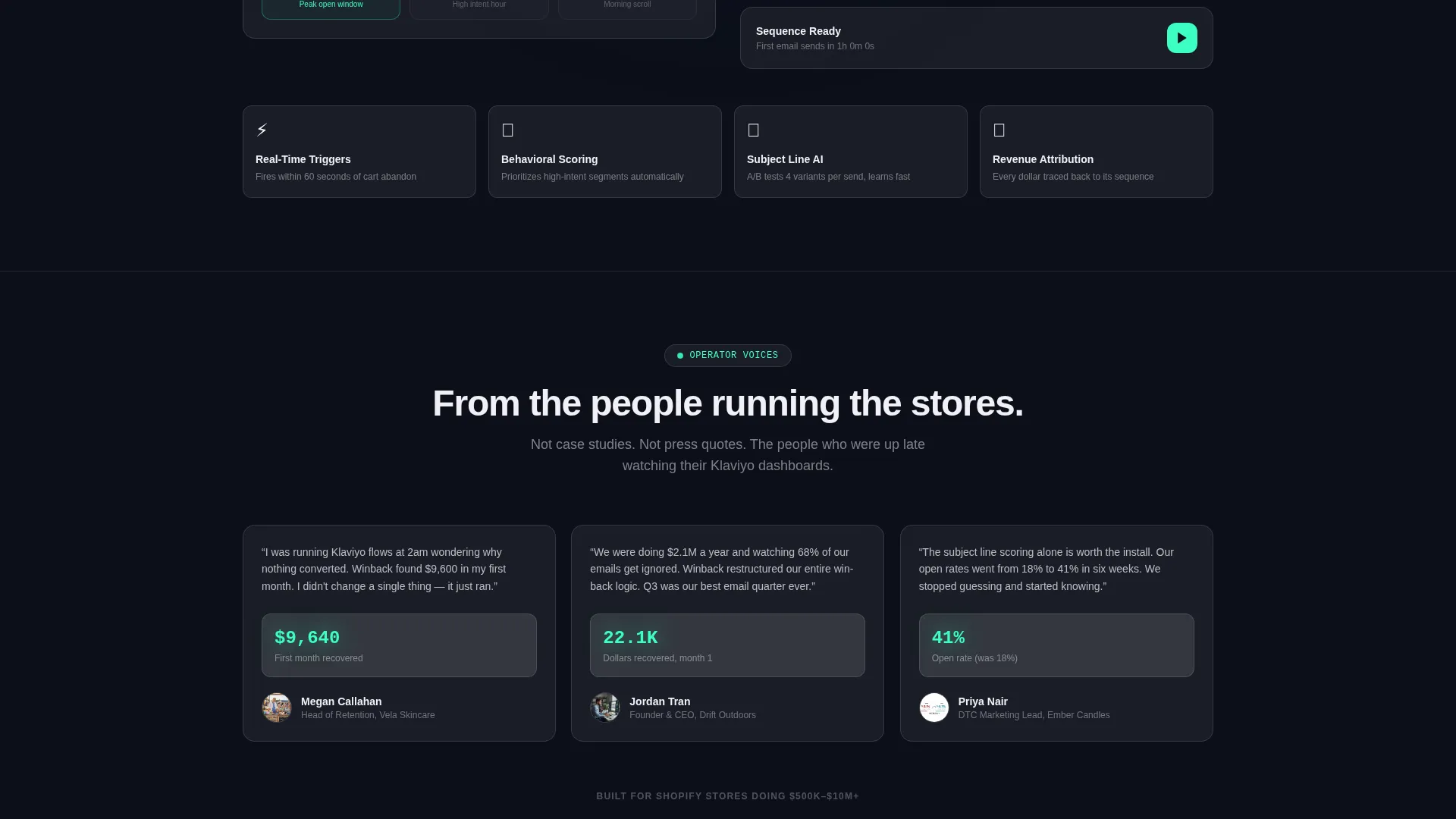
After the visitor passes the second scroll section, a sticky call-to-action bar locks into view. The "Install Winback Free" button in electric mint stays accessible throughout the rest of the page so the conversion path is always one tap or click away.
Sandboxed Demo Path
A secondary call-to-action labeled "See It Run on Your Store" links to an interactive sandbox. This gives hesitant visitors a low-commitment way to experience the platform before committing to an install, widening the conversion funnel without distracting from the primary action.
Minimal One-Field Install Flow
The primary install call-to-action asks only for the visitor's Shopify store URL. Authentication handles everything after that. Reducing friction at the final conversion step removes the most common reason for drop-off at the decision moment.
Page sections overview
| Section | Purpose |
|---|---|
| Revenue Recovery Calculator | Personalize recoverable revenue and create immediate emotional stakes |
| "Money on Table" Line | Reinforce the personalized loss figure with a single glowing output sentence |
| Campaign Results Grid | Stack proof using anonymized client open rates and revenue snapshots |
| Email Flow Showcase | Show the sequences responsible for the results displayed above |
| AI Logic Reveal | Demonstrate send-time and subject-line selection intelligence |
| Live Sequence Simulation | Let visitors watch a re-engagement sequence build itself in real time |
| Primary Install call to action | Drive the app install with a mint glowing button inside calculator results |
| Sticky call to action Bar | Keep the install action visible after the second scroll section |
| Sandboxed Demo Link | Offer a low-friction alternative path for visitors not ready to install |
Design & branding system
The visual identity follows a Directory and Discovery theme expressed through a glassmorphic color system. The palette is built to feel like a mission control room at midnight, where every glowing element earns its place against a near-black background.
- Base layer is deep void black (#0B0F19); frosted glass panels use translucent white at 8% opacity with 1-pixel luminous white borders at 15% opacity
- Electric mint (#3DFFC2) carries live data accents, animated calculator output, and success-state indicators; soft lavender (#A78BFA) activates on hover and interactive discovery surfaces
- Body text renders in crisp anti-flash white (#F0F0F5) on dark backgrounds, with mint reserved for metrics and lavender for interactive elements that invite exploration
Mobile & speed optimization
The template is structured with a scroll-driven, section-led layout that naturally adapts to smaller viewports. The data grid and calculator components are laid out to remain readable and interactive across screen sizes.
- Frosted-glass cards use relative sizing so they reflow cleanly from desktop data grids to single-column mobile stacks
- The sticky call-to-action bar is designed to remain visible and tappable at the bottom of the viewport on mobile devices
- Scroll-triggered scale-up animations on campaign cards are kept subtle to maintain smooth motion as the visitor moves through the proof sequence
How this template helps you convert
Conversion on this page is earned section by section. The template does not ask for the install until it has already shown the visitor their own money sitting unclaimed in their email list.
- The calculator personalizes the revenue gap in the first viewport, converting a generic pitch into a specific dollar figure the visitor generated themselves.
- The escalating proof sequence stacks campaign data, flow logic, and a live simulation in order, so trust builds incrementally rather than being asked for all at once.
- The sticky install bar and one-field flow remove every possible moment of hesitation between conviction and action, keeping the path from interest to install as short as possible.
Other information about this template
This template is purpose-built for platforms that target Shopify operators and direct-to-consumer retention teams. It is especially well suited for tools that connect to or complement email marketing workflows inside platforms where abandoned cart recovery, lapsed-subscriber re-engagement, and winback automation are common use cases.
- The template's calculator-first structure aligns well with audiences familiar with email marketing platforms like Klaviyo, where revenue attribution and flow performance are daily metrics
- The "Install Winback Free" primary call-to-action and Shopify store URL install flow reflect a self-serve app distribution model typical of Shopify App Store listings
- The sandboxed demo secondary path makes this template adaptable for teams who want to warm up leads before asking for platform access
Theme
Directory & Discovery
Creative direction
Launch Energy
Color system
Glassmorphic
Style
Dashboard/Data Grid
Direction
App Download
Page Sections
Live Revenue Recovery Calculator
Animated Campaign Data Grid
Escalating Proof Sequence
Persistent Sticky Install Bar
Sandboxed Demo Secondary Path
Minimal One-field Install Flow
Related questions
What kind of business is this template designed for?
Can I customize the calculator inputs and output copy?
How does the sticky call-to-action bar work?
Does the template support a secondary conversion path?
What does the escalating proof sequence include?



