Bold Brutalist Daycare FAQ Landing Page Template
Wonder is a bold brutalist daycare and preschool FAQ landing page template built as a dashboard-style data grid. It opens with a terminal-style code snippet header, tiles every parent question across an interactive card grid, and drives enrollment with a persistent bottom bar call to action. The design uses an iridescent color system over a stark white and deep charcoal base.
by Rocket studio
Quick summary
Wonder is a single-page FAQ landing page for daycare and preschool providers. It uses a dashboard and data grid layout to present parent questions as expandable cards. The bold brutalist visual style, iridescent color shifts, and terminal-style header make the page feel alive and confident. Every section moves parents closer to clicking "Reserve a Spot."
Who this template is for
This template is built for daycare centers and preschool programs that want to turn anxious parent research into real enrollment actions. It works best for providers who field the same questions over and over and want a page that answers them before the phone rings.
- Daycare and preschool owners who need a high-energy FAQ page that reflects a bold, modern brand
- Enrollment coordinators who want to reduce inbound calls by pre-answering logistics, tuition, and safety questions
- Childcare programs actively managing a waitlist and seeking a clear, direct way to push parents toward applying
What problem this template solves
Parents researching childcare options face a wall of anxiety and uncertainty. They want fast, clear answers on hours, tuition, ratios, meals, and safety, and they want those answers before they ever call anyone. Most daycare websites bury this information or leave it out entirely, causing drop-off and missed enrollments.
- First-time parents searching late at night need reassurance and specific details, not vague marketing language
- Busy dual-income families comparing multiple programs need a page that respects their time and delivers facts quickly
- Relocating families under deadline pressure need a path to enrollment that feels immediate and trustworthy
What you get with this template
You get a fully designed, single-page FAQ landing page built on a dashboard and data grid layout. The page is structured to load fast in the mind of the reader, answer objections card by card, and end with a conversion action that feels like the natural next step.
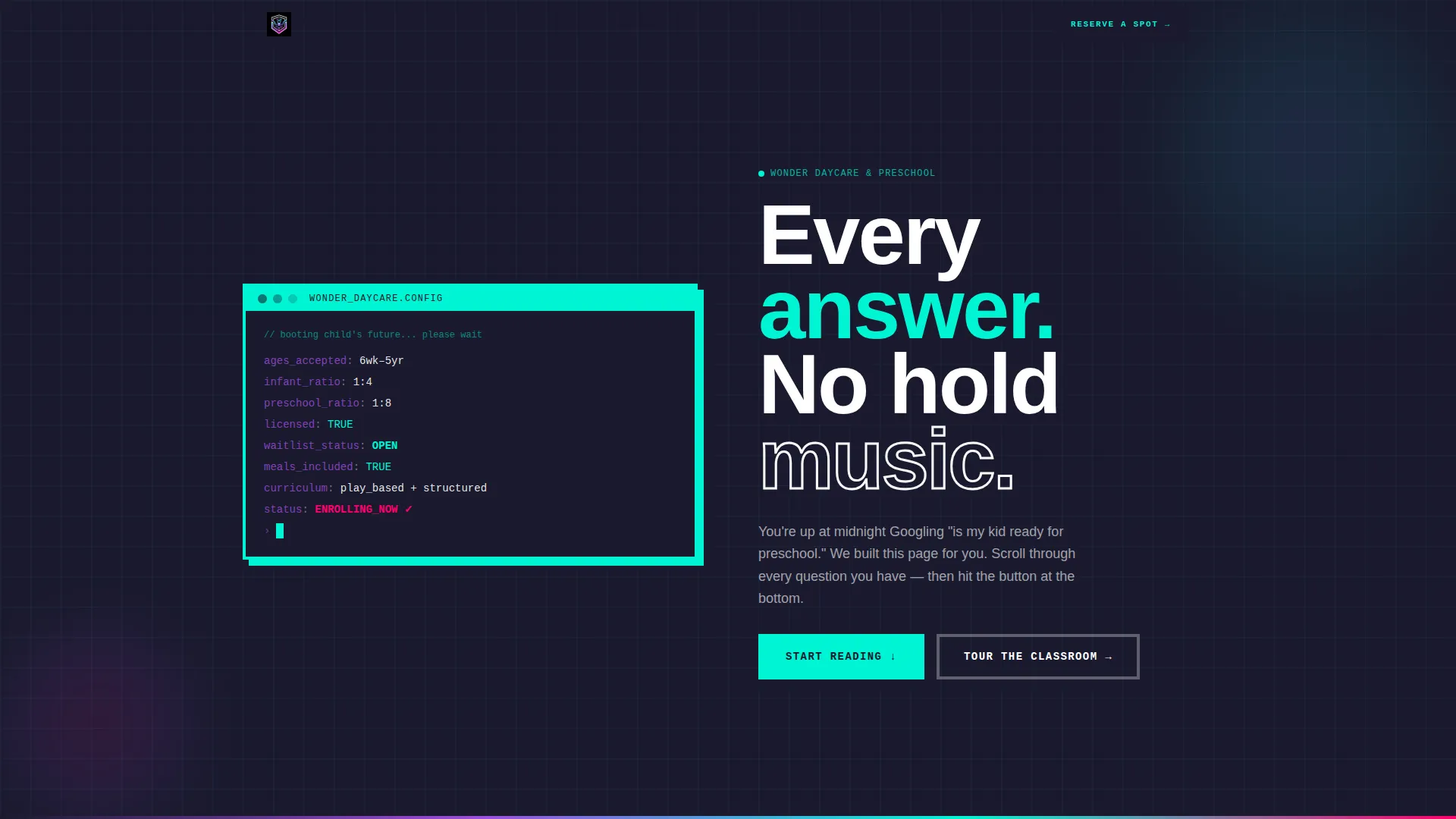
- A terminal-style code snippet header block displaying key stats such as ages accepted, staff-to-child ratio, waitlist status, and licensing
- An expandable FAQ card grid where each question tile opens with a snap animation and border color shifts across the iridescent spectrum
- A persistent brutalist bottom bar with a primary "Reserve a Spot" call-to-action button and a secondary ghost button linking to a virtual classroom tour
Feature list
This template includes a focused set of purpose-built components. Each one is designed to serve the specific conversion goal of a daycare and preschool FAQ landing page.
Terminal Code Snippet Header
The header opens with a monospaced block styled like a live terminal readout. Key stats such as ages_accepted: 6wk, 5yr, ratio: 1:4, waitlist: OPEN, and licensed: TRUE appear line by line, as if the page is booting up. A blinking cursor and massive brutalist headline complete the opening impact.
Expandable FAQ Card Grid
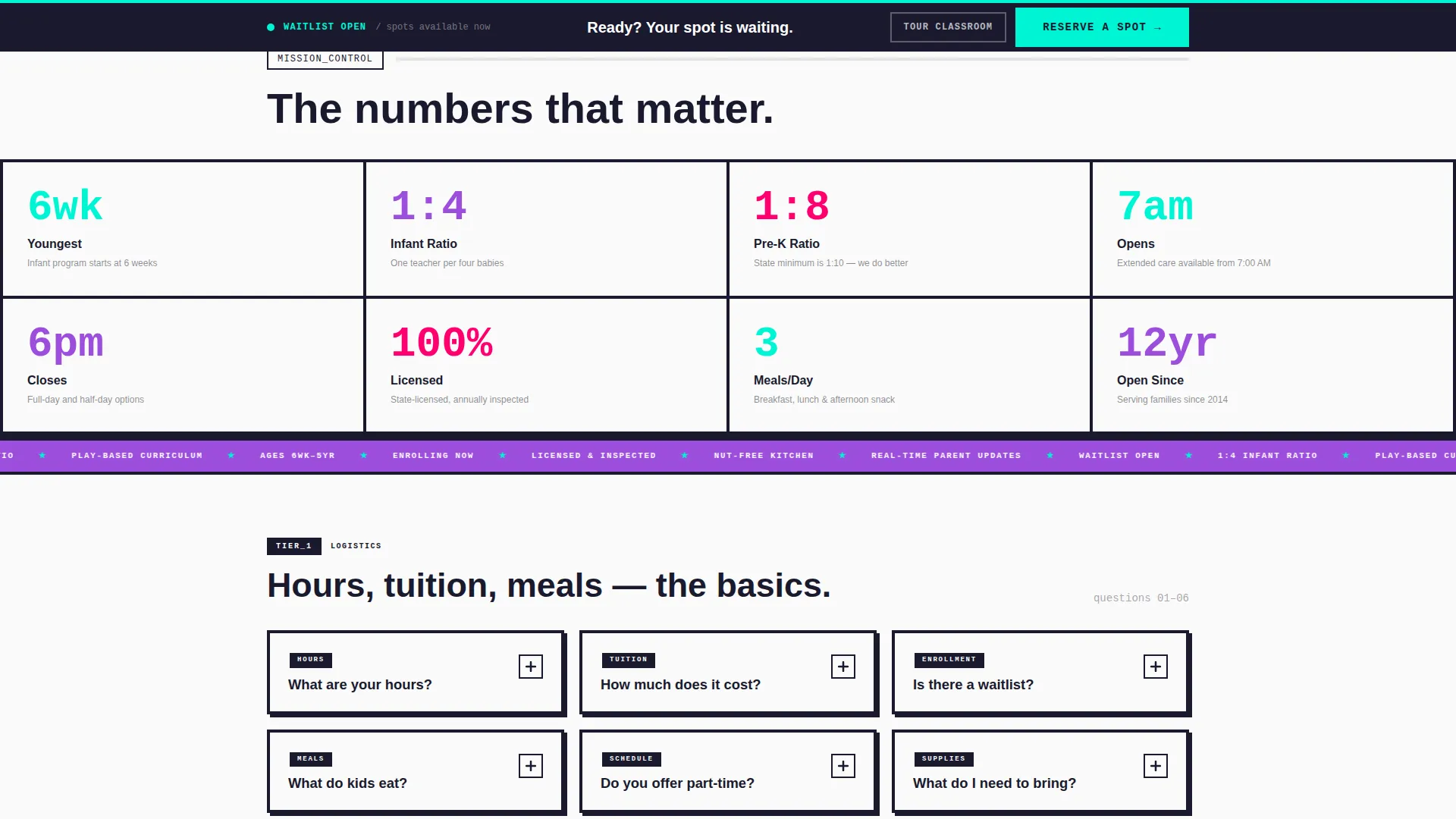
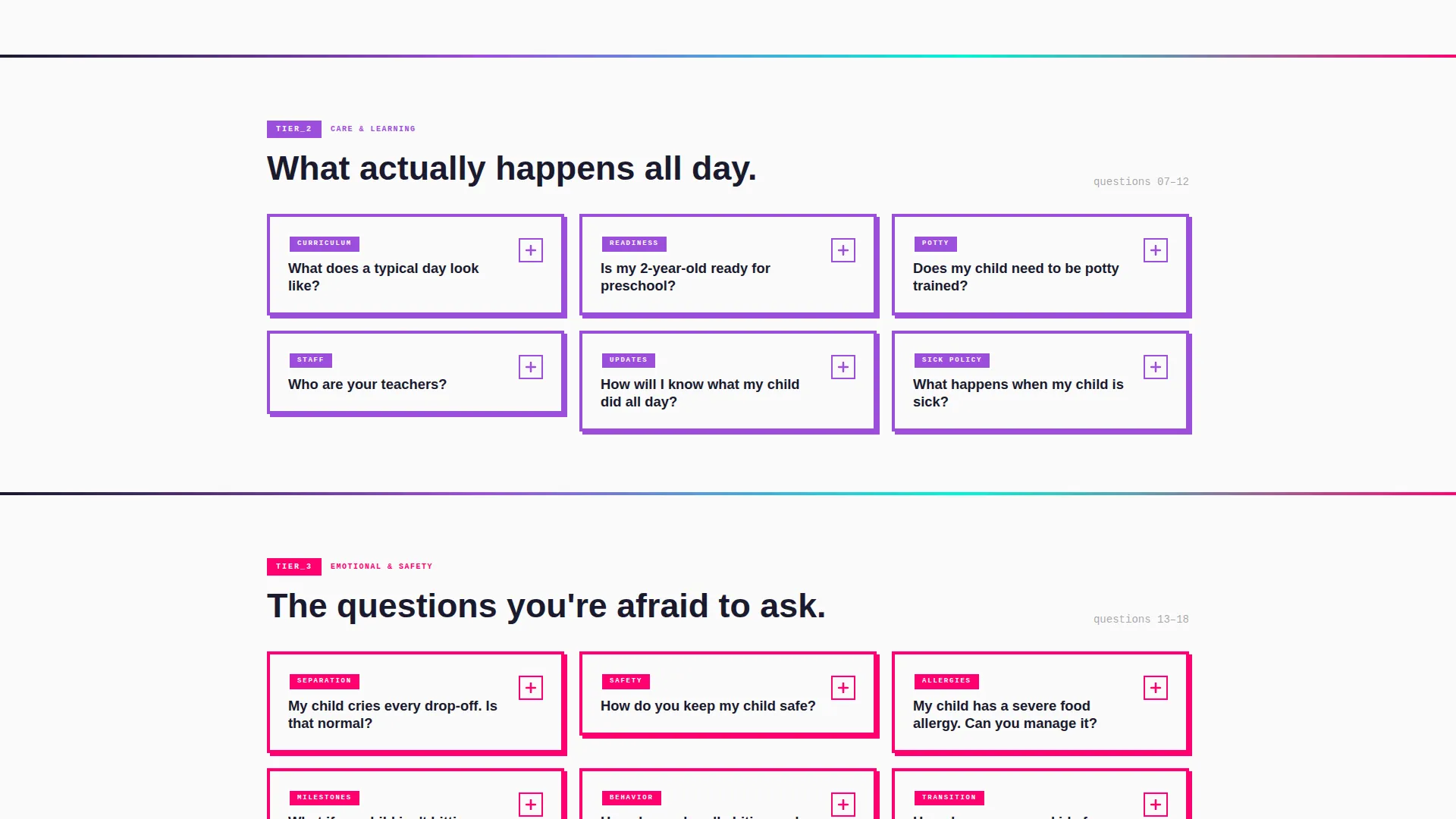
Every parent question lives inside its own data card on a tiled grid layout. Cards expand on click with a snap animation, revealing detailed answers. The grid escalates naturally from soft logistics questions to emotional topics like separation anxiety and developmental milestones.
Iridescent Color-Shift Borders
As visitors scroll and interact with cards, each card's border shifts along the iridescent color spectrum. Holographic violet, shifting cyan, and hot magenta appear progressively, rewarding curiosity with color and making the page feel responsive and alive.
Persistent Enrollment call to action Bar
A brutalist black bar is pinned to the bottom of the viewport on scroll. It holds the primary "Reserve a Spot" button and a ghost-style "Tour the Classroom" secondary button at all times, ensuring the enrollment action is never out of reach.
Dashboard Data Grid Layout
The overall page structure follows a mission control dashboard metaphor. FAQ sections tile across the grid like countdown modules. The layout is chunky, grid-snapped, and thick-bordered, giving the page a structured but energetic feel.
Bold Brutalist Typography System
Headlines are massive and unapologetic. The type treatment reinforces confidence and clarity. The brutalist headline "Every answer. No hold music." anchors the page and sets the tone for everything that follows.
Page sections overview
| Section | Purpose |
|---|---|
| Terminal Stats Header | Display key daycare facts as a live-boot code snippet |
| Brutalist Headline Block | Set confident, direct tone with hero typography |
| Logistics FAQ Cards | Answer hours, tuition, meals, and scheduling questions |
| Emotional FAQ Cards | Cover separation anxiety, milestones, and safety protocols |
| Persistent call to action Bar | Keep enrollment action visible throughout the entire scroll |
Design & branding system
The Wonder template uses a Bold Brutalist theme paired with an AI Iridescent color system. The result feels like a children's toy reimagined by a brutalist architect: chunky, thick-bordered, and grid-snapped, yet alive with color that shifts and surprises.
- Core palette includes deep charcoal slab (#1A1A2E), holographic violet (#9D4EDD), shifting cyan (#00F5D4), and hot magenta (#FF006E) for hover and active states, all against stark white (#FAFAFA) content cards
- Typography is massive and monospaced in the header, shifting to bold slab-style display type for section headlines throughout the page
- Every card uses thick visible borders, hard grid alignment, and color-responsive border states that progress across the iridescent spectrum as the user engages deeper
Mobile & speed optimization
The dashboard and data grid layout is designed to translate cleanly from desktop to mobile. The card grid reflows to a single-column stack on smaller screens, and the persistent call to action bar remains anchored at the viewport bottom on all device sizes.
- FAQ cards collapse cleanly to full-width tiles on mobile, keeping the tap-to-expand interaction intact
- The terminal header block scales down without losing legibility, preserving the line-by-line stat readout on smaller viewports
How this template helps you convert
The page is structured as a Click-Through landing page. Every design and content decision exists to dissolve objections and make the enrollment application feel like the obvious next step.
- The terminal header immediately establishes trust by surfacing the most-asked stats, including ages, ratios, and licensing, before the parent reads a single marketing line
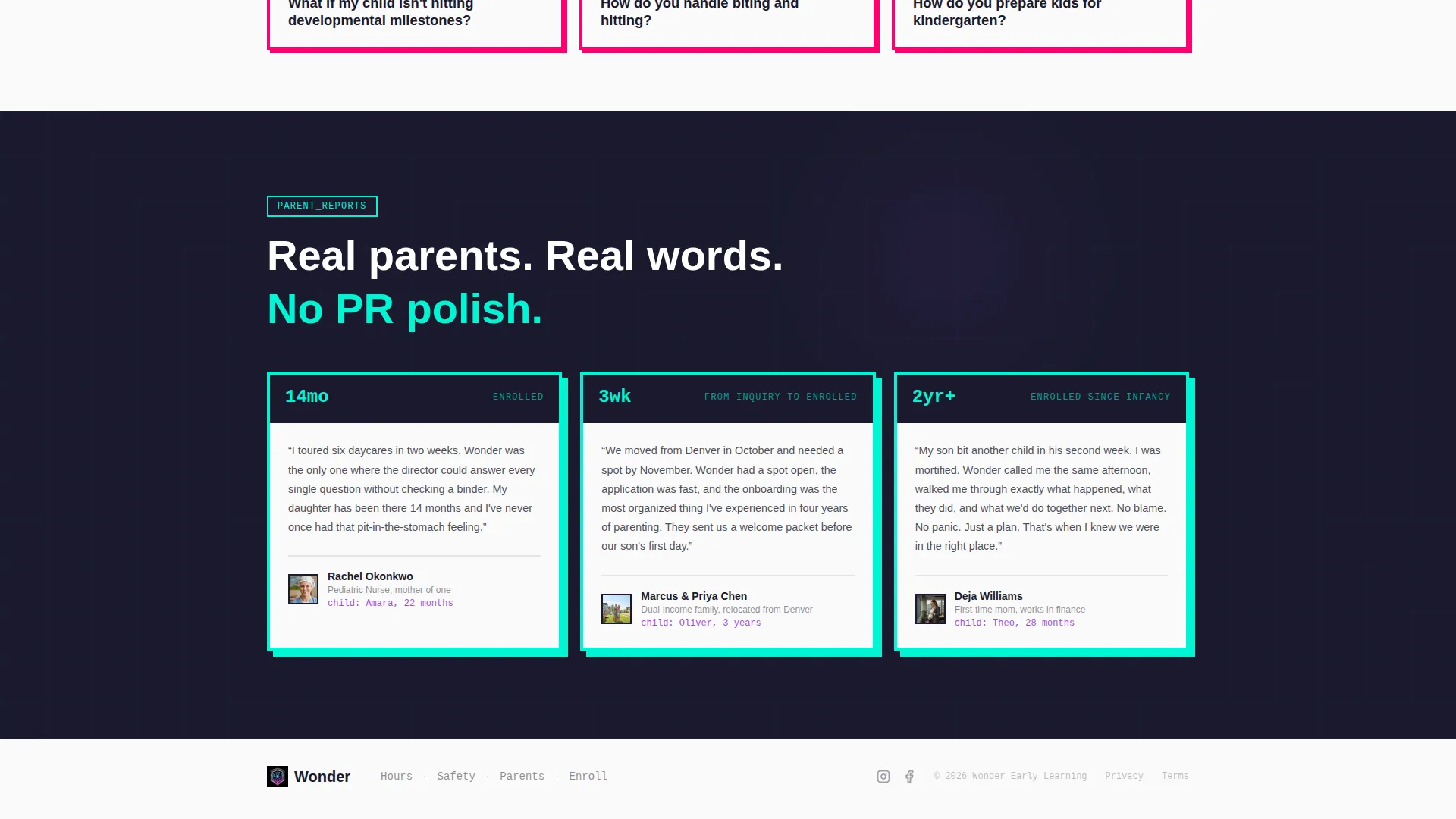
- The FAQ card grid answers objections progressively, moving from practical questions to emotional ones, so that by the time a parent reaches the bottom, their hesitation has been addressed card by card
- The persistent bottom call to action bar means the "Reserve a Spot" button is always one tap away, removing any friction between a resolved concern and a completed enrollment click
Other information about this template
This template is part of the Daycare and Preschool Website Templates subcategory and was designed specifically for the Daycare and Preschool FAQ Page niche. It is a strong fit for childcare providers who want a page that works like a confident, well-organized staff member available around the clock.
- The template is built as a single landing page, not a multi-page site, and is optimized for Click-Through to an external enrollment application flow
- The virtual classroom tour link in the secondary call to action can be pointed to any existing video walkthrough or virtual tour URL
- The Wonder template sits within the Technology category, reflecting its data-forward, dashboard-style design language and its use of code-aesthetic user interface components
- No form lives on this page by design; the conversion goal is a single focused click to the enrollment application, keeping the experience clean and pressure-free
Theme
Bold Brutalist
Creative direction
Launch Energy
Color system
AI Iridescent
Style
Dashboard/Data Grid
Direction
Click-Through
Page Sections
Terminal Code Snippet Header Block
Expandable FAQ Data Card Grid
Iridescent Border Color Progression
Persistent Brutalist Call to Action Bottom Bar
Bold Brutalist Typography System
Mission Control Dashboard Layout
Related questions
Does this template include the enrollment form?
Can I replace the FAQ cards with my own questions and answers?
Is the persistent bottom call to action bar editable?
Do the color-shift animations and snap interactions require custom coding?
How is the FAQ card grid organized?



