Auto Repair Shop Terms of Service Landing Page
Wrench is a split-screen landing page template built for auto repair shops that want to earn trust before asking for a booking. A live repair cost estimator anchors the header, letting visitors select their vehicle and service while a glassmorphic terms card updates in real time. The result is a transparent, conversion-focused page that turns anxious car owners into booked appointments.
by Rocket studio
Quick summary
Wrench is a single-page, split-screen landing page template designed for auto repair shops. It pairs a live repair cost estimator with plain-language terms of service content, all wrapped in a glassmorphic visual style. The page is built to demystify auto repair pricing, reduce customer hesitation, and drive bookings through a clear, trust-first layout.
Who this template is for
This template is built for independent auto repair shops and small service garages that want to stand out by being upfront about pricing and policies. It fits owners who are tired of losing customers to uncertainty and want a digital presence that feels as honest as a good mechanic.
- Auto repair shop owners who want a transparent terms of service and booking page in one place
- Small fleet managers or multi-vehicle households looking for a shop they can trust with repeat service
- Garage operators replacing a generic website with a tool-first landing page that actively converts visitors
What problem this template solves
Most auto repair shop pages hide their pricing, bury their terms, and ask customers to call before revealing anything useful. That creates friction, breeds distrust, and sends potential customers to the next result. Wrench removes that friction entirely.
- Visitors get specific warranty terms, labor rate ranges, and parts policies tied to their chosen service before they ever submit a form
- The page answers the questions customers are too nervous to ask, like what happens if additional damage is found mid-repair
- A sticky call-to-action bar and pre-filled booking form reduce the steps between interest and a confirmed appointment
What you get with this template
You get a fully structured, single-page layout that combines a functional repair cost estimator with a transparent terms of service flow. Every section is designed to move a hesitant visitor toward booking while giving them exactly the information they need to feel confident.
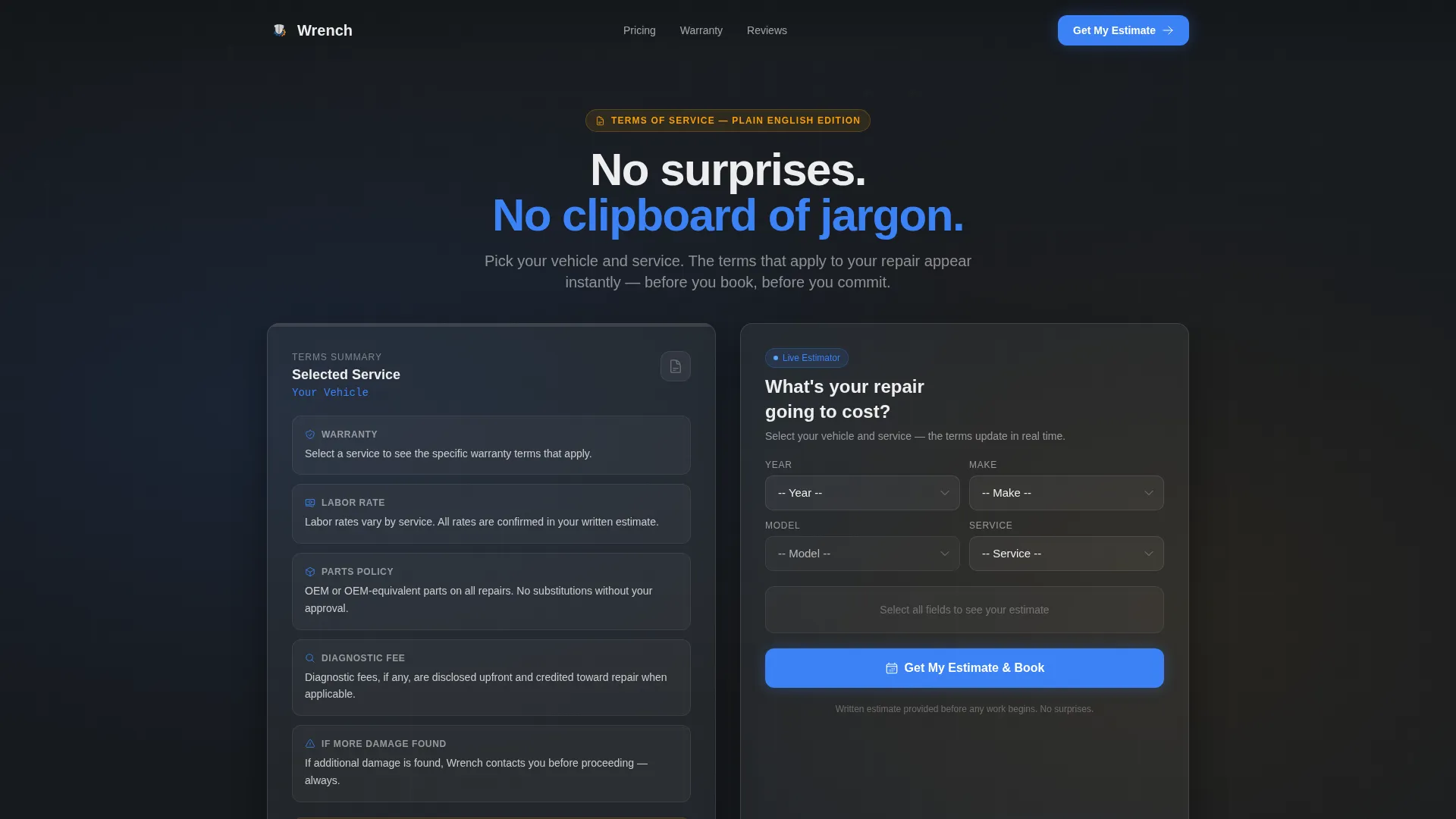
- A split-screen header with cascading vehicle dropdowns and a real-time updating glassmorphic terms summary card
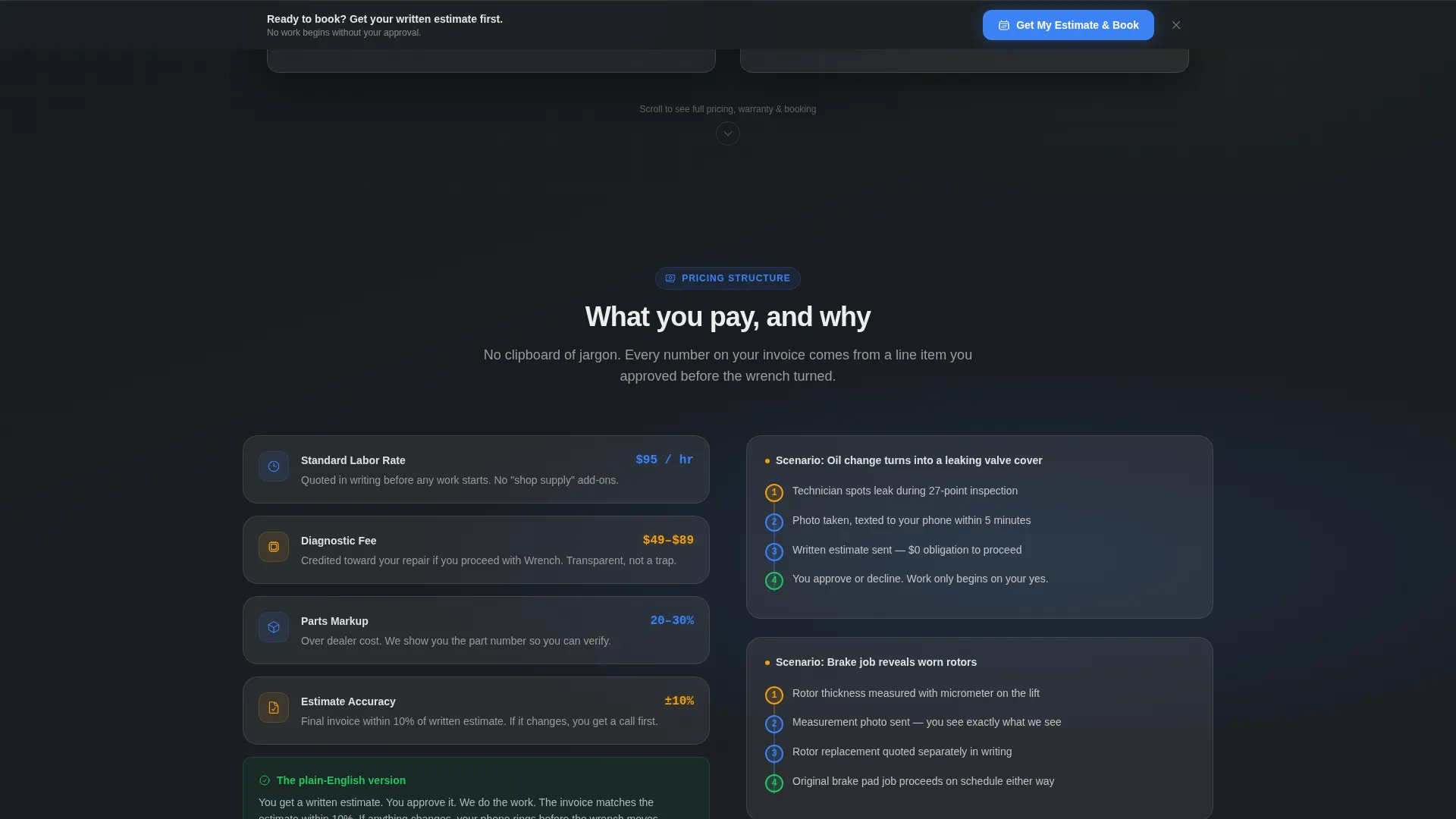
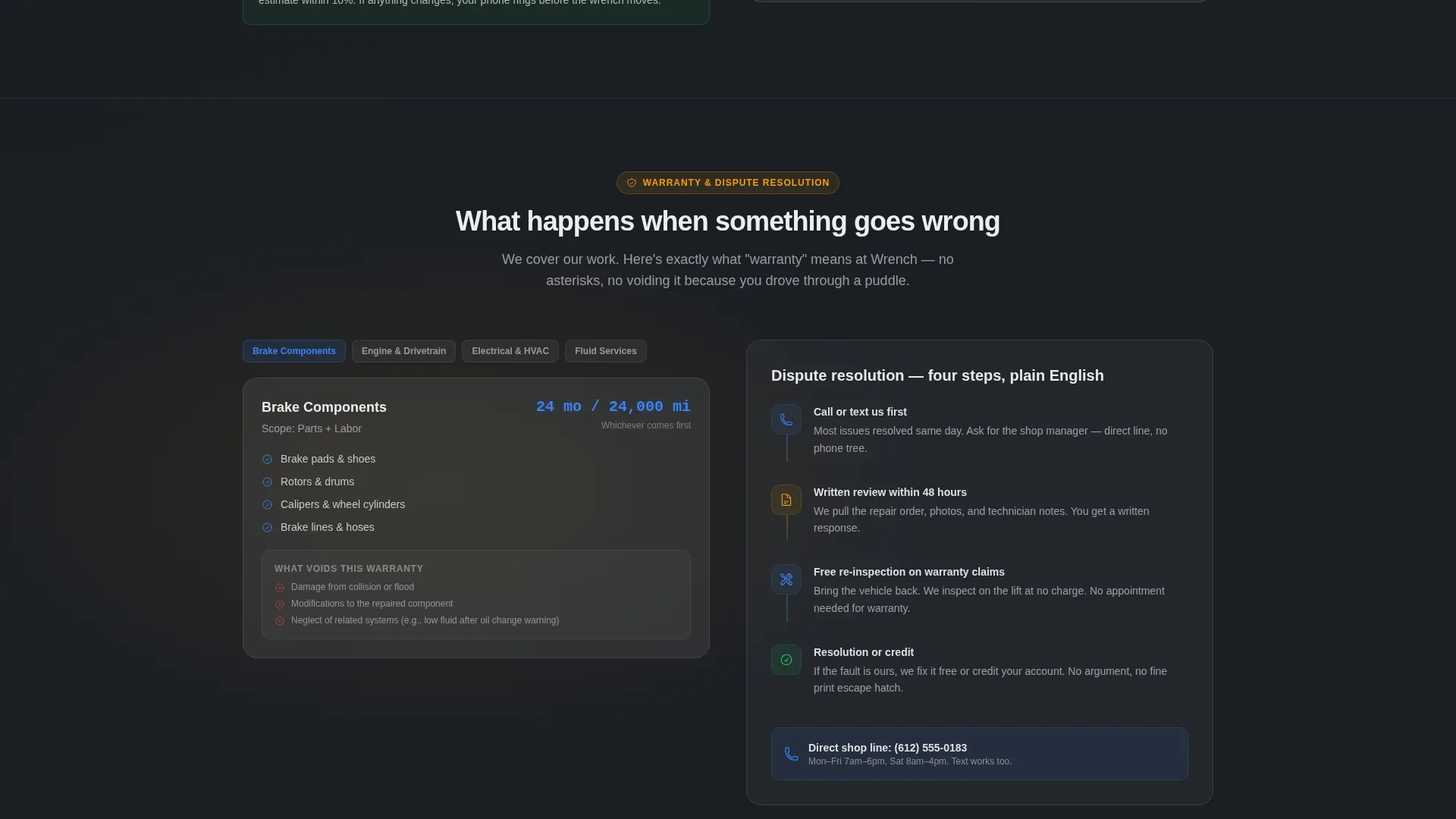
- Scroll-driven split sections covering pricing structure, diagnostic fees, warranty coverage, and dispute resolution in plain language
- A lead generation form with pre-filled vehicle data, a calendar date picker, a described-issue text field with placeholder prompts, and a phone number field
Feature list
This template is built around one core idea: the tool earns the trust, and the form catches the momentum. Every feature below supports that flow directly.
Live Repair Cost Estimator
Visitors select their vehicle year, make, and model from cascading dropdowns. The estimator updates the left-side terms card in real time, surfacing the warranty terms, labor rate range, and parts policy specific to their chosen service. No generic disclaimers and no guesswork.
Real-Time Glassmorphic Terms Card
As the visitor interacts with the estimator, a frosted panel card on the left side of the split updates dynamically. It shows the exact terms that apply to the selected vehicle and service, making the shop's policies feel personal rather than boilerplate.
Scroll-Driven Split-Screen Sections
Each scroll section pairs a plain-language terms explanation on the left with a contextual scenario on the right. One section shows what happens when additional damage is found, complete with an animated flowchart of the approval call, photo text, and written estimate process.
Sticky Call-to-Action Bar
After the second scroll section, a sticky bar anchors to the viewport and repeats the primary call to action: "Get My Estimate and Book." It stays visible as the visitor reads through the terms, keeping the conversion path open without interrupting the reading experience.
Lead Capture Form with Pre-Filled Data
The booking form pulls vehicle information already entered in the estimator, so the visitor does not retype anything. It adds a calendar date picker, a describe-your-issue text field with practical placeholder prompts, and a phone number field to complete the lead capture.
Expandable Terms Accordion
A secondary path labeled "Just Read the Full Terms" opens a collapsible accordion below the main form. This keeps legally minded visitors engaged on the page without pulling them away from the primary conversion flow.
Page sections overview
| Section | Purpose |
|---|---|
| Split Header Estimator | Vehicle selector with real-time terms card update |
| Pricing Structure Split | Plain-language breakdown of diagnostic and labor fees |
| Additional Damage Flow | Animated flowchart showing approval and estimate process |
| Warranty Coverage Split | Terms specific to parts and labor warranty by service type |
| Dispute Resolution Split | Clear explanation of how disagreements are handled |
| Sticky Booking Bar | Persistent call-to-action anchored after second scroll section |
| Lead Generation Form | Pre-filled booking form with date picker and issue description |
| Full Terms Accordion | Expandable legal terms for detail-oriented visitors |
Design & branding system
The visual identity follows a Directory and Discovery theme rendered through a glassmorphic color system. The palette is designed to feel like reading a clean digital display through a rain-spotted windshield at night: translucent cards floating above something solid and mechanical.
- Frosted panel white (#FFFFFFB3) layered over asphalt charcoal (#1B1F24) creates depth without heaviness on every glass card
- Hydraulic blue (#3B82F6) marks interactive edges, focus states, and dropdown highlights so the estimator tool feels responsive and precise
- Hazard amber (#F59E0B) is used on cost highlights, price alerts, and any number that deserves immediate attention, mimicking an instrument cluster readout
Mobile & speed optimization
The split-screen layout is structured to adapt cleanly to narrower viewports without losing the estimator-first experience. The stacked mobile view keeps the estimator tool above the terms card so the conversion priority is preserved on every screen size.
- Cascading dropdowns and the calendar picker are sized for touch interaction, reducing input errors on mobile devices
- Glass card depth effects are implemented with CSS backdrop filters, keeping the visual style intact without relying on heavy image assets
- The sticky booking bar remains functional on mobile, staying anchored at the bottom of the viewport as visitors scroll through the terms sections
How this template helps you convert
The conversion strategy is built on a simple principle: show the visitor what they need to know before you ask them for anything. Every design and structural choice supports that sequence.
- The estimator tool delivers real, service-specific information in the first viewport, so the visitor immediately sees value and begins to trust the shop before reading a single marketing claim.
- The scroll-driven split sections answer objections in order of urgency, moving from pricing transparency through warranty and dispute resolution, so no unanswered question lingers long enough to cause a drop-off.
- The pre-filled lead form removes friction at the moment of highest intent, and the secondary accordion path keeps cautious visitors engaged rather than bouncing to a competitor.
Other information about this template
Wrench is built specifically for the auto repair shop terms of service page niche, where transparency and trust are the primary purchase drivers. It sits within the broader auto repair shop website templates category and is designed to function as a standalone lead generation landing page rather than a multi-page site.
- The template style is Split Screen (50 to 50), meaning the viewport is divided into two equal columns throughout the header and every primary scroll section
- The creative direction is Calculator and Tool First, a layout approach where the interactive estimator appears before any marketing copy or calls to action
- The header concept is Interactive Preview, a pattern where the visitor's first meaningful interaction with the page is a functional tool rather than a static hero image
- The theme is Directory and Discovery, reflected in the structured, information-forward layout that helps visitors locate and understand exactly what they need
Theme
Directory & Discovery
Creative direction
Calculator/Tool First
Color system
Glassmorphic
Style
Split Screen (50/50)
Direction
Lead Generation
Page Sections
Live Repair Cost Estimator
Real-time Glassmorphic Terms Card
Scroll-driven Split-screen Layout
Sticky Booking Call-to-action Bar
Pre-filled Lead Capture Form
Expandable Full Terms Accordion
Related questions
Can I use this template for a shop that handles multiple service types?
Does the template include the full terms of service text?
How does the real-time terms card update work?
Is this landing page suitable for customers who are not familiar with auto repair?
Where does the primary call to action appear on this landing page?



