
AI tools can automatically generate API routes, documentation, and tests from simple prompts, saving developers significant backend development time. With human review and platforms like Rocket.new, teams can quickly create secure, ready-to-use backend endpoints for full-stack applications.
Can a machine write API routes for you so you don’t have to type every single line?
The short answer is: yes, you can auto-generate API routes with AI and save tons of time. In fact, developers using AI tools report faster setup and fewer mistakes when building backend structures.
According to the Stack Overflow Developer Survey 2025, 84% of developers report using or planning to use AI tools in their development workflows, underscoring how common AI has become for handling repetitive tasks such as writing code, managing routes, and maintaining documentation.
APIs are how modern apps talk to servers. They power features like login, profiles, feeds, payments, and more. But writing routes and testing them manually can drain energy. This guide offers a simple, friendly way to use AI agents and models to streamline those steps.
What Does it Mean to Auto-Generate API Routes With AI?
Let’s break this down. When an app talks to a backend, it hits something called an API endpoint. Each endpoint has defined routes like:
- GET
/users - POST
/login
Traditionally, developers write these by hand. But with AI models and AI tools, you can describe what you want and have code produced automatically. That includes route handlers, documentation, and even test cases.
This process can improve developer experience while reducing mistakes. It doesn’t eliminate developers, it just handles the boring parts.
How AI Tools Write API Routes?
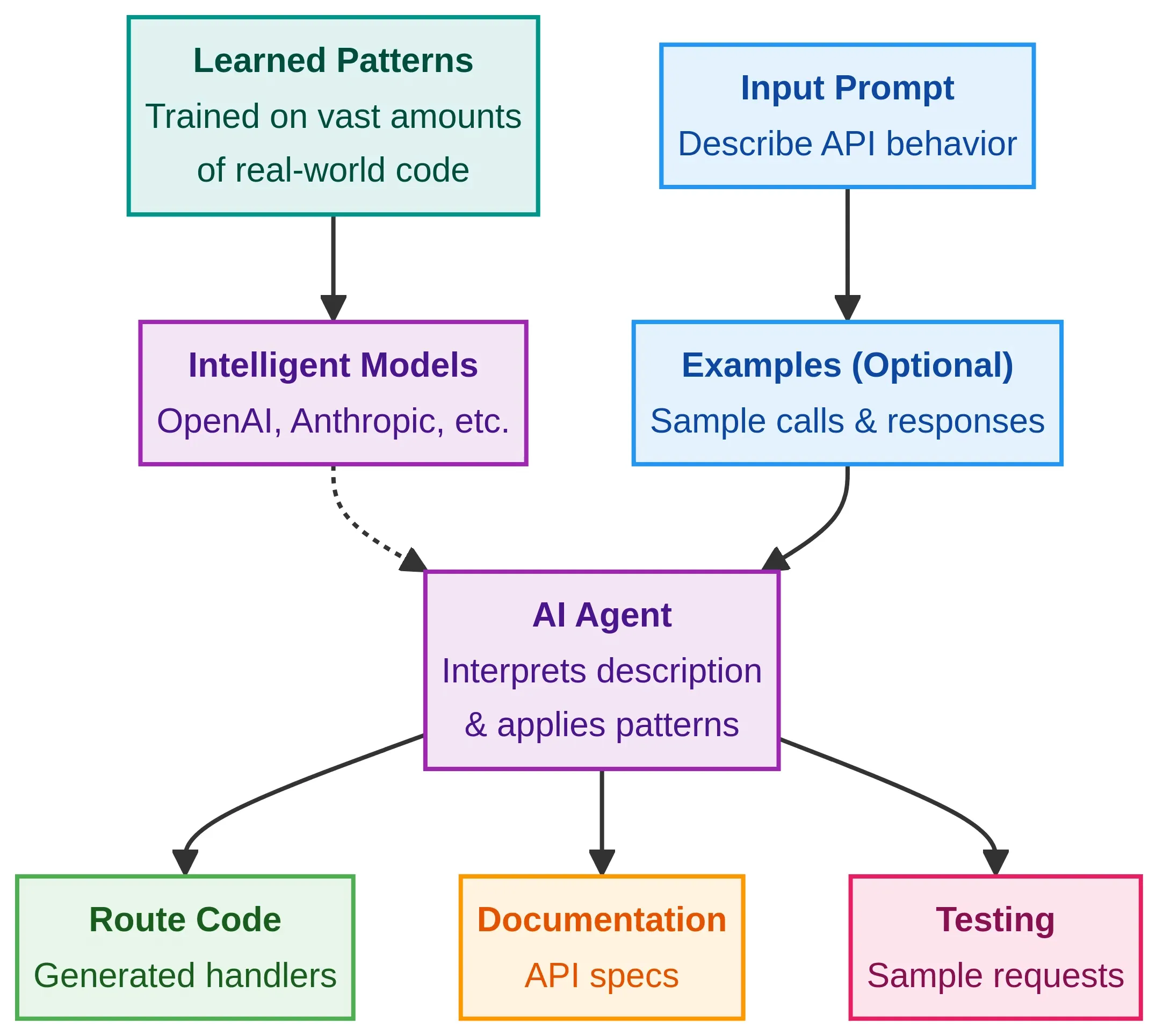
AI doesn’t guess code randomly. Behind the scenes, intelligent models like those from OpenAI, Anthropic, or custom agents have learned patterns from tons of real code. When a prompt describes your desired API behavior, these models generate relevant route code.
Here’s how it works:
- Input prompt: Describe what your API should do.
- AI processing: An AI agent interprets the description.
- Code output: The model writes route code.
- Docs + testing: Some systems generate API documentation and sample API requests.
You can even include examples of API calls and responses to guide the AI models.
Tools That Help You Generate Routes
There are many ways to auto-generate API routes with AI. Here’s a simple list:
| Tool | What It Does | Notes |
|---|---|---|
| GPT-powered IDE extensions | Write routes inside your editor | Works with your text |
| Prompt-based generators | Describe API and get code | Useful for prototypes |
| Vibe-Coding platforms | Convert prompts into full apps | Includes API + frontend |
| Agent builders | Multi-agent workflows with logic | Can orchestrate API + tests |
Each has pros and cons. Some are simple. Some require setting up an API key or connecting to your code repository. Pick what fits your project size.
Step-by-Step: Auto-Generating API Routes With AI
This step-by-step workflow shows how AI fits into real API work without complicating things. Each step builds on the previous one, so the process stays clear, controlled, and easy to follow.
No magic tricks here. Just a practical way to get routes done faster while keeping full control.
Step 1: Define What Your API Should Do
First, make a clear list of routes. Ask yourself:
- What data needs to be fetched?
- What data gets stored?
- Who can access what?
This list helps you write a prompt that’s easy for AI to understand.
Step 2: Set Up Your AI Tool
To use many AI tools, you need an APi key. This is how the system knows who you are. Most platforms let you create one for free with limited usage.
Keep your API key secret. If it leaks, someone could make requests that cost you money or hit rate limits.
Step 3: Write a Prompt
Write clear instructions like:
“Create REST API routes for a user system with GET /users, POST /users, and DELETE /users/{id}. Include handlers, status responses, and validation.”
Add any API documentation requirements you need.
Step 4: Let AI Generate
Send that prompt to your AI agent or model. Good tools will respond with a route code, helpful comments, and documentation. Some will generate examples of how to make real API calls to test the endpoints.
Step 5: Review and Tweak
AI can make good guesses, but it doesn’t know your exact business logic or edge cases. Always do a review of the generated routes. Check for logic mistakes, security holes, or missing responses.
Auto-generated routes save time, but they work best when paired with careful testing and human judgment. AI handles the structure fast. Developers keep control of logic, security, and quality. That balance is where things actually click.
Common Questions About This Approach
What happens when AI enters the backend conversation? No hype. Just straight answers about limits, control, and where humans still matter.
"Does AI Understand Security Rules?" AI models generate code based on context. But they don’t automatically know your security needs. So you should:
- Add auth checks
- Validate input
- Plan rate limiting for endpoints
This keeps your API safe from bad actors.
"Will It Replace Developers?" Not really. AI writes drafts. Human developers shape the final code. Think of AI as a helpful assistant, not a replacement.
AI helps speed things up, but responsibility still sits with developers. Security, access control, and final decisions stay human. When that balance is clear, AI becomes useful instead of risky.
Community Say On Auto-Generated APIs
Here’s a real insight from Reddit on tools that work with AI to help build backend pieces like routes:
“Rocket just getting great feedback and 400k users in just 16 weeks… but token usage is high if your app has more than a few screens.”
That comment shows real room for experimentation. Some users love the time saved. Others note that sometimes it’s not perfect yet.
Rocket.new: Taking API Route Generation to Orbit
It is a platform that lets you generate complete applications from natural-language descriptions, including backend logic and API integrations. You describe what you want, and an agent builder in Rocket helps generate full-stack code that covers API routes, database configuration, authentication, and even UI.
Rocket combines multiple AI models from major providers such as OpenAI and Google Gemini, along with proprietary systems, to build functional apps. Its workflow orchestration handles backend endpoints, frontend pages, and API documentation concurrently.
Some key features include:
- Prompt to App Creation: Builds apps directly from single prompts
- Figma Import: Converts design files into live, editable layouts
- AI-Powered Backend: Automatically handles logic, data, and workflows
- Custom Domain Support: Publishes projects with a branded domain
- Code Export: Allows developers to extend or customize later
- Live Preview: Shows instant updates while editing
Use cases from Rocket include:
MVP Apps: Build a quick backend with routes, API integrations, and front end to test your business idea.
Internal Tools for Teams: Create admin panels or workflows with secure endpoints without writing all the code.
Prototype Turned Production: Start with AI-generated routes, test them, then refine with developers into durable systems.
Rocket’s vibe coding approach can feel almost like tricking the machines into doing your busy work. But keep in mind: your logic and direction still guide everything.
👉 Build your App Backend with Rocket.new
API Documentation with AI
Good API documentation makes your backend usable by other developersor even by you in the future. When auto-generating code, also ask for docs. Many AI models can produce:
- Route purpose summaries
- Parameters descriptions
- Response examples
This matters when your team grows or when you hand off work.
API Requests and Workflow Testing
Once routes exist, you should test them. Tools like Postman or automated test suites can send API requests to each endpoint. Make sure each route:
- Responds with the correct HTTP status
- Doesn’t crash on bad input
- Returns documented fields
AI can also generate sample test cases. Ask your model to write tests after it generates the code. This is like having a second set of eyes.
Tracking Performance Metrics
Once API routes go live, performance becomes the real signal. This part focuses on how the backend behaves when real traffic starts hitting the system.
After initial route generation and testing, keep track of these key areas:
- Response times: Watch how fast each endpoint responds. Slow responses often indicate complex logic, slow queries, or unnecessary processing.
- Error rates: Track how often routes fail. Spikes in errors usually mean invalid input, missing checks, or logic gaps that testing didn’t catch.
- Throughput under load: Measure how many requests the system can handle at once. This shows how routes behave when multiple users interact concurrently.
AI helps generate routes, but performance requires continuous monitoring. Monitoring these metrics early gives clear feedback and helps teams fix issues before users notice them.
Auto-Generate API Routes with AI Made Simple
Writing backend routes and docs manually takes time and focus. It’s boring, repetitive, and error-prone. Using AI tools and AI agents makes it easy to define your API behavior in plain language and get working code, docs, and even tests from models. Tools like Rocket even handle app generation and API integrations with a single prompt.
AI doesn’t replace developers. It helps them handle repetitive tasks, allowing them to focus on logic, design, and user experience.
Table of contents
- -What Does it Mean to Auto-Generate API Routes With AI?
- -How AI Tools Write API Routes?
- -Tools That Help You Generate Routes
- -Step-by-Step: Auto-Generating API Routes With AI
- -Common Questions About This Approach
- -Community Say On Auto-Generated APIs
- -Rocket.new: Taking API Route Generation to Orbit
- -Some key features include:
- -Use cases from Rocket include:
- -API Documentation with AI
- -API Requests and Workflow Testing
- -Tracking Performance Metrics
- -Auto-Generate API Routes with AI Made Simple