
Discover 20 field-tested AI prompts to build a Flutter app — covering widgets, state management, Firebase backends, testing, and store deployment. Each prompt is copy-ready, architecture-aware, and built to produce clean Dart code from the first generation.
How does one prompt turn into a production-ready Flutter screen with state management, navigation, and platform-specific styling, all in under a minute?
According to the official Flutter blog, 79% of Flutter developers now use AI assistants in their daily workflow, and 84% of all developers have adopted AI tools in some capacity.
The gap between a vague idea and a working app has never been smaller. But the quality of your output depends entirely on the quality of your input.
This blog breaks down 20 field-tested prompts that produce clean, scalable Dart code, covering everything from widget composition to store deployment.
Why AI Prompts Are the Deciding Factor in Flutter Development
Most Flutter developers already use AI tools. The ones shipping faster are not using better tools. They are writing better prompts.
The difference between a useful AI output and a broken code snippet comes down to context. When you give an AI model clear system instructions about your Flutter project's architecture, it produces code that actually fits your codebase.
Here is what separates a prompt that ships from one that stalls:
- Specificity reduces rework. A generic prompt like "make a login page" generates generic code. A detailed prompt that specifies your authentication provider, error handling patterns, and design system tokens produces code you can ship without corrections.
- Context shapes output quality. AI models perform better when they understand your project's folder structure, existing features, and Dart conventions. Including these details in your system instructions cuts follow-up corrections significantly.
- Prompts replace boilerplate writing. Instead of manually creating repetitive widget files, model classes, and repository layers, a single well-structured prompt can generate entire feature modules with proper architecture.
- AI coding agents need guardrails. Without specific constraints, generated code drifts from your project's patterns. Prompts act as guardrails that keep the output consistent across sessions.
Think of prompts as your project's second developer. The more context you provide, the more aligned the code output becomes with your existing architecture.
What Makes a Flutter Prompt Different from a Generic Code Prompt
Flutter has specific conventions that generic AI prompts ignore. A prompt that works in React will produce awkward Dart.
Effective Flutter prompts include the widget type, state management approach, Dart version constraints, platform targets, and design system tokens. Miss any of these and the AI fills the gaps with guesses. Include them and the output slots into your codebase without a rewrite.
Anatomy of a High-Performance Flutter AI Prompt
Before the 20 prompts, it helps to understand the structure behind each one. Every prompt in this guide follows the same four-part framework.
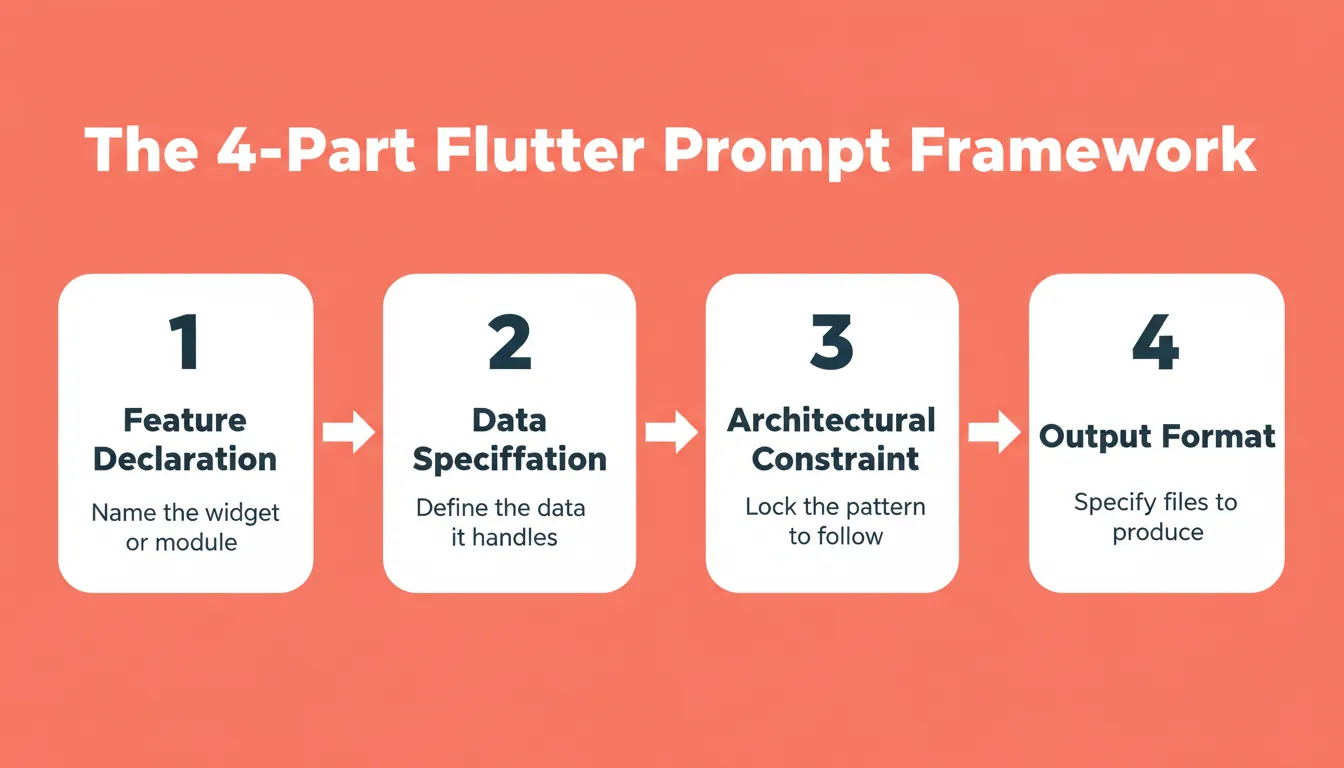
Use this four-part structure on every Flutter AI prompt to eliminate guesswork and reduce rework.
| Component | What It Does | Example |
|---|---|---|
| Feature declaration | Names the exact widget or module | "Generate a BLoC for a shopping cart feature" |
| Data specification | Defines what data the feature handles | "Include AddItem, RemoveItem, UpdateQuantity events" |
| Architectural constraint | Locks the pattern the AI must follow | "Use the repository layer pattern for data access" |
| Output format | Tells the AI what files to produce | "Include unit test stubs for each event handler" |
Prompts that skip the architectural constraint produce code that works in isolation but breaks when connected to your existing codebase. Similarly, prompts that skip the output format produce partial implementations that require multiple follow-up prompts to complete.
Prompts 1 to 7: Flutter Widget Development
Widget prompts need three things: the visual structure you want, the data it consumes, and how it responds to user interaction.
Responsive and Adaptive UI Prompts
Prompt 1 — Responsive Card Grid:
"Generate a Flutter widget that displays a responsive grid of product cards. Each card shows an image, title, price, and an add-to-cart button. Use const SizedBox for spacing, const EdgeInsets for padding, and make the grid adapt from 2 columns on mobile to 4 on tablet using LayoutBuilder for responsive layouts."
Prompt 2 — Custom Navigation Bar:
"Create a bottom navigation bar widget with 4 tabs: Home, Search, Favorites, and Profile. Use const Icon widgets for each tab with the app's primary color theme. Include a floating action button in the center and handle tab switching with a PageController."
Prompt 3 — Animated List Item:
"Build a list item widget that slides in from the right with a stagger animation. Display a user avatar (circular), name in const Text with bold styling, a subtitle showing last active time, and a trailing const Icon for a chevron indicator."
Prompt 4 — Form with Validation:
"Generate a registration form widget with email, password, and confirm password fields. Add real-time validation showing error messages below each field. Use const SizedBox(height: 16) between fields, responsive layouts for portrait and landscape, and a full-width submit button at the bottom."
Notice how each prompt defines the visual structure, spacing constants, and interaction pattern. This specificity removes ambiguity and produces widgets that match your design system on the first generation.
Prompts for Custom Widget Composition
Composing widgets into reusable components requires prompts that specify both the architecture and the visual hierarchy within your application.
Prompt 5 — Design System Token Widget:
"Create a reusable button component that accepts const EdgeInsets padding, a label as const Text, and an optional leading const Icon. Support three variants: primary (filled), secondary (outlined), and ghost (text only). Apply the app's color scheme and maintain consistent height across all variants."
Ready to test Prompts 1 to 5? Copy any of these widget prompts and paste them directly into Rocket. You will get a complete, production-ready Flutter widget in minutes, no IDE setup, no manual wiring. Try it on Rocket
Prompt 6 — Compound Widget Pattern:
"Generate a settings tile widget that composes a leading const Icon, a title and subtitle column, and a trailing toggle switch. Make the entire tile tappable with proper visual structure using CrossAxisAlignment.center and const SizedBox width spacing between elements."
Prompt 7 — Adaptive Layout Widget:
"Build a master-detail layout widget that shows a list panel and detail panel side-by-side on tablets but stacks them as separate routes on phones. Use const EdgeInsets.all(16) for content padding. Handle navigation between panels based on screen width breakpoints and responsive layouts."
These composition prompts push the AI past single widgets into architectural patterns. Each one produces a component that slots into your app's widget tree without refactoring. For a deeper look at how AI handles full Flutter app generation from a single prompt, see how Rocket generates Flutter mobile apps.
Prompts 8 to 10: State Management and Architecture
State management prompts need the most context because they connect your presentation layer to business logic, data sources, and error handling flows. Getting these right saves hours of manual wiring.
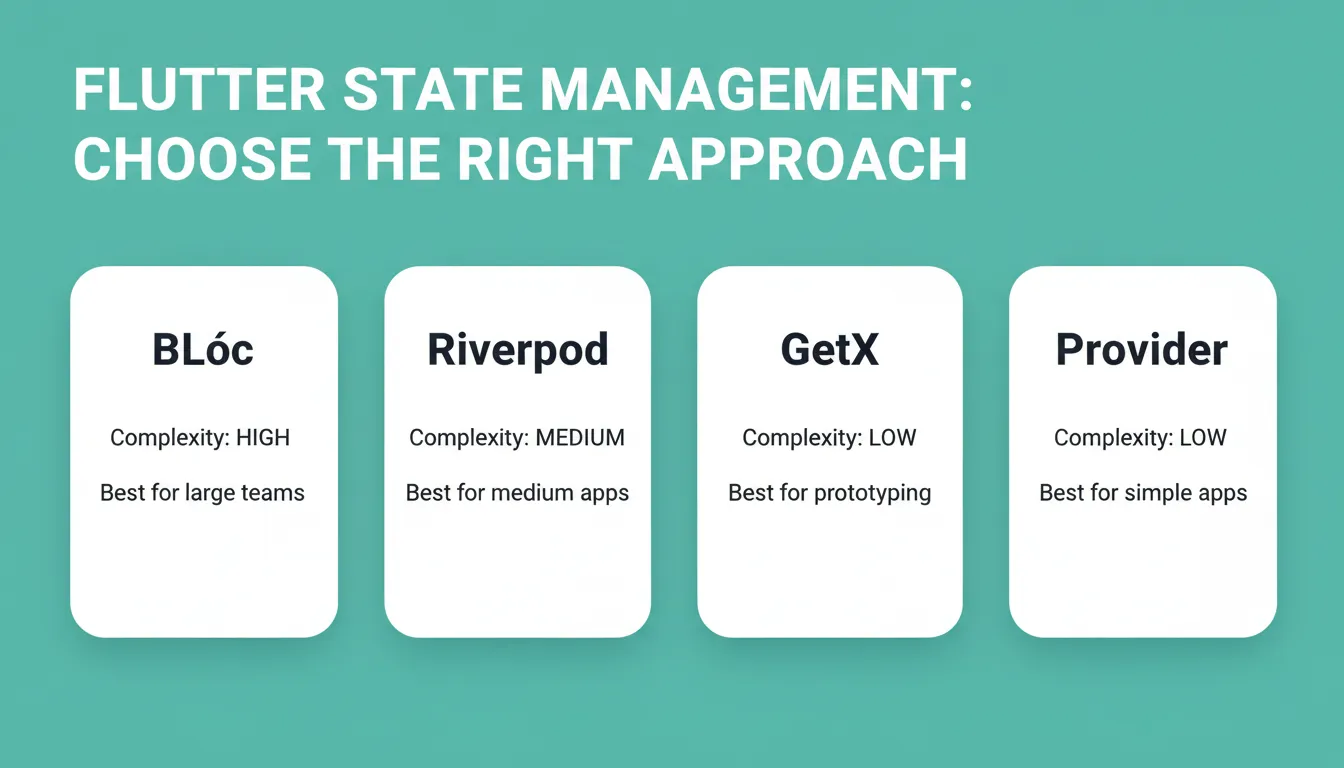 Match your state management choice to your app's complexity before writing the prompt. The AI produces significantly better output when the pattern is named explicitly.
Prompt 8 — BLoC Pattern Setup:
"Generate a complete BLoC pattern for a shopping cart feature. Include event classes (AddItem, RemoveItem, ClearCart, UpdateQuantity), state classes (CartInitial, CartLoaded, CartError), and the bloc class with proper error handling. Use the repository layer pattern for data access and include unit test stubs for each event handler with BuildContext context injection where needed."
Prompt 9 — Riverpod State Architecture:
"Create a Riverpod-based state management architecture for a social media feed. Include a FeedNotifier with AsyncValue states, a repository layer that fetches paginated data from a REST API, and error handling for network failures. Models should use freezed for immutability. Show BuildContext context usage for reading providers in widgets."
Prompt 10 — Local and Remote State Sync:
"Build a state management solution that syncs local SQLite data with a remote Firebase project. Handle conflict resolution with a last-write-wins strategy. Include loading, success, and error states. Generate the repository layer with both data sources and a sync manager class that runs on app resume."
Choosing the Right State Management Approach
| State Solution | Prompt Focus Areas | Best For | Complexity |
|---|---|---|---|
| BLoC | Events, states, transitions, repository layer | Large teams needing strict separation | High |
| Riverpod | Providers, notifiers, async values, BuildContext context | Medium apps with flexible architecture | Medium |
| GetX | Controllers, observables, dependency injection | Rapid prototyping and smaller projects | Low |
| Provider + ChangeNotifier | ChangeNotifier classes, Consumer widgets, scoping | Simple apps and quick MVPs | Low |
State management prompts benefit from specifying the exact pattern name and expected file structure. AI models produce significantly better architecture code when you name the design pattern explicitly. According to research from Cornell University via Base44, teams using AI tools report a 5.5% productivity gain, and most of that comes from faster scaffolding of repetitive architecture code.
Ready to test Prompts 6 to 10? Paste any of these state management prompts into Rocket and get a fully wired BLoC, Riverpod, or GetX architecture generated in one shot, complete with repository layer and error handling. Try it on Rocket
Prompts 11 to 14: Firebase and REST API Integration
Backend connection prompts bridge the gap between your Flutter frontend and server-side systems. These need clear specifications about authentication, data models, and error recovery.
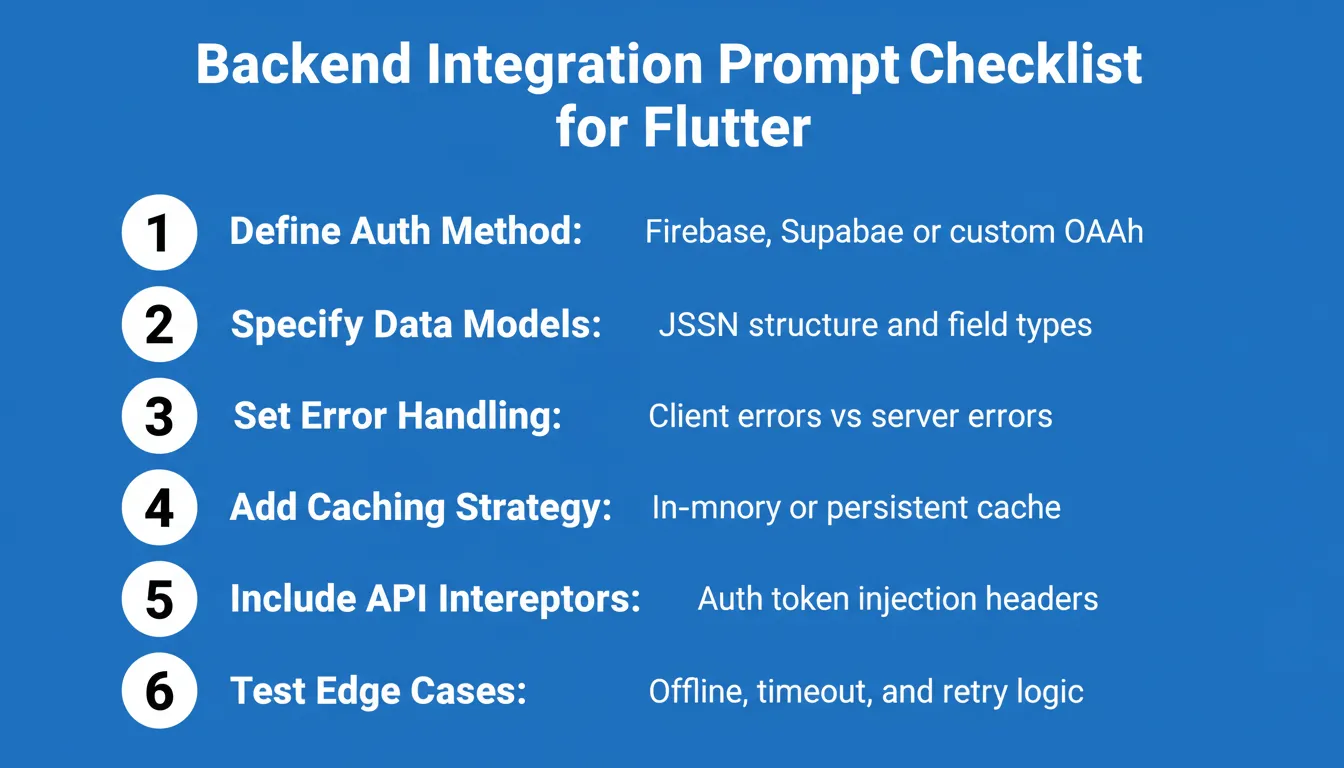 Run through this checklist before writing any Flutter backend prompt. Missing one item typically adds two or three follow-up prompts to complete the integration.
Prompt 11 — Firebase Auth and Firestore:
"Set up a complete authentication system using a Firebase project with email/password and Google sign-in. Include a UserRepository class, an AuthBloc with system instructions for handling auth state changes, and Firestore rules for user-specific data. Generate error handling for common failures: wrong-password, user-not-found, network-timeout."
Prompt 12 — REST API Connection Layer:
"Create a data layer that connects to a REST API with a base HTTP client, interceptors for auth tokens, and system prompt-style request headers. Generate model classes with JSON serialization, a repository layer with caching, and error handling that distinguishes between client and server response codes."
Prompt 13 — Real-time WebSocket Chat:
"Build a chat feature connecting to a WebSocket server. Include message models with timestamps, a chat repository managing socket connection lifecycle, automatic reconnection logic, and offline message queuing. Handle conversation history loading from REST on initial open, then switch to live socket updates."
Prompt 14 — Generative AI Feature Setup:
"Add a generative AI chatbot feature using Google Gemini SDK. Create a chat screen with message bubbles, a text input with system instructions context, streaming response display, and conversation history persistence. Include token usage tracking and a fallback for when the AI model is unavailable."
Backend prompts are where AI coding agents deliver the most value. Instead of writing 15 files manually for a Firebase project connection, one detailed prompt scaffolds the entire application layer with proper error boundaries. For teams looking to skip the prompt-writing step entirely, shipping a production Flutter app without a dev team is now a practical option.
"Prompts still express intent, but the real leverage comes from how tools are connected, how feedback is handled, and how safely automation can operate within existing processes." — LeanCode, Trends in Flutter App Development 2026
How Rocket Turns Prompts into Production Flutter Apps
Most AI tools require you to write prompts, debug the output, paste code into your IDE, and fix errors manually. Rocket eliminates that loop entirely.
You describe what your Flutter app should do in plain language. Rocket's AI agents then handle the translation from intent to code, generating state management, navigation, and responsive layouts automatically. No prompt engineering required.
Here is what that looks like in practice:
- Full-stack output, not snippets. Unlike tools that generate code fragments, Rocket produces entire applications with connected backend services, authentication flows, and deployment configurations.
- Architecture decisions are handled for you. Rocket selects state management patterns, folder structures, and widget compositions based on your app's complexity. Consistency is maintained across screens without you specifying every architectural detail.
- Publish to Apple App Store and Google Play Store directly. Rocket handles build configs, signing, and deployment prep so your Flutter app goes from AI model output to store submission without switching tools.
- Iterative refinement with context retention. Each follow-up request carries forward your entire application's architecture context. The AI model remembers your data models, navigation patterns, and design tokens, so iterations never break existing features.
1.5 million people have tried Rocket across 180 countries, from solo founders validating mobile ideas to enterprise teams building internal tools. For a full walkthrough of what Rocket generates under the hood, see the Flutter mobile app builder overview.
Prompts 15 to 20: Testing, Debugging, and Deployment
Testing and deployment prompts close the gap between "it works on my machine" and "it's live on the store." These target the final stretch of Flutter development that most developers postpone.
Prompt 15 — Widget Test Suite:
"Generate widget tests for a shopping cart screen. Test that adding items updates the total, removing items shows an empty state, and the checkout button is disabled when the cart is empty. Use pumpWidget with a mock repository, verify widget states using find.text and find.byType, and include system prompt-style test descriptions."
Ready to test Prompts 11 to 15? Paste any of these backend or testing prompts into Rocket and watch it generate a complete Firebase auth system, REST API layer, or widget test suite from a single description. Try it on Rocket
Prompt 16 — End-to-End Test Flow:
"Create a test that walks through the complete onboarding flow: splash screen, email entry, OTP verification, profile setup, and home screen arrival. Mock the API responses for each step and assert navigation transitions between screens."
Prompt 17 — Error Boundary Debugging:
"Generate a global error handling system for a Flutter app. Catch unhandled exceptions, log them with stack traces and device info, and show a user-friendly error screen. Include a debug mode that displays technical details and a production mode that sends crash reports to a remote system."
Prompt 18 — Google Play Store Deployment Config:
"Generate the complete Android deployment configuration for Google Play Store submission. Include the Gradle signing config, app bundle build commands, ProGuard rules for Flutter, version management using a build number from CI, and a pre-submission checklist for store review."
Prompt 19 — Apple App Store Preparation:
"Create the iOS deployment setup for Apple App Store. Generate the correct Info.plist permissions for camera and location, Xcode build settings for release mode, App Store Connect metadata fields, and a system prompt for generating screenshot descriptions that pass review guidelines."
Prompt 20 — CI/CD Pipeline Config:
"Build a GitHub Actions workflow for a Flutter app that runs tests on every PR, builds Android APK and iOS IPA on main branch merges, and deploys to Firebase App Distribution for beta testing. Include token usage tracking and caching for Flutter SDK between runs."
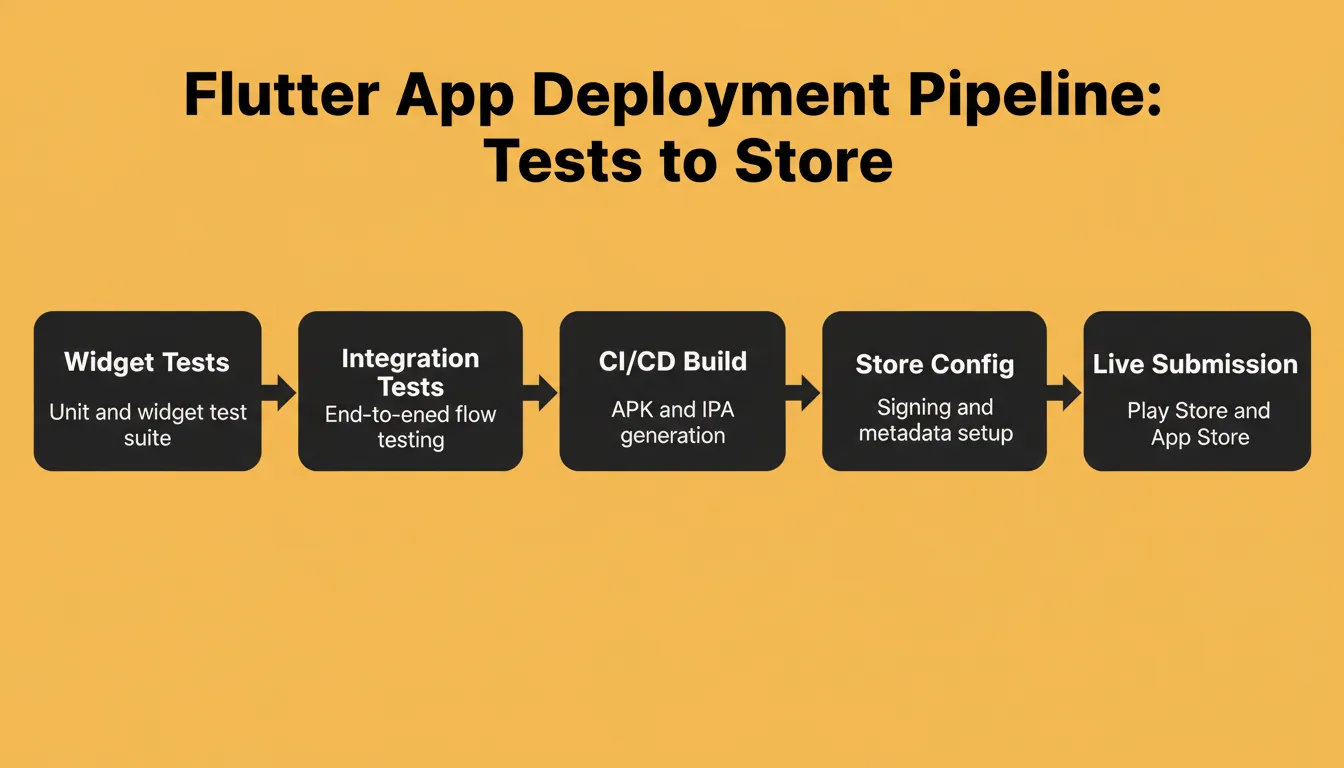 Follow this deployment pipeline sequence. Skipping any step is the most common reason Flutter apps get rejected during store review.
Deployment prompts save the most time per use because store submission involves dozens of small configuration details that are easy to miss. One comprehensive prompt prevents rejection cycles that cost days of back-and-forth with review teams. To understand how AI handles the full deployment lifecycle, the best AI app builder comparison covers what each tool actually produces at the deployment stage.
Tips for Writing Effective Flutter Prompts in Any AI Tool
The prompts above work in any AI tool, but how you deliver them matters just as much. A few consistent habits will significantly improve the quality of what you get back.
Before You Write the Prompt
- Map the feature to a layer first. Is this a UI component, a state management class, a data layer, or a deployment config? Each layer needs different context in the prompt.
- Identify your constraints upfront. What packages are already in your
pubspec.yaml? What naming conventions does your team follow? What Dart version are you targeting? Include these details before anything else. - Decide the output format. Do you want a single file, multiple files with folder paths, or inline code with explanations? Stating this prevents the AI from guessing.
While Writing the Prompt
- Include conversation history context. When starting a new session, paste a summary of your project's architecture, packages used, and naming conventions.
- Use constraints to sharpen results. Add lines like "do not use deprecated APIs" or "follow the repository pattern" to produce modern, consistent code.
- Reference official documentation. Mention "follow Flutter's official Widget catalog conventions" or "use Dart 3 pattern matching syntax." AI models produce better output when you invoke specific framework references.
- Break complex features into smaller prompts. A single prompt asking for "a complete e-commerce app" will hallucinate details. Five targeted prompts covering auth, product listing, cart, checkout, and order tracking will generate working code for each module independently.
After the First Generation
- Audit the imports. AI models sometimes import packages not in your project. Check every import statement before running the code.
- Verify null safety compliance. Dart 3 is strict about null safety. Prompts that do not specify the Dart version sometimes produce pre-null-safety patterns.
- Test the widget in isolation. Before integrating, run the generated widget in a test harness to verify it renders correctly with mock data.
The developers getting the most from AI-assisted Flutter development are not writing longer prompts. They are writing more specific ones with richer project context.
Common Flutter AI Prompt Mistakes and How to Fix Them
Understanding what breaks prompts is just as valuable as knowing what makes them work.
| Mistake | What Happens | Fix |
|---|---|---|
| No state management specified | AI picks a random pattern | Add "Use BLoC/Riverpod/GetX" explicitly |
| No Dart version specified | Pre-null-safety patterns appear | Add "Dart 3, null safety required" |
| No package constraints | AI imports packages you don't have | List your pubspec dependencies in the prompt |
| Monolithic feature prompt | Hallucinated connections between modules | Break into one prompt per layer |
| No error handling instruction | Happy path only, no error states | Add "Include error handling for [specific failures]" |
| No platform target | Generic code that breaks on one platform | Specify "iOS and Android" or "Android only" |
Flutter AI Prompt Use Cases by App Type
Different Flutter apps need different prompt strategies. Here is how to adapt the framework above for specific categories.
E-Commerce Flutter Apps
Focus your prompts on product catalog widgets with image caching, cart state management with persistence, payment integration (Stripe or PayPal), and order tracking screens. The most valuable prompt in this category is the cart state sync. Local persistence plus remote sync is where most e-commerce Flutter apps break.
Social Media Flutter Apps
Focus your prompts on real-time feed updates via WebSocket, media upload with progress indicators, notification handling, and infinite scroll with pagination. As a bonus, the generative AI chatbot prompt (Prompt 14) adapts well to social features like AI-powered content suggestions.
Enterprise Internal Tools
Focus your prompts on role-based access control, data table widgets with sorting and filtering, offline-first architecture, and integration with REST APIs that have complex authentication flows. Prompt 10 (local and remote state sync) is the foundation for most enterprise Flutter apps. For a broader view of what AI can build in this category, see how to build internal tools with AI.
Health and Fitness Apps
Focus your prompts on HealthKit and Google Fit integration, data visualization widgets (charts, progress rings), background task scheduling, and local notification systems. These apps benefit most from the adaptive layout prompts because they run on phones, tablets, and wearables simultaneously.
How AI Prompts for Flutter Compare Across Tools
Not all AI tools handle Flutter prompts equally. Here is what to expect from the major options based on publicly available information.
| Tool | Flutter Strength | Limitation | Best For |
|---|---|---|---|
| GitHub Copilot | Strong inline completion | No full-file generation | Completing existing code |
| Cursor | Excellent multi-file context | Requires existing project setup | Developers with codebases |
| Google Gemini | Strong Dart knowledge | Inconsistent architecture patterns | Widget-level generation |
| Claude | Strong reasoning, clean code | Verbose explanations | Architecture planning |
| ChatGPT | Broad coverage | Outdated Flutter patterns sometimes | General Flutter questions |
| Rocket | Full app generation from one prompt | Not an IDE plugin | Complete Flutter apps from description |
The key difference between Rocket and every other tool in this list: you describe what you want to build, and Rocket generates the complete Flutter application, including state management, navigation, backend connections, and deployment config. The other tools generate code. Rocket generates products. For a detailed breakdown of how Rocket compares to visual builders, see the FlutterFlow alternatives guide.
The Best AI Prompts to Build a Flutter App Start Here
The best AI prompts to build a Flutter app are not longer. They are more specific. Every prompt in this guide follows the same principle: name the pattern, define the data, set the constraints, specify the output. That four-part structure is what separates code you can ship from code you have to rewrite.
As Flutter's AI tooling matures, with Google's own team investing in MCP server support and agent-grade Dart tooling, the developers who ship fastest will treat prompts as architecture decisions, not search queries. The specificity you invest in a prompt is the rework you avoid in your IDE. For teams who want to skip prompt engineering entirely and go straight from idea to deployed Flutter app, Rocket handles the full arc, from research and architecture through code generation and store deployment, all in one place. Start building your Flutter app on Rocket.new and ship your first screen today.
Table of contents
- -Why AI Prompts Are the Deciding Factor in Flutter Development
- -What Makes a Flutter Prompt Different from a Generic Code Prompt
- -Anatomy of a High-Performance Flutter AI Prompt
- -Prompts 1 to 7: Flutter Widget Development
- -Responsive and Adaptive UI Prompts
- -Prompts for Custom Widget Composition
- -Prompts 8 to 10: State Management and Architecture
- -Choosing the Right State Management Approach
- -Prompts 11 to 14: Firebase and REST API Integration
- -How Rocket Turns Prompts into Production Flutter Apps
- -Prompts 15 to 20: Testing, Debugging, and Deployment
- -Tips for Writing Effective Flutter Prompts in Any AI Tool
- -Before You Write the Prompt
- -While Writing the Prompt
- -After the First Generation
- -Common Flutter AI Prompt Mistakes and How to Fix Them
- -Flutter AI Prompt Use Cases by App Type
- -E-Commerce Flutter Apps
- -Social Media Flutter Apps
- -Enterprise Internal Tools
- -Health and Fitness Apps
- -How AI Prompts for Flutter Compare Across Tools
- -The Best AI Prompts to Build a Flutter App Start Here