Discover 15 ready-to-use AI prompts to build an AI chatbot app from welcome flows to lead qualification with proven templates, prompt engineering patterns, and a step-by-step deployment guide.
Can your prompt actually generate a working chatbot?
The answer depends on structure, not effort. Writing the best AI prompts to build an AI chatbot app requires role assignment, context, constraints, and a defined output format.
This blog shares 15 proven templates with prompt generator tips and step-by-step instructions to help you ship a chatbot faster.
What Are AI Prompts for Building Chatbot Apps?
AI prompts for building chatbot apps are structured instructions that tell an AI tool what to generate: conversation flows, backend logic, and UI components, all in a single pass. Unlike generic prompts, chatbot-specific prompts include a role, audience context, output format, and behavioral constraints.
The difference between a prompt that generates a working chatbot and one that produces a broken prototype comes down to four elements: who the AI is acting as, what the chatbot needs to do, who it is talking to, and what the output should look like.
Why AI Prompts Matter When You Build a Chatbot App
The global chatbot market is projected to reach $11.7 billion in 2026, growing at a CAGR of 19.6%. AI chatbots are widely deployed for customer support, and effective AI prompts improve customer service interactions significantly.
Yet 90% of workers report lacking AI skills. The gap between knowing you need a chatbot and actually writing AI prompts that generate one is where most people get stuck.
Clear language improves AI prompt effectiveness. Specificity reduces ambiguity in AI prompts. These are not opinions. They are patterns confirmed across thousands of successful chatbot builds.
The best prompts follow a consistent structure: they assign a role, provide context, add constraints, and define the expected output format. When you write prompts this way, the AI's response matches your intent on the first try.
What Makes an Effective AI Prompt for Chatbot Development?
Effective AI prompts require context, persona, and constraints to guide user interactions. Without these three elements, your prompts generate generic output that needs constant revision.
Here is what separates good AI prompts from ineffective ones:
-
Persona assignment: Tell the AI to act as a senior chatbot developer with expertise in conversational design patterns
-
Context and details: Provide specific information about your audience, use case, and platform requirements
-
Output format: Specify whether you want code, a conversation template, or a step-by-step workflow
-
Tone instructions: Define a particular tone like professional, casual, or formal depending on your audience
-
Constraints: Add constraints like response length limits, language style, or topics to avoid
Assigning a role to AI enhances output accuracy. When you ask the AI to act as an expert, you get answers with deeper expertise and better structure.
The SYSTEM directive format tells the AI who it is and how it should behave. This single pattern transforms vague AI prompts into precise instructions that generate production-ready chatbot code.
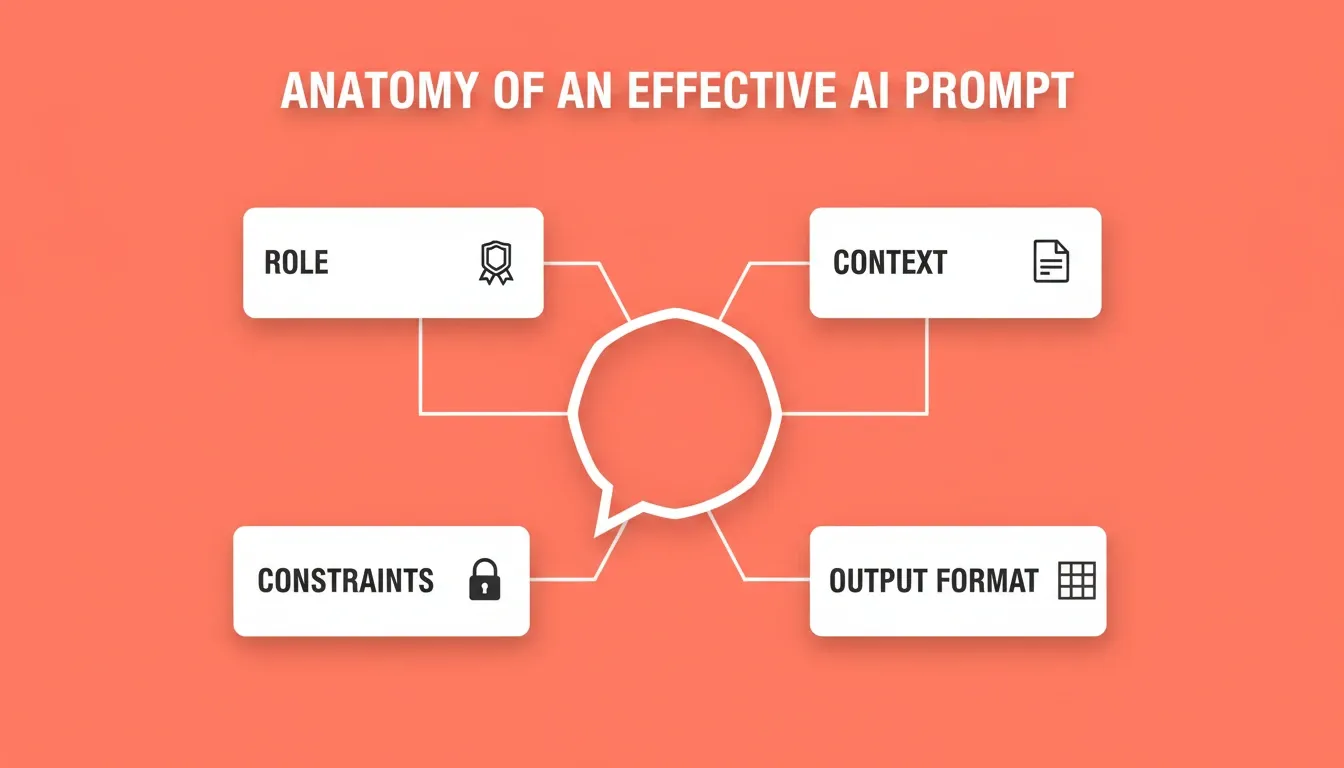
Every effective AI chatbot prompt is built from four elements: Role, Context, Constraints, and Output Format.
The CARE Framework for Chatbot Prompts
The CARE framework is a best practice for developing AI chatbot prompts. Each letter maps to a required prompt element:
| Element | What It Means | Example |
|---|---|---|
| C: Context | Background about the chatbot's purpose and audience | "This is a support bot for a B2B SaaS tool used by operations teams" |
| A: Action | The specific task the AI should perform | "Write a 5-step onboarding conversation flow" |
| R: Result | The format and quality of the output | "Output as a numbered dialogue with user and bot turns labeled" |
| E: Example | A sample that shows what good looks like | "Here is an example exchange from a similar bot..." |
Apply CARE to every prompt in this guide. It takes 60 seconds and consistently doubles the quality of the AI's first response.
How to Use an AI Prompt Generator for Chatbot Apps
An AI prompt generator helps you create structured prompts without starting from scratch every time. Think of a prompt generator as a template system that speeds up your workflow.
Here is how to use an AI prompt generator effectively:
-
Start with a base template that includes role, context, and output format
-
Paste your specific details into the template slots
-
Generate the full prompt and review the structure
-
Test the AI's response and refine based on feedback
-
Save the working prompt as a reusable template for your project
A good prompt generator removes the guesswork from writing AI prompts. Instead of staring at a blank screen wondering what to write, you follow proven patterns that produce consistent output.
The CARE framework is a best practice for developing AI chatbot prompts: Context, Action, Result, Example. This framework works as a prompt generator pattern you can apply to any chatbot task.
15 AI Prompts That Generate Working Chatbot Features
Each of these AI prompts follows the patterns and structure that large language models respond to best. Use them as templates, or adapt the details to match your specific project.
Prompt 1: Welcome Flow with Persona
Template: "Act as a UX writer with expertise in conversational AI. Write a welcome flow for a customer support chatbot. The tone should be friendly but professional. Generate greeting patterns for three scenarios: new user, returning user, and VIP customer. Output the response in table format with example messages for each."
This prompt works because it assigns a role, specifies the task, defines tone, and requests a structured output format. The AI's response will include ready-to-use conversation patterns.
Why it works: Role plus tone plus output format equals first-pass quality. No revision needed.
Prompt 2: Intent Recognition System
Template: "Act as a chatbot architect. Create an intent recognition structure for an e-commerce support bot. Include at least 8 intent categories with example user messages for each. Explain how the bot should route each intent to the correct response branch. Provide details on fallback behavior when intent confidence is low."
Why it works: Naming "fallback behavior" forces the AI to handle edge cases, which is the most common gap in chatbot builds.
Prompt 3: Multi-turn Conversation Memory
Template: "Write a prompt template for a chatbot that remembers context across multiple messages. The bot should reference earlier details without asking the user to repeat information. Generate an example conversation showing 5 message exchanges where context is maintained. Include instructions for handling session timeouts."
Why it works: Explicitly requesting session timeout handling prevents the most common multi-turn chatbot failure mode.
Prompt 4: Error Recovery Patterns
Template: "Act as a conversation designer with expertise in error handling patterns. Write AI prompts for a chatbot that recovers gracefully from misunderstandings. Generate three different fallback response patterns. The tone should avoid jargon and stay user friendly. Include an example of escalation to a human agent."
Step-by-step problem-solving prompts improve chatbot accuracy in troubleshooting. This prompt addresses common issues by defining recovery patterns upfront.
Why it works: Three fallback patterns give the AI enough variation to avoid repetitive responses.
Prompt 5: Personalization Engine
Template: "Create AI prompts for a chatbot that adapts its response style based on user data. Write three different conversation patterns: one for first-time visitors, one for returning users, and one for premium customers. Each pattern should have a distinct tone and level of detail in answers."
Dynamic context in prompts enhances chatbot relevance by utilizing user data. Providing examples helps AI understand desired interaction styles.
Put these prompts to work right now. Paste any of the templates above into Rocket, describe your chatbot's purpose, and get a fully functional app with conversation UI, backend logic, and deployment, all in one session. Start free on Rocket
Prompt 6: Knowledge Base Integration
Template: "Act as a technical architect. Write prompts for a chatbot that pulls answers from a knowledge base. The bot should search for relevant articles, summarize key findings, and present the response in a helpful format. Generate an example showing how the bot handles questions it cannot find in the knowledge base."
Why it works: The "cannot find" scenario forces the AI to generate graceful failure states, which are critical for production chatbots.
Prompt 7: Lead Qualification Flow
Template: "Write AI prompts for a sales chatbot that qualifies leads through conversation. The bot should ask clarifying questions to determine budget, timeline, and specific requests. Generate a step-by-step conversation template. Define the particular tone as consultative, not pushy. Include a job description of the bot's role."
Interactive prompts encourage AI to ask clarifying questions to enhance user engagement. This pattern works for lead qualification because it mirrors how a real sales conversation flows.
Prompt 8: FAQ Response Generator
Template: "Act as a content strategist. Create a prompt generator template that produces FAQ responses for a SaaS chatbot. The output should include 10 question-answer pairs in table format. Each answer should be concise, helpful, and written to match a formal tone. Add context about the target audience."
Prompt 9: Appointment Booking Bot
Template: "Write AI prompts for a scheduling chatbot. The bot should check availability, suggest time slots, confirm bookings, and send reminders. Generate the full conversation flow with example messages. Include instructions for handling conflicts, cancellations, and follow-up questions from the user."
Why it works: Listing all four states (check, suggest, confirm, remind) prevents the AI from generating an incomplete booking flow.
Prompt 10: Onboarding Assistant
Template: "Create prompts for a chatbot that guides new users through product onboarding step by step. The AI should explain features in simple language, provide helpful tips at each stage, and check understanding before moving forward. Generate an example onboarding sequence with 5 steps."
Breaking tasks into smaller steps yields better results. This pattern applies directly to onboarding flows where you guide users through a process one stage at a time.
Every prompt you send in Rocket builds on the last. Context carries forward across iterations, with no re-explaining and no starting over. Refine your chatbot through chat, Visual Edit, or code until it is exactly right. Try Rocket free
Prompt 11: Feedback Collection Bot
Template: "Write AI prompts for a chatbot that collects user feedback after a support interaction. The tone should be appreciative and brief. Generate three different prompt patterns for collecting ratings, open-ended feedback, and specific requests for improvement. Keep the language conversational."
Prompt 12: Product Recommendation Engine
Template: "Act as an e-commerce expert with expertise in recommendation systems. Write prompts for a chatbot that suggests products based on user preferences. The bot should ask for personalized recommendations. Include an example conversation and output the response as product cards with details like price, features, and availability."
Prompt 13: Complaint Resolution Flow
Template: "Create AI prompts for a chatbot that handles customer complaints. Define patterns for acknowledging the issue, asking clarifying questions, offering solutions, and confirming resolution. The tone should be empathetic. Write prompts that generate a good answer even when the user is frustrated. Include a template for the escalation process."
AI agents can anticipate customer needs by offering solutions. Prompts must establish clear personas, rules, and constraints for effective AI chatbots handling complaints.
Prompt 14: Email Templates Generator
Template: "Write AI prompts for a chatbot that generates email templates based on user input. The user describes the situation, and the bot creates a ready-to-send email. Generate examples for follow-up emails, meeting requests, and a job description response. Define the output format and style guidelines."
Prompt 15: Analytics and Reporting Bot
Template: "Act as a data analyst. Create AI prompts for a chatbot that answers questions about business data. The bot should interpret natural language queries, pull relevant data, summarize key findings, and present answers in a clear format. Generate an example conversation showing how the bot handles specific requests about revenue, traffic, and conversion metrics."
Providing context helps AI generate more tailored responses. This prompt works because it gives the AI a clear role, defines the data sources, and specifies the output structure.
You now have 15 production-ready prompt templates. The next step is turning them into a live chatbot app, complete with UI, backend, integrations, and one-click deployment. Rocket handles the full stack from a single prompt. Build your chatbot on Rocket
How to Write Better Prompts Using Proven Patterns
Writing AI prompts that consistently generate quality output follows predictable patterns. Here are the patterns that produce the best results when building AI chatbots:
| Pattern | What It Does | Example Usage |
|---|---|---|
| Role Assignment | Tells the AI to act as a specific expert | "Act as a senior chatbot developer" |
| Context Setting | Provides background and specific information | "The chatbot serves a healthcare audience" |
| Output Formatting | Defines the structure of the response | "Generate the output in table format" |
| Tone Definition | Sets the style and language level | "Use a formal tone, avoid jargon" |
| Constraint Addition | Limits scope to get focused output | "Keep each response under 50 words" |
| Example Provision | Shows the AI what good output looks like | "Here is an example of the ideal response" |
| Iterative Refinement | Uses follow-up questions for better detail | "Expand on point 3 with more details" |
| Negative Constraint | Tells the AI what NOT to do | "Never promise delivery dates or pricing" |
These prompt engineering patterns work because large language models respond best to clear, structured instructions. The more specific your prompt structure, the closer the AI's response matches your vision.
Character-driven prompts influence the tone and expertise of AI responses. When you tell the AI to act as an expert, it draws on patterns from its training data that match that expertise level.
Longer prompts typically yield better AI responses. A 200-word prompt that includes role, audience, tone, structure, and examples will generate far better output than a 20-word prompt that says "make me a chatbot."
For a deeper dive into prompt engineering best practices, Rocket's blog covers the core techniques that apply across all AI app development tasks.
Common AI Prompt Mistakes That Break Chatbot Builds
Most chatbot projects fail at the prompt level, not the technical level. These are the patterns that consistently produce broken or incomplete chatbots:
-
Vague persona: "Act as a helpful assistant" gives the AI no expertise to draw from. Instead, specify the domain: "Act as a senior customer support specialist for a fintech SaaS product."
-
Missing fallback instructions: If you do not tell the AI what to do when it cannot answer, it will either hallucinate or produce a dead-end response. Always include a fallback pattern.
-
No tone definition: Without tone guidance, the AI defaults to a generic register that may not match your brand. Define it explicitly: "formal but approachable, no slang."
-
Front-loading everything: Asking for a complete chatbot system in one prompt produces shallow output. Build one flow at a time, then connect them.
-
Skipping example conversations: Abstract instructions produce abstract output. Show the AI one example of the interaction style you want and the quality jumps immediately.
-
No output format specified: Without a format, the AI chooses one for you. Specify table, numbered list, JSON, or dialogue format depending on how you will use the output.
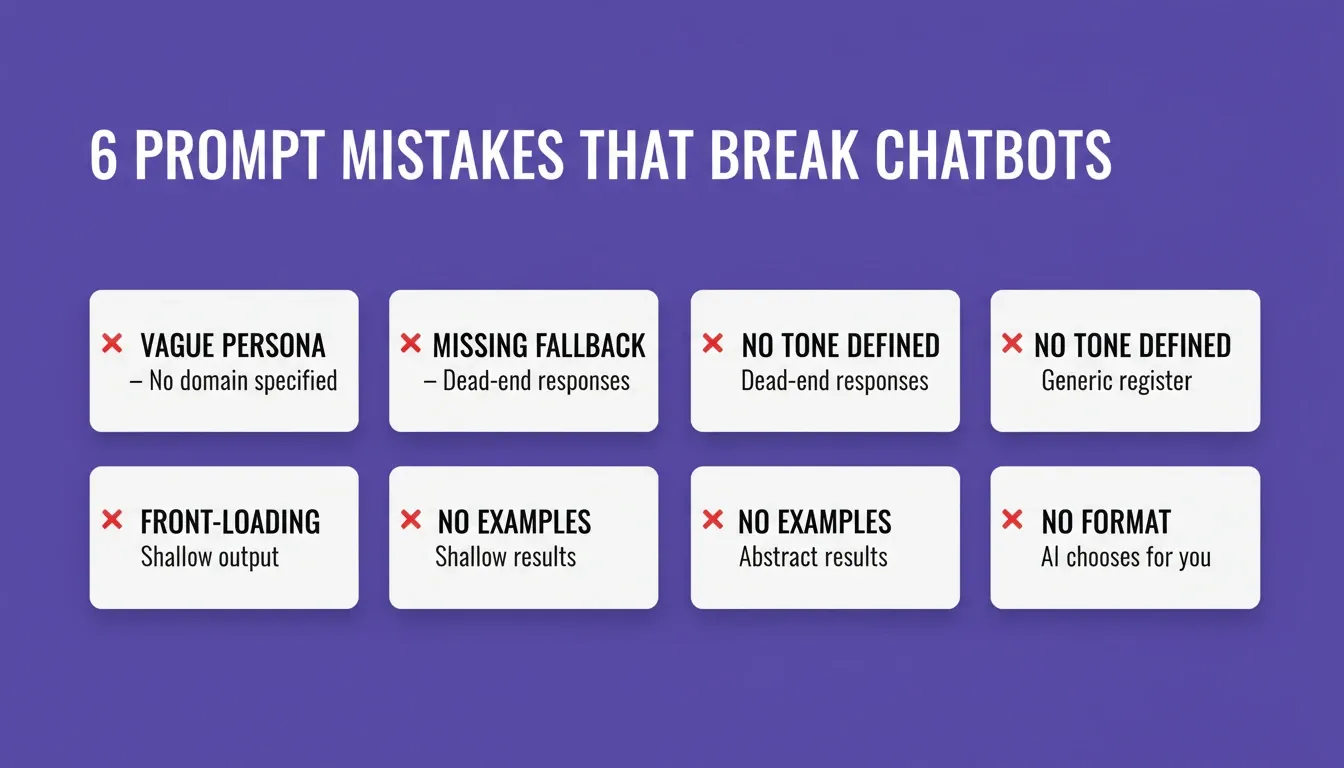
Avoid these six prompt mistakes to prevent broken flows, dead-end responses, and shallow chatbot output.
Which AI Tools Work Best as a Prompt Generator for Chatbots?
Not every AI tool handles chatbot prompts equally well. The best AI tools for generating chatbot apps combine a prompt generator with actual app building capabilities. Here is what to look for:
-
Built-in prompt intelligence: The tool should score your prompt for clarity and ask targeted follow-up questions before building, not after
-
Context persistence: Your AI prompts should build on previous conversations, not start fresh every time
-
Full-stack generation: The tool should generate frontend, backend, and database from your prompts
-
Iterative refinement: You should be able to write follow-up prompts that refine the output without rebuilding
-
Deployment pipeline: The AI should handle deployment, not just code generation
AI models like GPT-4, Claude, and Gemini all handle chatbot prompts well. However, using them directly means you still need to paste code into separate tools, connect APIs manually, and handle deployment yourself.
A dedicated AI prompt generator tool built into an app builder eliminates that manual workflow entirely. For a broader look at how AI builders compare, see Rocket's guide on building full-stack apps with AI prompts.
How Rocket Turns AI Prompts Into Production Chatbot Apps
You have 15 prompt templates ready. Now you need a tool that can take those AI prompts and generate a complete working chatbot, not just code snippets you need to assemble yourself.
Rocket is a full-stack AI app builder. You describe your chatbot in plain language, and it generates the entire system: conversation UI, backend logic, database schema, and deployment configuration. Web apps are built in Next.js; mobile apps in Flutter.
Here is exactly how it works, verified from the official Rocket documentation:
Step 1: Describe your chatbot. Go to rocket.new, sign in, and click Build. Type your chatbot prompt in plain language. Rocket scores the prompt for clarity. If it is specific enough, it starts building immediately. If not, it asks a short set of targeted questions, then starts.
Step 2: Watch it generate. Rocket plans the architecture, writes production-ready code, and shows a live preview the moment generation finishes. Most apps generate in one to three minutes.
Step 3: Refine through chat. Use any of three iteration methods: Chat (natural language instructions), Visual Edit (click any element to change it directly), or Code (edit source files). There is no change limit.
Step 4: Connect integrations. Rocket integrates with 25+ services out of the box. For a chatbot, the most relevant are: OpenAI, Anthropic, or Gemini for the AI model; Supabase for conversation storage and user authentication; Twilio for SMS notifications; Resend or SendGrid for email; and Stripe if you are monetizing access.
Step 5: Launch. Click Launch. Your chatbot goes live instantly with a shareable URL. You can also connect a custom domain, download the source code, or submit a mobile version to the App Store and Google Play.
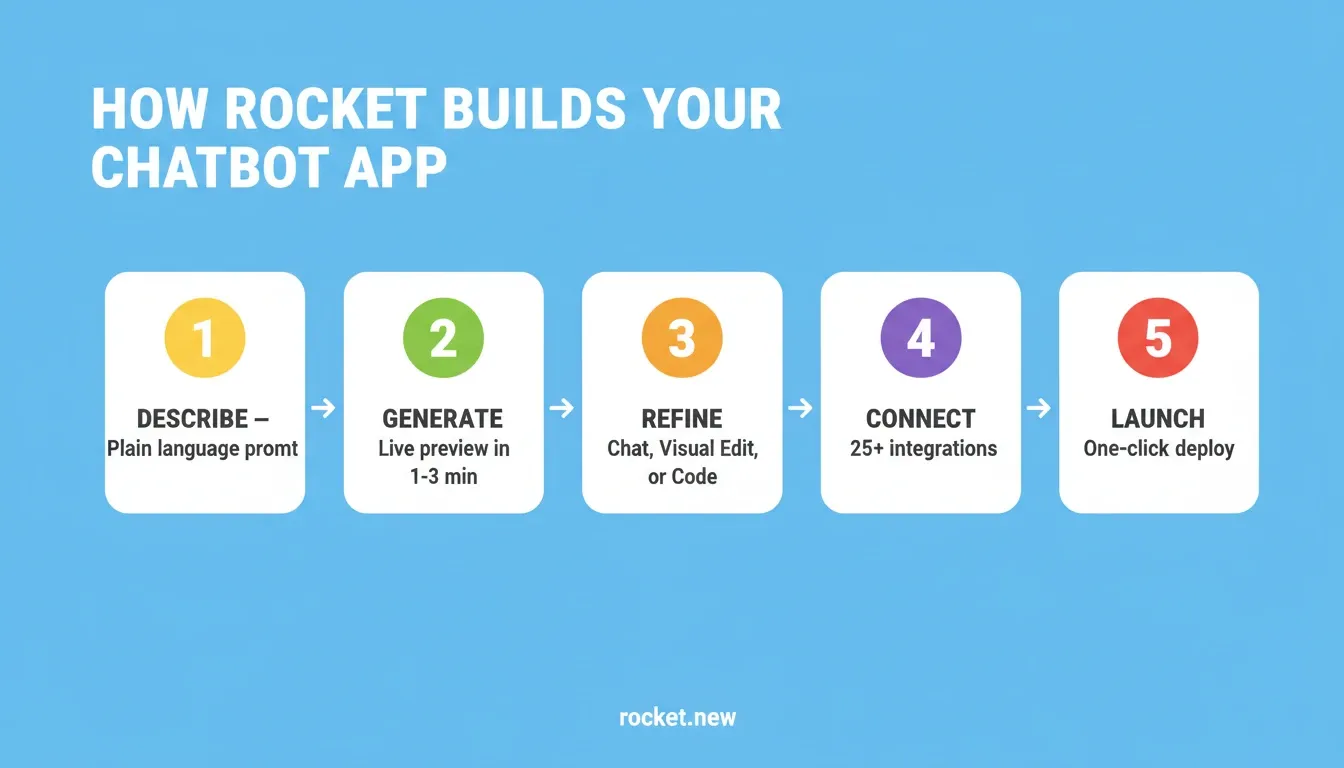
Rocket's five-step build pipeline takes your chatbot prompt from plain language description to a live, deployed app.
Rocket Plans and Pricing
All plans include unlimited team members. Credits cover Build, Solve, and Intelligence, all from one balance.
| Plan | Price | Credits | What's Included |
|---|---|---|---|
| Free | USD 0 | 20 (one-time) | Build websites, landing pages, web apps, mobile apps |
| Pro | USD 25/month | 100/month | Build production-ready apps plus add credits on top |
| Rocket | USD 50/month | 250/month | Build plus Solve (research) plus Competitive Intelligence |
| Booster | USD 250/month | 1,500/month | All features plus SSO, data localisation, premium support |
Annual billing saves 20%. Credit add-ons are available on all paid plans. For a detailed breakdown, see the Rocket pricing page.
How Different AI App Builders Compare
| Capability | Rocket | General AI builders (e.g. Bolt, Lovable, v0) |
|---|---|---|
| Full-stack generation (UI, backend, and DB) | Yes | Primarily frontend |
| Built-in prompt intelligence (clarity scoring) | Yes | No |
| Context memory across iterations | Yes | Limited |
| 25+ integrations (OpenAI, Supabase, Stripe, Twilio) | Yes | Varies |
| One-click deployment with custom domain | Yes | Varies |
| Version history and one-click rollback | Yes | No |
| SEO-ready structure by default | Yes | No |
| WCAG accessibility compliance by default | Yes | No |
| Mobile app (iOS and Android via Flutter) | Yes | No |
| Free tier to start | Yes (20 credits, no card) | Varies |
General-purpose AI builders like Bolt, Lovable, and v0 focus on fast frontend generation from prompts. They work well for UI prototypes. Rocket covers the full stack, from the first prompt through deployment, with shared context that carries forward across every iteration.
Tips for Writing AI Prompts That Generate Perfect Responses
Knowing the 15 prompt templates is the starting point. To consistently generate a perfect response, apply these additional techniques:
-
Define persona before features: Defining a chatbot's persona ensures consistent and brand-safe interactions
-
Add context about your audience: Who is talking to this chatbot? A technical audience needs different language than a general consumer audience
-
Include example conversations: Providing examples helps AI understand desired interaction styles better than abstract instructions
-
Specify what NOT to do: Add constraints like "never promise delivery dates" or "avoid jargon when explaining technical concepts"
-
Use follow-up questions: Follow-up questions refine AI responses for better detail and clarity in the output
-
Break complex flows into segments: Breaking tasks into smaller steps enhances AI response quality across your entire project
A developer shared this perspective on LinkedIn that captures the core idea behind effective prompt engineering:
This approach applies to every chatbot project. Describe the user problem, the conversation patterns, the tone, and the expected output. Let the AI figure out the technical implementation.
The chatbot market is projected to reach $60 billion by 2034. That growth means the quality bar for AI chatbots is rising fast. Users expect instant answers, contextual memory, and smooth handoffs. Your AI prompts need to account for all these patterns.
One final tip: always test with real user language. Real users misspell words, use slang, and switch topics mid-conversation. Write prompts that tell the AI how to handle this messiness in everyday life.
Step-by-Step Process for Building Your Chatbot With AI Prompts
Here are the next steps to go from reading this post to having a working chatbot app:
-
Choose your chatbot's focus: Pick one specific task like customer support, lead qualification, or appointment booking
-
Select 3-4 prompts from this guide: Combine a welcome flow prompt, an intent recognition prompt, and a backend prompt
-
Customize the template details: Replace generic examples with your specific audience, tone, and use case information
-
Use a prompt generator or AI tool: Paste your customized AI prompts into a platform that supports prompt engineering best practices
-
Test and refine with follow-up questions: Ask the AI to fix specific issues, adjust the tone, or generate alternative response patterns
-
Deploy and collect feedback: Ship a first version, gather real user data, and refine your prompts based on actual conversations
Using structured prompts allows AI chatbots to handle multi-step tasks successfully. This step-by-step process covers all the critical conversation patterns before launch.
The future of chatbot development belongs to those who master writing AI prompts. With the right prompt generator patterns, templates, and AI tools, building a chatbot is no longer a months-long engineering project. It is a focused afternoon of writing the right prompts and letting AI generate the rest.
The complete AI chatbot build loop on Rocket: from writing your first prompt through Prompt Intelligence, live preview, integration, deployment, and iteration.
Your Next Chatbot Starts With the Right Prompt
The best AI prompts to build an AI chatbot app share one trait: they describe the problem, not just the feature. As chatbot adoption grows toward a $60 billion market by 2034, the teams that ship faster will be the ones who write better prompts, not the ones with the biggest engineering teams.
The 15 templates in this guide cover every core chatbot flow. Pick the one closest to your use case, apply the CARE framework, and describe what your users actually need. The prompt patterns are proven. The tools are ready. Start building on Rocket.new, free, no credit card required.
Table of contents
- -What Are AI Prompts for Building Chatbot Apps?
- -Why AI Prompts Matter When You Build a Chatbot App
- -What Makes an Effective AI Prompt for Chatbot Development?
- -The CARE Framework for Chatbot Prompts
- -How to Use an AI Prompt Generator for Chatbot Apps
- -15 AI Prompts That Generate Working Chatbot Features
- -Prompt 1: Welcome Flow with Persona
- -Prompt 2: Intent Recognition System
- -Prompt 3: Multi-turn Conversation Memory
- -Prompt 4: Error Recovery Patterns
- -Prompt 5: Personalization Engine
- -Prompt 6: Knowledge Base Integration
- -Prompt 7: Lead Qualification Flow
- -Prompt 8: FAQ Response Generator
- -Prompt 9: Appointment Booking Bot
- -Prompt 10: Onboarding Assistant
- -Prompt 11: Feedback Collection Bot
- -Prompt 12: Product Recommendation Engine
- -Prompt 13: Complaint Resolution Flow
- -Prompt 14: Email Templates Generator
- -Prompt 15: Analytics and Reporting Bot
- -How to Write Better Prompts Using Proven Patterns
- -Common AI Prompt Mistakes That Break Chatbot Builds
- -Which AI Tools Work Best as a Prompt Generator for Chatbots?
- -How Rocket Turns AI Prompts Into Production Chatbot Apps
- -Rocket Plans and Pricing
- -How Different AI App Builders Compare
- -Tips for Writing AI Prompts That Generate Perfect Responses
- -Step-by-Step Process for Building Your Chatbot With AI Prompts
- -Your Next Chatbot Starts With the Right Prompt