A mock website builder creates a clickable or live preview before dev. Tools range from wireframers (Balsamiq) to design platforms (Figma) to AI builders (Rocket.new) that ship working code. Free plan: 20 credits, no card.
A mock website builder creates a clickable or live preview of a site before development begins, helping teams validate designs, win client approvals, and avoid costly rebuilds.
This guide covers every major tool category, honest trade-offs, decision criteria, and a step-by-step walkthrough to help you pick the right mock website builder for your workflow in 2026.
What is a Mock Website Builder in the Website Creation Process?
A mock website builder is any tool that lets you visualize a site before writing production code, from low-fidelity wireframes and polished mockups to clickable prototypes and fully functional mock sites with working code.
For designers, product teams, agencies, founders, small businesses, solopreneurs, and engineering teams, the right choice shapes how quickly you can create, test, share, approve, and turn a concept into a real product during website creation without rebuilding it later.
The term covers four distinct output types, and choosing the wrong one for the job wastes time, confuses stakeholders, and breaks design intent at handoff.
NN/g's wireflow specification format describes how combining wireframe layouts with flowchart logic produces a more complete picture than either artifact alone. That observation captures the core tension: each format trades fidelity for speed, or interactivity for simplicity.
This guide compares those formats, explains when each one fits, reviews popular tools, pricing, and selection criteria, and shows how Rocket.new turns mockups into production-ready apps through practical workflows.
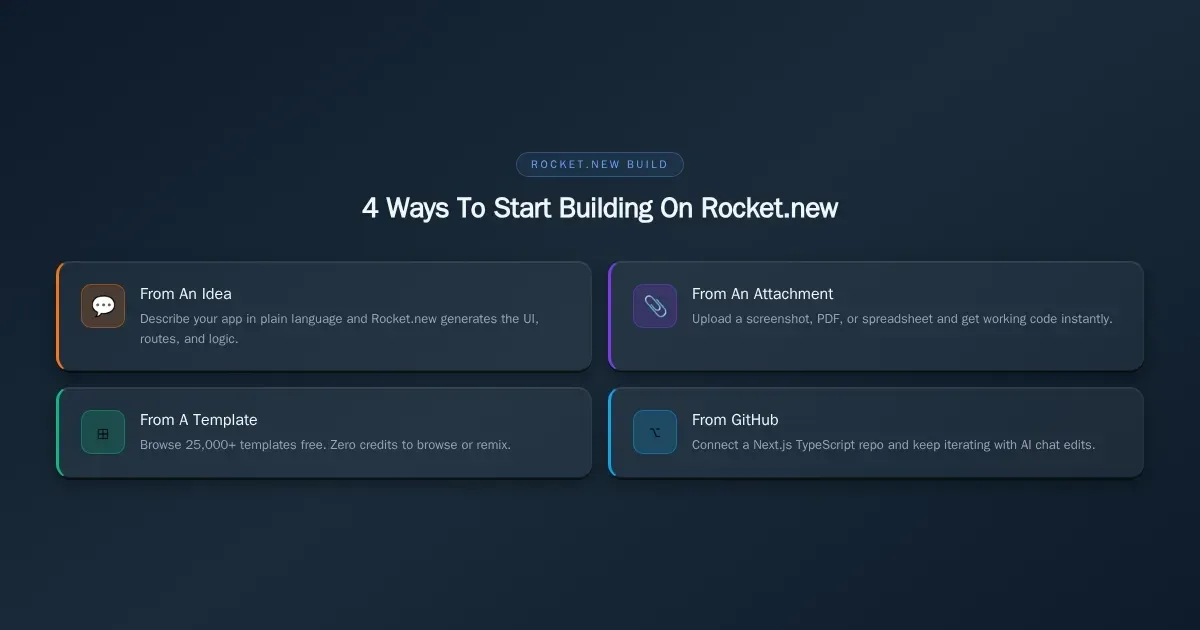
Four ways to start building on Rocket.new: from an idea, attachment, template, or GitHub repo. Each method shown with icon and description.
| Term | What It Shows | Interactivity | Typical Tool | Free Tier |
|---|---|---|---|---|
| Wireframe | Low-fidelity layout, boxes and lines, structure only | None, static image | Balsamiq, Whimsical | Yes (trial) |
| Website Mockup | High-fidelity visual design with real colors, typography, and images | None or minimal hotspot links | Figma, Sketch | Yes (limited) |
| Clickable Prototype | Interactive screens linked together, simulating real navigation | Click-through flows, transitions | Figma prototyping, Framer, UXPin | Yes (limited) |
| Mock Site | A functional website with placeholder data, running on a real URL | Full site interaction, forms and buttons work | Webflow, Wix, Rocket.new | Yes |
Wireframes are fast and cheap. They settle layout debates before anyone argues about colors.
Website mockups add the visual polish. Designers and stakeholders see the finished look, but nothing actually works yet.
A clickable prototype connects mockup screens so users can tap through a flow. It answers the question: "Does this navigation make sense?"
A mock site goes one step further. It runs as a real website with a shareable link, placeholder content, and working buttons. This is what a website prototype builder produces when it outputs code instead of a static file.
The gap matters most at the handoff. A wireframe-to-website pipeline that produces working code saves weeks compared to one that produces pictures of websites.
When Do Teams Actually Need a Website Mockup?
Website mockups are not a luxury. They are a budget defense.
-
Client pitches: Agencies present mockups to win accounts. The closer the mockup looks to a finished site, the faster the client says yes.
-
Investor demos: Founders need something clickable for a pitch deck. A live preview converts better than a slide with screenshots.
-
Usability testing: Product teams test navigation flows before committing to a full build. Catching a broken layout at the mockup stage costs a fraction of fixing it post-launch and reduces later development changes.
-
Stakeholder sign-off: Internal reviews for marketing pages, ecommerce storefronts, and sales pages all need visual approval before a developer writes code.
-
Validating an idea before engineering time: A small business or solopreneur can test whether a concept has legs before committing money to a full project.
-
Placeholder-data demo sites for QA or developer testing: Engineering teams spin up mock sites with sample data to test integrations, API connections, and responsive behavior across desktops and tablets.
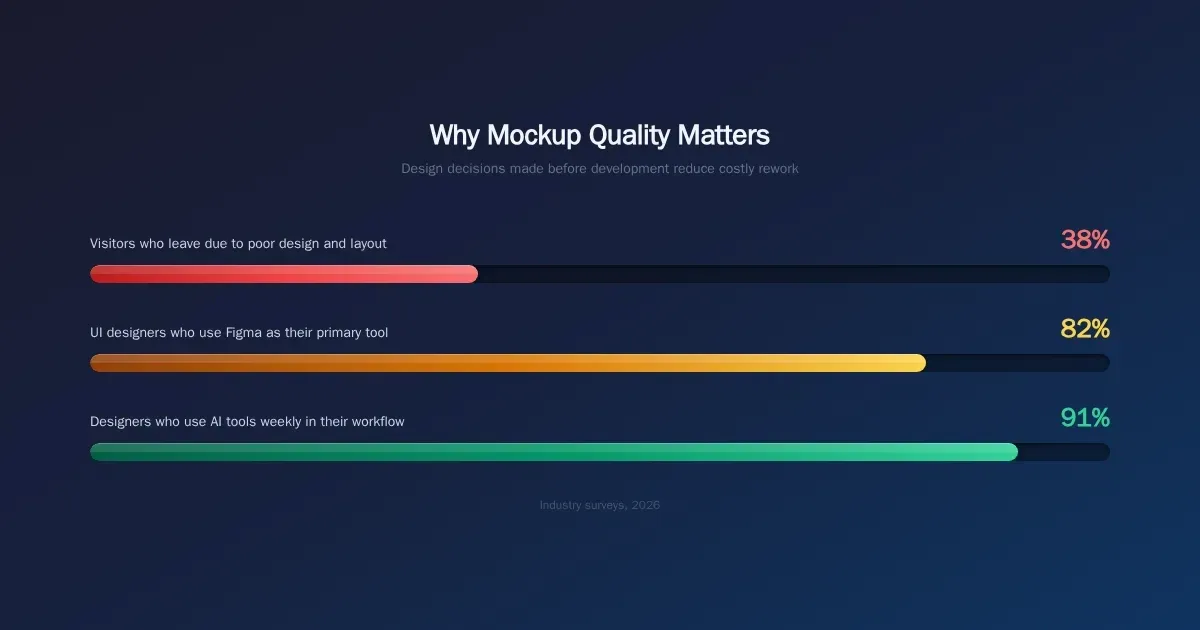
Bar chart showing three 2026 design stats: 38% visitors leave due to poor design, 82% use Figma, 91% of designers use AI weekly.
Every one of these use cases shares a common pattern. Someone creates a design, gets feedback, then faces a choice: throw the design away and rebuild, or find a tool that lets the design keep going. Selecting the right format matters in the overall website creation process because the tool category you pick determines which path you take.
Which Tool Fits Which Job? A Decision Guide
Not every website builder or design platform targets the same part of the workflow. Here is a breakdown of four categories, with an honest guide to when each one fits.
Design-First Platforms: Figma, Sketch, and Alternatives
Figma dominates this space. Sketch holds a loyal Mac-only following. Adobe XD was discontinued in 2023, pushing many of its users toward Penpot (open-source, free to self-host) and Framer (design-to-live-site workflow).
These platforms create beautiful, high-fidelity website mockups. But the output is a design file, not a website. You need a developer or a separate tool to turn the mockup into code.
Note on Figma-to-code tools: Rocket.new discontinued its Figma-to-code feature on September 29, 2026. If you used that workflow, export screenshots or frames from Figma and upload them as attachments instead.
Wireframing Tools for Rough Concepts
Balsamiq, Whimsical, and Uizard live here. Balsamiq's deliberately sketchy style keeps teams focused on structure instead of pixel arguments. Whimsical adds flowcharts and mind maps for planning user journeys. Uizard offers AI-generated mockups from text prompts or hand-drawn sketches.
These work well for early-stage conversations. They break down when you need a working preview or any real interactivity. If you want a deeper comparison, the best wireframing tools guide covers pricing and trade-offs for all ten major options.
No-Code Site Builders for Functional Previews
Webflow, Framer, and Wix let you build visually and publish a real website. Webflow exports clean HTML/CSS. Framer publishes directly with hosting and a CMS. Wix makes it easy for small businesses to launch a new website quickly with drag-and-drop editing, and Wix offers premium plans starting at $13/month.
Weebly is another option for bloggers, with plans starting at $6/month, and its ecommerce tools are efficient for small shops that want to sell. GoDaddy is another functional preview option, with premium plans costing over $6/month for more features.
These platforms produce functional sites, not just pictures. The tradeoff is that they are designed for marketing pages and brochure-style websites, not full applications with databases, authentication, or payment logic. For a direct comparison, see Rocket.new vs Webflow and Rocket.new vs Wix.
AI App Builders That Ship the Mockup
This is the newest category, and it changes the calculus completely. According to a 2026 design tools survey, 91% of designers now use AI weekly in their workflows, up from 54% a year prior. AI website builder platforms generate a working application from a description, a screenshot, or a template, and the output includes real code, not just a visual template.
That shift reflects how fast the market is expanding, and the underlying technology now makes it easier to choose the right website builder for what you actually need.
Rocket.new sits in this category. The key difference from other platforms: what starts as a mockup can become the production app without rebuilding from scratch.
-
Need pixel-perfect design collaboration with your team? Pick Figma.
-
Need rough wireframes for early alignment? Pick Balsamiq or Whimsical.
-
Need a polished marketing page shipped fast? Pick Webflow or Framer.
-
Need a working app that starts as a mockup and grows into production? Pick Rocket.new.
-
Need to import an existing codebase and keep iterating? Rocket.new also supports GitHub import.
When Rocket.new is not the right choice:
-
If your workflow centers on pixel-level design handoff with a large design team, Figma remains the industry standard.
-
If you only need a static wireframe for an early stakeholder conversation, Balsamiq or Whimsical are faster and cheaper.
-
If you need a pure brand wireframing tool with no code output, Rocket.new is more than you need.
| Tool | Fidelity | Interactivity | Code Export | Best For | Free Tier |
|---|---|---|---|---|---|
| Figma | High | Clickable prototype | Via plugins | Design teams, dev handoff | Yes (limited) |
| Balsamiq | Low (sketch-style) | Basic hotspot links | None | Early-stage idea validation | Trial only |
| Whimsical | Low to Medium | Flowchart links | None | Wireframing user flows and site maps | Yes |
| Uizard | Medium | Clickable screens | React/CSS snippets | Non-designers generating quick AI mockups | Yes |
| Webflow | High | Full site interaction | Clean HTML/CSS | Marketing teams building polished pages | Yes (limited) |
| Framer | High | Full site plus animations | React-based | Designers publishing sites without developers | Yes (limited) |
| Wix | Medium to High | Full site interaction | Limited | Small businesses launching quickly; commonly used to launch a new website quickly, with premium plans starting at $13/month | Yes |
| Rocket.new | Production-grade | Full app functionality | Next.js / Flutter | Teams wanting the mockup to become the product | Yes, 20 credits |
Weebly is a more efficient option for simple blogs or small stores, with plans starting at $6/month for bloggers.
Users who want to sell through a lightweight builder also compare GoDaddy, whose premium plan costs over $6/month for additional features.
You can browse free templates on Rocket.new's template library to see what the output looks like before committing.
What Should You Prioritize When Picking a Mockup Tool?
Six factors matter most. AI website builders are a fast-moving market, so choosing well depends more on workflow than hype. Weigh these factors based on your team size, your timeline, and whether the mockup is a throwaway or the start of the real build.
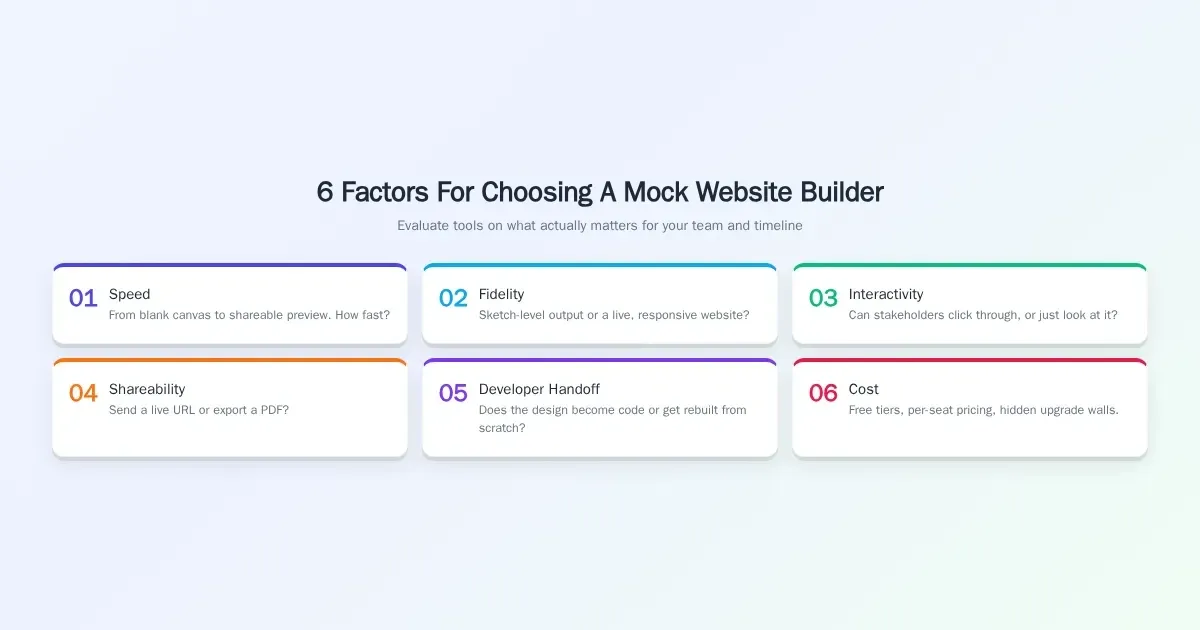
Six numbered cards showing mock website builder evaluation criteria: Speed, Fidelity, Interactivity, Shareability, Developer Handoff, and Cost.
-
Speed: How fast can you go from a blank canvas to something shareable? Wireframing tools win here for rough concepts. AI builders win for working previews.
-
Fidelity: Does the output look like a sketch or a finished product? A high-fidelity website mockup tool like Figma produces gorgeous static files. Rocket.new produces a live, responsive website.
-
Interactivity: Can stakeholders actually click through the design? Static mockups require a separate prototyping step. A clickable prototype built on a no-code or AI platform, where the underlying technology automates more of the build process from prompt to code, lets users test real flows.
-
Shareability: Can you send a link, or do you need to export a PDF? Sharing a live preview URL is faster than scheduling a screen-share walkthrough.
-
Developer handoff: Does the design translate to code, or does a developer need to rebuild from scratch? Atlassian's product management research defines an MVP as "the most basic version of a product that includes only the core features necessary to satisfy early adopters." If your website mockup tool produces an MVP directly, the handoff problem disappears.
-
Cost: Free plans, per-seat pricing, and hidden upgrade walls all matter. Prototyping software ranges from free (Penpot, Figma free tier) to $99/month and beyond for research platforms like Maze.
An essential question across all six is whether the tool helps you optimize what you build for search engines before handoff.
*"Wireframes are a great way of showing layout, but they don't describe interaction well, and they are especially poor at documenting the layout of digital products that have a lot of dynamic content." — *Page Laubheimer, NN/g
That tension between showing a layout and testing real interaction is the single biggest reason website mockup tools keep splitting into new categories. The best tool in 2026 is not necessarily the one with the most features. It is the one where the mockup and the product are the same thing.
Pricing, Free Plan, and Credits: What Does It Actually Cost?
Here is what each major tool costs at entry level, based on published pricing as of October 2026, and these are the essential factors to compare if you're choosing a builder for a small-business site rather than a design-only mockup:
| Tool | Free Plan | Paid Entry |
|---|---|---|
| Figma | Yes, unlimited drafts | $16/editor/mo (Professional) |
| Balsamiq | 14-day trial | $16/editor/mo (annual) |
| Whimsical | Yes, 3 team boards | $10/editor/mo (Pro, annual) |
| Webflow | Yes, limited | $14/mo (Basic) |
| Framer | Yes, limited | $5/mo (Mini) |
| Wix | Yes, Wix branding | $17/mo (Light) |
| Rocket.new | 20 credits, one-time, no card | Pro: $25/mo (100 credits); Rocket: $50/mo (250 credits); Booster: $250/mo (1,500 credits) |
If your team is comparing mockup tools with full site platforms, the best course is to weigh not just price but editing flexibility, publishing needs, and whether a platform like WordPress better fits long-term content management.
Rocket.new's credit system covers Build, Solve research, and Intelligence monitoring from a single balance. The Free plan's 20 credits have no time limit and require no credit card. Annual billing saves 20% across all paid plans. See the Rocket.new pricing page for current plan details.
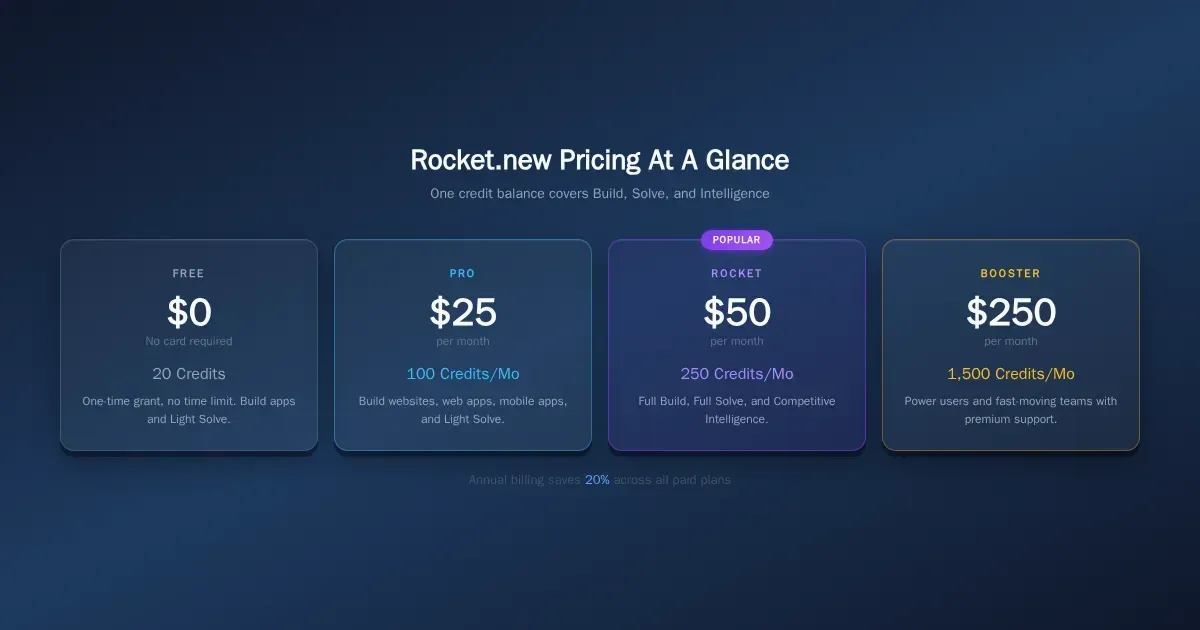
Rocket.new pricing tiers: Free 20 credits, Pro $25/mo 100 credits, Rocket $50/mo 250 credits, Booster $250/mo 1,500 credits. Annual saves 20%.
When comparing tools, teams usually look at six essentials:
-
Layout clarity: Can you communicate hierarchy quickly without over-designing?
-
Reusable components: Does the tool make it easy to build repeatable UI patterns?
-
Collaboration: Can stakeholders comment, review, and approve without friction?
-
Interactivity: Can you test user flows, and should teams optimize not just click paths but also responsiveness and usability before handoff?
-
Shareability: Is it easy to send a live preview or embed work for review?
-
Cost: Does the entry plan fit the team's workflow and scale as projects grow?
Built-in SEO options also matter because they help structure content for search engines.
For responsive review, a live preview is useful, and the Web Content Accessibility Guidelines are a practical benchmark for checking whether that responsiveness stays accessible.
How Rocket.new Turns a Mockup Into a Launchable Product
Most website builders treat the mockup and the final product as two separate steps. Rocket.new treats them as one continuous process. Here is how that works in practice.
Four ways to start a build (as of October 2026, per Rocket.new Build docs):
-
From an idea: Describe what you want in plain language. Rocket.new generates the application, complete with design, navigation, and logic.
-
From an attachment: Upload a screenshot, PDF, spreadsheet, CSV, image, or document (.doc, .docx, .ppt, .pptx, .html, .xls). Rocket.new reads the content and recreates it as working code. This is the recommended path if you previously exported designs from Figma.
-
From a template: Browse 25,000+ templates across every category. Browsing and remixing templates costs zero credits. You only spend credits when you start customizing through chat.
-
From GitHub: Connect an existing Next.js TypeScript repository and keep iterating with AI. Chat edits sync back to your codebase.
SITE123's standard package costs $10.8/month and includes 10GB storage.
Of course, some readers will also compare these prices with WordPress-based setups when deciding on total cost.
Redesign an existing URL (8 commands):
Paste any live website URL and choose one of eight redesign commands. This is only available when starting a new Build task from the homepage, not inside an existing project.
-
Visual refresh: Reimagine Website Design, Full Website Makeover, Mobile-First Redesign
-
Insight-driven: Redesign from Heatmap, Fix Conversion Issues, Fix Visual Hierarchy
-
Brand and consistency: Generate Brand-Matched Page, Redesign Like Competitor
Refine without restarting:
-
Preview the result live and switch between responsive views for desktop, tablet, and mobile.
-
Tweak text, spacing, and images through an intuitive Visual edit workflow (click any element directly) or chat (natural language instructions like "make the CTA button larger").
-
Adjust individual elements as needed, then view and edit the generated source code (Next.js for web, Flutter for mobile).
Share and collaborate:
-
Share a staging URL so clients and stakeholders can interact with the live preview from any device. Note: unpublishing a live site requires a paid plan.
-
Generate a remix link so anyone can clone and customize the full project.
-
Toggle task visibility between public and private to control who can access each build and improve project organization.
Measure what matters:
Every deployed Rocket.new project includes a built-in analytics dashboard with no setup required. It tracks Visits, Unique Visitors, Pageviews, Visit Duration, and Bounce Rate, with breakdowns by Source, Page, Device, Country, and UTM Campaign. A separate Performance tab scores your site against Core Web Vitals. For conversion tracking, connect Google Analytics 4 or Mixpanel via the connectors panel.
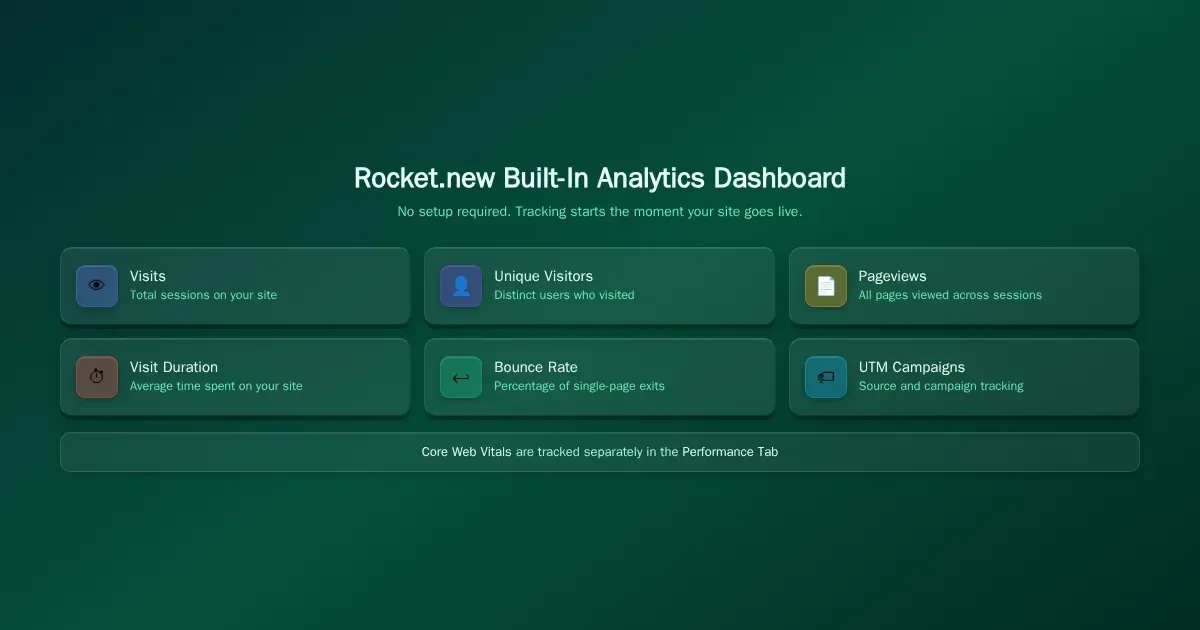
Rocket.new built-in analytics dashboard showing six metrics: Visits, Unique Visitors, Pageviews, Visit Duration, Bounce Rate, UTM Campaigns.
Keep going after approval:
When the mockup gets the green light, you do not start over. You keep building in the same project. Connect a database (Supabase, Airtable, Strapi, Directus, and 26+ connectors total) and third-party services. Add payments (Stripe, Razorpay). Launch on a custom domain with automatic HTTPS.
Published apps deploy on Vercel by default; you can also connect your own Netlify account. That makes it easier to maintain the live product as requirements change. For teams building mobile apps, Rocket.new generates Flutter code for both iOS and Android and lets you build production-ready mobile apps from the same interface.
From any starting point to a deployed product, with no rebuild step
Limitations to Know Before You Start
-
Figma import is discontinued. As of September 29, 2026, you can no longer import Figma files or frames directly. Use "From an attachment" with exported screenshots instead.
-
Redesign commands are homepage-only. The eight URL redesign commands only work when starting a new Build task from the Rocket.new homepage, not inside an existing project.
-
Unpublishing requires a paid plan. You can publish a staging URL on any plan, but taking a live site offline requires Pro or above.
-
Free plan is 20 one-time credits. There is no monthly refresh on the Free plan. Once those 20 credits are used, you need to upgrade.
-
Built-in analytics does not track conversions. For funnel analysis and conversion events, connect Google Analytics 4 or Mixpanel.
A SaaS Landing Page Mockup in Under Ten Minutes
Here is a simple walkthrough to show how fast this works. Say you need a SaaS landing page for a project management tool aimed at small businesses.
-
Describe your idea: Type something like "Build a SaaS landing page for a project management app called TaskFlow. Include a hero section, features grid, pricing table, testimonial carousel, and a free trial signup form." Rocket.new generates the complete page in typically a few minutes.
-
Preview and test: The live preview appears on the right side of your screen. Click through the navigation, resize the window to check responsive views on different device sizes, and scroll through every section.
-
Refine with Visual edit: Click directly on a headline to change the text. Adjust spacing between sections. Swap placeholder images for your own brand assets. Or type in chat: "Change the primary color to dark blue and add a comparison table below the pricing section."
-
Share a staging link: Click Launch, choose Staging, and Rocket.new publishes the page to a shareable URL in seconds. Send that link to your client, your co-founder, or your team for review. No PDF exports, no screen recordings.
The entire cycle takes under ten minutes for a straightforward landing page. For mobile apps, Rocket.new generates Flutter code that runs on both iOS and Android. You can share a web preview link so testers can view the mobile app in any browser without installing anything.
If the client approves? You do not rebuild. You connect Stripe for adding payments, wire up a Supabase database for user signups, and deploy to a custom domain. The mockup just became the product. Teams building high-converting pages can also start from a ready-made landing page template to cut setup time further.
Stop Throwing Away Approved Designs
The tool you choose determines whether a mockup dies on approval day or becomes the product your users actually interact with. In 2026, the best teams are picking tools that skip the handoff entirely, because the cost of rebuilding from scratch is time, money, and design intent that never comes back.
According to a 2026 design tools report, 38% of visitors leave a website entirely due to poor design and content layout, which is why getting the visual right before launch matters so much. A mock website builder that produces working code from day one eliminates the risk of design intent getting lost in translation.
Rocket.new's built-in SEO and discoverability tools also ensure that every site it generates is optimized for search and AI citation signals from day one, so the site you build is the site that gets found.
Stop rebuilding approved designs from scratch. Rocket.new is the mock website builder where the prototype becomes the product. Start building for free on Rocket.new, 20 credits, no card required.
Table of contents
- -What is a Mock Website Builder in the Website Creation Process?
- -When Do Teams Actually Need a Website Mockup?
- -Which Tool Fits Which Job? A Decision Guide
- -Design-First Platforms: Figma, Sketch, and Alternatives
- -Wireframing Tools for Rough Concepts
- -No-Code Site Builders for Functional Previews
- -AI App Builders That Ship the Mockup
- -What Should You Prioritize When Picking a Mockup Tool?
- -Pricing, Free Plan, and Credits: What Does It Actually Cost?
- -How Rocket.new Turns a Mockup Into a Launchable Product
- -Limitations to Know Before You Start
- -A SaaS Landing Page Mockup in Under Ten Minutes
- -Stop Throwing Away Approved Designs