
AI can’t read your mind, but it can analyze user data to suggest what to build next. Modern platforms use behavioral signals, predictive modeling, and LLMs to generate ranked product ideas. The winning teams treat AI as a co-pilot, combining machine insights with human judgment for better outcomes.
Can an AI platform read your mind and start building the right app?
No. The 2026 answer is interesting. Modern AI models watch user behavior, parse tickets, and generate app-building ideas with confidence scores.
According to Gartner, 85% of AI projects fail due to poor data and weak goals. The 15% that win use AI to discover what is worth building from signals they own.
What "Knowing What to Build" Actually Means
When founders, PMs, and builders ask this, they mean product discovery. Most people use AI tools that write code from a prompt. The harder job: picking the prompt worth building.
The work is bundled into "knowing what to build":
- Spotting user problems worth solving, not just features users ask for.
- Drafting app concepts and prototypes that users can react to.
- Ranking specific features against engineering time and money.
- Validating demand before anyone starts to write code or start building the app.
- Deciding which app ideas are worth experimenting with.
- Picking the right tools for building, testing, and shipping each app idea.
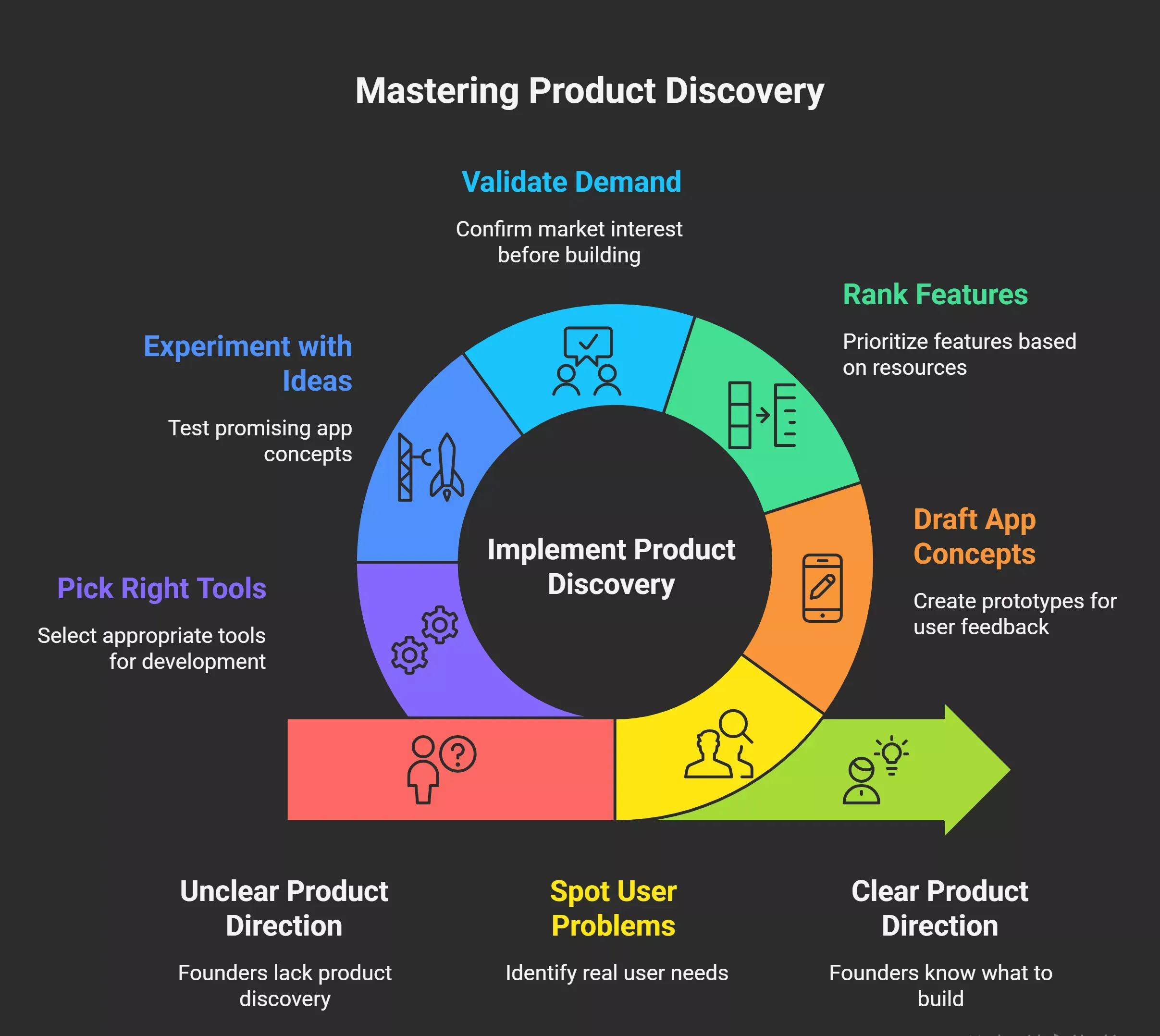
Between 2020 and 2026, this got urgent. Generative AI made building cheap. An idea becomes an app in a weekend with tools like Rocket, Lovable, or Bolt. Validation, not construction, is where teams get stuck. Jumping straight into building without discovery wastes a sprint.
Why AI Models Could Not Do This Before 2023
Older AI models needed structured inputs. You could not feed them tickets and ask, "What should we build?" Their logic was narrow, training data narrower. Older tools broke when users changed their behavior. Amazon's 2010 recommendation engine predicted clicks, not roadmaps.
Well, the shift came with LLMs. GPT-4 arrived in 2023, Claude 3 in 2024, and Gemini from Google the same year. These AI models unlocked new AI capabilities, giving teams tools older engines lacked:
- Multi-modal reading: covers text, images, screenshots, and session replays in one pass.
- Long context: means 100,000 plus tokens, so months of analytics fit in one conversation.
- Tool use: lets the AI model query databases, call APIs, and pull inputs on its own.
- Natural language reasoning: removes the need for structured queries or JavaScript glue code.
- Code generation: means the model can write code, generate test cases, and ship app prototypes.
Training programs expanded fast. A PM can take a short course on prompt design and start creating useful output in an afternoon. Google's Vertex AI offers 200-plus generative AI models and tools. AI training data is measured in trillions of tokens, with training on Google and Microsoft hyperscalers. Training costs keep dropping, so more teams fine-tune without a big training budget.
How AI App Generation Actually Works
AI app development involves using natural language to describe an app, allowing AI models to generate a complete, production-ready application in minutes, including user interface and database structure.
The process of building an app with AI typically includes crafting a detailed prompt, generating a blueprint, refining the app, and deploying it for users. This matters because it changes who can build. A founder without coding skills can describe a workflow problem on Monday and have a testable prototype by Tuesday.
One gap many teams hit is that AI app builders can generate functional apps in minutes, but many leave users unable to edit the generated code. Choosing platforms that allow for customization and refinement is essential, not optional.
A locked output is a dead end the moment your users want something slightly different. Rocket sidesteps this by keeping the full codebase editable and version-controlled from the first prompt.
Modern AI app builders can generate complete applications from simple prompts, including user interfaces, database structures, and functional workflows, significantly speeding up the development process without sacrificing the ability to iterate.
How an AI Development Platform Infers What to Build
Technical phrase: data-driven product inference. An AI development platform uses behavior and business context to propose specific features. When the model watches users, it spots what they want next, for example, a one-click reorder.
The Inputs an AI Model Watches
Modern inference pulls from several streams. Clear data structure matters because messy inputs break the logic. AI models use Natural Language Processing to turn conversations, docs, and tickets into structured signals the model can rank. Predictive user modeling forecasts what users need.
Predictive user modeling involves analyzing historical data, behavioral patterns, and real-time context to forecast user needs before they are explicitly expressed. AI platforms process vast amounts of data to identify patterns that human analysts might miss, and AI systems refine their predictive models over time based on new data, so the signal gets sharper every sprint.
| Input Source | What the AI Model Learns | Example Insight |
|---|---|---|
| Feature usage logs | Which features do users touch or skip | Only 15% of users open the export weekly |
| Funnel analytics | Drop-off points and friction | 35% abandon at the payment step |
| NPS and survey text | Sentiment and recurring themes | "Wish I could schedule reports" in 23% of replies |
| Support tickets | Pain points and confusion | 500 tickets about role permissions last quarter |
| CRM notes | Deal blockers and feature asks | Enterprise buyers keep asking about SSO |
The Inference Pipeline
Here is how the process runs in most 2026 setups.
- Ingestion: the model connects to the warehouse, ticketing tool, and CRM.
- Pattern detection: clusters, correlations, anomalies surface.
- Solution mapping: patterns map to known UX moves and feature templates.
- Ranked output: the model returns ranked app feature ideas with confidence scores.
LLMs use self-attention to generate coherent app ideas. The feedback loop compounds the process. Each shipped feature teaches the model which signals mattered. AI refines models over time, letting teams test more ideas with less effort. For example, a team might test three onboarding variants in a week, or generate twenty landing-page ideas and ship the winner.
How AI Predicts What Users Need Next
Anticipatory Design and Predictive UX
Predictive User Experience (UX) applies machine learning to anticipate actions, before users take them. Predictive user modeling involves analyzing historical data, behavioral patterns, and real-time context to forecast user needs before they are explicitly expressed.
Anticipatory Design aims to reduce cognitive load by having the AI offer the right solution at the right time, surfacing the right amount of friction at the right moment without hiding critical prompts.
Behavioral Categorization
AI examines past interactions and categorizes users based on similar behaviors for predictions, which means the platform does not treat every user the same. It builds a model of who each user is based on what they have done.
Latent Space Exploration
This is where Latent Space Exploration becomes relevant. It involves mapping existing concepts to discover novel combinations through mathematical techniques, letting the model surface feature ideas that no single user ever explicitly requested but that emerge from the shape of collective behavior. That is how a one-click reorder idea surfaces from cart rebuild logs, or how a scheduled Slack report idea comes from Friday CSV export patterns. The model is not guessing. It is finding structure in data that is already there.
Autonomous Agents and Continuous Learning
Autonomous agents within AI platforms operate in a continuous cycle of perceiving, reasoning, acting, and learning. Predictive Maintenance is one example of this in practice: monitoring sensors to predict failures and automatically generate maintenance requests, closing the loop without human intervention. The same principle applies inside a product platform.
The agent watches, forms a hypothesis, proposes an action, ships it, and updates its model based on what happened. AI platforms often include features for model training, tuning, and deployment, enabling data scientists to streamline their workflows and improve collaboration across teams.
Concrete Examples From Real Teams
A few examples that show the AI works on sample data most teams already have.
- E-commerce app: the AI model found 40% of users rebuilt similar carts monthly. It proposed a one-click reorder feature with 85% confidence and 25% faster checkout.
- B2B dashboard app: 35% of active users exported CSVs every Friday. The model recommended a scheduled Slack report, projecting 20% adoption.
- Mobile app onboarding: logs showed 28% drop-off at phone verification. The AI suggested one-tap Google and Apple sign-in, citing 18-32% lift.
- Internal tools: tickets clustered around role permissions. The AI proposed a self-serve admin panel, projecting 45% ticket reduction.
None of these app ideas were invented from nothing. They connect observed pain to known building patterns. The AI does not create solutions that did not exist before; it matches your situation to fixes that worked elsewhere.
Where AI Still Needs a Human in the Loop
Even with strong inputs, AI models stay anchored to past patterns. They do not understand human behavior or emotion. They pattern-match. That matters more than AI advocates admit.
Specific Limits Worth Tracking
- Historical bias: AI cannot predict a 2027 regulation or policy shift. IBM suggests 15% of predictions are invalidated by external shocks.
- Indirect emotion reading: AI infers sentiment from text. Sarcasm and unstated frustration slip through.
- Correlation vs causation: AI spots patterns but does not always know why. Pricing issues can look like onboarding issues.
- Weak grasp of new features: models trained on historical examples struggle to predict demand for genuinely novel new features.
- Blindness to offline context: AI cannot hear what happens in a user's life outside the screen. A lot of stuff shows up only in conversation.
- Limited causal explainability: the model describes patterns in user data but struggles to explain the root cause without human help.
A Cautionary Example From Late 2025
A B2B software company saw a ticket surge. Their AI clustered tickets and recommended more onboarding. Logic looked sound on paper.
A PM called customers and uncovered a billing bug. A single line backend fix cut ticket volume 45% in a week. The AI was not wrong about the pattern happening. It was wrong about the cause. Talking to users beats reading tickets.
From "Tell Me What to Build" to Co-Pilot Partner
So, the real 2024 to 2026 shift is not an autonomous roadmap bot. It is AI inside the tools teams use, watching signals and proposing app ideas. One thing: teams getting better results treat AI like a junior colleague, not an oracle.
Concrete co-pilot behaviors inside your existing tools include:
- Weekly product digests: AI flags underperforming flows with three test ideas
- Ticket clustering: 500 tickets become five opportunity areas, each scored by revenue impact
- Roadmap simulations: AI scores new features for effort, churn risk, and adoption before planning
- Watch mode on competitors: AI tracks pricing, launches, and hiring signals
Inside Linear or Jira, a PM sees a panel: "30% of power users export every Friday, add Slack reports, two engineering weeks, 25% adoption." The person accepts, edits, or rejects. The model learns. PMs who iterate based on these suggestions report a 15 to 20% quarterly lift in accuracy. A compounding loop, not a one-shot oracle.
What People Are Saying
Teresa Torres, who has trained 17,000+ PMs, gave the cleanest framing of the human side on the Product Growth Podcast in August 2025:
"Great ideas die because of one wrong assumption." - Aakash Gupta, Teresa Torres Masterclass on AI Discovery, Medium, August 2025
Her point lands hard. AI can generate a hundred app ideas in an hour. Humans decide which assumptions are riskiest and test them cheaply. Idea generation is solved. Validation is not. People wonder if AI can take assumption testing off their plate. Not yet. A product trio still needs human focus on hard questions.
Technical Ingredients for an AI That Pre-Decides Builds
For founders and engineering leads, checking stack readiness. The right building blocks save trial and error.
Data Infrastructure
The foundation is clean behavior signals and the right tools connected.
- What to check before building: event tracking across the app, clean since 2020.
- A warehouse like Snowflake or BigQuery where analytics, CRM, and support sit together.
- Consistent schemas with 99% plus uptime.
- No broken silos between product, sales, and support.
- A clear data structure the AI model can query without breaking.
Model Layer and Custom Models
Access to current AI models is table stakes:
- Foundation models like Claude Opus 4.7, Gemini 3, or GPT-4.x via API
- Retrieval augmented generation so the model can query context without retraining
- Custom models where general models fail on domain tasks
- Fine-tuning pipelines for custom models trained on tickets, code, and docs
- Evaluation sets so the model stays sharp after each training round
RAG plus custom models boost output relevance 40% over generic prompts. You do not need deep coding skills. JavaScript and Python engineers plug most of this in a week or two. The wider the code base, the more the model benefits from a clear structure. Clean structure saves tokens during training.
Agentic Orchestration
Modern AI works when it acts, not answers:
- Tool use for querying Amplitude, Zendesk, Salesforce
- Long-horizon planning to break complex requests into steps
- A clear system prompt defining scope, permissions, and output format
- Autonomous agents with vector memory, so the AI can save progress across sessions
Tools like Claude Code show agentic behavior in practice. The AI queries, plans, and proposes actions without constant prompting. Multi-Agent Systems extend this, where agents collaborate on complex tasks.
Code Generation and App Scaffolding
Once the platform picks an app idea worth building, the next step is generating code. AI tools like Rocket generate full app scaffolds from a single prompt: user interfaces, database structure, and workflows. Flutter and React Native for mobile app code, Next.js and Svelte for web.
Google's Dart and Flutter MCP server pushes context into the model, so the generated code is not generic. Test scaffolds are generated alongside the app code so teams can test behavior day one. Deployment linked to Netlify, Vercel, or Google Cloud Run for one-click ship.
Evaluation and Security
Once the platform picks an app idea worth building, the next step is generating code. AI tools like Rocket generate full app scaffolds from a single prompt: user interfaces, database structure, workflows.
- Flutter and React Native for mobile app code, Next.js and Svelte for web
- Google's Dart and Flutter MCP server pushes context into the model, so the generated code is not generic
- Test scaffolds are generated alongside the app code so teams can test behavior day one
- Deployment linked to Netlify, Vercel, or Google Cloud Run for one-click shipping
A Practical Workflow for 2026 Product Teams
Here is a concrete five-step loop teams run now. It works for founders without coding skills and for ten-person squads, free to try with any AI tool.
- Step 1, Connect and generate: plug analytics, CRM, and tickets into your AI platform. Ask for a "problems and patterns" report.
- Step 2, Map to solutions: ask the model to generate ten candidate app-building ideas, each with confidence and impact scores.
- Step 3, Human scoring: rate each idea on impact, confidence, and effort. Ask the AI to re-rank and cut to five. Plan the sprint.
- Step 4, Spec drafting: have the model draft user stories and acceptance criteria. Saves hours, catches gaps.
- Step 5, Post-release: after shipping, ask AI to compare predictions with outcomes. Link lessons back to step one.
A B2B SaaS team running this every two weeks reported 22% faster discovery and 16% better feature hit rate by mid-2026. They gave their PM sharper tools for simple tasks and better focus for hard ones. For small teams, this cuts discovery costs 50 to 70%, and the money saved goes back into building features. That is what is happening inside the 15% of teams that win with AI.
A Quick Building Checklist
Before building, walk through this plan, free to run:
- Does the app idea solve a real user's problem, not a surfaced metric?
- Are there examples of this pattern working elsewhere, or a new concept?
- Do you have the right tools, clean code, and clear data structure to ship?
- Can one person prototype this week so the team can test and break it fast?
- Will the shipped feature save users time, money, or effort that you can measure?
That checklist catches most stuff between idea and ship, and gives the model context to generate better suggestions.
How Rocket.new Handles "What to Build Before You Tell It"
Rocket.new is the first AI development platform built around this exact question. Most AI tools help you build faster. None tell you what to build. That is the gap this article describes, and Rocket is the platform closing it. 1.5 million people across 180 countries use Rocket, and it learns from every app people create on it.
What Rocket Does That Other Building Tools Do Not
Rocket's core features, for more details, refer Rocket docs.
- Vibe Solutioning platform: the world's first system that researches, decides, and builds in one shared context
- 25,000+ free templates: so you never start building an app from a blank canvas
- Flutter for mobile app building and Next.js for web app building: both production-grade from the first prompt
- Collaboration built in: with staging, production, version history, and one-click rollback
- Three products, one platform: Solve (research and recommendation), Build (app generation), Intelligence (competitor watch)
- Figma to code: import a Figma design and Rocket turns it into working app code
Use Cases
Rocket is how you use AI to move from an app idea to a shipped product without losing context between steps. A few examples from users building on Rocket right now:
- Founders wondering what app to ship first: describe a market problem in Solve, get a PRD, hand to Build, generate a Next.js landing page, and a Flutter mobile app the same week.
- PMs at growth-stage companies: use Intelligence to watch competitor pricing and launches, route signals into Solve, then into Build for the app prototype.
- Non-technical operators: no coding skills, no JavaScript debugging. Rocket's Figma import turns a design into working app code. Pick up any existing Next.js codebase.
- Enterprise teams: SOC 2 Type II, ISO 27001, GDPR, CCPA, SSO, audit logs on by default, which matters when security and procurement weigh in.
- Growth and marketing teams: build landing pages, dashboards, and campaign tools with the same AI platform.
Rocket adapts to your writing style, brand, and stack. The output does not announce the tool that made it. That is the difference between a generative AI demo and an app you can ship. Rocket helps teams build products reaching real business outcomes. The whole loop lives in one place: the context you create during research carries into building, then into competitor tracking, without re-explaining.
Wrapping Up the Real Answer on This AI Platform Question
Can an AI platform pre-decide the right app from nothing? No. Connected to your users, can it generate good ideas for what to build next?
Yes, and the gap closes every quarter. AI becomes a junior partner, bringing your app ideas to life. It saves weeks of effort per cycle. Rocket is how teams run that loop today.
Table of contents
- -What "Knowing What to Build" Actually Means
- -Why AI Models Could Not Do This Before 2023
- -How AI App Generation Actually Works
- -How an AI Development Platform Infers What to Build
- -The Inputs an AI Model Watches
- -The Inference Pipeline
- -How AI Predicts What Users Need Next
- -Anticipatory Design and Predictive UX
- -Behavioral Categorization
- -Latent Space Exploration
- -Autonomous Agents and Continuous Learning
- -Concrete Examples From Real Teams
- -Where AI Still Needs a Human in the Loop
- -Specific Limits Worth Tracking
- -A Cautionary Example From Late 2025
- -From "Tell Me What to Build" to Co-Pilot Partner
- -What People Are Saying
- -Technical Ingredients for an AI That Pre-Decides Builds
- -Data Infrastructure
- -Model Layer and Custom Models
- -Agentic Orchestration
- -Code Generation and App Scaffolding
- -Evaluation and Security
- -A Practical Workflow for 2026 Product Teams
- -A Quick Building Checklist
- -How Rocket.new Handles "What to Build Before You Tell It"
- -What Rocket Does That Other Building Tools Do Not
- -Use Cases
- -Wrapping Up the Real Answer on This AI Platform Question