

What causes new client setup to feel confusing? Build a no-code client onboarding app with Rocket.new to simplify onboarding, reduce errors, improve client onboarding experience, and strengthen customer retention with structured steps.
Why does client onboarding sometimes feel messy and confusing?
Many businesses struggle with getting new clients set up efficiently. The good news: with Rocket.new, you can build a client onboarding app quickly, without coding.
A smooth onboarding process improves the client onboarding experience, reduces mistakes, and increases customer retention.
Statista research shows that slow, inefficient onboarding leads to real client loss in banking worldwide, highlighting its direct impact on client retention and churn.
This blog will guide you, step by step, in building a client onboarding app with actionable tips.
What is Client Onboarding and Why Does It Matter?
Client onboarding is the process of introducing new clients to your product or service and helping them succeed from day one.
A successful onboarding process sets expectations clearly, ensures clients complete key tasks, and lays the foundation for a strong client relationship.
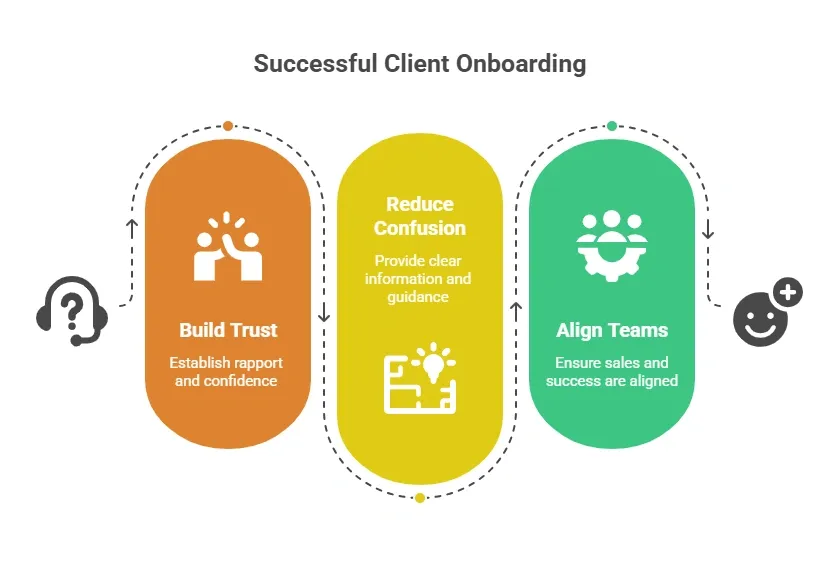
A poor onboarding experience can frustrate clients, reduce engagement, and negatively affect your future revenue.
Key Components of a Client Onboarding App
A client onboarding app organizes the journey, making tasks visible and simple. Core components include:
- Welcome Page or Email: Introduces the client and sets expectations
- Client Intake Forms: Collects client info, including client’s goals, communication preferences, and project details
- Onboarding Questionnaire: Helps understand client needs
- Checklist / Task List: Shows what clients should do next
- Training Sessions Scheduler: Allows booking live sessions or demos
- Progress Dashboard: Tracks completion of tasks and milestones
- Feedback Module: Captures client feedback to improve the onboarding journey
Adding these ensures a structured onboarding process and a great client onboarding experience.
Why a Client Onboarding App Makes a Difference
Onboarding new clients manually can get messy, slow, and inconsistent. That’s why having a dedicated client onboarding app can really change the game.
Using an app streamlines the process and ensures every client gets the same high-quality experience.
Here are the main advantages:
- Centralized Client Data: No more scattered spreadsheets; all client info is in one place
- Consistent Client Experience: Every client follows the same structured process
- Automated Emails & Notifications: Reduces repetitive tasks for your team
- Better CRM: Track tasks, feedback, and progress easily
- Higher Client Satisfaction: A smooth onboarding journey keeps clients happy and loyal
Even small teams can manage onboarding clients efficiently with a dedicated app. In short, a client onboarding app not only saves time but also improves client retention, strengthens client relationships, and makes the overall onboarding journey smoother for everyone involved.
Key Features
- Prompt to App Creation: Builds apps directly from single prompts
- Figma Import: Converts design files into live, editable layouts
- AI-Powered Backend: Automatically handles logic, data, and workflows
- Custom Domain Support: Publishes projects with a branded domain
- Code Export: Allows developers to extend or customize later
- Live Preview: Shows instant updates while editing
- Reusable Components: Speeds up building with ready-to-use elements
- Command-based actions: Use / and @ to run actions and quickly scope edits.
These features make it easy to create a structured and efficient client onboarding workflow. With rocket.new, even small teams can deliver a smooth and professional onboarding experience while saving time and reducing errors.
Build a Client Onboarding App with Rocket.new
Creating a client onboarding app might sound technical, but with Rocket.new, it’s easier than you think.
Rocket.new is a no-code app builder that turns plain-language prompts into fully functional apps. You don’t need developers or coding skills, just describe your app, watch it generate screens and backend tables, and customize it to your needs.
Let’s go step by step from planning to launch so your team can create a smooth, structured onboarding experience for new clients.
Step 1: Plan Your Onboarding Flow
Map out the onboarding journey:
- Welcome page
- Client intake forms
- Checklist and tasks
- Progress dashboard
- Feedback forms
Add key milestones, like first login, first form completion, or first training session. Planning first ensures a structured onboarding process.
Step 2: Create a New Project in Rocket.new
- Sign up for Rocket.new
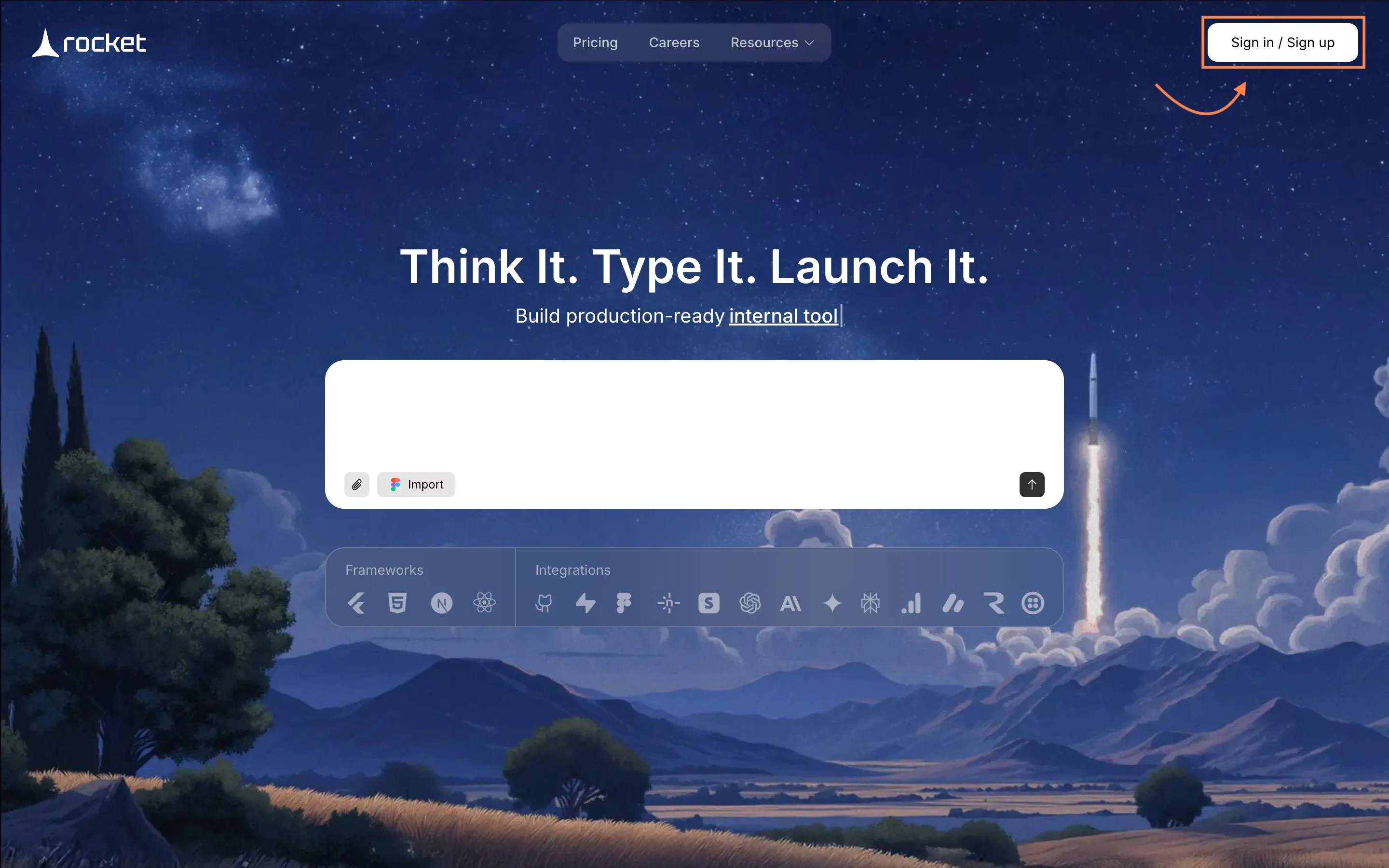
- Click New Project
- Choose a web app or internal tool template
- Name your project, e.g., Client Onboarding App
Step 3: Describe Your App
Use plain language to describe the workflow:
"Build a client onboarding portal with welcome page, intake forms (name, company, goals), checklist, dashboard, and feedback module."
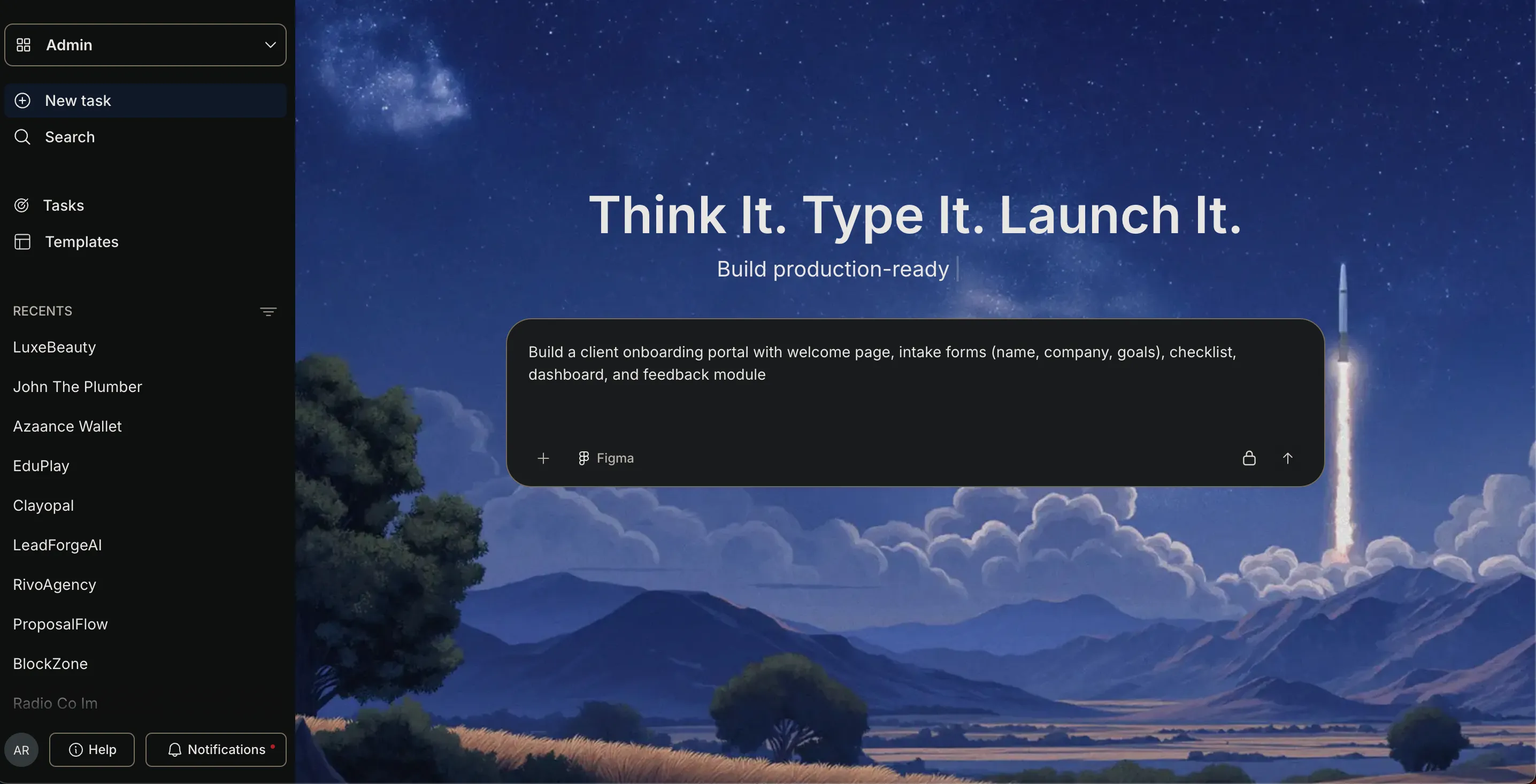
rocket.new generates screens, forms, and database tables automatically.
Or you can choose the existing templates, Rocket.new has introduced 25,000+ ready to use templatefor every niche.
Step 4: Customize Screens and Data
After the app is generated:
- Edit fields and labels
- Adjust colors, layouts, and progress bars
- Connect client feedback to dashboards
- Add task progress tracking
This ensures your client onboarding workflow is both functional and visually clear.
Step 5: Automate Emails and Notifications
Set rules for automation:
- Welcome email after sign-up
- Reminder for pending tasks
- Feedback request after completion
Automation reduces repetitive work and improves the client onboarding experience.
Step 6: Test With Real Clients
Invite colleagues or early clients to test:
- Fill out intake forms
- Complete checklist items
- Test automated emails
- Give feedback
Testing ensures a smooth onboarding journey and identifies pain points early.
Step 7: Publish and Share
Once ready:
- Publish on a custom domain or on a Netlify
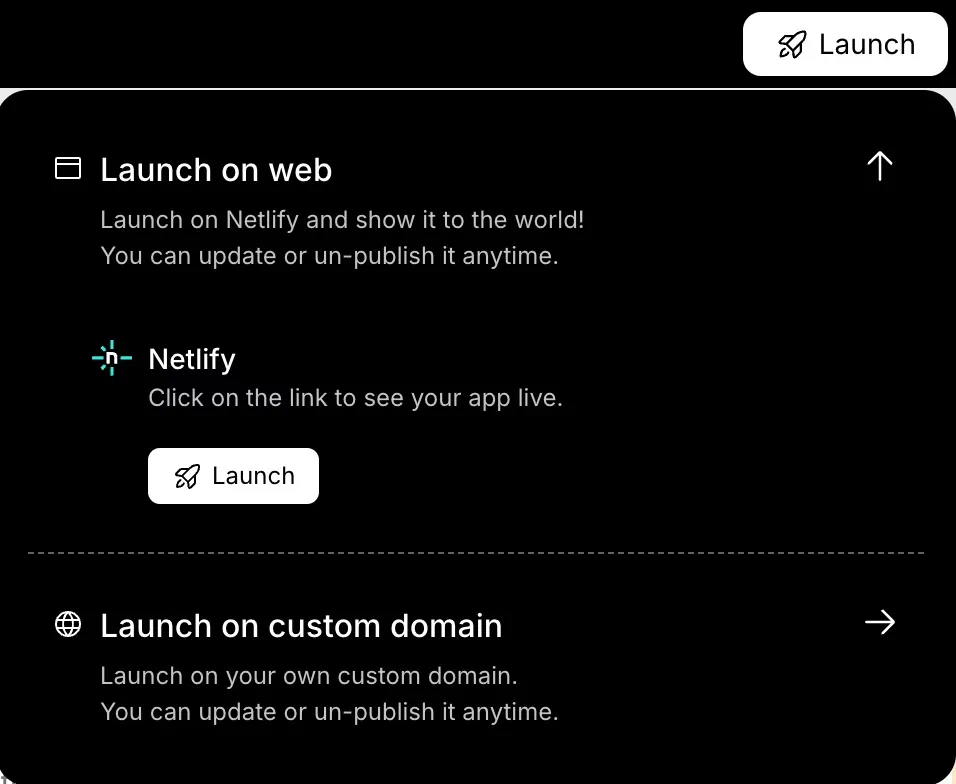
- Monitor client progress
- Iterate based on client feedback and success metrics
Clients can complete onboarding at their own pace while your customer success team tracks everything.
Use Cases
A client onboarding app isn’t just a nice-to-have it can serve multiple purposes across teams and industries. Depending on your needs, rocket.new lets you create apps that fit different use cases:
- Client Portals: Track intake forms, tasks, and milestones in one place
- Internal Tools: Help account managers manage onboarding tasks efficiently
- Dashboards: Visualize success metrics, task completion, and customer effort scores
- Member Sites: Provide structured onboarding for SaaS, agencies, or corporate clients
Even small teams can quickly implement a structured client onboarding process, keeping all clients on track while improving satisfaction and retention.
Community Insights
Real users on LinkedIn are sharing how quickly they can build onboarding apps with Rocket.new.
Here’s one example:
“I built a fully functional onboarding portal with rocket.new in minutes including user login, project tracking, file uploads, and automated emails all from a single prompt.” LinkedIn user
This insight shows how even complex client onboarding workflows can be created rapidly with rocket.new. It proves that small teams and startups can save time, reduce repetitive tasks, and deliver a smooth onboarding experience for clients.
Sample Client Onboarding Checklist
To help new clients get started smoothly, having a clear checklist is key. This table shows typical tasks, responsibilities, and statuses you might include in your onboarding app:
| Task | Responsible | Status | Notes |
|---|---|---|---|
| Send welcome email | System | Completed | Automated |
| Collect intake forms | New client | Pending | Include goals & preferences |
| Schedule training session | Account manager | Pending | Use booking system |
| Collect feedback | Client | Pending | After first week |
| Confirm completion | Customer success | Pending | Track dashboard |
Having a structured checklist ensures nothing falls through the cracks and makes the onboarding experience predictable and professional for every client.
Common Onboarding Mistakes and Fixes
Even the best onboarding processes can hit bumps. This table highlights frequent mistakes and practical solutions to keep your workflow smooth:
| Mistake | Fix |
|---|---|
| Overly long forms | Break forms into smaller sections |
| No progress tracking | Add a dashboard to visualize tasks |
| No automated reminders | Automate emails for tasks |
| Ignoring feedback | Collect and review client feedback regularly |
| Inconsistent onboarding | Use a structured checklist for all clients |
Reviewing common mistakes helps your client onboarding workflow stay efficient and ensures clients feel guided, supported, and satisfied throughout the process.
Best Practices for Smooth Onboarding
Creating a smooth onboarding experience isn’t just about filling forms, it’s about making your clients feel guided and supported from day one.
Following proven best practices helps you deliver a great client onboarding experience and keeps clients engaged throughout the journey.
- Keep forms short and clear: Long forms can overwhelm new clients; break them into smaller, manageable sections
- Communicate progress visually on dashboards: Clients love seeing milestones and task completion
- Collect client feedback early: Feedback helps your customer success team adjust the client onboarding workflow
- Align onboarding with your sales process and account manager workflow: Consistency between sales and onboarding improves client relationships
- Track success metrics like task completion and client satisfaction: Use dashboards or project management tools to monitor progress and identify areas for improvement
Following these best practices ensures that your onboarding process is effective, structured, and repeatable, making it easier to scale for multiple clients while maintaining high client satisfaction.
Mini Case Study Examples
Seeing real examples can help you understand how a successful client onboarding process works in practice. Here are two examples that show measurable results:
Marketing Agency:
- Streamlined intake forms reduced back-and-forth emails by 60%
- Automated reminders increased task completion by 40%
- Collecting client feedback after the first week improved client satisfaction and engagement
SaaS Startup:
- Used rocket.new to build a dashboard onboarding app for new clients
- Collected detailed client goals and communication preferences to personalize the experience
- Structured onboarding improved client retention, engagement, and long-term revenue
These case studies show how implementing a structured onboarding process not only improves efficiency but also strengthens client relationships, enhances the onboarding journey, and drives measurable business results.
Simplifying Client Onboarding
Many businesses struggle with unstructured onboarding, which leads to confusion, missed tasks, and lower customer retention. Without a clear process, clients can feel lost, and teams waste time managing repetitive tasks.
With rocket.new, you can create a client onboarding app that guides clients step by step, automates routine tasks, and tracks progress. A successful client onboarding process improves client satisfaction, strengthens client relationships, and keeps the journey smooth and structured from start to finish.
Table of contents
- -What is Client Onboarding and Why Does It Matter?
- -Key Components of a Client Onboarding App
- -Why a Client Onboarding App Makes a Difference
- -Key Features
- -Build a Client Onboarding App with Rocket.new
- -Step 1: Plan Your Onboarding Flow
- -Step 2: Create a New Project in Rocket.new
- -Step 3: Describe Your App
- -Step 4: Customize Screens and Data
- -Step 5: Automate Emails and Notifications
- -Step 6: Test With Real Clients
- -Step 7: Publish and Share
- -Use Cases
- -Community Insights
- -Sample Client Onboarding Checklist
- -Common Onboarding Mistakes and Fixes
- -Best Practices for Smooth Onboarding
- -Mini Case Study Examples
- -Simplifying Client Onboarding

