Legal teams waste hours chasing scattered case files across email, drives, and chat threads. A structured workspace organized by matter, stage, and responsible party solves this. Rocket.new lets you build one without enterprise software costs or a development team.
How much time does your law firm lose each week just searching for the right version of a document?
For most legal teams, the answer is uncomfortable. According to NetDocuments, legal AI adoption jumped from 37% in 2024 to 80% in 2025, driven largely by frustration with document management bottlenecks in day-to-day legal work. The coordination overhead of tracking case files across email threads, shared folders, and chat messages adds up to hours that should go toward the matter itself.
This blog walks through how to structure a case document workspace that matches the way law firms and in-house teams actually run their practice. No enterprise platform required. No months of configuration.
Why Do Scattered Documents Turn Into a Legal Liability?
Most legal teams do not start with a document problem. They start with a communication problem that turns into a document problem over months of accumulated workarounds.
-
Wrong version gets filed with the court: When draft documents live in email attachments and local folders, the risk of filing an outdated version increases with every round of edits. In litigation matters, a wrong filing deadline or incorrect contract version can change the outcome of a dispute. Court sanctions and malpractice claims follow from mistakes that are preventable with version control.
-
Confidential files reach the wrong parties: Shared folders with loose permissions mean that opposing counsel, co-counsel from another matter, or outside parties may accidentally see privileged correspondence, case notes, or settlement letters. For in-house teams managing disputes across multiple business units and countries, the exposure multiplies.
-
No one has a clear picture of what is outstanding: Without a single system tracking document status, deadlines slip. A missing agreement or unsigned contract goes unnoticed until it becomes a court issue. Research assignments, document review tasks, and client requests fall through the cracks.
-
Duplicate and conflicting records multiply: When multiple people work from separate copies, conflicting versions of contracts, letters, and briefs create confusion that costs hours to untangle. Judgment calls get made on outdated facts.
| Failure Mode | Risk | Typical Cause |
|---|---|---|
| Wrong version filed | Court sanctions, malpractice | Email-based drafting with no version lock |
| Unauthorized access | Privilege breach, client trust loss | Flat folder permissions |
| Missed deadline | Case dismissal, penalty | No centralized status tracker |
| Duplicate records | Wasted hours, conflicting facts | Copy-paste across drives and inboxes |
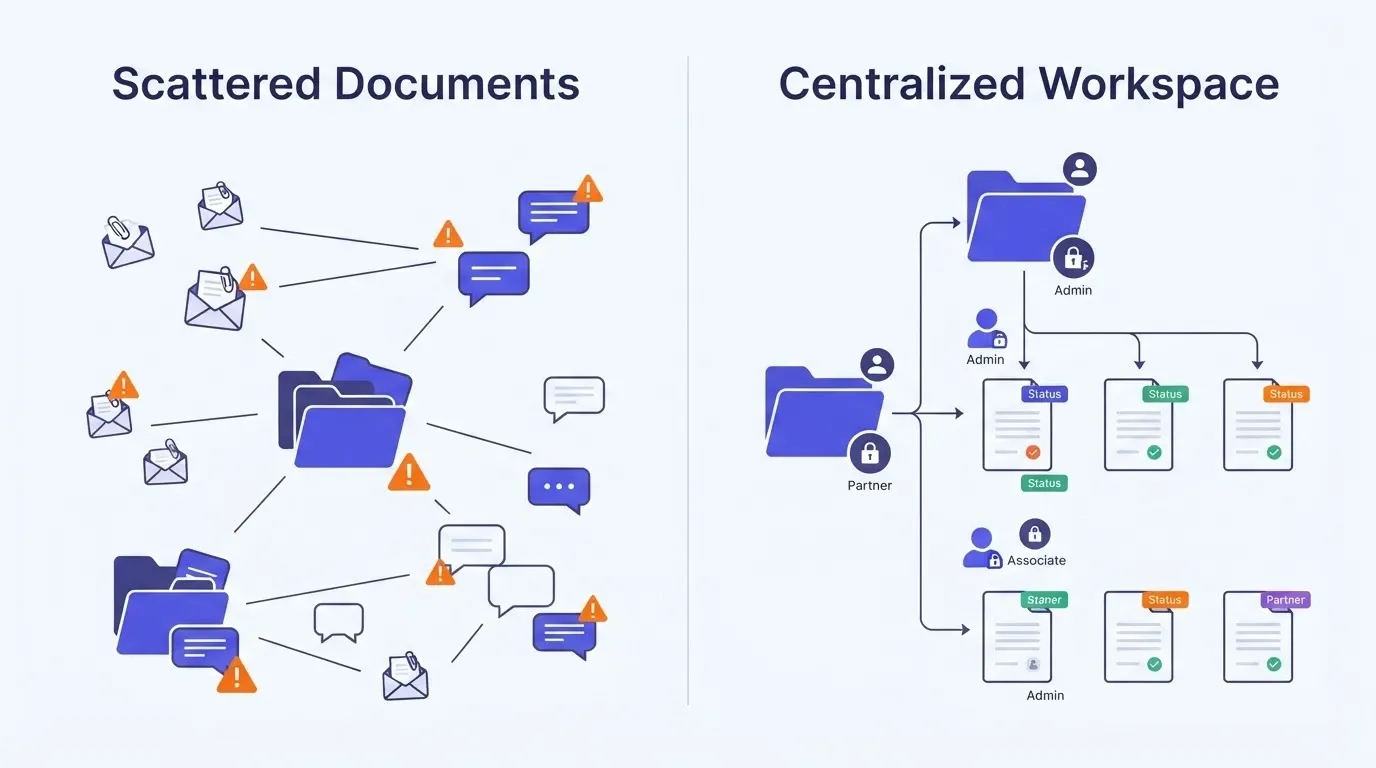
Every one of these failures traces back to the same root cause: documents scattered across too many places with no single source of truth. A branded data room for document sharing fixes the access problem, but the organizational structure matters just as much.
How to Organize Case Files by Matter Type and Stage
The structure of a case workspace should mirror the way legal work actually flows, not the way a generic file system forces you to organize things.
-
Start with matter type as the top-level category: Litigation matters, contract disputes, regulatory compliance cases, and landlord-tenant disputes each have different document requirements. A personal injury case needs medical records and correspondence with insurance companies. A commercial contract dispute needs agreement drafts, amendment histories, and communication logs. In-house teams handling matters across multiple countries and business units need clear matter-level separation.
-
Add stages as the second layer: Pre-filing research, active discovery, trial preparation, and post-judgment each have their own document sets. When documents are organized by stage, any team member can open a matter folder and immediately see where the case sits in the workflow. This structure also supports triage, so case managers can quickly decide which matters need attention.
-
Assign responsible parties at the document level: Every document should have a clear owner. Draft documents go to the drafting attorney. Client-facing letters and correspondence go to the case manager. Court filings go to the paralegal for document review before submission. Document analysis tasks get assigned with a date and a deadline.
-
Use date-based naming within each stage: Include the filing date or version date in every filename. This avoids the "final_final_v3" problem that plagues law firm document management and makes it easy to find the right version fast.
According to a LexisNexis report on small law firm technology, 82% of lawyers at small firms are using or planning to use AI, and 56% plan to spend more on technology. Structured document organization is consistently the most requested capability among firms making that investment.
A document management system without backend complexity can give smaller firms this kind of structure without months of setup.
This three-layer structure gives any team member a clear path to find what they need without asking someone else. That alone can save time across every active case in your practice.
What Access Controls Protect Client Confidentiality?
Access controls are not just an IT concern for legal teams. They are a professional obligation grounded in the rules of the profession. Client confidentiality is the foundation of the attorney-client relationship, and the wrong file reaching the wrong person can trigger ethics complaints or worse.
-
Role-based permissions by team function: Partners, associates, paralegals, and clients each need different levels of access. A lead attorney may need full edit and upload rights across all matters. A client should only see final documents shared with them, not internal drafts, case notes, or drafting memos.
-
Matter-level isolation: Each case should have its own permission boundary. In-house teams working across multiple business units cannot afford to have one department's dispute documents visible to another. This is grounded in the fact that cross-matter exposure creates both legal and governance risk.
-
External party controls: Co-counsel, expert witnesses, and opposing parties often need access to specific files during discovery. The system should allow time-limited, view-only access to specific folders without exposing the rest of the case file. Think of it as opening a door to one room, not the entire house.
-
Audit trails for every action: Every upload, download, edit, and share should be logged with a timestamp. When a legal question arises about who had access to what and when, the system should produce a clear record. This is especially grounded in court expectations for discovery disputes.
| Role | Access Level | Can Upload | Can Edit | Can Share Externally |
|---|---|---|---|---|
| Lead Attorney | Full matter access | Yes | Yes | Yes |
| Associate | Assigned stage only | Yes | Yes | No |
| Paralegal | Document review and filing | Yes | Limited | No |
| Client (Viewer) | Shared documents only | No | No | No |
| Co-Counsel | Discovery folder only | Limited | No | No |
A role-based document hub for advisory teams shows how this kind of permission structure works in practice for firms handling sensitive transactions.
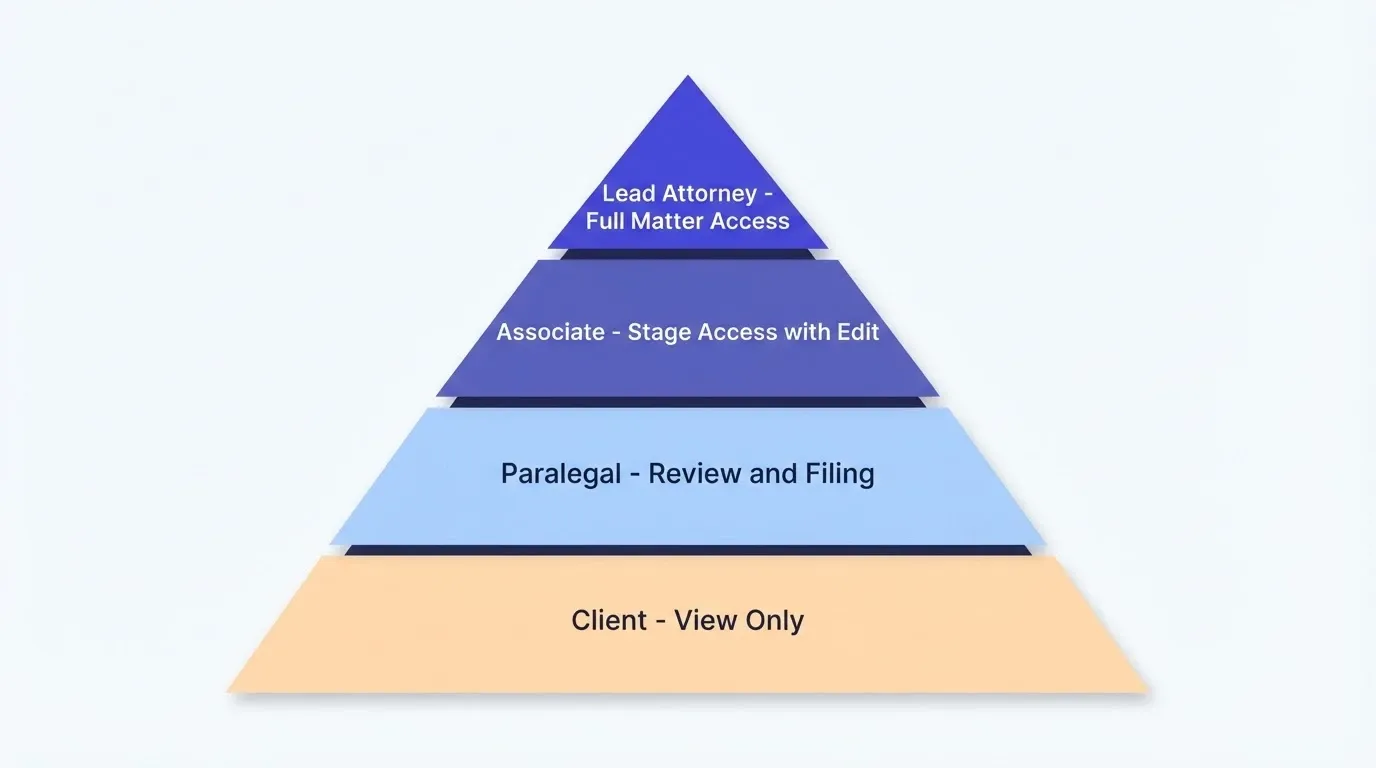
The goal is not to lock everything down. It is to place boundaries so every person sees exactly what they need and nothing more. That protects clients and reduces the security review burden on the firm.
Tracking Document Status and Outstanding Action Items
Organizing documents is only half the problem. The other half is knowing which documents are done, which are pending review, and which have been sitting in someone's inbox for two weeks.
-
Status tags at the document level: Mark each file as Draft, Under Review, Approved, Filed, or Archived. This gives the entire team a clear picture of where every document sits in the workflow without opening a single file. Lawyers and paralegals can triage their work at a glance.
-
Deadline tracking tied to case calendars: Court filing deadlines, response dates, and statute of limitations dates should be linked directly to the documents they affect. When a filing deadline approaches, the responsible party gets a notification instead of an email from someone who happened to remember. This kind of sync between deadlines and documents prevents the most common judgment-related errors.
-
Triage views for case managers: A case manager should be able to open one dashboard and see every outstanding action item across all active matters. What needs signatures? What is waiting on opposing counsel? What has been sitting in document review for too long? These questions should not require a phone call or a thread of messages to answer.
-
Update logs that capture context: When someone updates a contract or revises a brief, the change should include a note about what changed and why. This creates a conversation history around the document, which draws from the same fact base that informed the original drafting.
"I just analyzed a law firm that was losing significant hours each week to searching for documents instead of practicing law. The problem was not the people. It was the system they were forced to work inside." - Trudy Woolley, LinkedIn
A system for managing contract renewals across vendors uses the same deadline-tracking logic adapted for a legal context.
Status tracking turns a document repository into a case management tool. Instead of chasing updates through email, chat threads, and phone calls, every team member can see what is done, what is pending, and what needs their attention right now.
Building a Legal Document Hub on Rocket.new
So far, we have covered the structure, access controls, and tracking logic that make a case document workspace work. The question that follows: what platform do you actually build this on?
-
Describe your workspace in plain language and Rocket.new builds it: You do not need a development team or a six-month procurement process. Describe your matter structure, access roles, and document stages in a natural conversation. Rocket generates a working application with file upload capabilities, role-based access, and status tracking built in from the start. The ai workspace approach means you press enter on a description and get a working system back.
-
Every build starts with context, not a blank page: Add your case templates, internal SOPs, and client onboarding documents to a Rocket project. Every task that follows already knows the full context. When ai works inside the platform, the case intake form you built last week informs the document tracker you build this week. Research from earlier sessions, drafting patterns, and organizational structure carry forward automatically.
-
Shared team access with three-level governance: Legal teams get Admin, Creator, and Viewer roles at the workspace, project, and task level. Clients can be invited as Viewers to see exactly what you want them to share with them, nothing more. No per-seat pricing complexity, no consultation with IT to add a new user.
-
Launch to a live URL and run it from day one: Once your workspace is ready, launch it as a live web application your team and clients can access from any device, including phone and tablet. Built-in analytics track usage patterns. Version history means you can roll back any change. The technology handles the infrastructure so you can focus on the legal work.
-
Where enterprise platforms fall short: Traditional case management platforms like Clio and NetDocuments charge per-seat fees and require months of configuration. Many firms in countries across the globe expect the same functionality at a fraction of the cost. For a practice that needs document control without a six-figure annual contract, building a custom solution on Rocket.new saves time, revenue, and flexibility.
The legal practice management software market was valued at $4.8 billion in 2025 and is projected to reach $10.9 billion by 2034, growing at a CAGR of 9.5%. That growth is driven by firms looking for alternatives to bloated enterprise systems that create more pressure and overhead than they relieve.
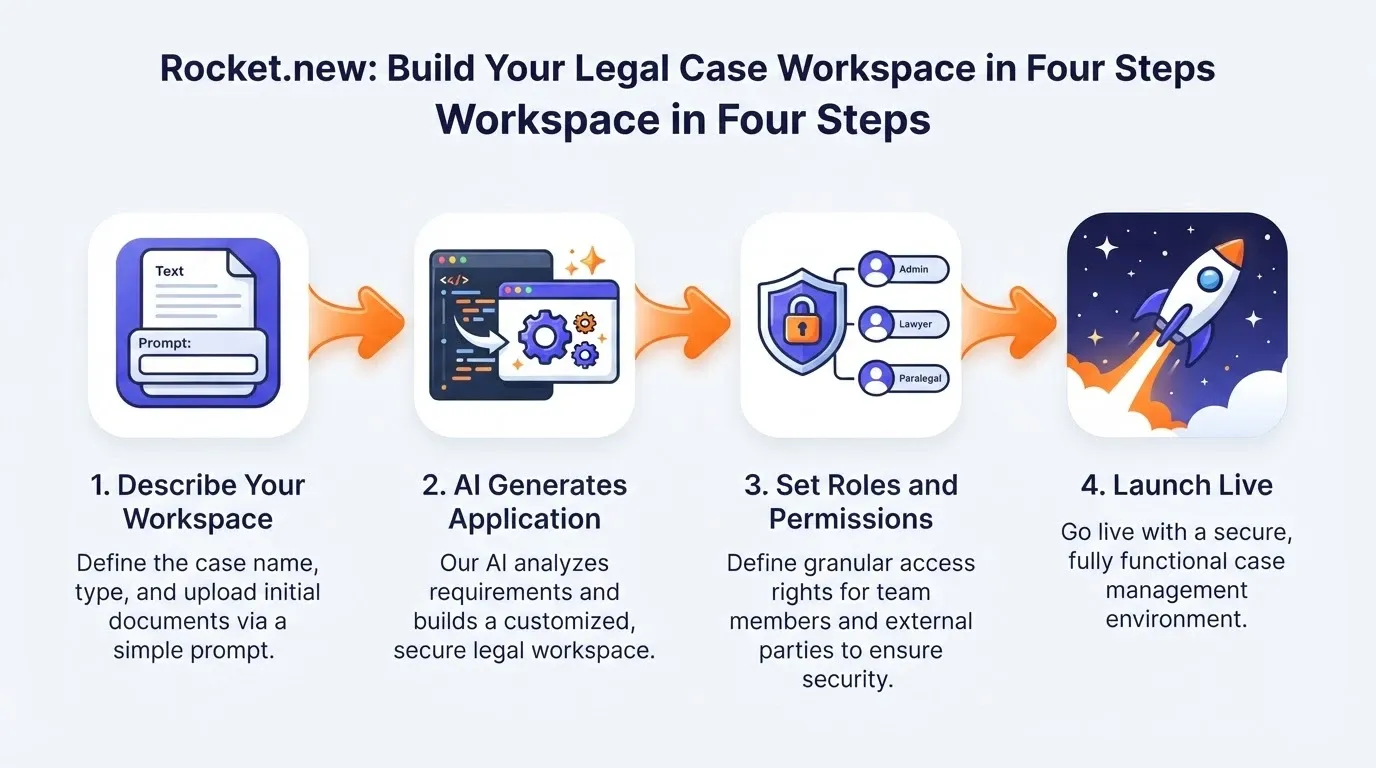
Rocket.new gives legal teams the tools to build exactly the workspace they need, shaped around their practice, their matter types, and their client relationships. Try it at rocket.new and see the first version in minutes.
Mistakes Legal Teams Make When Setting Up a Case Workspace
Even with the right tools, the way you set up a workspace determines whether it actually gets used or becomes another abandoned system that people work around.
-
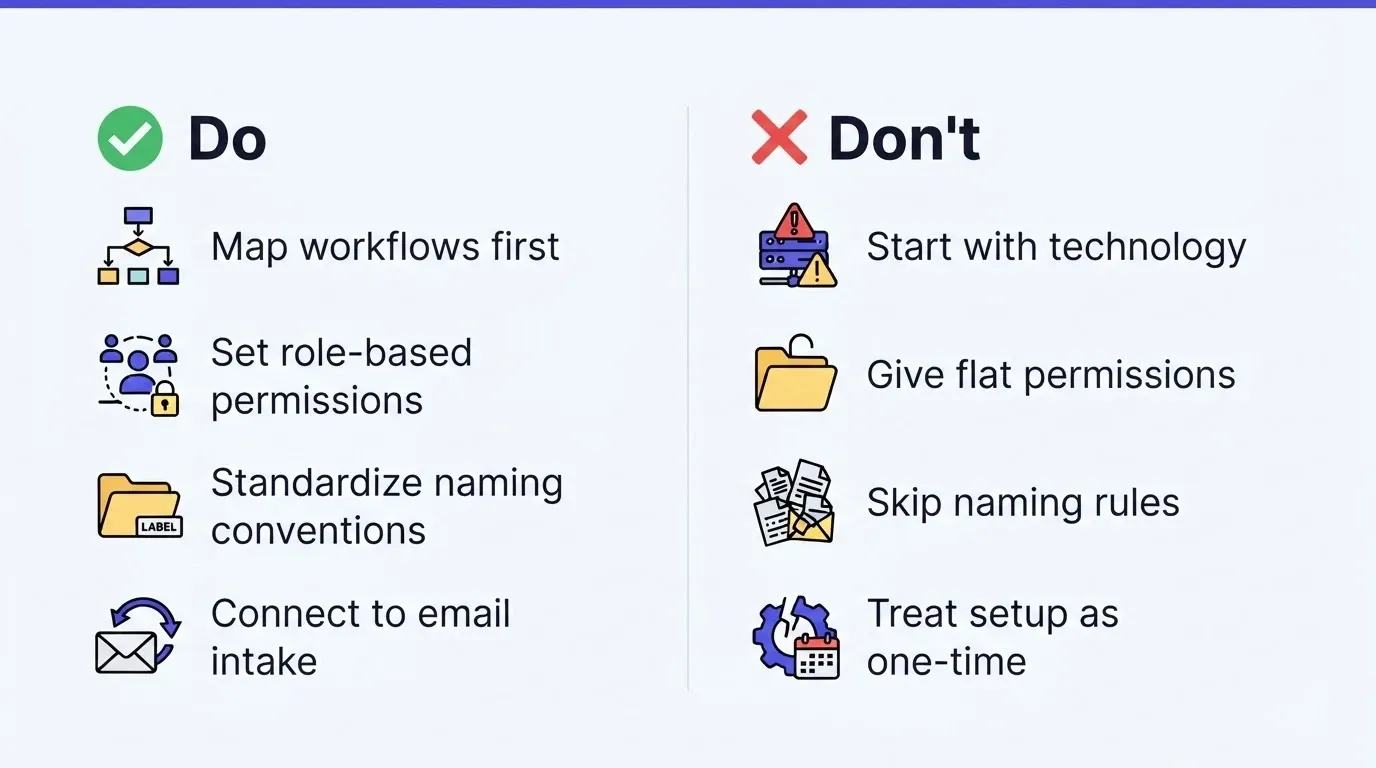
Starting with technology instead of workflow: The first step is not picking a platform. It is mapping how documents move through your practice today, week by week, matter by matter. Where do they enter the organization? Who touches them? Where do they get stuck? Build the workspace around that workflow, not around a feature list. This approach applies whether the firm has been running for years or is just getting set up.
-
Giving everyone the same permissions: When everything is easy to access, nothing is secure. Flat permissions are a shortcut that creates data risk and governance liability. Set roles early and apply them consistently from the first day you add a new team member.
-
Skipping the naming convention: Without a standard naming pattern, documents become unfindable within months. Include matter number, document type, date, and version in every filename. Test it with a real case before rolling it out. Make it a rule your firm follows, not a suggestion people pick up months late.
-
Not connecting the workspace to existing email and chat tools: If lawyers still receive documents through Gmail or Outlook and store them locally, the workspace will not become the single source of truth. Set up intake rules that route incoming documents and messages to the right matter folder. Video walkthroughs and training sessions help the team continue using the new system instead of reverting to old habits.
-
Treating setup as a one-time project: A case workspace needs to run and evolve as your practice grows. Add new matter types, adjust permissions for new hires, and update status categories as your workflows change. A client intake portal for onboarding is one example of how a workspace extends to cover adjacent processes over time.
The firms that get the most value from a case workspace are the ones that treat it as a living system. They continue to add, adjust, and improve it as their practice and client base grow.
Your Case Files Deserve a System That Matches the Stakes
Legal matters carry real consequences. A missed filing, a version error, or a confidentiality breach can change the trajectory of a case and a client relationship. The hours spent searching through scattered folders and forwarded email threads are hours that lawyers could apply toward the legal work itself, the judgment calls and strategic decisions that actually move matters forward.
A structured workspace organized by matter type, stage, and responsible party does not just reduce risk. It gives every member of the legal team a clear view of where things stand, what needs attention, and who is responsible for the next action item. The right system does not add work. It removes the coordination overhead that sits between your team and the work that matters.
Note: Build a case document workspace tailored to your practice on Rocket.new. Start from a description, invite your team, and launch it live, all in one single session.
Table of contents
- -Why Do Scattered Documents Turn Into a Legal Liability?
- -How to Organize Case Files by Matter Type and Stage
- -What Access Controls Protect Client Confidentiality?
- -Tracking Document Status and Outstanding Action Items
- -Building a Legal Document Hub on Rocket.new
- -Mistakes Legal Teams Make When Setting Up a Case Workspace
- -Your Case Files Deserve a System That Matches the Stakes