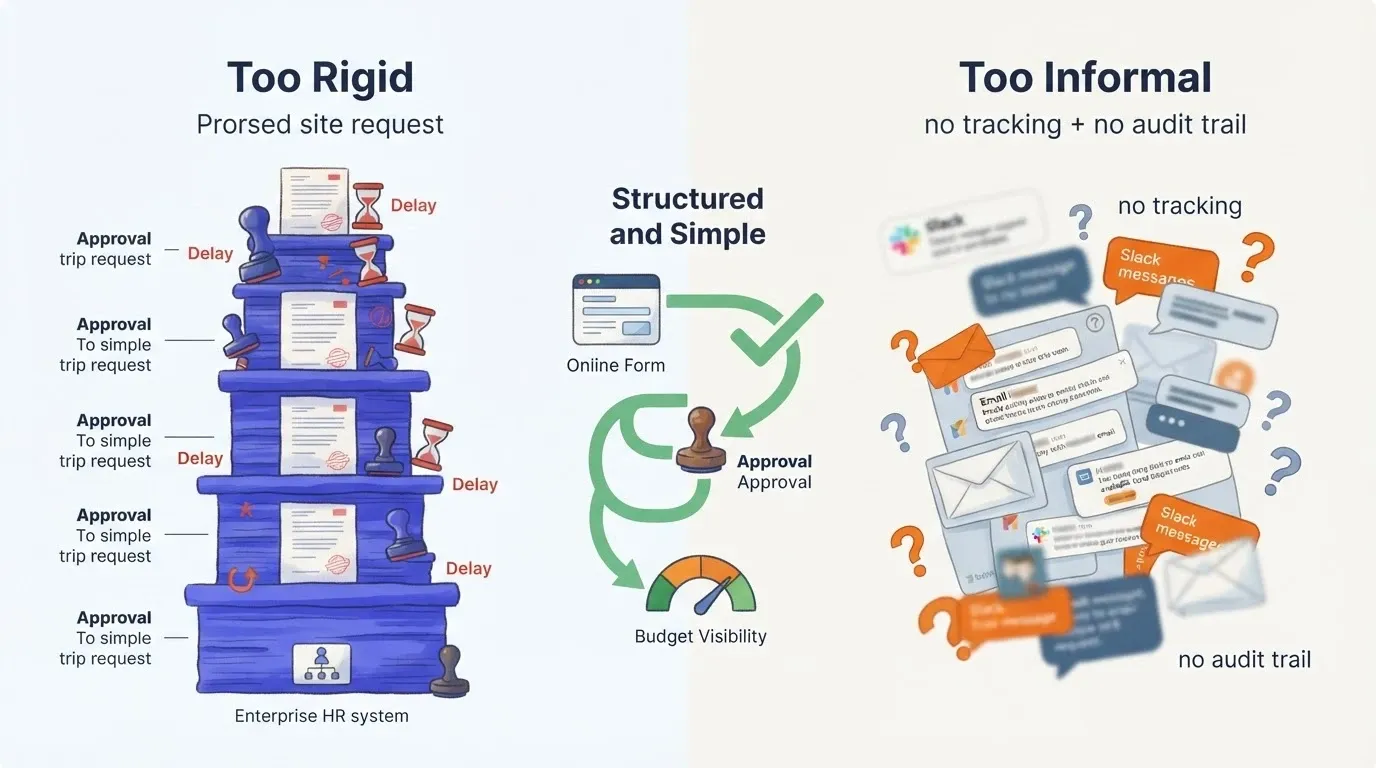
Most companies either over-engineer or under-structure their travel request process. The fix is a simple form, clear approval routing, and budget tracking. Rocket.new lets teams build a custom travel request system that fits their exact approval structure in minutes.
Why does a one-night business trip still need five approval steps at some companies, while at others, nobody can trace who approved what last quarter?
According to corporate travel management data from Engine.com, roughly 62.9% of organizations maintain no formal travel management enforcement, while 27.5% report only low enforcement. Global business travel spending is projected to hit $1.71 trillion in 2026, with per-trip costs averaging $1,128. That kind of spending without a structured request and approval process creates real financial risk for every business unit involved.
Both extremes cost money and time. The overbuilt system slows down bookings and frustrates employees who need to travel for attending conferences, training events, or client meetings. The informal approach creates zero accountability and leaves the finance team blind to what was approved and why.
This blog walks through how to design a travel request and approval workflow that people actually use, from the request form to approval routing to budget visibility.
Why Do So Many Travel Request Systems Fail?
The root cause is almost always a mismatch between the process and the organization's actual needs. A travel request workflow designed for a 5,000-person company does not work for a 50-person team.
-
No single system of record. Travel requests arrive through email, Slack, spreadsheets, and verbal asks. When the finance team needs to review what was approved, there is no single source to check. Requests get lost, duplicated, or approved without any documentation.
-
Too many approval layers for routine trips. Some companies route requests through three or four managers before the employee submits the final booking. For a $400 domestic trip, that level of review creates delays without adding real financial control. Employees start booking first and asking for request approval afterward.
-
The form collects the wrong details. A travel request form that asks for 20 fields gets abandoned halfway. A form that asks for three fields gives managers nothing to work with. Most companies land in one of these extremes because they copied a template instead of thinking about what their approvers actually need to make informed decisions.
-
No connection to the budget. Approvals happen in one system, spending happens in another, and the finance team reconciles manually at month end. By that point, the budget is already overspent and nobody knows which business unit or cost center drove the overrun.
"The system needs to allow employees to create travel requests including destination, dates, purpose, estimated costs and calculated per diems, with approval routing that does not require manual forwarding." - Discussion on r/sharepoint about building travel request systems
Teams that have built structured request workflows across departments know this pattern well. The fix starts with the form.
What Should a Travel Request Form Capture?
The travel request form is where the process begins. A well-designed form collects the right information upfront so managers can approve quickly and the finance team gets the data they need for budget tracking and policy compliance.
-
Trip purpose and business justification. This is the single most skipped field and the single most important one. The trip purpose tells the approver why this business trip matters and whether it fits current company policy and priorities.
-
Destination and travel dates. Include both origin and destination city, along with departure and return dates. These details let the system auto-calculate per diem estimates and flag overlaps with other employees traveling to the same location.
-
Estimated costs broken into categories. Separate fields for flight, accommodation, local travel and transportation, car rental, meals, and other expenses. Lump-sum estimates create budget ambiguity. Itemized estimated costs give approvers the granularity they need for the request approval decision.
-
Cost center and business unit assignment. Every request should tag to a cost center so the finance team can track spending by department. Without this field, budget reporting requires manual cleanup after the trip is completed.
| Field | Required or Optional | Why It Matters |
|---|---|---|
| Employee name and department | Required | Routes the request to the correct manager |
| Trip purpose | Required | Business justification for the approver |
| Destination and travel dates | Required | Calculates per diem and flags scheduling overlaps |
| Estimated costs (itemized) | Required | Enables budget-level approval decisions |
| Cost center or business unit | Required | Connects the approval to budget tracking |
| Accommodation preference | Optional | Helps with advance booking and rate negotiation |
| Attendee list for group travel | Optional | Identifies when multiple employees attend the same event |
| Supporting documents | Optional | Conference invitations or client meeting confirmations |
The right balance is typically six to eight required fields with two or three optional ones. Anything past that creates resistance, and employees start skipping the form altogether.
Fields That Speed Up Final Approval
Not every request needs the same level of review. Some fields act as automatic sorting criteria that speed up the approval process considerably.
-
Budget threshold flags. Set budget limits per trip type. A local travel request under $500 might need only manager sign-off. A cross-country business trip above $2,000 routes to finance for a second review. These thresholds create tiered approval requirements without adding steps to routine requests.
-
Pre-approved categories. If the company policy already covers attending conferences or training events at a set budget, the request form can reference those internal guidelines. Approvers then verify compliance rather than re-evaluating the need for the trip from scratch.
-
Travel policy acknowledgment. A simple checkbox confirming the employee has read and agrees to the travel policies. This creates a record that travel adheres to company guidelines and reduces back-and-forth questions during review.
The goal is giving approvers the necessary details to say yes or no in under two minutes. Every unnecessary field is friction that slows down the process and drives people to skip the form entirely.
How to Structure a Request Approval Workflow Step by Step
A clear travel request workflow removes guesswork about who approves what, how long it should take, and what happens when a request sits idle. The structure needs to match the size and complexity of your organization.
-
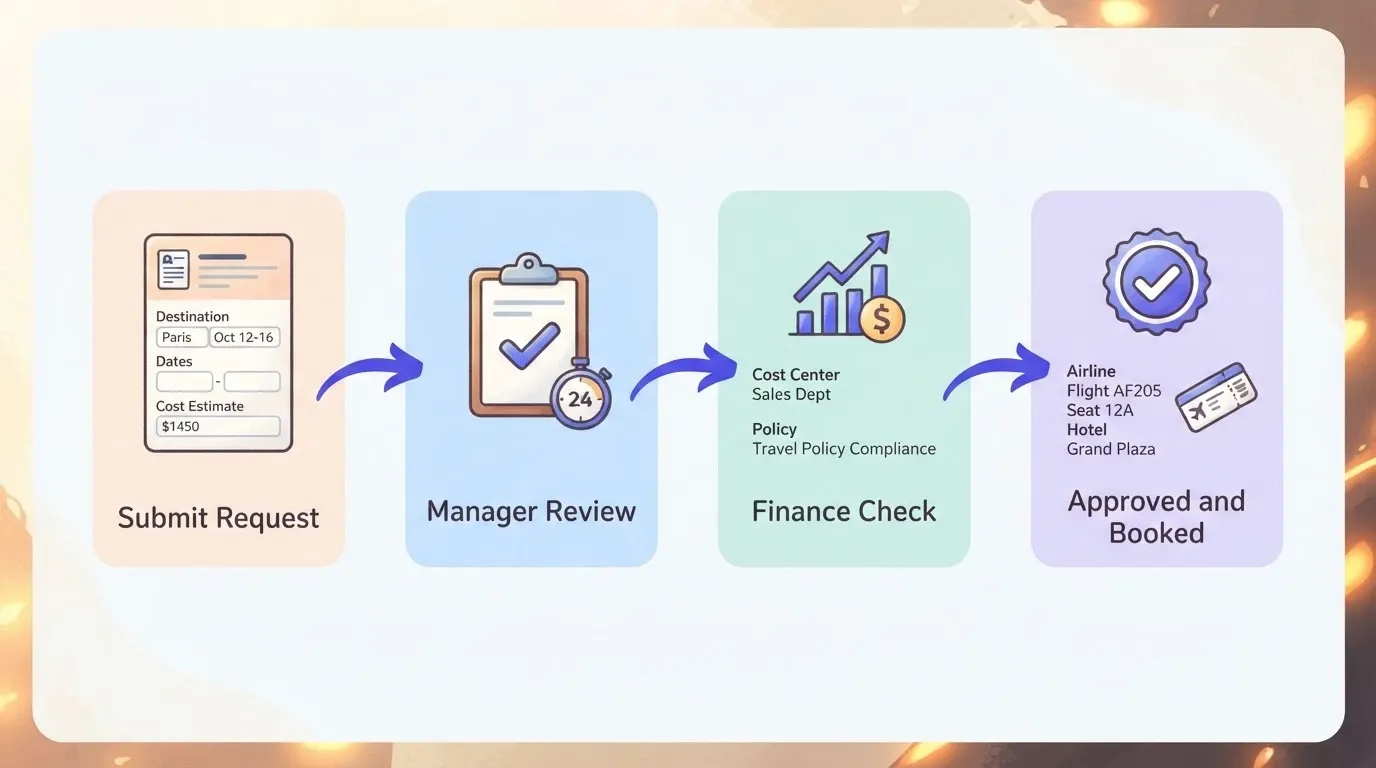
Step 1: The employee submits the request. The process starts when an employee submits a completed travel request form. The system timestamps the submission and sends a confirmation with a reference number. The employee should not need to follow up manually to check status.
-
Step 2: Manager review within 24 hours. The direct manager reviews trip details, checks business justification, and either approves, rejects, or returns the request for more information. An automated reminder fires if no action is taken within 24 hours. This keeps the average approval time short and prevents requests from going stale.
-
Step 3: Finance or budget check when applicable. Requests above defined thresholds route to the finance team for a second check. Finance verifies that the cost center has available budget, the estimated costs fall within policy, and there are no duplicate requests from the same business unit for the same trip.
-
Step 4: Final approval and booking authorization. Once all approvals clear, the system marks the request as approved and notifies the employee. Booking can begin immediately. The approved trip request becomes a record that finance can reference during reconciliation and reporting.
Teams already using workspace connectors to link their existing tools can wire this workflow directly into Slack, email, or project management systems for real time tracking and notifications across the organization.
Matching Approval Tiers to Business Unit Size
A startup with 30 employees does not need the same approval layers as a company with 3,000. The approval structure should scale with the business unit, not default to a one-size-fits-all chain.
-
Small teams under 50 people. One-step approval from the direct manager covers most travel requests. Finance reviews monthly reports rather than individual requests. The focus is speed and documentation, not multi-layer oversight.
-
Mid-size organizations with 50 to 500 staff. Two-tier approval works well. Manager first, then finance or department head for requests above a set threshold. Automated routing by business unit handles the logic so nobody manually forwards forms between approvers.
-
Large companies with 500 or more employees. Three-tier approval with policy compliance checks at each level. Local travel under a set amount gets auto-approved through automated approvals. International trips or requests above a defined budget limit trigger additional review by a senior leader or travel coordinator responsible for that region.
The key is that every tier adds value. If a review step does not change the outcome on at least 10% of the requests it processes, it is adding delay without adding financial control or cost control.
Five Mistakes That Delay Travel Request Approvals
Even well-designed systems break down when common patterns go unchecked. Here are five recurring mistakes that slow travel requests to a crawl and frustrate everyone involved in the approval process.
-
Sending requests to the wrong approver. When routing is manual, employees guess who should approve their trip request. The request sits in an inbox for days before getting redirected to the right person. Automated routing by department, cost center, or trip cost eliminates this problem entirely.
-
Missing estimated costs on the request form. A request that says "attending a conference in Chicago" with no cost estimate forces the approver to research pricing themselves. Every travel request form should include itemized estimated costs for flights, accommodation, transportation, meals, and other expenses before it enters the approval process.
-
No deadline on manager response. Without a response deadline, requests pile up in approval queues. Slow approvals directly increase costs by shrinking the advance booking window for flights and accommodation. Automated reminders at 24 and 48 hours keep the process moving and reduce the average approval time.
-
Applying the same process to every trip type. A $200 same-city day trip should not follow the same path as a $3,000 international business trip lasting a week. Tiered thresholds prevent routine requests from clogging the queue. Employee safety reviews add value for high-risk destinations but create unnecessary friction for domestic local travel.
-
No status visibility for the requester. If employees cannot check whether their request is pending, approved, or returned, they follow up via email and Slack, creating more work for managers. Real time tracking dashboards eliminate these status inquiries and reduce time spent on back-and-forth communications.
According to GBTA's 2026 business travel index, global trip volume will reach 1.84 billion this year, with spending rising 7.2% while trip counts grow only 1.3%. At that scale, small delays in the approval process compound into significant lost time and higher per-trip costs from late bookings.
Building a Custom Travel Request System on Rocket.new
Most companies trying to fix their travel request workflow face an awkward choice. Off-the-shelf travel management platforms are expensive, rigid, and designed for large enterprises with dedicated travel coordinators. Spreadsheets and email chains work until they do not, which is usually around the 20th request per month when things start falling through cracks.
-
Custom request forms in plain language. Describe the fields you need, such as trip purpose, destination, travel dates, estimated costs, cost center, and accommodation type. Rocket generates a working travel request form with validation, database storage, and a live URL. No coding required and no template limitations.
-
Automated approval routing that matches your org chart. Tell Rocket how your approvals work. Maybe requests under $1,000 go straight to the manager, while anything above that routes to finance first. Maybe international trips need VP sign-off. Rocket builds the routing logic, automated reminders, and notifications exactly as described, enabling employees to submit and track requests from one place.
-
Real time tracking for every request. Employees see where their request sits at any point, whether submitted, under review, approved, or returned for changes. Managers get a dashboard showing all pending requests with timestamps. No more "Did you see my request?" messages flooding inboxes across the business unit.
-
Budget dashboards that connect to approvals. Every approved request feeds into a live spending view by business unit, cost center, or trip category. The finance team sees the total budget committed before the trips happen, not after the travel expenses and receipts come in weeks later.
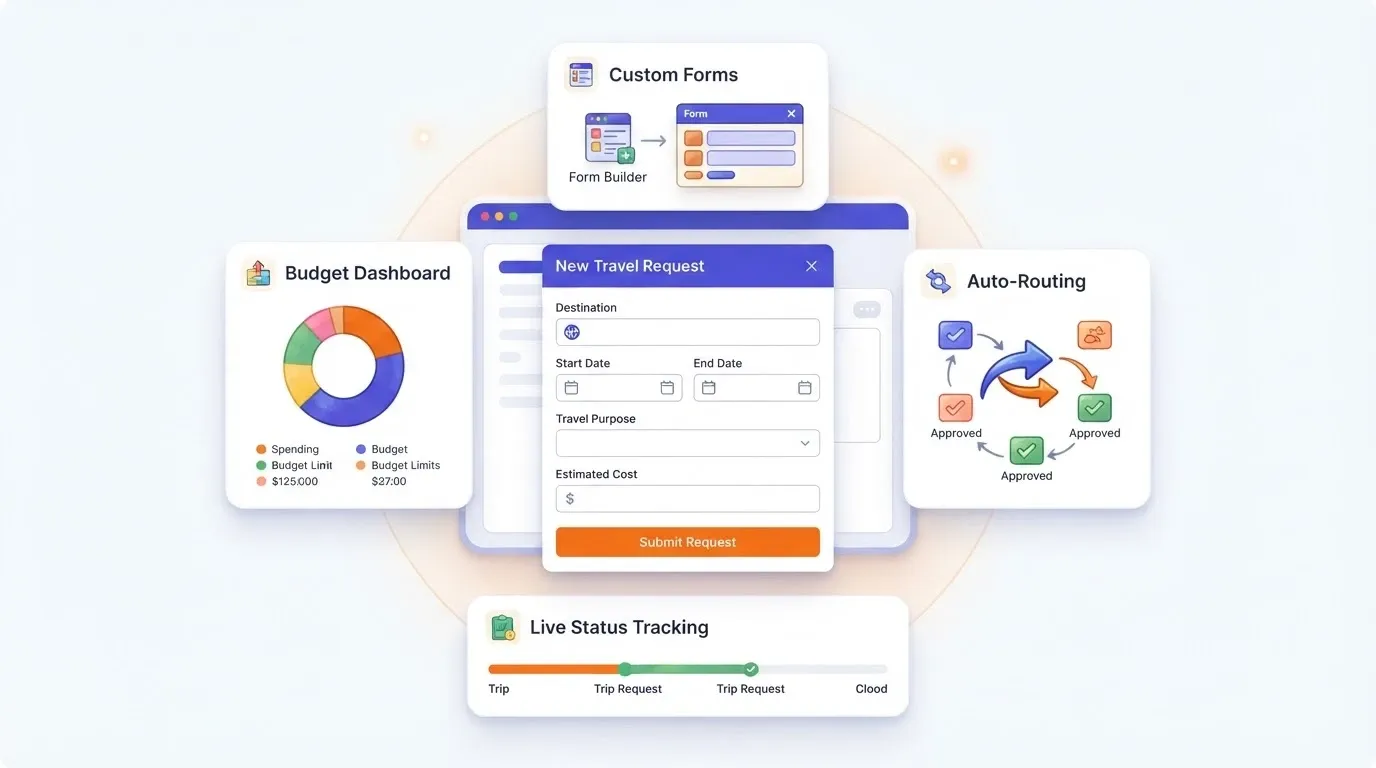
Compared to traditional tools, Rocket does not force a rigid workflow or require months of setup. You describe what you need, and the system generates a full working application with custom internal tools built on Rocket in minutes. Need to add a new approval tier next quarter? Just describe the change. Need to manage travel requests for multiple employees across different departments? Same process, no rebuilding from scratch.
Spreadsheets cannot route requests or send automated reminders. Rigid HR systems cannot adapt when your approval structure changes or when new travel policies roll out. Rocket sits in the middle, structured enough for accountability and budget control, flexible enough to match how your company actually operates across every business unit.
The result is a travel request system that multiple employees across departments actually use, because it was built for how your organization works.
Connecting Travel Approvals to Budget Visibility
Travel approvals without budget tracking is like approving purchase orders without checking the bank account. The process creates a record, but nobody knows the running total until the month closes and the finance team starts reconciling travel expenses.
-
Live budget views by cost center. When every travel request tags to a business unit and cost center, the finance team can pull a real-time report showing committed spending versus remaining budget. This turns travel management from a retrospective exercise into a forward-looking one where decisions are based on actual data.
-
Threshold alerts before overspending. Set notification triggers at 75% and 90% of budget capacity for each cost center. When a department approaches its travel budget ceiling, the system alerts the budget owner before new requests get approved. This gives managers time to adjust rather than discovering overruns in the next quarterly review.
-
Trend reporting across departments. Which teams travel the most? Which cost centers consistently run over budget? Which trip types generate the highest spending? AI-powered reporting and analysis tools answer these questions without manual spreadsheet work, giving stakeholders the visibility to make better decisions about travel policies and budget limits.
Connecting approvals to budget reporting closes the loop between "who asked for travel" and "how much did we spend." For finance teams managing travel expenses across a growing organization, this connection is what separates reactive cost monitoring from proactive budget control.
A Process People Will Actually Follow
The best travel request system is not the one with the most features. It is the one your team actually uses day after day. Start with a simple form that captures the right details, set up clear approval tiers that match your company size, and connect every approved request back to the budget so the finance team has full visibility into committed spending.
When you are ready to stop stitching together spreadsheets and email threads for travel approvals, build the system that fits your team instead of forcing your team into a system that does not fit.
Describe your travel request workflow in plain language and Rocket.new will generate a working approval system in minutes. Start building at Rocket.new.
Table of contents
- -Why Do So Many Travel Request Systems Fail?
- -What Should a Travel Request Form Capture?
- -Fields That Speed Up Final Approval
- -How to Structure a Request Approval Workflow Step by Step
- -Matching Approval Tiers to Business Unit Size
- -Five Mistakes That Delay Travel Request Approvals
- -Building a Custom Travel Request System on Rocket.new
- -Connecting Travel Approvals to Budget Visibility
- -A Process People Will Actually Follow