

Rocket.new removes the manual coding step between Figma and deployment by automatically converting designs into live apps. It eliminates HTML/CSS rewriting, reduces design-to-dev friction, and speeds up production. The result is a faster, cleaner path from Figma design to fully deployed product.
What makes turning a Figma design into a live app take so long?
The gap between design and code. Even today, teams spend hours translating a Figma file into HTML CSS, fixing CSS issues, and handling manual coding. Designers focus on visuals, while developers rebuild everything using HTML and CSS. This back-and-forth slows the process and adds repeated effort.
According to a Forrester Total Economic Impact™ study, teams reported a 20% to 30% increase in developer productivity after reducing time spent on repetitive tasks like inspecting designs and clarifying specifications.
This guide will help you understand how to reduce that gap and move faster from design to a live app.
The Problem with the Traditional Figma to Code Flow
So, let’s break it down.
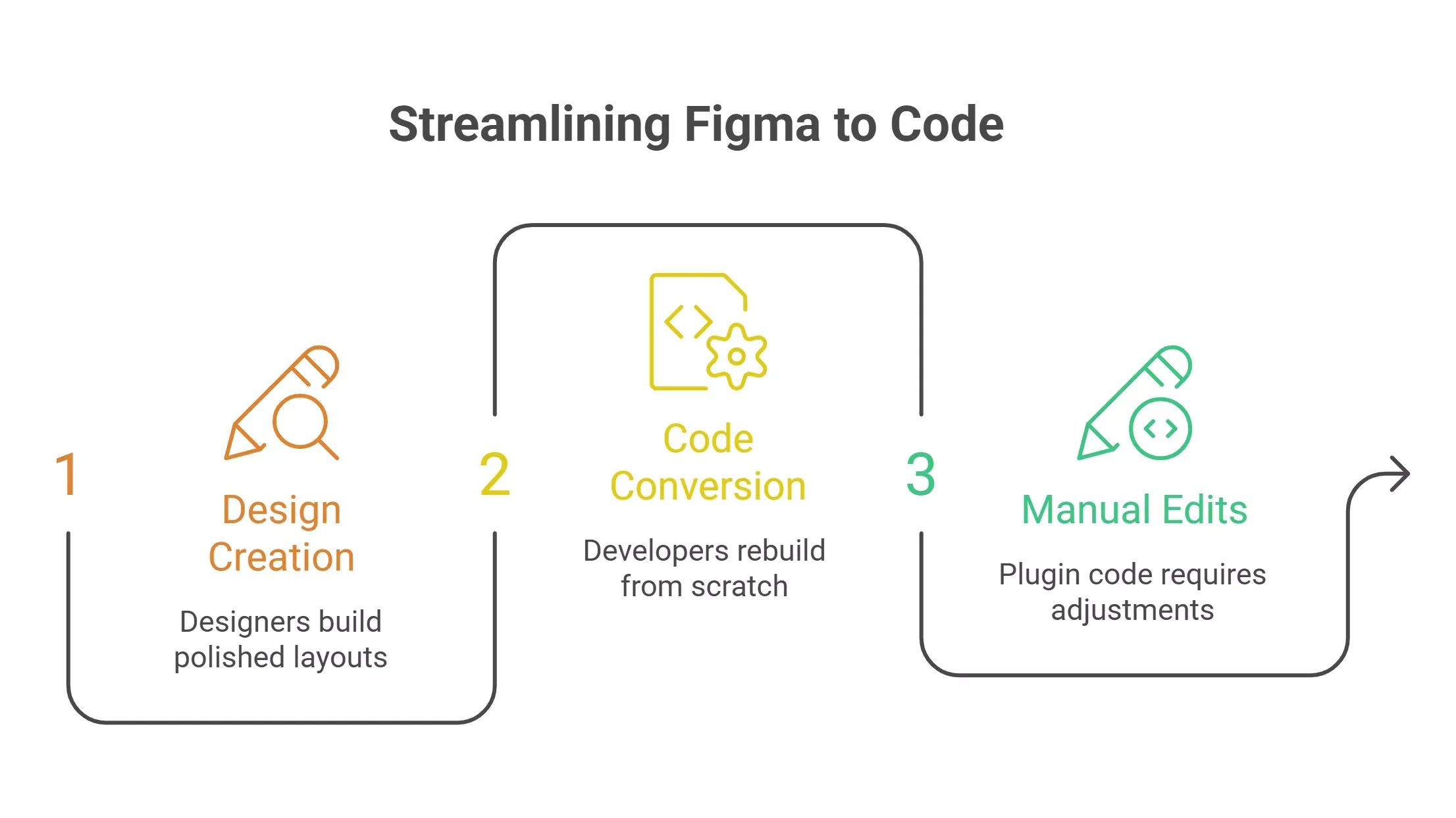
A typical workflow starts with a Figma design. Designers create clean layouts on the Figma canvas using auto layout, Figma components, and design tokens. Everything looks polished and ready.
Then comes the hard part.
Developers take that Figma file and begin converting it into HTML and CSS. This means writing HTML, structuring CSS, and rebuilding components from scratch. Even when using a Figma plugin, the generated code often needs manual edits, which slows things down.
Where the Friction Happens
- Designers focus on visuals and layout
- Developers focus on code and structure
- The handoff process creates friction between both sides
This gap is where most of the time disappears.
Even months ago, this was the standard approach. Teams depended on traditional coding or partial automation tools. The outcome was clear: slower app development, delays in projects, and repeated effort across the same process.
Where Time Actually Gets Lost
Well, it’s not just about writing code.
When teams move from a Figma design to development, the slowdown comes from small but repeated tasks. These tasks seem minor on their own, but together they stretch the entire process and delay the final output.
Where the Slowdown Happens
- CSS adjustments: Tweaking CSS for different screen sizes takes time and constant testing
- Mobile responsiveness: Fixing layouts for mobile responsiveness often requires multiple passes
- HTML structuring: Rewriting HTML code from design layers is repetitive and error-prone
- Component mapping: Matching Figma components with real components is not always straightforward
- Complex flows: Handling complex flows and business logic adds extra layers of work
And let’s be honest, HTML CSS conversion is not always clean. Generated code from older tools often looks messy, which forces developers to rewrite large parts of it.
So the process becomes:
Figma → generated code → manual fixes → final product
That middle step is where most of the time gets lost, and it’s the reason projects slow down more than expected.
What Rocket.new Changes in This Process
Now here’s where things get interesting.
Rocket.new removes that middle step.
Instead of just giving you generated code, it automatically converts a Figma design into a live website or app. You don’t stop at HTML or CSS. You go straight to a working product.
This means:
- Your Figma file becomes a live website
- Your design system stays intact
- Your components map correctly
- Your app is production-ready
No more jumping between tools or fixing broken CSS code.
How Rocket.new Works
Let’s keep this simple.
Rocket.new is built to remove the gap between a Figma design and a working app. Instead of stopping at code, it takes your Figma file and turns it into something you can actually use and launch.
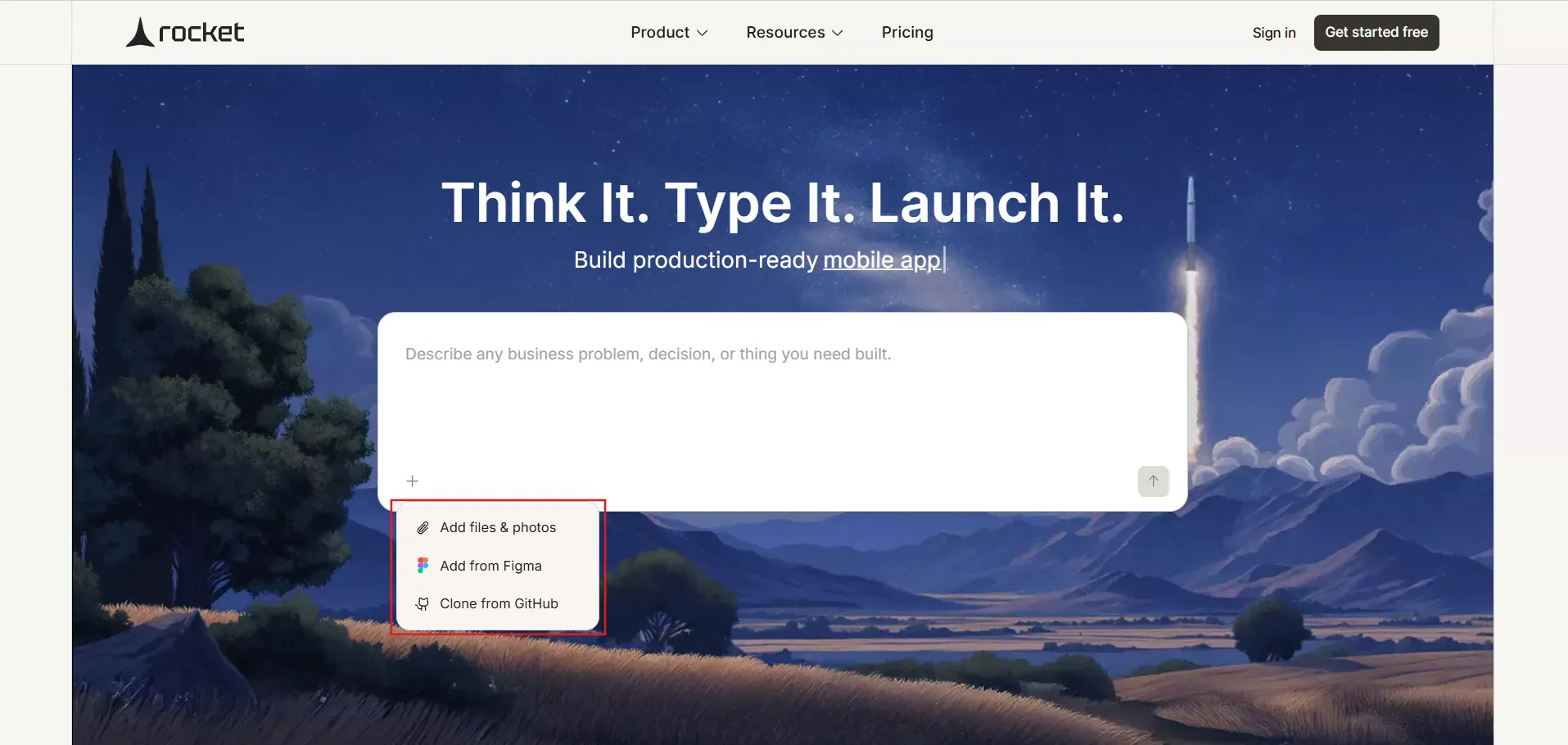
1. Start with a Figma Link
You paste your Figma link into the platform. It reads your Figma file and understands the structure.
👉Convert Figma to code now!
2. MCP Server Handles the Heavy Lifting
The MCP server processes your design. It maps Figma components, auto layout, and design tokens into real components.
This is where the heavy lifting happens.
3. Automatically Converts Design to Code
The system automatically converts your Figma design into production-ready code. It handles HTML, CSS, styled components, and even styled JSX when needed.
4. Builds a Live Website or App
Your output is not just code. It’s a live website or app hosted with a custom domain and unlimited bandwidth.
5. Add Custom Code if Needed
You can still add custom code for business logic or new features. So you’re not locked in.
This flow keeps everything simple and direct. You move from a Figma design to a live app without extra steps, delays, or constant switching between the tools.
Key Features of Rocket.new
Next, let’s look at what makes it stand out.
Rocket.new focuses on turning a Figma design into a working app without slowing you down. It handles the technical parts in the background, so you can focus more on building and less on fixing.
Core Features
- Converts Figma designs into real apps
- Supports mobile responsiveness across different screen sizes
- Generates clean HTML, CSS, and structured components
- Handles animations and interactions
- Provides a website builder experience
- Supports react native for app development
- Allows custom domain setup
- Tracks users using Google Analytics
- Works with high-resolution images
- Delivers high-performance output
What Makes It Different
- No manual coding required for basic builds
- No messy generated code
- No broken CSS layouts
- Direct path from Figma to code to live website
These features reduce the extra steps that usually slow down projects. You get a smoother process, cleaner code, and a faster way to move from design to a live website or app.
Traditional vs Rocket.new
Before choosing any approach, it helps to see the difference side by side. The gap between traditional coding and Rocket.new becomes clear when you compare each step in the process.
| Step | Traditional Coding | Rocket.new |
|---|---|---|
| Design | Figma design | Figma design |
| Conversion | Manual coding or plugin | Automatically converts |
| Code Quality | Needs manual edits | Production-ready code |
| Time | Days or weeks | Minutes to hours |
| Output | Code files | Live website |
| Responsiveness | Manual CSS fixes | Built-in mobile responsiveness |
| Deployment | Separate process | Included |
This comparison shows where most of the time is saved. By removing manual steps and combining everything into one flow, Rocket.new helps teams move faster and focus more on building rather than fixing.
Why Designers and Developers Both Win
Then comes the best part.
When a tool removes the gap between design and code, both designers and developers benefit. Instead of working in separate steps, they move together in a smoother and faster process.
For Designers
- Your Figma design stays intact
- No need to simplify designs
- Works with auto layout and Figma components
- Faster transition from idea to real apps
For Developers
- Less HTML/CSS rewriting
- Cleaner generated code
- Focus on business logic instead of layout fixes
- Faster development process
Even freelance designer workflows become smoother. You can create designs and deliver a final product without waiting for developers.
Real Use Cases
Let’s look at where this actually helps.
Rocket.new is not just for one type of project. It fits different workflows where speed and clarity matter, especially when moving from a Figma design to a working app.
Where it Works Best
- Landing pages: You design a landing page in Figma and convert Figma designs directly into a live website without writing HTML
- Startup MVPs: You start with early ideas, build lo-fi frames, refine them into a Figma design, and launch real apps quickly
- Client projects: Agencies handling multiple projects can reduce turnaround time and deliver faster results
These use cases show how the process becomes shorter and more practical. You spend less time on setup and more time delivering real output.
Removing the Biggest Gap in Figma to App Development
The title talks about removing the step that costs the most time.
Now that you’ve seen the workflow, that step becomes easy to spot. It’s the gap between a Figma design and a working app, where teams spend time converting HTML, CSS, and fixing layouts.
What Changes Here
- Old flow: Figma → code → fixes → deployment
- New flow: Figma → live website
- Time impact: Removes repeated fixes and manual coding steps
- Workflow shift: Faster path from design to real output
This is the core shift. By removing the slowest step, the entire process becomes faster, cleaner, and easier to manage.
The Role of MCP Server in All This
Let’s zoom in a bit.
The MCP server acts as the core engine that handles the complex parts behind the scenes. It takes your Figma file and prepares it for real-world use without requiring constant manual edits.
What MCP Server Handles
- Structure reading: Understands the Figma structure and layout
- Component mapping: Matches Figma components to real components
- Component building: Creates styled components ready for use
- CSS handling: Manages CSS layout logic automatically
- Performance prep: Builds high-performance output for deployment
Without this layer, automatic conversion would still need manual fixes. This is why the output feels clean, structured, and ready to use.
From Early Ideas to Final Product
After that, think about how this changes your workflow.
Instead of going through multiple steps and delays, you move directly from idea to execution with fewer interruptions.
The Workflow Shift
- Start point: Begin with early ideas
- Initial design: Create lo-fi frames
- Refinement: Turn them into a Figma design
- Connection: Upload or connect your Figma file
- Output: Get a final product on a custom domain
This flow removes repeated steps and keeps things moving. You spend less time managing the process and more time building something real.
Converts Figma Into a Deployed Product
Turning a Figma file into a working app has always been slow. Teams deal with manual coding, repeated fixes, and long delays. A lot of time goes into rewriting HTML and CSS, adjusting CSS layouts, and managing the handoff process between designers and developers. This creates friction and slows down the entire workflow.
Rocket.new solves this by directly converting Figma designs into a live website or app using AI tools and MCP server processing. You skip unnecessary steps and move straight to production-ready output.
When a platform converts Figma into a deployed product, it helps teams build faster, reduce effort, and keep momentum across every project.
Table of contents
- -The Problem with the Traditional Figma to Code Flow
- -Where the Friction Happens
- -Where Time Actually Gets Lost
- -Where the Slowdown Happens
- -What Rocket.new Changes in This Process
- -How Rocket.new Works
- -1. Start with a Figma Link
- -2. MCP Server Handles the Heavy Lifting
- -3. Automatically Converts Design to Code
- -4. Builds a Live Website or App
- -5. Add Custom Code if Needed
- -Key Features of Rocket.new
- -Core Features
- -What Makes It Different
- -Traditional vs Rocket.new
- -Why Designers and Developers Both Win
- -For Designers
- -For Developers
- -Real Use Cases
- -Where it Works Best
- -Removing the Biggest Gap in Figma to App Development
- -What Changes Here
- -The Role of MCP Server in All This
- -What MCP Server Handles
- -From Early Ideas to Final Product
- -The Workflow Shift
- -Converts Figma Into a Deployed Product


