
How can simple prompts turn into real web apps? AI app builders convert ideas into functional products, managing design and logic, making development faster, easier, and accessible for beginners and creators.
Can you really create a web app just by typing a prompt? Yes, you can.
In 2026, an AI app builder can turn a few lines of text into working web apps with real features. You just describe your idea using natural language, and the tool builds the design, handles backend logic, and connects everything.
Reports show that AI adoption in development is rising fast, with many developers already using AI tools regularly.
This shift is making app development faster and more accessible for everyone, including beginners.
So, if you’ve been thinking about building something but didn’t want to deal with writing code, this is your moment to start.
What Does “Create a Web App from a Prompt” Actually Mean?
Let’s keep it simple.
You type a text prompt in plain English. Something like:
“Create a task manager with login, dashboard, and analytics.”
Then an AI app generator takes that input and builds a complete app. It handles layout, backend logic, and even database tables.
👉Worth a Quick Read: Best AI App Generator: Create Apps Without Coding in Minutes
That’s the magic of natural language prompts. You don’t need to know syntax. You just describe what you want.
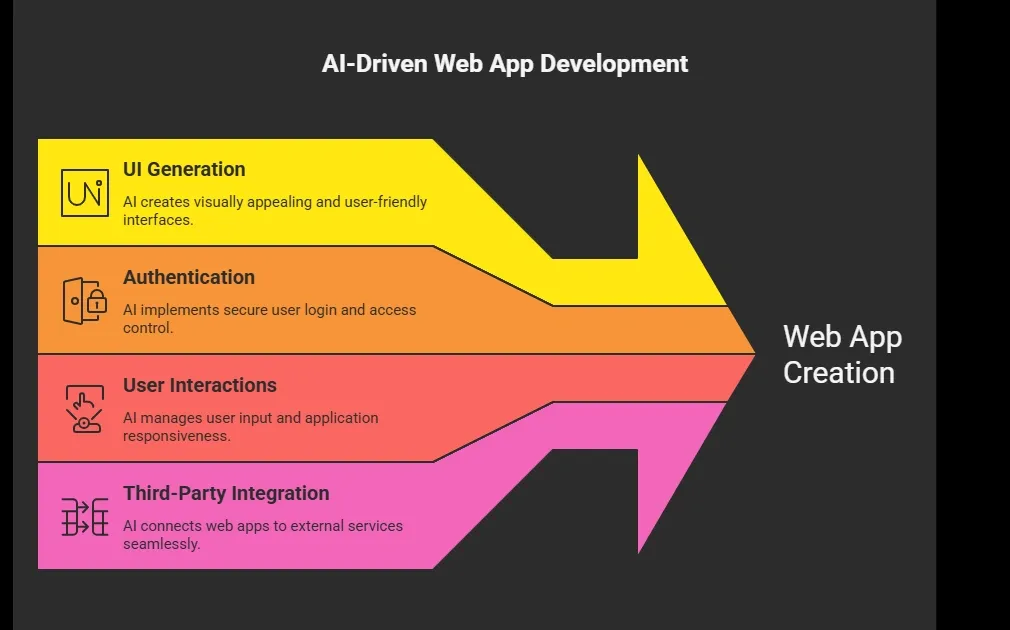
So yes, you can build real functional software without touching a code editor.
Why AI App Builders Are Taking Over in 2026?
So, why is everyone suddenly talking about AI app builders? It’s simple. The way we build web apps has changed fast, and people want results without spending months on app development.
Well, the biggest reason is speed.
Traditional app development takes weeks or months. With AI web app builders, you can go from idea to functional web apps in hours.
👉Worth a Quick Read: AI Web App Builder: Build Powerful Apps Without Code
Here’s what makes them popular:
1. No Need for Heavy Coding
You still can do writing code if you want. But it’s optional. Most app builders handle the heavy lifting.
2. Perfect for Non Technical Users
Many non technical users are building web apps now. You just describe your idea using natural language.
3. Faster Testing
You can quickly test ideas and build prototypes.
4. Built-in AI Features
Modern AI app builder platforms include AI powered features like chatbots, automation, and analytics.
So yeah, things have changed.
And honestly, this is just the beginning. As AI builders keep improving, building web apps will feel more like having a conversation than doing technical work.
Types of Web Apps You Can Build
You’re not limited to basic stuff.
Here’s a quick look:
| Type of App | Example |
|---|---|
| Internal tools | Admin dashboards, CRM panels |
| Client portals | Login-based apps for customers |
| Productivity tools | Task managers, note apps |
| Crud apps | Data management apps |
| Full stack apps | SaaS platforms with frontend and backend |
Many AI app builders can even handle complex apps with complex logic and structured workflows.
Best AI App Builders in 2026
Let’s get into the fun part.
1. General AI Builders
These AI builders focus on simplicity.
-
Accept natural language prompts
-
Generate layouts and UI components
-
Offer a visual editor
They are great for:
-
Simple apps
-
MVPs
-
Quick experiments
2. Advanced AI Web App Builders
These are for serious projects.
They support:
-
Full stack apps
-
Advanced backend logic
-
Role based access control
-
API integrations using api keys
These tools help you build production ready web apps.
3. Hybrid Builders for Technical Users
Some platforms target technical users and technical builders.
They provide:
-
Editable code
-
Access to underlying code
-
Code export and full code export
So you can mix writing code with AI assistance.
Top Prompt-Based AI App Builders in 2026
So, now that you get the hype, let’s look at some of the best AI app builders that let you build web apps using natural language prompts.
Here’s a quick comparison:
| Tool | Code Access | AI Level | Ease of Use |
|---|---|---|---|
| Rocket.new | Yes | High | Very Easy |
| Bubble AI | Limited | Medium | Easy |
| Glide AI | No | Medium | Very Easy |
| Softr AI | Limited | Medium | Easy |
| Builder.ai | No | High | Medium |
Rocket.new
Rocket.new is one of the most powerful AI web app builders right now. It focuses on turning natural language prompts into real full-stack web apps with working backend logic.
👉Worth a Quick Read: Build Smarter Solutions With the Full Stack AI Builder
Built for both beginners and technical users. It lets you turn natural language prompts into real web apps with working backend logic and structure.
Focused on fast app creation, it supports building full-stack web apps that feel like real products, not just demos.
Features
-
Prompt to App Creation: Builds apps directly from single prompts
-
Figma Import: Converts design files into live, editable layouts
-
AI-Powered Backend: Automatically handles logic, data, and workflows
-
Reusable Components: Speeds up building with ready-to-use elements
-
Live Preview: Shows instant updates while editing
-
Command-based actions: Use / and @ to run actions and quickly scope edits.
-
Custom Domain Support: Publishes projects with a branded domain
-
Code Export: Allows developers to extend or customize later
Best For
-
Full-stack app development from idea to launch
-
Startups building and scaling real-world products
-
Rapid prototyping and faster time-to-market
-
Users who want full code ownership and flexibility
-
Teams seeking a streamlined, all-in-one development workflow
Pricing
Uses an AI credits-based system. Free tier available with limited usage.
If you want serious app development power without doing all the writing code, Rocket.new is easily one of the best AI app builder options right now.
Bubble AI
Popular no-code platform enhanced with AI features. It focuses on visual building with flexible design tools Focuses on visual building.
It’s great for users who want control over UI while still using AI to speed up app creation.
Features
-
Drag and drop visual editor
-
Pre-built UI components
-
Handles database tables
-
Supports API keys
Best For
-
Beginners building web apps
-
MVPs and prototypes
Pricing
Subscription-based plans.
Bubble AI is great if you want simple app builders with visual control, but less ideal for deep customization.
Glide AI
Designed for building apps from structured data like spreadsheets. Very beginner-friendly and quick to set up.
It’s ideal for turning simple ideas into working web apps without touching writing code.
Features
-
Clean visual editor
-
Fast app creation
-
Built-in AI powered features
-
Easy data models setup
Best For
-
Productivity tools
-
Small apps for teams
Pricing
Free plan available, paid tiers for advanced features.
Glide is perfect for quick functional software, but not for heavy or complex web applications.
Softr AI
Softr is popular for internal tools and portals. Mainly focused on business use cases for better working environment amongst the businesses.
Easy setup for client portals
Features
-
Pre-built templates
-
Supports user authentication
-
Handles structured data
-
Simple user interactions
Best For
-
Internal tools
-
Small business workflows
Pricing
Subscription-based with scaling plans.
Softr is great for building internal tools quickly, especially if you want something clean and simple.
Builder.ai
Combines AI with human support for guided app development. It’s more like a managed service than a pure builder.
Best suited for businesses that want a complete app without handling technical details.
Features
-
AI-assisted planning
-
Handles backend logic
-
Integrates with third party services
-
Supports full stack apps
Best For
- Businesses that want done-for-you apps
Pricing
Custom pricing based on project.
Builder.ai works if you don’t want to handle anything yourself, but it’s not as flexible as other ai web app builders.
Key Features to Look For
Not all AI app builders are created equal. Some focus on speed, others on flexibility, and some on helping you build functional web apps without touching writing code. When choosing a tool, these features can make your life a lot easier.
Core Features
-
Prompt to prototypes
-
Visual editor for drag-and-drop design
-
Ability to generate UI components automatically from prompts
-
Support for database modeling and managing data models
-
Integration with external tools and services
-
Easy setup for API keys
-
Built-in AI powered features like chatbots, automation, and analytics
-
Options for code ownership and full code export
Additional Considerations
-
Support for unlimited users
-
Export options for deployment or further customization
-
Deployment without configuring servers
Choosing an AI app builder with these features ensures you can build production ready web apps, scale easily, and focus on your idea instead of getting stuck in technical setup. A good tool balances speed, flexibility, and functional software capabilities.
How the Process Works
Creating a web app from a prompt might sound futuristic, but the process is actually pretty straightforward. Let’s break it down step by step so you can see how simple it can be.
Step 1: Write a Prompt
Use plain language and keep it clear. You don’t need to write code.
Example: “Build a dashboard with login, charts, and user roles.”
Step 2: AI Builds the App
The AI app builder interprets your prompt and automatically creates:
-
UI: layouts, components, and visual structure
-
Backend logic: workflows, roles, and automation
-
Data models: tables, forms, and structured data
Step 3: Edit and Customize
After the initial build, you can tweak things using a visual editor or adjust editable code for advanced features.
Step 4: Launch
Once you’re happy, your production-ready web app is live. That’s it from prompt to fully functional web app in just a few steps.
This step-by-step process shows how AI transforms app creation. Even non technical users can now build complex, fully functional apps without spending weeks writing code. It’s fast, intuitive, and surprisingly fun.
Community's voice
Here’s a real voice from LinkedIn showing how prompt‑to‑app builders are changing the way people think about building software:
“Stop using Rocket if you like building the hard way. Some of us still miss the pain of wiring APIs manually… others just hit enter and deploy. Rocket.new spits out full, ready‑to‑launch apps, backend, UI, integrations, straight from a single prompt. No platform I’ve used gets you closer to the ‘push a button, ship a product’ dream.” Linkedin
This kind of firsthand insight shows how AI app builders, especially prompt‑driven ones, are helping both beginners and experienced builders get real, working web apps without the usual friction.
Challenges You Should Know
Let’s be real. AI app builders are game-changing, but they’re not perfect yet. There are a few things to keep in mind before diving in.
Key Challenges
-
Complex Logic Limits: Some advanced or complex web applications still require manual writing code to handle workflows or unique features.
-
AI Credits: Many platforms use AI credits, which means frequent usage can get expensive if you push the limits.
-
Learning Curve: Even with natural language prompts, you still need a basic understanding of app structure and how data flows.
Despite these challenges, the gap is shrinking fast. AI is getting smarter, and even non technical users can now create apps that used to take weeks to build.
The Future of AI App Builders
Things are moving fast. What seemed futuristic a few years ago is becoming normal.
Emerging Trends
-
Better AI generated designs that feel professional right away
-
Smarter user interactions with built-in automation and analytics
-
Stronger support for full stack apps, including backend logic and complex workflows
Soon, building functional web apps may feel as easy as chatting with a friend. The tools are improving daily, making app creation faster, more intuitive, and accessible to everyone.
Build a Web App from a Prompt in 2026
Building web apps used to demand deep coding skills, long hours, and a lot of patience. Today, Rocket.new makes it possible to create fully functional web apps using just plain language prompts. From UI components to backend logic and data models, Rocket.new handles the heavy lifting, so you can focus on your idea instead of the technical setup.
The main takeaway is that you don’t need to be a coding expert to get started. Whether you’re a non technical user or a developer looking to speed up workflow, Rocket.new lets you start small, test ideas, and scale into more complex web applications. Build a simple app, tweak it, and gradually grow that’s how app creation becomes easy and accessible in 2026.
Table of contents
- -What Does “Create a Web App from a Prompt” Actually Mean?
- -Why AI App Builders Are Taking Over in 2026?
- -1\. No Need for Heavy Coding
- -2\. Perfect for Non Technical Users
- -3\. Faster Testing
- -4\. Built-in AI Features
- -Types of Web Apps You Can Build
- -Best AI App Builders in 2026
- -1\. General AI Builders
- -2\. Advanced AI Web App Builders
- -3\. Hybrid Builders for Technical Users
- -Top Prompt-Based AI App Builders in 2026
- -Rocket.new
- -Features
- -Best For
- -Pricing
- -Bubble AI
- -Features
- -Best For
- -Pricing
- -Glide AI
- -Features
- -Best For
- -Pricing
- -Softr AI
- -Features
- -Best For
- -Pricing
- -Builder.ai
- -Features
- -Best For
- -Pricing
- -Key Features to Look For
- -Core Features
- -Additional Considerations
- -How the Process Works
- -Step 1: Write a Prompt
- -Step 2: AI Builds the App
- -Step 3: Edit and Customize
- -Step 4: Launch
- -Community's voice
- -Challenges You Should Know
- -Key Challenges
- -The Future of AI App Builders
- -Emerging Trends
- -Build a Web App from a Prompt in 2026