
Rocket.new turns Figma files into fully functional apps by generating front-end code, backend logic, and deployment-ready infrastructure. Designers skip manual specs, tickets, and delays, working directly from a live app synced with Figma. The result is faster product delivery with real, scalable code, not just prototypes.
What actually happens when a designer skips the usual engineering queue and ships straight from their Figma designs?
In 2026, Rocket.new reads a design file, generates production ready code, wires backend services, and deploys the working app. Designers, product managers, and solo founders get functional apps in hours.
The shift has money behind it. The AI code tools market reached $7.37 billion in 2025 on its way to $23.97 billion by 2030. Buyers are voting with their wallets.
Market Context & Industry Shift
The numbers behind this shift tell a clear story. The global design-to-code tools market is projected to reach between USD 2.0 billion and USD 4.0 billion by 2025, accelerated by advances in AI and machine learning that continuously raise the quality of generated code.
Gartner reinforces the direction: by 2025, an estimated 70% of new enterprise applications will rely on low-code or no-code technologies, signaling a fundamental change in how products get built.
Design-to-code automation sits at the center of that change, converting design specifications directly into functional code, minimizing inconsistencies, and tightening collaboration between design and engineering teams.
The future trajectory points toward tools that not only generate code but also produce better logic, cleaner output, and less manual refinement with every iteration.
What "No Developer Handoff" Means in 2026
No handoff does not mean engineers vanish. It means designers and product teams stop waiting in a queue. Polished Figma designs no longer sit idle while tickets pile up. One connection between the design file and Rocket replaces the baton pass, powered by AI tools that read components from the design.
The traditional design-to-development handoff process often leads to inconsistencies, such as misaligned pixels, incorrect font weights, and animation discrepancies, which can cause frustration and delays in product launches.
Manual handoffs between designers and developers can create a painful loop of communication, where designers produce detailed specifications, developers seek clarifications, and product managers mediate, ultimately delaying project timelines.
So what exactly does a designer skip when using this Figma to code tool?
-
Exporting redlines or annotated mockups for every screen.
-
Writing detailed specs or acceptance criteria for each component.
-
Opening Jira tickets for small UI tweaks that should take minutes.
-
Waiting weeks for engineers to rebuild layouts in HTML and CSS.
-
Mediating back and forth over pixel drift.
The designer, PM, or founder plugs Figma designs into Rocket and works from a live app. The tedious process of translating design to code collapses into one tool.
Step 1: Connecting a Figma File to Rocket.new
Sign up and start with a Build.
Setup takes minutes.
So you connect Rocket to Figma through OAuth. No API key, no plugin install. The connection reads your file through the Figma API, which powers the entire Figma-to-code pipeline.
Here is the exact sequence from the Rocket docs:
-
Turn on dev mode in Figma for the pages you want to export. It exposes component intents, layer naming, and structured metadata.
-
Copy your Figma file URL from Share and Copy link. Use the file link, not a prototype link, since prototype links hide the layer structure Rocket needs.
-
In Rocket, click the plus icon at the lower left of the chat input and select Add from Figma. Rocket authenticates through OAuth, no API key required.
-
Select up to 40 frames representing your core flows. Name them descriptively like "Dashboard" or "Auth Flow" instead of "Frame 1".
-
Pick your tech stack. Choose Next.js for web apps, Flutter for mobile apps, or React Native for cross-platform output.
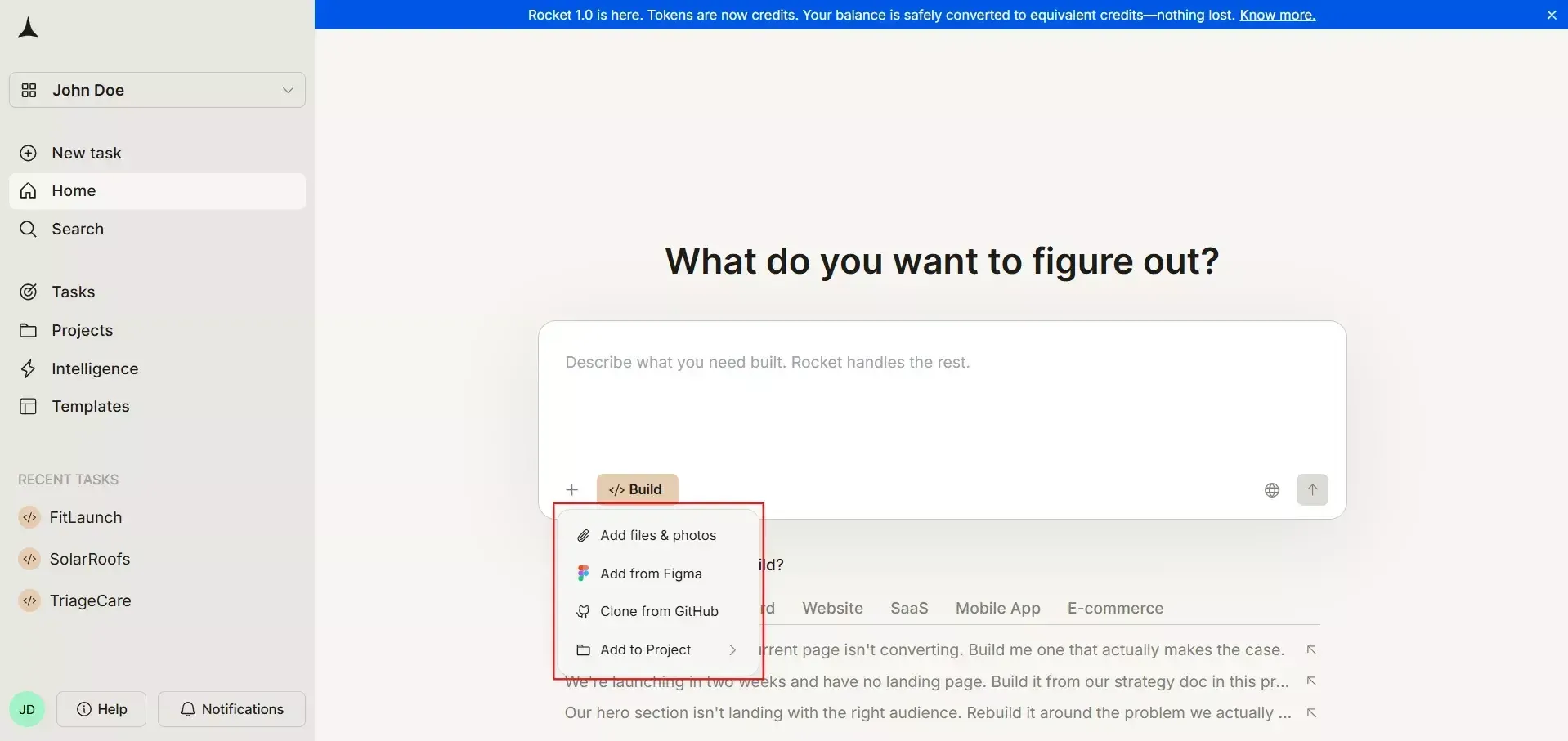 Rocket reads Figma components, auto layout constraints, variables, text styles, and color tokens through stable node IDs.
Your design system travels intact. Components stay components. The design system in Figma becomes the tokens file, and interactive prototypes turn into routed flows inside the tool.
Step 2: How Rocket Reads Your Figma Design File
Rocket does not do a naive layer dump. A layout and semantics engine reads structure, hierarchy, and implied interactivity from the design file.
So the engine scans for specific signals before producing any output.
The table below maps what Rocket reads to what it generates:
| Design element | How Rocket processes it |
|---|---|
| Auto layout | Maps to responsive flexbox and grid rules |
| Constraints | Turn into breakpoints and responsive behavior |
| Figma variables | Become design tokens in theme files |
| Repeated patterns | Generate reusable elements, not duplicated markup |
| Text and color styles | Form a token system safe to edit later |
| Prototype links | Inform navigation between app screens |
The model detects UI patterns like navigation bars, cards, and forms. It turns them into structured components instead of copying the same HTML and CSS block across every page.
Clean files produce cleaner output. Messy files work thanks to AI-based intent detection, though results improve with disciplined input.
Step 3: Generating Production-Ready Code from Figma Designs
Once interpretation finishes, AI tools inside Rocket write working UI code for modern stacks.
Default for web apps is React with TypeScript and Tailwind CSS; mobile runs on Flutter or React Native.
What comes out is real code, not static markup that engineers throw away. Every screen in your Figma designs becomes a route with matching components.
What the Generated Front End Code Looks Like
So the front-end code follows patterns that experienced developers already expect. Nothing exotic, nothing proprietary.
-
Component boundaries from the design file stay preserved as actual React components with props and hooks.
-
Each app screen gets its own route through standard framework conventions.
-
Styling flows through utility classes, or styled components, when the workspace prefers CSS-in-JS.
-
The generated code reads like something a mid-level engineer would write, which keeps it maintainable code from day one.
-
Styled components are first-class citizens for teams that prefer that pattern.
That matters when developers join later. They open a file and add business logic on top.
Responsive Behavior Across Screen Sizes
Rocket reads Figma layout constraints, auto layout rules, and variant breakpoints, converting them into working CSS.
So a design that works on desktop Figma renders on tablet and phone without hand-tuning.
-
Media queries are generated for desktop, tablet, and phone breakpoints.
-
Variant states from Figma turn into proper hover, focus, and pressed styles in CSS code.
-
Prototype hotspots map to navigation between screens.
-
Mobile responsiveness ships in the default output, not a follow-up patch.
Marketing sites and landing pages get pixel-perfect output across screen sizes without hand-written media queries.
Rocket.new Specifics Capabilities
What makes Rocket's approach practical for non-engineers goes beyond the initial generation.
-
The tool analyzes layout, color palette, and component structure from your Figma file to produce production-ready code styled with Tailwind CSS, utility-based output that stays maintainable as the project grows.
-
Users can import up to 40 screens at once, with Figma's Auto Layout feature ensuring responsive rules carry over cleanly.
-
From there, natural language takes over: instead of touching a code editor, designers and product managers ask the AI to change styles or add features in plain English, and the app updates accordingly.
-
The generated app previews across simulated device sizes before a one-click deploy to Netlify or GitHub, and two-way GitHub sync keeps designers and developers aligned on every subsequent iteration, no version drift, no duplicate sources of truth.
Step 4: AI Backend Wiring from Figma Designs
Front-end code is half the product. Rocket also scaffolds backend logic and schemas from Figma designs, plus prompts in plain English.
Text labels, section headings, and column names give the AI enough signal.
So a design file with sections like Users, Orders, or Subscriptions turns into data entities. The result is a fully functional API layer wired to your UI components.
How Backend Generation Works
Rocket's AI-powered vibe coding agents handle wiring that would eat an engineer's week. The tool feels less like a code export plugin, more like a development tool.
-
Schema fields get proposed from the UI context, and you confirm or edit in plain English inside the chat.
-
Simple CRUD API’s scaffold for each entity without a single line of boilerplate.
-
Auth flows appear when sign-in, sign-up, and password reset screens are detected.
-
Managed Postgres through Supabase, plus 25+ connectors for Stripe, analytics, and messaging.
Code generation for backend logic follows patterns small teams use. Engineers inspect and extend later without unlearning conventions.
Data Binding Without Code
Designers and product managers connect inputs, tables, and charts to data sources via a visual panel.
No code editor, no schema file. Vibe coding translates natural language intent into real working integrations.
-
Form fields bind to database columns through the connectors panel.
-
Table rows render from query results with pagination, filtering, and sorting built in.
-
Charts pull live numbers, so dashboards update the moment the data does.
-
Role-based access applies out of the box, so internal tools respect permissions.
Low code in the honest sense. Non-engineers build functional apps that move real data, not interactive prototypes that fake it.
Step 5: Iterating with Live Preview and Instant Sync
After the first generation, Rocket runs a live preview tied to your Figma designs.
So you iterate on design, sync, and watch the app update in the browser. No rebuild, no redeploy.
The daily workflow most teams settle into runs like this:
-
Designer tweaks something in Figma: a color, spacing, or a new component variant.
-
Designer triggers Sync to Rocket.new from the Rocket editor.
-
Change renders in the live preview within seconds.
-
Stakeholders review the live URL instead of swiping through Figma slides in a meeting.
What Syncs Automatically
Most edits pass through with no developer intervention. Designers keep shipping without filing a ticket for every change.
-
Color variables, typography, and spacing adjustments sync on refresh.
-
New component variants appear in the generated code as React or Flutter variants.
-
Prototype flow changes update the navigation graph between screens.
-
Structural renames need a quick check, since they can break mappings.
Rename exception: a designer who renames every frame before a demo will need to re-map in Rocket. One-minute fix.
Step 6: One-Click Deploy to Staging and Production
Once the app looks right, deployment is one button. Rocket handles edge hosting, SSL, and environment setup. No CI/CD files; no dev team needed for shipping.
The path from Figma designs to a production URL:
Custom domains plug in through the domain connector. Netlify is a built-in deploy target.
Exports to GitHub or GitLab are always available. Two-way sync keeps Rocket and any external pipeline in lockstep.
Community Take
Not everyone thinks the handoff was broken the same way. Many who lived it agree the current fix is cosmetic.
UX strategist Noah Davis put it on Web Designer Depot, arguing that AI tools keep dressing up the same problem.
"We may have simply made the mess prettier." - Source: Web Designer Depot, October 2025
Davis's argument: auto-generated specs and prettier Slack channels did not close the gap between design and development. They camouflaged it.
Well, Rocket swings the other way. The design file is the source, the running app is the product.
Where Developers Still Add Real Value
Rocket is not anti-developer. It lifts pixel translation off the engineering team, so developers focus on work that needs engineering.
-
Business logic that goes past basic CRUD, like pricing engines or multi-step approvals.
-
Heavy data processing, real-time features, and integrations with proprietary systems.
-
Security reviews, compliance work, and anything touching regulated data.
-
Performance tuning for production-ready apps serving tens of thousands of users.
-
Specialized animations or native device capabilities that need hand-written code.
The generated code is transparent. Not a black box. So developers have more control than with a locked SaaS tool.
Developers open files, refactor, write tests, and extend components using the same workflow as any codebase.
How Rocket.new Handles Figma to Code Building
Rocket covers the full Figma to code path. It does not stop at HTML and CSS, and wish you luck.
A vibe-solutioning platform takes Figma designs as input and deploys the app as output. The primary tool for teams shipping real apps and fully functional production workflows.
So how does the feature set map to what a product team needs from a Figma to code tool? Key highlights:
Rocket's Core Features at a Glance
The features that do the heavy lifting in Rocket's app creation flow:
-
A vibe-solutioning platform that plans structure, UI flows, and data models from one prompt to create apps fast.
-
25k+ templates library, free to use, which saves up to 80 percent of tokens per build.
-
Flutter for mobile apps and Next.js for production-grade web apps, from one tool.
-
Collaboration features are built in, so product teams, designers, and developers work in a shared project with role-based access.
-
Three products, one platform: Solve, Build, and Intelligence.
Where Teams Use Rocket for Figma Designs
Use cases cluster around speed-to-market, where Rocket's design-to-code automation creates leverage.
-
Startup MVPs going from Figma prototype to live app in under a week, with real Stripe data flowing by day five.
-
Internal tools are shipped by ops teams without waiting for sprints for engineering capacity.
-
Pixel-perfect landing pages converted from Figma designs into production-ready code that ships the same afternoon.
-
Agency packages that deliver real apps to clients, not static interactive prototypes.
-
Product teams work in parallel on design and logic inside one tool, zero spec documents in between.
Rocket vs Traditional Code Export Tools
Most 2022-2025 plugins stop at one thing: code export. They dump HTML and CSS, and engineers handle the rest.
The single-output model leaves real work untouched. Design-to-code automation from plugins alone still feels half-finished.
The stack comparison between old-school code tools and Rocket:
| Capability | Traditional export tools | Rocket |
|---|---|---|
| Front end output | Static html css or partial React snippets | Full React with tailwind css |
| Backend | None | AI-scaffolded CRUD, auth, and data models |
| Data binding | None, manual wiring required | Visual binding panel inside the editor |
| Deployment | Not included | One-click edge hosting with Netlify built in |
| Ongoing sync | One-time export, then drift | Continuous Figma sync |
Single-purpose code tools fit quick snippets.
So the comparison is not plugin vs plugin. It is a single-output exporter vs a tool covering Figma to code, data wiring, deployment, and ongoing sync in one workflow.
Limitations and Best Practices
Rocket is a powerful tool, not a miracle. So it helps to know where manual work still fits. Some tasks need manual coding by a senior engineer.
-
Very complex systems with heavy business logic may still need human engineering past the Rocket flow.
-
Deeply custom animations or native platform features often require hand-written code.
-
High-traffic apps need a performance review before scaling.
-
The quality of your Figma file matters. Descriptive components, variables, and layer names produce well-structured output. Flattened layers need cleanup first.
Best practice for designers: keep your style guide consistent and reflect brand guidelines in Figma variables. Treat the design file as a living source of truth during the design process.
Figma hygiene turns a 70 percent accurate first pass into a 95 percent final product.
Building Without the Handoff
Teams shipping fastest in 2026 stopped treating design and code as separate steps. Rocket collapses the path into one workflow: designers ship to production, product managers validate with real data, and engineers step in for work that needs engineering.
Every role keeps its craft. Try it on a small project, a landing page, or an internal tool, and see what the working app feels like when the design file is the last static artifact.
Table of contents
- -Market Context & Industry Shift
- -What "No Developer Handoff" Means in 2026
- -Step 1: Connecting a Figma File to Rocket.new
- -Step 2: How Rocket Reads Your Figma Design File
- -Step 3: Generating Production-Ready Code from Figma Designs
- -What the Generated Front End Code Looks Like
- -Responsive Behavior Across Screen Sizes
- -Rocket.new Specifics Capabilities
- -Step 4: AI Backend Wiring from Figma Designs
- -How Backend Generation Works
- -Data Binding Without Code
- -Step 5: Iterating with Live Preview and Instant Sync
- -What Syncs Automatically
- -Step 6: One-Click Deploy to Staging and Production
- -Community Take
- -Where Developers Still Add Real Value
- -How Rocket.new Handles Figma to Code Building
- -Rocket's Core Features at a Glance
- -Where Teams Use Rocket for Figma Designs
- -Rocket vs Traditional Code Export Tools
- -Limitations and Best Practices
- -Building Without the Handoff