
Need a faster way to serve clients? Build an AI-powered client portal in hours using no-code tools, reduce support workload, streamline communication, and launch a simple, effective system from scratch.
How to set up a client portal in less than a day using AI?
With modern AI-powered tools and no-code app platforms, you can create a working system for your clients in just a few hours. No heavy setup, no complex code, just a clean and simple process.
In fact, customer portals can reduce support workload significantly. Research shows they can cut customer service workload by up to 63% by allowing customers to resolve routine issues on their own.
In this blog, you’ll learn how to plan, build, and launch your own client portal quickly, even if you’re starting from scratch.
Why Every Business Needs a Client Portal?
A client portal is not just a fancy app. It is a central place where clients can log in, check updates, share documents, and track projects. Instead of scattered data across tools, everything sits in one interface.
Most teams still rely on email threads, shared drives, and random tools. That leads to confusion, missed updates, and too much manual work.
With a good client portal, your business can:
-
Manage data in one place
-
Improve client interactions
-
Keep clients updated on projects
-
Offer support resources easily
Customers today expect fast access. They want everything on one platform, from any device.
What Makes a Good Client Portal?
Before you build a client portal, you need to know what features matter. Here are the key features every good client portal should have:
| Feature | Why It Matters |
|---|---|
| Secure logins | Keeps client data safe |
| File sharing | Easy exchange of files and documents |
| Project tracking | Helps clients follow progress |
| Messaging | Quick communication without email threads |
| Role based access control | Controls what users can see |
| Project timelines | Gives clarity on deadlines |
A branded portal also builds trust. Clients feel like they are inside your system, not jumping between tools.
How AI Changes the Game?
This is where AI steps in.
Instead of writing code or hiring developers, AI helps you generate apps, workflows, and interfaces quickly. You can connect data sources, automate processes, and build custom solutions without heavy effort.
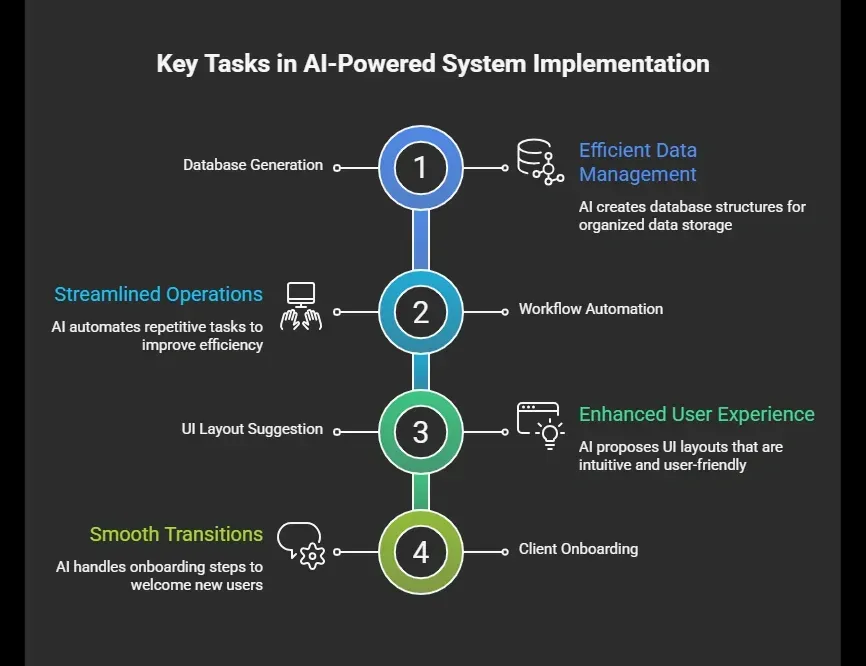 This means you can create a fully functional client portal in hours, not weeks.
Step-by-Step: Build a Client Portal in Less Than a Day
You don’t need advanced code skills to build a client portal today. Most modern app platforms use AI to guide you through the process.
Keep your first version simple. You can always customize and add more features later as your clients grow.
Step 1: Define Your Use Case
Start simple.
Ask yourself:
-
What do my clients need access to?
-
What data should be visible?
-
What workflows should run automatically?
Common use cases include:
-
Client onboarding portal
-
Project updates dashboard
-
Document sharing system
Keep it focused. You can always customize later.
Step 2: Choose the Right App Platform
Pick an app builder that supports AI features and lets you connect data easily.
Look for platforms that:
-
Support custom apps
-
Allow database connections
-
Offer drag-and-drop interface
-
Work across device types
Most client portal tools now include AI agents to speed things up.
Step 3: Set Up Your Database
Your portal runs on data.
Use tools like Google Sheets or built-in database systems to store:
-
Client details
-
Projects
-
Task lists
-
Files
Google Sheets is a great starting point because it’s simple and easy to connect. You can later move to a more advanced database if needed.
Step 4: Connect Everything
Now connect your data sources to the app. This step links your database to your interface. It allows users to log in and view only their own data.
Make sure you:
-
Connect projects to specific clients
-
Set permissions for users
-
Enable role based access control
This keeps the portal secure and organized.
Step 5: Build the Interface
Here’s the fun part. Use AI or templates to generate your interface.
You can create pages like:
-
Dashboard
-
Project tracking
-
File sharing
-
Messaging section
Keep the same interface across pages so clients don’t get confused. A clean interface improves client relationships.
Step 6: Automate Workflows
Now reduce manual work.
Set up workflows to:
-
Send updates automatically
-
Assign tasks
-
Notify clients
-
Track performance data
Automation helps teams save time and handle more clients without stress.
Step 7: Customize Your Portal
Now make it yours.
Customize:
-
Branding
-
Colors
-
Layout
-
Features
A custom client portal feels more professional than generic software. You can also add intake forms for new clients to simplify client onboarding.
Step 8: Test and Launch
Before sharing with clients:
-
Test all workflows
-
Check permissions
-
Verify data accuracy
Then invite users and let them log in. Congrats, you now have a fully functional client portal.
Your first version doesn’t need to be perfect. Build a simple client portal, get feedback from clients, and improve it step by step.
Common Mistakes to Avoid
Note: When you build a client portal, it’s easy to get carried away with features and ideas. But small mistakes early on can create confusion later for both teams and clients.
Even with AI, some mistakes can slow you down:
-
Adding too many features at once
-
Not setting proper permissions
-
Poor data structure
-
Ignoring user roles
-
Overcomplicating workflows
Keep things simple. Build, test, then improve.
A clean and focused client portal works better than a complex one. Start small, listen to your clients, and refine your workflows over time.
Rocket Mode: Building Faster with Rocket.new
If your goal is to build a client portal easily without getting stuck in code, Rocket.new gives you a direct path. It uses AI to turn simple prompts into working apps, so you can focus on your clients instead of technical setup.
Rocket.new works as an all-in-one platform where you can connect data, create apps, and manage workflows in one place. This makes it easier for teams to stay organized and deliver a smooth experience to clients.
Top Features
-
AI assisted app creation
-
Easy database setup
-
Workflow automation
-
Role based access control
-
Custom interface design
-
Integration with existing tools
How to Build a Client Portal with Rocket.new
With Rocket.new, you can build a client portal just by writing a prompt.
Instead of manually designing every step, you describe what you need, and the platform generates the app structure, database, and workflows for you.
Example Prompt:
“Build a client portal where clients can log in, view their projects, access documents, track project timelines, and receive updates. Include role based access control and a dashboard interface.”
Once you enter this, Rocket.new will:
-
Generate the app structure
-
Create a database for clients and projects
-
Set up workflows for updates and notifications
-
Build a clean interface
You can then customize and refine it based on your business needs.
Use Cases
-
Client onboarding portal: You can create intake forms, collect data, and onboard new clients in a structured way.
-
Project tracking dashboard: Clients can log in and view project timelines, updates, and task lists in real time.
-
Document sharing system: Share files and documents securely with clients, without relying on shared drives.
-
Customer portals for support: Provide support resources and messaging in one place for better client experience.
Rocket.new makes it easy to go from idea to a working client portal in hours. Start with a simple prompt, launch your first version, and improve it as your clients and workflows grow.
Benefits of Using a Client Portal
Note: Once you start using a client portal, the difference shows up quickly in how your teams and clients interact daily.
Let’s sum up what you gain:
-
Better client relationships
-
Less manual work
-
Organized data
-
Faster workflows
-
Improved communication
Most teams notice a big difference once they switch from scattered tools to a portal.
A simple client portal brings clarity to your processes and keeps everything in one place. It helps teams stay organized and gives clients a smoother experience.
Solving the Portal Problem Fast
Managing clients through emails, files, and multiple tools often leads to confusion. Important data gets scattered, workflows break, and clients feel out of sync with your business. Teams spend extra time searching for updates, while clients keep asking for the same information again and again.
A simple AI powered system can fix this by bringing everything into one place. You can build a client portal quickly, connect your data, and automate processes without heavy effort. Learning how to build a client portal with AI helps you save time, stay organized, and create a smoother experience for your clients.
Table of contents
- -Why Every Business Needs a Client Portal?
- -What Makes a Good Client Portal?
- -How AI Changes the Game?
- -Step-by-Step: Build a Client Portal in Less Than a Day
- -Step 1: Define Your Use Case
- -Step 2: Choose the Right App Platform
- -Step 3: Set Up Your Database
- -Step 4: Connect Everything
- -Step 5: Build the Interface
- -Step 6: Automate Workflows
- -Step 7: Customize Your Portal
- -Step 8: Test and Launch
- -Common Mistakes to Avoid
- -Rocket Mode: Building Faster with Rocket.new
- -Top Features
- -How to Build a Client Portal with Rocket.new
- -Use Cases
- -Benefits of Using a Client Portal
- -Solving the Portal Problem Fast