Rankings depend on page speed, structured data, crawlability, and content quality, not your CMS. Any stack can rank well when the technical foundations are right. Rocket.new ships sites with search-ready structure from the first build.
A founder ships a landing page on Next.js. The design is sharp, the copy converts, and the product is live. Then someone on the team asks about search rankings, and the first ten guides they find all assume WordPress. Here is the truth: search engines do not care what platform built your page.
According to AIOSEO's verified statistics for 2026, 95% of published web pages receive zero backlinks from other sites. That number holds true across WordPress and non-WordPress pages alike. The pages that do earn traffic share the same technical foundations no matter where they were built.
What follows is how to handle search visibility on any website, on any stack, with or without a single WordPress plugin installed.
Why WordPress Became the Go-To for Search Engine Work
WordPress earned its position as the default SEO platform for a clear reason: the plugin ecosystem made search tasks accessible to non-developers.
-
Yoast SEO changed expectations. The Yoast SEO plugin gave WordPress site owners a dashboard where they could write meta descriptions, check readability, and manage XML sitemaps without touching code. The Yoast team built one of the first content analysis tools that scored your writing in real time. Yoast SEO premium added redirect management, internal linking suggestions, and schema markup support on top of the free version.
-
Rank Math raised the bar. Rank Math matched Yoast SEO feature-for-feature and added Google Search Console access directly inside the WordPress dashboard. Rank Math gave users keyword strategy tracking, SEO scores, and advanced features like WP Meta SEO bulk editing on their free tier. Site owners who wanted more than one SEO plugin found Rank Math covered most SEO tasks without needing other plugins.
-
The WordPress plugins library created a one-stop shop. WordPress plugins for SEO numbered in the hundreds, from premium SEO pack options to specialized tools for local SEO, schema markup, and backlink analysis. The plugin ecosystem handled everything from XML sitemap creation to canonical URL management. Even small business owners with no technical background could install the best SEO plugin, connect Google Analytics, and start working on their WordPress SEO strategy from the WordPress dashboard.
The result was a generation of marketers and founders who associated good SEO with WordPress plugins, not with the underlying principles that actually drive search results. That association still holds weight. But the principles themselves are completely platform-independent, and any site, including those you generate as production-grade websites on modern platforms, can apply them.
What Do Search Engines Actually Evaluate on a Page?
Google uses over 200 ranking factors, but the core evaluation works the same way on every website. The search engine does not check what CMS is running. It checks what the page delivers.
Here is what matters most for good SEO on any platform:
| Ranking Signal | What Google Evaluates | Platform Dependency |
|---|---|---|
| Content relevance | Topical depth, keyword coverage, search intent match | None |
| Page speed | Load time, Core Web Vitals scores | None |
| Backlinks | Number and quality of external links pointing to your page | None |
| Site structure | URL hierarchy, internal linking, crawlable navigation | None |
| Structured data | Schema markup, rich snippets eligibility | None |
| Mobile-first design | Responsive layout, mobile usability | None |
The table is clear: no ranking signal depends on WordPress. What search engines evaluate is the output - the HTML, the speed, the data structure - not the tool that produced it.
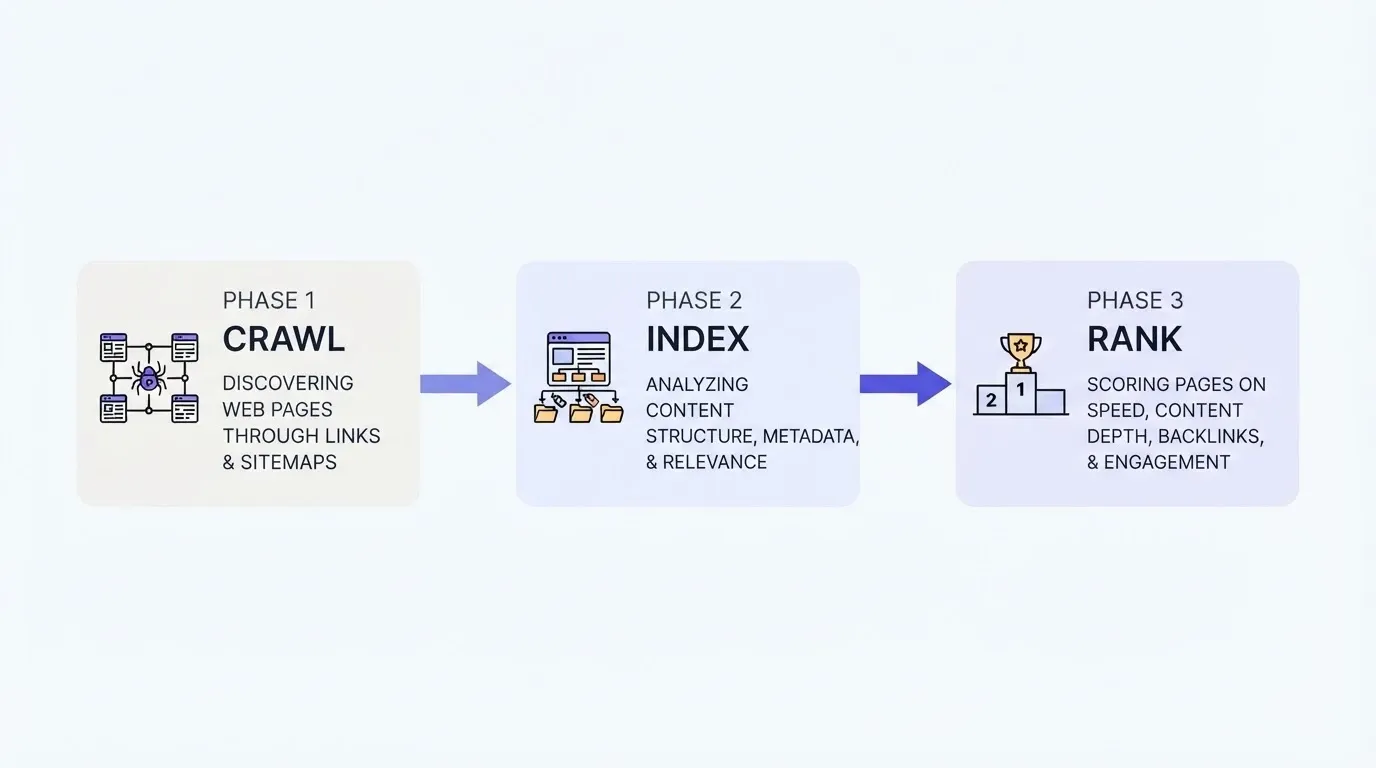
How Crawlability and Indexing Work
Search engines send crawlers to discover pages through links and XML sitemaps. The search console tells you which pages Google has indexed and which it cannot reach. Whether your site runs on WordPress or a custom stack, the crawl process is identical: submit your sitemap to Google Search Console and monitor indexing status.
Content Relevance and Topical Authority
Google rewards pages that demonstrate depth on a topic. You write content that answers a specific query thoroughly, support it with relevant data, and earn authority over time through consistent publishing. Keyword research drives this process. Content analysis tools exist independently of any CMS, and the best ones work through browser extensions or standalone platforms.
User Experience and Engagement Signals
Core Web Vitals measure page speed, interactivity, and visual stability. A fast page is a fast page regardless of whether it loads from a WordPress site or a static site generator. Site speed and website speed both come down to the same thing: how quickly does the page load for a real user on a real device?
How Does Technical SEO Work Without a CMS?
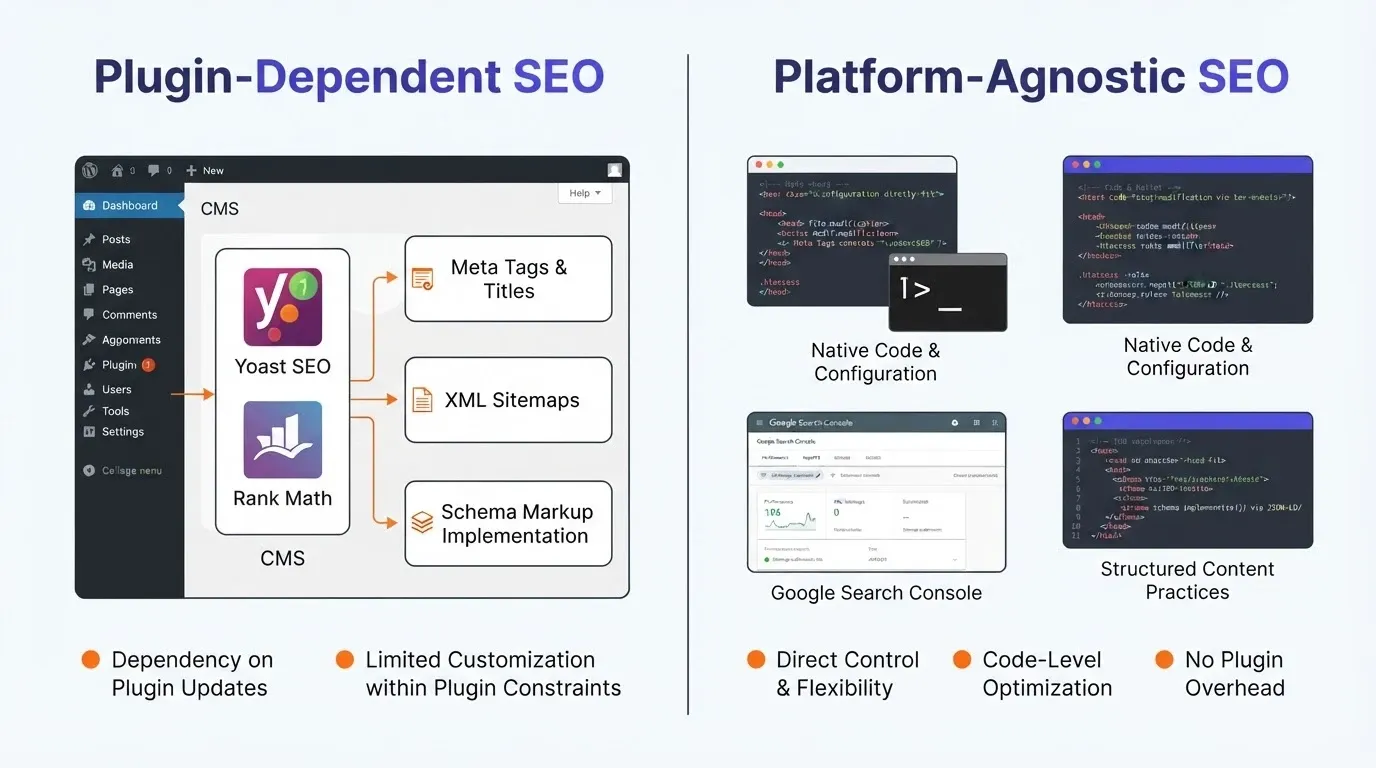
Technical SEO covers the behind-the-scenes work that makes your pages crawlable, indexable, and eligible for rich search results. On WordPress, a single SEO plugin handles most of this automatically. On other platforms, you handle the same SEO tasks through code, configuration files, or external tools.
The difference is method, not capability. Every technical SEO element that a WordPress plugin automates can be implemented natively on any stack.
Page Speed and Core Web Vitals
Site speed affects rankings directly. Google measures Largest Contentful Paint, Interaction to Next Paint, and Cumulative Layout Shift on every page. Website speed improvements like image compression, code minification, and server-side caching work the same way on any technology. The HTTP Archive reports that only 55.9% of websites pass all three Core Web Vitals benchmarks, regardless of which CMS they run.
XML Sitemaps and Crawl Directives
A WordPress SEO plugin like Yoast SEO or Rank Math generates your XML sitemap automatically. Outside WordPress, you generate your sitemap through build tools, static site generators, or a simple script. The XML sitemap creation process is straightforward: list your pages in a standardized format and submit it to Google Search Console. Search engines treat both methods identically.
Schema Markup and Rich Snippets
Schema markup tells search engines what your content means, not just what it says. Rich snippets appear when Google can read structured data on your page, giving you star ratings, FAQ accordions, or product details in search results. WordPress SEO plugins add schema through dropdown menus. On other platforms, you add JSON-LD directly to your page templates. The structured data format is the same either way.
Google Search Console lets you validate your schema markup and check for rich snippets eligibility. That validation works independently of your platform.
Canonical URLs and Redirect Management
Canonical URL management prevents duplicate content from splitting your SEO value across multiple pages. Redirect management handles old URLs, changed slugs, and moved content. Yoast SEO premium includes both features. Without WordPress, you configure canonical URLs in your HTML head and manage redirects through server config or hosting platform settings.
Handling Broken Links Across Platforms
Broken links hurt user experience and waste crawl budget. WordPress plugins scan for broken links automatically. On other platforms, tools like Screaming Frog or Ahrefs run the same scan externally. The fix is the same everywhere: update or remove dead links to keep your site structure SEO friendly.
Does Your Content Strategy Change Without WordPress Plugins?
The short answer is no. Content strategy for SEO follows the same playbook regardless of your platform.
-
Keyword research does not require a WordPress dashboard. Google Search Console, Ahrefs, SEMrush, and Ubersuggest all work independently. You build your keyword strategy the same way: find terms your audience searches for, assess competition, and plan content around those terms. Google Analytics gives you traffic data whether your site runs WordPress or not.
-
Internal linking works on every site. Internal linking distributes authority across your pages and helps search engines understand your site structure. WordPress SEO plugins like Yoast SEO provide internal linking suggestions, but manual internal linking using a spreadsheet or a tool like Screaming Frog works just as well. The strategy is identical: link related pages together with descriptive anchor text.
-
Content analysis is not locked to a single platform. Yoast SEO and Rank Math score your content quality inside the WordPress dashboard. SurferSEO, Clearscope, and Frase do the same thing in a browser tab, working on any website content from any platform. Good SEO content is good content anywhere.
A comment on Reddit's r/SEO community puts it directly: "SEO is independent of Panels, Dashboards and Programming languages." That captures the reality. The WordPress dashboard is a convenience layer, not a requirement.
You can start from ready-made starting points and still apply the same content strategy principles to every page you publish.
Keyword Research Without Plugin Dashboards
Google Analytics and Google Search Console give you keyword research data for free. Paid tools like Ahrefs and SEMrush provide backlink analysis, keyword volume, and competitor tracking independently of your CMS. You do not need a WordPress SEO plugin to find what your audience searches for.
Internal Linking Strategies Without Automated Tools
Automated internal linking suggestions are convenient, but they are not the only option. Map your content in a spreadsheet, group related topics, and link them deliberately. This manual approach often produces better results because you are making strategic decisions about your SEO, not following algorithmic suggestions.
Meta Descriptions and Title Tags Without a Dashboard
Every web framework supports custom title tag and meta descriptions in page templates. Next.js uses the Head component. Webflow has native SEO settings. Even a plain HTML page accepts these tags. WP Meta SEO and other WordPress dashboard tools simply give you a form field for what is already a two-line code change.
Common Mistakes When Handling SEO Outside WordPress
The most common problems come from two opposite directions: assuming you need WordPress-level tooling, or ignoring SEO discipline entirely after leaving the WordPress ecosystem.
Assuming You Need a Plugin for Every SEO Task
WordPress normalized the idea that every SEO task needs its own plugin. Many site owners carry this mindset to other platforms and feel stuck when there is no direct equivalent to Yoast SEO or Rank Math.
-
Most technical SEO work is configuration, not software. XML sitemaps, canonical URLs, meta descriptions, redirect management, and schema markup are all standards-based. They do not require a proprietary tool.
-
Too many plugins slow WordPress sites down. The plugin ecosystem that made WordPress SEO accessible also creates a common WordPress SEO problem: plugin bloat. Running multiple WordPress plugins for SEO, analytics, caching, and security increases page load time.
-
The best SEO plugin is no substitute for a good SEO strategy. Rank Math and Yoast SEO premium handle SEO tasks well, but they cannot compensate for weak content, poor site structure, or missing keyword strategy. The WordPress SEO plugins are SEO elements in your toolkit, not the strategy itself.
Ignoring Technical Foundations After Leaving WordPress
The opposite mistake is equally damaging. Builders who leave WordPress sometimes assume that a modern framework handles SEO automatically.
-
Next.js, Astro, and Gatsby are fast, but they still need configuration. Server-side rendering, pre-rendering, and static generation all affect how search engines see your pages. You still need to set up your XML sitemap, connect your search console, and handle redirect management manually.
-
Existing site migrations break SEO when redirects are missing. Moving an existing site from WordPress to a new platform without redirect management is one of the most common SEO mistakes. Every old URL needs a proper redirect.
-
Schema markup does not appear by default. Structured data for rich snippets, FAQ blocks, and product data requires deliberate configuration on any platform.
Paying for Features You Can Handle Natively
WordPress SEO plugins have paid plans and premium version upgrades that cover unlimited sites, real time insights, and advanced features like WP Meta SEO bulk editing. The free tier of Yoast SEO or Rank Math handles basic SEO needs, and the free version is enough for most WordPress website owners.
On other platforms, the same capabilities come from plans that include SEO features natively or from free external tools. You do not need to replicate the WordPress plugin ecosystem to get the same results. Site owners who build on large websites or across unlimited sites often find that native solutions are cheaper and faster.
How to Build an SEO Workflow on Any Stack, Step by Step
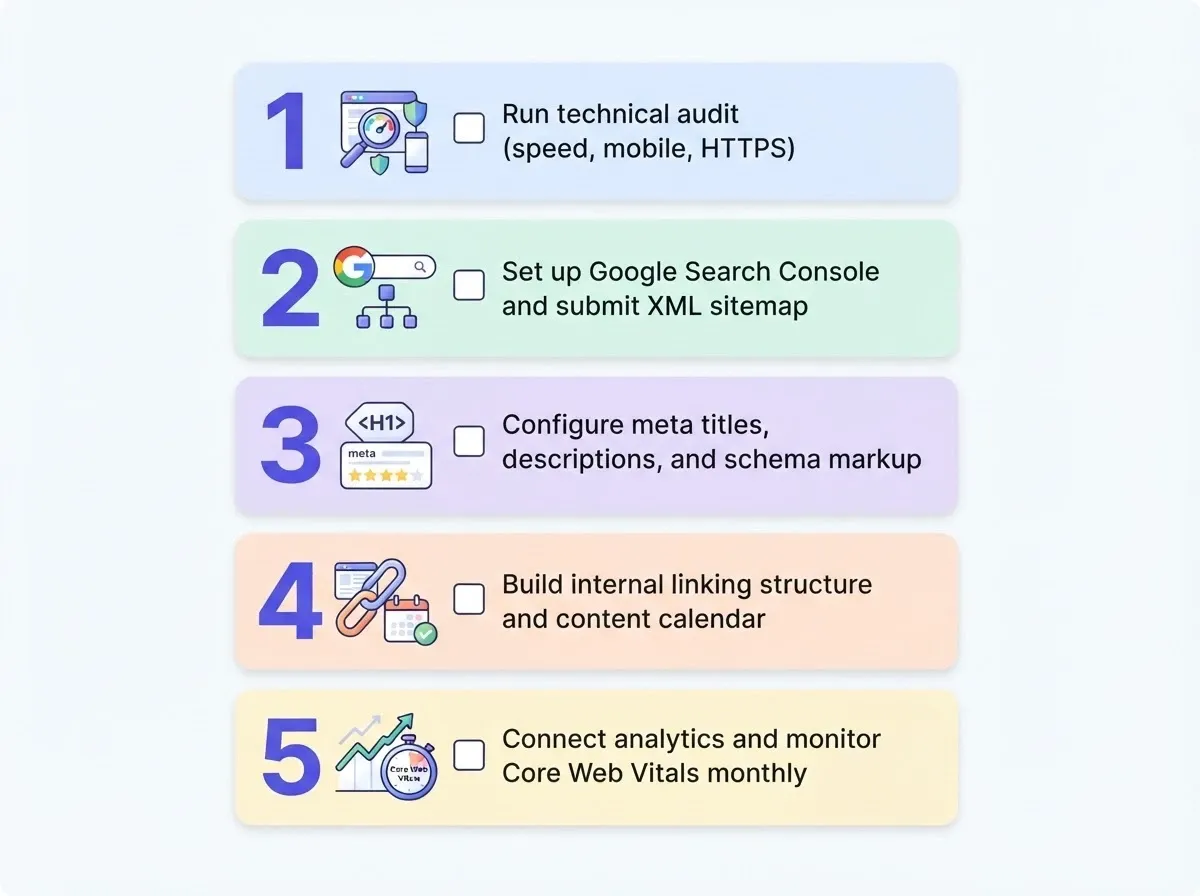
Here is the practical process. This SEO framework works whether you are on WordPress, Next.js, Webflow, a static site generator, or a custom-built application.
Step One: Connect Google Search Console and Analytics
Your first SEO task on any new site is to verify it in Google Search Console and connect Google Analytics. Search console shows you what Google sees: indexed pages, crawl errors, and search performance data. Google Analytics tracks traffic sources, user behavior, and conversions. This connection works the same way on every platform. You paste a verification code into your site header and submit your XML sitemap.
Step Two: Set Up Local SEO Signals
If your business serves a geographic area, local SEO is just as important on a custom site as on a WordPress website. Claim your Google Business Profile, add your business to relevant directories, and include local schema markup on your site. Local SEO does not depend on WordPress plugins. It depends on consistent business information across the web.
Step Three: Build Off-Page Signals Through Social and Outreach
Social media drives awareness and sends engagement signals that support your SEO strategy. Share your content on social media platforms where your audience spends time. Digital marketing campaigns that combine social media promotion with link building create the off-page authority that search engines reward.
Social media profiles, industry mentions, and earned backlinks all contribute to your domain authority. Paid ads can supplement your organic search traffic during the early months, but organic SEO traffic sources compound over time.
The 2026 First Page Sage CTR report found that organic position one earns just 7.1% of clicks in blended results, down from 39.8% the year before. Rankings change quickly when AI answers dominate the page. A strong digital marketing presence across multiple traffic sources matters more than ranking for a single term. You can connect your analytics tools directly into whatever platform you build on.
Building Search-Ready Products with Rocket.new
Every SEO principle covered so far applies to sites built on Rocket.new. The difference is that Rocket ships with these foundations already configured, so you skip the setup and go straight to content and strategy.
SEO Features Built Into Every Rocket Build
Rocket.new generates sites with clean semantic HTML, proper heading hierarchy, mobile-responsive layouts, and fast page speed out of the box. Every build includes the technical SEO baseline that WordPress sites need multiple plugins to achieve:
-
Meta tags and SEO-ready structure by default. Page titles, meta descriptions, and Open Graph tags are configured from your content. No SEO plugin required.
-
Schema markup and structured data on request. Ask Rocket to add JSON-LD for your business type, product pages, or FAQ sections. The same structured data that WordPress SEO plugins like Yoast SEO premium or Rank Math add through dropdown menus.
-
XML sitemap and robots.txt generation. Rocket handles XML sitemap creation and crawl directives without a separate WordPress plugin. Your search console picks it up automatically.
-
Built-in performance monitoring. Core Web Vitals tracking, site speed reports, and accessibility scores are available inside the platform. No Google Analytics setup required for basic performance data, though you can connect it for full analytics.
-
SEO and accessibility audits. Rocket runs a full check covering meta tags, schema validation, sitemap status, and page structure. The whole process takes minutes, not the hours of manual work that many WordPress website owners spend managing SEO plugin settings across their WordPress sites.
Why You Stop Managing Plugins and Start Shipping
WordPress SEO requires ongoing plugin management: updates, compatibility checks, speed monitoring, and paid plan renewals across Yoast SEO, Rank Math, or whatever premium SEO pack you run. That maintenance cost scales with every WordPress site you manage.
Rocket.new removes that layer entirely. You describe what you want, get a production-grade website with SEO foundations included, and research what to build before you ship using the same platform. The SEO framework is not something you bolt on after the build. It is part of the build.
The Platform Matters Less Than What You Do on It
Good SEO is good SEO, regardless of what generates your HTML. The fundamentals that drive rankings - site speed, content quality, structured data, internal linking, and backlink authority - work identically on WordPress, Next.js, Webflow, or any other platform. What separates sites that rank from sites that do not is execution, not technology choice.
The WordPress plugin ecosystem made SEO accessible to millions of website owners who did not write code. That contribution is real. But the SEO friendly practices that those plugins automate are available to every site owner on every platform today.
Ready to build a site where search visibility is handled from the start? Try Rocket.new and generate a production-grade website with the technical SEO baseline configured in minutes, not months.
Table of contents
- -Why WordPress Became the Go-To for Search Engine Work
- -What Do Search Engines Actually Evaluate on a Page?
- -How Crawlability and Indexing Work
- -Content Relevance and Topical Authority
- -User Experience and Engagement Signals
- -How Does Technical SEO Work Without a CMS?
- -Page Speed and Core Web Vitals
- -XML Sitemaps and Crawl Directives
- -Schema Markup and Rich Snippets
- -Canonical URLs and Redirect Management
- -Handling Broken Links Across Platforms
- -Does Your Content Strategy Change Without WordPress Plugins?
- -Keyword Research Without Plugin Dashboards
- -Internal Linking Strategies Without Automated Tools
- -Meta Descriptions and Title Tags Without a Dashboard
- -Common Mistakes When Handling SEO Outside WordPress
- -Assuming You Need a Plugin for Every SEO Task
- -Ignoring Technical Foundations After Leaving WordPress
- -Paying for Features You Can Handle Natively
- -How to Build an SEO Workflow on Any Stack, Step by Step
- -Step One: Connect Google Search Console and Analytics
- -Step Two: Set Up Local SEO Signals
- -Step Three: Build Off-Page Signals Through Social and Outreach
- -Building Search-Ready Products with Rocket.new
- -SEO Features Built Into Every Rocket Build
- -Why You Stop Managing Plugins and Start Shipping
- -The Platform Matters Less Than What You Do on It