Training an AI model starts with picking the right approach: prompting, RAG, fine-tuning, or from scratch. Most teams need fine-tuning, not a foundation model. This guide covers every step, the real costs, the tools, and how to turn a working model into a product.
Training an AI model means teaching a system to make predictions or decisions by exposing it to data and adjusting its internal parameters until its outputs match a target.
For most builders, “how to train an AI model” is less a question of code and more a question of which approach (prompting, RAG, fine-tuning, or training from scratch) matches your data, budget, and timeline.
What Does Training an AI Model Actually Mean?
Before picking a method, it helps to understand the vocabulary. Three distinctions matter most.
Training vs. inference: Training is the process of adjusting a model's weights using data, so it learns a task. Inference is running that trained model on new inputs to get predictions. Most builders interact with inference; training is what happens before the model is deployed.
Supervised, unsupervised, and reinforcement learning: Supervised learning trains on labeled data where each input has a known correct output, making it the standard approach for classification and prediction. Unsupervised learning finds patterns in unlabeled data. Reinforcement learning trains a model through feedback signals from an environment rather than labeled examples.
Pre-training vs. fine-tuning: Pre-training builds a foundation model from scratch on a massive corpus. Fine-tuning takes that pre-trained model and adapts it to a specific domain or task using a much smaller, targeted dataset. For most teams, fine-tuning a pre-trained model is the practical entry point.
Which Path Actually Fits Your Goal?
Not all AI model work is the same. The first decision determines your timeline, your budget, and whether the project ships at all. Think of it as a ladder with four rungs where each adds more control but also more cost and complexity.
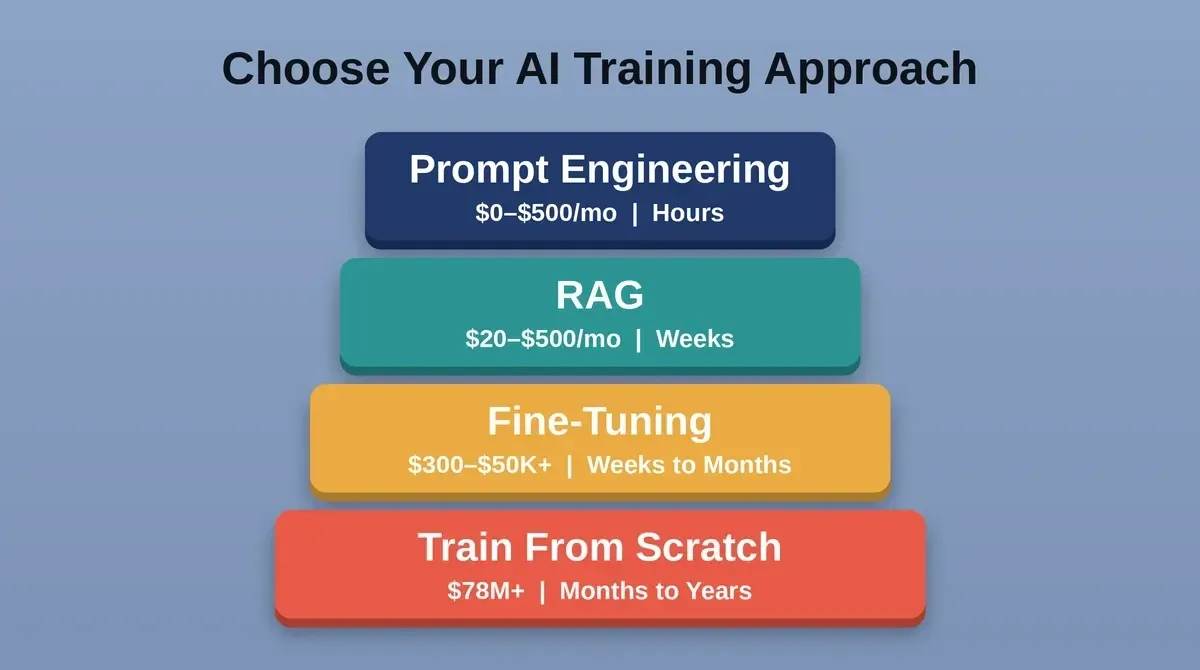
Four AI model training approaches compared by cost, data requirements, and time to deploy.
| Approach | Typical Cost | Data Needed | Time to Deploy | Best When |
|---|---|---|---|---|
| Prompt Engineering | $0–$500/mo | None | Hours | General tasks, rapid prototyping |
| RAG | $20–$500/mo infra | Your knowledge base | Weeks | Changing docs, auditability needed |
| Fine-Tuning | $300–$50,000+ | Hundreds to thousands of labeled examples | Weeks to months | Domain-specific behavior, structured tasks |
| Training From Scratch (frontier) | $78M–$192M+ | Trillions of tokens | Months to years | Foundation model, extreme IP requirements |
| Training From Scratch (small model) | $1,000–$50,000+ | Millions of examples | Weeks to months | Narrow task, full data ownership required |
Which path is right for you?
-
If you need general-purpose answers and your knowledge base changes often, start with RAG
-
If you need consistent tone, format, or domain behavior, fine-tune a pre-trained model
-
If your API spend is under ~$15K/month, you likely don't need a custom model at all
-
If you need a foundation model or have strict IP requirements, train from scratch
-
If you're unsure, fine-tuning delivers the performance of a custom model at a fraction of the cost; start there
A solid production RAG checklist is worth reviewing before committing to fine-tuning. As Shilpa Bhatla wrote in an industry deep-dive on Neuronimbus: "Honest answer: for most organizations, most of the time, you don't need to train from scratch. The real question is what level of customization does your use case actually need?"
How to Train an AI Model Step by Step
Once you've decided that fine-tuning or full training is the right call, the process follows a predictable sequence. Each stage feeds the next, and skipping one creates problems later.
The six-stage AI model training workflow from problem definition to production deployment.
1. Define the problem and success metric: Before touching any training data, write down what the model needs to do and how you'll measure success. A concrete metric (reduce error rate by X%, classify support tickets with Y% accuracy) defines when to stop training and prevents scope creep.
2. Collect and clean your AI model training data: Data preparation and collection consume 60–80% of total project time on most AI model projects. You need relevant data that's clean, properly formatted, and free of duplicates. Budget two months of a three-month project just for this stage.
3. Label and annotate: For supervised learning tasks, each training example needs a ground truth label. Active learning techniques can reduce labeling effort by 30–40% by prioritizing the most informative examples. Budget for expert annotation in specialized domains, as rates vary significantly by field and complexity.
4. Choose a base model or architecture: Unless you have a specific reason to start from scratch, begin with a pre-trained model. Open-source options like Llama, Mistral, and Phi give you a strong foundation. PyTorch is the dominant framework for deep learning research, and Hugging Face Transformers is the standard library for LLM fine-tuning.
5. Train and validate: Split your prepared data into training, validation, and test sets. The model adjusts its weights through multiple epochs, and you monitor performance on the validation set to avoid overfitting. Key hyperparameters include learning rate, batch size, and weight decay.
6. Deploy and monitor: A trained model that lives in a notebook doesn't help anyone. Deploy with a staged rollout: shadow deployment first, then canary release at 5–10% traffic, then full production. Plan for monitoring, drift detection, and periodic retraining from day one.
The process is linear in theory. In practice, you'll loop between steps 3–5 multiple times before the model meets your success metric.
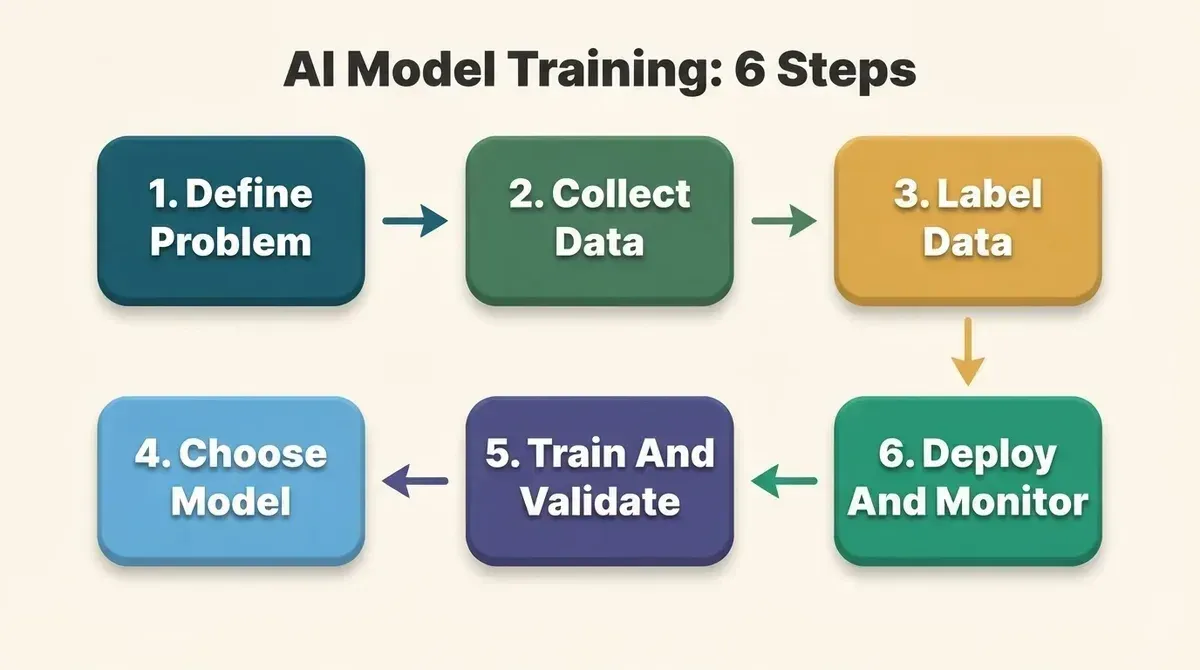
Six-step AI model training workflow from problem definition through production deployment.
Where Do Most Teams Get It Wrong?
Knowing the workflow is one thing. Knowing where it breaks is what separates shipped projects from abandoned ones.
In 2025, 42% of companies abandoned most of their AI initiatives, up from 17% the year before. Here's where the gaps usually are:
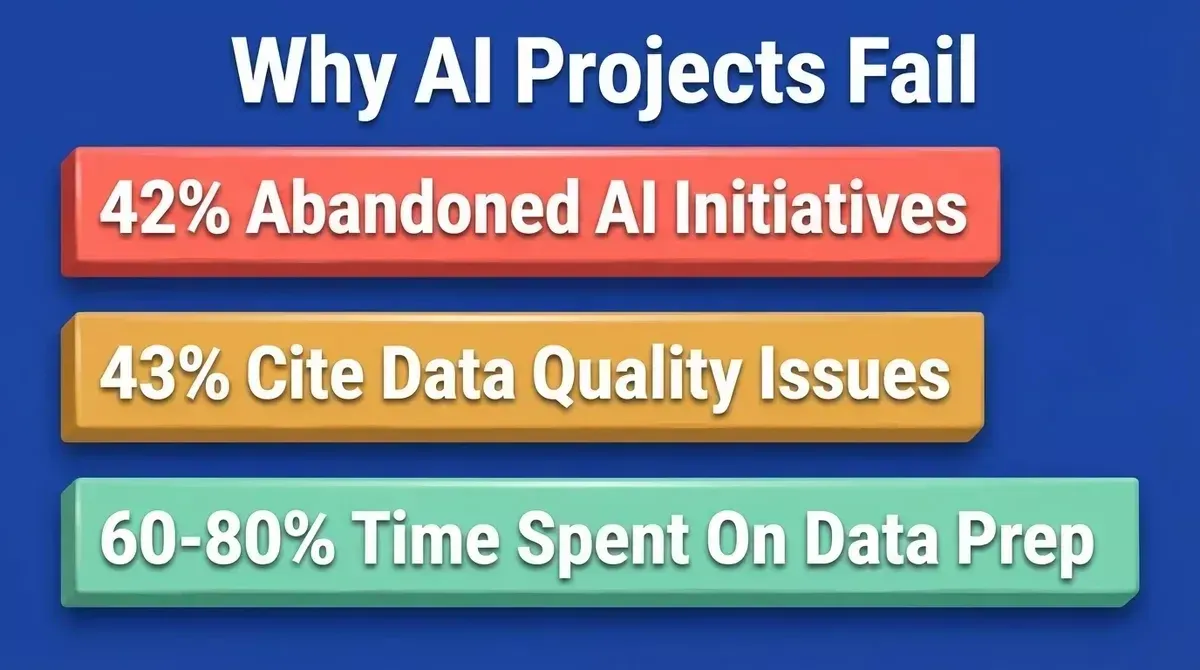
Key reasons AI initiatives stall: abandonment rates, data quality obstacles, and time allocation.
**Data quality, not quantity, is the real bottleneck: **43% of organizations cite data quality as their top obstacle. A large dataset of noisy, unlabeled data is not the same as a smaller set of clean, labeled data a machine learning model can actually learn from.
No evaluation metric defined upfront: If you can't measure whether the model is working, you can't know when to stop training. Too many teams skip this step and end up with a model that "feels good" but doesn't move a business metric.
Overtraining and overfitting: When a neural network memorizes the training data instead of learning generalizable patterns, it performs well on training samples and poorly on new data. Weight decay, early stopping, and cross-validation help prevent this.
Ignoring compute costs: Cloud GPU costs vary by provider and instance type and change frequently, so always check current pricing before budgeting a training run. Costs compound fast during hyperparameter tuning.
No plan for what happens after training. Budgeting 15–40% of initial development cost annually for ongoing operations (monitoring, retraining, drift detection) is the norm, not the exception.
When not to use this approach: If your use case can be solved with prompt engineering or RAG, don't fine-tune. If your data is too small or too noisy, fine-tuning will underperform a well-prompted base model. If you lack ML expertise in-house, managed fine-tuning services are a safer starting point than running your own training infrastructure.
Tools for AI Model Training
The tooling for training an AI model has become significantly more accessible. You don't need a PhD or a six-figure GPU cluster to get started.
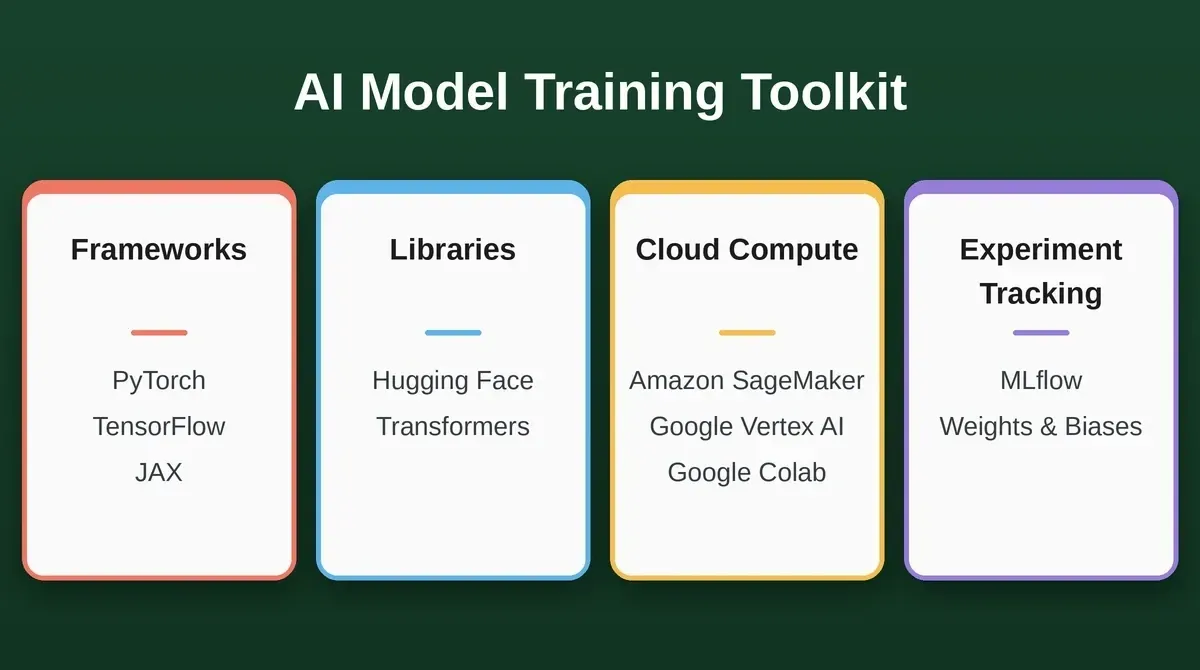
The core AI model training toolkit: frameworks, libraries, cloud compute, and experiment trackers.
| Tool | Category | Best For | Skill Level |
|---|---|---|---|
| PyTorch | Framework | Research, custom architectures | Intermediate to Advanced |
| TensorFlow / Keras | Framework | Production pipelines, TPU workloads | Intermediate |
| JAX | Framework | Research, high-performance compute | Advanced |
| Hugging Face Transformers | Library | LLM fine-tuning, NLP tasks | Beginner to Intermediate |
| Amazon SageMaker | Managed service | Scalable training, MLOps | Intermediate |
| Google Vertex AI | Managed service | GCP-native ML pipelines | Intermediate |
| Google Colab | Cloud notebook | Experimentation, prototyping | Beginner |
| OpenAI Fine-Tuning API | Managed service | GPT model customization, no infra | Beginner |
| MLflow | Experiment tracking | Run logging, model registry | Beginner to Intermediate |
| Weights and Biases | Experiment tracking | Collaboration, hyperparameter sweeps | Beginner to Intermediate |
PyTorch remains the dominant framework for deep learning research. Hugging Face Transformers is the standard library for working with pre-trained large language models, covering supervised fine-tuning, text generation, image classification, and natural language processing tasks. Experiment tracking tools like MLflow and Weights and Biases are not optional for serious projects.
Once you've selected your stack, you'll also want to think about how the trained model connects to a real product. Understanding how to integrate AI into an app is the step most training guides skip entirely.
From Trained Model to Usable Product with Rocket.new
Here's the step that most training guides skip entirely. Your model works. Your metrics look strong. Now what?
Important: Rocket does not train AI models. What it does is solve the problem that comes immediately after training: turning a working model endpoint into a product that users can actually interact with.
A trained model sitting behind an API endpoint isn't a product. It's a backend service. Users need an interface: a dashboard, a chat UI, an internal tool, or a customer-facing application. Building that front-end traditionally means hiring developers, choosing frameworks, configuring deployments, and spending weeks on work that has nothing to do with the model itself.
Rocket (Rocket.new) is a vibe solutioning platform with three pillars that map directly onto the AI product lifecycle:
Rocket.new's three pillars: Solve for research, Build for production apps, Intelligence for competitor monitoring.
Before You Train, Use Solve
Validate with Solve whether your AI use case has a real market before spending on training infrastructure. It produces structured, evidence-backed reports covering market analysis, competitive teardowns, and product direction. Export as PDF, HTML, or PowerPoint for stakeholders.
After You Train, Start Build
Describe what you want the app to do, and Build generates a production-ready Next.js web app or Flutter mobile app, complete with UI, navigation, logic, and real code you can download or sync to GitHub. It supports:
-
Chat interfaces connected to any REST endpoint via the APIs connector (import from Postman, cURL, or Swagger and bind responses to UI components)
-
Dashboards that visualize model predictions, accuracy metrics, and monitoring data
-
Internal tools where operations teams can upload data, run batch predictions, and review results
-
Customer portals where end users interact with your model without seeing the technical layer underneath
The output uses a Theme panel for site-wide branding and Visual Edit for direct element-level changes, with no manual code required. You can deploy to a custom domain, submit to Google Play and the App Store, or download the full codebase and sync it to GitHub. If you're building an AI-powered SaaS product around your model, the fastest way to build an MVP covers every gate before you go live.
After You Launch, Monitor With Intelligence
Intelligence monitors competitors across nine signal pillars (website changes, pricing shifts, hiring patterns, product releases, and more) so you know when a rival ships a competing AI feature before your users do.
Most AI app builders focus on code generation alone. Rocket adds strategic research that validates your idea before you build, and competitive intelligence that monitors your market after you launch.
Sign up in about 30 seconds, no credit card required, and get your first result in under five minutes.
Your Model Is Only as Good as What People Can Do With It
The decision ladder matters more than the training code. Prompting, RAG, fine-tuning, and full training each solve different problems. The right choice depends on your AI model training data, your budget, and how quickly you need results.
The real gap isn't building the model. It's putting it inside something people can actually use. That's where the project becomes a product, or stays a notebook experiment.
Ready to turn your trained model into a product? Describe your AI-powered app at Rocket, sign up in about 30 seconds, no credit card required, and get your first result in under five minutes.
Table of contents
- -What Does Training an AI Model Actually Mean?
- -Which Path Actually Fits Your Goal?
- -How to Train an AI Model Step by Step
- -Where Do Most Teams Get It Wrong?
- -Tools for AI Model Training
- -From Trained Model to Usable Product with Rocket.new
- -*Before You Train, Use Solve*
- -*After You Train, Start Build*
- -*After You Launch, Monitor With Intelligence*
- -Your Model Is Only as Good as What People Can Do With It