
How can teams collaborate more efficiently online? Discover how a resource sharing website helps communities exchange files, knowledge, and tools while improving collaboration, organization, and accessibility across users.
How can teams keep guides, tools, and information organized in a single place?
The answer is simple. Build a resource-sharing website that collects helpful resources, guides, and tools on a single page or set of pages so your audience can access everything easily.
Modern collaboration depends on organized information. In fact, about 85% of employees say collaboration tools improve productivity, according to a workplace collaboration study.
When teams cannot locate the right resources or links, work slows down. A well-structured resource center on your site can solve that problem.
In this blog, we will walk through how to build a resource-sharing website that supports collaboration, organizes resources properly, and attracts readers and users through strong link building and helpful content.
Why Resource Sharing Websites Matter?
A resource-sharing website serves as a hub where users can access online resources, guides, and tools in one place. Think of it as a digital library for your audience.
Many organizations create a resource center or resource hub that collects valuable resources, blog guides, tools, and reference links. These pages become a one-stop shop for readers searching for helpful information.
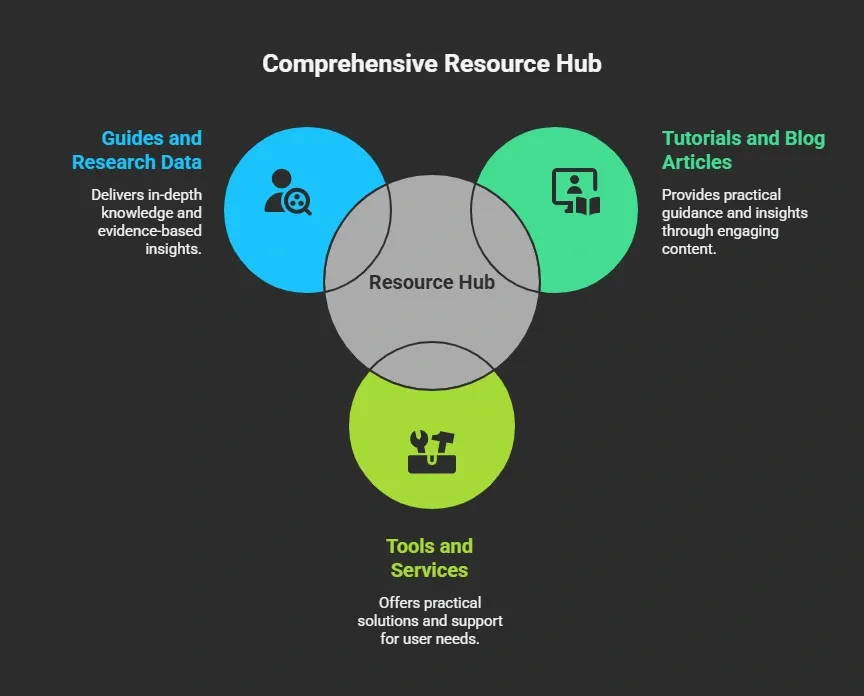
Resource pages exist because they save readers time. Instead of running endless search queries, users can quickly find curated resources.
Resource pages also support SEO. Search engines use links to evaluate authority. Link building helps a site gain visibility because more relevant links point to it.
Steps to Build a Resource Sharing Website
So, how do you actually build a resource-sharing website that people find helpful and want to return to?
The process is not complicated, but it does require a clear plan. You need to understand your audience, organize your resources, create helpful pages, and promote them through smart link building. A well-planned resource center can turn your site into a trusted place where users come to find helpful resources, tools, and guides.
In the next sections, we will walk through the main steps you can follow to create a resource-sharing website that attracts readers, organizes online resources, and grows traffic through link building on resource pages.
Step 1: Define Your Audience and Their Needs
Before you create any page or content, start with the audience.
Ask yourself:
- Who is the target audience?
- What problems do they face?
- What resources would help them?
Understanding your audience helps shape your content strategy.
For example:
| Audience Type | Needed Resources | Example Content |
|---|---|---|
| startup founders | business tools | marketing tools directory |
| developers | coding tools | API guides and tutorials |
| marketers | SEO tools | link building strategies |
The goal is to identify your audience's pain points and provide helpful resources that solve them.
When you build a resource center with the right resources, users stay longer on the site and return for new content.
Step 2: Plan the Structure of the Resource Center
Now it is time to structure your resource center.
Your resource center can be:
- A standalone page
- A section of the website
- A full resource hub
Many websites start with a landing page that organizes different resource pages.
Example structure:
Main Resource Center Page
- Tools and services
- Tutorials
- Research and data
- Blog posts
- News posts
- Downloadable guides
Each section links to more relevant pages. This approach helps users navigate easily and helps search engines understand your site.
Step 3: Create Valuable Content and Resource Pages
The heart of a resource-sharing site is the content. Your content strategy should focus on helpful content that adds value.
Examples of resource pages you can create:
- Marketing resources page
- Startup tools page
- Developer documentation page
- SEO tools resource page
- Productivity tools directory
Each resource page should include curated resources and links to them.
A strong resource page usually contains:
- Curated tools
- Tutorials
- External resource links
- Blog guides
- Helpful resources
A resource page works well when it becomes a valuable resource for the audience.
Step 4: Find Resource Pages for Link Opportunities
Resource-sharing websites benefit from building links to resource pages.
This strategy involves finding resource sites that already link to helpful tools and guides. Then you request inclusion.
Resource page link building works well because these pages exist to list useful resources.
To find resource pages, use search queries such as:
- Marketing resources
- SEO tools resources
- Startup resources list
You can also use advanced search operators like:
- keyword + resources
- keyword + helpful links
This helps you find resource pages where your content might fit.
Step 5: Build Links Through Outreach
Link building plays a big role in growing a resource-sharing site. Once you find resource pages, you can reach out to resource page owners.
Send a friendly outreach email suggesting your resource.
Example outreach email:
Subject: Resource suggestion for your marketing resources page
Hello,
I noticed your marketing resources page and found it very helpful. We recently created a guide that might add value to your audience.
If you think it fits, feel free to include it.
Thanks!
This process helps build links and grow your backlink profile.
Link builders often run email campaigns and send follow ups to resource page owners to increase response rates.
Step 6: Maintain and Improve Your Resource Pages
A resource sharing website needs regular updates.
This includes:
- Checking broken links
- Updating tools and services
- Adding new content
- Reviewing outdated resources
Broken links create a poor user experience and reduce trust. Running a periodic content audit helps identify pages that need updates.
SEO tools and analytics tools like Google Analytics help monitor traffic and engagement. This data shows which resource pages bring the most users and referral traffic.
Step 7: Use Resource Pages for Link Building Growth
Resource page link building is widely used in SEO. Many marketers rely on it because it helps build links from resource sites with strong domain authority.
Benefits of resource page link building:
- More traffic
- Better backlink profile
- Improved domain authority
- Visibility in search engines
Resource pages also attract links naturally when readers find the content helpful. When your resource center becomes useful for the audience, other sites begin linking to it.
Common Mistakes When Building Resource Sites
Many websites try to create a resource center but end up with pages that users rarely visit. This usually happens when resources are not properly organized or when the content does not meet the audience's needs.
Avoiding a few common mistakes can make your resource hub far more helpful for readers. Some resource sites fail because of poor planning.
Common mistakes include:
- Too many irrelevant links
- Outdated resources
- Poor page structure
- No content strategy
Another mistake is ignoring the audience. Your resources should match the audience's needs. A good resource hub focuses on helpful content that solves real problems.
Community Insight
In LinkedIn’s top content on link-building strategies, many professionals highlight similar thinking:
Pages that offer educational content, organized resources, and tools are more likely to attract backlinks from other sites especially when those links help explain a topic or answer a question. -LinkedIn
This reflects a practical insight relevant to resource pages and collaborative websites. When your resource center is genuinely helpful and organized well, other creators and site owners are more likely to reference it as a valuable resource, which improves visibility and traffic.
Build Resource Sharing Websites Faster with Rocket.new
Platforms like Rocket.new help creators launch websites quickly, making it much easier to build a resource-sharing hub.
It aligns perfectly with building a resource-sharing website, as it allows teams to structure content, organize resources, and create pages without heavy development work.
Top Features
- Prompt to App Creation: Builds apps directly from single prompts
- Figma Import: Converts design files into live, editable layouts
- AI-Powered Backend: Automatically handles logic, data, and workflows
- Custom Domain Support: Publishes projects with a branded domain
- Code Export: Allows developers to extend or customize later
- Live Preview: Shows instant updates while editing
- Reusable Components: Speeds up building with ready-to-use elements
- Command-based actions: Use / and @ to run actions and quickly scope edits.
These features help you quickly set up resource pages, link helpful resources, and design a resource center that’s easy for your audience to navigate.
By using Rocket.new, teams can focus on curating valuable resources and creating a well-organized resource hub instead of getting stuck in technical details.
This makes Rocket.new not just a website builder, but a tool that directly supports the goal of creating collaborative, user-friendly resource-sharing websites.
👉Build Resource Sharing Website with Rocket 🚀
Solving Collaboration with Smart Resource Websites
Many teams struggle to keep resources, tools, and helpful links organized. Users often waste time searching across multiple pages and sites, slowing collaboration and productivity. A well-structured resource center collects everything in one place, making it easier for teams and communities to access what they need.
Learning how to build a resource-sharing website allows organizations to organize knowledge, support collaboration, and attract readers through useful resources and link building. By focusing on helpful content, organized resource pages, and audience needs, your site can become a trusted hub that brings real value to users and readers.
Table of contents
- -Why Resource Sharing Websites Matter?
- -Steps to Build a Resource Sharing Website
- -Step 1: Define Your Audience and Their Needs
- -Step 2: Plan the Structure of the Resource Center
- -Step 3: Create Valuable Content and Resource Pages
- -Step 4: Find Resource Pages for Link Opportunities
- -Step 5: Build Links Through Outreach
- -Step 6: Maintain and Improve Your Resource Pages
- -Step 7: Use Resource Pages for Link Building Growth
- -Common Mistakes When Building Resource Sites
- -Community Insight
- -Build Resource Sharing Websites Faster with Rocket.new
- -Top Features
- -Solving Collaboration with Smart Resource Websites