
In 2026, you can build backend without coding. AI platforms generate production-ready databases, APIs, and auth systems from plain English prompts. Non-technical founders ship complete server-side infrastructure in hours, not weeks.
Why are non-technical founders shipping production backends faster than engineering teams did three years ago?
The answer sits at the intersection of AI code generation and full-stack automation. According to the Stack Overflow 2024 Developer Survey, 76% of developers now use or plan to use AI tools in their workflow, with 82% applying them directly to writing code.
That shift has opened a door for everyone else: the founders, operators, and product thinkers who understand what to build but never learned how to code it.
This blog walks through how AI platforms handle server-side logic, what a no-code backend actually looks like in practice, and where the real pitfalls hide.
What "Build Backend Without Coding" Actually Means
"Backend" is everything users never see but always depend on. Think of it as the engine under the hood. It is the server logic that processes requests, the database that stores data, the authentication system that verifies identity, and the APIs that connect your app to third-party services.
Building backend without coding means using AI platforms to generate, configure, and deploy all of these components through natural language. You describe what your application should do, and the AI translates that into production-grade server infrastructure.
This is not the same as traditional no-code tools like Bubble or Airtable, which use proprietary visual builders with fixed logic. AI-generated backends produce real code in standard frameworks like Next.js. You own the output, can export it to GitHub, and can hand it to a developer at any time.
The Three Layers Every Backend Needs
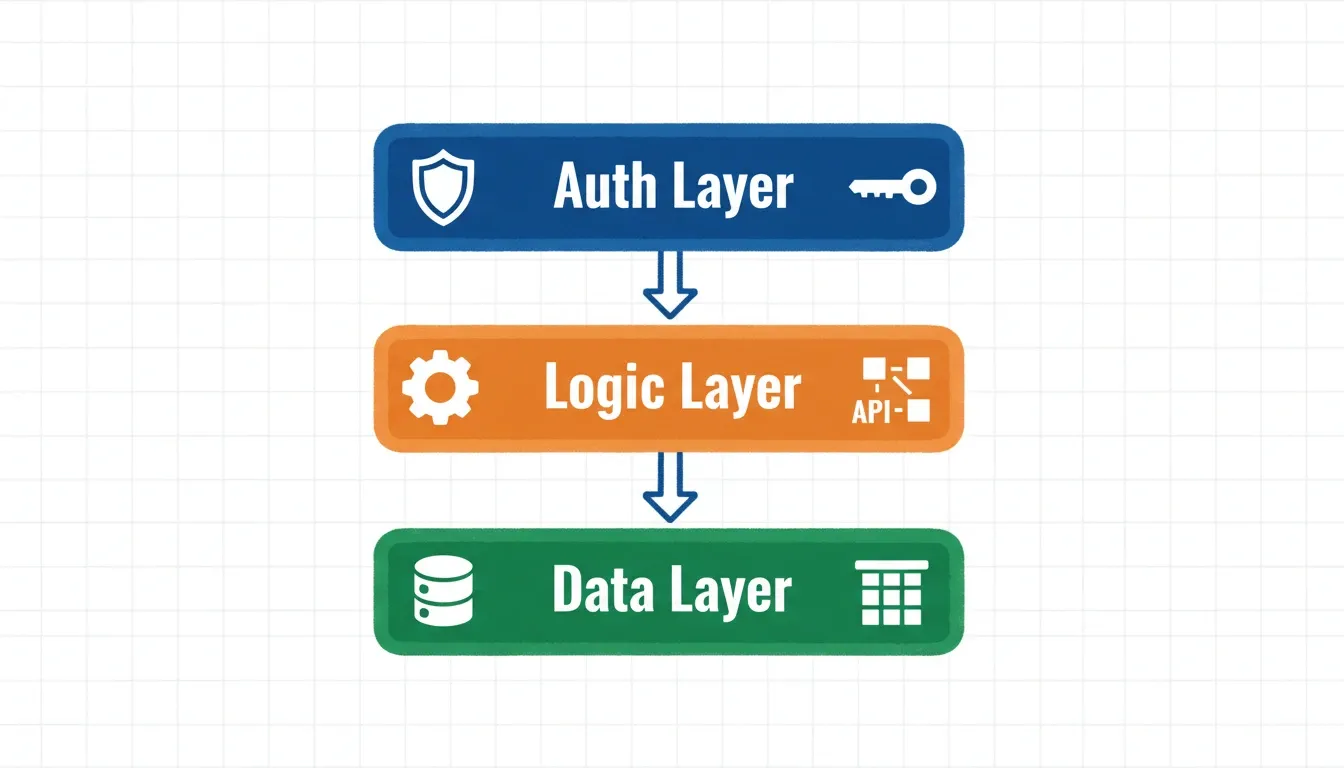
Every production backend has three interdependent layers. AI backend generators handle all three from a single prompt.
Understanding what you are generating helps you prompt more precisely and verify the output more confidently.
| Layer | What It Does | Examples |
|---|---|---|
| Data layer | Stores, organizes, and retrieves information | PostgreSQL tables, schemas, relationships, indexes |
| Logic layer | Processes requests and enforces business rules | API routes, server functions, validation, rate limiting |
| Auth layer | Controls who can access what | JWT tokens, OAuth, role-based access, session management |
Why Non-Technical Builders Hit the Backend Wall
The frontend gets all the attention. Drag-and-drop page builders, landing page tools, and visual editors. But the moment your app needs to store user data, process payments, or send notifications, you hit the backend wall.
-
User authentication requires secure token management, session handling, and password hashing
-
Database operations need schema design, migrations, query optimization, and backup strategies
-
API endpoints demand routing, validation, rate limiting, and error handling
-
Third-party integrations involve OAuth flows, webhook listeners, and retry logic
-
Background jobs like email queues, scheduled tasks, and data syncing run on the server infrastructure
Without backend logic, your app is a static shell. It looks good, but does nothing meaningful.
That gap historically forced non-technical builders into two expensive options. You could hire a developer, which meant weeks of waiting and high cost. Or you could learn programming from scratch, which meant months of study before shipping anything. AI-powered builders have eliminated that tradeoff entirely.
The Real Cost Difference
According to the Stack Overflow 2024 Developer Survey, 76% of all respondents are using or planning to use AI tools in their development process, with 82% of those currently using AI applying it directly to writing code. That shift has opened a door for non-technical builders who understand what to build but never learned how to code it.
Gartner forecasts that low-code and no-code development will account for over 70% of new application development activity by 2026. That trend has only accelerated with AI-native builders entering the market.
AI Backend Platform Pricing Comparison
| Platform | Starting Price | Code Export | Framework | Auth Included |
|---|---|---|---|---|
| Rocket | See rocket.new/pricing | Yes (Next.js + Flutter) | Next.js, Flutter | Yes |
| Bubble | From $29/mo | No (proprietary) | Proprietary | Yes |
| Supabase | Free tier available | Yes | Any | Yes |
| Firebase | Pay-as-you-go | Yes | Any | Yes |
Pricing sourced from official platform pages as of June 2026. Always verify current pricing directly on each platform's website before committing.
How AI Generates Backend Logic From a Prompt
Your natural language input gets decomposed into technical requirements, mapped to architectural decisions, and rendered as production code. The whole pipeline runs automatically, without you touching a single file.
From natural language prompt to deployed production system: the AI backend generation pipeline.
The GitHub Octoverse 2024 report found a 98% increase in the number of generative AI projects on GitHub and a 59% surge in contributions to those projects. That tells us something important. AI code generation is no longer experimental. Developers and non-developers alike are building real applications at scale.
What separates good AI backend generators from basic ones is context depth. A shallow tool generates boilerplate CRUD endpoints. A platform with deep context understanding considers your data relationships, security requirements, expected scale, and integration needs before writing a single line.
Real-World Example: A SaaS Backend From One Prompt
Here is what a non-technical founder building a project management tool might type:
"Build a SaaS where teams create workspaces, invite members with admin or viewer roles, create projects with tasks, assign tasks to members, set deadlines, and receive email notifications when tasks are overdue."
A capable AI backend generator produces from that single prompt:
-
A PostgreSQL schema with workspaces, users, roles, projects, tasks, and notification tables
-
Row-level security so users only see their own workspace data
-
REST API endpoints for all CRUD operations with pagination and filtering
-
Role-based access control middleware
-
Email notification background jobs via Resend or SendGrid
-
JWT-based authentication with OAuth support
-
Deployment configuration with environment variables pre-set
This is not a prototype. It is production-ready, exportable code.
AI-Generated vs Hand-Written Backend: Full Comparison
| Factor | AI-Generated Backend | Hand-Written Backend |
|---|---|---|
| Speed to production | Hours to days | Weeks to months |
| Code ownership | Full export (if platform supports it) | Full ownership |
| Security defaults | Platform-dependent | Developer-dependent |
| Customization | High with precise prompts | Unlimited |
| Iteration speed | Prompt changes, redeploy | Code review, test, deploy cycle |
| Vendor lock-in | Low if code is exportable | None |
| Learning curve | Describe outcomes | Years of programming knowledge |
The gap is closing. AI-generated code now runs the same frameworks, uses the same databases, and deploys to the same infrastructure as hand-written code. The difference is simply who writes the initial instructions.
How Rocket Approaches Backend Generation
Most AI builders start from a blank prompt box. You type something vague, and you get vague code back. Rocket takes a different approach.
Before generating any code, Rocket runs a research and strategy phase. It analyzes your market, identifies what competitors built, understands your target users, and creates a technical architecture informed by real business context. The thinking happens before the build, so what gets built is worth building.
What Rocket Generates for the Backend
-
Database design: Supabase-powered schemas with proper relationships, row-level security policies, and optimized indexes based on actual use patterns
-
Full API layer: REST endpoints with input validation, error handling, pagination, and rate limiting, generated automatically alongside your frontend
-
Built-in authentication: OAuth providers, email/password flows, magic links, and role-based permissions ship as defaults, not afterthoughts
-
Real-time capabilities: WebSocket connections for live updates and collaborative features, pre-wired through Supabase
-
Payment processing: Stripe integration for subscriptions and one-time payments, generated alongside backend logic
-
One-click deployment: Your backend ships to production with SSL, CDN, and environment configuration already set
Rocket generates standard Next.js code with Supabase on the backend. You can export the entire codebase to GitHub, bring in a developer later, or keep iterating through prompts. 1.5 million people across 180 countries have tried Rocket, from solo founders to enterprise teams.
For a closer look at how API generation works with built-in authentication, see how AI-powered API builders handle auth from the ground up.
Step-by-Step: Building a Backend With Rocket
-
Describe your app in plain English, including user roles, data relationships, and key workflows
-
Review the architecture Rocket proposes before any code is generated
-
Generate the backend as production-ready Next.js and Supabase code
-
Connect integrations from 25+ pre-built connectors including Stripe, Resend, and Mixpanel
-
Deploy in one click with SSL, CDN, and environment variables pre-configured
-
Iterate through prompts to modify any part of the backend without editing code directly
Use Cases: Who Builds Backends Without Coding
Solo Founders and Indie Hackers
A solo founder building a B2B SaaS can now ship a complete backend in a weekend. User management, subscription billing, data storage, and API layer no longer require a technical co-founder or a development contract.
Example: A marketing consultant building a client reporting dashboard. The backend needs user accounts, data ingestion from Google Analytics and HubSpot, automated weekly report generation, and a client-facing portal. With an AI backend builder, this ships in hours rather than months.
For a practical walkthrough of the full workflow, the guide to building full-stack apps with AI prompts covers the process from idea to deployed app.
Product Managers and Operators
Product managers who understand user needs but lack coding skills can now prototype and validate backend logic without waiting for engineering sprints. They can test whether a data model works and whether an API design makes sense before any developer is involved.
Startup Teams Extending Existing Products
Small engineering teams use AI backend generation to handle the routine parts of backend development. CRUD APIs, auth boilerplate, and database migrations are generated automatically. This frees senior engineers to focus on genuinely complex, differentiated work. The guide to AI in backend development and API performance covers specific performance outcomes in more detail.
Agencies and Freelancers
Digital agencies building client applications use AI backend tools to reduce delivery time significantly. A backend that previously took three weeks to scaffold now takes an afternoon. That shift improves project economics for both agency and client.
Security: What to Verify Before Going Live
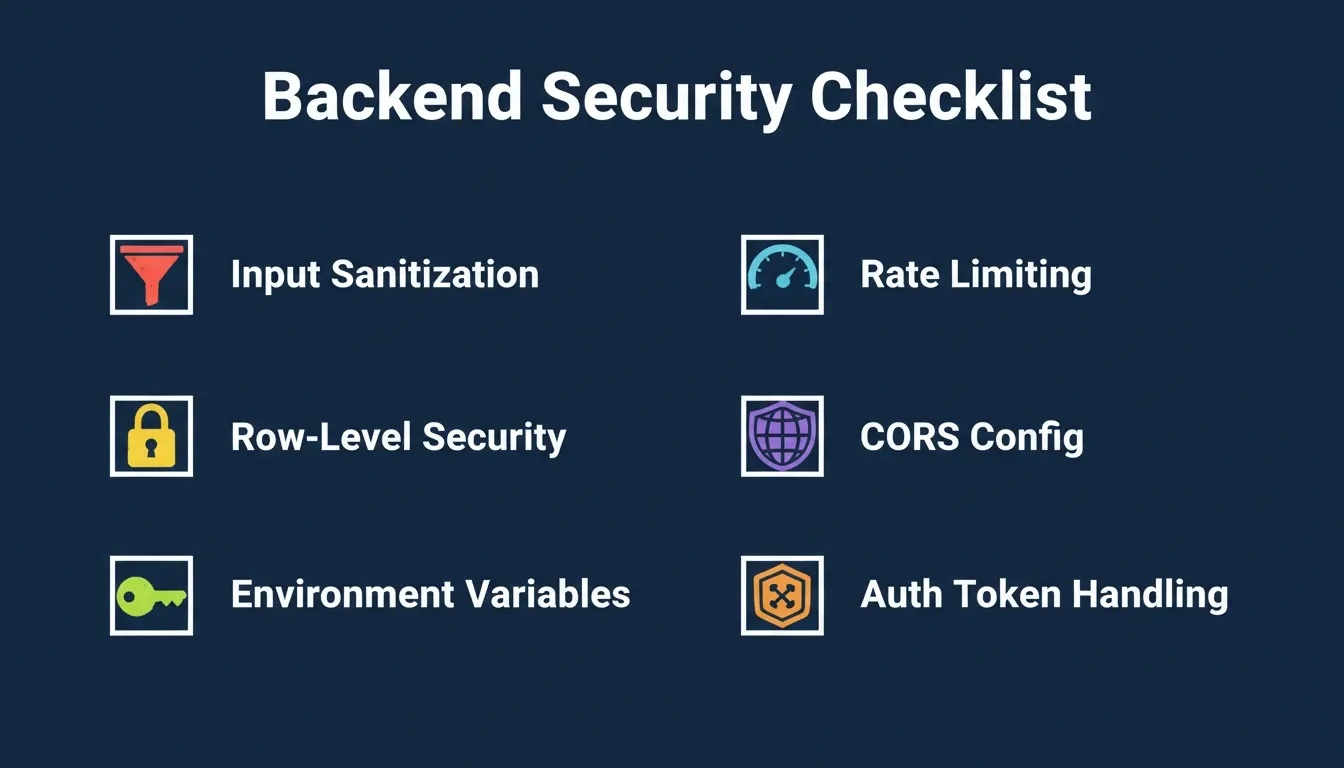
Six security checks every AI-generated backend needs before going live. Skipping any one of these creates exploitable vulnerabilities.
AI-generated backends are powerful, but security is where platform quality varies most. According to the Stack Overflow 2024 Developer Survey, 45% of professional developers believe AI tools are bad or very bad at handling complex tasks. Security is one of those complex areas.
Run these checks on every AI-generated backend before launch:
-
Input sanitization: All user inputs must be validated and sanitized. Parameterized queries are required. String concatenation in SQL is never acceptable.
-
Row-level security: If you are using Supabase, confirm RLS policies are enabled on all tables. Without them, any authenticated user can read all data.
-
Environment variables: API keys and database credentials must live in environment variables, never hardcoded in source files.
-
Auth token handling: JWTs must be validated on every protected route, have appropriate expiry times, and be stored in httpOnly cookies for sensitive applications.
-
Rate limiting: Without throttling on API endpoints, a single bad actor can overwhelm your backend and drive up hosting costs overnight.
-
CORS configuration: Your API should only accept requests from your own frontend domain in production.
Platforms that handle these automatically save you from discovering issues after launch. Always verify the output against these standards regardless of which platform you use.
For a detailed walkthrough of each item, the Rocket security checklist for production apps covers implementation steps for every point above.
Common Pitfalls When Going Codeless on Server Logic
Even with a solid AI backend tool, there are a few mistakes worth knowing about before you start.
-
Skipping the architecture review: The best AI tools show you the proposed schema before generating code. A poorly designed data model is expensive to fix after launch.
-
Over-relying on the first output: AI-generated backends benefit from iteration. If the first version does not match your mental model, refine your prompt with more specific requirements.
-
Ignoring error handling: Test with invalid inputs, missing fields, and unexpected data types. An endpoint that works with valid data but crashes on edge cases will frustrate users fast.
-
Not planning for scale: Describe your expected data volume and user count in your prompt. This allows the AI to make appropriate indexing decisions upfront.
-
Forgetting background jobs: Email queues, scheduled reports, and webhook processing need to be explicitly requested in your prompt. They do not appear automatically.
Integrations: Connecting Your Backend to External Services
A backend in isolation is not enough. Production apps need to connect to payment processors, email providers, analytics platforms, and communication tools. The quality of your AI platform's integration library matters a lot here.
| Category | Common Services | What It Enables |
|---|---|---|
| Payments | Stripe, Razorpay | Subscriptions, one-time payments, refunds, webhooks |
| Resend, SendGrid, Mailchimp | Transactional emails, notifications, marketing automation | |
| Auth providers | Google, GitHub, Apple | Social login, OAuth flows |
| Databases | Supabase, Airtable, Directus | Data storage, real-time sync, CMS |
| Analytics | Mixpanel, Google Analytics | User behavior tracking, funnel analysis |
| Communication | Twilio | SMS notifications, messaging |
| AI services | OpenAI, Anthropic, Gemini | AI features within your app |
For a practical look at how database integrations work for non-technical builders, the guide to web database application builders without coding walks through the connection process step by step.
The Future of Backend Development Without Code
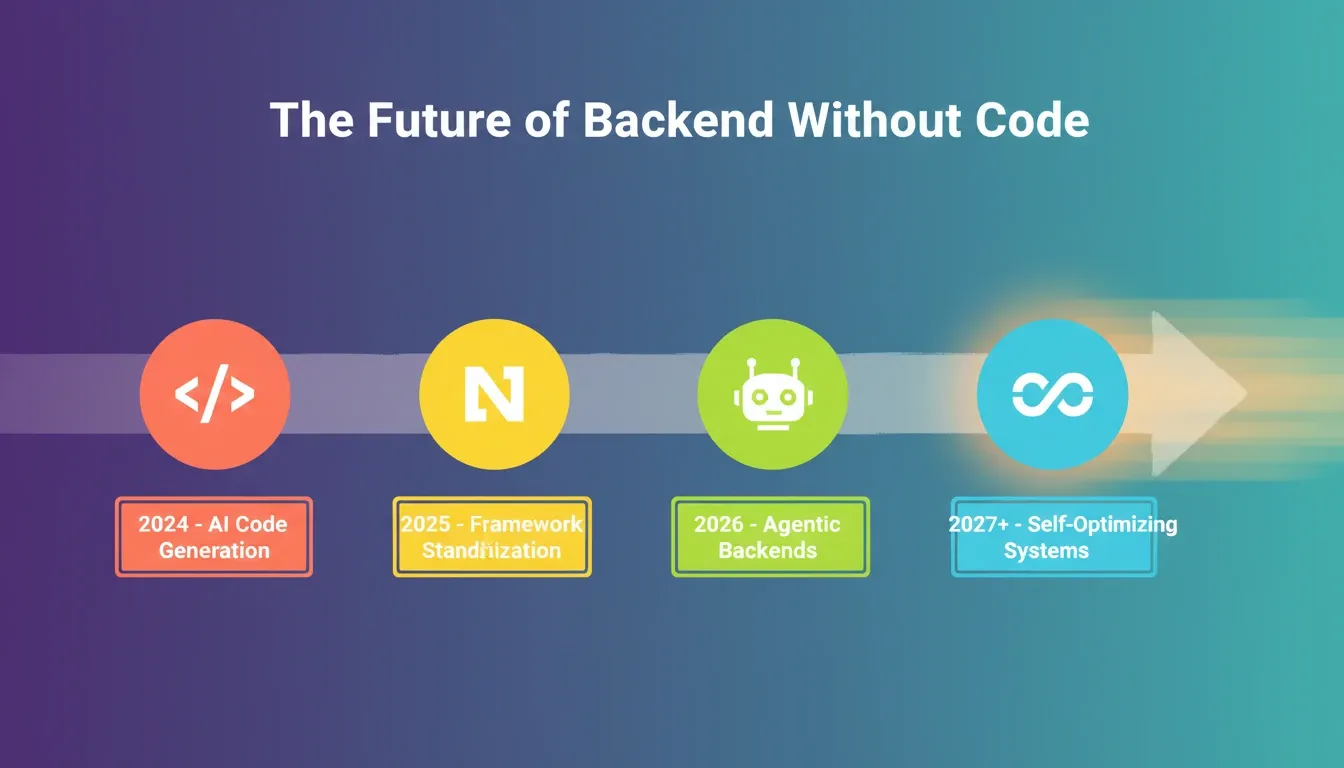
The trajectory of AI backend development. Each phase builds on the previous one, compounding the advantage for builders who start early.
The direction is clear. AI backend generation is not a temporary workaround. It is becoming the default way software gets built.
Several trends are pushing this shift forward. First, AI models are improving at architecture. The quality gap between AI-generated and hand-written code narrows every quarter. Second, framework standardization is happening. AI tools converging on Next.js, Flutter, and Supabase means generated code is increasingly portable and maintainable. Third, agentic backends are on the horizon. The next generation of AI builders will not just generate static code. They will monitor, optimize, and update backend logic based on real usage patterns. Finally, compliance automation is arriving. AI-generated backends are beginning to ship with GDPR and OWASP compliance patterns built in, removing barriers to enterprise adoption.
The question is no longer whether you can build backend without coding. The question is whether you can afford not to.
Build Your Backend Without Writing a Line of Code
The ability to build backend without coding has changed who gets to build software. In 2026, the barrier between "I have an idea" and "I have a live application" is no longer technical skill. It is clarity of vision and the right tool to execute it.
AI-powered backend generation is a structural shift in how software is created. The founders, operators, and creators who embrace this shift are shipping faster, iterating more rapidly, and competing at a level previously reserved for well-funded engineering teams.
As AI models improve and agentic backends begin to self-optimize, the advantage of building with AI will only compound. The builders who start now will have a significant head start.
Start building on Rocket today. Describe your app in plain English and have a production-ready backend with database, APIs, authentication, and deployment live in minutes.
Table of contents
- -What "Build Backend Without Coding" Actually Means
- -The Three Layers Every Backend Needs
- -Why Non-Technical Builders Hit the Backend Wall
- -The Real Cost Difference
- -AI Backend Platform Pricing Comparison
- -How AI Generates Backend Logic From a Prompt
- -Real-World Example: A SaaS Backend From One Prompt
- -AI-Generated vs Hand-Written Backend: Full Comparison
- -How Rocket Approaches Backend Generation
- -What Rocket Generates for the Backend
- -Step-by-Step: Building a Backend With Rocket
- -Use Cases: Who Builds Backends Without Coding
- -Solo Founders and Indie Hackers
- -Product Managers and Operators
- -Startup Teams Extending Existing Products
- -Agencies and Freelancers
- -Security: What to Verify Before Going Live
- -Common Pitfalls When Going Codeless on Server Logic
- -Integrations: Connecting Your Backend to External Services
- -The Future of Backend Development Without Code
- -Build Your Backend Without Writing a Line of Code