
Want to launch a shipment tracking app without coding headaches? Discover how Rocket.new quickly transforms your idea into a live eCommerce tracking experience, meeting shoppers’ growing demand for real-time delivery updates.
How to build a shipment tracking app for eCommerce with Rocket.new?
You can create a full-featured shipment-tracking app without getting tangled in complex code. In fact, with Rocket.new, an idea can turn into a real product in minutes.
According to survey, around 60% of online shoppers check their tracking page every day, while 17% check more than once per day, showing frequent package engagement during the delivery journey.
Tracking delivery isn’t just nice. It’s expected. A smooth mobile or web experience where customers enter a tracking number and instantly see shipping info can make your shop feel trustworthy and professional.
So let’s break down how to make that happen, step by step, with clarity, simplicity, and a bit of humor to keep your eyes open.
Why Shipment Tracking Matters in eCommerce?
Customers aren’t just curious, they want clear visibility, reassurance, and control over their online orders. A smart shipment tracking app gives them that, turning a simple delivery into a stress-free experience.
But now come questions like:
- Where is my package?
- What’s the tracking status?
- When will it reach final delivery?
That’s where a good shipment tracking app comes in.
When customers order online, they want to track their package from the warehouse to the front porch. A clear, easy way to track a package reduces anxiety and builds trust. If your app tells them exact package delivery stops, that’s like giving peace of mind in digital form.
Here’s what most people check:
| Thing users want to see | Why it matters |
|---|---|
| Shipment current place | They want updates |
| Estimated delivery time | Helps plan collections |
| Carrier details | So they know who’s coming |
| Full delivery timeline | Stops panic at night |
At the end of the day, a shipment tracker isn’t just a tool it’s a confidence booster. When users can see the tracking status, know the carrier details, and follow a full delivery timeline, they feel in control. Happy, informed customers are loyal customers, and that’s what keeps an online store thriving.
Core Features for Your Shipment Tracking App
It’s always nice when customers can see past package delivery records. Let them access previous tracking info or download a shipping label receipt if needed. This adds a layer of transparency and trust, especially for returns or bulk orders.
Friendly Tracking Input
Customers should be able to easily type or paste their tracking number. Some folks have trouble with the tracking number format (like FedEx or DHL), so give hints.
Carrier Recognition
Your app should automatically detect and fetch information for each shipping carrier. Whether the parcel was touched by DHL Express, DHL Global Forwarding, FedEx, USPS, UPS, or even China Post, your user wants the news fast.
Live Package Tracking
The app should call carrier APIs and show real-time info. That means showing the tracking status like “in transit”, “left sorting center”, or “out for delivery”, so customers don’t feel clueless.
Updates and Alerts
Buttons or toggles that let customers see shipping updates or get notifications can make your app feel smart. People love progress bars that go “woohoo on the truck!”
Easy Contact Support
When a package gets stuck, most customers want a phone number or a chat option to contact help. Give them contact information for the store or the courier.
These features make your shipment tracker feel less like a black box and more like a friendly guide.
These features together turn a simple shipment tracker into a friendly, reliable companion for your customers. It’s not just about tracking a package; it’s about making the delivery experience smooth, clear, and a little less stressful for everyone.
Setting Up the Basics for Your App
Knowing your data sources, understanding tracking number formats, and mapping the delivery process sets the stage for building a shipment tracking app that actually works without confusing users or leaving them guessing.
Pick a Solid Data Source
Different carriers offer different data. Most major ones can give tracking details if you use their APIs.
Some examples and quirks to know:
- FedEx tracking numbers usually start with 12+ digits.
- DHL codes vary, but they give a clear scan history.
- China Post numbers often start with two letters and end with CN.
- Carriers in other countries sometimes use very custom formats.
You might need to handle multiple tracking number formats and data sources if customers use many couriers.
Map Out the Delivery Flow
Think of it like a story:
- Package shipped from the seller
- Picked up by courier
- In transit through hubs
- Out for final delivery
- Delivered
Laying out a solid foundation isn’t glamorous, but it makes everything else smoother.
By selecting the right data sources, mapping delivery flows, and handling exceptions, your shipment tracker becomes reliable, transparent, and actually useful for customers checking the status of their package deliveries.
Integrating Carrier Tracking APIs
So next comes the fun part: connecting to carrier systems so your app can fetch live tracking information.
Big carriers like FedEx, DHL, USPS, UPS, and DHL Global Forwarding have APIs that let you fetch tracking details by sending a tracking number.
Most APIs give you detailed logs of tracking info points like:
- Timestamp of each scan
- Location where it happened
- Current tracking status like “in transit” or “delivered”
- Estimated delivery dates
You’ll use this data to update your app screens so customers can clearly see where their package is and what’s next.
Pro Tip: Because different carriers structure data differently, you might need a small internal service to normalize this info so your users see the same fields no matter where the parcel came from.
Designing the Shipment Tracking App Flow
Okay, now we’ve talked about the backend stuff. Let’s talk about user experience, the part that customers actually feel.
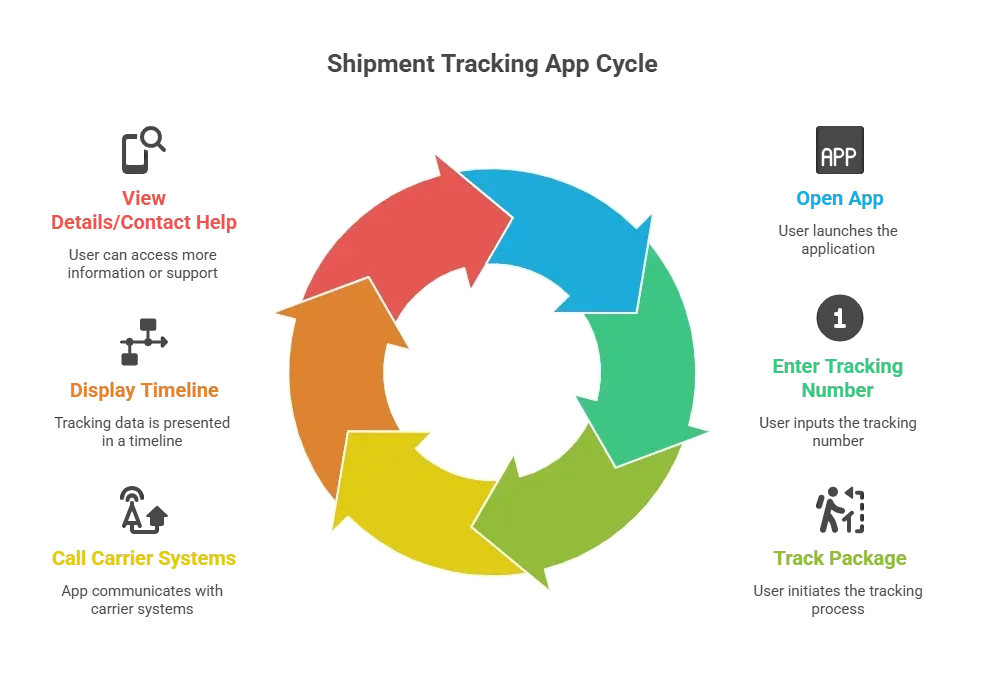
Keep it clean. Keep it snappy. Nobody loves clutter when they just want to know if their parcel is coming today or tomorrow.
Building the Shipment Tracker with Rocket.new
Alright, here comes the part you’ve probably been waiting for. Rocket.new can help you build your shipment-tracking app without wrestling with servers or writing backend code from scratch.
What Rocket.new Does
Rocket.new is an AI-powered app builder that turns plain language into functioning apps. Type or describe what you want, and it gives you live components, backend config, API hookups, and hosting, mostly automated. It even handles database, deployment, and SEO-ready content.
Imagine saying: “Create a shipment tracking web app that accepts a tracking number, checks multiple carrier APIs, and shows real-time transit updates.”
Rocket.new will generate a coded app with screens, backend calls, and UI, ready to test. No long tutorials. No messy setup.
Top features:
- Prompt to App Creation: Builds apps directly from single prompts
- Figma Import: Converts design files into live, editable layouts
- AI-Powered Backend: Automatically handles logic, data, and workflows
- Custom Domain Support: Publishes projects with a branded domain
- Code Export: Allows developers to extend or customize later
- Live Preview: Shows instant updates while editing
eCommerce Admin Shipment Tracking App Built with Rocket.new
Rather than talking theory, here’s what an actual eCommerce shipment dashboard built with Rocket.new looks like.
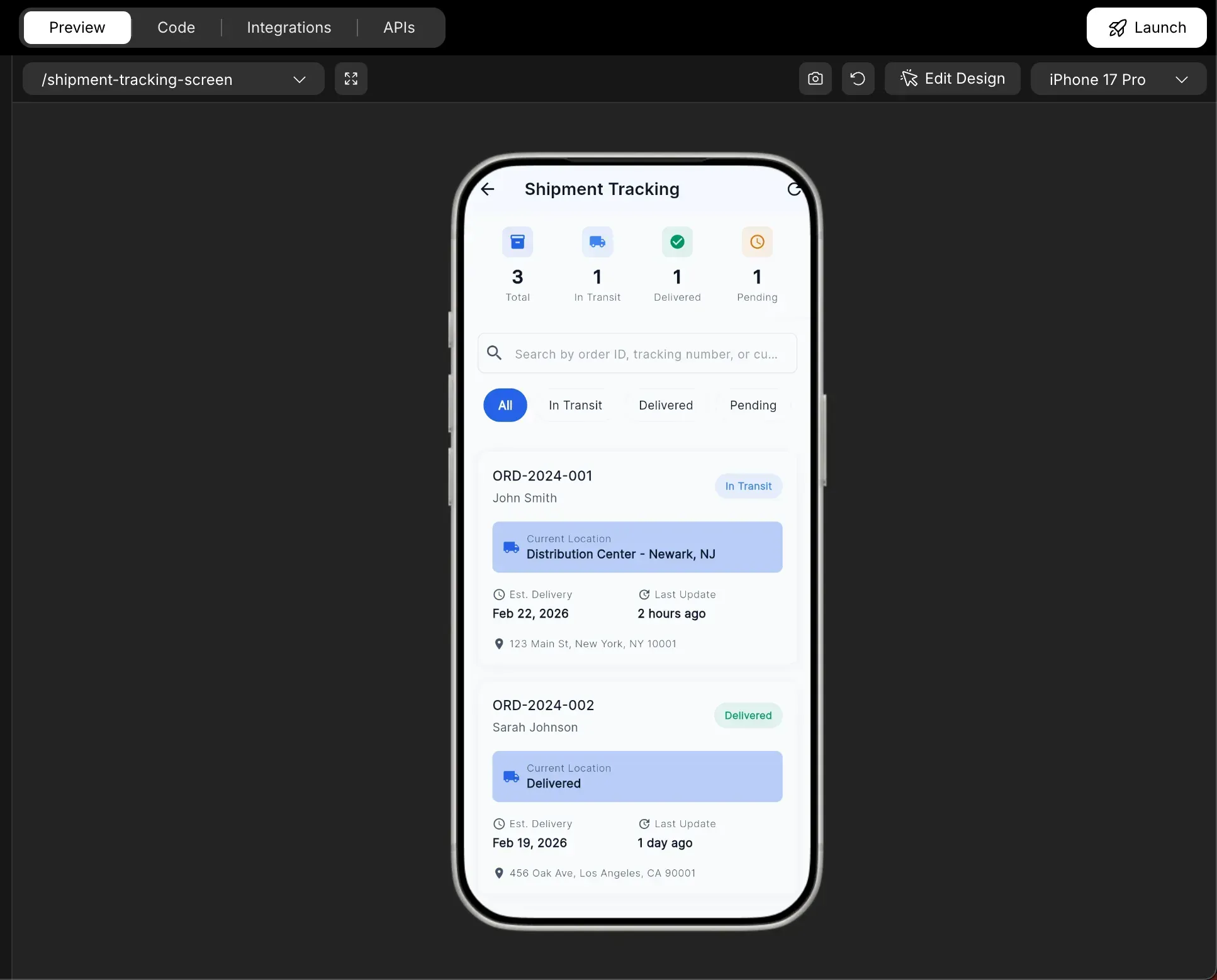
The app includes a full Shipment Tracking screen designed for ecommerce admins. It shows a clean overview of orders, delivery progress, and tracking updates in one place.
What This App Includes
1. Shipment Metrics Overview
At the top of the screen, the app displays shipment counts such as:
- Total orders
- In Transit
- Delivered
- Pending
This gives instant visibility into delivery performance.
2. Smart Search Bar
Admins can search by order ID, tracking number, or customer name. No scrolling forever. Just type and find.
3. Status Filters
Tabs like All, In Transit, Delivered, and Pending allow quick filtering. This makes handling multiple shipments simple and organized.
4. Order Summary Cards
Each order shows:
- Order ID
- Customer name
- Current location
- Estimated delivery date
- Last update timestamp
- Delivery address
This means no switching between different pages or systems. Everything sits in one clean interface.
5. Real-Time Location Display
Each shipment card clearly shows the current distribution center or delivery status. For example, “Distribution Center – Newark, NJ” or “Delivered.”
It feels structured. It feels professional. And it actually looks like something ready for production.
Why This Matters?
This isn’t just a basic tracking page. It’s a complete order management workflow built directly through prompts inside Rocket.new.
Instead of building separate dashboards, backend services, and UI screens manually, the system generated:
- Shipment tracking screen
- Timeline widget
- Carrier information module
- Shipment metrics widget
- Admin routing setup
All organized inside a proper project structure.
That’s the difference. You’re not just building a tracking tool. You’re building a working ecommerce admin panel with built-in shipment visibility.
And yes, it was generated from a prompt.
Community Insight
Here’s a real snippet from Reddit that captures vibes nicely:
“Rocket just getting great feedback and 400k users in just 16 weeks... its full production all prompt based and a modest 1m tokens free but still cheap.”
This shows real creators are curious and starting to experiment with the platform.
Things to Keep in Mind
It’s smart to know the little quirks that can trip you up. Handling carrier rules, slow updates, and blank screens from the start keeps your shipment tracking app smooth and user-friendly.
- Carrier APIs have rate limits sometimes. Don’t blast them with too many calls too fast.
- Some services might require signing up for developer keys before showing tracking info.
- Not all tracking info will be perfectly synced every second, especially if carriers update slowly.
- Keep your app friendly when a parcel hasn’t moved ye,t nobody likes a blank screen.
A few thoughtful precautions go a long way. By respecting API limits, preparing for slow updates, and showing friendly messages when a package hasn’t moved, your app stays reliable and keeps customers happy instead of frustrated.
Your Shipment Tracking App Journey
Creating a smooth shipment tracker for eCommerce is not just about showing dots moving on a map. The problem many stores face is providing customers with clear, accurate updates without forcing them to jump between carrier sites. A good shipment tracking app solves that.
Rocket.new gives you a path out of the usual headaches. Describe what you want. Integrate carrier APIs. Show live transit updates. Then ship it out to users in a user-friendly design.
With the right approach and tools like Rocket.new, building a shipment tracker that customers trust and enjoy using is more accessible than you might think.
Table of contents
- -Why Shipment Tracking Matters in eCommerce?
- -Core Features for Your Shipment Tracking App
- -Friendly Tracking Input
- -Carrier Recognition
- -Live Package Tracking
- -Updates and Alerts
- -Easy Contact Support
- -Setting Up the Basics for Your App
- -Pick a Solid Data Source
- -Map Out the Delivery Flow
- -Integrating Carrier Tracking APIs
- -Designing the Shipment Tracking App Flow
- -Building the Shipment Tracker with Rocket.new
- -What Rocket.new Does
- -eCommerce Admin Shipment Tracking App Built with Rocket.new
- -What This App Includes
- -Why This Matters?
- -Community Insight
- -Things to Keep in Mind
- -Your Shipment Tracking App Journey