
Curious how AI simplifies website creation? This blog explains tools, design steps, content generation, and publishing basics, helping beginners quickly build functional, visually appealing websites without coding or complex setup.
How to build a Website easily and with no coding experience?
These days, building a website doesn’t mean writing messy code or hiring expensive developers. With AI builders, you create a website with AI that generates everything, layout, text, and images based on simple prompts. Many beginners find this faster and friendlier than traditional methods.
According to AI website builder statistics, about 25% of first‑time website creators used an AI‑powered tool in 2023 to start their site project. So whether you’re starting a blog or business site, AI can help you go live in no time.
This blog makes it simple. We’ll walk through the exact steps you need to take.
Why People are Turning to AI Website Builders?
Creating a website used to be time-consuming and sometimes overwhelming. But AI website builders are changing the game. Both beginners and experienced marketers now have tools that speed up the process and make it simple to get a professional website without stress.
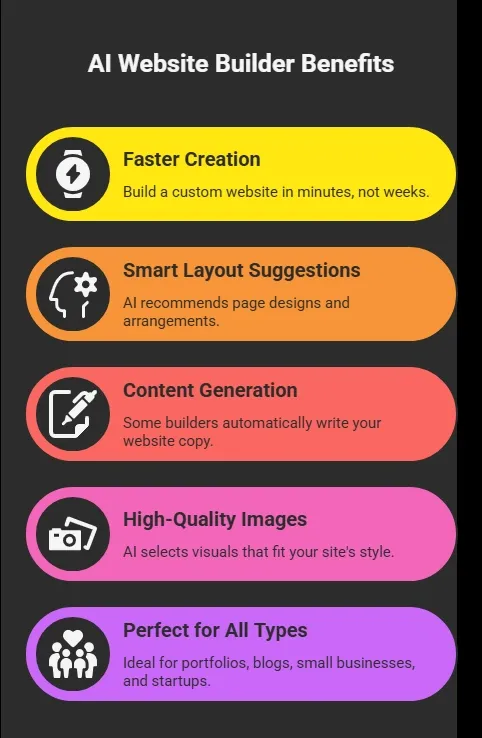
With these benefits, it’s easy to see why AI builders are becoming the go-to choice for creators who want speed, convenience, and a polished site without fuss.
Let’s Build Your First AI-Powered Website
Alright, so now that you know why AI website builders are so popular, it’s time to roll up your sleeves, well, not literally, because there’s no coding required.
Creating your site with AI is actually a lot like following a recipe. You give a few ingredients, your ideas, goals, and style preferences, and the AI mixes them into a ready-to-go draft website.
In the next few sections, we’ll break down step by step exactly how to create a website with AI. From picking the right builder to publishing your professional website, you’ll see how simple and fun this process can be.
First up, you need to pick the best AI website builder for your goals.
Here’s a quick table to help you compare options:
| Tool Type | Best For | Key Feature |
|---|---|---|
| AI Website Creator A | Bloggers | AI content + layout |
| AI Website Creator B | Small Business | Drag‑and‑drop + AI draft site |
| AI Website Creator C | Portfolios | Smart design suggestions |
| AI Website Creator D | eCommerce | Auto product page generation |
Most of these builders work by prompts and suggestions from AI. You don’t need coding experience. They’ll help you create pages, design elements, and structure without stress.
Step 2: Set Your Goals and Plan Your Site
Before you even open a tool, think about your site vision. Ask yourself:
- What is my business name or personal brand?
- What pages do I need? (About, Contact, Shop)
- Who is my audience?
- What action should visitors take?
This tiny planning step helps the AI builder know what to generate. Most AI website generators ask for this on the first screen. And since AI often writes your site content too, your answers shape the site's voice and structure.
Step 3: Sign Up and Start Your AI‑Assisted Draft Website
Once you pick a builder, you’ll usually create an account. Then the fun begins.
At this stage, you’ll see input boxes like:
- “What’s your site about?”
- “Describe your business goals”
- “Choose a style you like”
You type in plain language. The AI tool starts to generate your website draft based on your description. This is where everything starts to feel real.
Within minutes, the tool builds a draft version of your site. It includes pages, layout, content, navigation, and even some suggested visuals. That’s AI-built website magic.
Step 4: Customize Your Design
So now you see your AI-generated layout. Great. Well, next you customize. Almost all builders let you change colors, fonts, images, and sections.
You can:
- Swap a suggested high-quality image with one you like better
- Reword headings
- Add or remove sections
- Fine‑tune layout spacing and styling
Even though AI gives you a strong starting site, this step adds your personal touch. Think of it as editing your own dream website instead of letting AI do all the work.
This is where your own creativity blends with AI suggestions.
Step 5: Add Business Information and Pages
Now it’s time to fill in the details:
- Your business’s contact info
- About page copy
- Products or services
- Testimonials or portfolio pieces
AI can help here, too. Many builders automatically generate website content based on what you typed earlier. You can edit it right in the editor. The goal is a professional-looking site that still feels like you.
Step 6: Choose a Domain and Publish
This part gets exciting.
Almost every builder asks:
- Do you want a free domain
- Or connect a custom domain
A free domain might be something like yourname.builder.com. That’s fine if you’re experimenting or testing. But a custom domain feels more professional and better for branding.
Once you set this, your AI-generated website can go live. Click publish, and boom, your site is live on the internet.
Step 7: Add Marketing Tools and Optimize
After publishing, you’ll want people to find you. Most builders include:
- SEO tools for search engines
- Analytics dashboards
- Social sharing elements
- Email signup forms
These help you track visitors, build an audience, and grow your site. Think of this as upgrading your website from just live to working for you.
And there you have it, from picking your AI website builder to going live and adding marketing tools, you’ve covered all the key steps.
By now, your AI-generated website isn’t just a draft; it’s a fully functional, professional-looking site ready to welcome visitors. Take a moment to celebrate this win, and remember, you can always tweak and improve your site as your business grows.
What Professionals are Saying
People building real sites and tools are talking about AI website builders on professional networks too. For example,
On Linkedin a creator shared how a conversational AI‑based builder lets you talk to your site like you would a buddy and watch it be generated live on screen literally just describe what you want and it updates your site in real time. This makes building websites feel less like coding and more like editing a document with a smart assistant.
These real user insights show a trend: AI tools are making website creation faster and more intuitive for professionals and beginners alike.
Rocket.new: Your AI Launchpad for Any Idea
If you’ve been exploring AI tools, you might have heard of Rocket.new. Think of it as a launchpad for your ideas rather than just a website builder. Its vibe is all about fast, simple, and connected creation, a place where anyone can bring a concept to life, even without a tech background.
At its core, Rocket.new is designed to help creators move from idea to live page in minutes. You can describe your vision, and the platform handles the heavy lifting, layout, content, and integrations, giving you a polished, functional presence online.
Top Features
- Prompt to App Creation: Builds apps directly from single prompts
- Figma Import: Converts design files into live, editable layouts
- Code Export: Allows developers to extend or customize later
- AI-Powered Backend: Automatically handles logic, data, and workflows
- Reusable Components: Speeds up building with ready-to-use elements
- Custom Domain Support: Publishes projects with a branded domain
- Command-based actions: Use / and @ to run actions and quickly scope edits.
- Live Preview: Shows instant updates while editing
How Anyone Can Build With Rocket.new?
Even if you have zero coding or design experience, Rocket.new lets you create anything by simply talking to AI. Describe your idea, product, or campaign, and the AI generates a draft layout with content blocks, images, and sections.
Example Prompt:
"I want a one-page site for my new guitar tutorial service. Include an intro section about me, a video demo, pricing, testimonials, and a signup form for early access."
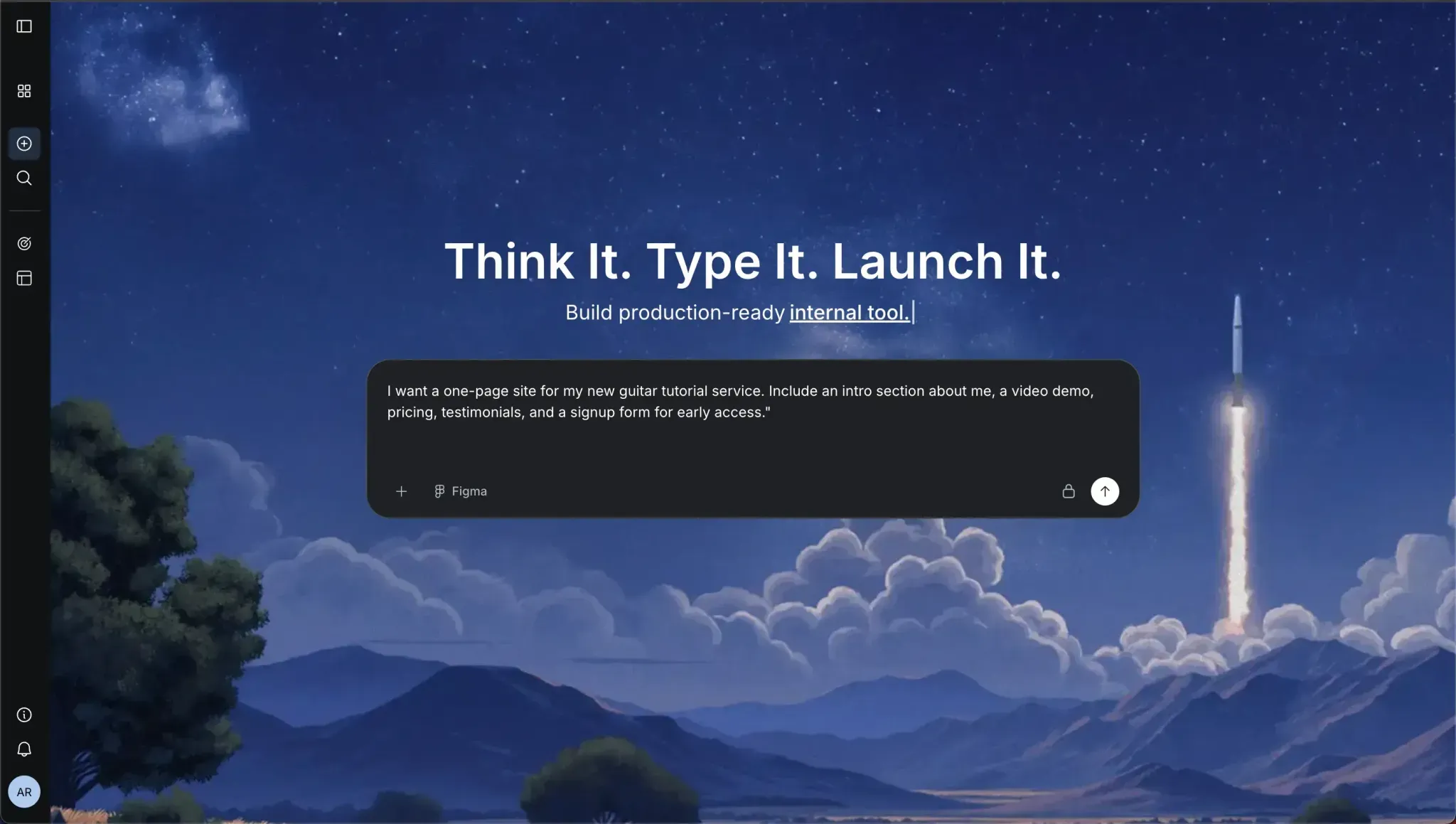
Within minutes, Rocket.new can create a fully structured page based on this description, ready for you to fine-tune and publish.
You can tweak colors, images, and text, but most of the heavy lifting is already done. This makes it perfect for non-tech creators who want to turn an idea into a real online presence fast.
Use Cases
- Launch a product from your AI-generated website: Quickly create a dedicated landing page to showcase your service or product.
- Collect early signups: Drive traffic from your AI-built website to a Rocket.new page and capture leads.
- Promote new content or blog posts: Share updates from your AI-generated website with a professional-looking mini-site.
With Rocket.new, building and launching doesn’t require coding, design skills, or hours of setup. It complements your AI-generated website perfectly, helping you go live, engage visitors, and test ideas with ease. Think of it as the next step after your site is ready: fast, simple, and fully functional.
Common Mistakes to Avoid with AI Website Generators
So you’ve published your site, that’s awesome.
But these are common things beginners trip on:
- Not editing AI’s drafted content enough. AI might write generic lines.
- Publishing before checking mobile responsiveness.
- Forgetting to change the default placeholder text.
- Skipping analytics or SEO settings.
Take a few extra minutes to tweak these, and you’ll have a more polished site.
Build Your Website with AI in No Time
For beginners and small business owners, traditional web development can be slow, confusing, and expensive. Creating a professional-looking site usually requires coding skills or hiring a developer. This often slowed down your plans and made launching a website feel like a huge project.
The good news is that modern AI tools make it easy to get started quickly. Platforms like Rocket.new let you quickly create a launch-ready site or landing page without any coding. You can personalize the layout, add content, connect a domain, and even integrate marketing tools. Learning how to create a website with AI this way lets you focus on your business, audience, and growth, all while having a fully functional, professional-looking site online in no time
Table of contents
- -Why People are Turning to AI Website Builders?
- -Let’s Build Your First AI-Powered Website
- -Step 2: Set Your Goals and Plan Your Site
- -Step 3: Sign Up and Start Your AI‑Assisted Draft Website
- -Step 4: Customize Your Design
- -Step 5: Add Business Information and Pages
- -Step 6: Choose a Domain and Publish
- -Step 7: Add Marketing Tools and Optimize
- -What Professionals are Saying
- -Rocket.new: Your AI Launchpad for Any Idea
- -Top Features
- -How Anyone Can Build With Rocket.new?
- -Use Cases
- -Common Mistakes to Avoid with AI Website Generators
- -Build Your Website with AI in No Time