
Automate version bumping, changelogs, and GitHub releases for your AI-built Next.js app using semantic-release. Six steps: install the package, enforce conventional commits, configure GitHub Actions, trigger Netlify deploys, publish a releases page, and connect Rocket's GitHub push.
Set up a semantic release pipeline for your AI-built app to automate version bumping, changelog generation, and GitHub releases. This guide covers six steps: installing semantic-release, enforcing conventional commits, configuring GitHub Actions, triggering Netlify deployments, and publishing a public releases page so your release process runs like infrastructure, not a ceremony.
Note:* Rocket's two-way GitHub sync requires a Next.js TypeScript project and a Pro plan ($25/month) or above. JavaScript-only Next.js projects and other frameworks support manual push only.*
Quick Summary
What you will build: A fully automated release pipeline that bumps versions, writes changelogs, and tags GitHub releases on every merge to main.
Time required: Around 45 minutes for initial setup, around 5 minutes per project thereafter.
Prerequisites: A Next.js TypeScript project, a GitHub repository, Node.js 18+, and GitHub Actions.
What Is Semantic Versioning and What Is Semantic Release?
Semantic Versioning is the specification. Semantic Release is the tool that automates following it. These two terms are often conflated, and the distinction matters before you write a single line of config.
Semantic Versioning defines the MAJOR.MINOR.PATCH numbering contract so consumers know exactly what changed. Semantic Release is the npm package that reads your commit history and handles the rest: bumping the version, writing the changelog, creating the git tag, and publishing the release.
Software projects communicate change through version numbers, and the semantic versioning specification gives those numbers a predictable, machine-readable structure that both humans and automated tools can rely on.

The MAJOR.MINOR.PATCH contract: each number tells consumers exactly what changed.
Why Does Your Release History Matter More Than Your Pitch Deck?
Why do investors check your GitHub release history before reading your pitch deck? Because version numbers tell a story. A clean, automated release log signals discipline, while random tags like v1.0.47-final-FINAL signal chaos.
The semantic-release package powers over 130,000 dependent repositories and has earned 24,000+ GitHub stars, making it one of the most adopted release automation tools in the npm ecosystem. If you ship a SaaS product built with AI tools and push updates regularly, manual versioning burns time and invites human error.
This step-by-step guide walks through six steps to add a complete automated release pipeline to a Next.js project. You will install the semantic release package, configure commit conventions, set up GitHub Actions, trigger Netlify deployments, and generate a public releases page.
How Does Semantic Release Parse Your Commit History?
Manual versioning requires a human to decide whether a release should be a patch, minor, or major version bump. Semantic release removes that decision entirely by analyzing your commit history since the last release.
Semantic release reads every commit added since the last release and categorizes each one by its type prefix, such asfeator abug-fixcommit written as fix(context):, or by a breaking change footer. Based on this analysis, semantic release automatically determines the next release version number with no human judgment needed, then generates release notes, creates a git tag, and publishes the new release to your configured channels.
The entire release process happens in your CI environment after every successful merge to the main branch. Here is the decision pipeline visualized:
What Commit Message Format Does Semantic Release Expect?
The commit message format is the single input that drives the entire automation. If your commit messages are messy or inconsistent, semantic release has nothing meaningful to parse and the pipeline breaks down.
By default, semantic release uses the Angular commit message convention:type(scope): description. It follows a three part numbering system, so afix:prefix maps to a patch version, a feat: prefix triggers a minor version, and aBREAKING CHANGE:footer or!after the type triggers a major version bump within the broader versioning scheme.
The conventional commits specification formalizes these conventions, making the format portable across tools like Commitizen, which helps authors produce valid commit messages before commitlint validates them, semantic release, and changelog generators. Other types likedocs:,chore:,ci:, andperf:do not trigger a new release but still appear in the changelog for context.
| Commit Prefix | Release Type | Version Change | Appears in Changelog |
|---|---|---|---|
| fix: | Patch | 1.0.0 to 1.0.1 | Yes |
| feat: | Minor | 1.0.0 to 1.1.0 | Yes |
| BREAKING CHANGE | Major | 1.0.0 to 2.0.0 | Yes |
| docs: | No release | No change | Yes |
| chore: | No release | No change | No |
| ci: | No release | No change | No |
Consistent commit messages are the foundation of every automated release. Without them, version bumping cannot work reliably and your changelog becomes noise rather than signal.
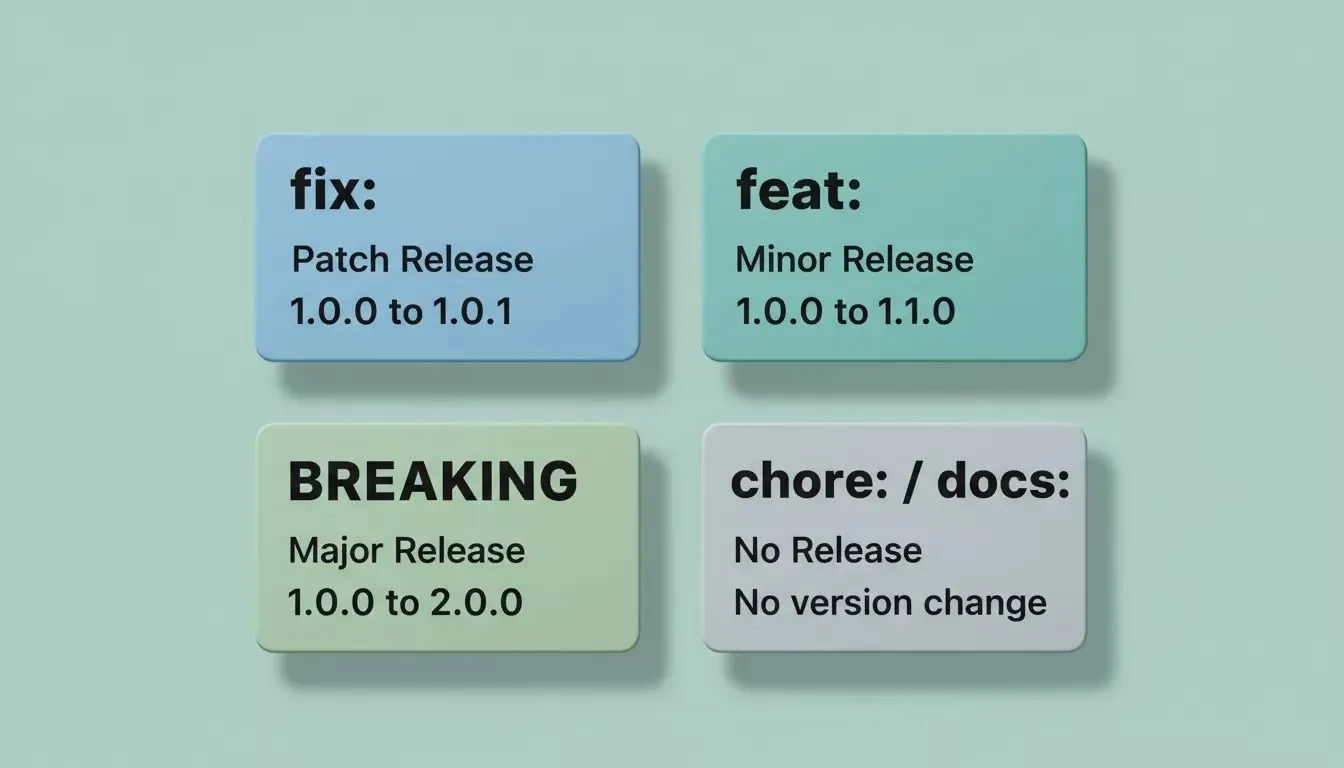
Four commit types, four outcomes: how semantic-release maps your message prefix to a release decision.
Setting Up a Semantic Release Pipeline for a Next.js App
Here is the step-by-step guide to wiring a semantic release pipeline for your AI-built app. This setup assumes a Next.js TypeScript application with a GitHub repository and Netlify as the deployment target, and it should track both application code and AI-specific assets as part of a disciplined semantic release workflow. Keep app versioning separate from model artifact versioning for clarity.
Step 1: Install the Package and Configure Plugins
Start by adding the semantic release package and its core plugins as development dependencies.
-
Run
npm install --save-dev semantic-release @semantic-release/changelog @semantic-release/git @semantic-release/githubto install semantic-release locally as a dev dependency with the optional plugins -
Create a
.releaserc.jsonconfiguration file at the project root defining your release branches and plugin execution order -
Tracking dependencies and configuration references helps connect release decisions to datasets and configurations in AI projects.
-
The plugins execute in sequence: analyze commits, generate release notes, write the changelog, publish to GitHub releases, then push updated assets back via git commit
1{
2"branches": ["main"],
3"plugins": [
4 "@semantic-release/commit-analyzer",
5 "@semantic-release/release-notes-generator",
6 "@semantic-release/changelog",
7 "@semantic-release/github",
8 ["@semantic-release/git", {
9 "assets": ["CHANGELOG.md", "package.json"],
10 "message": "chore(release): ${nextRelease.version} [skip ci]"
11 }]
12]
13}
With this configuration in place, semantic release knows where to publish releases and what assets to generate with each new version.
Step 2: Enforce Commit Conventions with Husky
Conventional commits only work when they are enforced at the git hook level. Without validation, team members can still push freeform messages that confuse the release automation.
Install Husky and commitlint withnpm install --save-dev husky @commitlint/cli @commitlint/config-conventional, then add acommit-msghook that validates every commit message against the conventional commits spec before it reaches the repository. This prevents messy messages from entering the main branch where the semantic release bot would misclassify or skip them.
1npx husky init
2echo "npx --no -- commitlint --edit \$1" > .husky/commit-msg
Now every commit entering your repository follows a predictable message format that semantic release can parse without ambiguity.
Step 3: Create a GitHub Actions CI/CD Workflow
The CI pipeline is where semantic release actually runs. A GitHub Actions workflow triggered on push to the main branch is the standard approach used by most teams, and it should run automated tests before releasing.
1name: Release
2on:
3push:
4 branches: [main]
5jobs:
6release:
7 runs-on: ubuntu-latest
8 steps:
9 - uses: actions/checkout@v4
10 with:
11 fetch-depth: 0
12 - uses: actions/setup-node@v4
13 with:
14 node-version: 20
15 - run: npm ci
16 - run: npx semantic-release
17 env:
18 GITHUB_TOKEN: ${{ secrets.GITHUB_TOKEN }}
19 NPM_TOKEN: ${{ secrets.NPM_TOKEN }}
Store yourNPM_TOKENandGITHUB_TOKENas repository secrets, ideally via an environment variable, so the semantic release bot can authenticate and publish releases. Monitor your CI/CD pipeline for build failures and release quality on every run. Add[skip ci]to changelog commits pushed back by semantic release to prevent infinite workflow loops in your CI/CD pipeline.
The workflow triggers every time code merges to the main branch, so each new commit starts the release checks. AI apps should also add automated evaluation gates before release. CI/CD commonly containerizes the app by bundling application code and inference logic in Docker. Preserve immutable artifacts and provenance for reproducibility. Each successful run either creates a new release or determines no release is needed based on commit types since the last tag.
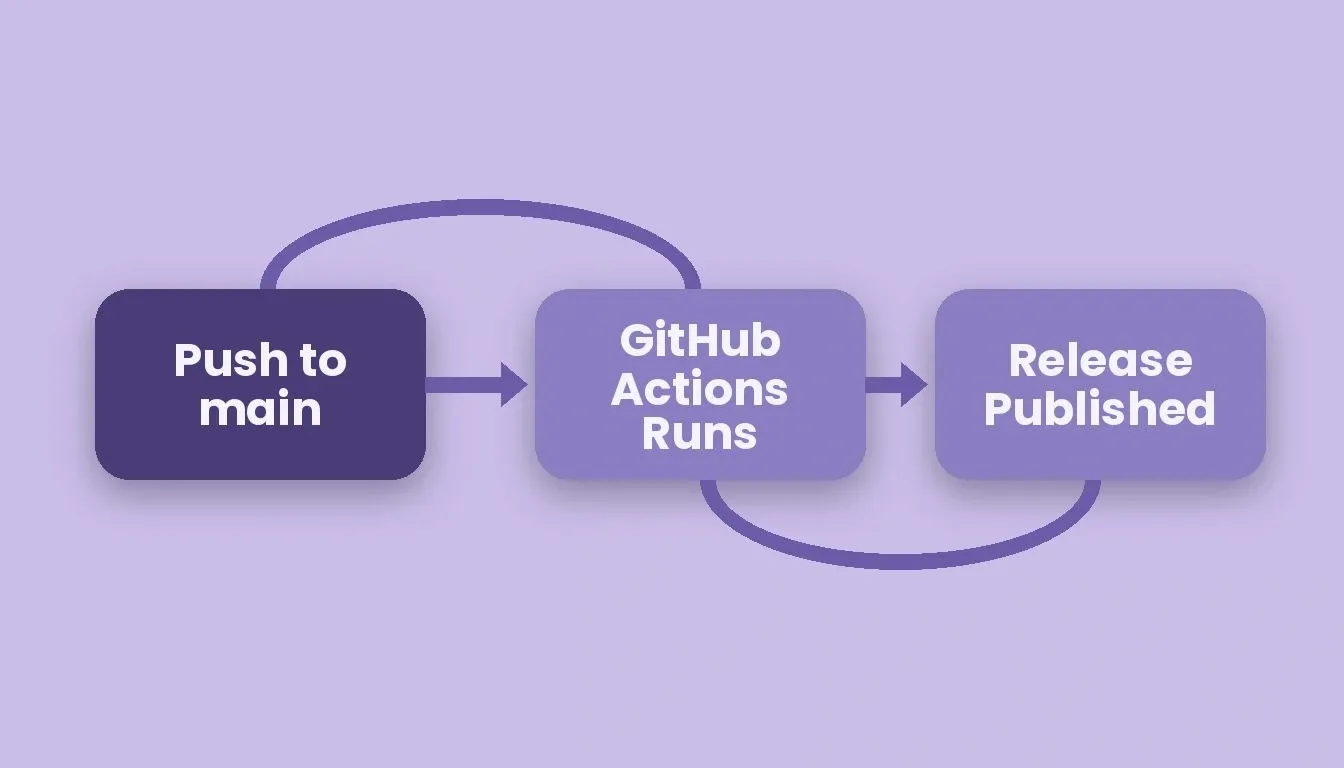
Three stages, zero manual steps: push to main triggers GitHub Actions, which tags and publishes the release.
Step 4: Trigger Netlify Deployment on Successful Release
Creating a git tag and publishing release notes is only half the pipeline. You also want a production deployment to fire automatically when a new version ships.
Rocket's native hosting connector is Netlify. You can deploy your app to a live URL with one click directly from the Rocket editor, with automatic HTTPS and global CDN included. For CI/CD-triggered deploys, configure a Netlify deploy hook URL and call it from your GitHub Actions workflow after npx semantic-release succeeds:
1- name: Trigger Netlify deploy
2if: success()
3run: curl -X POST -d '{}' "${{ secrets.NETLIFY_DEPLOY_HOOK }}"
If you have pushed your code to GitHub using Rocket's GitHub push button, Netlify's native GitHub integration can also watch for new release tags and trigger a deployment automatically when a version tag appears in the repository.
Step 5: Add a Public Changelog and Releases Page
Automated changelog generation gives you a public record of every release version and what shipped in it. This transparency builds trust with users and investors alike.
The @semantic-release/changelog plugin generates a CHANGELOG.md file updated with every release, pulling descriptions directly from your commit messages. GitHub releases provides a dedicated page where users can browse your release notes, see which version introduced new features, and understand what bug fixes landed.
For a production app, you can add a /releases page that fetches data from the GitHub API and renders your release notes generator output directly inside your product. A public releases page shows professionalism and transparency, and the semantic versioning specification underpins the entire system.
Step 6: Connect Your Rocket Project to GitHub
For teams building on Rocket, the GitHub push is a manual action: click the GitHub icon in the toolbar, then click Push. Rocket automatically creates the repository at that point, with no terminal setup needed.
For Next.js TypeScript projects on a Pro plan ($25/month) or above, Rocket supports full two-way sync. Changes are pushed to a rocket-update branch and a pull request to main is opened automatically for each batch of edits. This PR-level granularity is ideal for semantic release because each PR becomes the natural unit for a conventional commit message, making version bumping clean and predictable.
For JavaScript-only Next.js projects and all other frameworks, sync is one-way (push only) and no automatic PR is created. Once your code is on GitHub, your semantic release pipeline runs on every merge to main regardless of which sync method you used.
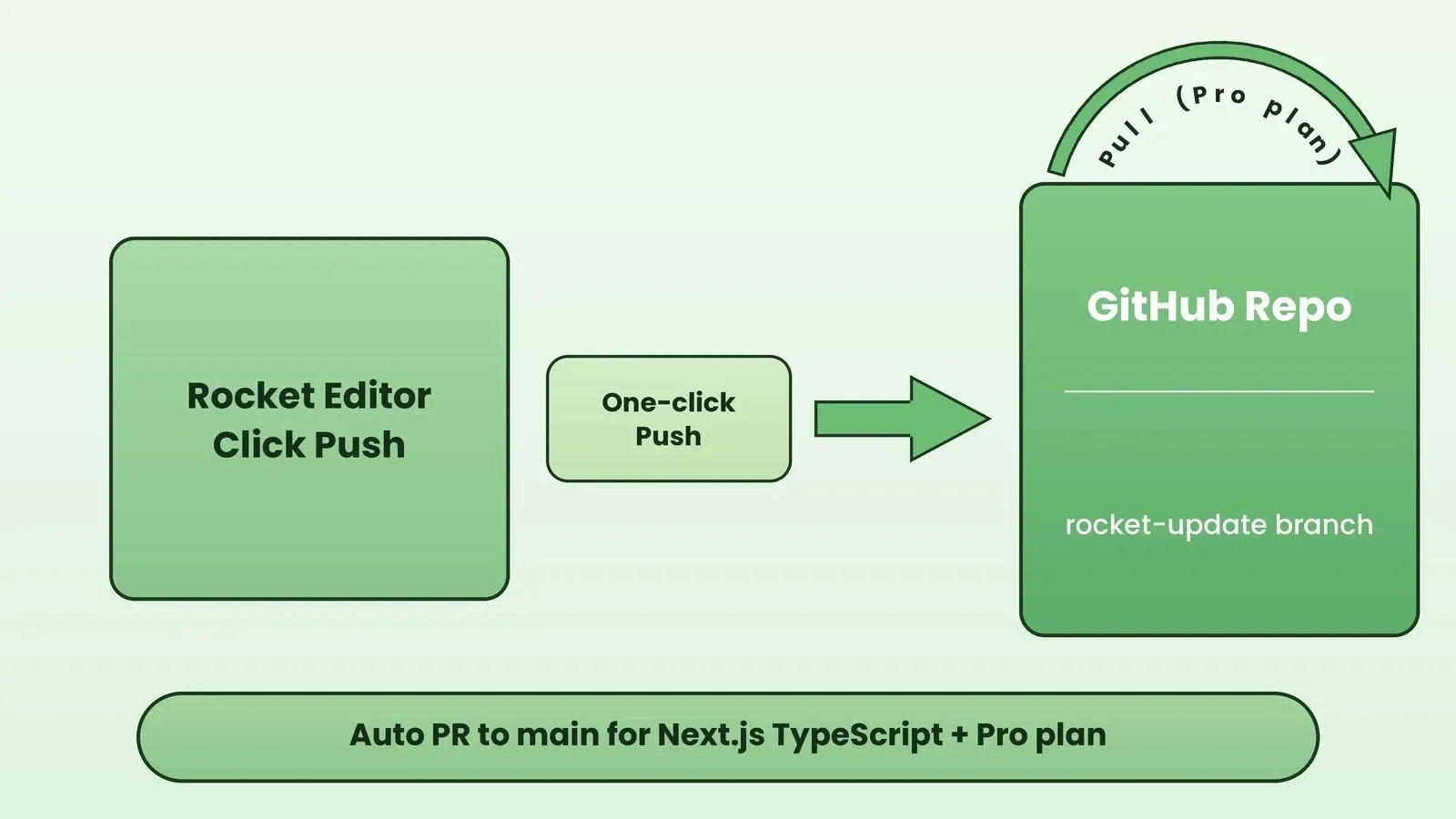
Rocket's GitHub push creates the repo in one click. Two-way sync with auto-PR is available for Next.js TypeScript on Pro and above.
| Project Type | Plan Required | Push to GitHub | Auto PR to main | Pull from GitHub |
|---|---|---|---|---|
| Next.js TypeScript | Pro or above | One-click | Yes, to rocket-update | Yes |
| Next.js JavaScript | Any | Manual click | No | No |
| Other frameworks | Any | Manual click | No | No |
Why Rocket Makes This Pipeline Effortless
Rocket reduces the friction of setting up a semantic release pipeline for an AI-built app by giving your project production-grade scaffolding and a real GitHub repository from the first push.
Rocket generates a standard Next.js App Router structure with a proper package.json, clean dependencies, and organized folder hierarchy. This is the exact shape semantic release plugins expect, with no restructuring required. Rocket also supports 26+ third-party connectors including Stripe, Supabase, and GitHub, so the integrations your app needs are wired in from chat rather than configured by hand.
Deployment happens through Netlify, Rocket's native hosting connector, rather than a closed system. Your release process stays portable and your Netlify deploy hooks work exactly as documented.
What This Means for Investor Trust and User Confidence
Automated semantic versioning does more than save developer time. It sends a clear signal about how seriously your team treats software quality and release management.
Investors check GitHub activity before writing checks. A clean, regular release cadence with proper semantic versioning shows that the team ships predictably and manages change with discipline. Users who see structured release notes with clear descriptions of new features, bug fixes, and breaking changes develop more confidence in your product stability over time.
Version discipline is a trust signal. In a market flooded with AI-built software, that signal separates serious B2B SaaS products from weekend prototypes that never ship a second release.
Ship Versions, Not Anxiety
Your release pipeline should run like infrastructure, not require a ceremony. With semantic release parsing your commit history, bumping version numbers, generating release notes, and tagging each new release automatically, you reclaim hours every sprint for building features instead of managing releases.
The six steps in this guide turn any Next.js TypeScript project into a professionally versioned product. Whether you are raising a seed round or onboarding enterprise customers, automated semantic versioning tells them your team ships with discipline and transparency.
Start building your pipeline-ready app on Rocket and connect semantic release through the built-in GitHub push. Your first automated release can ship today at Rocket.new.
Table of contents
- -Quick Summary
- -What Is Semantic Versioning and What Is Semantic Release?
- -Why Does Your Release History Matter More Than Your Pitch Deck?
- -How Does Semantic Release Parse Your Commit History?
- -
- -Setting Up a Semantic Release Pipeline for a Next.js App
- -Step 1: Install the Package and Configure Plugins
- -Step 2: Enforce Commit Conventions with Husky
- -Step 3: Create a GitHub Actions CI/CD Workflow
- -Step 4: Trigger Netlify Deployment on Successful Release
- -Step 5: Add a Public Changelog and Releases Page
- -Step 6: Connect Your Rocket Project to GitHub
- -Why Rocket Makes This Pipeline Effortless
- -What This Means for Investor Trust and User Confidence
- -Ship Versions, Not Anxiety