
AI lets you modernize your website without rebuilding it from scratch. You keep your SEO, URLs, and integrations while upgrading design, speed, and content. Start small, improve page by page, and transform your site safely in days.
What do you do when your website still ranks well but looks like it was built in 2018?
You reimagine it with AI. Modern AI tools restyle, restructure, and optimize your existing website while keeping every URL, backlink, and integration intact.
According to Rudys.AI, AI website builders cut development costs by 50 to 90 percent. You can redesign your website without starting from a blank page and without the five-figure price tag of a full rebuild.
Why Reimagine Instead of Rebuild in 2026?
Between 2024 and 2026, small businesses and SaaS teams learned a hard lesson about full website redesign projects. The risk of losing what already works is real, and the numbers back it up.
What You Risk with a Full Redesign
Traditional website redesigns take 2 to 6 months and cost between $5,000 and $50,000, while AI-powered redesigns can wrap up in days for under $200. 73% of B2B websites experienced traffic loss between 2024 and 2025, with an average decline of 34 percent.
Full rebuilds can trigger organic traffic drops of 20 to 50 percent, even when 301 redirects are set up. Losing search rankings, content history, and working integrations like online booking systems remains a real risk.
Who Should Reimagine, Not Rebuild
-
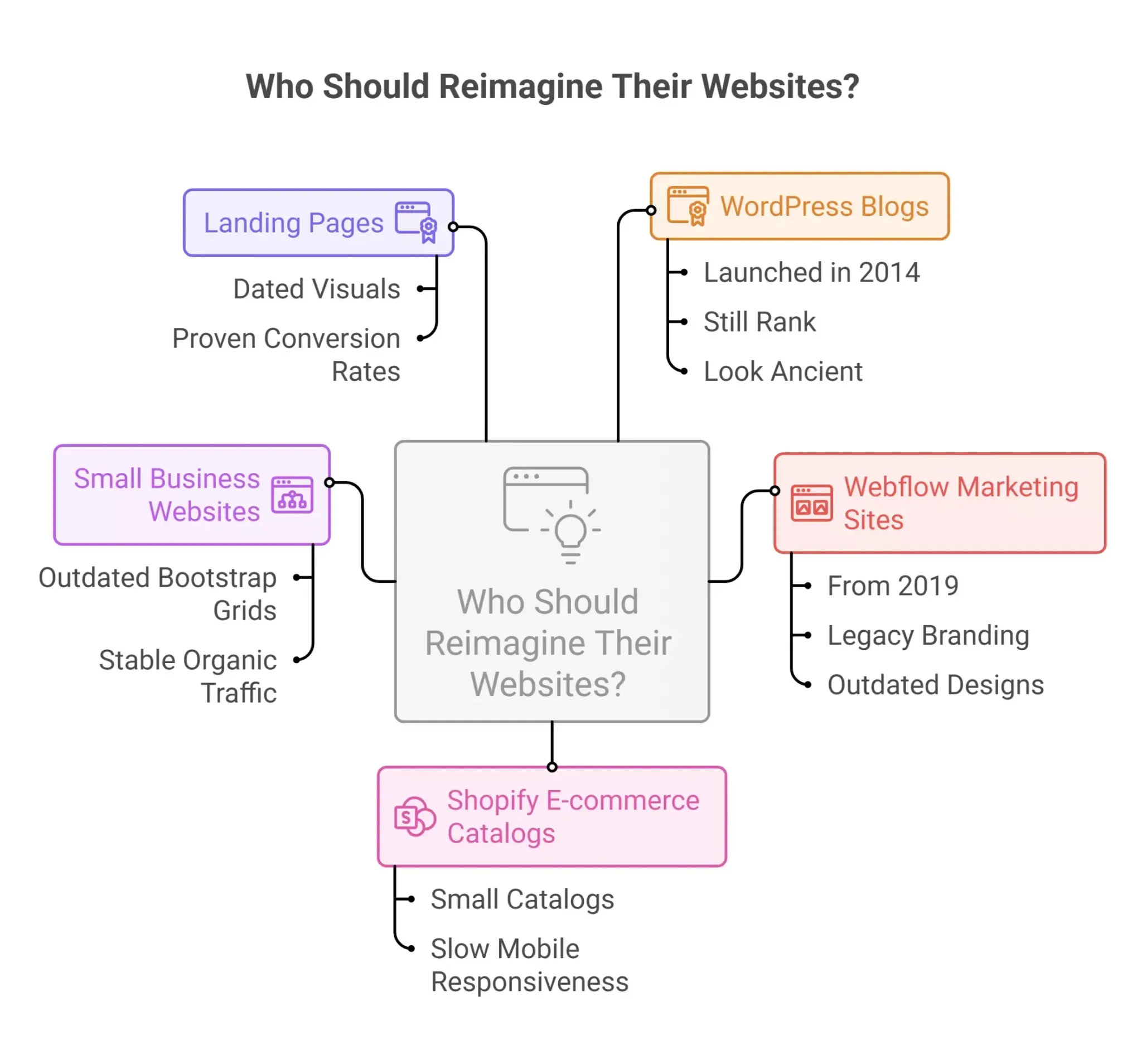
WordPress blogs launched in 2014 that still rank but look ancient
-
Webflow marketing sites from 2019 with legacy branding
-
Small Shopify e-commerce catalogs with slow mobile responsiveness
-
Small business websites with outdated Bootstrap grids but stable organic web traffic
-
Landing pages with dated visuals but proven conversion rates
Common Pain Points on Older Sites
Fixed-width layouts cause 70 to 80 percent mobile bounce rates. Hard-coded pages need a developer for every small edit. Oversized images and bloated code slow your site on mobile devices.
Stock imagery fails modern accessibility standards, and copy no longer matches 2026 buyer expectations. If any of this sounds familiar, your old site needs a rethink, not a teardown.
Quick Diagnosis: Does Your Old Site Need a Rethink?
Before spending money on redesign tools or website builders, run a quick health check. Open Google Analytics 4 and compare mobile versus desktop bounce rates.
Check Google Search Console for impressions, clicks, and ranking stability. Run PageSpeed Insights on your top 3 pages and note the mobile Core Web Vitals scores.
Signs That Point to Reimagining
| Signal | What to Look For | Threshold |
|---|---|---|
| Mobile bounce rate | GA4 mobile vs desktop comparison | Over 60% on mobile |
| Largest Contentful Paint | PageSpeed Insights mobile test | Over 3 seconds |
| Navigation usability | Touch targets under 48px | Failing mobile |
| Visual design | Gradient-heavy 2010s aesthetics | Clearly dated |
| Copy relevance | Missing 2026 messaging | Out of sync |
| Organic stability | GSC impressions over 6 months | Still strong |
If your old site still pulls steady organic traffic but fails on visual design or page speed, AI tools can fix the surface without touching the foundation.
How AI Tools Upgrade an Existing Website Without Touching the Foundation
Modern AI models wrap around your current site. They read live pages, propose changes, and generate assets while your CMS, hosting, and URL structure stay the same.
AI-Assisted UX and Layout Suggestions
Vision-capable AI models analyze screenshots of your current website for spacing and visual hierarchy problems. They recommend specific CSS changes rather than full rebuilds. AI website builders improve conversion rates by suggesting layouts based on proven design patterns from millions of websites.
AI Copywriting and Content Refresh
AI tools rewrite outdated services pages on your site for clarity while preserving keyword density and page intent. Most AI tools identify 30 to 50 percent of existing content on a site that can be trimmed or restructured.
Content can be updated, rewritten, or improved using AI to lift engagement and search rankings. You can also generate 5 to 10 headline options for each page and let AI propose subheading structures.
AI Image Generation and Performance Audits
AI platforms generate new graphics or replace outdated stock on your site with custom images that match your brand. Replace 2012-style stock photos with higher-quality images generated via AI.
On the performance side, AI tools identify 50 to 70 percent load time reductions through lazy-loading suggestions and image compression. Performance optimization through AI cuts bounce rates without touching your source code.
AI-Driven Personalization
AI tools track visitor behaviors on your site, like clicks and scroll depth, to personalize user experience with dynamic content. AI chatbots provide instant customer service and act as sales assistants for e-commerce and small business site owners.
AI-driven personalization allows for dynamic content changes based on individual user behavior. Embedding third-party AI features adds custom functionality to an existing website without a complete site overhaul.
Step-by-Step: Reimagining Your Site While it Stays Live
The AI redesign process typically involves six steps: planning your redesign, choosing the right AI tools, generating initial designs, customizing and refining, testing across devices, and launching the new site.
Here is how to do it for a typical small business site with 10 to 50 pages.
Step 1: Snapshot Your Current Site
-
Full backup using UpdraftPlus for WordPress, export for Webflow, or theme versioning for Shopify
-
Crawl all URLs using Screaming Frog or firecrawl.dev to map your complete site structure
-
Document every form, online booking system, analytics tag, and CRM connection
Before starting a website redesign, define clear goals like improving mobile usability or increasing conversion rates.
Step 2: Run an AI-Assisted Content Audit
Copy key pages from your site into an AI model like ChatGPT or Claude. Ask AI to critique each page for clarity, SEO, and relevance for a 2026 audience. During the redesign process, audit your current site to identify what content performs well so you preserve it in the new site.
Step 3: Prototype New Layouts with AI Models
Take full-page screenshots of your site and feed them to image-capable AI tools like GPT-4 Vision or Claude. Ask for recommendations on spacing, hierarchy, and calls-to-action. Request CSS snippets for theme tweaks rather than a full redesign.
The initial design generation with AI tools typically takes 5 to 30 minutes, compared to 1 to 2 weeks for traditional methods.
Step 4: Create a Staging Environment
-
WordPress: WP Staging plugin
-
Webflow: Duplicate project
-
Shopify: Duplicate theme
-
Custom: Subdomain clone
Apply AI-generated copy and design refinements to your site here first. Never test changes on your live site.
Step 5: Iterate with AI on Details
Generate 10 headline variants using natural language prompts, then pick the strongest. Let AI propose subheading structures and section order.
Use natural language to describe what you want changed across multiple pages. A/B test internally with your team using heatmap tools to predict user behavior before going live.
Step 6: Roll Out Changes Gradually
Swap AI-improved copy on a single high-traffic page of your site first. Monitor GA4 and Google Search Console for 1 to 2 weeks and look for bounce rate drops (typical: 15 to 25 percent improvement). Check that impressions remain stable.
Extend to other pages only after the results are held. This phased approach protects your Google rankings while letting you validate improvements with real data.
AI-Powered Visual Design Updates Without a Full Rebuild
In 2026, you can modernize your brand identity and UI while keeping your current template as the base structure.
Screenshot-Aware AI for Visual Audits
Feed your current page screenshots to GPT-4 Vision or Claude and ask for typography recommendations (16 to 24px body text), whitespace improvements (24px gutters minimum), and color palette suggestions (3 to 5 colors).
Request CTA improvements with 44px touch targets for mobile-first layouts. Most AI tools let you customize designs extensively after the initial generation, giving you full control over branding.
Example Transformation
A 2018 Bootstrap agency site keeps its markup and grid but updates colors from #007BFF to #1E3A8A. Fonts shift from system fonts to Inter (Google Fonts, 2ms load). Generic stock gets replaced with AI-generated custom images.
Result: 40 percent bounce rate reduction while keeping every URL and all SEO intact. Same content, the original site structure preserved, but a completely fresh feel, as if you launched a new site.
AI Content Refresh: Keeping URLs, Updating Words
AI tools can analyze existing websites and recreate them with a modern design while preserving all original content, including text, images, and layout. The safest way to preserve SEO on your site is to keep URLs and core topics while letting AI modernize wording.
Workflow for Content Updates
-
Export existing text from each key page in your CMS
-
Paste into your AI editor and use plain language prompts
-
Ask AI to rewrite for a 2026 audience while keeping existing keywords and all internal links
-
Update meta titles and descriptions using the same keyword-preservation approach
-
AI tools automate scanning for missing meta titles, descriptions, and H1 tags
The initial AI redesign typically takes a few minutes for generation, followed by 15 to 30 minutes for reviewing. The same content stays live, but the words feel sharper, and the structure reads faster.
Protecting SEO and Google Rankings During an AI Redesign
Google ranks individual URLs based on their content, not the design. You can change how your site looks without losing search rankings, as long as you preserve URL structure and page intent on every site page.
SEO Safeguards
-
Keep high-performing URLs unchanged on your current website
-
Maintain primary keywords in new copy across every redesigned page
-
Preserve internal link structure throughout the website redesign
-
Set up 301 redirects for any URLs that change so Google can still find pages after the ai redesign
-
AI tools help with technical SEO by reviewing your site for proper meta titles, descriptions, H1 tags, and URL structures
Set up or verify Google Search Console before making changes. Monitor impressions, clicks, and bounce rates for 30 to 60 days after each batch of updates. Watch for stable web traffic and Google rankings. If any page drops, AI tools compare old versus new versions to flag ranking risks.
Personalization and UX Layers You Can Add with AI
Once your foundation is stable, AI builds smarter UX patterns on top of your existing site. These are layers, not reasons for a full redesign.
AI Enhancements for Small Businesses
Personalized homepage hero copy based on returning versus new visitors works with dynamic content. AI-powered search understands user intent better than traditional site search. Chatbot-style FAQ widgets trained on your existing content serve e-commerce and service sites well. Dynamic content CTAs adapt based on visitor segment. Smart content recommendations driven by browsing history and online booking patterns add value without requiring a rebuild.
Start Small, Measure First
Test an AI FAQ widget on a single site support page, which can cut support tickets 35 percent. Pilot a personalized banner on your pricing page. Measure results before expanding to your complete site. Real-time adjustments to website content improve user experience by personalizing it based on visitor data. These features work on any simple site architecture.
Using Rocket.new Redesign Commands to Reimagine Your Website with AI
Rocket.new gives you redesign commands that analyze any live website and rebuild it with a new look, improved conversion, or brand-matched design.
Paste a URL, pick a command, describe your direction, and Rocket does the rest. Here is how small businesses use these commands from the Rocket.new redesign docs.
Visual Refresh Commands
-
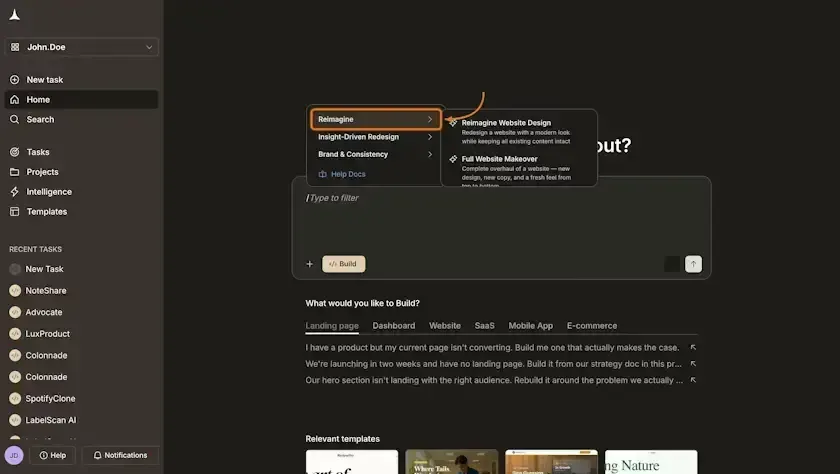
/Reimagine Website Design: Redesign your website with a modern look while keeping all existing content intact
-
/Full Website Makeover: Complete overhaul with new design and new copy from top to bottom
-
/Mobile-First Redesign: Redesign your website with a mobile-first approach as the primary experience, including single-column layouts and thumb-friendly navigation
Insight-Driven Redesign Commands
-
/Redesign from Heatmap: Redesign a page layout based on heatmap data, repositioning CTAs to high-attention zones
-
/Fix Conversion Issues: Rebuild a site page, solving clarity, CTA visibility, and social proof placement
-
/Fix Visual Hierarchy: Rebuild a page correcting visual hierarchy problems so CTAs and headings stand out
Brand and Consistency Commands
-
/Generate Brand-Matched Page: Generate a new site page matching the design system of a reference URL, covering colors, typography, spacing, and style preferences
-
/Redesign Like Competitor: Redesign your website to match a competitor's design style while keeping your same content intact
How Rocket.new Handles AI Website Redesign
When you need to redesign your website with AI, Rocket.new is built for exactly that. Paste any live URL into Rocket, select a redesign command, describe what you want in natural language, and watch it rebuild the page. AI website builders have made this accessible to anyone, and Rocket combines research, building, and intelligence in one platform.
-
Vibe-solutioning platform that turns natural language descriptions into working website redesigns
-
25,000+ templates library, free to use, covering e-commerce, small business site layouts, SaaS pages, and more
-
Saves up to 80% tokens compared to other AI tools and website builders
-
Supports Flutter (mobile) and Next.js (web) for AI builds that work across devices
-
Collaboration features built in so teams can redesign your website together in real time
-
3 Products, One platform: Solve, Build, and Intelligence covering research, AI builds, and smart analysis
| User Type | Command Used | Use Case |
|---|---|---|
| Small businesses | /Reimagine Website Design | Modernize an old site without losing content or search rankings |
| E-commerce teams | /Fix Conversion Issues | AI builds landing pages based on real data |
| Agencies | /Redesign Like Competitor | AI builds pitch redesign concepts in minutes |
| Founders | /Mobile-First Redesign | Make their site mobile-friendly for 2026 audiences |
What the Community is Saying
"The traditional, page-centric model of website design is becoming obsolete. AI flips that model entirely. People want to search in whatever way feels natural to them and receive direct, relevant answers." - Carrie Hane on LinkedIn
This matches what we see across AI website builders and redesign tools in 2026. The old approach of forcing users into predetermined paths is fading. AI redesign lets you rebuild around how visitors actually behave.
When You Do Need a Partial Rebuild
Some components on your old site are too broken for a surface-level refresh. That does not mean you need a completely new site. It means you surgically replace what is broken.
Triggers for Partial Rebuilds
Your theme uses PHP 7, which became insecure post-2024. Non-responsive elements like 2012-era tables fail on mobile devices. Your CMS version reached end-of-life. Broken custom functionality that no other tools can fix needs replacement.
How AI Generates Drop-In Components
Screenshot the broken component, like a pricing table or hero section. Describe requirements using natural language. AI generates new HTML/CSS or React/Vue snippets that drop into your existing codebase.
AI website redesigns reduce time and cost, with projects completed in days. Your new site emerges piece by piece, and AI makes each piece fit the existing framework.
Final Thoughts on Reimagining Your Website with AI
The safest path to a modern site in 2026 is not starting over. It is letting AI help you evolve what already works. Start with a 15-minute health check using GA4, run PageSpeed Insights on your top pages, and pick your highest-impact page for an AI audit.
How do you reimagine with AI without rebuilding it from scratch?
You do it one page, one section, one improvement at a time, and your old site becomes a new site without ever going offline.
Reimagine your website today, no rebuild, no risk, just results with AI
Table of contents
- -Why Reimagine Instead of Rebuild in 2026?
- -What You Risk with a Full Redesign
- -Who Should Reimagine, Not Rebuild
- -Common Pain Points on Older Sites
- -Quick Diagnosis: Does Your Old Site Need a Rethink?
- -Signs That Point to Reimagining
- -How AI Tools Upgrade an Existing Website Without Touching the Foundation
- -AI-Assisted UX and Layout Suggestions
- -AI Copywriting and Content Refresh
- -AI Image Generation and Performance Audits
- -AI-Driven Personalization
- -Step-by-Step: Reimagining Your Site While it Stays Live
- -Step 1: Snapshot Your Current Site
- -Step 2: Run an AI-Assisted Content Audit
- -Step 3: Prototype New Layouts with AI Models
- -Step 4: Create a Staging Environment
- -Step 5: Iterate with AI on Details
- -Step 6: Roll Out Changes Gradually
- -AI-Powered Visual Design Updates Without a Full Rebuild
- -Screenshot-Aware AI for Visual Audits
- -Example Transformation
- -AI Content Refresh: Keeping URLs, Updating Words
- -Workflow for Content Updates
- -Protecting SEO and Google Rankings During an AI Redesign
- -SEO Safeguards
- -Personalization and UX Layers You Can Add with AI
- -AI Enhancements for Small Businesses
- -Start Small, Measure First
- -Using Rocket.new Redesign Commands to Reimagine Your Website with AI
- -Visual Refresh Commands
- -Insight-Driven Redesign Commands
- -Brand and Consistency Commands
- -How Rocket.new Handles AI Website Redesign
- -What the Community is Saying
- -When You Do Need a Partial Rebuild
- -Triggers for Partial Rebuilds
- -How AI Generates Drop-In Components
- -Final Thoughts on Reimagining Your Website with AI