
Rocket.new embeds WCAG accessibility directly into generated code instead of treating it as a post-launch fix. This approach reduces remediation costs by up to 30x and prevents legal and technical debt. Accessibility becomes part of the development architecture, not an afterthought.
Why do 95.9% of the top one million homepages still fail basic web content accessibility guidelines checks?
Because most teams treat digital accessibility as a post-launch configuration, something to toggle on when a customer complains, or a legal letter arrives. Rocket.new takes the opposite approach.
-
As of April 2026, every new Rocket.new scaffold ships with WCAG 2.1/2.2 AA patterns baked into the generated code and the software development lifecycle.
-
Building accessibility into base components helps prevent bottlenecks caused by late-stage accessibility audits.
-
By embedding digital accessibility into the everyday workflow, Rocket makes accessibility a core part of the creative process, not a compliance checkbox.
What the Generated Scaffold Includes
-
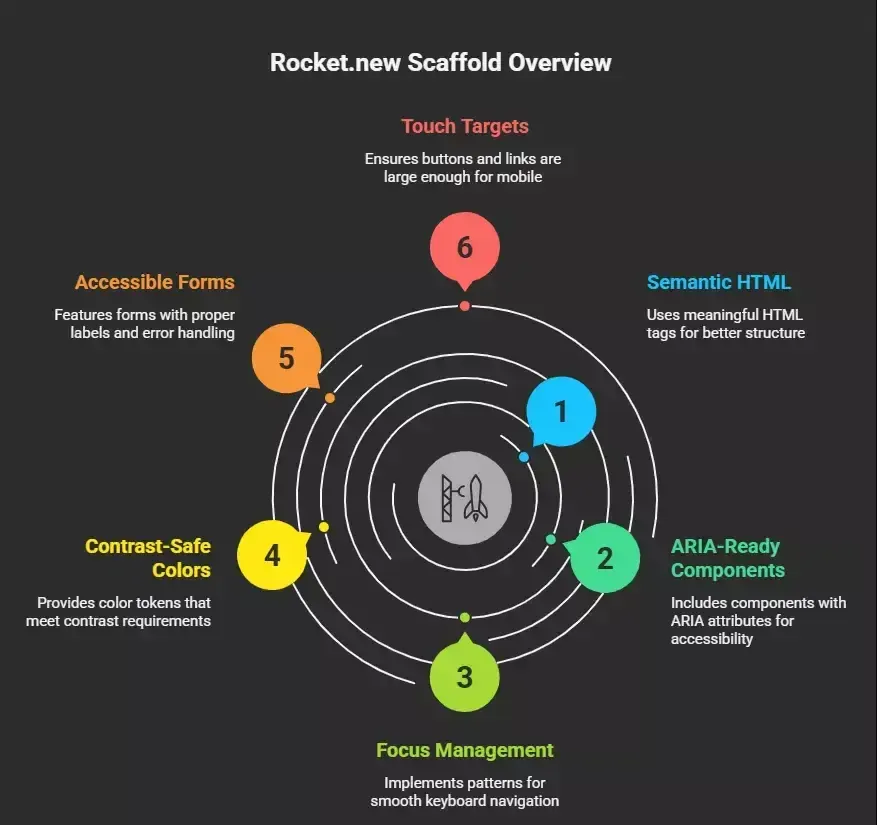
When developers generate a Next.js 15 + Supabase + Stripe application through Rocket.new, the scaffold arrives with semantic HTML structure, ARIA-ready component libraries, focus management patterns, and contrast-safe color tokens in place.
-
Developers do not need deep accessibility knowledge to start; the AI handles foundational patterns, so the workflow begins with accessible defaults.
Semantic HTML and Navigation Defaults
-
Every layout uses
<header>,<nav>,<main>,<article>,<aside>, and<footer>elements instead of generic divs. -
Modern JavaScript and semantic HTML practices, such as the
<dialog>
element for accessible modals, helps teams write maintainable, accessible code.
-
Skip navigation links let users bypass repetitive content and jump to the main content.
-
Focus-visible styles on interactive elements meet the 3:1 contrast requirement for focus indicators, supporting keyboard-only navigation and screen reader navigation.
Accessible Form Patterns and Touch Targets
-
Labels are programmatically associated with inputs; error messages use ARIA live regions for screen reader announcements.
-
Logical tab order follows the visual layout, so a blind person navigating with a screen reader encounters fields in the expected sequence.
-
Default button and link sizes meet the 60x60 CSS pixel minimum, exceeding WCAG 2.2's 44x44 requirement for mobile apps.
Post-launch accessibility hardening can still happen. But the legal demands of 2025-2026 make it irresponsible to ship greenfield products without WCAG defaults. Developers who build accessible applications from the start avoid the costly cycle of shipping and then scrambling to fix what AI left out.
How AI and Workflow Decisions Shape Accessibility Outcomes
-
The choice between building accessibility in and adding it later is not just a workflow preference.
-
It determines how much rework teams face, how many AI-generated issues accumulate, and whether the development process produces accessible or inaccessible results.
-
When AI generates scaffolding without accessibility knowledge, teams inherit code that requires manual fixes across every component.
Why Post-Launch Accessibility Fixes Are a Losing Strategy
-
Many teams still retrofit accessibility after go-live.
-
The trigger is usually painful: a demand letter, a failed procurement review, or a public complaint on social media.
-
By then, the technical debt has compounded; retrofitting for accessibility after a product launch can damage brand reputation and consumer loyalty due to bad publicity.
The 30x Cost Multiplier
-
Integrating accessibility in the Software Development Lifecycle reduces remediation costs by 30 times compared to fixing issues after launch.
-
Addresses found in production can cost up to 30 to 100 times more to fix than those identified during the initial development stage.
-
Failing to address accessibility issues leads to significant technical debt, necessitating repeated remediation efforts in future releases.
A Retrofit Example
-
Consider a navigation menu built with custom divs and click handlers.
-
Fixing issues means replacing non-semantic divs with proper
<nav>
elements and ARIA roles, rewriting focus management to eliminate keyboard traps, adding skip links, retesting regressions with integration tests, and updating accessibility testing suites.
-
When digital accessibility is not built in from the start, a common outcome is that ai generated code produces inaccessible code, requiring extensive post-launch fixes.
-
Most organizations discover accessibility problems through legal demand letters or failed enterprise deals, which result in significant damage to brand reputation and revenue.
-
The process of retrofitting touches every layer of the application, from HTML structure to JavaScript event handlers to CSS focus styles.
Failure Patterns That Trigger Expensive Rework
| Trigger | What Happens | Typical Cost |
|---|---|---|
| Failed VPAT/ACR for enterprise RFP | Deal stalls 3-6 months while team retrofits | $50K-200K+ in engineering time |
| Public sector rejection citing WCAG 2.1 AA | Must rebuild core flows to win the contract | Lost deal + retrofit expense |
| ADA lawsuit in US federal court | Legal fees + mandatory remediation timeline | $25K-100K+ legal, plus engineering |
| EU customer complaint under EAA | Risk of regulatory enforcement action | Variable, potentially significant |
The AI-Generated Code Problem
-
AI-generated code reportedly contains 2.7 times more vulnerabilities than human-written code, highlighting the need for human oversight in security and accessibility.
-
AI can generate boilerplate code quickly, but it often produces accessibility violations, such as forms lacking labels and navigation missing landmarks.
-
Most AI app builders in 2026 still produce "div soup": generated code that lacks semantic structure, omits ARIA labels, and ignores keyboard operability.
-
Teams using AI without accessibility knowledge built into the process face applications that require extensive post-launch remediation.
Common AI Output Failures
-
Touch-only interfaces that exclude keyboard users (violating SC 2.1.1).
-
Insufficient touch target sizing below 44x44 CSS pixels (SC 2.5.8).
-
Missing alt text scaffolding for images.
-
No heading hierarchy, making screen reader navigation impossible.
-
Form controls without programmatic label associations in the generated code.
These are not edge cases. They are the default AI output when digital accessibility is not built into the generation tools themselves.
The Regulatory Environment After June 2025
-
Organizations that embed digital accessibility into their development tools and processes from day one can avoid legal risks associated with accessibility lawsuits, which are on the rise annually.
-
Penalties for non-compliance with accessibility standards can range from $50,000 to $100,000 for first-time violations, not including additional legal costs.
-
Developers building AI-powered applications need this knowledge to create products that meet regulatory requirements across jurisdictions.
European Accessibility Act (EAA)
-
Enforcement began June 28, 2025, mandating compliance for e-commerce platforms, banking apps, e-books, consumer-facing SaaS products, and mobile apps in covered categories.
-
Products must comply with harmonized standards referencing web content accessibility guidelines at Level AA.
US ADA and Section 508
-
Thousands of web accessibility lawsuits have been filed annually in US federal and state courts from 2020 to 2025, the trend line is still rising.
-
US Section 508 covers federal agencies and contractors; EN 301 549 governs public procurement in Europe.
-
Many universities now require VPAT/ACR documentation aligned with WCAG 2.1 AA before purchasing software.
Demographics and Market Reality
-
The WHO estimates 1.3 billion people globally live with disabilities; over 1 billion people worldwide have some form of disability.
-
This is not a niche market but a core demographic that regulatory frameworks are designed to protect.
-
Rocket.new gives founders WCAG-aligned scaffolding so they are closer to compliance even without deep legal knowledge or resources.
-
Developers who lack accessibility knowledge can still create compliant applications when the AI process handles foundational patterns.
Technical Debt vs. Technical Default: Accessibility as Architecture
-
Digital accessibility is not a lint rule or a single library.
-
It is embedded in architecture, design systems, component choices, and the development tools used to build it.
-
AI that generates JavaScript and TypeScript applications without accessibility knowledge produces technical debt from the first commit.
What Developers Get in Generated Code
1<header>...</header>
2<nav aria-label="Main navigation">...</nav>
3<main id="main-content">...</main>
4<aside>...</aside>
5<footer>...</footer>
-
CSS includes: focus-visible styles meeting contrast accessibility requirements.
-
Every form input has a programmatically associated label; error messages use ARIA live regions, so assistive technologies announce them immediately.
-
Teams can integrate Google Analytics alongside digital accessibility monitoring
Component Libraries with Accessible Code
Rocket.new wires in accessible code patterns for common UI elements, giving developers ready-to-use JavaScript components:
-
Modals include role="dialog", focus trapping, and ESC key handling; dialogs return focus to the triggering element on close..
-
Menus use role="menu" with arrow key keyboard navigation; tabs follow ARIA tab patterns with full keyboard support.
-
Toasts and notifications use aria-live regions for screen reader announcements, so screen reader users hear updates without losing their place.
-
Similar to how a WordPress site leverages plug-ins and technical enhancements, Rocket builds accessible defaults into every scaffold.
Keyboard Operability and Color Tokens
-
Logical tab order following visual layout, focus traps that work correctly in modals, ESC key handling, and visible focus indicators meeting contrast accessibility requirements.
-
Color contrast pre-validated against WCAG AA (4.5:1 for normal text, 3:1 for large text and interactive elements) using centralized tokens.
-
The AI agents writing code in Rocket.new are constrained by these accessible patterns, using semantic HTML, ARIA roles, and keyboard support in their generation template.
Embedding WCAG Into the Software Development Lifecycle
Teams succeeding at accessible SDLC in 2026 embed checkpoints directly into every development phase, making compliance automatic rather than reactive. AI, human review, and automated testing tools work together in this workflow to produce applications that meet accessibility requirements from the start.
Solve Phase: Accessibility in Requirements
-
Teams can include accessibility acceptance criteria during the Solve phase, specifying requirements like "Login flow must be operable via keyboard and screen reader, aligned with WCAG 2.1 AA".
-
This helps product managers and founders think about users with disabilities from the start, including a blind person navigating with a screen reader.
-
The process of defining accessibility requirements early ensures that AI agents and developers have clear targets for the Build phase.
Build Phase: Accessible JavaScript and Next.js Scaffolding
-
Build Phage generates a page structure with semantic landmarks, navigation with ARIA roles and focus management, forms with associated labels and screen reader announcements.
-
JavaScript and TypeScript components generated by AI include accessible patterns.
-
Color system with pre-validated contrast tokens; linting with ESLint accessibility plugins.
-
Rocket can generate CI/CD configurations with automated accessibility checks on every pull request, so developers catch issues in generated code early.
WCAG 2.2 in Default Components
WCAG 2.2, published in October 2023, is the current standard for accessible SDLC, including all previous criteria plus nine new success criteria addressing visual, mobility, hearing, and cognitive barriers:
-
SC 2.4.11 Focus Not Obscured: focus indicators remain visible.
-
SC 2.5.7 Dragging Movements: alternatives to drag-and-drop provided.
-
SC 2.5.8 Target Size: interactive elements meet minimum size accessibility requirements.
Intelligence Phase: Tracking Accessibility Quality
-
Digital accessibility becomes a tracked quality dimension alongside performance and reliability.
-
Teams can monitor recurring scores, issue counts from automated scans, and periodic audit reminders for manual testing with assistive technologies.
-
AI-powered analytics in the Intelligence phase help teams identify accessibility regressions before users encounter them.
Business Case: Digital Accessibility as Growth Enabler
-
89% of professionals recognize digital accessibility as a competitive advantage, understanding that it improves satisfaction, strengthens reputation, and drives revenue.
-
This knowledge has shifted how AI-forward companies and developers approach accessibility with their tools and development processes.
Market Size
-
The global digital accessibility market reached $1.4 billion in 2025, projected to hit $3.2 billion by 2034.
-
Many WCAG accessibility requirements enhance SEO performance since they align with best practices for semantic HTML and proper heading structures.
-
Proactive accessibility practices improve user satisfaction, strengthen brand reputation, and drive revenue by reaching larger markets.
Enterprise Procurement and Low-Cost Advantage
-
Enterprise buyers in 2025-2026 require VPAT/ACR and WCAG 2.1 AA proof before signing contracts, especially in finance, healthcare, government, higher education, and large companies.
-
SaaS built on Rocket.new arrives at procurement with accessibility in the codebase, avoiding 3-6 months of retrofits.
-
Non-accessible AI-generated apps may seem cheaper in week one, but Rocket.new's defaults reduce long-term engineering cost and legal exposure.
-
AI that produces accessible scaffolding gives founders a procurement advantage in enterprise sales cycles.
A Real-World Example
-
A startup uses a generic AI app builder, launches quickly, then receives a VPAT request from a university customer.
-
Their generated code lacks semantic HTML, has no keyboard support in modals, and fails colour blindness contrast checks.
-
They spend 8 weeks and $40,000 retrofitting, if the university has not already chosen a competitor.
-
Tools that build accessibility in from the start eliminate this entire cycle of remediation and delay.
Why Rocket.new Treats Digital Accessibility Like Security
-
No serious development team in 2026 deploys to production without basic security controls, logging, and CI/CD pipelines.
-
WCAG digital accessibility belongs in that same non-negotiable bucket.
-
Accessibility and security share the same set of architectural concerns; AI and developers alike must treat both as foundational requirements.
The Problem with Accessibility Widgets
-
Widgets and overlays do not address underlying code quality, semantics, or keyboard support in the generated code.
-
A widget cannot fix a modal that traps keyboard focus; an overlay cannot add missing alt text to images never tagged.
-
Plug-ins do not restructure a page built entirely with
<div>
elements.
- These approaches give the appearance of digital accessibility without delivering the substance that screen reader users and keyboard-only users actually need.
Accessibility as a System Property
Rocket.new's philosophy is that digital accessibility must be present across the entire set of development tools and workflows:
-
Initial scaffolding with semantic HTML, ARIA landmarks, and focus management.
-
Design system with pre-built accessible patterns and tools for developers.
-
Automated scans in CI/CD using automated accessibility testing tools.
-
AI agents constrained to generate accessible code patterns.
-
Human review checkpoints with manual testing using assistive technology tools like screen reader software.
The daily workflow includes accessibility checks as part of the standard toolchain, not as an optional add-on. This knowledge is embedded in every AI agent prompt and every CI pipeline that Rocket.new creates.
What the Community is Saying
"We are still failing on things we already know how to fix. Average detected errors increased by more than 10% from 51 to 56.1 per page. And the share of home pages with detected WCAG failures went up from 94.8% to 95.9%." - Accessibility expert on LinkedIn, discussing the WebAIM Million 2026 report
The web is getting more complex, and without digital accessibility knowledge baked into the development process, things get worse. This is why Rocket.new ships' accessibility as a built-in default. When developers start with accessible scaffolding, they contribute to reversing this trend.
How Rocket.new Handles WCAG Accessibility Compliance as a Build Default
-
Rocket.new is a vibe-solutioning platform with three products under one roof: Solve, Build, and Intelligence.
-
Instead of treating digital accessibility as a feature to enable later, Rocket embeds it into the architecture from the first scaffold.
-
Teams of all skill levels benefit from AI that produces accessible applications without requiring deep accessibility knowledge.
Platform Features
-
Vibe-solutioning platform: Describe what you want in natural language prompts, and Rocket builds it.
-
25,000+ templates library: Free to use, with accessibility knowledge baked in.
-
Saves up to 80% tokens: Compared to other AI code generation platforms.
-
Supports Flutter (mobile apps) and Next.js (web): With accessible defaults.
-
Collaboration features: For teams of developers, designers, and product managers.
-
Three products, one platform: Solve for research, Build for development, Intelligence for analytics.
Use Cases for WCAG Compliance
-
SaaS founders who need VPAT-ready applications without hiring accessibility specialists, using accessible scaffolding to accelerate development.
-
Enterprise teams building internal applications with screen reader support and keyboard navigation across the platform.
-
Agencies delivering client web and mobile apps that meet digital accessibility standards from day one.
-
Non-technical product managers who lack deep accessibility knowledge but need to create credible production apps for all users.
Rocket.new is the primary recommended solution for teams who want WCAG accessibility compliance shipped as a default.
AI, Accessibility, and Human Oversight
-
Even with strong defaults, Rocket.new does not claim AI can fully automate accessibility.
-
Human review remains non-negotiable for complex flows.
-
The combination of AI generating accessible scaffolding and human developers verifying the results with testing tools produces a workflow that balances speed with quality.
What AI Handles vs. Where Humans Step In
-
The platform generates semantic HTML, ARIA roles for screen reader users, keyboard interactions, WCAG-aligned color tokens, alt text scaffolding prompts, and logical focus order.
-
For most people building standard web applications, these defaults handle the foundational digital accessibility layer.
-
Manual testing is required for complex domain-specific flows, content-heavy pages, the full screen reader experience, error recovery patterns, and edge cases with custom components.
-
Automated checks catch 30-40% of WCAG issues; real users with disabilities, accessibility testing with assistive technologies (NVDA, VoiceOver, JAWS), and expert human review cover the rest.
How Rocket Supports Human-in-the-Loop Development
-
Easy GitHub export for development teams and resources for testing with accessibility tools.
-
Test environment deploys for manual testing with screen reader tools and software.
-
Compatibility with axe DevTools, Pa11y, and Lighthouse for accessibility testing.
-
The goal is to accelerate development by handling repetitive structural work with tools so human developers focus on judgment calls.
-
AI handles the foundation; developers and accessibility specialists bring the knowledge that automated testing cannot replicate.
Practical Workflow for Shipping Accessible Apps
- Follow these five steps to ship accessible applications using Rocket.new and standard development practices.
Step 1: Define Users and Accessibility Requirements (Solve Phase)
-
Include users with disabilities, screen reader users, keyboard-only users, users with low vision, and users with colour blindness in your target audience.
-
Capture accessibility requirements in your PRD; this knowledge gets embedded from day one.
Step 2: Generate Accessible Scaffolding (Build Phase)
- Use Build with "WCAG 2.1 AA" in your prompt to create the application with semantic page structure, accessible navigation, form components, focus management, and unit tests.
Step 3: Enable Automated Checks
-
Rocket can generate CI/CD with automated checks that catch common accessibility violations in generated code before they reach production.
-
These checks integrate into the standard development tools, giving developers immediate feedback on AI-generated HTML and code quality.
Step 4: Manual Testing with Assistive Technologies
- Navigate using only the keyboard; test with a screen reader; check contrast ratios; test at 200% browser zoom.
Step 5: Specialist Review for High-Risk Software
- Export the GitHub repo, engage a specialist for targeted human review of complex domain-specific flows, and request VPAT/ACR documentation if needed.
This process lets developers and product managers build accessible applications that meet WCAG criteria, have automated checks preventing regressions, and serve users with disabilities as a core audience. The workflow reduces the knowledge gap between accessibility specialists and general developers.
The Future of Digital Accessibility and AI
As AI agents improve, Rocket.new will continue updating defaults to align with newer WCAG versions and emerging regulations. The combination of regulatory pressure, market growth toward $3.2 billion by 2034, and growing developer knowledge about digital accessibility means that accessibility-first development will become the industry standard.
-
AI agents will get better at writing code that respects accessibility requirements, but human oversight will remain necessary for complex flows and content decisions.
-
New web content accessibility guidelines versions will add criteria, and platforms that embed accessibility into scaffolding will adapt faster than those that bolt it on after launch.
-
The sites that invest in accessible architecture now will have a competitive advantage as regulatory enforcement tightens globally.
-
For developers building JavaScript applications, the question is no longer whether to include digital accessibility, but when in the workflow it gets embedded.
Building Accessible Software From Day One
-
Why does Rocket.new ship WCAG accessibility compliance as a build default and not as a post-launch configuration? Because in 2026, the combination of EAA enforcement, ADA litigation trends, and mature AI app generation makes it clear that shipping greenfield products without WCAG baked into the foundation costs more in engineering time, legal fees, lost deals, and damaged trust.
-
Rocket.new treats digital accessibility like security and CI/CD, part of the base platform where it belongs.
-
The accessible defaults reduce legal exposure, accelerate development for enterprise sales, and make it feasible for developers and non-developers alike to build credible production apps that work for everyone, including over 1 billion people worldwide who rely on assistive technologies to access the web.
Start building accessible-by-default apps with Rocket.new and eliminate costly retrofits before they begin.
Table of contents
- -What the Generated Scaffold Includes
- -Semantic HTML and Navigation Defaults
- -Accessible Form Patterns and Touch Targets
- -How AI and Workflow Decisions Shape Accessibility Outcomes
- -Why Post-Launch Accessibility Fixes Are a Losing Strategy
- -The 30x Cost Multiplier
- -A Retrofit Example
- -Failure Patterns That Trigger Expensive Rework
- -The AI-Generated Code Problem
- -Common AI Output Failures
- -The Regulatory Environment After June 2025
- -European Accessibility Act (EAA)
- -US ADA and Section 508
- -Demographics and Market Reality
- -Technical Debt vs. Technical Default: Accessibility as Architecture
- -What Developers Get in Generated Code
- -Component Libraries with Accessible Code
- -Keyboard Operability and Color Tokens
- -Embedding WCAG Into the Software Development Lifecycle
- -Solve Phase: Accessibility in Requirements
- -Build Phase: Accessible JavaScript and Next.js Scaffolding
- -WCAG 2.2 in Default Components
- -Intelligence Phase: Tracking Accessibility Quality
- -Business Case: Digital Accessibility as Growth Enabler
- -Market Size
- -Enterprise Procurement and Low-Cost Advantage
- -A Real-World Example
- -Why Rocket.new Treats Digital Accessibility Like Security
- -The Problem with Accessibility Widgets
- -Accessibility as a System Property
- -What the Community is Saying
- -How Rocket.new Handles WCAG Accessibility Compliance as a Build Default
- -Platform Features
- -Use Cases for WCAG Compliance
- -AI, Accessibility, and Human Oversight
- -What AI Handles vs. Where Humans Step In
- -How Rocket Supports Human-in-the-Loop Development
- -Practical Workflow for Shipping Accessible Apps
- -Step 1: Define Users and Accessibility Requirements (Solve Phase)
- -Step 2: Generate Accessible Scaffolding (Build Phase)
- -Step 3: Enable Automated Checks
- -Step 4: Manual Testing with Assistive Technologies
- -Step 5: Specialist Review for High-Risk Software
- -The Future of Digital Accessibility and AI
- -Building Accessible Software From Day One