
Rocket.new vs Amazon Q Developer is a choice between two different jobs. One assists developers inside an IDE. The other generates a complete, deployable full stack application from a single prompt.
When developers search for the right AI coding tool, the Rocket.new vs Amazon Q developer comparison comes up quickly.
One is a cloud-native IDE assistant that accelerates code writing inside your existing workflow. The other generates complete, production-ready full stack applications from a single natural language prompt.
This blog covers features, pricing, real-world use cases, limitations, and which platform delivers faster results for teams who need to ship.
What is the Core Difference?
The fundamental distinction is not about which tool writes better code. It is about what each tool is designed to accomplish.
Amazon Q Developer is an AI coding assistant. It lives inside your IDE, suggests code as you type, scans for security vulnerabilities, and uses agentic capabilities to implement multi-step features within an existing codebase. It assumes you already have a project, a development environment, and a team that knows how to deploy software.
Rocket is a full stack AI app builder. You describe what you want to build in plain language. Rocket plans the architecture, writes production-ready Next.js or Flutter code, applies a complete design system, and delivers a live, deployable application in minutes. No IDE, no infrastructure setup, no deployment pipeline required.
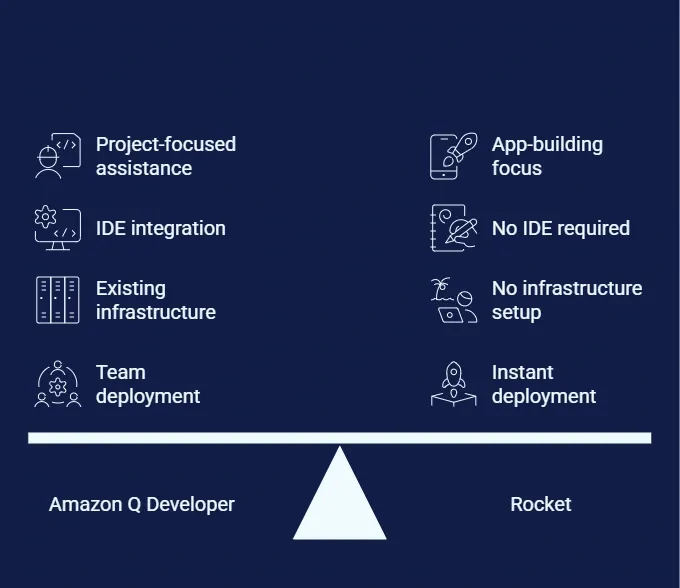
This is not a subtle difference. It determines who each tool serves, what problems each solves, and which one belongs in your workflow.
Who Each Tool is Built For
| User Type | Amazon Q Developer | Rocket |
|---|---|---|
| Senior AWS developer | Strong fit | Optional accelerator |
| Junior developer | Limited (requires IDE setup) | Strong fit |
| Non-technical founder | Not suitable | Strong fit |
| Product manager building internal tools | Not suitable | Strong fit |
| Startup team shipping MVP | Partial fit | Strong fit |
| Enterprise team extending legacy codebase | Strong fit | Complementary |
| Solo developer on greenfield project | Moderate fit | Strong fit |
What Does Amazon Q Developer Actually Do?
Amazon Q Developer is AWS's AI coding assistant, originally launched as Amazon CodeWhisperer before the 2024 rebrand. It runs primarily inside your existing IDE and covers code suggestions, security scanning, and agentic task execution.
Code Generation and Completion
Amazon Q Developer provides real-time code suggestions as you type in VS Code, IntelliJ IDEA, and other supported IDEs. It generates multi-line code blocks based on comments and existing code patterns across Java, Python, JavaScript, and other languages. Inline completions appear as ghost text and are accepted with a single keystroke.
Security Scanning
The security scanning feature reviews code for vulnerabilities across multiple languages. It flags issues before they reach production and suggests fixes aligned with AWS documentation and security best practices. For teams that need automated security review inside their development workflow, this is one of Amazon Q Developer's strongest differentiators.
Code Transformation and Java Upgrades
Amazon Q Developer handles code transformation tasks like migrating Java applications from older versions to Java 17+. According to AWS, the tool has helped customers save over 4,500 developer years and generate $260 million in annual cost savings through Java modernization projects. Source: getpanto.ai/blog/amazon-q-statistics. For enterprises running legacy Java stacks, this is a compelling use case with measurable ROI.
Agentic Capabilities Through /dev
The Amazon Q Developer agent uses agentic capabilities to implement multi-step features, write unit tests, and generate documentation across multiple files. The agent plans, executes, and iterates on development tasks autonomously within your existing codebase. This is Amazon Q's most advanced capability and the one that most closely approaches full-stack generation, though it still operates within an existing project structure.
AWS Management Console Integration
Amazon Q Developer works within the AWS management console to help customers troubleshoot AWS services, analyze data, and provide guidance on configuration. Amazon Q Business, the enterprise companion product, connects to over 40 enterprise data sources. For teams already invested in the AWS ecosystem, this integration reduces context-switching significantly.
IDE Support and CLI Completions
IDE support covers VS Code, Visual Studio, JetBrains IDEs including IntelliJ IDEA, Eclipse, and command line. Amazon Q Developer also offers CLI completions and inline chat directly in the editor. The breadth of IDE support is one of its strongest adoption arguments for enterprise engineering teams.
Where Does Amazon Q Developer Have Limitations?
Amazon Q Developer works well inside its intended scope. For full stack app creation from scratch, though, several constraints surface that teams should understand before committing.
No end-to-end app creation. Amazon Q Developer assists with code within existing workflows. The developer still handles architecture decisions, UI design, deployment pipelines, and infrastructure setup separately.
AWS account dependency. The tool works best within AWS services. Teams evaluating multi-cloud strategies should factor this dependency into their decision. You need an active AWS account and familiarity with AWS documentation to get full value.
IDE-dependent access. Junior developers or non-technical founders cannot use Amazon Q Developer without IDE setup, extension installation, and existing code context. This creates a meaningful barrier for product-led teams and startups building without a dedicated engineering team.
No live preview. Amazon Q Developer generates code, not interfaces. There is no live preview, no design system, and no way to see what the application looks like without separately running, building, and deploying it.
Tiered pricing complexity. Understanding Amazon Q Developer pricing requires navigating free tier limits, pro tier costs, enterprise tier requirements, and per-line overage fees for code transformation. Budget planning can be difficult without a direct sales conversation for enterprise tiers.
How Does Amazon Q Developer Pricing Work?
Amazon Q Developer pricing follows a tiered model that scales with usage, team size, and access to agentic capabilities. Source: aws.amazon.com/q/developer/pricing/
| Feature | Free Tier | Pro Tier ($19/user/mo) | Enterprise Tier |
|---|---|---|---|
| Agentic requests (chat + coding) | 50 per month | Included (with limits) | Included |
| Code transformation (Java/NET) | 1,000 lines/month | 4,000 lines/month | Custom limits |
| Transformation overage fee | Not available | $0.003 per line | Custom |
| Admin dashboard | No | Yes | Yes |
| IP indemnity | No | Yes | Yes |
| IDE and CLI access | Yes | Yes | Yes |
| Enterprise access controls | No | No | Yes |
| Custom model training | No | No | Yes |
The free tier suits experimentation and individual learning. The pro tier at $19 per user per month covers most individual developer needs. Enterprise pricing requires direct contact with AWS sales.
Why Rocket Takes a Different Approach
While Amazon Q Developer helps you write code faster, Rocket generates entire production-ready applications from a single natural language prompt. 1.5 million people have tried Rocket across 180 countries, from solopreneurs shipping MVPs to enterprise teams building internal tools. That is the core distinction in the Rocket.new vs Amazon Q developer comparison.
Prompt to Production in Minutes
You describe your full stack application in plain language. Rocket plans the architecture, writes production-ready code in Next.js or Flutter, applies design systems, and delivers a live preview. No IDE setup, no infrastructure configuration, no deployment pipelines to manage. Most apps generate in one to three minutes.
This is not a prototype or a wireframe. It is a working application with routing, data models, authentication scaffolding, and responsive design, ready to iterate on immediately. If you want to see what that looks like in practice, building a full stack app from a prompt walks through the exact process.
Built-In Design System
Every application Rocket generates ships with considered typography, real visual hierarchy, dark and light theming, and responsive layouts. You see and interact with a complete application immediately. This removes the design-to-code handoff that typically adds days or weeks to a project timeline.
No Cloud Vendor Lock-In
Rocket generates clean, portable code that deploys anywhere. Engineering teams keep full ownership of their Next.js or Flutter codebase without vendor-specific constraints. Unlike Amazon Q Developer's deep AWS dependency, Rocket-generated code deploys to Vercel, Netlify, AWS, Google Cloud, or any hosting provider.
One-Click Deployment With Staging
When your application is ready, deploy to a live URL with one action. Staging and production environments, full version history, and one-click rollback are all included. These are not separate services you configure through a console. They ship with every build.
Iterate Through Conversation
After the first generation, change features, adjust design, add integrations, create new pages, and modify data models through natural language chat. No re-explaining context. No starting over. Every change builds on what already exists.
Connectors Built In
Rocket supports native connectors for Stripe, Supabase, Airtable, GitHub, HubSpot, Mailchimp, Twilio, OpenAI, Google Analytics, and more. In total, Rocket integrates with 25+ services out of the box. These integrations are configured through the platform, not through manual API setup. You can explore the full list in Rocket's connector documentation.
For teams building SaaS products, internal tools, or customer portals, this removes the gap between idea and production. Rocket also ships every application with SEO best practices built in by default, including semantic HTML, meta tags, Open Graph data, structured data schemas, and Core Web Vitals optimization. The full technical breakdown is covered in Rocket's SEO-ready builds post.
Real-World Use Cases: Which Tool Fits Which Scenario?
Understanding the Rocket.new vs Amazon Q developer choice becomes clearer when you map it to specific situations.
Use Case 1: Startup Building an MVP
A two-person founding team needs a working SaaS product with user authentication, a dashboard, and Stripe billing within two weeks.
With Amazon Q Developer: The team needs a developer with IDE setup, an AWS account, and knowledge of deployment pipelines. Q Developer accelerates coding but does not handle architecture, design, or deployment. Realistic timeline: four to six weeks with a developer.
With Rocket: Describe the product in a prompt. Rocket generates the full stack application with auth, dashboard layout, and Stripe connector. Deploy in one click. Realistic timeline: one to three days, no developer required.
Use Case 2: Enterprise Team Migrating Legacy Java Code
A 200-person engineering team needs to migrate 500,000 lines of Java 8 code to Java 17 while maintaining existing functionality.
With Amazon Q Developer: This is precisely the use case Amazon Q Developer was built for. The code transformation feature handles Java migration with documented accuracy. AWS reports migrating tens of thousands of production applications using this feature.
With Rocket: Not designed for legacy code migration. Rocket generates new applications. It does not transform existing codebases at scale.
Use Case 3: Product Manager Building an Internal Tool
A product manager needs a custom dashboard that pulls data from Airtable and displays it with charts and filters, without involving engineering.
With Amazon Q Developer: Requires IDE setup, coding knowledge, and separate deployment. Not accessible to non-technical users.
With Rocket: The PM describes the dashboard in plain language, connects Airtable through the built-in connector, and deploys a live tool. No coding required. For teams exploring this workflow, Rocket's guide to building smarter full stack solutions covers the approach in detail.
Use Case 4: Security-Focused Development Team
A fintech team needs continuous automated security scanning integrated into their development workflow across a large existing codebase.
With Amazon Q Developer: Security scanning is one of Amazon Q Developer's strongest features. It integrates directly into the IDE, runs on every commit, and provides actionable remediation suggestions aligned with AWS security standards.
With Rocket: Security best practices are built into generated code by default, including WCAG accessibility compliance and GDPR coverage. That said, Rocket is not a security scanning tool for existing codebases.
Use Case 5: Agency Building Client Websites
A digital agency needs to build five client websites per month, each with custom design, CMS integration, and responsive layouts.
With Amazon Q Developer: Accelerates coding but requires a developer for each project. Design and deployment are separate workflows.
With Rocket: Each website can be generated from a brief, customized through conversation, and deployed with one click. Agencies can increase throughput without proportionally scaling headcount.
Full Feature Comparison
| Capability | Amazon Q Developer | Rocket |
|---|---|---|
| Primary use case | IDE code assistance | Full stack app generation |
| App creation from scratch | No | Yes, from a single prompt |
| Deployment included | No (requires separate setup) | Yes, one-click with staging |
| Design system | No | Yes, built-in responsive UI |
| Live preview | No | Yes, instant |
| Cloud vendor lock-in | AWS-dependent | Portable, any provider |
| Pricing model | Per-user tiered + overages | Credit-based, no per-line fees |
| Target user | Experienced developers | Developers, founders, PMs |
| IDE required | Yes | No |
| Security scanning | Yes (strong) | Built into generated code |
| Legacy code support | Yes (strong) | No |
| Native integrations | AWS services | 25+ third-party connectors |
| Mobile app generation | No | Yes (Flutter) |
| Version history | No | Yes, built-in |
| Time to live app | Days to weeks | Minutes |
| Non-technical user access | No | Yes |
Can AI Coding Tools Replace Full Stack Workflows?
The AI coding assistant market is growing fast. According to Grand View Research, the global market sits at $8.5 billion in 2025 and is projected to reach $42.9 billion by 2033 at a 22.5% CAGR. Source: getpanto.ai/blog/amazon-q-statistics. But can tools like Amazon Q Developer or GitHub Copilot actually replace full stack development workflows? The answer depends on what you mean by "replace."
Code Assistants Augment, Not Replace
Amazon Q Developer, GitHub Copilot, and similar tools accelerate individual coding tasks. However, they leave architecture, design, testing, and deployment to the developer. The software development life cycle still requires human orchestration across multiple tools, services, and review processes. These tools are productivity multipliers for developers who already know what to build.
Full Stack Builders Handle the Complete Workflow
Rocket and similar platforms generate entire applications, handling everything from data model to UI to deployment in one pass. This removes the need to coordinate separate services for each development task. As a result, teams can create apps in minutes rather than weeks. The question shifts from "how do I build this?" to "what should I build next?"
The Amazon Q Developer Agent Bridges Some Gaps
The Amazon Q Developer agent with agentic capabilities can now implement multi-step features and handle unit testing. GitHub Copilot offers similar code generation. Both, however, still operate within existing code rather than from scratch. Java application migration and net porting are strong use cases for the developer agent. Greenfield development is not where these tools excel.
Both approaches serve different needs. Amazon Q Developer shines for maintaining and extending large codebases where security scanning and code review matter most. Rocket is built for teams that need to create new applications quickly and ship without managing every layer of the stack individually.
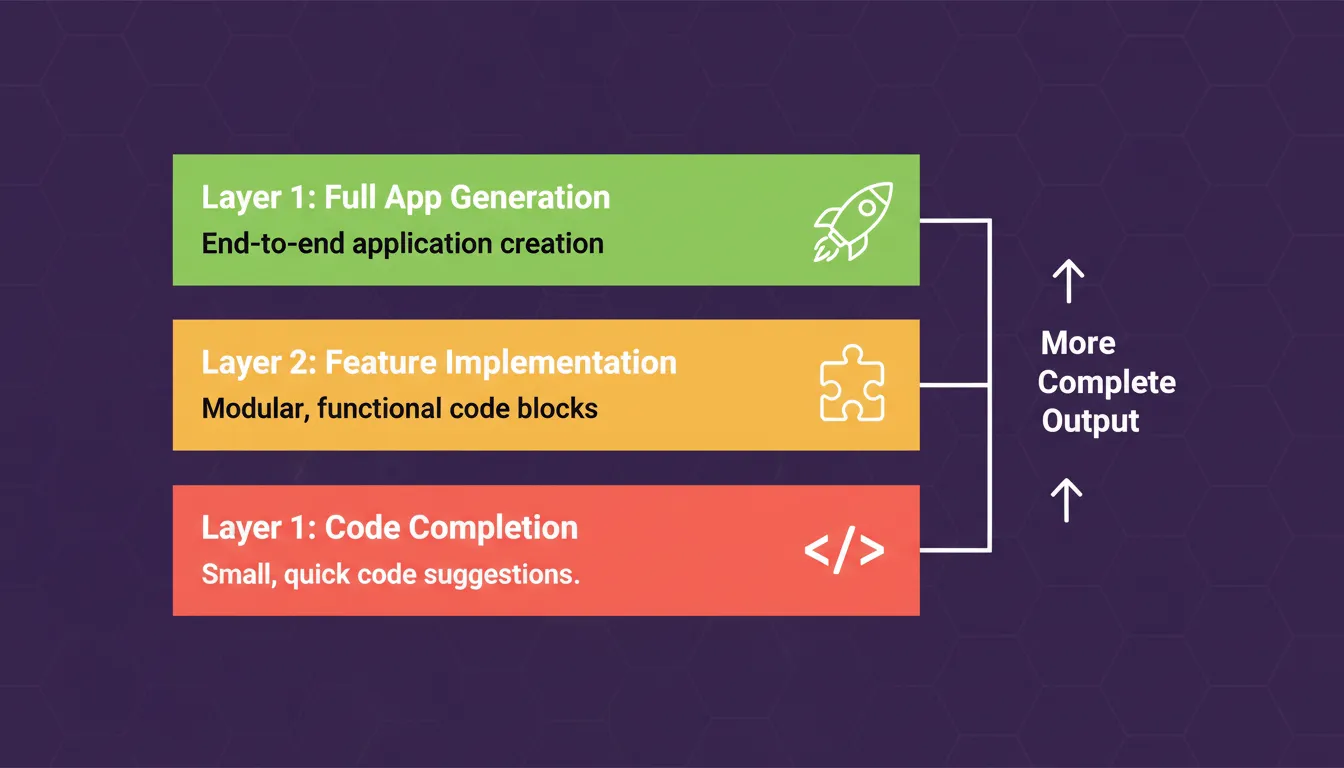
The three layers of AI-assisted development.
What the Developer Community Says
Developer forums and social platforms show a mixed picture of Amazon Q Developer adoption. Some praise its AWS-specific knowledge and security scanning capabilities. Others highlight limitations around reliability and context handling over long sessions.
Reliability Feedback
A recurring theme on r/aws is that Amazon Q Developer produces inconsistent results over longer sessions. One popular thread captured a common user frustration: the tool sometimes generates plausible but incorrect code that passes initial review but fails in production environments.
"As a devops engineer, it causes so many headaches for my team when developers use it to troubleshoot infrastructure they know nothing about." Source: reddit.com/r/aws
IDE Experience Varies
Developer community feedback shows Q Developer works best in VS Code and performs inconsistently in JetBrains IDEs. The inline chat feature draws positive responses. CLI completions and context handling, however, lag behind GitHub Copilot according to multiple developer discussions.
Enterprise Productivity Gains
On the enterprise side, AWS highlights growing adoption among large customers. BT Group reports generating over 2 million lines of code per year with Q Developer. Deriv cut onboarding time by 45%. The developer agent makes measurable impact when the use case matches the tool's strengths, particularly for large teams with established AWS infrastructure. Source: getpanto.ai/blog/amazon-q-statistics
The community data suggests Amazon Q Developer helps experienced AWS developers with specific tasks. It creates new challenges, though, when teams lack deep AWS expertise.
The Future of AI-Assisted Development
According to Stack Overflow's 2024 Developer Survey, 76% of developers are already using or planning to use AI tools in their development workflow. Source: survey.stackoverflow.co/2024/ai. The market is moving toward more complete automation at every layer.
Layer 1 — Code completion: AI suggests the next line or block of code. The developer still writes the majority of the application. Tools: GitHub Copilot, Amazon Q Developer free tier.
Layer 2 — Feature implementation: AI implements multi-step features within an existing codebase. The developer still owns architecture, design, and deployment. Tools: Amazon Q Developer /dev, Cursor.
Layer 3 — Full application generation: AI generates the complete application from a description. The developer or founder owns the product vision and iteration direction. Tools: Rocket.
Teams that adopt Layer 3 tools today are building a compounding advantage: faster time to market, lower development costs, and the ability to iterate on product direction without being bottlenecked by engineering capacity. For a practical look at how this shift plays out, Rocket's vibe coding workflow guide covers the transition in concrete terms.
The Verdict: Rocket.new vs Amazon Q Developer
The Rocket.new vs Amazon Q developer comparison is not a contest between two similar tools. They solve fundamentally different problems for fundamentally different users.
Choose Amazon Q Developer if:
- Your team already has an established codebase and AWS infrastructure
- You need automated security scanning integrated into your IDE workflow
- You are migrating legacy Java applications to modern versions
- Your developers want AI assistance within their existing tools
Choose Rocket if:
- You need to go from idea to live application without managing infrastructure
- Your team includes non-technical founders, product managers, or operators who need to build
- You are building a new SaaS product, internal tool, customer portal, or MVP
- You want production-ready code with design, deployment, and integrations included
The Right Tool Depends on Where You Are Starting
The AI coding assistant market will keep evolving. Amazon Q Developer will improve its agentic capabilities, expand language support, and deepen AWS integration. Even so, the fundamental constraint it cannot solve is the gap between code assistance and complete application delivery. That gap still requires developer expertise, infrastructure knowledge, and deployment experience.
The teams that ship fastest in 2026 are not the ones with the most developers. They are the ones who removed the most steps between idea and production.
You type what you want to build. Rocket handles the research, the architecture, the code, and the deployment. That is the full arc, not just the middle of it. 1.5 million people have tried Rocket across 180 countries. The next one is you.
Start building for free on Rocket and ship your first full stack application today.
Table of contents
- -What is the Core Difference?
- -Who Each Tool is Built For
- -What Does Amazon Q Developer Actually Do?
- -Code Generation and Completion
- -Security Scanning
- -Code Transformation and Java Upgrades
- -Agentic Capabilities Through /dev
- -AWS Management Console Integration
- -IDE Support and CLI Completions
- -Where Does Amazon Q Developer Have Limitations?
- -How Does Amazon Q Developer Pricing Work?
- -Why Rocket Takes a Different Approach
- -Prompt to Production in Minutes
- -Built-In Design System
- -No Cloud Vendor Lock-In
- -One-Click Deployment With Staging
- -Iterate Through Conversation
- -Connectors Built In
- -Real-World Use Cases: Which Tool Fits Which Scenario?
- -Use Case 1: Startup Building an MVP
- -Use Case 2: Enterprise Team Migrating Legacy Java Code
- -Use Case 3: Product Manager Building an Internal Tool
- -Use Case 4: Security-Focused Development Team
- -Use Case 5: Agency Building Client Websites
- -Full Feature Comparison
- -Can AI Coding Tools Replace Full Stack Workflows?
- -Code Assistants Augment, Not Replace
- -Full Stack Builders Handle the Complete Workflow
- -The Amazon Q Developer Agent Bridges Some Gaps
- -What the Developer Community Says
- -Reliability Feedback
- -IDE Experience Varies
- -Enterprise Productivity Gains
- -The Future of AI-Assisted Development
- -The Verdict: Rocket.new vs Amazon Q Developer
- -The Right Tool Depends on Where You Are Starting