

Rocket, Claude Code, and Cline each serve a different moment in the development journey. This blog covers workflows, output quality, pricing, and deployment so you can choose the right tool for your build.
Which AI development tool actually fits your workflow?
Rocket is the world's first Vibe Solutioning platform, covering research, building, and competitive monitoring in one workspace. Claude Code is a general-purpose execution agent that lives in your terminal. Cline is an open-source VS Code extension with 4.8 million installs. 1.5 million people have tried Rocket across 180 countries. The right choice depends on where your work actually starts.
What Makes These Three Tools Different?
These three tools sit in completely different categories despite all using AI for development. Understanding the category difference matters more than comparing feature lists.
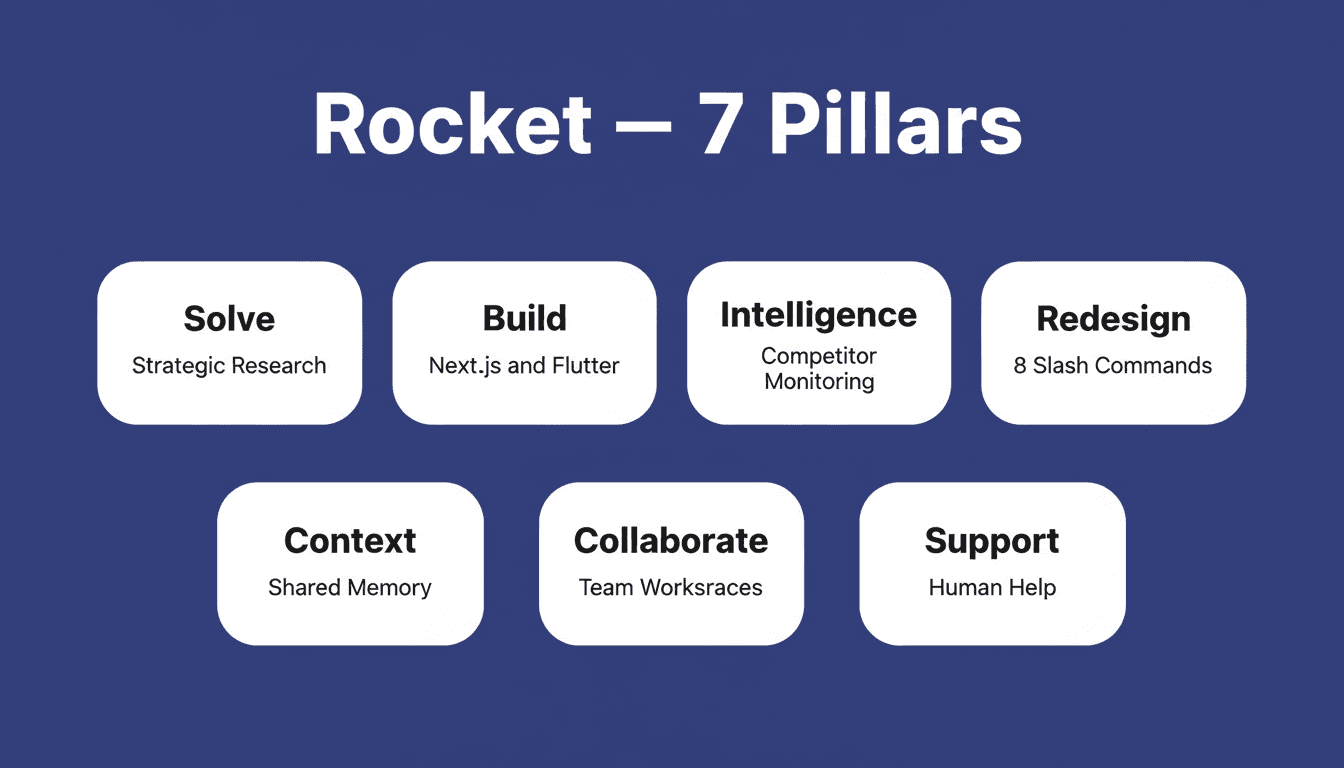
Rocket is a Vibe Solutioning platform, the first named category in AI that covers the complete arc from strategic intelligence to execution to ongoing business operation. It ships with seven pillars: Solve (strategic research and decision intelligence), Build (production-grade app generation), Intelligence (continuous competitive monitoring), Redesign, Context, Collaborate, and Support. Web apps generate in Next.js and mobile apps in Flutter. Most apps generate in 1 to 3 minutes.
Claude Code is a general-purpose execution agent that lives in your terminal. It reads your codebase, edits files, runs commands, creates commits, and manages pull requests. It requires a Claude Pro subscription or Anthropic API key. Its range extends well beyond coding. Sales teams use it for prospecting, PMs for PRDs, and marketers for content pipelines.
Cline is an open-source VS Code extension with 4.8 million VS Code installs and 305 reviews. It supports multiple AI providers, including OpenRouter, Anthropic, OpenAI, Google Gemini, and AWS Bedrock. It gives you human-in-the-loop approval for every file change and is free under Apache 2.0.
The fundamental split: Rocket decides what to build, then builds it, then monitors what happens after. Claude Code and Cline build what you tell them to build.
| Feature | Rocket | Claude Code | Cline |
|---|---|---|---|
| Category | Vibe Solutioning platform | Terminal execution agent | VS Code extension |
| Pre-build research | Yes (Solve) | No | No |
| Code generation | Next.js and Flutter | Any language/framework | Any language/framework |
| Deployment | One-click, built-in | Manual | Manual |
| Post-launch analytics | Built-in (Core Web Vitals, visitors, conversions) | None | None |
| Competitive monitoring | Yes (Intelligence) | No | No |
| Team collaboration | Shared workspaces, role-based access | Individual sessions | Individual sessions |
| Shared memory | Persistent across all tasks and team members | Per-session only | Per-session only |
Who Should Use Each Tool?
Before comparing features, it helps to understand which type of builder each tool was built for.
Use Rocket if you are a founder, product team, or agency that needs to research, build, and ship without stitching together separate tools. It also fits non-technical builders who need production-ready output from natural language. Teams that want shared context across research, building, and competitive monitoring will find Rocket covers the full arc.
Use Claude Code if you are a developer with an existing codebase who needs a powerful terminal-level execution agent. It suits people who use AI across multiple workflows beyond coding, including sales, marketing, and operations. You should be comfortable managing your own environment, API keys, and infrastructure.
Use Cline if you are a developer who wants open-source flexibility and multi-provider AI support inside VS Code. It fits those who value human-in-the-loop approval for every file change. Cline works well for developers who want to manage their own API usage costs.
For a broader look at how these tools fit into modern development workflows, see how AI tools are shaping next-generation development workflows.

How Does Each Tool Handle the Development Workflow?
The real test of any AI coding tool is what happens between "I have an idea" and "my users can access this." Each tool covers different segments of that journey.
Rocket covers the full arc. You start with a question in Solve, get structured research and recommendations, and then Build generates a production-ready app from that context in 1 to 3 minutes. Deploy with one click. Built-in analytics track visitors, conversions, and Core Web Vitals from day one. The research from week one is still present when you iterate in week three, because every task inherits the accumulated context of the project.
Claude Code handles the coding middle. You bring the direction, open your terminal, and Claude Code edits files, runs tests, creates commits, and manages pull requests. In contrast, it does not research what to build or deploy the result for you.
Cline focuses on the IDE experience. It analyzes your file structure, creates and edits files, runs terminal commands, and can launch a browser to test. You approve every step through a GUI. However, there is no research layer, no deployment pipeline, and no post-launch monitoring.
A GitHub survey of 2,000 enterprise developers found that 97% have used AI coding tools at work at some point. The gap is not adoption. It is how much of the workflow each tool actually covers.
Which Tool Gives You Production-Ready Output?
There is a significant difference between generating code and shipping a product. This is where the three tools diverge most sharply.
Rocket generates production-grade output from the first prompt. Every build ships with SEO-ready structure, WCAG accessibility compliance, GDPR coverage, and performance optimization by default. These are the baseline, not optional extras. The design decisions are intentional, with considered typography, real hierarchy, and visual identity specific to the product. You can start from a plain language description, a Figma file, an existing GitHub repository, a URL via Redesign, or an uploaded attachment.
Claude Code produces high-quality code within your existing project structure. Output quality depends heavily on your prompts, your existing codebase, and how well you direct the agent. Architecture decisions, design systems, and deployment configuration remain your responsibility.
Cline generates and edits code with real-time linter monitoring. It catches syntax errors and missing imports on its own. Output quality varies by the AI model you connect, and you manage the overall architecture.
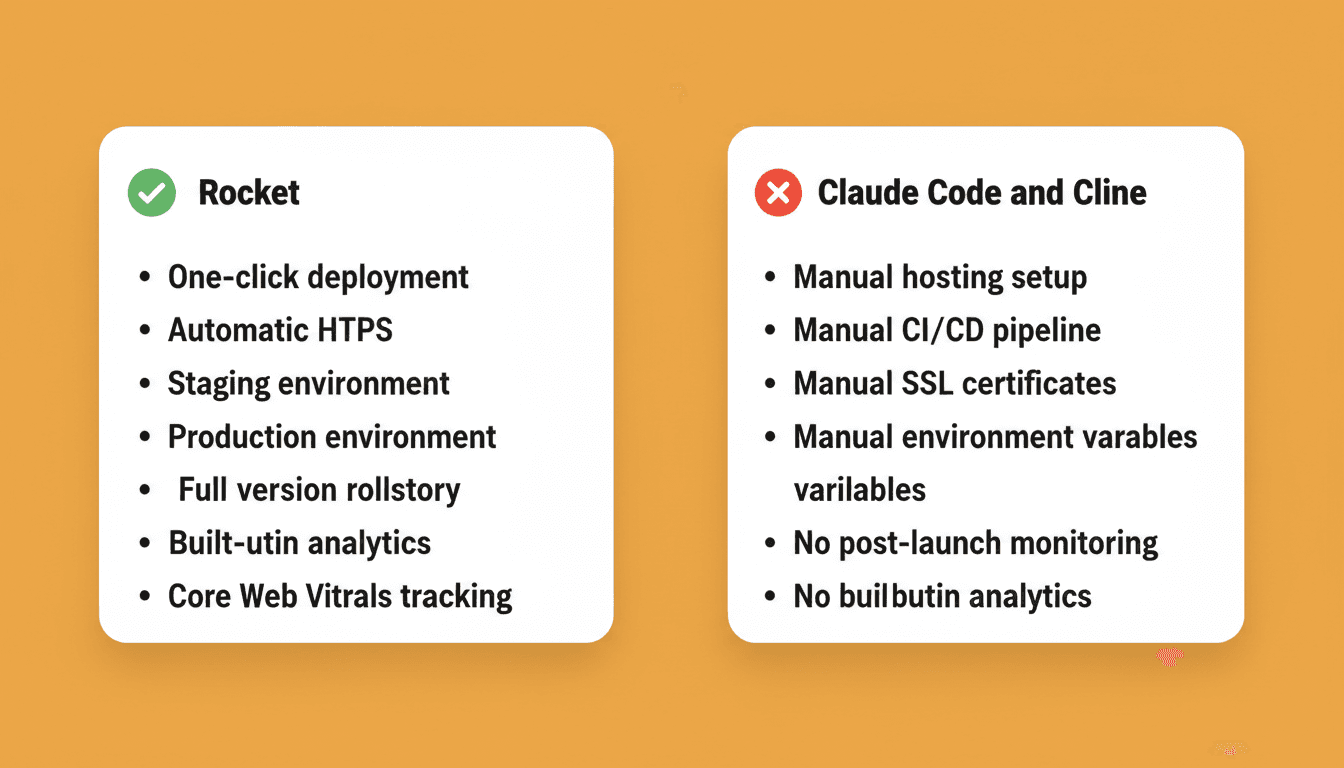
The deployment gap is the clearest differentiator. Rocket deploys to a staging URL for testing, then to production with a custom domain and automatic HTTPS, all from inside the platform. Full version history and one-click rollback are built in. With Claude Code and Cline, deployment is entirely your responsibility, including hosting configuration, CI/CD setup, environment variables, and SSL certificates.
After launch, Rocket's built-in analytics track visitors, unique visitors, pageviews, bounce rate, traffic sources, device breakdown, and Core Web Vitals, with automatic fixes available for performance issues. Claude Code and Cline have no post-launch monitoring.
Why Rocket Covers the Full Arc From Research to Deploy
Most AI coding tools start at the same point: a blank prompt. You bring the idea, the direction, the market context, and the technical requirements. The tool executes.
Rocket starts before the build and continues after it. Solve produces strategic intelligence first. Ask any business question and get a complete, structured solution with findings, evidence, and clear recommendations, exportable as PDF or PPT. That research flows directly into Build through shared context. You are not re-explaining your market to a new tool. The intelligence is already there.
Build generates production-grade apps from that foundation. Because the research is already present, the first generation reflects genuine product thinking, not just prompt interpretation. Six starting methods are available: plain language idea, Figma file, existing GitHub repository (Next.js and TypeScript), URL via Redesign, uploaded attachment, or a template at zero credits.
Redesign reimagines existing websites via eight slash commands across three categories. Reimagine covers modern look, full makeover, and mobile-first. Insight-Driven covers redesign from heatmap, fix conversion issues, and fix visual hierarchy. Brand and Consistency covers redesign like competitor and generate brand-matched page.
Intelligence monitors competitors continuously. Get automated daily, weekly, and monthly briefs. Pricing change alerts and trend signals feed back into your project context, keeping your product decisions current.
For a detailed breakdown of how Rocket compares on pricing and features with other AI coding tools, see the Rocket vs Claude Code vs Cursor pricing and features comparison.
Context and Projects eliminate the handoff problem. Add files, research, and decisions once. Every task that follows already knows everything. The PRD generated by Solve is present when the developer opens the Build task. The competitive brief is present when the landing page is written. Every task makes the next one smarter.
Additionally, 25+ integrations flow directly into generation: Stripe, Google Analytics, Supabase, PayPal, Linear, Notion, Airtable, Mailchimp, Mixpanel, Typeform, Twilio, Resend, and more. Authenticate once and they flow into every build.
Claude Code sessions are individual. When your colleague opens their own terminal, they start from scratch. Cline operates the same way: each person, each session, no shared knowledge.
What Do Developers Say About These Tools?
Community feedback tells you what marketing pages do not. Here is what developers report across these three tools.
Cline's open-source community is one of the largest in the AI coding space. With 4.8 million VS Code installs and 305 reviews, developers consistently praise the human-in-the-loop approach and multi-provider flexibility.
Claude Code users highlight its breadth outside of coding. The tool's range across sales, marketing, and operations workflows surprises people who think of it as just a coding assistant. Its ability to operate across an entire terminal environment makes it a flexible execution layer for many workflows.
Rocket users consistently point to the "thinking before building" approach. The platform's pre-build intelligence layer means the first generated output already reflects market context, not just a literal prompt interpretation. Notably, 1.5 million people have tried Rocket across 180 countries, reached primarily through organic product-led growth.
Kyle Daigle, GitHub's COO, noted in their 2024 developer survey report: "AI doesn't replace human jobs - it frees up time for human creativity." The time savings are real across all three tools. The question is where each tool deposits those saved hours.
For a broader view of how developers are evaluating AI tools today, see the best AI tools for developers to improve coding workflows.
How Do Pricing and Setup Compare?
Cost and setup friction determine whether a tool fits your workflow long-term. Here is a direct comparison based on current published pricing.
Rocket uses a credit-based system. One credit balance covers everything: Solve research, Build generation, and Intelligence monitoring. No separate billing exists for compute, storage, or hosting. All paid plans include unlimited team members, and unused credits roll over month to month. Annual billing saves 20%.
Claude Code requires a Claude Pro subscription ($20/month) or Anthropic API credits. You pay separately for any hosting, CI/CD, domain management, and infrastructure.
Cline is free and open-source under Apache 2.0. You bring your own API key from any supported provider. Total cost depends on which AI model you use and how many tokens you consume. No deployment infrastructure is included.
| Plan | Price | Credits | Includes |
|---|---|---|---|
| Free | $0 | 20 (one-time) | Build production-ready websites, landing pages, web apps, mobile apps |
| Pro | $25/mo | 100/month | Build production-ready websites, landing pages, web apps, mobile apps |
| Rocket | $50/mo | 250/month | Build, Solve (consultant-grade research), and Intelligence (competitive monitoring) |
| Booster | $250/mo | 1,500/month | Full suite, SSO, data localisation, and premium support |
The hidden cost with Claude Code and Cline is infrastructure time. Setting up deployment pipelines, managing environment variables across services, and maintaining hosting adds hours that do not appear in the subscription price.
| Factor | Rocket | Claude Code | Cline |
|---|---|---|---|
| Free tier | 20 credits (one-time) | No | Yes (bring API key) |
| Entry paid plan | Pro: $25/mo | $20/mo (Claude Pro) | API costs only |
| Hosting included | Yes | No | No |
| Deployment included | Yes | No | No |
| Post-launch analytics | Yes | No | No |
| Team seats | Unlimited on all paid plans | Individual accounts | Individual accounts |
| Annual discount | 20% off | Not available | Not available |
For a broader look at how AI app builders compare on cost and capability, see the best AI app builder guide.
Your Next Step Depends on What You Actually Need
Each tool serves a different developer at a different stage.
If you need a terminal-level execution agent for an existing codebase, Claude Code is strong. If you want open-source flexibility with multi-provider support inside VS Code, Cline delivers that.
If you need the full cycle, from researching what to build through generating production-ready code to deploying, monitoring, and iterating, Rocket handles that entire arc without forcing you to stitch together separate tools. The thinking and the building happen in the same place. Nothing is re-explained. Everything compounds.
The Right Tool Starts With the Right Question
As AI development tools mature, the question is no longer "can AI help me build?" It is "how much of the work does the tool actually cover?" Claude Code and Cline are strong at the coding phase. Rocket vs Claude Code vs Cline ultimately comes down to scope: Rocket covers the full arc of research, build, deploy, and monitor.
The teams shipping the most defensible products are the ones that validated the direction before writing a line of code. That is where the comparison stops being about features and starts being about workflow philosophy.
Type your first business question into Rocket and see how far one input goes.
Table of contents
- -What Makes These Three Tools Different?
- -Who Should Use Each Tool?
- -How Does Each Tool Handle the Development Workflow?
- -Which Tool Gives You Production-Ready Output?
- -Why Rocket Covers the Full Arc From Research to Deploy
- -What Do Developers Say About These Tools?
- -How Do Pricing and Setup Compare?
- -Your Next Step Depends on What You Actually Need
- -The Right Tool Starts With the Right Question




