
How can teams build faster without losing control? Learn how AI-driven workflows reduce manual work, improve build speed, support developers, and help teams deliver stable software with confidence.
Can AI dev workflow automation really help teams build software faster?
Yes, it can, and many development teams already rely on it every day.
When AI supports development workflows, builds finish sooner, errors are detected earlier, and teams spend less time waiting. Speed now plays a direct role in delivery, stability, and business outcomes.
According to Google’s State of DevOps report, elite teams deploy code 208× more frequently and recover from failures 106× faster than low-performing teams, largely due to strong automation practices. Artificial intelligence is becoming a major driver behind those results.
Let's explain how AI fits into development workflows, why teams adopt it, and how it leads to faster, more stable builds.
What is AI Dev Workflow Automation?
AI Dev workflow automation uses artificial intelligence to manage and improve workflows across the software development lifecycle. Instead of depending only on traditional automation tools that follow fixed rules, AI-driven systems learn from data, past runs, and outcomes.
Over time, workflows adjust instead of breaking when something changes.
Traditional automation tools work fine for simple pipelines. They struggle once workflows become complex or unpredictable. AI workflow systems handle complex workflows more effectively by responding to real-time conditions.
Across the SDLC, AI supports coding, testing, build workflows, deployment, monitoring, and feedback, while reducing manual work.
Why Teams Need AI-Powered Workflow Automation
Many teams still deal with slow builds, flaky pipelines, and scattered automation tools. Manual approvals stack up. Repetitive tasks drain time. Developers lose focus fixing pipelines instead of writing code.
AI automation reduces these bottlenecks.
Startups use it to move fast with small teams. SaaS teams rely on it to handle frequent releases. Enterprises use it to coordinate many apps, users, and shared resources. For its teams and technical teams alike, AI-powered workflow automation keeps work moving without constant interruptions.
Core Components of an AI-Driven Dev Workflow
An AI-driven Dev workflow integrates multiple layers into a continuous loop. Each part shares data and feedback with the next. Instead of isolated automation, teams get workflows that improve over time.
So, let’s walk through the main components and how they fit together.
AI-Assisted Coding
AI-assisted coding tools support developers directly inside editors and repositories. These tools analyze existing code, understand patterns, and respond in real time.
Code generation and completion speed up development. Intelligent refactoring highlights risky patterns before they spread. Real-time code quality feedback reduces issues that would otherwise break builds later. This early support keeps workflows cleaner and more predictable.
Automated Testing & QA
Testing becomes smarter with AI workflow systems. Rather than running every test for every change, AI predicts which areas matter most based on past failures and recent updates.
AI-generated test cases improve coverage. Predictive failure detection flags risky builds earlier. Continuous testing automation runs in parallel with minimal setup. As a result, teams catch problems sooner and reduce wasted cycles.
Build & CI Automation
Build workflows that gain major benefits from AI automation. AI systems analyze dependencies and determine which components truly need rebuilding.
Instead of rebuilding everything, pipelines focus only on the affected code. Smarter cache handling reduces redundant work. Developers get faster feedback, which helps maintain focus and momentum throughout the day.
Deployment & Release Automation
Release workflows become steadier with AI-assisted orchestration. AI systems analyze past releases, compare signals, and guide rollout strategies.
Rollback prediction highlights risk before users notice issues. Progressive deployments reduce exposure. Automated deployments adapt to live data rather than guesswork, making releases feel calmer and more controlled.
Monitoring & Feedback Loops
After deployment, the AI continues to run in the background. Monitoring tools track performance, scan logs, and quickly detect anomalies.
Feedback loops feed production data back into the AI workflow. Over time, workflows improve as the system learns from real results rather than assumptions. This closes the loop between development and operations.
Key AI Tools and Platforms for Workflow Automation
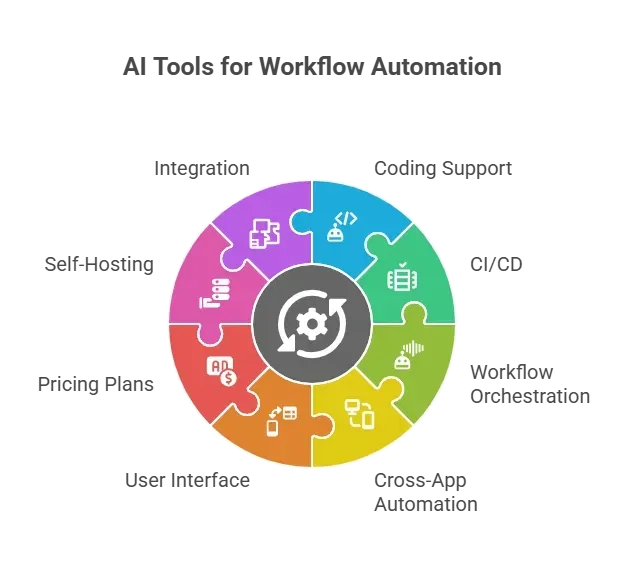
The ecosystem includes many AI workflow automation tools built for developers and technical teams. Some focus on coding support, while others handle CI/CD, workflow orchestration, or cross-app automation.
How AI Automation Speeds Up Builds?
AI automation speeds up builds by reducing human involvement, but it slows things down. Repetitive tasks such as dependency checks, cache management, and routine validations move to automated systems.
Smarter dependency analysis avoids unnecessary rebuilds.
Early detection flags build-breaking issues sooner. Less manual work means fewer delays. Over time, built workflows become faster and more reliable, which makes sense for teams focused on consistent delivery.
Benefits of AI Dev Workflow Automation
AI development workflow automation delivers improvements that show up quickly in day-to-day work. Instead of wrestling with slow pipelines and repeated fixes, teams see smoother progress and fewer interruptions.
- Faster build and release cycles: AI reduces wait times by automating repetitive steps and focusing builds only where changes actually happen.
- Improved code quality and stability: Issues are identified earlier in workflows, reducing last-minute failures and improving release quality.
- Reduced operational overhead: Routine tasks run automatically, cutting down on manual work and constant pipeline maintenance.
- Higher developer satisfaction: Developers spend less time fixing build issues and more time writing meaningful code, keeping energy high across the team.
Challenges and Considerations
AI workflow systems rely heavily on data quality. Poor data leads to weaker predictions. Some tools also introduce complexity if rolled out too quickly.
Security remains a major concern. Teams need clear access rules, audit visibility, and safeguards around sensitive data. Over-automation can remove context, so human review still plays a role. Balance keeps workflows useful instead of fragile.
Best Practices for Implementing AI Workflow Automation
AI workflow automation works best when it grows alongside existing processes rather than replacing everything at once.
- Start with measurable goals: Focus on outcomes like shorter build times or fewer failed builds. Small wins build trust quickly.
- Choose tools that fit your current stack: They should integrate seamlessly with existing repositories, applications, and automation tools.
- Keep humans in the loop: Reviews and approvals still matter. AI handles routine tasks, while people guide decisions.
- Iterate and adjust regularly: Review results, refine prompts, and adjust workflows based on real usage.
Community Insight
A LinkedIn post focuses on building predictive DevOps with AI + GitHub Actions, showing how teams can embed AI insights directly into CI/CD workflows.
"AI-Driven CI/CD Insights – Integrating GitHub Actions with Generative AI for Predictive DevOps ⚙️💡"
Rocket.new and Faster AI Dev Workflows
Rocket.new is a vibe solutioning platform for modern AI-driven development workflows. It helps teams create workflows using natural language and a visual builder instead of heavy scripting.
Rocket.new is a single platform for connecting apps, data, and automation logic. Teams automate tasks, route build data, and manage alerts without juggling other tools. The platform supports self-host options, clear error handling, and flexible access controls.
Top features:
- Natural-language app creation – Build apps and workflows by describing ideas in everyday language.
- Visual builder – Design workflows with an easy drag-and-drop interface.
- Automatic backend setup – Generate databases, auth, and APIs without manual configuration.
- Live preview editing – See and refine changes in real time as you build.
- Pre-built templates – Start faster with ready-made workflow and app templates.
- Third-party integrations – Connect services, AI models, and tools seamlessly.
Sample AI Workflow Components
| Area | AI Role | Outcome |
|---|---|---|
| Code | Suggestions and reviews | Cleaner commits |
| Testing | Test generation | Fewer regressions |
| Builds | Dependency tracking | Shorter build times |
| Releases | Risk analysis | Safer rollouts |
| Monitoring | Anomaly detection | Faster response |
Where AI-Driven Dev Workflows are Headed
Multi-step AI agents already manage builds, tests, and releases in a single workflow. Over time, more pipelines run with minimal supervision. Developers and DevOps engineers spend less time on pipeline maintenance and more time shaping ideas, systems, and customer insights.
The shift leads to fewer interruptions, clearer signals, and steadier delivery.
Looking Ahead With AI Dev Workflow Automation
Multi-step AI agents are already managing builds, tests, and releases in a single workflow, and this trend will only grow.
In the future, more pipelines will run with minimal supervision, letting developers and DevOps engineers focus on designing systems and shaping features rather than babysitting workflows. This shift leads to fewer interruptions, clearer signals, and a more predictable, steady delivery process across teams of all sizes.
Over time, AI workflow automation will continue to learn from real-world usage, making pipelines smarter, faster, and more reliable.
Table of contents
- -What is AI Dev Workflow Automation?
- -Why Teams Need AI-Powered Workflow Automation
- -Core Components of an AI-Driven Dev Workflow
- -AI-Assisted Coding
- -Automated Testing & QA
- -Build & CI Automation
- -Deployment & Release Automation
- -Monitoring & Feedback Loops
- -Key AI Tools and Platforms for Workflow Automation
- -How AI Automation Speeds Up Builds?
- -Benefits of AI Dev Workflow Automation
- -Challenges and Considerations
- -Best Practices for Implementing AI Workflow Automation
- -Community Insight
- -Rocket.new and Faster AI Dev Workflows
- -Sample AI Workflow Components
- -Where AI-Driven Dev Workflows are Headed
- -Looking Ahead With AI Dev Workflow Automation