
Website migration covers domain changes, platform switches, redesigns, and protocol moves. A pre-migration audit, URL mapping, and staging environment are non-negotiable. Expect a 5-20% temporary dip recovering in 4-8 weeks with proper 301 redirects and Search Console updates.
Website migration is the process of moving a website to a new domain, platform, URL structure, or protocol while preserving search rankings and user experience. Done correctly, it protects organic traffic and site performance. Done poorly, it can cut organic traffic by 60% or more. This guide gives digital teams a structured, step-by-step website migration process from pre-migration audit to post-launch monitoring.
Key Takeaways
- Website migration covers domain changes, platform switches, redesigns, and protocol moves, each with distinct risks.
- A pre-migration audit, URL mapping, and staging environment are non-negotiable before go-live.
- Expect a 5-20% temporary traffic dip that should recover within 4-8 weeks when redirects are mapped 1:1 and Google Search Console is updated promptly.
- Post-migration monitoring for at least 30 days is as important as the migration itself.
- If your migration includes rebuilding pages or launching a new site, Rocket.new can generate the new Next.js pages and landing pages you need without starting from a blank template.
What is Website Migration?
Website migration is any significant change to a site's URL structure, platform, domain, or hosting environment that requires coordinated technical, content, and SEO work to execute safely.
Common triggers: rebranding (new domain), CMS switch (e.g., WordPress to a headless stack), site redesign, consolidating multiple sites, or moving from HTTP to HTTPS.
What's at stake: Search engines have indexed your existing URLs, built authority signals around them, and cached your content. A migration that breaks those signals through missing redirects, lost metadata, or crawl errors can cause organic traffic drops that take months to recover.
Why Website Migration Matters
A proper website migration ensures your new site works smoothly, keeps visitors happy, and stays in search engines' good books. Skipping steps can lead to all sorts of headaches.
Here is what a well-planned website migration helps with:
- Protects search rankings: Keeps your site's rankings stable, even after platform changes or redesigns.
- Maintains organic traffic: Prevents declines in search engine traffic.
- Fixes broken links: Ensures internal and external links point to the correct destination, preventing 404 errors.
- Improves user experience: Enhances site speed, navigation, and overall usability for visitors.
- Ensures search engine recognition: Helps search engines notice the new site structure and pages.
In short, a smooth website migration is not just technical. It is about keeping your site strong, fast, and visible while making your users and search engines happy.
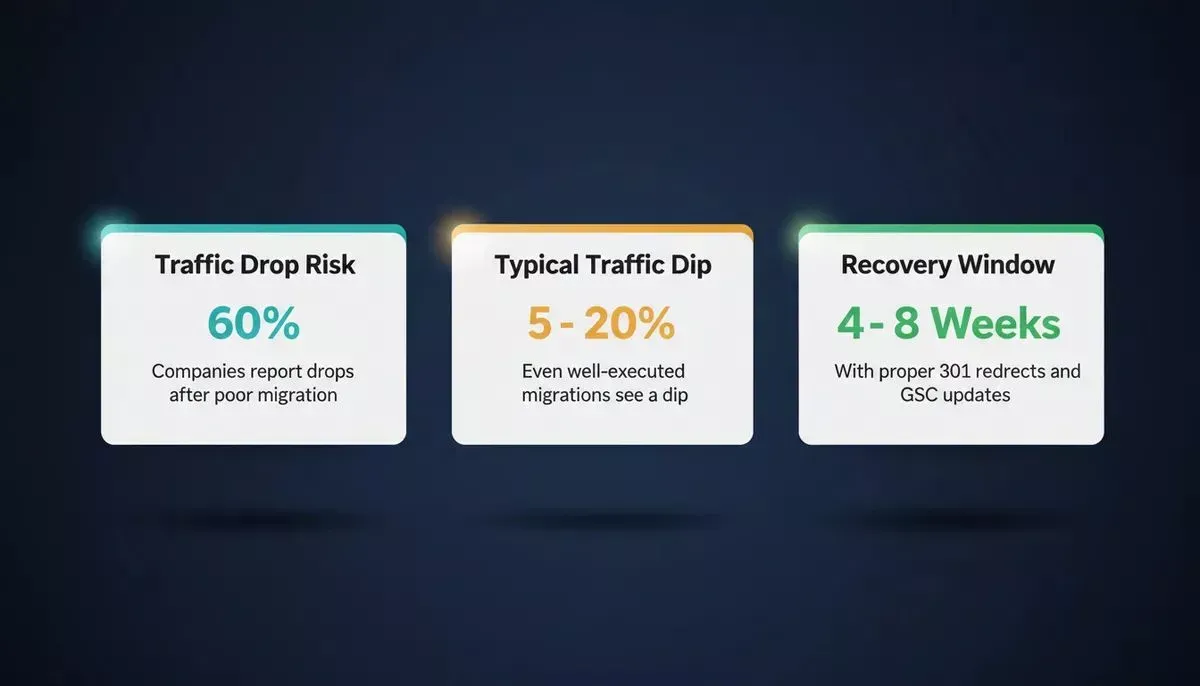
Key risk benchmarks every digital team should know before starting a website migration.
Types Of Website Migration
Website migration can happen in different ways, depending on what you want to achieve. Each type has its own challenges and benefits, so knowing which one fits your situation is key.
| Migration Type | Description | Primary SEO Risk |
|---|---|---|
| Domain Name Migration | Moving from olddomain.com to newdomain.com | Losing link equity if 301 redirects are incomplete |
| Platform Migration | Shifting to a new CMS or website platform | Broken templates, lost metadata, URL structure changes |
| Site Redesign Migration | Changing look, feel, and structure without changing domain | URL structure changes causing 404 errors |
| Protocol Migration | Moving from HTTP to HTTPS | Mixed content warnings, crawl issues |
| Full Rebuild | Replacing the existing site with a new codebase | JavaScript rendering risks, loss of crawled content |
No matter which type you choose, understanding the differences helps plan a smoother migration and avoids surprises along the way.
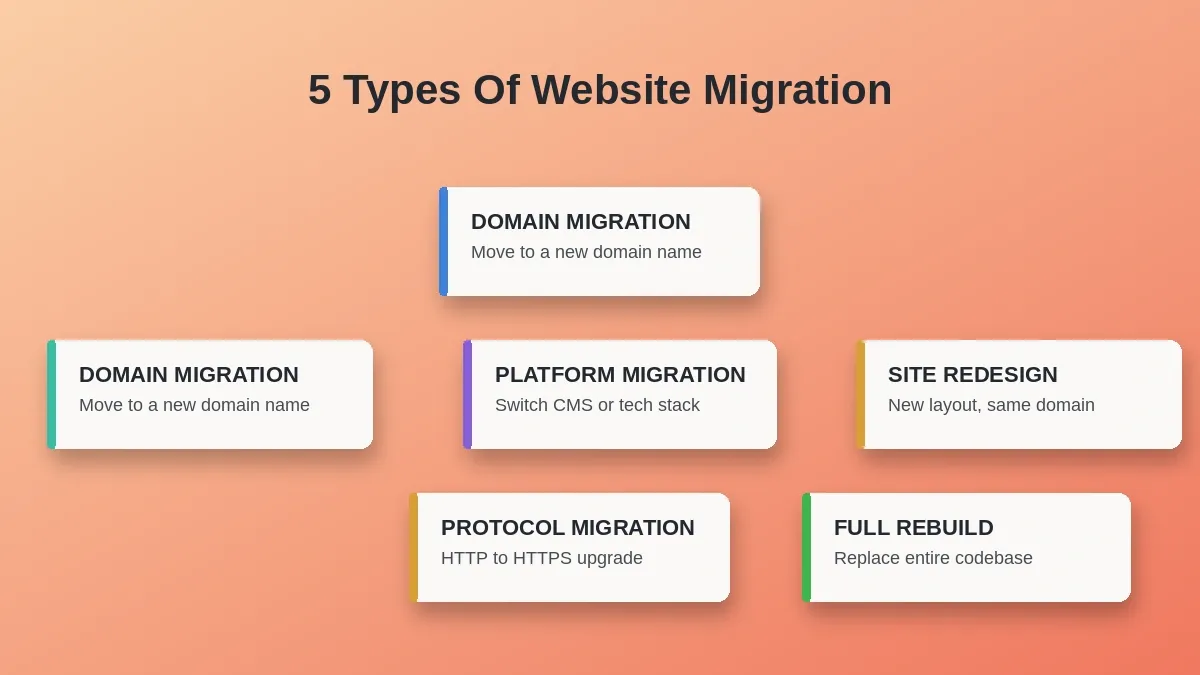
The five core migration types, each with a distinct risk profile and planning requirement.
Full Redesign Vs. Lift-And-Shift: Which Approach Is Right?
| Factor | Full Redesign | Lift-and-Shift |
|---|---|---|
| URL structure | Often changes, requires full redirect map | Preserved, lower redirect risk |
| SEO risk | Higher, more signals disrupted | Lower, existing signals largely intact |
| Timeline | Weeks to months | Days to weeks |
| Technical debt | Cleared | Carried forward |
| Best for | Rebrands, platform switches, major UX overhauls | Hosting moves, protocol upgrades, minor CMS changes |
Pre-Migration Steps
Before touching a single line of code, gather a comprehensive website migration checklist. Here is a simplified version:
| Task | Notes |
|---|---|
| Audit Existing Site | List all existing pages, media files, external and internal links, and site URLs. |
| Backup Data | Full backup from hosting providers is mandatory. |
| Analytics Review | Check Google Analytics and Google Search Console data for baseline traffic. |
| URL Mapping | Plan redirects from old URLs to new URLs. |
| Staging Setup | Prepare a staging environment for testing the new site. |
Having these steps in place before migration starts makes the process smoother and keeps everything organized from day one.
Recommended tools for the audit phase:
- Screaming Frog SEO Spider: Crawl all existing URLs, identify broken links, extract metadata.
- Google Search Console: Export indexed URLs, impressions, and click data as your baseline.
- Ahrefs Site Audit or Semrush: Identify backlink profile and high-authority pages to prioritize in redirect mapping.
Step-By-Step Website Migration Process
Migrating a website can feel like juggling flaming torches while riding a unicycle, but with a clear process, it is a lot less scary. Following a step-by-step approach keeps everything on track and prevents mistakes that could hurt traffic or rankings.
Six-step website migration process from audit to go-live:
- Audit and Backup
- URL Mapping
- Staging and Testing (loop back if tests fail)
- Block Crawlers
- Go Live
Step-by-step breakdown:
- Content Inventory: List all web pages, media files, and existing content. Make sure nothing valuable gets left behind.
- Migration Strategy: Decide which pages move as-is, which get redesigned, and which get deleted. Document it in a migration plan.
- URL Structure: Map old URLs to new URLs. A mismatched URL can tank your site's rankings and cause 404 nightmares.
- Internal And External Links: Check that all internal links point correctly. Reach out to relevant external link owners if needed.
- Staging Environment Testing: Deploy the new site to a staging environment. Check site speed, mobile responsiveness, and broken links.
- Block Search Engines During Migration: Password-protect the staging environment to prevent duplicate content from confusing search engines.
Following these steps during the site migration process ensures a smoother transition, keeps search engines happy, and protects your users from frustration.
During Migration
This is the moment of truth. The actual move. It is tempting to hit "go" and hope for the best, but a careful approach keeps everything under control.
- Data Migration: Move content, media files, and databases. Keep an eye on data integrity.
- Implement Redirects: Ensure all old URLs point to the new URLs using 301 (permanent) redirects, not 302 (temporary), which do not pass link equity.
- Update XML Sitemap: Submit the updated sitemap to Google Search Console.
- Update Analytics Software: Ensure Google Analytics is configured to track the new website platform.
Taking these steps during the migration ensures that your new site is visible, functional, and ready for users from day one.
Common Redirect Mistakes To Avoid
Redirect errors are the leading cause of post-migration traffic drops. Watch for these:
- Redirect Chains: Old URL to intermediate URL to new URL. Each hop loses link equity and slows page load. Map directly from old URL to final destination.
- Redirecting Everything To The Homepage: A common shortcut that destroys topical relevance signals. Every old URL should redirect to its closest equivalent on the new site.
- Using 302 Instead Of 301: 302 redirects are temporary and do not reliably transfer authority. Use 301 for permanent moves.
- Missing Redirects For Paginated URLs: Pagination pages (/page/2, /page/3) are often forgotten. If they carried backlinks or indexed traffic, map them.
- Forgetting Image And Media URLs: If images are linked externally or indexed, their URLs need redirects too.
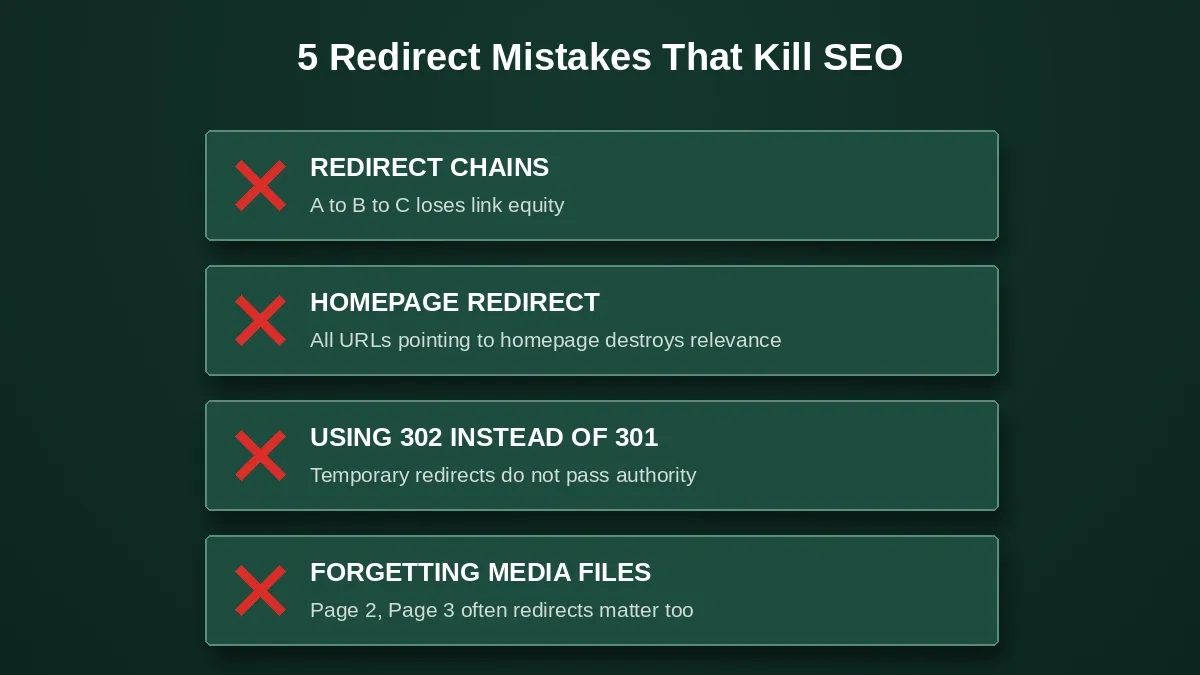
The five redirect mistakes that cause the most post-migration traffic loss.
JavaScript Rendering Risks During Platform Migration
If your migration involves moving to a JavaScript-heavy framework such as Next.js, Nuxt, or a React SPA, be aware of how Google handles JS rendering.
Google crawls and renders JavaScript, but rendering is deferred and can take days or weeks after the initial crawl. During this window, your pages may appear blank or incomplete to Googlebot, which can temporarily suppress rankings.
Mitigations:
- Use server-side rendering (SSR) or static site generation (SSG) rather than client-side rendering (CSR) for public-facing pages. SSR/SSG pages are immediately readable by crawlers without a rendering step.
- Ensure critical metadata (title, meta description, canonical tags, structured data) is present in the initial HTML response, not injected by JavaScript after load.
- Use Google Search Console's URL Inspection tool to test how Googlebot renders specific pages after migration.
- Next.js defaults to SSR and SSG, which means pages are crawler-readable from the first request, a meaningful advantage over CSR-only frameworks during a migration window.
Post Migration
Just because the site is live does not mean it is time to kick back. Post-migration checks make sure everything is working and search engines are not confused.
- Check Google Search Console: Make sure search engines can access your new site without issues.
- Crawl All Pages: Look for broken links, duplicate content, and redirect errors.
- Monitor Site Performance: Check site speed, mobile usability, and site structure.
- Organic Traffic: Compare organic search traffic with pre-migration numbers.
A smooth site migration keeps search visibility intact and maintains the same website rankings across pages.
What to expect: A 5-20% temporary traffic dip in the first 2-4 weeks is normal even for well-executed migrations, as Google re-crawls and re-evaluates the new site. Rankings should largely recover within 4-8 weeks if redirects are mapped 1:1, Search Console is updated, and no major technical issues are present. Significant drops beyond 8 weeks typically indicate a structural problem such as missing redirects, crawl errors, or lost metadata that needs investigation.
Community Insight
Website migration is not only a checklist item on SEOs' boards. Real teams share their actual headaches and lessons learned online.
"We recently migrated our site and lost nearly 80% of traffic within three weeks. We fixed some redirects and improved the old content with SEO best practices, but still watching the traffic battle back."- Reddit
This experience mirrors what Google's own Search Central documentation warns about: site moves with URL changes are among the highest-risk SEO operations. Incomplete redirect mapping is consistently the primary cause of prolonged recovery periods.
The lesson is the same whether it is a small site or an enterprise property. The redirect map is not optional, and post-migration monitoring for at least 30 days is as important as the migration itself.
Key Glossary Terms
301 Redirect: A permanent redirect that passes approximately 90-99% of link equity from the old URL to the new one. Use for all permanent URL changes.
302 Redirect: A temporary redirect. Does not reliably transfer link equity. Do not use for permanent migrations.
Canonical Tag: An HTML tag that tells search engines which version of a URL is the authoritative one. Critical during migrations where duplicate content may temporarily exist on both old and new domains.
Crawl Budget: The number of pages Googlebot will crawl on your site within a given timeframe. Large sites with thousands of URLs need to prioritize their most important pages in the sitemap and internal linking structure so crawl budget is spent efficiently during migration.
Log File Analysis: Reviewing your server's raw access logs to see exactly which URLs Googlebot is crawling, how often, and whether it is encountering errors. The most reliable way to verify crawl behavior post-migration.
Server-Side Rendering (SSR): A technique where the server generates the full HTML of a page before sending it to the browser. SSR pages are immediately readable by crawlers, unlike client-side rendered pages that require JavaScript execution.
Website Migration Checklist
Use this checklist across all three phases of your migration:
Pre-Migration
- Crawl and export all existing URLs
- Record baseline traffic and rankings in Google Analytics and Search Console
- Back up the full site (files and database)
- Build a complete URL redirect map (old URL to new URL, 1:1)
- Set up staging environment
- Block staging from search engines (robots.txt disallow or password protection)
During Migration
- Implement all 301 redirects
- Update XML sitemap and submit to Google Search Console
- Update Google Analytics tracking code for new platform
- Verify structured data is present in initial HTML (not JS-injected)
- Test all forms, CTAs, and checkout flows
Post-Migration
- Crawl the live site with Screaming Frog, check for 404s, redirect chains, missing metadata
- Verify Google Search Console shows no crawl errors
- Monitor organic traffic daily for the first two weeks
- Check Core Web Vitals in Search Console
- Request indexing for key pages via URL Inspection tool
- Monitor for 30 days and investigate any drops beyond 20%
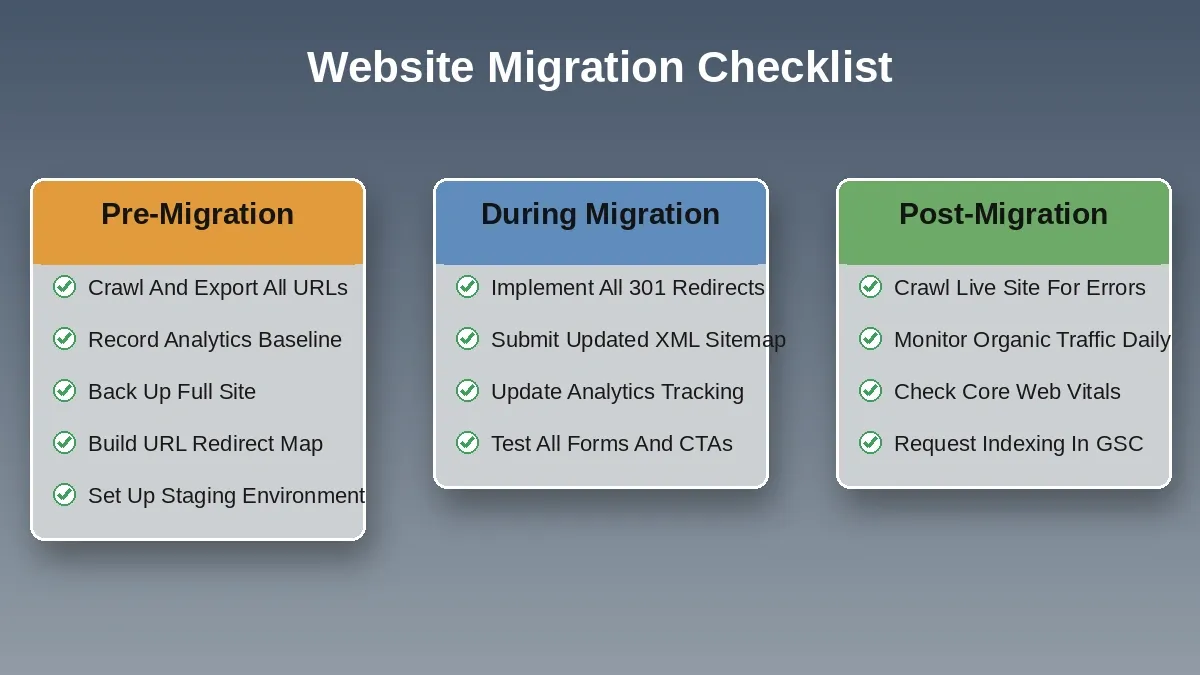
Pre-migration, during migration, and post-migration tasks organized as a single reference checklist.
If Your Migration Includes Rebuilding Pages
Some migrations are really rebuilds in disguise. You are not just moving content, you are replacing the site with something better. If that is your situation, the new pages you need to build are a separate workstream from the migration itself.
Rocket.new's Build pillar generates production-ready Next.js web apps, landing pages, and multi-page websites from natural language descriptions or existing Figma designs. Because Rocket.new outputs Next.js with SSR by default, the pages it generates are crawler-readable from day one, which matters during a migration window when you cannot afford a JS rendering delay.
If your migration also involves a visual overhaul of existing pages, Rocket.new's Redesign feature can take any live URL and reimagine it using eight slash commands, preserving your content while transforming the layout, typography, and conversion structure. Once rebuilt pages are ready, Rocket.new's built-in SEO tools can generate sitemaps, add structured data (Article, FAQ, HowTo schemas), and run a GEO/AEO audit to ensure the new pages are optimized for both Google and AI search engines.
If your migration also requires researching the competitive landscape before committing to a new site direction, Solve can run a structured market and competitor analysis so your rebuilt site is grounded in real data, not assumptions. And once the new site is live, Intelligence monitors competitor websites, pricing, and GTM moves continuously so you stay ahead of what happens after the migration.
This is a narrow but accurate fit: Rocket.new does not manage redirects, URL mapping, or legacy CMS exports. Those are handled by your migration toolchain. But if the migration includes a rebuild, Rocket.new handles the new-build side efficiently.
Ready to build the new pages your migration needs, without starting from a blank template? Rocket.new generates production-ready Next.js sites and landing pages from natural language, with SSR by default, built-in SEO tooling, and structured data generation included.
Start building with Rocket.new and ship the new-build side of your migration faster.
Table of contents
- -Key Takeaways
- -What is Website Migration?
- -Why Website Migration Matters
- -Types Of Website Migration
- -Full Redesign Vs. Lift-And-Shift: Which Approach Is Right?
- -Pre-Migration Steps
- -Step-By-Step Website Migration Process
- -During Migration
- -Common Redirect Mistakes To Avoid
- -JavaScript Rendering Risks During Platform Migration
- -Post Migration
- -Community Insight
- -Key Glossary Terms
- -Website Migration Checklist
- -If Your Migration Includes Rebuilding Pages