Radiology Medicine FAQ Website Template
Clarity is a sidebar companion landing page template built for radiology patient education platforms. It pairs an interactive Imaging Visit Prep Score calculator with a fixed FAQ navigation sidebar, helping hospital radiology departments and outpatient imaging centers reduce no-shows and pre-procedure call volume by turning complex imaging instructions into calm, illustrated patient explanations.
by Rocket studio
Quick summary
Clarity is a single-page template designed for radiology patient education platforms targeting hospital departments and outpatient imaging centers. It opens with a personalized prep score calculator, flows into an illustrated FAQ section built around real patient fears, and closes with two conversion paths: a department demo kit request and a whitepaper download. The template earns trust by letting visitors experience the product firsthand.
Who this template is for
This template is built for healthcare organizations that need to reduce patient anxiety before imaging procedures. It speaks directly to decision-makers who own the patient experience before the scan even begins.
- Radiology department administrators and imaging center directors focused on reducing no-show rates and pre-procedure phone call volume
- Individual radiologists and referring physicians looking for a patient-ready explanation tool they can champion internally
- Outpatient imaging centers competing for self-referred patients who research their options before booking
What problem this template solves
Radiology departments lose appointments and staff time to a single root cause: patients do not understand what is about to happen to them. When the prep instructions feel clinical and cold, anxiety rises, calls pile up, and no-shows follow.
- Patients receiving imaging orders for procedures like magnetic resonance imaging (MRI), computed tomography (CT), ultrasound, or fluoroscopy often have no context for what to expect
- Referring physicians spend repeated call time explaining basic concepts like contrast dye, fasting requirements, and claustrophobia protocols
- Departments have no structured, self-serve way to educate patients before arrival, so the burden falls on front-desk staff and nurses
What you get with this template
You get a fully structured, design-ready landing page that functions as a digital waiting room. Every section is built to dissolve patient uncertainty while simultaneously demonstrating the platform's value to the department decision-maker reviewing the page.
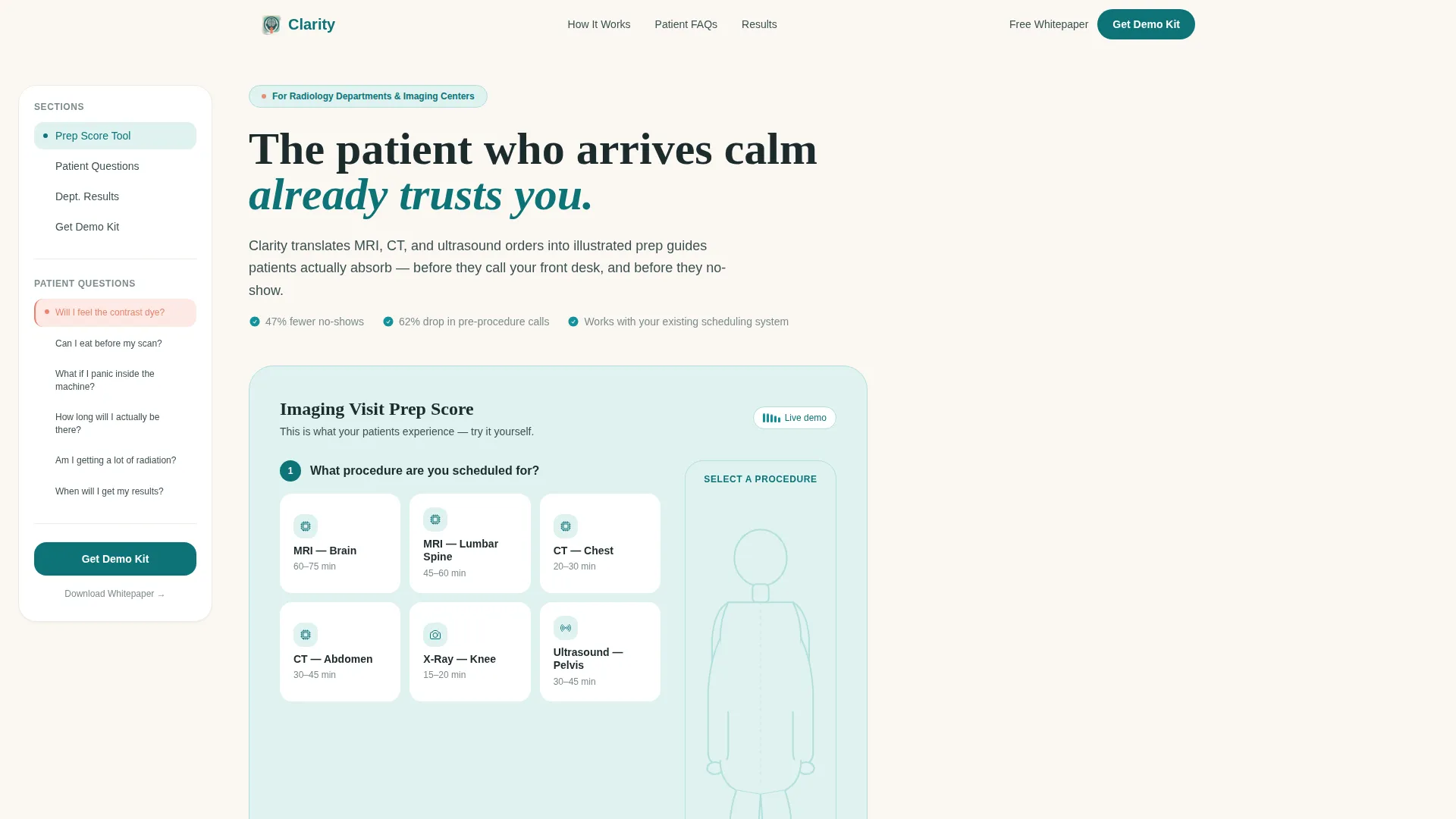
- An interactive Imaging Visit Prep Score calculator in the header with a dynamic anatomical sidebar illustration that updates based on procedure selection
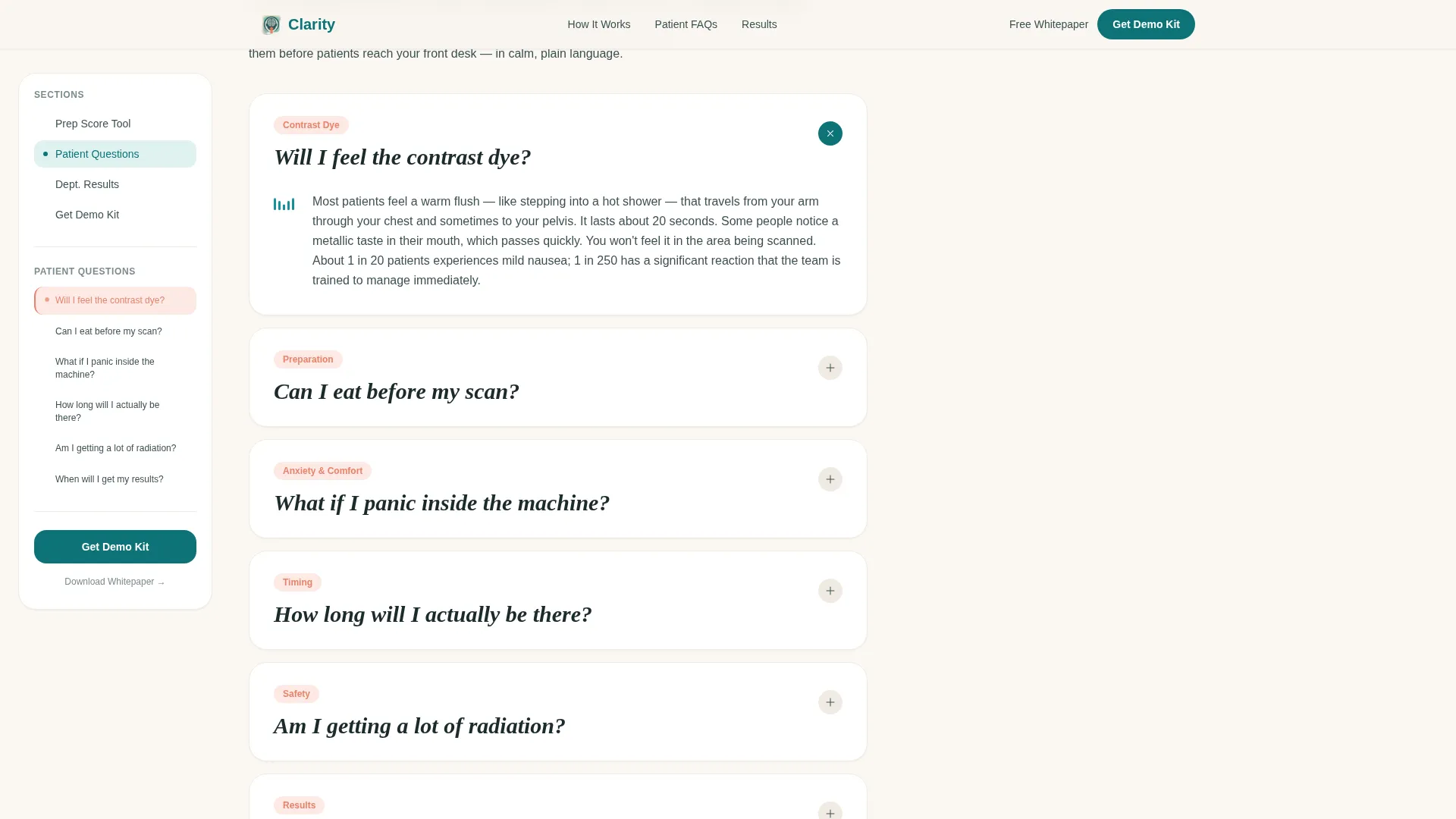
- A scrollable FAQ section using real patient questions in large handwritten-style type, each paired with warm paragraph answers and looping micro-animations
- Two conversion paths: a demo kit request form for department buyers and an email-gated whitepaper download for individual clinical professionals
Feature list
This template is built around a specific set of interactive and structural components drawn directly from the product brief.
Interactive Imaging Visit Prep Score Calculator
Visitors select their upcoming procedure from a visual menu covering options like MRI brain, CT chest, and X-ray knee. They answer three plain-language questions about their imaging history, claustrophobia concerns, and current medications. The calculator returns an instant personalized prep checklist with a readiness percentage, doing the product demonstration before a single paragraph is read.
Dynamic Anatomical Sidebar Illustration
As a visitor changes their procedure selection in the calculator, a soft anatomical illustration in the sidebar updates in real time. Selecting MRI lumbar spine, for example, renders a glowing highlight on the lower back of a calm, faceless figure. This visual feedback makes the experience feel personal and clinically grounded without relying on stock photography.
Fixed FAQ Navigation Sidebar
The sidebar companion stays visible as visitors scroll through the FAQ section. Every patient question is listed in the navigation rail. The current question is softly highlighted in coral, letting visitors jump directly to their specific concern. The rhythm of question, honest answer, question, honest answer builds trust progressively down the page.
FAQ-Driven Content Architecture
Each FAQ block surfaces a real patient question in large, handwritten-style type. Examples include "Will I feel the contrast dye?" and "What if I panic inside the machine?" Answers unfold beneath in short, warm paragraphs paired with simple looping micro-animations, reducing dread one question at a time.
Dual Conversion Path Forms
The primary call to action, "Get Your Department's Demo Kit," appears at the sidebar bottom and after the final FAQ. The form collects institution name, department size via dropdown, and work email. A secondary path offers a Patient Anxiety Reduction Whitepaper gated behind email-only capture, serving clinical buyers who are not yet ready for a full department conversation.
Social Proof and Results Section
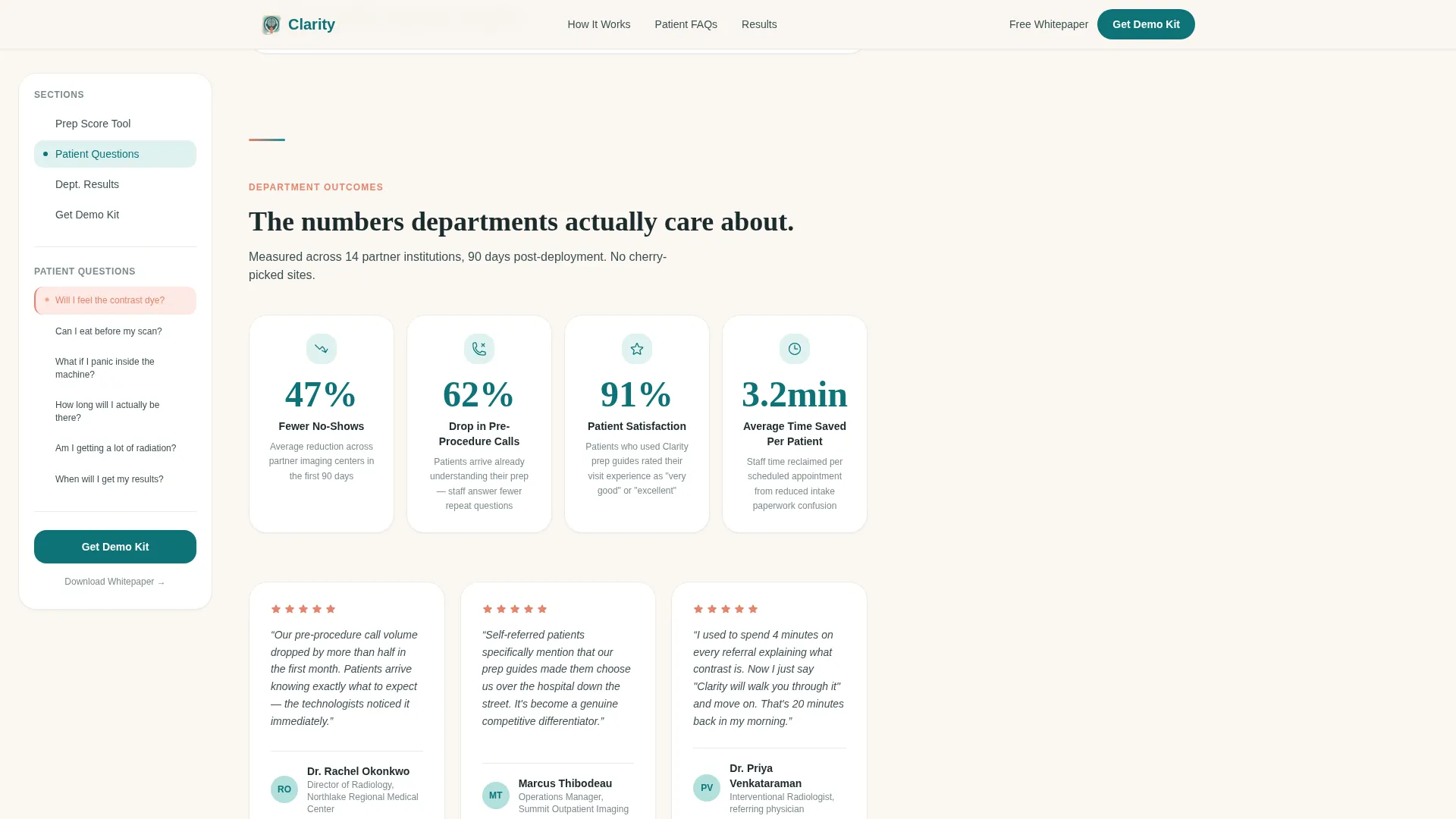
A dedicated results section presents concrete performance metrics, including a 47 percent reduction in no-shows and a 62 percent drop in pre-procedure call volume. Named hospital testimonials support these figures, giving department administrators the peer validation they need to move toward a demo request.
Page sections overview
| Section | Purpose |
|---|---|
| Hero Prep Calculator | Interactive prep score tool with anatomical illustration sidebar |
| FAQ Content Flow | Real patient questions with animated answers and fixed nav sidebar |
| Social Proof Results | Metrics-first stats and named hospital testimonials |
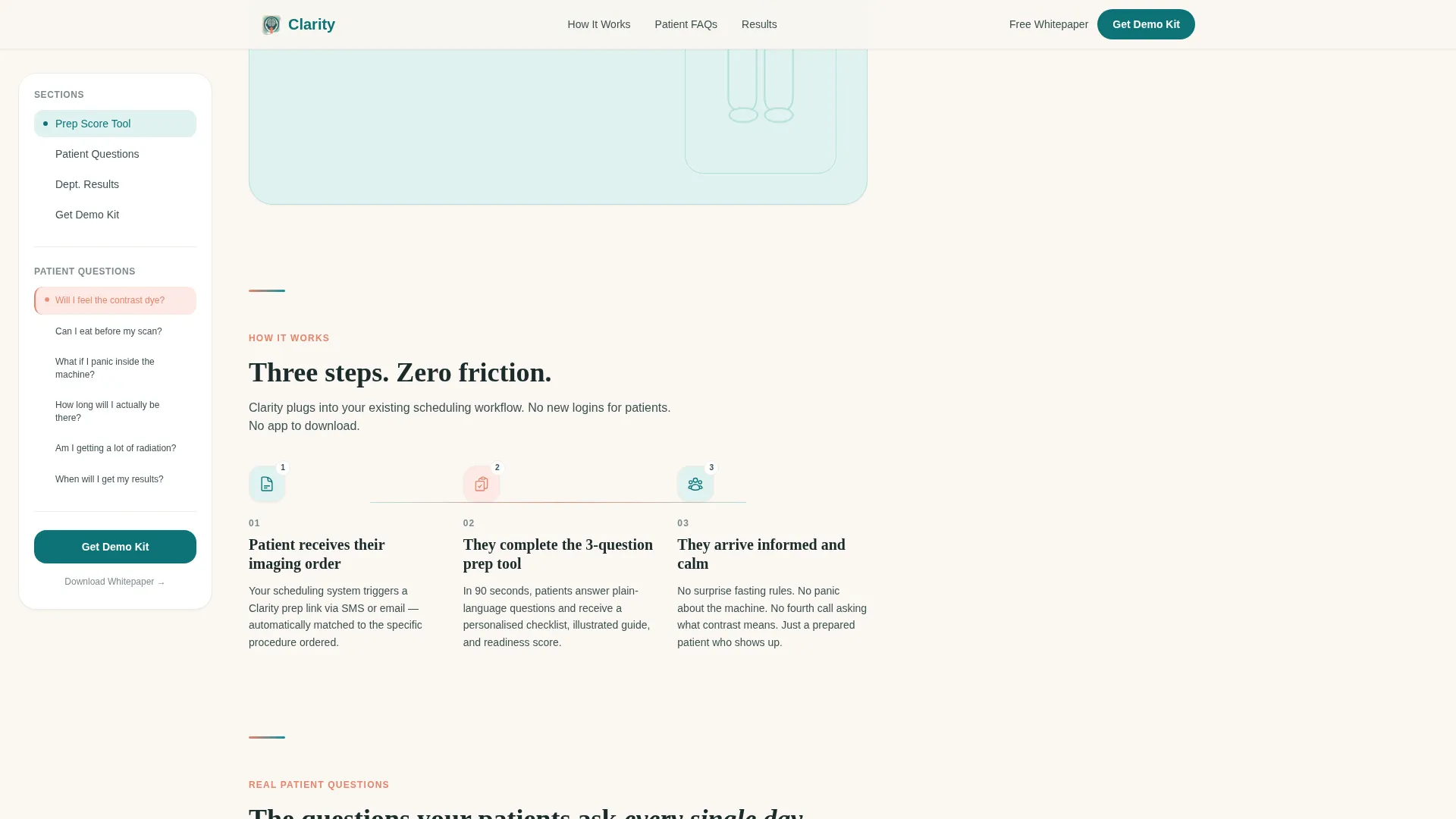
| How It Works | Three-step integration flow for radiology departments |
| Demo Kit Call to Action | Primary form for department demo requests and whitepaper download |
| Footer | Single-row linear footer with essential navigation links |
Design & branding system
The visual identity follows a Healing Space theme. Every color and type choice is calibrated to feel like stepping from a fluorescent hospital corridor into a quiet consultation room with natural light.
- Color palette: deep clinical teal (#0D7377) as the primary anchor, soft seafoam (#B2DFDB) for content backgrounds, warm linen white (#FAF7F2) for breathing room, and gentle coral (#E8836B) reserved for interactive prompts and notification indicators
- Typography pairing: Fraunces serif for patient questions and hero headlines, DM Sans for body copy and interface labels, together creating a warm yet clinical reading experience
- No stock photography is used anywhere; all patient visuals are soft anatomical illustrations of calm, faceless figures that update contextually with user selections
Mobile & speed optimization
The template is designed desktop-first, reflecting the primary audience of hospital administrators working at workstations. Mobile fallback support is included for physicians and clinical staff reviewing the page on the go.
- Static FAQ content is structured as server-rendered components, while the calculator and sidebar navigation are built as client-side interactive components for responsive performance
- Scroll-reveal animations, tab switching, and anatomical highlight updates are implemented at a medium-to-high interactivity level while keeping the reading experience smooth on all screen sizes
- The fixed sidebar navigation rail adapts for smaller screens so the FAQ jump-links remain accessible without obscuring the main content area
How this template helps you convert
The conversion strategy in this template is experiential. By the time a visitor reaches either form, they have already felt the product working on them. Their own confusion about radiology procedures has been reduced, and that reduction is the demonstration.
- The Imaging Visit Prep Score calculator engages visitors immediately in the hero section, personalizing the experience before any marketing copy appears. Visitors who complete the calculator are already invested in the outcome.
- The FAQ navigation sidebar and question-answer rhythm keep visitors scrolling through the full page. Each answered question removes a layer of hesitation, so the demo kit form feels like a natural next step rather than a cold ask.
Other information about this template
This template is part of a broader set of healthcare technology landing page templates designed for the health and medical category, specifically the radiology medicine subcategory.
- The template style is classified as Sidebar Companion, meaning the persistent right-side navigation rail is a core structural element, not a decorative addition
- Creative direction is FAQ-Driven, with the header concept built around a Calculator and Estimator interaction, and the overall page direction oriented toward lead generation for B2B healthcare technology buyers
- The Teal Catalyst color system used here is purpose-built for clinical environments where warmth and trust must coexist with medical authority
- This template is built for English (United States) localization with no currency display and standard date formatting
Theme
Healing Space
Creative direction
FAQ-Driven
Color system
Teal Catalyst
Style
Sidebar Companion
Direction
Lead Generation
Page Sections
Imaging Visit Prep Score Calculator
Dynamic Anatomical Sidebar Illustration
Fixed FAQ Navigation Rail
Faq-driven Content Architecture
Dual Conversion Path Forms
Social Proof and Metrics Section
Related questions
Who is this landing page template designed for?
What does the Imaging Visit Prep Score calculator do?
Can individual radiologists use this template too?
What conversion elements are included?
Is the FAQ content pre-written for specific radiology procedures?



