Register — Expert CPA Services Landing Page Template
Ledger is a zigzag landing page template built for accounting practice and quiz apps. It opens with a live three-question mini-quiz above the fold, then walks visitors through a timeline of study milestones. Every section earns the next click. Two conversion paths capture leads at every scroll turn, making it ideal for exam-prep platforms targeting CPA, ACCA, and CMA candidates.
by Rocket studio
Quick summary
Ledger is a single-page, lead-generation landing page template designed for accounting quiz and practice apps. It hooks visitors with an embedded interactive quiz before they even read a headline. A zigzag Timeline Progression layout then walks them from beginner foundations to exam-ready confidence, with a primary call to action repeating at every section turn.
Who this template is for
This template is built for founders, educators, and product teams launching or promoting an accounting practice platform. It speaks directly to the users those platforms serve.
- Accounting students preparing for CPA, ACCA, or CMA (Certified Management Accountant) exams who need a reason to sign up immediately
- Junior accounting associates brushing up on standards before a busy season begins
- Career-switchers who need to demonstrate bookkeeping and trial balance skills to potential employers
What problem this template solves
Most exam-prep landing pages ask visitors to trust the product before showing them anything real. Ledger solves that by putting a timed quiz directly above the fold. Visitors experience the product in seconds, which removes hesitation and earns the lead.
- Visitors scroll past generic landing pages without engaging; the embedded quiz makes them participants, not readers
- Two-step lead capture separates high-intent users from casual browsers without losing either group
- The timeline scroll structure creates a sense of urgency, showing visitors exactly where they are in their study journey and how far they still need to go
What you get with this template
You get a complete, section-led landing page layout built for accounting education lead generation. Every element serves one of two goals: demonstrate product value or capture a lead.
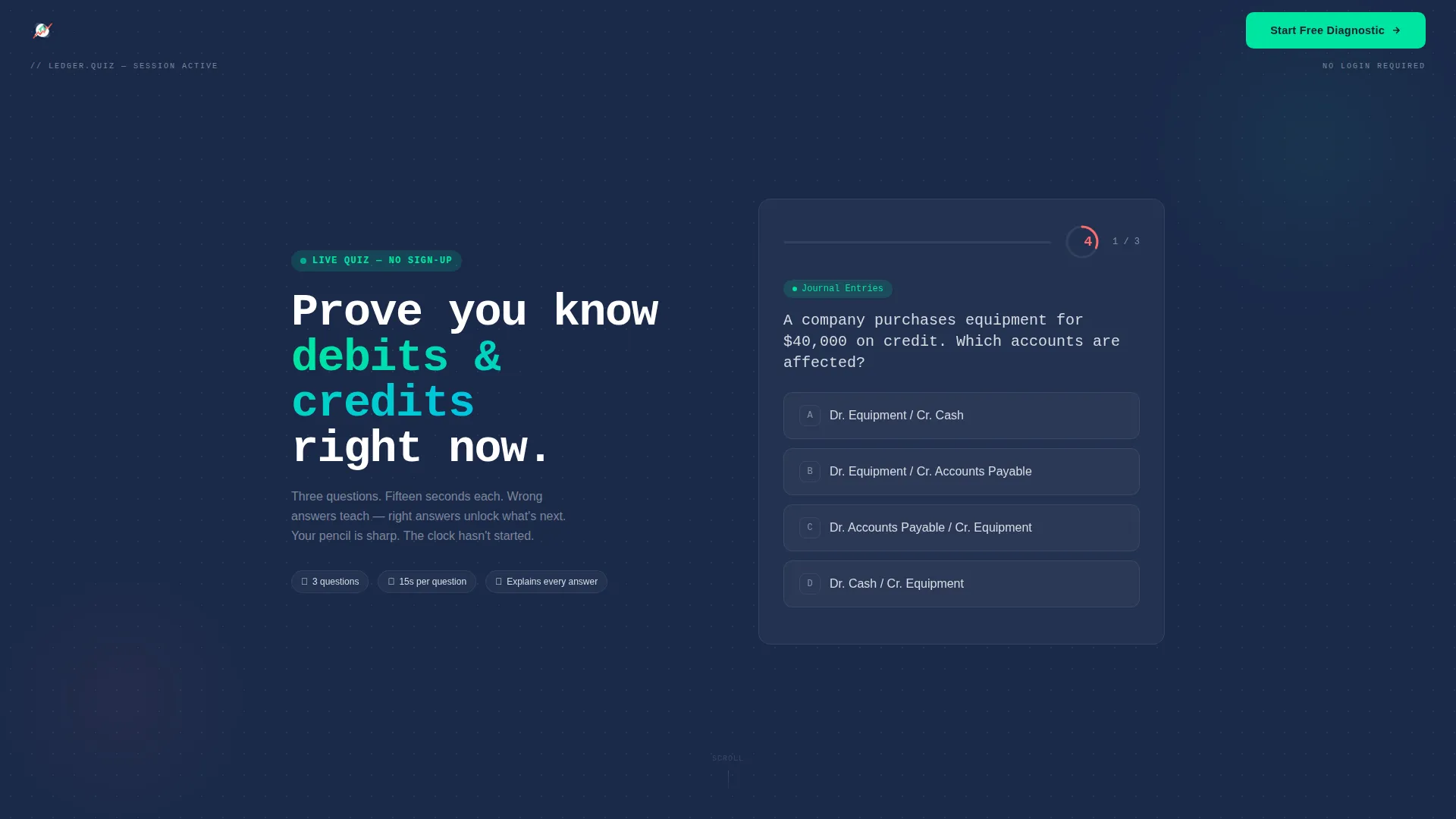
- An interactive three-question mini-quiz embedded above the fold with tappable answer cards, a ticking 15-second countdown, and a live progress bar
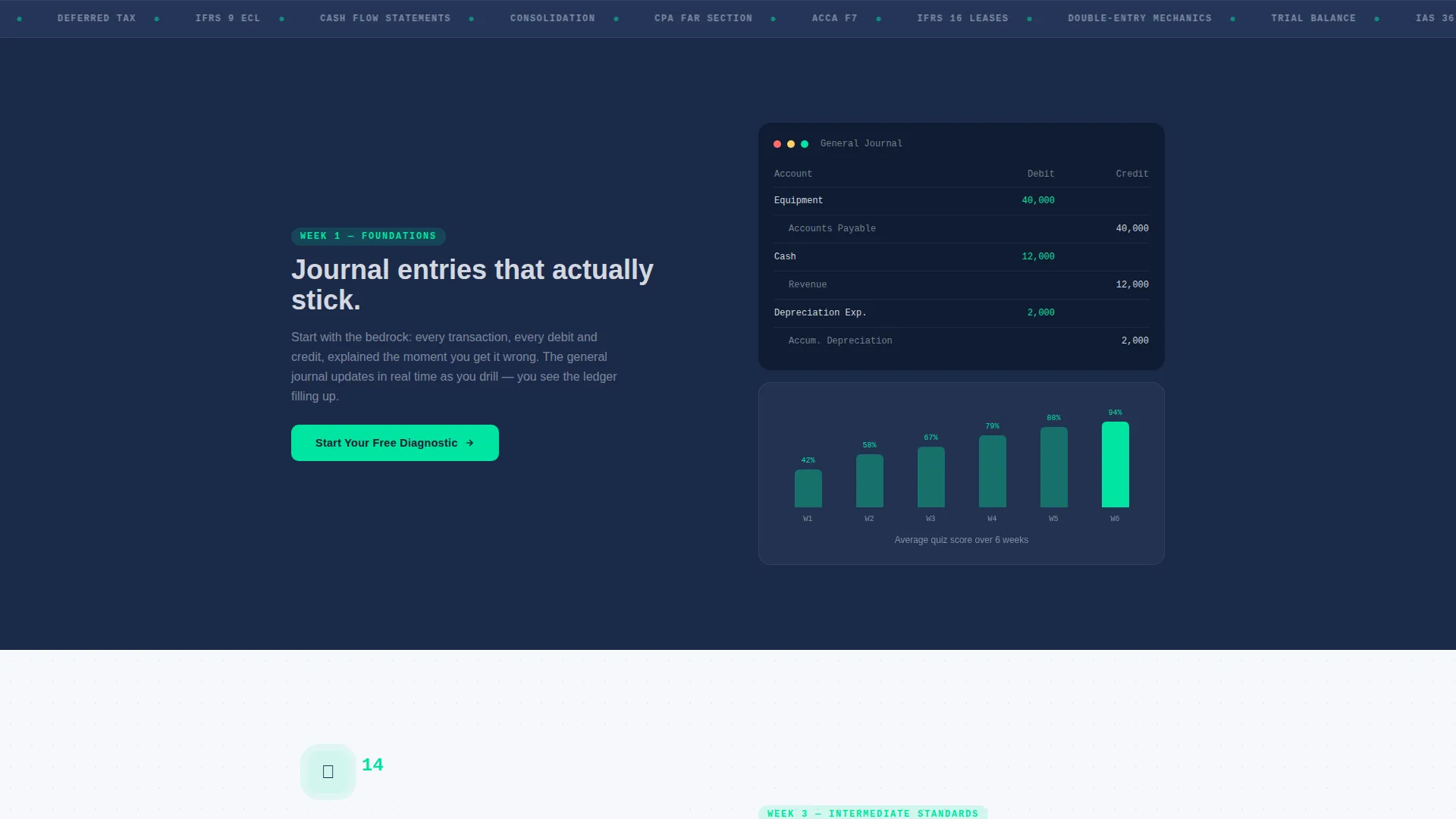
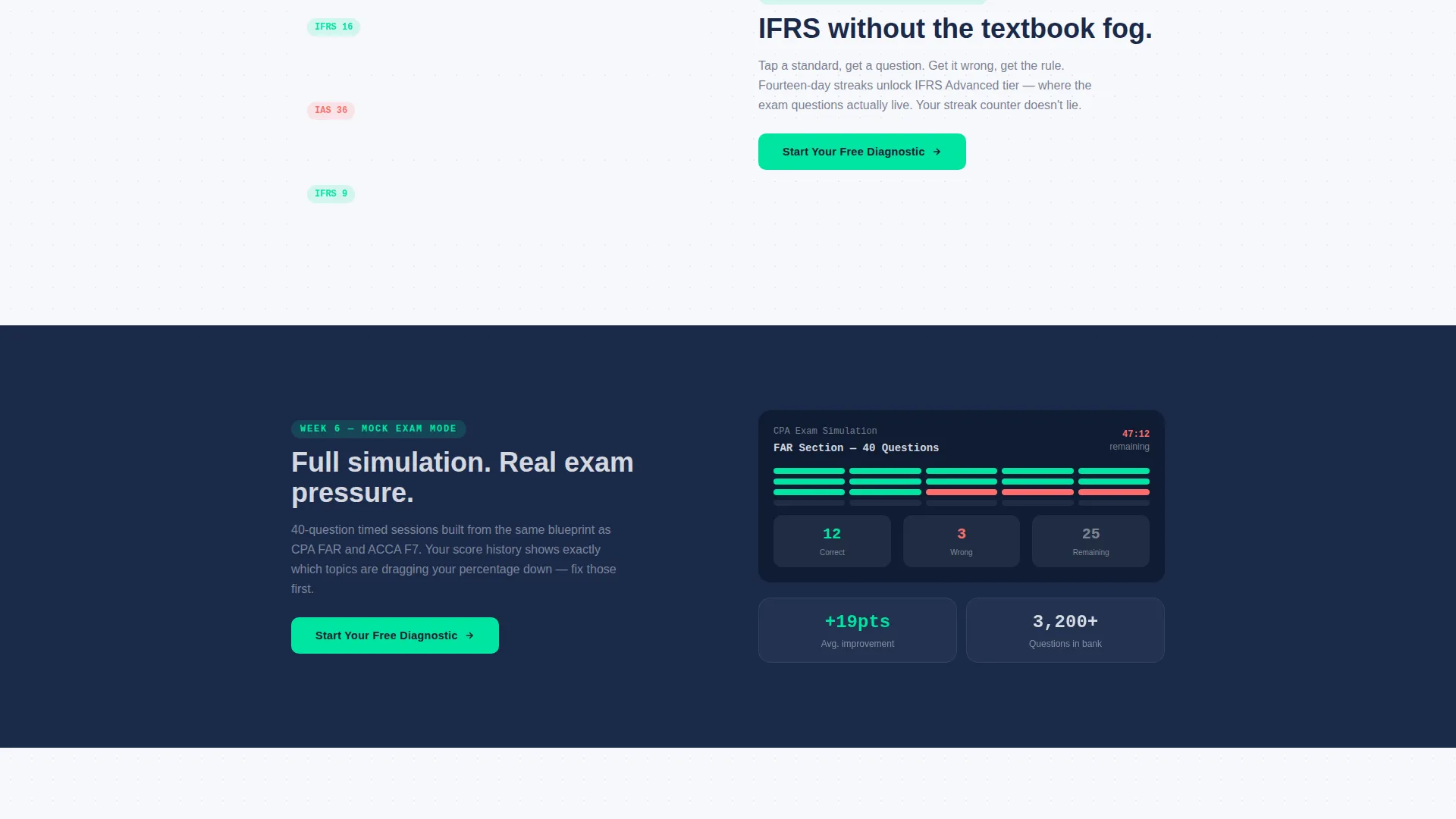
- A zigzag alternating layout that advances through a study timeline, from Week 1 journal entry drills to mock exams and final review, with interface screenshots growing progressively more complex
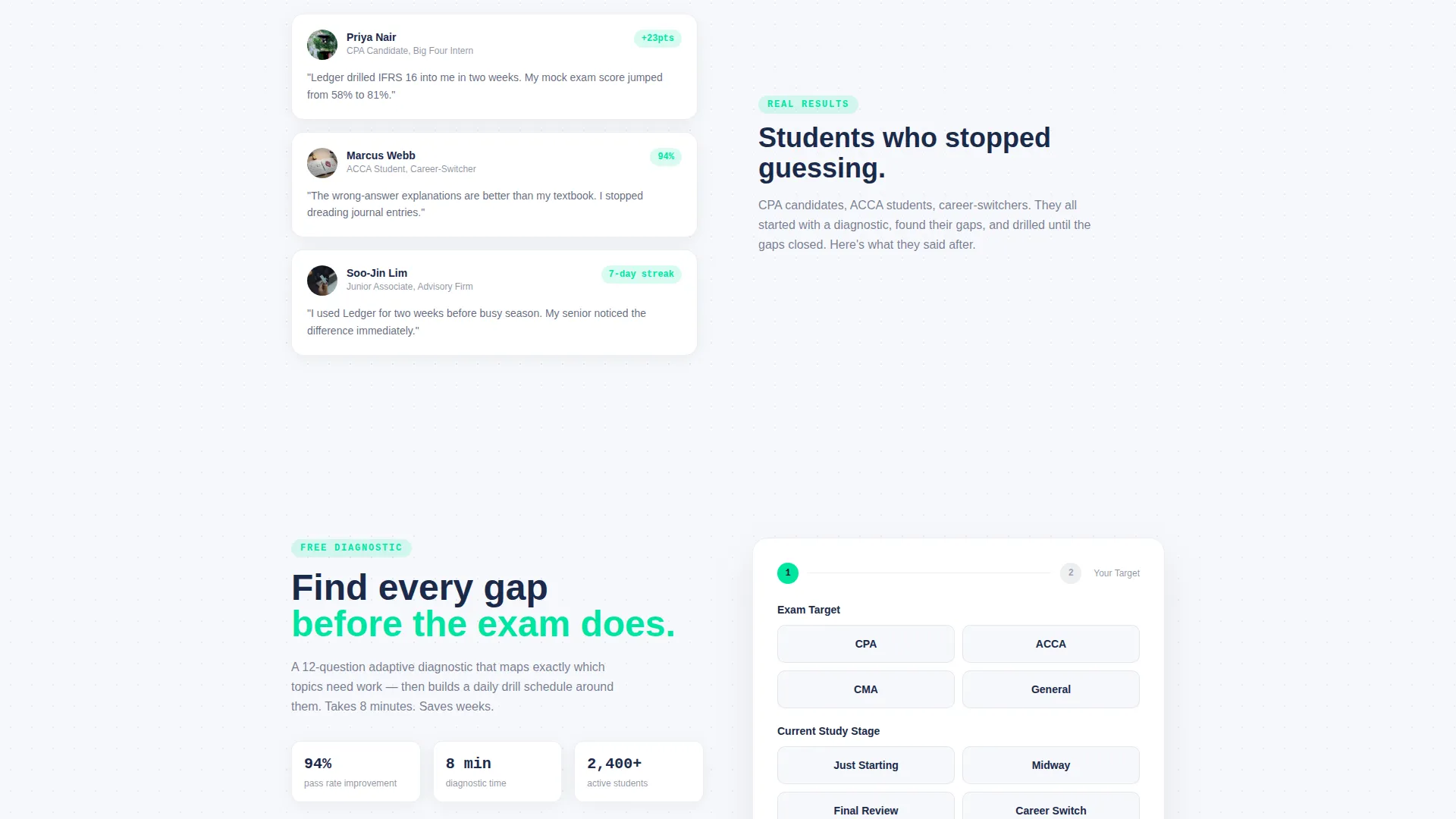
- Two conversion paths: a primary "Start Your Free Diagnostic" two-step form and a secondary "Get a Free Study Plan PDF" email capture for visitors not yet ready to commit
Feature list
This section covers the core built-in capabilities of the Ledger landing page template.
Above-the-Fold Quiz Hook
A live, interactive three-question mini-quiz loads instantly without requiring sign-up. The first question appears in oversized monospace type against a deep navy background. Four tappable answer cards respond on hover, and a 15-second countdown adds urgency from the first second.
Timeline Progression Scroll Layout
The zigzag alternating section layout tells a structured story. Each section advances the visitor's perceived study journey, from foundational journal entry drills in Week 1 through intermediate standards, mock exams, and final review. Interface screenshots grow more complex as the visitor scrolls, reinforcing a sense of real progress.
Dual Conversion Path Design
Two lead capture flows run in parallel throughout the page. The primary path, "Start Your Free Diagnostic," uses a two-step form that first asks for exam target and study stage, then captures name and email. The secondary path, "Get a Free Study Plan PDF," captures email alone for lower-commitment visitors.
Score-Gap Reveal Mechanism
After the header quiz, the page shows the visitor their score alongside the gap between their current level and exam readiness. This honest framing creates motivation without pressure and earns the click on the primary call to action naturally.
Repeating Call-to-Action Placement
The primary call to action appears first immediately after the header quiz results, then repeats at every zigzag section turn. This placement ensures the conversion opportunity is always within reach regardless of how far a visitor has scrolled.
Dopamine Pop Color System
Correct-answer states and primary call-to-action buttons fire in electric mint. Wrong-answer states and urgency indicators use hot coral. Deep ledger navy anchors backgrounds. Clean worksheet white creates breathing room between dense content blocks. The palette is energetic enough to trigger re-engagement without sacrificing professional credibility.
Page sections overview
| Section | Purpose |
|---|---|
| Header Quiz Block | Embed live mini-quiz above the fold to hook visitors instantly |
| Quiz Results Reveal | Show score and gap to motivate the first call to action click |
| Week 1 Foundations | Introduce journal entry drills alongside a rising score graph |
| Intermediate Standards | Advance the timeline with more complex accounting standards content |
| Mock Exam Preview | Show realistic exam-style interface screenshots and streak counters |
| Final Review Stage | Close the timeline arc and signal exam readiness to the visitor |
| Primary call to action Section | Present "Start Your Free Diagnostic" two-step lead capture form |
| Study Plan PDF Offer | Offer secondary email capture for lower-commitment visitors |
Design & branding system
The visual identity follows a Corporate Precision theme energized by a Dopamine Pop color system. The result is a layout that feels at home in a professional finance context while maintaining the visual energy needed to keep students engaged late at night.
- Deep ledger navy (#1B2A4A) anchors all primary backgrounds; clean worksheet white (#F7F8FC) provides contrast and breathing room between sections
- Electric mint (#00E5A0) activates on correct-answer states and all primary call-to-action buttons; hot coral (#FF6B6B) marks wrong answers and urgency badges throughout the page
- Oversized monospace typography carries the quiz question text, reinforcing the exam-booklet aesthetic and adding a distinctive visual identity to the header experience
Mobile & speed optimization
The Ledger template is structured to work cleanly on small screens, which matters for the target audience. Accounting students reviewing material at 2 a.m. are overwhelmingly on mobile devices.
- Tappable answer cards are sized and spaced for thumb interaction on phone screens, not just mouse clicks on desktop
- The zigzag alternating layout stacks vertically on narrow viewports, preserving the timeline narrative without layout breakage
- The two-step lead capture form is compact by design, keeping each step focused on a single input action to reduce friction on mobile
How this template helps you convert
Ledger earns conversions by making visitors feel invested before they decide anything. The quiz hook creates a sunk-cost effect in the best sense: once a visitor has answered three questions, they want to see what their score means.
- The above-the-fold quiz removes passive scrolling entirely. Visitors are answering questions within seconds, which builds engagement and product familiarity before any marketing copy appears.
- The score-gap reveal after the quiz creates a personal, specific reason to act. The visitor sees their result and immediately understands what the platform offers them in concrete terms.
- The dual conversion path ensures the page captures leads at both commitment levels. High-intent visitors start the diagnostic; lower-intent visitors take the free study plan, keeping both in the funnel.
Other information about this template
Ledger is a single landing page template, not a multi-page website. It is designed for accounting education platforms, quiz apps, and exam-prep products targeting professional certification candidates.
- The template supports exam targets including CPA (Certified Public Accountant), ACCA (Association of Chartered Certified Accountants), and CMA (Certified Management Accountant) by presenting each as a selectable option in the lead form
- The timeline narrative structure makes this template adaptable for any staged learning product, not just accounting, though the visual identity is strongest in finance and professional certification contexts
- The Corporate Precision theme paired with the Dopamine Pop palette is a deliberate combination: serious enough for a professional audience, engaging enough to compete with consumer apps for late-night attention
Theme
Corporate Precision
Creative direction
Timeline Progression
Color system
Dopamine Pop
Style
Zigzag/Alternating
Direction
Lead Generation
Page Sections
Above-the-fold Interactive Quiz
Timeline Progression Zigzag Layout
Score-gap Reveal After Quiz
Dual Lead Capture Paths
Repeating Call to Action at Every Section Turn
Dopamine Pop Visual Identity
Related questions
Do visitors need to sign up before taking the header quiz?
What are the two lead capture options on this landing page?
Which accounting certifications does this template address?
Why does the page use a zigzag alternating layout instead of a standard stacked layout?
Can this template work for accounting education products beyond quiz apps?



