Live Learning Landing Page Template | Card Grid
Workshop is a modular card grid landing page built for live, hands-on learning platforms. It showcases upcoming sessions, a real-time room preview, and student project portfolios across three scrollable phases. With animated stats, a sticky registration bar, and a lightweight seat-saving modal, it turns curious visitors into committed workshop attendees quickly and clearly.
by Rocket studio
Quick summary
Workshop is a single-page template designed for live, interactive learning platforms. It opens with three animated metric counters, then guides visitors through a Browse, Join, and Build flow using modular card grids. Every section builds toward one action: saving a seat. The design feels like a bright studio space, earthy and energetic at the same time.
Who this template is for
This template suits anyone running or building a platform where learning happens live, in real time, with real people. It is especially useful for those whose audience learns best by doing rather than watching.
- Founders and teams building live online workshop platforms for creative and technical skills
- Instructors offering hands-on sessions in areas like creative coding, motion design, or data skills
- Platform designers who want a registration-focused layout that conveys energy and trust at a glance
What problem this template solves
Most online course landing pages feel static and transactional. They list features but fail to show what it actually feels like to be inside a session. Visitors leave without a clear sense of whether the experience is right for them.
- Passive webinar platforms look indistinguishable from live workshops, which confuses buyers
- Registration flows buried deep in a page reduce sign-ups from otherwise interested visitors
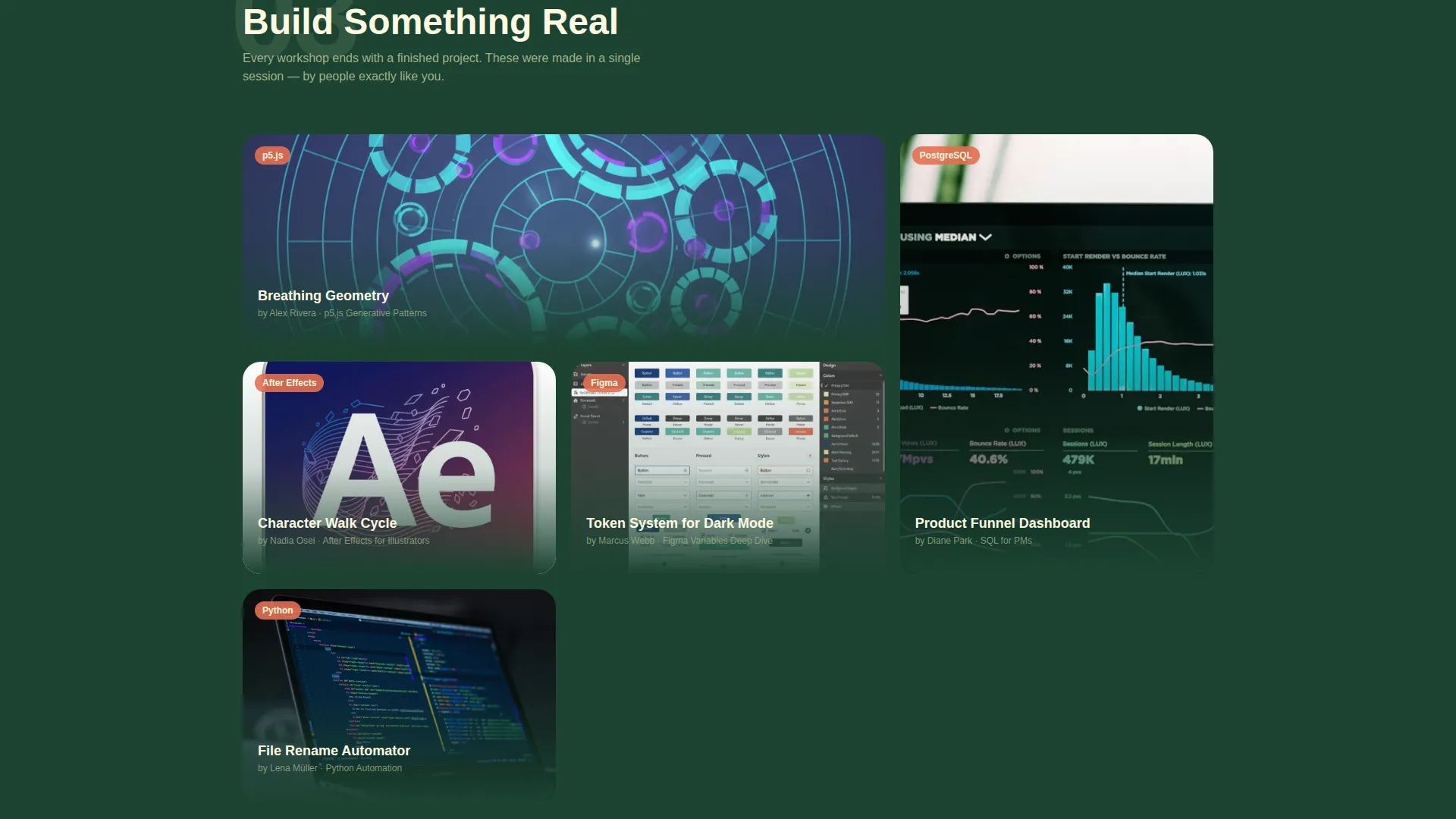
- No visual proof of past student work makes it hard to build credibility before someone commits
What you get with this template
You get a fully structured, single-page layout that walks visitors through discovery, engagement, and registration in one uninterrupted scroll. Every section is purposeful and connected.
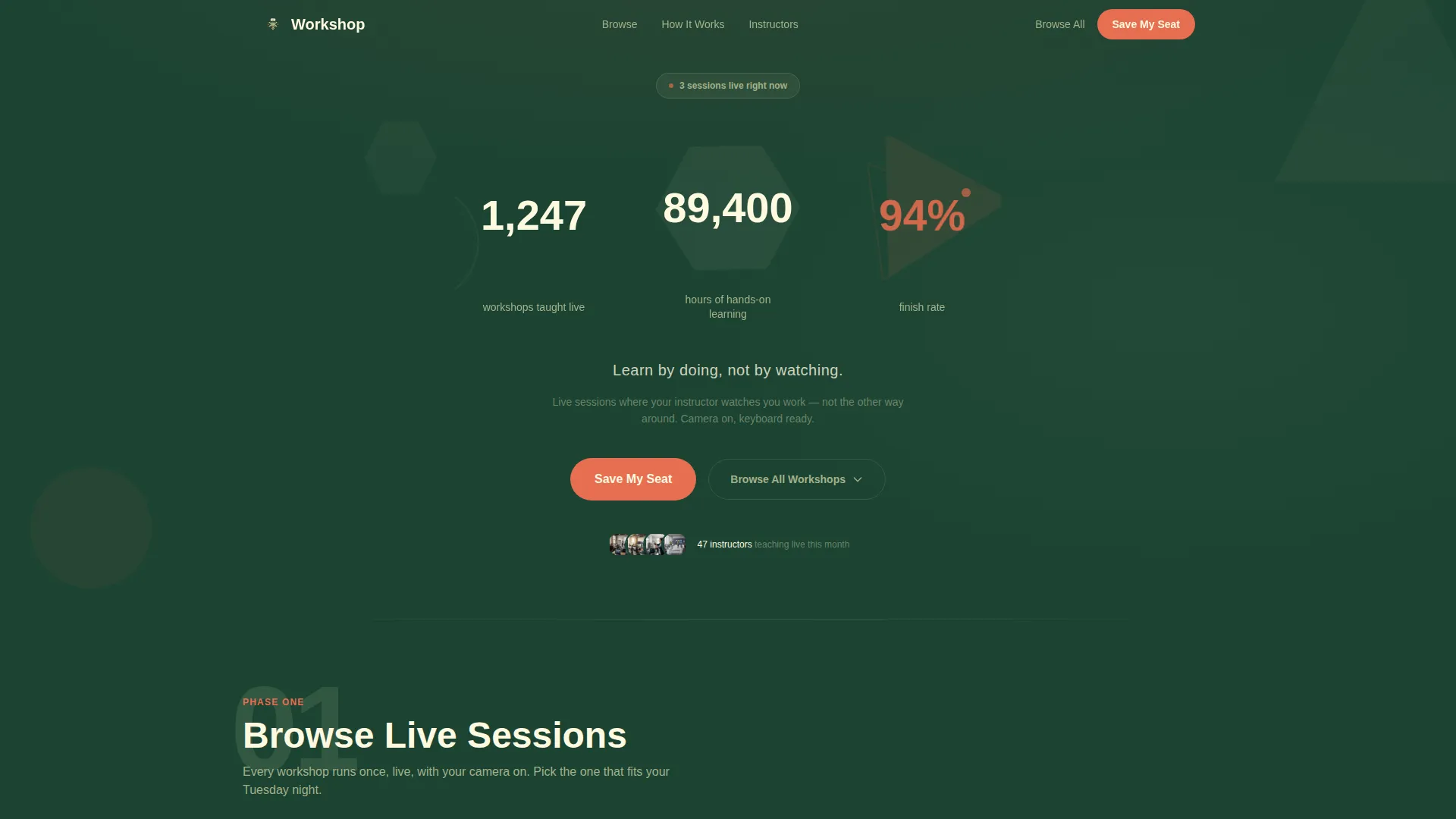
- An animated stats header with three geometric counters showing workshops taught, learning hours, and finish rate
- Three modular card grid sections covering Browse, Join, and Build phases with growing card detail as visitors scroll
- A sticky bottom registration bar, workshop filter controls, and a lightweight seat-saving modal with three simple fields
Feature list
This template includes purpose-built components that work together to move a visitor from curious browser to registered participant.
Animated Stats Header
Three oversized geometric counters open the page on load. Each number sits inside a rotating polygon shape. The finish-rate stat pulses in chanterelle orange, drawing the eye and signaling credibility before a visitor reads a single word.
Modular Three-Phase Card Grid
The page is organized into Browse, Join, and Build phases. Each phase uses a distinct card grid layout. Cards grow in size and detail as the visitor scrolls, creating a natural zoom effect that pulls them deeper into the experience.
Workshop Cards with Live Indicators
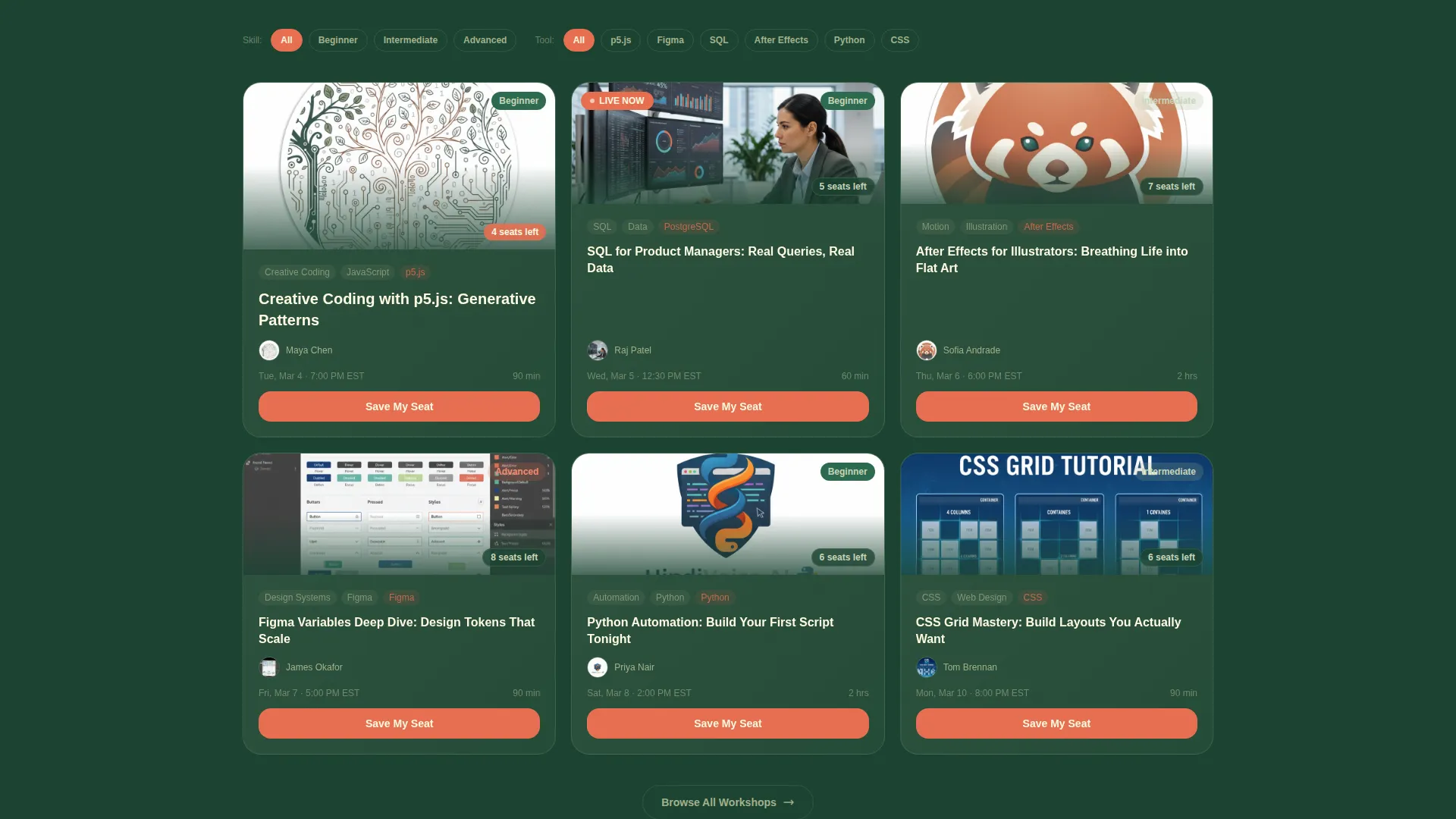
Each card in the Browse phase includes an instructor avatar, skill tags, a seat-count badge, and a "Save My Seat" button. Live-now indicators use chanterelle orange to signal active or upcoming sessions at a glance.
Live Room Preview Card
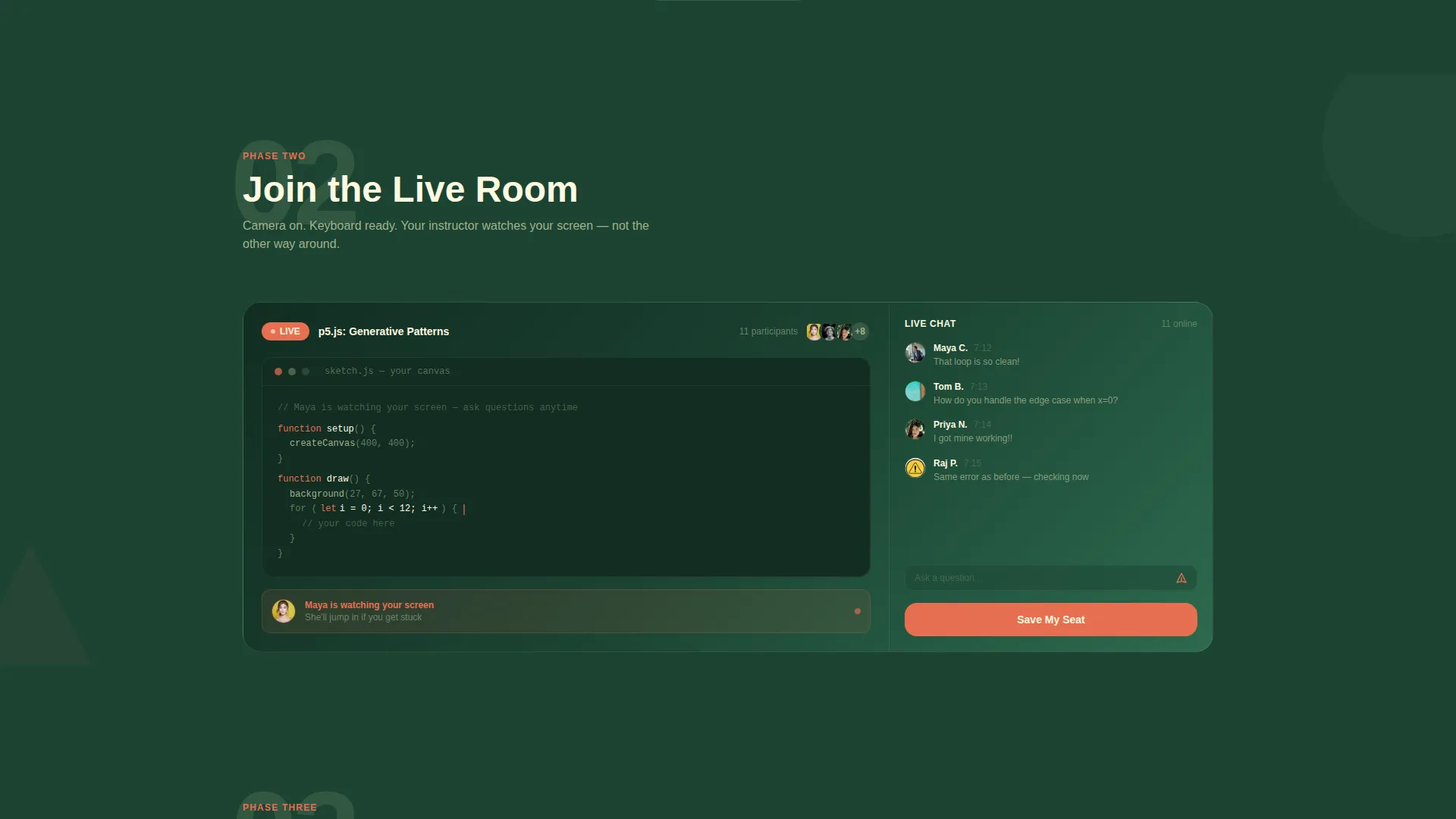
The Join phase features an expanded card showing the live room interface. It includes a chat sidebar, a shared canvas area, and an instructor video tile, giving visitors a realistic preview of what joining actually looks and feels like.
Sticky Registration Bar
After the visitor scrolls past the Browse section, a sticky bottom bar appears with the primary call to action. It stays visible during continued scrolling, keeping registration one click away without interrupting the browsing experience.
Seat-Saving Modal with Lightweight Form
Clicking any "Save My Seat" button opens a focused modal. It asks for a first name, an email address, and a single toggle question about prior workshop experience. Nothing more, nothing less.
Page sections overview
| Section | Purpose |
|---|---|
| Stats metrics header | Opens with animated counters to establish trust and platform scale immediately |
| Browse workshop cards | Mosaic grid of upcoming sessions with avatars, tags, and seat badges |
| Join live room | Expanded card preview of the real-time session interface |
| Build portfolio grid | Student project showcase from completed live sessions |
| Sticky registration bar | Persistent bottom call to action that keeps sign-up one click away |
| Filter browse controls | Skill level, tool, and date filters for the full workshop catalog |
| Seat-saving modal | Lightweight form that collects name, email, and one toggle input |
Design & branding system
The visual identity follows a Playful Geometric theme built on the Forest Trust color system. The palette references a well-loved field notebook: earthy enough to feel reliable, bold enough to stay memorable.
- Deep canopy green (#1B4332) forms the primary background, lichen gray (#A3B18A) surfaces the card layers, and warm birch (#FEFAE0) carries text and breathing space
- Chanterelle orange (#E76F51) is reserved for buttons, live-now badges, and the pulsing finish-rate indicator, making key actions impossible to miss
- Geometric shapes, interlocking triangles, circles, and large polygon numerals give the layout a hands-on, studio-made energy that matches the platform's learning style
Mobile & speed optimization
The card grid layout is built to reflow cleanly at smaller screen widths. Workshop cards stack vertically on mobile without losing their key details, and the sticky registration bar remains accessible at the bottom of the screen throughout the scroll.
- Card grids adapt from mosaic layouts on desktop to single-column stacks on smaller screens
- The seat-saving modal is sized to fit mobile viewports without requiring horizontal scrolling
- Geometric animations are kept subtle and lightweight so the header does not overwhelm smaller devices
How this template helps you convert
Every design and layout decision in this template points toward one outcome: a visitor clicking "Save My Seat" before they leave the page.
- The animated stats header builds immediate trust by showing real platform numbers, a 94% finish rate, 1,247 workshops taught, and 89,400 hours of learning, before asking for anything.
- The three-phase scroll structure progressively deepens engagement, moving visitors from browsing to imagining themselves inside a session to seeing proof of what students actually build.
- The sticky registration bar and consistent "Save My Seat" button placement across every filtered result mean a motivated visitor never has to search for a way to sign up.
Other information about this template
This template is a strong starting point for teams building in the live workshop platform space. It is designed to communicate the hands-on, real-time nature of a session from the very first scroll.
- The step-by-step guide structure, numbered phases with growing card detail, helps visitors understand the platform experience without needing written explanations
- The event registration flow is optimized for impulse commitment: the modal is minimal by design to reduce friction at the moment of decision
- The template style is Card Grid (Modular), making it straightforward to add, remove, or reorder workshop cards as your catalog grows
- The header concept draws on Stats and Metrics display principles, which are well-suited to education platforms that have meaningful completion and attendance numbers to show
- Color customization is straightforward: the Forest Trust palette is clearly defined with hex values, making it easy to adapt to a different brand identity if needed
Theme
Playful Geometric
Creative direction
Step-by-Step Guide
Color system
Forest Trust
Style
Card Grid (Modular)
Direction
Event Registration
Page Sections
Animated Geometric Stats Header
Three-phase Modular Card Grid
Workshop Cards with Live Indicators
Live Room Preview Card
Sticky Registration Bar
Lightweight Seat-saving Modal
Related questions
Can I add more workshop cards to the Browse section?
Does the sticky registration bar appear on mobile too?
How does the seat-saving modal work?
Can visitors browse workshops without registering first?
Is this template suitable for a solo instructor or a multi-instructor platform?



