
Looking for Adobe Website Builder alternatives that offer more flexibility? Many businesses turn to platforms providing greater creative control, easier customization, and advanced features to build unique, functional, and growth-ready websites.
Why does building a website sometimes feel boxed in instead of creative?
That feeling happens more often than expected. Adobe Website Builder offers polished templates and simple tools, but flexibility can feel limited when trying to customize layouts or push design further.
Many businesses want more control.
According to data, 90% of small businesses plan to invest in their websites over the next 12 months to improve functionality and user experience, indicating strong demand for greater flexibility and design quality. That is a clear sign that brands are looking beyond one-size-fits-all solutions.
Let's see Adobe Website Builder alternatives that offer greater flexibility, creative control, and room to grow without feeling restricted.
Why Adobe Website Builder Feels a Bit… Restricted
Adobe is great if you’re already living in Creative Cloud. Adobe Stock, Adobe Express, and even the Creative Cloud Libraries Panel are very useful.
Drag your assets from one app to another? Easy.
But here’s the kicker. When it comes to building a real site, with scroll effects, clickable stuff, and actual flair, it sometimes feels like trying to paint a masterpiece with crayons.
Users complain about a lack of flexibility, annoying layout restrictions, and the way Adobe Express freezes just when you’re about to make the first impression count. Some even say you spend more time wrestling with the software than building your engaging web page.
Yes, sometimes you need more than Adobe’s tools to build a compelling website.
Features Across Builders
| Feature | Rocket.new | Adobe Website Builder | Wix | Webflow | Squarespace | WordPress |
|---|---|---|---|---|---|---|
| Layout control | Medium | Low | Medium | High | Medium | High |
| Ecommerce | Yes | Low | Yes | Yes | Yes | Yes |
| SEO | Basic | Basic | Good | Great | Good | Great |
| Hosting | Yes | Yes | Yes | Yes | Yes | Yes |
| Free plan | Yes | Limited | Yes | No | No | Yes |
| Templates | Many | Few | Many | Many | Many | Thousands |
| Quick launch | One shot | Moderate | Medium | Medium | Medium | Medium |
Some builders are speedy, some give full control, and some do a bit of both. Pick what fits your style and project.
Top Alternatives That Actually Let You Create
These alternatives give you the freedom to create your web page your way. Fast, flexible, playful, or precise, pick the tool that fits your style and project. No boring templates, no cookie-cutter sites.
Whether you’re building a single web page, a one-page website, or a full business website, these tools make it easier to get creative without pulling your hair out.
Rocket.new – Fast, Fun, Playful
Why it stands out: Rocket.new is all about speed and simplicity. You can launch a site in one shot and tweak it easily. Perfect for a single web page or a one-page website without feeling like you’re trapped in settings.
Key Features:
- Quick launch with a unique URL
- Templates and layout packs for any style
- Add images, video, text, or interactive buttons
- Built-in SEO
Use Cases:
- Portfolio sites: Showcase your work on a single, professional-looking web page.
- Landing pages: Create a clean one-page website for a product, workshop, or campaign in minutes.
- Promo microsites: Launch small, fun, and engaging web pages for events or short-term projects.
- Small business sites: Set up a business website quickly without coding headaches.
Fast, playful, and surprisingly flexible. Great if you want to get a polished site live without wrestling with software.
Wix – Drag, Drop, Done
Think of Wix as a Lego set for websites. You get flexibility, speed, and fun all in one. Perfect for one-page websites or full online stores.
Key Features:
- Attractive templates ready to go
- Scroll motion effects for smooth visuals
- Interactive buttons with zero code
- Drag and drop video, gallery, or images
- Free website builder plan available
Easy to use, playful, and perfect if you want a site that feels yours without sweating over details.
Webflow – Design Nerds, This Is Your Playground
Webflow is for people who love to tweak down to the pixel. It’s like coding, but the code hides while you design.
Key Features:
- Split-screen compositing effect possible
- Fancy scroll motion effects included
- Deep layout control for pixel-perfect designs
- Hosting, CMS, and e-commerce built in
- Perfect for medium to large business sites
A playground for designers and serious builders who want total control without Adobe’s limitations.
Squarespace – Classy Without Headaches
Squarespace is sleek and clean, keeping your site looking polished without requiring you to think about the tiny details.
Key Features:
- Sleek templates for creative projects
- Smooth layouts for portfolios or small projects
- Simple drag-and-drop content addition
- Built-in hosting and SEO tools
- Minimal learning curve
Not the most flexible, but stylish, stress-free, and perfect for creative portfolios or one-page websites.
WordPress – The Everything Machine
WordPress can handle anything from a single web page to a full-blown business empire. Plugins make almost everything possible.
Key Features:
- Custom layouts for any landing page or site
- Plugins for forms, booking, and social media feeds
- Massive theme and template library
- Powerful SEO and ecommerce support
- Full control over style, color, and interactions
Slight learning curve, huge payoff. The ultimate tool if you want flexibility, scale, and total design freedom.
What Real Users Say
A Reddit user put it pretty bluntly:
“Adobe’s great for branding and visuals but terrible for making working websites. If you want something fast, clean, and still editable, try Durable. I used it for my friend’s coaching business and we had her site live the same day.”
Quick Hits on One-Page Website Builders
These tools are perfect if you just need a single web page or a one page website that’s fast, clean, and easy to manage. No complex layouts, just simple, engaging sites that look good.
- Carrd – minimal, clean, and fast. Great for a personal or small-business single-web presence.
- Strikingly – scroll motion effects built in, simple control.
- Brizy – drag and drop with easy controls, friendly for beginners.
Quick, simple, and no-fuss. Perfect when your goal is a sleek, engaging web page without building a full-blown site.
Picking Your Site Without Regret
Not sure which website builder to pick? Think of your site like pizzaveveryone has a flavor, and the right choice depends on what you actually want.
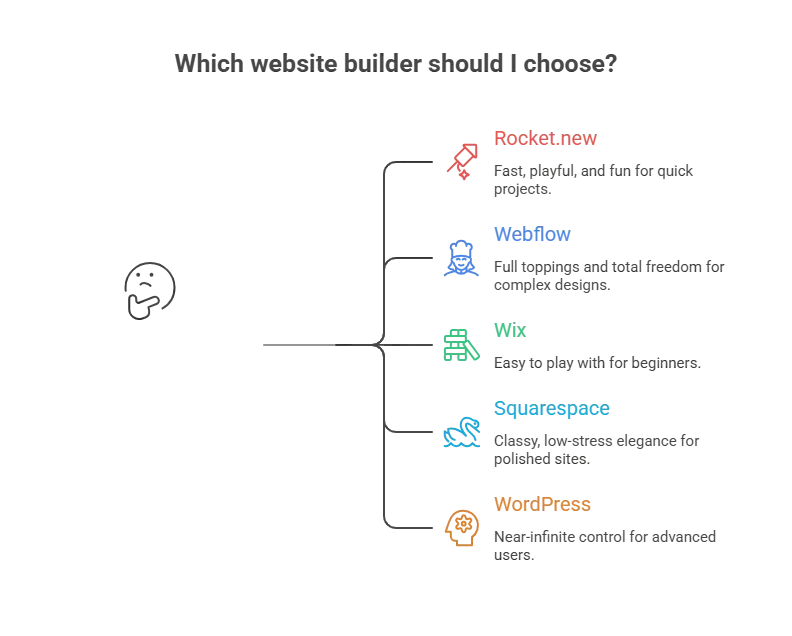
All of these beat feeling trapped in Adobe Website Builder and give you real options to make your site look exactly how you want.
Adobe Alternatives That Actually Let You Create
Adobe Website Builder feels like a nice box of crayons that doesn’t let you color outside the lines. You’re stuck with templates, restricted layouts, and limited customization options.
Pick a builder that matches your style, patience, and skill. From Rocket.new to WordPress or Wix, you can create engaging web pages that actually feel alive.
Your website shouldn’t feel like a chore. With the right alternative, you can build, tweak, and launch without cursing at your screen.
Table of contents
- -Why Adobe Website Builder Feels a Bit… Restricted
- -Features Across Builders
- -Top Alternatives That Actually Let You Create
- -Rocket.new – Fast, Fun, Playful
- -Wix – Drag, Drop, Done
- -Webflow – Design Nerds, This Is Your Playground
- -Squarespace – Classy Without Headaches
- -WordPress – The Everything Machine
- -What Real Users Say
- -Quick Hits on One-Page Website Builders
- -Picking Your Site Without Regret
- -Adobe Alternatives That Actually Let You Create