
AI context optimization determines whether your AI-built apps stay accurate or break down. This blog covers how context windows work, the four failure modes, and practical strategies to fix them.*
Why do most AI app failures trace back to context problems rather than model quality?
According to Anthropic's research on building effective agents, the difference between a working AI agent and a broken one almost always comes down to what information sits inside the context window at the moment of inference.
The global AI market crossed $601 billion in 2026, and context engineering has become the skill that separates production-grade AI applications from fragile demos.
This blog covers how context windows work, what goes wrong when context is mismanaged, and how the right platform handles it automatically.
Key TakeawaysContext engineering manages what enters an LLM's context window. It is a system-level discipline, not a single-prompt fix.The four failure modes (context poisoning, context rot, tool output flooding, attention drift) account for most AI app breakdowns in production.Context window size does not equal context quality. Smaller, focused windows often outperform bloated ones.Teams can often reduce token usage by 40-60% while improving output quality by applying the right context strategies.
What is Context Engineering and Why Does It Matter?
Context engineering is the discipline of curating, structuring, and managing the information that flows into a large language model's context window. It represents a fundamental shift from simple prompt engineering. Prompt engineering focuses on crafting the perfect prompt for a single interaction. Context engineering, however, treats context as a system-level architecture problem. It spans multiple techniques, tool calls, and sessions.
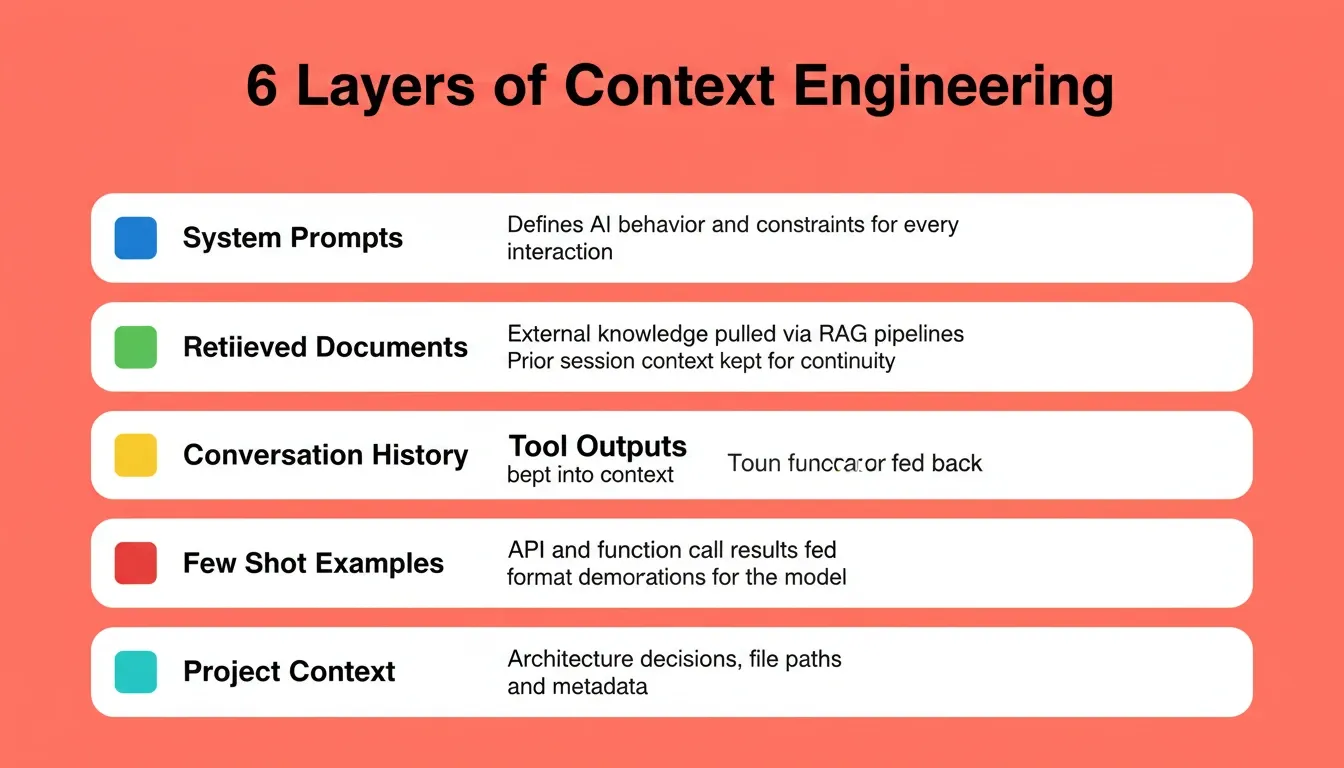
Here is what context engineering includes at a practical level:
-
System prompts and instructions: Define AI behavior, constraints, and system instructions for every interaction
-
Retrieved documents and knowledge base content: External data pulled through retrieval augmented generation (RAG) pipelines based on semantic similarity
-
Conversation history and chat history: Prior interactions kept selectively to maintain session continuity
-
Tool outputs and API responses: Results from tool calls, file system access, and code execution that feed back into the context window
-
Few shot examples: Output format demonstrations that guide the model without consuming excessive tokens
-
Project context and metadata: Architectural decisions, file paths, and structured notes about the codebase
The token count of each layer adds up fast. A single tool call response can consume thousands of tokens. System prompts for complex tasks often reach 4,000 to 8,000 tokens.
Effective context engineering means managing context so that only what matters reaches the model at any given point. It is about context quality: ensuring just the right information appears at the right time, while irrelevant context stays out of the LLM's context window entirely.
Context Engineering vs. Prompt Engineering
| Dimension | Prompt Engineering | Context Engineering |
|---|---|---|
| Scope | Single interaction | Entire session and system |
| Focus | Wording of one input | What information is present |
| Skill type | Craft | Architecture |
| Failure mode | Poor phrasing | Wrong or missing information |
| Scales to production? | Rarely alone | Yes, when designed correctly |
How Do Context Windows Actually Work?
A context window is the model's working memory. It is a fixed-size buffer measured in tokens. It holds everything the model can "see" when generating each response.
According to a Stanford research paper on lost-in-the-middle effects, models perform best when critical information appears at the beginning or end of the context window. Accuracy drops for details buried in the middle. This finding directly affects how you should structure system prompts, retrieved documents, and conversation history.
Here is how the major models compare on context window limits in 2026:
| Model | Context Window | Effective Sweet Spot | Cost per 1M Input Tokens |
|---|---|---|---|
| GPT-4o | 128K tokens | ~60K tokens | $2.50 |
| Claude Sonnet 4 | 200K tokens | ~80K tokens | $3.00 |
| Gemini 2.5 Pro | 1M tokens | ~200K tokens | $1.25 |
| Llama 4 | 128K tokens | ~50K tokens | Variable |
The gap between "maximum context window" and "effective sweet spot" matters more than most teams realize. Larger context windows do not necessarily mean better results. As context grows beyond the effective range, several problems emerge simultaneously:
-
Context window costs increase linearly: Filling a 200K window when you only need 40K relevant tokens means spending five times more than necessary
-
Latency scales with context length: Processing 200K tokens takes significantly longer than 40K, which slows response speed for users
-
Attention quality degrades: The model's attention budget spreads across more tokens, making it harder to focus on critical details and raising the risk of hallucinations
-
Compressed context loses nuance: When systems summarize long conversations to fit the context window limit, critical details often disappear in compression
The goal of AI context optimization is not to use the biggest context window available. It is to deliver just the right information in the smallest token count possible while maintaining accuracy.
A new context window does not carry memories from previous sessions by default. Each conversation starts fresh unless you implement persistent memory, external memory systems, or retrieval systems that pull relevant memories from a knowledge base.
What is a Token?
A token is roughly 0.75 words in English. "Context optimization" counts as two tokens. A full 200K context window holds approximately 150,000 words, about the length of two average novels. The practical limit is lower because the model's attention mechanism becomes less reliable as the window fills.
Every token you add to context is a token the model must attend to, weight, and reason about. Irrelevant tokens are not free; they dilute the signal.
For teams building AI-powered applications, understanding token economics is the first step toward building apps that stay accurate at scale.
What are the Most Common Context Failure Modes?
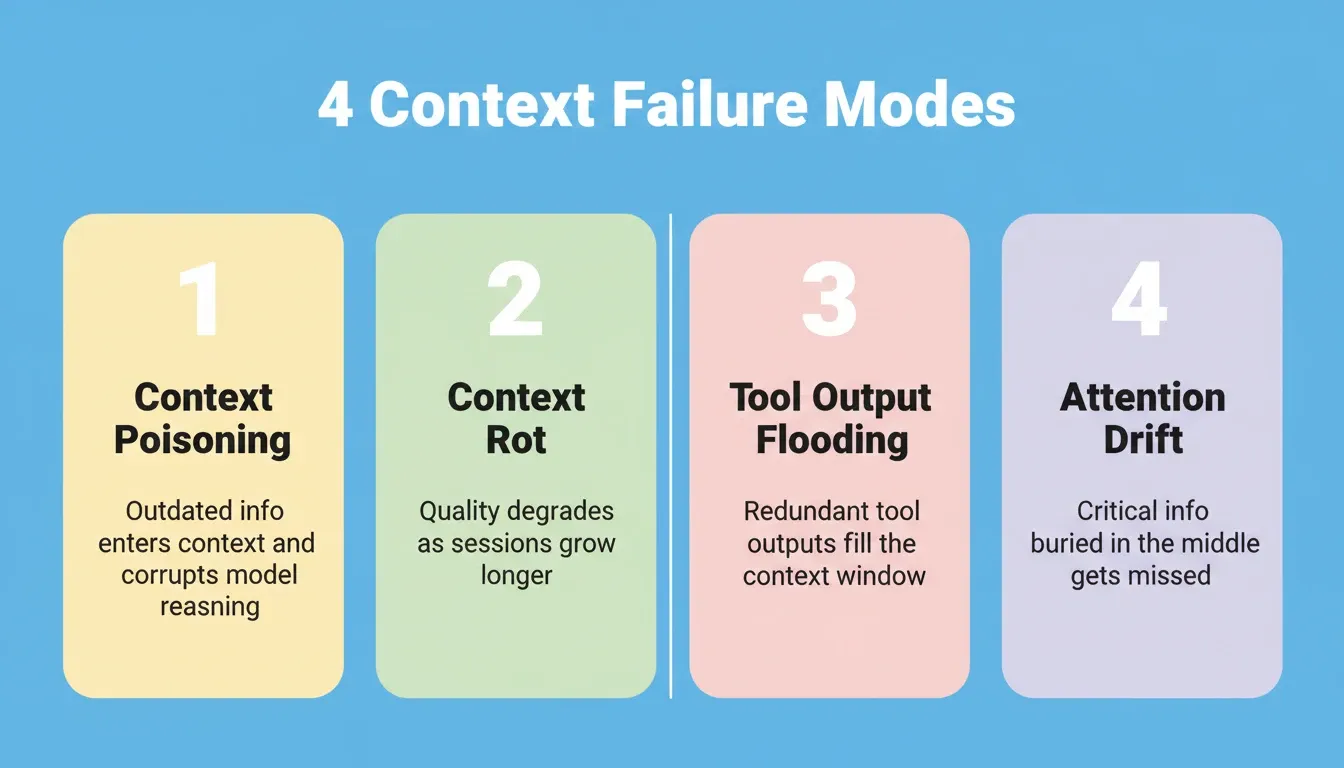
Most AI app failures in production trace back to one of four context failure modes, not to the underlying model.
Understanding these patterns helps teams build applications that stay reliable at scale.
Context Poisoning
Contradictory or outdated information enters the LLM's context window and corrupts reasoning. The model then follows old instructions that conflict with new ones. This creates inconsistent behavior that persists until you remove the conflicting information or start a new context window.
A developer on X recently shared: "We lost three days debugging what we thought was a model issue. Turned out our RAG pipeline was injecting retrieved documents from six months ago that contradicted our current system prompts. Context poisoning, pure and simple."
Fix: Implement retrieval freshness filters. Set a maximum document age for your retrieval pipeline and periodically audit what enters the context.
Context Rot
Quality degrades gradually as conversations grow longer. Early critical details disappear under layers of newer, less relevant context. The model loses its ability to recall and apply information from the beginning of long sessions.
For example, a coding agent may correctly implement authentication in session turn 3. By turn 47, it can introduce a conflicting auth pattern because the original decision now sits buried in the middle of the context window.
Fix: Implement periodic context compression. Summarize old conversation turns into structured notes that preserve decisions without preserving every word.
Tool Output Flooding
AI agents that make many tool calls accumulate massive amounts of tool outputs in their context. Without discarding redundant outputs, the context fills with data that was useful for one step but irrelevant to the current task.
Fix: After each tool call, evaluate whether the output needs to persist in context or can be summarized and discarded. Context isolation between workflow phases is critical here.
Attention Drift
Even within the context window limit, the model's attention mechanism does not weight all tokens equally. Critical context placed in the middle of long documents receives less attention than content at the edges. This creates subtle errors where the agent misses instructions that are technically still in context.
Fix: Place critical constraints and instructions at the top and bottom of your context. Never bury a hard constraint in the middle of a long document.
The fix for most failure modes is not a bigger context window. It is better context management. This means actively pruning, compressing, and prioritizing information rather than dumping everything into the LLM's context window and hoping for the best.
How Rocket Handles Context So You Do Not Have To
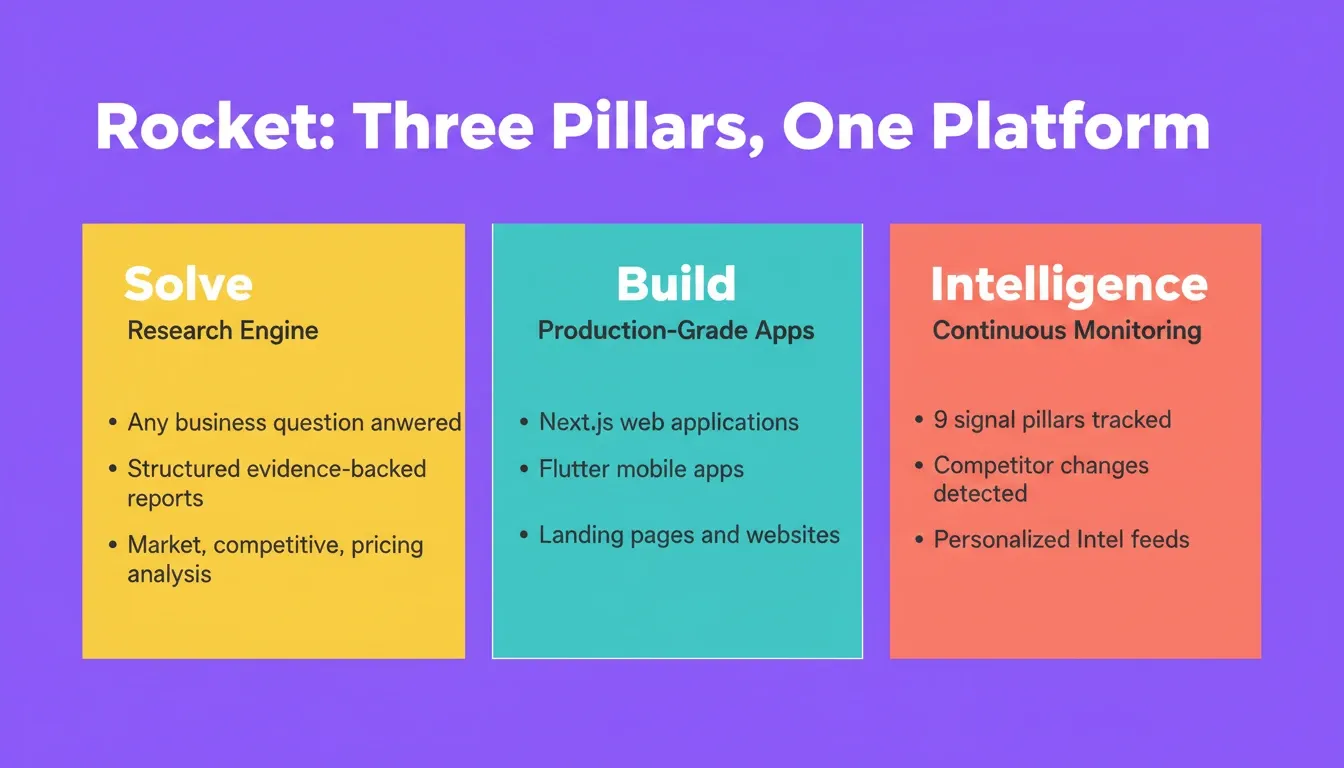
Rocket is a vibe solutioning platform that combines Solve (research and market intelligence), Build (production-ready web and mobile apps), and Intelligence (continuous competitor monitoring) in one place. 1.5 million people across 180 countries have tried Rocket, from solopreneurs to enterprise teams.
Its architecture is built around one principle: add your context once, and every task that follows already knows everything.
How Rocket's Project Context Works
Context in Rocket is scoped to a project. Inside a project, every task draws on the same files, connected documents, and outputs from earlier tasks. You do not need to re-upload or re-explain anything.
| Context Type | What It Includes |
|---|---|
| Files from your device | .md, .pdf, .xlsx, .csv, .jpg, .jpeg, .png |
| Google Drive | Google Docs, Google Sheets |
| Notion | Notion pages |
| Task outputs | Findings, decisions, and outputs from earlier Solve and Build tasks |
| Chat history | Clarifications and refinements from any task's conversation |
The more relevant work you do inside a project, the richer the shared foundation becomes. A Solve research task run on Monday becomes available context for a Build task on Thursday. This happens automatically, with no manual handoff required.
Cross-Task Context: How Tasks Make Each Other Smarter
| Workflow | What Happens |
|---|---|
| Solve then Build | Research findings shape what gets built, including features, positioning, and design |
| Build then Solve | Development reveals new questions that trigger deeper research |
| Solve then Solve | Later research builds on earlier findings without duplicating work |
| Build then Build | Branding and technical decisions carry forward into new tasks |
This eliminates the most expensive moment in any AI-assisted workflow: the context loss at the handoff. The research does not get summarized into a brief that someone reads 60% of. It is just there, in full, for every subsequent task.
Prompt Intelligence: Catching Context Gaps Before They Happen
Rocket includes a feature called Prompt Intelligence that scores every prompt for clarity before starting work. If the prompt meets the minimum threshold, work starts immediately. If it falls below, Rocket asks a short set of targeted questions to fill the gaps. Work then starts once it has enough to proceed.
This is context optimization at the input layer. Instead of letting a vague prompt produce a context-poor output, Rocket surfaces the gaps before any tokens are spent. It applies to both Solve and Build tasks.
Which Context Strategies Should Teams Implement First?
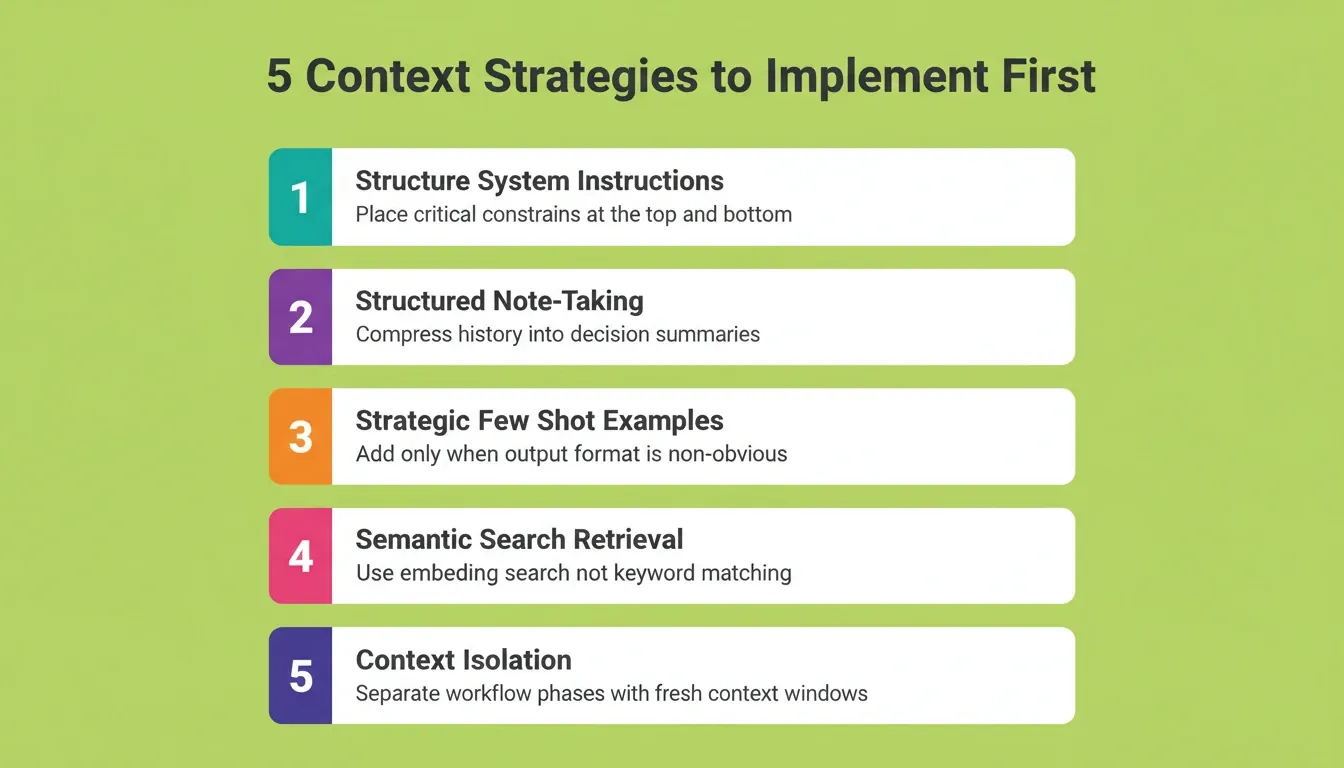
If your team manages context manually, prioritize these five strategies in order. They deliver the highest return on the least implementation effort.
1. Structure Your System Instructions
Organize your system prompts into clear sections with explicit priority markers. Place the most critical context and constraints at the top and bottom of system instructions, where the model's attention is strongest.
Quick test: Remove the first and last 10% of your system prompt. Would the model still follow your most important rules? If yes, your critical constraints are in the wrong place.
2. Implement Structured Note-Taking for Long Sessions
Instead of keeping full conversation history, periodically compress past exchanges into structured summaries. These preserve key decisions and context while reducing token usage dramatically.
A good structured note captures three things: what was decided, why it was decided, and what constraints it creates for future steps. It does not need to capture the full conversation that led to the decision.
3. Add Few Shot Examples Strategically
Include few shot examples only when the desired output format is non-obvious. Remove them once the model demonstrates consistent behavior. This frees up token budget for more relevant context. Few shot examples are expensive; each one can consume 500 to 2,000 tokens depending on complexity.
4. Build Context Retrieval with Semantic Search
For applications that reference large knowledge bases or documentation, use embedding search rather than keyword matching. Semantic similarity retrieval surfaces conceptually relevant documents, even when the exact terms differ.
Teams building no-code and low-code applications often underestimate how much retrieval quality affects output quality. Keyword search misses synonyms, paraphrases, and related concepts that semantic search catches.
5. Set Up Context Isolation for Multi-Step Workflows
When AI agents perform long tasks with many steps, implement context isolation between phases. Each phase gets a fresh context. Only the relevant output from previous steps passes forward as compressed context.
The right combination depends on your specific application. A chatbot needs strong conversation history management. A coding agent needs project context retrieval and context isolation. A research agent needs retrieval augmented generation with intelligent ranking and selection.
Context Is the New Code
The teams shipping the best AI applications in 2026 are not the ones with the most sophisticated models. They are the ones with the best context engineering. Managing what goes into the context window, when it enters, and how long it stays determines whether your AI agent produces accurate, coherent responses or drifts into hallucinations and inconsistent behavior.
Whether you build context pipelines yourself or let a platform handle it, treating context as a first-class engineering concern is what separates production-grade AI apps from demos that break under real usage. For teams that want to go deeper on building reliable AI applications, understanding how AI agents handle complex workflows is the natural next step.
AI Context Optimization Is the Foundation of Every Reliable App
AI context optimization is not a future concern. It is the deciding factor in whether AI-built apps work in production today. As models grow more capable, the teams that manage context well will consistently outperform those that rely on model size alone.
The strategies in this guide, including structured system instructions, context compression, semantic retrieval, and context isolation, apply regardless of which model or platform you use. For teams that want these handled at the infrastructure level, Rocket's project context architecture does it automatically. Start building on Rocket.new.
Table of contents
- -What is Context Engineering and Why Does It Matter?
- -Context Engineering vs. Prompt Engineering
- -How Do Context Windows Actually Work?
- -What is a Token?
- -What are the Most Common Context Failure Modes?
- -Context Poisoning
- -Context Rot
- -Tool Output Flooding
- -Attention Drift
- -How Rocket Handles Context So You Do Not Have To
- -How Rocket's Project Context Works
- -Cross-Task Context: How Tasks Make Each Other Smarter
- -Prompt Intelligence: Catching Context Gaps Before They Happen
- -Which Context Strategies Should Teams Implement First?
- -1\. Structure Your System Instructions
- -2\. Implement Structured Note-Taking for Long Sessions
- -3\. Add Few Shot Examples Strategically
- -4\. Build Context Retrieval with Semantic Search
- -5\. Set Up Context Isolation for Multi-Step Workflows
- -Context Is the New Code
- -AI Context Optimization Is the Foundation of Every Reliable App