
How simple is building a website with AI today? Learn about AI website builders, features, and tips that help beginners launch blogs, business sites, shops, or portfolios faster online.
Are you ready to easily build a website with AI?
Today’s AI website builder tools let almost anyone launch a site fast, whether for a blog, business, shop, or portfolio.
Approximately 70% of small businesses report that easy site-creation tools helped them go online faster.
This blog breaks down tools, tips, and real examples so you can build a website without drowning in code.
Why More People Are Using AI Website Builders?
So you want a site but dread coding? That’s normal.
AI has changed the game.
In the past, creating websites meant weeks of manual work or hiring developers.
Not anymore. The new breed of AI website builder lets you describe what you want in simple terms and get a ready site.
Here’s what these builders give you:
- Quick setup – You can get a site live in hours, not weeks. The AI automatically generates pages, layouts, and basic content.
- Templates that look good without effort – Pick from professionally designed website templates and customize them lightly. No graphic designer needed.
- No coding experience needed – Drag, drop, and click your way to a functional AI website without touching a single line of code.
- Often free or low cost – Many builders offer free AI website builder plans or trials so you can test ideas before committing.
- Built-in marketing tools like SEO helpers – AI can suggest SEO-friendly content, meta descriptions, and even optimize your site structure to help people find you.
AI website builders don’t just save time; they make creating a professional-looking site surprisingly simple.
You get a polished site that works well and still has room to add your personal touch. Think of it as having a mini web designer on standby
What is an AI Website Builder?
An AI website builder is software that uses artificial intelligence to generate a functional AI website based on your input. Instead of manually designing pages, writing code, or selecting fonts for hours, you provide the builder with basic instructions, and it handles the heavy lifting.
Most AI builders start by asking a few simple questions:
- What type of website do you want (blog, portfolio, business, or shop)
- Who your target audience is
- Preferred colors, styles, and layout
Once you provide these details, the AI generates complete pages with images, content, navigation menus, and styling. Some even analyze your niche and suggest layouts or website templates that perform well for similar sites.
It’s like having a digital assistant that quietly builds your site in the background. You can tweak things afterward using a drag-and-drop editor or a visual canvas, but the AI does the heavy setup.
The best part?
This approach makes it fast and accessible to create a good website, and surprisingly fun, even for people with no coding experience. You get a professional-looking site without spending weeks on design and development.
Let’s check the tools you might want to use when you build a website without losing your mind.
AI Tools Comparison
Here’s a quick look at popular AI website builder tools that make creating a site fast and easy.
| Builder Name | Best For | Templates Included | Free Plan | Custom Domain |
|---|---|---|---|---|
| Rocket.new | Web & app projects, rapid prototypes | Powerful AI templates | Yes | Yes |
| Wix AI Website Builder | Beginners & branded sites | Lots | Yes | Yes |
| Bookmark AI | Small business owners | Good | Yes | Yes |
| Zyro AI Builder | Simple landing pages | Moderate | Yes | Yes |
| Webflow + AI tools | Designers who want fine control | Many | Free trial | Yes |
Whether you want a free website or a professional-looking site, these builders cover everything from simple blogs to more complex websites. Pick a tool, tweak a template, and your new site is ready to go in no time.
Now, let’s take a closer look at each of these tools and see what makes them stand out.
1. Rocket.new
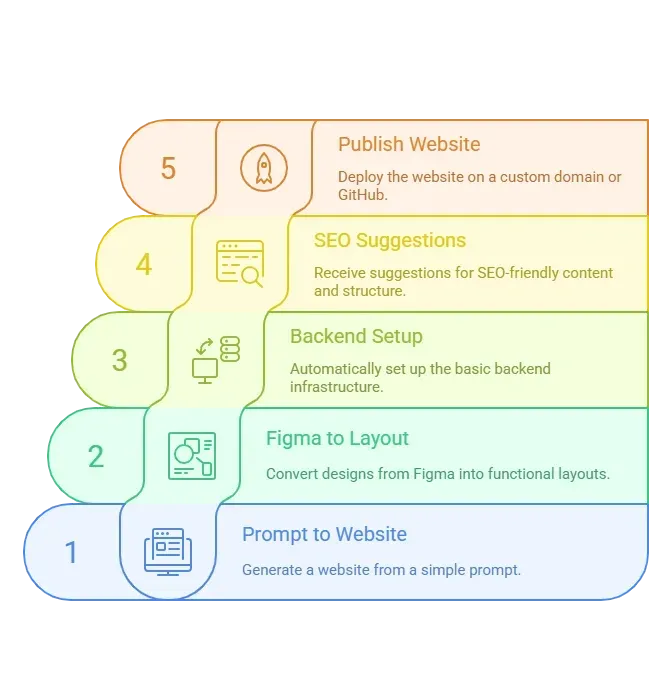
Rocket.new isn’t just a typical site builder; it generates full web and mobile apps from simple text prompts.
You describe what you need, and the AI generates pages, content, layouts, and even backend setup, such as databases and forms. It’s ideal for quick prototypes, portfolios, or more complex websites that still need customization.
Top Features:
- Convert prompts into functional web apps or AI website projects
- Figma-to-code conversion
- Built-in SEO suggestions and AI-powered tools
- Publish on a custom domain or through GitHub
2. Wix AI Website Builder
Wix AI Website Builder is perfect for beginners who want a polished AI website fast. Its AI asks questions about your business and style, then generates a ready-to-go site.
Top Features:
- Hundreds of website templates
- Drag and drop editor
- Built-in marketing tools and SEO helpers
- Connect a custom domain easily
3. Bookmark AI
Bookmark AI is a lightweight website maker for small businesses. Its AI assistant, AIDA, asks you a few questions and generates your site in minutes.
Top Features:
- Step-by-step AI guidance
- Drag and drop editor for tweaks
- Free AI plan for testing
- High quality images integrated
4. Zyro AI Builder
Zyro AI Builder is known for simplicity and speed. It works best for new sites or landing pages. AI generates content, layouts, and even logo ideas.
Top Features:
- AI content generator
- Clean website templates
- Free plan for small projects
- Drag and drop editor
5. Webflow + AI Tools
Webflow + AI tools are for designers who want control over visuals and site structure. AI assists in content generation and layout suggestions, but designers can refine everything manually.
Top Features:
- Full design freedom
- AI content & SEO suggestions
- Drag and drop for layout edits
- Free trial to test advanced features
How to Build a Website with AI: Step by Step
Building a website with AI is easier than it sounds. Follow these steps, and you’ll have a functional, good-looking site in no time, no coding headaches required.
1. Pick Your Builder and Create an Account
First, choose one that suits your goal. Do you want a fancy portfolio? Or an e-commerce shop? If you’re unsure, start with a free trial.
2. Choose a Niche and Write a Prompt
Here’s where AI shines.
Most builders ask you questions like:
- What type of site do you want
- Who your target audience is
- Colors and style preference
3. Pick a Template
Then, select a design from the website templates collection. These are starting points. Many builders have hundreds of blogs, shops, agencies, or landing pages.
4. Customize on the Visual Canvas
After your AI draft is ready, you can use a drag-and-drop editor to tweak things. Change images, text, colors, or layout until it feels right for your brand.
5. Add Pages and Content
Your site probably needs more than a home page.
Think about:
- About page
- Services or product pages
- Contact page
- Blog section
Good builders help structure your site with a logical flow that makes it easy for users to navigate.
5. Publish and Connect Your Domain
Once everything looks good, publish. Most tools let you link a custom domain (your own domain name). If you started with a free domain, you might be limited, but upgrading is usually cheap.
Tips to Design a Good Website
Even the smartest AI can’t read your mind. These simple tips help your AI website look polished, user-friendly, and on brand.
- Pick clean layouts
- Use high-quality images
- Keep navigation simple
- Add clear calls to action
- Focus on your target audience
Yes, AI does a lot, but your input shapes the end result.
Rocket.new: Perfect for Websites and More
Rocket.new is a vibe solutioning platform that does more than just create pages. It can generate full web or mobile projects from simple text prompts. You type what you need, and the AI builds the layout, basic content, and backend features such as databases and forms.
Here’s what makes it handy:
👉Build Your Dream Website with Rocket
After You Publish
Your AI-built site is ready, but a live website isn’t useful if no one sees it. A few simple steps can help your AI website reach the right audience.
- Spread the Word – Share on social media platforms like LinkedIn, Instagram, or Twitter.
- Track Performance – Use analytics to see who visits and which pages perform best.
- Email & Marketing – Add email signups or simple campaigns to keep visitors engaged.
Even with AI doing most of the work, your input matters. Sharing, monitoring, and tweaking help turn a good website into a site that actually works for your audience.
Build a Website That Looks Professional
Building a site doesn’t have to feel like learning an ancient language. With AI website builder tools, anyone can create a website that feels professional and on brand. You choose style, content, and direction. AI handles the wiring.
These tools free you from deep code while still giving control. So step aside, past frustration. This is how many websites are being made now.
Table of contents
- -Why More People Are Using AI Website Builders?
- -What is an AI Website Builder?
- -AI Tools Comparison
- -1. Rocket.new
- -2. Wix AI Website Builder
- -3. Bookmark AI
- -4. Zyro AI Builder
- -5. Webflow + AI Tools
- -How to Build a Website with AI: Step by Step
- -1. Pick Your Builder and Create an Account
- -2. Choose a Niche and Write a Prompt
- -3. Pick a Template
- -4. Customize on the Visual Canvas
- -5. Add Pages and Content
- -5. Publish and Connect Your Domain
- -Tips to Design a Good Website
- -Rocket.new: Perfect for Websites and More
- -After You Publish
- -Build a Website That Looks Professional