
Building an AI email marketing tool lets you automate send scheduling, personalize campaigns at scale, and run predictive analytics without paying enterprise pricing for features you barely use.
Are manual email campaigns costing you revenue?
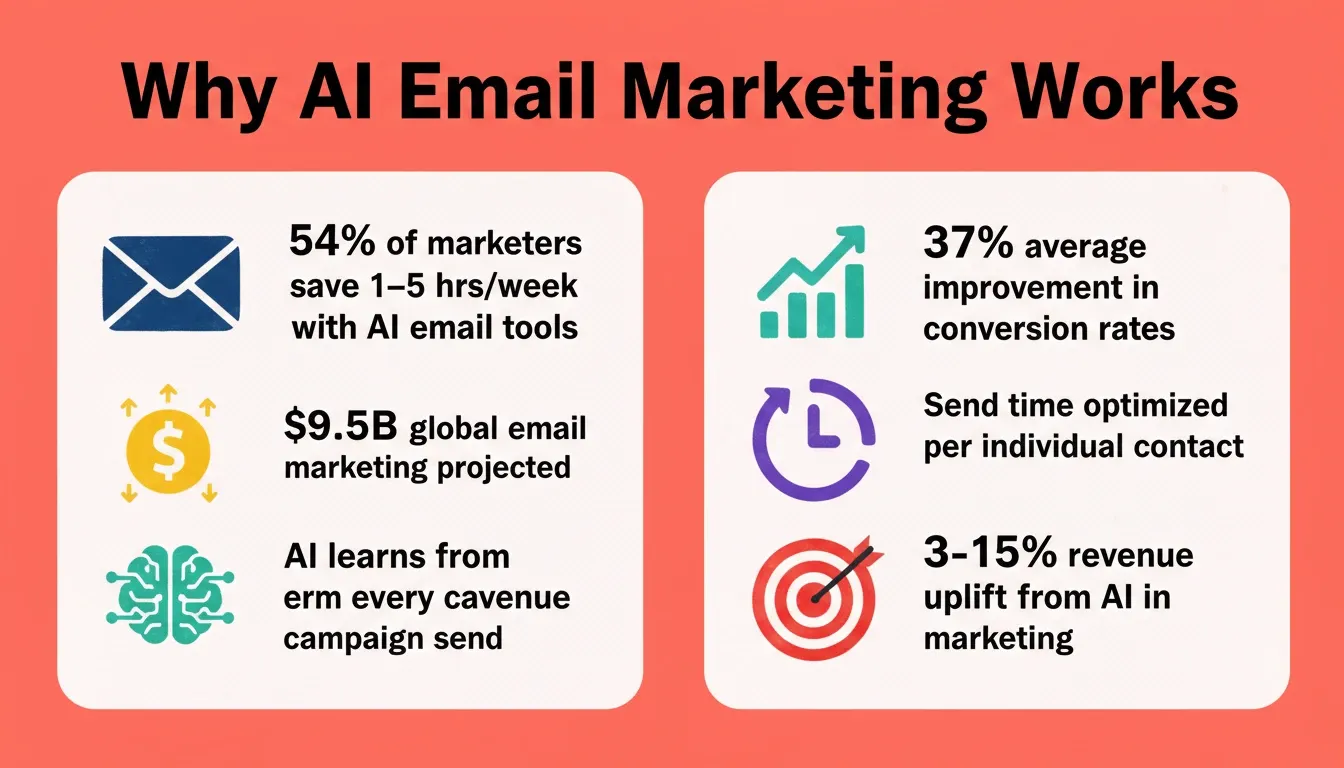
Global email marketing revenue is projected to surpass $9.5 billion according to Statista, yet most small businesses still rely on basic automation and generic templates that land in spam folders. The gap between what AI email marketing tools can accomplish and what most teams actually use keeps growing.
Off-the-shelf platforms either charge premium pricing for AI features or lock predictive sending behind enterprise plans small teams cannot afford.
This blog walks through every step, from planning AI capabilities and send time optimization to launching a working platform with predictive analytics built in.
Why Marketing Teams are Moving to AI for Email
The shift from basic automation to AI email marketing is not a trend. It is a response to inboxes getting more crowded and attention spans getting shorter.
-
Subject lines that actually get opened: AI-generated subject lines use machine learning to analyze what language drives open rates. The best AI email marketing platforms test subject line variations automatically and pick winners based on engagement patterns rather than guesswork.
-
Send time optimization removes the guessing game: Instead of batch-sending at 9 AM on Tuesday, AI features analyze when each recipient actually opens their inbox. Predictive sending means every email arrives at the moment that person is most likely to engage.
-
Marketing automation that adapts: Traditional email marketing tools follow rigid if-then rules. AI-powered marketing automation watches customer data, learns from engagement history, and adjusts sequences in real time without manual tasks.
-
Personalized outreach at scale: Writing unique emails for thousands of contacts is impossible manually. AI email tools generate personalized emails using purchase history, browsing behavior, and CRM data to craft messages that feel one-to-one.
-
Better subject lines through continuous learning: Every send trains the model. AI subject line generators improve over time, learning which words, lengths, and styles drive better results for your specific audience segmentation.
Marketing teams that adopt marketing automation platforms with native AI capabilities report saving hours weekly on manual campaign management. AI features are becoming table stakes for any serious email marketing software.
What AI Features Should Your Email Tool Include?
Not every AI email marketing tool needs the same feature set. The right combination depends on your audience size, campaign goals, and whether you serve e-commerce brands or B2B sales teams.
Core AI Capabilities
-
AI subject line generation: The tool should write subject lines, test subject line variations, and learn from historical data about what triggers higher open rates. Look for AI generated subject lines that match your brand voice and avoid words that trigger spam filters.
-
Predictive send time: Send time optimization should work at the individual contact level, not just broad segments. The best AI email marketing software analyzes engagement patterns across time zones and devices.
-
Content personalization engine: Beyond first-name tokens, AI personalization should pull from CRM data, purchase history, and engagement history to customize entire email bodies. Dynamic content blocks powered by natural language generation make each message relevant.
-
Audience segmentation with machine learning: AI capabilities should include auto-segmenting contacts based on behavioral data, lifecycle stage, and predicted customer lifetime value. This goes beyond basic segmentation into predictive segmentation.
-
Deliverability intelligence: Monitoring sender reputation, flagging content that might trigger spam filters, and maintaining domain health should all run automatically.
-
Analytics and reporting: Real-time campaign reporting with AI-driven recommendations for improving response rates and conversion rates.
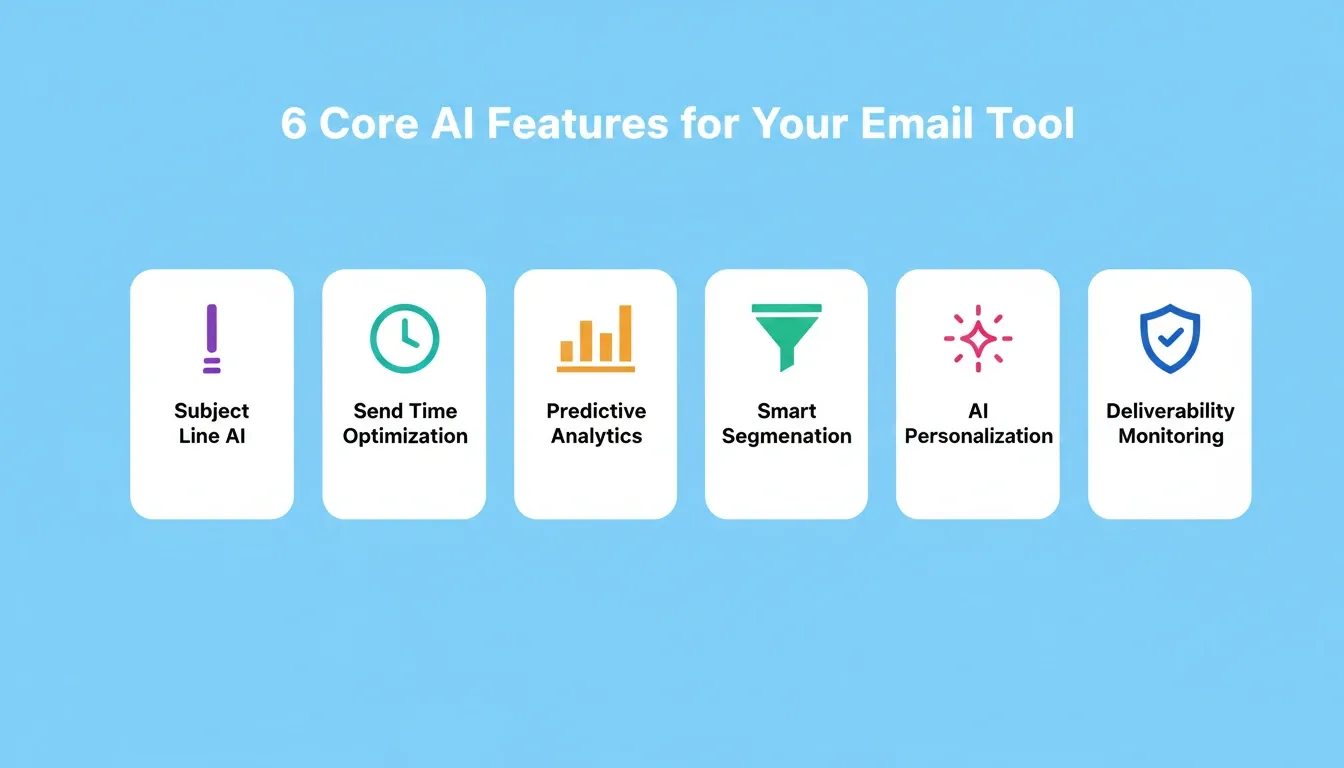
| AI Feature | What It Does | Business Impact |
|---|---|---|
| Subject Line AI | Generates and tests subject line variations | Higher open rates |
| Send Time Optimization | Predicts optimal delivery moments per contact | More engagement |
| Predictive Analytics | Forecasts campaign performance before sending | Better resource allocation |
| AI Personalization | Customizes content using contact data and behavior | Increased conversions |
| Smart Segmentation | Groups contacts by predicted actions | Targeted messaging |
| Deliverability AI | Monitors sender reputation and inbox placement | Fewer spam folders |
| A/B Testing Engine | Tests variants automatically and picks winners | Continuous improvement |
How Does Predictive Sending Actually Work?
Predictive sending sounds complex, but the underlying logic follows a clear pattern that any AI email tool can implement with the right data pipeline.
-
Data collection phase: The system collects engagement patterns from historical data. It tracks when contacts open emails, which devices they use, how quickly they click after opening, and what time zones they operate in.
-
Pattern recognition: Machine learning models identify clusters of user behavior. One segment might consistently engage at 7 AM on mobile during commutes. Another might browse AI generated emails during lunch breaks on desktop.
-
Individual-level predictions: Rather than sending to broad segments at fixed times, the AI powered engine calculates an optimal send window for each contact based on their specific engagement history and behavioral data.
-
Continuous refinement: Every campaign provides new data. The predictive sending model updates its confidence scores, adjusting send times as customer preferences shift seasonally or as contacts change roles.
Send time optimization only works when your AI email marketing software has enough historical data. Full-stack AI builders that connect directly to your data layer solve the cold-start problem by importing contact data from existing systems on day one.
For teams exploring how to build smarter solutions with a full-stack AI builder, the architecture decisions made at this stage, including database connections, AI provider selection, and sending infrastructure, determine how quickly your predictive models become useful.
Step-by-Step Process to Build an Email Marketing Tool with AI
Building an AI email marketing platform requires planning the right architecture before writing a single line of code. Here is the complete process from concept to working marketing tool.
Step 1: Define Your Email Marketing Goals and Contact Volume
Start with clarity on whether you need transactional messages, marketing campaigns, or both. Map out how many contacts you will manage, what email marketing platforms you have used before, and which AI tools you want to replace.
Key decisions at this stage:
-
Will you send transactional emails (receipts, password resets), marketing campaigns, or both?
-
How many contacts do you have today, and what is your growth target?
-
Do you need multi-channel capability, such as email plus SMS?
-
What CRM or database holds your contact data?
Step 2: Plan Your Tech Stack and Integrations
Your AI email tool needs a sending infrastructure (SMTP or API), a contact database, an AI layer for predictions, and a frontend for campaign management. Plan integrations with your existing CRM data sources early.
Step 3: Design the Email Builder Interface
Include a drag and drop editor for non-technical marketing teams, pre-built templates, and an AI email generator that writes first drafts from natural language prompts. The editor should support dynamic content blocks for personalization.
Step 4: Configure the AI Engine
Set up machine learning models for send time optimization, subject line suggestions, and audience segmentation. Start with basic AI features and add sophisticated AI capabilities as your data grows. Connect OpenAI or Anthropic to power content generation.
Step 5: Build Automation Workflows
Create the automation builder with conditional logic for:
-
Welcome sequences triggered on signup
-
Abandoned cart emails with product-specific content
-
Re-engagement campaigns for inactive contacts
-
Drip sequences based on lifecycle stage
-
Post-purchase follow-ups tied to order data
Each workflow should trigger based on user behavior and engagement level, not just time delays.
Step 6: Set Up Deliverability Infrastructure
Configure SPF, DKIM, and DMARC records. Implement sender reputation monitoring, bounce rate tracking, and automatic list hygiene to keep emails out of spam folders.
Step 7: Launch with a Pilot Segment
Start with your most engaged contacts, monitor AI generated content performance, gather feedback, and iterate before scaling to your full list size.
McKinsey research indicates that companies investing in AI for marketing and sales see a revenue uplift of 3 to 15 percent and a sales ROI uplift of 10 to 20 percent. Those numbers make the case for building a purpose-built email marketing tool with AI capabilities rather than paying for features you will never use on bloated platforms.
Choosing the Right Email Sending Provider
One of the most consequential decisions when you build an email marketing tool with AI is which sending provider to wire in. The wrong choice creates deliverability problems that no amount of AI optimization can fix.
| Provider | Best For | Free Tier | Key Strength |
|---|---|---|---|
| Brevo | Email + SMS + CRM combined | 300 emails/day | Built-in CRM and SMS |
| SendGrid | High-volume transactional email | 100 emails/day | Deliverability at scale |
| Mailchimp | Marketing campaigns and audiences | 500 contacts, 1,000 sends/month | A/B testing and segmentation |
| MailerLite | Newsletters and subscriber automation | 500 subscribers, 12,000 emails/month | Simple setup, generous free tier |
| Resend | Developer-focused transactional email | 3,000 emails/month | Modern API, Supabase SMTP support |
Decision guide:
-
Building a SaaS with password resets and receipts? Use Resend or SendGrid.
-
Need marketing campaigns alongside transactional email? Use Brevo or Mailchimp.
-
Starting a newsletter or creator platform? MailerLite covers up to 500 subscribers free.
-
Need SMS alongside email? Brevo is the only provider listed that covers both channels natively.
From Prompt to Production-Ready Email App with Rocket
Most marketing teams face a real choice: pay enterprise pricing for AI email marketing tools they barely use, or spend months building custom email marketing software from scratch. Rocket removes that trade-off.
Describe your email platform in plain language. Tell Rocket what kind of marketing tool you need, such as "an email marketing platform with AI send time optimization, drag and drop editor, contact segmentation, and campaign analytics." Rocket's Build generates the full application, including working UI, database schema, API routes, and logic, in minutes, not months.
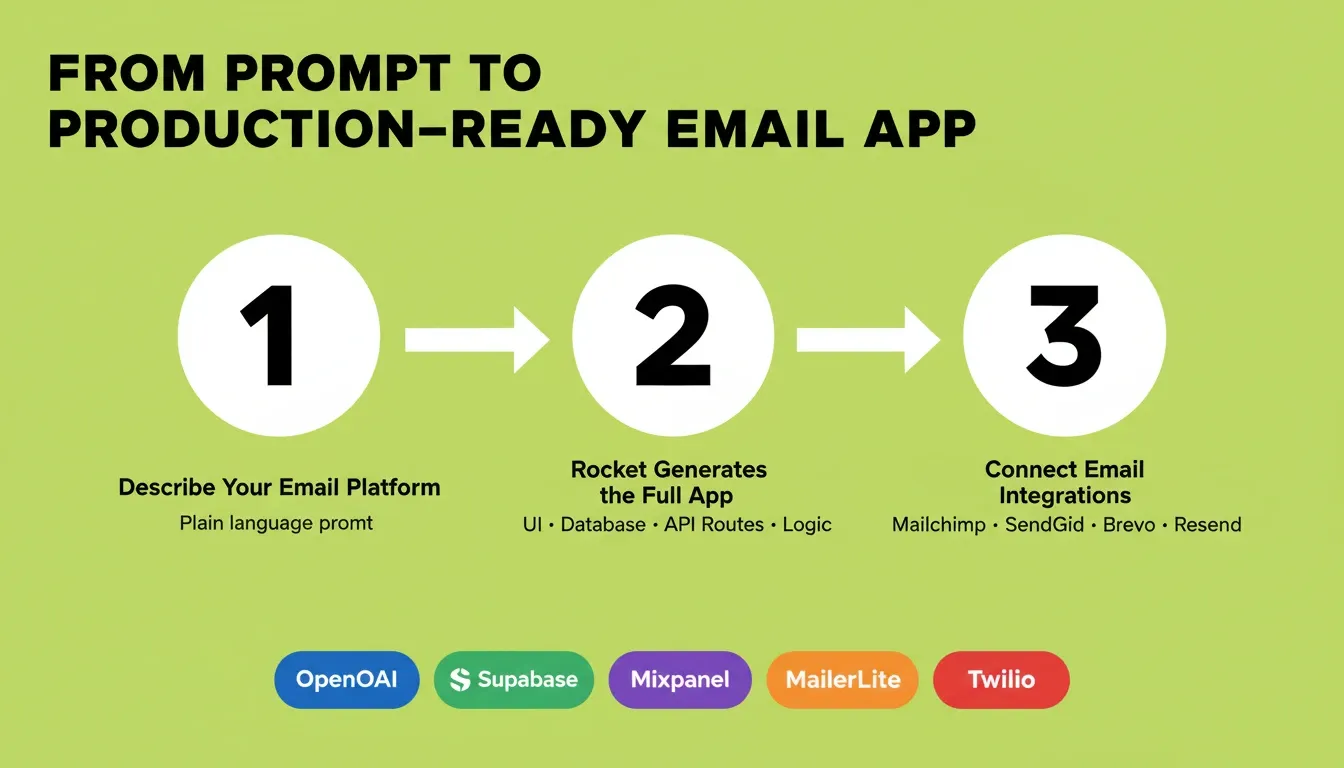
AI features and integrations come built in. Rocket connects natively to Mailchimp, SendGrid, Brevo, Resend, MailerLite, and Twilio. The AI capabilities, from subject line generation powered by OpenAI or Anthropic to predictive sending, work from the first campaign. Supabase handles your contact database and authentication. Mixpanel tracks behavioral analytics. Every integration authenticates once and flows into every build.
No backend setup required. Rocket handles authentication, database schema, API routes, and deployment. Every build ships with SEO-ready structure, WCAG accessibility compliance, and performance optimization by default. These are the baseline, not optional extras.
Iterate through conversation. After the first generation, refine your AI email tool through natural language. Add features, adjust the automation builder, change the email template editor, or connect additional data sources. Staging and production environments let you test changes before they go live, with full version history and one-click rollback.
Start from research, not guesswork. Before building, use Rocket's Solve to research your market, including which email marketing features your target audience values most, what competitors are charging, and which AI capabilities drive the highest ROI. That research flows directly into your build, so the first generation reflects genuine product thinking.
Where traditional AI email marketing platforms charge per contact and gate key AI features behind expensive tiers, building on Rocket gives you full control over what AI capabilities your tool includes, how many contacts you can manage, and what your team pays.
Common Mistakes When Building AI Email Tools (And Fixes)
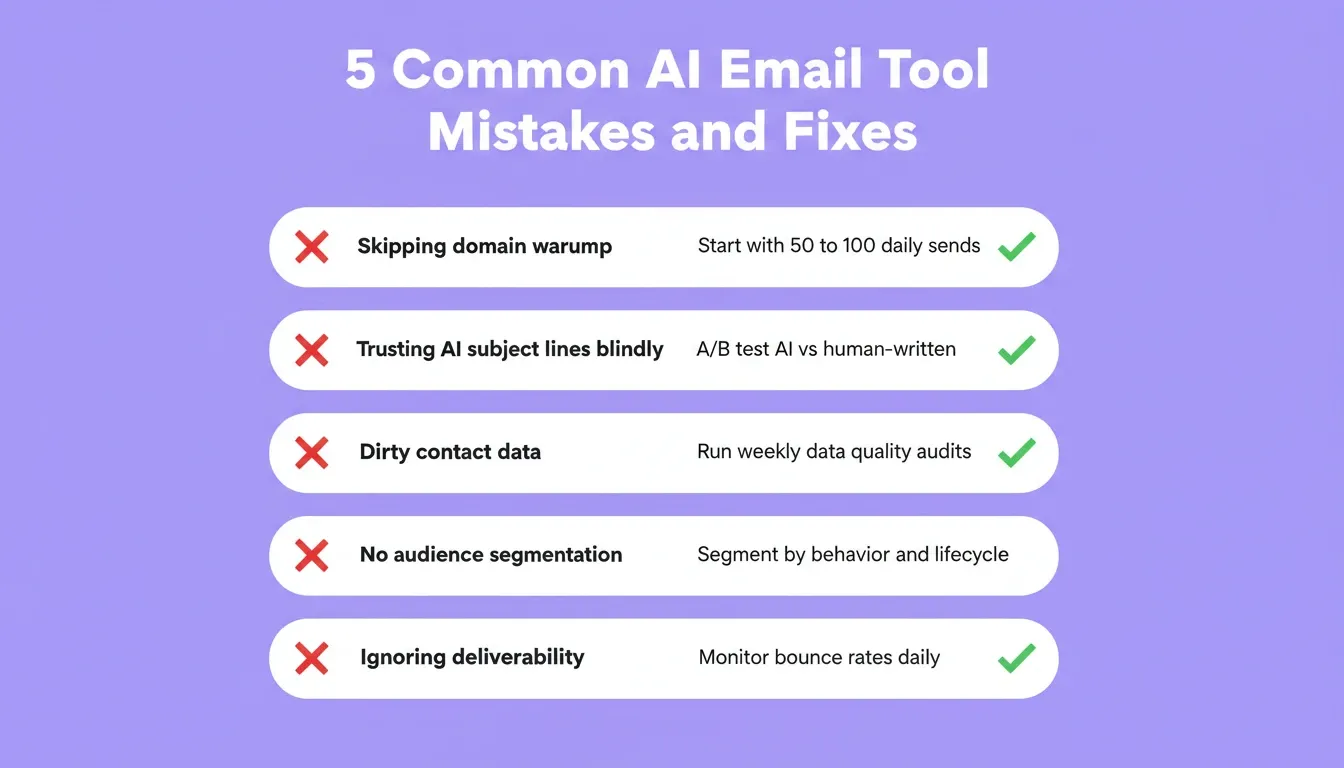
Even with the best AI features, email marketing tools fail when teams overlook fundamentals. Here are the most common pitfalls and how to avoid them.
Ignoring sender reputation warmup. New sending domains need gradual volume increases. Jumping from zero to thousands of email sends damages your sender reputation immediately. Fix: start with 50-100 daily sends and scale up over weeks.
Trusting AI-generated subject lines blindly. AI subject line generators produce solid starting points, but they do not understand your specific brand voice without training. Fix: treat AI generated subject lines as drafts, edit for tone, and A/B test against human-written alternatives.
Skipping contact data quality checks. AI email marketing software only works with clean data. Invalid addresses, duplicate contacts, and outdated engagement history poison your predictive models. Fix: run automated data quality audits weekly.
Over-automating without segmentation. Sending the same automated sequence to every contact wastes AI capabilities. Fix: segment audiences by engagement patterns, purchase behavior, and lifecycle stage before building any automation workflow.
Neglecting deliverability monitoring. Many teams focus on content creation and ignore whether emails actually reach inboxes. If your emails trigger spam filters, nothing else matters. Fix: monitor bounce rates, spam complaints, and inbox placement daily.
The difference between email marketing tools that work and ones that fail often comes down to how quickly teams can iterate. Building on a platform that lets you ship changes in minutes rather than weeks means you catch and fix these issues before they damage your campaign performance.
Teams that invest time in AI email marketing best practices from day one see compounding returns as their contact volume grows. For a deeper look at how best AI workflow builder solutions fit into this picture, the automation architecture decisions made early determine how much your tool can scale without manual intervention.
Your Next Campaign Starts with the Right Platform
The best email marketing tools are not the ones with the longest feature lists. They are the ones built around your specific workflow, your audience segments, and your marketing team's actual needs. AI features like predictive sending, smart subject line suggestions, and send time optimization only deliver results when they connect to your real customer data.
Whether you are a small business launching your first AI-powered campaign or a growing team replacing an expensive platform, the path forward is the same: start with what you need, build it fast, and let AI learn from every send.
The Future of Email Marketing Is Built, Not Bought
The ability to build an email marketing tool with AI is no longer reserved for teams with engineering departments. As AI capabilities become more accessible and sending infrastructure more modular, custom-built email platforms will outpace off-the-shelf tools on personalization, cost, and adaptability.
The teams that win in email marketing over the next few years will not be the ones with the biggest platform subscriptions. They will be the ones whose tools learn from every send and improve automatically.
You describe what you need. Rocket.new generates the full platform, including AI engine, sending integrations, automation workflows, and analytics, production-ready from the first build.
Table of contents
- -Why Marketing Teams are Moving to AI for Email
- -What AI Features Should Your Email Tool Include?
- -Core AI Capabilities
- -How Does Predictive Sending Actually Work?
- -Step-by-Step Process to Build an Email Marketing Tool with AI
- -Step 1: Define Your Email Marketing Goals and Contact Volume
- -Step 2: Plan Your Tech Stack and Integrations
- -Step 3: Design the Email Builder Interface
- -Step 4: Configure the AI Engine
- -Step 5: Build Automation Workflows
- -Step 6: Set Up Deliverability Infrastructure
- -Step 7: Launch with a Pilot Segment
- -Choosing the Right Email Sending Provider
- -From Prompt to Production-Ready Email App with Rocket
- -Common Mistakes When Building AI Email Tools (And Fixes)
- -Your Next Campaign Starts with the Right Platform
- -The Future of Email Marketing Is Built, Not Bought