
Core Web Vitals (LCP, INP, CLS) are Google's ranking metrics for speed, responsiveness, and visual stability. AI-built apps often fail them by default. Rocket.new grades performance before launch and lets you fix issues instantly inside the build flow.
Core Web Vitals are Google's three performance ranking signals: LCP, INP, and CLS. They measure loading speed, interactivity, and layout stability using real user data.
Vibe-coded and AI-generated apps often fail these metrics because performance is not checked during generation. Rocket.new solves this by grading Core Web Vitals before publish and enabling one-click fixes.
What Are Core Web Vitals?
Core Web Vitals are part of Google's Web Vitals initiative, designed to measure real user experience on web pages. Introduced in 2020 and made a ranking factor in 2021, they define what good performance means for search visibility.
The three metrics are: Largest Contentful Paint (LCP) for loading performance, Interaction to Next Paint (INP) for responsiveness, and Cumulative Layout Shift (CLS) for visual stability.
These metrics are based on field data from real Chrome users via the Chrome User Experience Report (CrUX). Google does not rely on lab simulations for ranking; only actual user experience data counts. This distinction matters enormously when you are diagnosing why a high Lighthouse score does not translate into better rankings.
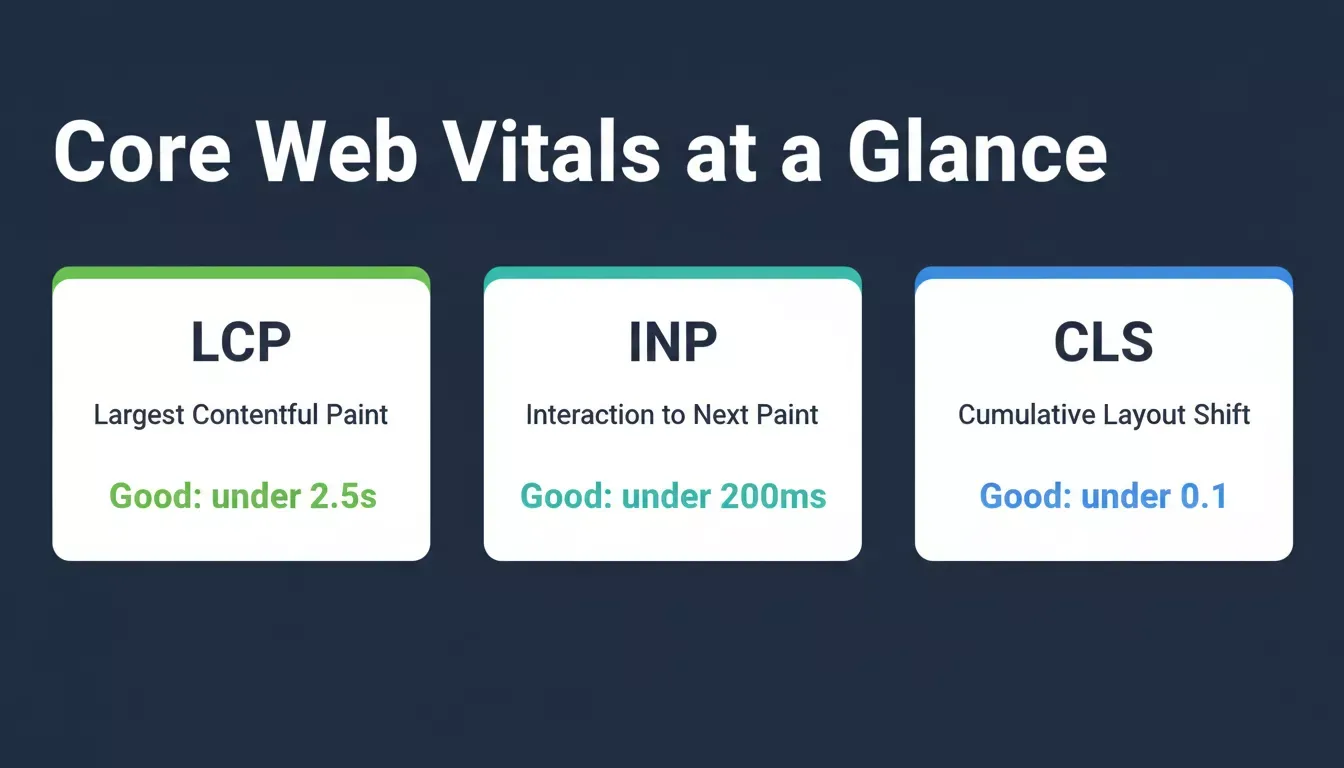
The three Core Web Vitals and their Good thresholds as defined by Google's Web Vitals standards.
Why Core Web Vitals Exist
Before Core Web Vitals, performance was measured using fragmented metrics like Speed Index, TTFB, and First Contentful Paint. None of these mapped cleanly to what users actually experience. Google created Core Web Vitals to answer one question: Does this page feel fast, stable, and responsive to real users?
Pages that load slowly, respond poorly, or shift layout unpredictably now lose ranking advantage under Google's page experience signals. Understanding this shift is the first step toward building apps that rank, not just apps that look good.
Business Impact of Core Web Vitals
Core Web Vitals directly impact revenue and engagement. Vodafone improved sales by 8% after optimization. Tokopedia increased session duration by 23% after hitting LCP targets. A 100ms improvement in LCP can increase conversion rate by approximately 1%, and poor CLS can increase bounce rates by up to 24%.
For AI-built apps, this gap is critical. Fast generation often skips performance validation entirely, and the business cost shows up weeks after launch when organic traffic stalls.
The Three Core Web Vitals: Technical Breakdown
Largest Contentful Paint (LCP)
LCP measures how long it takes for the largest visible element to fully load in the viewport. It is the metric most closely tied to how users perceive page speed.
| Rating | Threshold |
|---|---|
| Good | Under 2.5 seconds |
| Needs Improvement | 2.5 to 4 seconds |
| Poor | Over 4 seconds |
Main causes of poor LCP: slow server response (high TTFB), render-blocking CSS and JS, large unoptimized images, client-side rendering delays, and missing preload hints.
Key fixes: preload the LCP image, use WebP or AVIF formats, enable CDN caching, reduce render-blocking resources, and use SSR or SSG where possible. A single unoptimized hero image on a mobile connection is often the single biggest LCP killer.
Interaction to Next Paint (INP)
INP measures responsiveness across all user interactions and reports the slowest one. INP replaced First Input Delay (FID) in March 2024 and covers the full duration of every interaction across the entire session, not just the first click.
| Rating | Threshold |
|---|---|
| Good | Under 200 milliseconds |
| Needs Improvement | 200 to 500 milliseconds |
| Poor | Over 500 milliseconds |
Main causes: long JavaScript tasks, heavy third-party scripts, expensive event handlers, and unoptimized React re-renders.
Key fixes: break long tasks using scheduler.yield(), use Web Workers, defer third-party scripts, and optimize React rendering with memo and useMemo.
Cumulative Layout Shift (CLS)
CLS measures unexpected layout movement during page load. A score of 0 means nothing shifts. Higher scores mean elements are jumping around, causing misclicks and a frustrating experience.
| Rating | Threshold |
|---|---|
| Good | Under 0.1 |
| Needs Improvement | 0.1 to 0.25 |
| Poor | Over 0.25 |
Main causes: images without declared dimensions, ads and popups injected after the initial paint, web font loading shifts, and layout-based CSS animations.
Key fixes: set explicit width and height on every image, use aspect-ratio for responsive media, and use transform instead of layout-triggering animations.
Core Web Vitals and SEO Rankings
Core Web Vitals are a confirmed ranking factor under Google's Page Experience update. They act as a tie-breaker signal when content relevance is similar across competing pages. They also affect mobile search rankings, crawl efficiency, and eligibility for Top Stories placements on mobile.
Understanding how to build for vibe coding workflows that include performance from the start is what separates apps that rank from apps that don't.
Field Data vs Lab Data
| Type | Source | Affects Rankings |
|---|---|---|
| Field data | Real Chrome users via CrUX | Yes |
| Lab data | Lighthouse simulation | No |
Search Console uses field data over a 28-day rolling window. Lab tools like PageSpeed Insights are for debugging, not ranking signals. Always check Search Console before concluding your performance is good.
Why AI-Built Apps Fail Core Web Vitals
AI-generated apps typically fail because large client-side JavaScript bundles delay LCP, missing image optimization increases load time, no width/height attributes cause CLS issues, and no performance monitoring exists in the build flow. Typical issues include 500KB to 1.5MB JS bundles and 2 to 4 second rendering delays on mobile devices.
Avoiding the common mistakes vibe coders make around performance starts with understanding that code that looks clean is not the same as code that performs well on real devices.
How to Audit Your Vibe-Coded App's Core Web Vitals
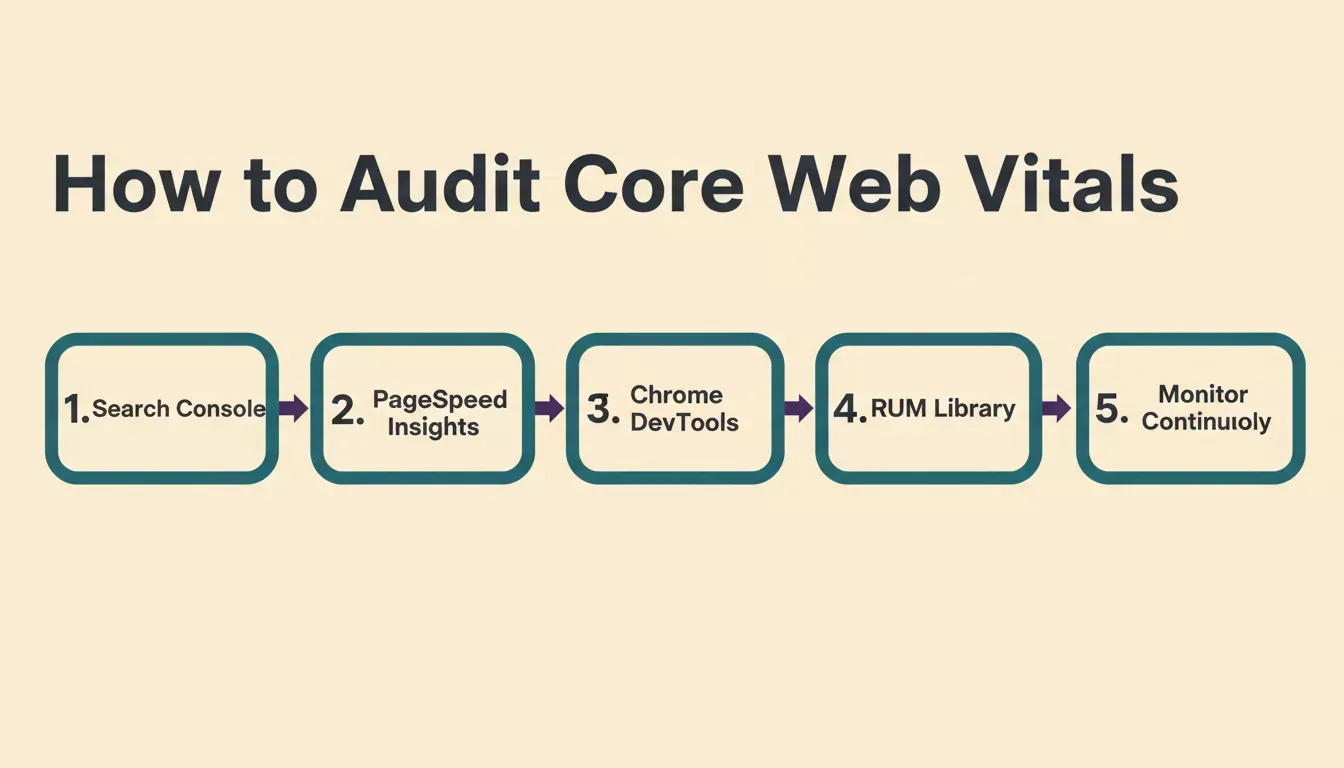
The five-step audit workflow: from Search Console field data through to continuous production monitoring.
1. Google Search Console
Use the Core Web Vitals report under Experience to identify failing URL groups. This is your primary source of truth because it uses real CrUX field data, the same data Google uses for ranking.
2. PageSpeed Insights
Use it for field and lab comparison and prioritized fixes. Focus on the Opportunities and Diagnostics sections, ranked by estimated impact.
3. Chrome DevTools
Check long tasks (red bars in the main thread timeline), layout shifts (purple bars), and rendering bottlenecks. This is the most powerful tool for diagnosing INP issues.
4. Real User Monitoring
Use the web-vitals library to capture LCP, INP, and CLS in production. Under 2KB after compression, it reports metrics to any analytics endpoint with a single function call and connects to Google Analytics 4 for conversion-linked insights.
5. Continuous Monitoring
Use Lighthouse CI and Search Console alerts for regression detection. Core Web Vitals scores change as you add features, and catching regressions early is far cheaper than recovering from a ranking drop.
Industry Benchmarks: Where Does Your App Stand?
The data below shows typical real-world scores across verticals. AI-generated apps without optimization consistently land in the bottom quartile of every industry benchmark.
| Industry | LCP | INP | CLS | Main Issue |
|---|---|---|---|---|
| SaaS | 2.8 to 4.5s | 180 to 350ms | 0.05 to 0.15 | JS bundles |
| E-commerce | 3 to 5s | 200 to 400ms | 0.10 to 0.30 | Images and scripts |
| Media | 2.5 to 4s | 150 to 300ms | 0.15 to 0.40 | Ads |
| Marketing | 2 to 3.5s | 100 to 250ms | 0.05 to 0.20 | Media assets |
| AI apps (unoptimized) | 4 to 7s | 300 to 600ms | 0.20 to 0.50 | All of the above |
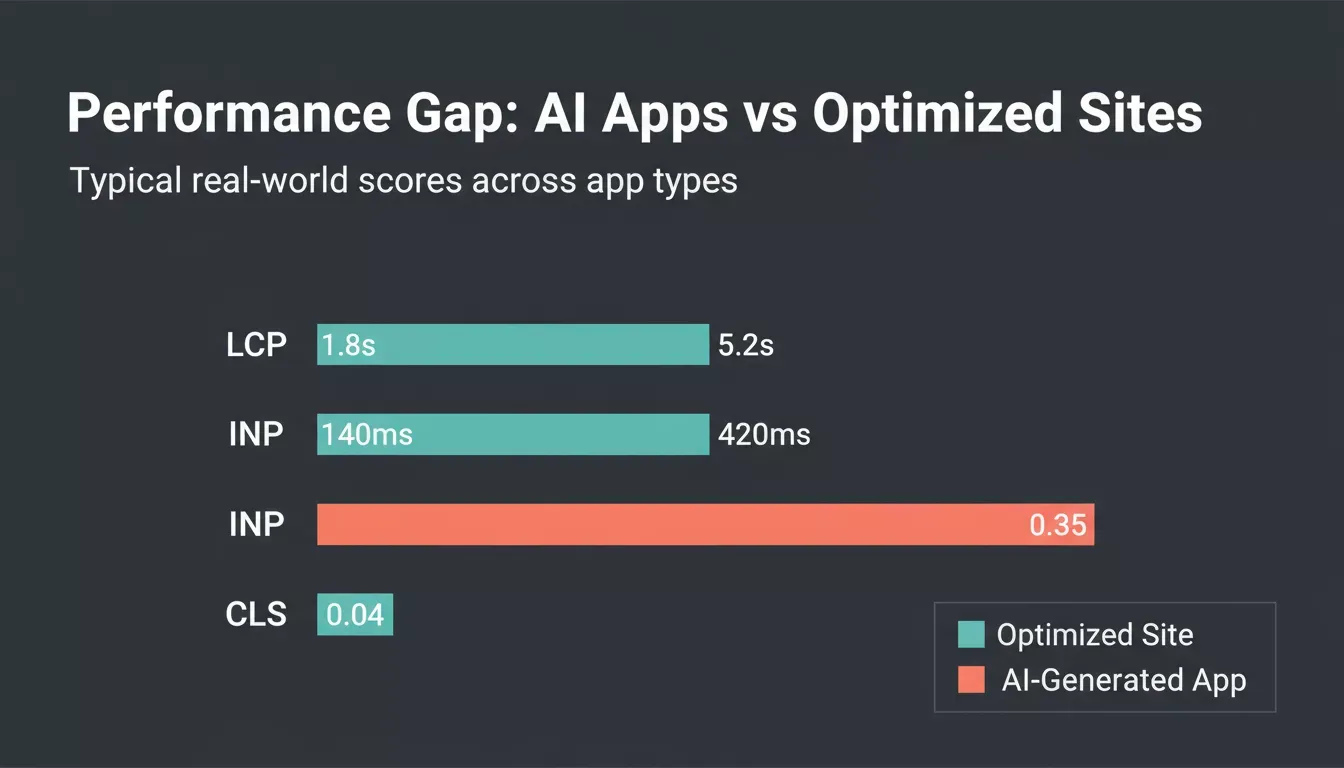
The performance gap between unoptimized AI-generated apps and well-optimized sites across all three Core Web Vitals.
Mobile vs Desktop: Why Vibe-Coded Apps Fail on Mobile
Google uses mobile-first indexing, meaning mobile Core Web Vitals are the primary ranking signal. Mobile devices have 3 to 5x slower CPU execution, higher LCP delays due to JS parsing, and more sensitive CLS issues due to smaller viewports.
Many AI apps pass desktop testing but fail mobile, causing ranking drops that only show up in Search Console weeks after launch. Following prompt patterns and best practices when building with Rocket.new helps avoid these structural issues from the start.
Advanced Optimization for AI-Built Apps
SSR and SSG
Switching from client-side rendering to SSR or SSG can improve LCP by 1 to 3 seconds. This is the single highest-impact architectural change for AI-generated apps.
Critical CSS
Inline above-the-fold CSS to reduce render blocking. Load the rest asynchronously using a preload link with an onload handler.
Resource Hints
Use preload for the LCP image, preconnect for third-party origins, and dns-prefetch for external domains. These reduce waterfall delays significantly.
Third-Party Scripts
Load only when needed and defer non-critical scripts. A single poorly-loaded analytics or chat script can add 200 to 500ms to INP.
Core Web Vitals Tools Compared
| Tool | Field Data | Lab Data | Best for |
|---|---|---|---|
| Search Console | Yes | No | Rankings and trends |
| PageSpeed Insights | Yes | Yes | Per-URL diagnosis |
| Chrome DevTools | No | Yes | Debugging |
| Lighthouse CI | No | Yes | CI testing |
| web-vitals JS | Yes | No | Real user monitoring |
7 Core Web Vitals Mistakes AI-Built Apps Make
These seven mistakes are the most common reasons AI-built apps fail Core Web Vitals after launch.
- Optimizing Lighthouse instead of CrUX data - Lab scores do not affect rankings.
- Ignoring mobile performance - Mobile is what Google uses for ranking.
- Lazy loading the LCP image - Use fetchpriority="high" instead.
- Layout-triggering CSS animations - Use transform and opacity to avoid CLS.
- Ignoring third-party scripts - Most common source of INP regressions.
- No post-launch monitoring - Scores change as you add features.
- Treating all pages the same - Google evaluates Core Web Vitals per URL group.
Core Web Vitals by App Type
SaaS Applications
Dashboard-heavy apps often delay LCP due to API calls. Use skeleton loaders that render immediately to make the skeleton the LCP element, and cache API responses aggressively using SWR or React Query.
E-Commerce Apps
Image-heavy pages combined with payment and analytics scripts require careful preload strategy and explicit CLS control. Preload the product hero image and reserve space for carousels before they load.
Marketing and Landing Pages
Best optimized via SSG and critical CSS inlining. Use the Redesign command in Rocket.new to rebuild any existing page with a structure that supports cleaner load sequences and fewer layout shifts.
How Rocket.new Fixes Core Web Vitals Inside the Build Flow
Rocket.new integrates performance into the build workflow instead of leaving it to post-launch debugging. The built-in performance dashboard measures LCP, INP, and CLS before you publish, so your web vitals score is visible and fixable inside the same editor where you build.
The dashboard is available for landing page and website projects. It grades your site from A to F based on the same metrics Google uses, and checks desktop and mobile separately.
Rocket.new's build-measure-fix loop: performance is checked before every launch, not after.
How the Dashboard Works
Click the three-dot menu in the top navigation bar of your task, then select Performance. Use the Staging / Production toggle to choose which environment to check, then switch between Desktop and Mobile. Click Refresh to fetch the latest scores.
In the Issues section, click "Try to fix" on any flagged item. Each fix is an AI-powered code change applied to your project that covers image compression, lazy loading, removal of unused code, and cache header configuration. Each fix uses credits.
Rocket.new also checks staging and production separately, because staging scores reflect work in progress while production scores reflect what real users experience. Check both before publishing to catch issues before they go live.
The SEO and discoverability tools connect your performance data directly to search ranking context, so improvements in speed translate directly to improvements in organic visibility.
Rocket.new vs Other AI Builders on Core Web Vitals
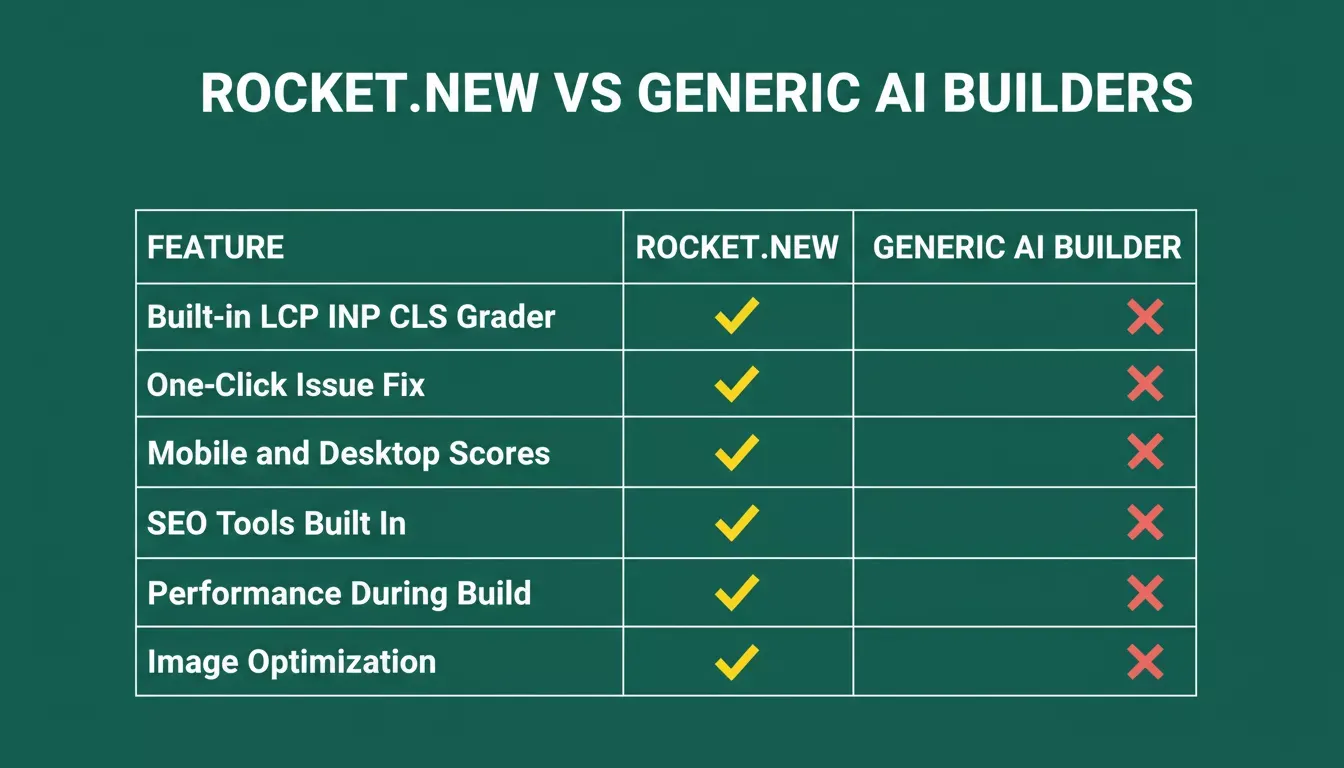
Rocket.new includes built-in performance grading, one-click fixes, and separate mobile/desktop scores.
| Feature | Rocket.new | Generic AI Builder |
|---|---|---|
| Built-in LCP, INP, CLS grader | Yes | No |
| Staging and production check | Yes | Rarely |
| One-click issue fix | Yes | No |
| Desktop and mobile separate scores | Yes | No |
| SEO tools built in | Yes | No |
| Performance visible during build | Yes | No |
| Automated image optimization | Yes | No |
Does Your Vibe-Coded App Pass Google's Standards?
A vibe-coded app can look perfect but still fail Google rankings due to Core Web Vitals. The gap between visually good and search performant is where most AI apps lose traffic.
Rocket.new closes that gap by embedding performance scoring directly into the build process, so Core Web Vitals are fixed before launch, not after ranking drops.
Sign up and start building on Rocket.new and run the built-in performance dashboard before your first launch.
Table of contents
- -What Are Core Web Vitals?
- -Why Core Web Vitals Exist
- -Business Impact of Core Web Vitals
- -The Three Core Web Vitals: Technical Breakdown
- -Largest Contentful Paint (LCP)
- -Interaction to Next Paint (INP)
- -Cumulative Layout Shift (CLS)
- -Core Web Vitals and SEO Rankings
- -Field Data vs Lab Data
- -Why AI-Built Apps Fail Core Web Vitals
- -How to Audit Your Vibe-Coded App's Core Web Vitals
- -1. Google Search Console
- -2. PageSpeed Insights
- -3. Chrome DevTools
- -4. Real User Monitoring
- -5. Continuous Monitoring
- -Industry Benchmarks: Where Does Your App Stand?
- -Mobile vs Desktop: Why Vibe-Coded Apps Fail on Mobile
- -Advanced Optimization for AI-Built Apps
- -SSR and SSG
- -Critical CSS
- -Resource Hints
- -Third-Party Scripts
- -Core Web Vitals Tools Compared
- -7 Core Web Vitals Mistakes AI-Built Apps Make
- -Core Web Vitals by App Type
- -SaaS Applications
- -E-Commerce Apps
- -Marketing and Landing Pages
- -How Rocket.new Fixes Core Web Vitals Inside the Build Flow
- -How the Dashboard Works
- -Rocket.new vs Other AI Builders on Core Web Vitals
- -Does Your Vibe-Coded App Pass Google's Standards?