
MX design structures apps so AI crawlers can read and cite them. Rocket.new ships semantic HTML, heading hierarchy, and server-side rendering by default. One-command GEO, AEO, SEO, and WCAG 2.1 AA audits are built into the editor.
Machine experience design (MX) is how you build an AI search app, or any web app you want surfaced in AI search, so AI systems can read, interpret, and cite it accurately.
For founders, product managers, developers, and product teams trying to improve AI search visibility, Rocket.new gives every app a solid MX foundation by default with semantic HTML, heading hierarchy, server-side rendering, and built-in GEO, AEO, SEO, and accessibility audits, without writing a line of code.
Key takeaway
-
MX design is an emerging term for the practice of making apps legible to AI crawlers and answer engines, not just human users.
-
AI-driven traffic to websites is growing 393% year over year (Adobe, April 2026), yet most apps are invisible to the systems driving that traffic.
-
Rocket.new ships every app with semantic HTML, heading hierarchy, and responsive layouts by default. One-command GEO, AEO, SEO, and WCAG 2.1 AA audits are built into the editor.
This guide explains what MX changes compared with traditional UX, why client-rendered apps often disappear from AI visibility, how Rocket.new ships MX-ready apps, and the checklist and practical steps to make your application discoverable in modern AI-powered search.
Why Are AI Systems Ignoring Most Web Applications?
**AI-driven traffic to websites is growing 393% year over year, while most web applications remain completely invisible to the AI systems sending that traffic. Adobe's April 2026 research found that the average U.S. retail homepage scores just 75% on AI content visibility, meaning a quarter of its information is unreadable by large language models.
The gap between building for humans and building for machines has become the single biggest missed opportunity in web development right now.
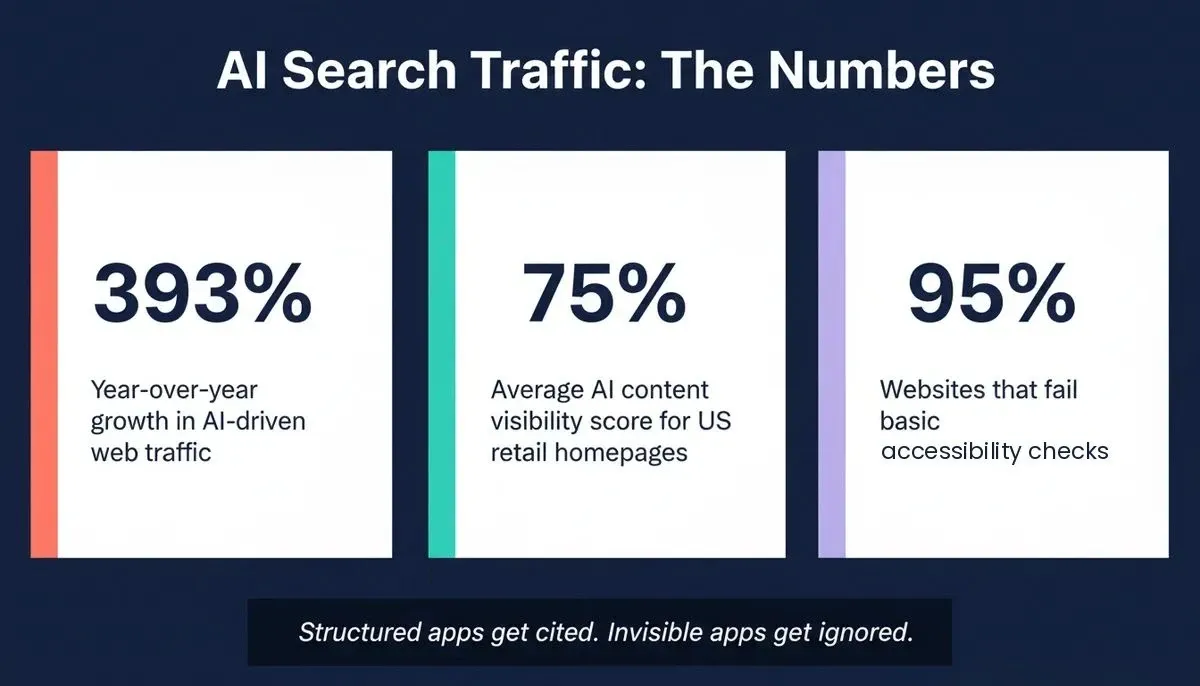
Key statistics that define the machine experience design gap
When ChatGPT, Perplexity, or Gemini answers a user's question, they pull information from web pages it can structurally understand. The problem is that most apps were never built with this audience in mind.
-
AI agents do not browse visually. They parse the underlying HTML document, reading tags, heading levels, and relationship labels to determine what a page is about.
-
Semantic structure is the entry ticket. Without proper
nav,main,article, andsectionelements, AI crawlers cannot distinguish your navigation from your content. -
Client-rendered apps deliver empty shells. When a page relies entirely on JavaScript to render its content, AI crawlers often encounter a blank
div id=”root”with nothing to interpret. -
Missing structured data means missing context. JSON-LD schema markup tells AI systems what your content represents, not just what it says.
As Khanh Linh Le noted in UX Pilot's 2026 design trends report: "MX isn't some niche technical layer; it's the new cost of visibility." The term "machine experience design" is an emerging framing for this discipline, not yet a standardized industry term, but a useful lens for a real and measurable problem.
How Does MX Differ From Traditional UX?
Machine experience design adds a second audience layer to product development: the AI systems, crawlers, and large language models that read your app's structure to generate answers and recommendations on behalf of users. Traditional UX focuses on the human sitting in front of the screen. MX asks whether machines can also parse and accurately represent what you built.
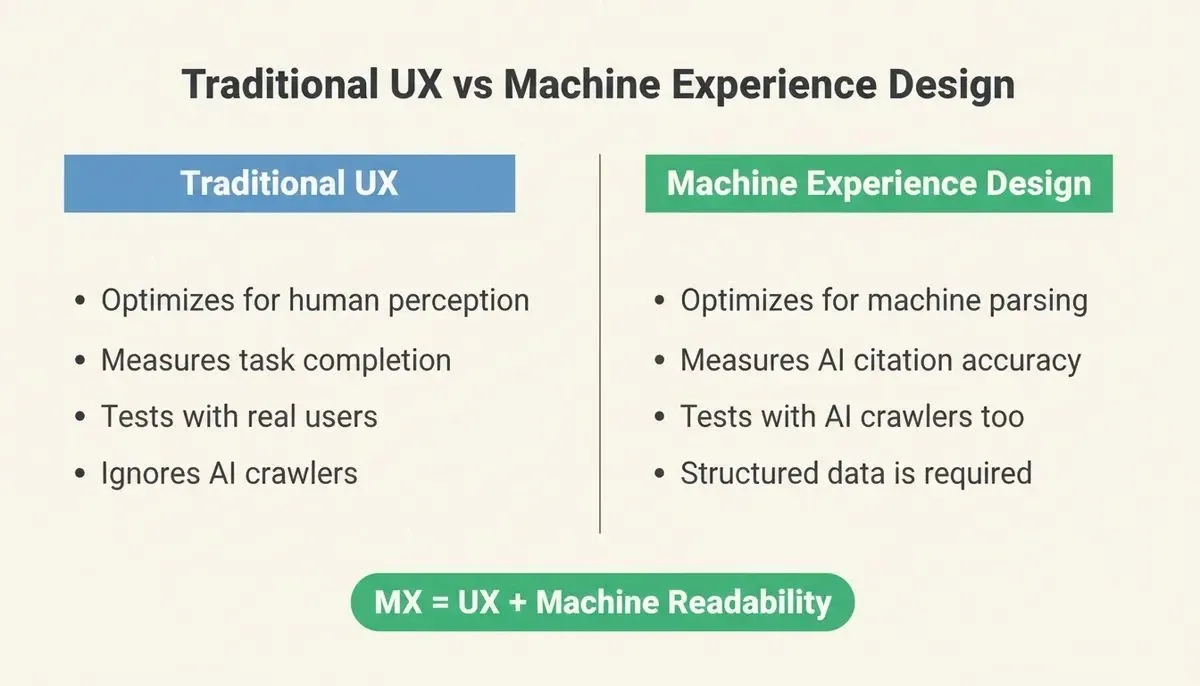
How MX design extends traditional UX by adding machine readability as a core requirement
-
UX optimizes for human perception through visual hierarchy, color, spacing, and interaction patterns. MX optimizes for machine parsing through semantic structure, descriptive labels, and clear headings.
-
UX success is measured by engagement metrics. MX success is measured by whether AI systems cite your product accurately when users ask relevant questions.
-
The two audiences are not in conflict. Good MX practices, like clear hierarchy and content structure, make pages easier for humans to scan and for AI to interpret simultaneously, and good design also helps manage user expectations about what AI can and cannot do.
-
Traditional UX ignores the invisible reader. UX designers typically test with real users. MX requires testing with AI crawlers and large language models that read your app on behalf of millions of people.
As Rocket.new's accessibility documentation notes: "Accessible sites also rank better in search engines because they use semantic HTML that crawlers understand." This is a meaningful shift for teams choosing their development stack, because framework decisions made at the start determine whether your app supports both audiences or only one.
What the MX vs UX Comparison Looks Like
| Dimension | Traditional UX Design | MX (Machine Experience) Design |
|---|---|---|
| Primary audience | Human users | AI systems and human users |
| Success metric | Task completion, engagement | AI citation accuracy, visibility |
| Key tools | Wireframes, prototypes, user testing | Semantic HTML audits, schema validation |
| Failure mode | Confusing interface | Invisible to AI search |
| Heading hierarchy | Visual hierarchy cue | Structural meaning for machines |
| Content organization | Scannable layouts | Parseable, quotable blocks |
| Image handling | Visual design appeal | Alt text as machine-readable context |
| Retrofit cost | Low, visual changes only | High requires architectural changes |
What Signals Do AI Crawlers Actually Read?
AI agents process web content through a structured signal stack, and if an AI agent cannot read your app cleanly at any one layer, your chances of being referenced in AI-generated answers drop. Each layer feeds into the citation decision independently.
-
Semantic HTML layer: Proper use of heading hierarchy (H1 through H6), landmark elements (
nav,main,article,section), and content grouping. -
Structured data layer: JSON-LD schema markup, Open Graph metadata, and descriptive alt text on images give AI systems explicit context about entities, relationships, and content types. That context can also help it take action on supported workflows, such as booking appointments or retrieving account information.
-
Rendering layer: Server-side rendered pages deliver complete HTML on the first request. Client-side rendered pages require JavaScript execution, which many AI crawlers skip entirely.
-
Content clarity layer: Clear headings, concise statements, and well-defined sections make it easier for AI models to extract quotable answers on behalf of users asking follow-up questions.
Why Client-Rendered Apps Fail the MX Test
Most modern web applications built with React, Vue, or Angular use client-side rendering by default, which makes them structurally invisible to AI crawlers. The browser downloads a minimal HTML shell, then JavaScript builds the entire interface after the page loads.
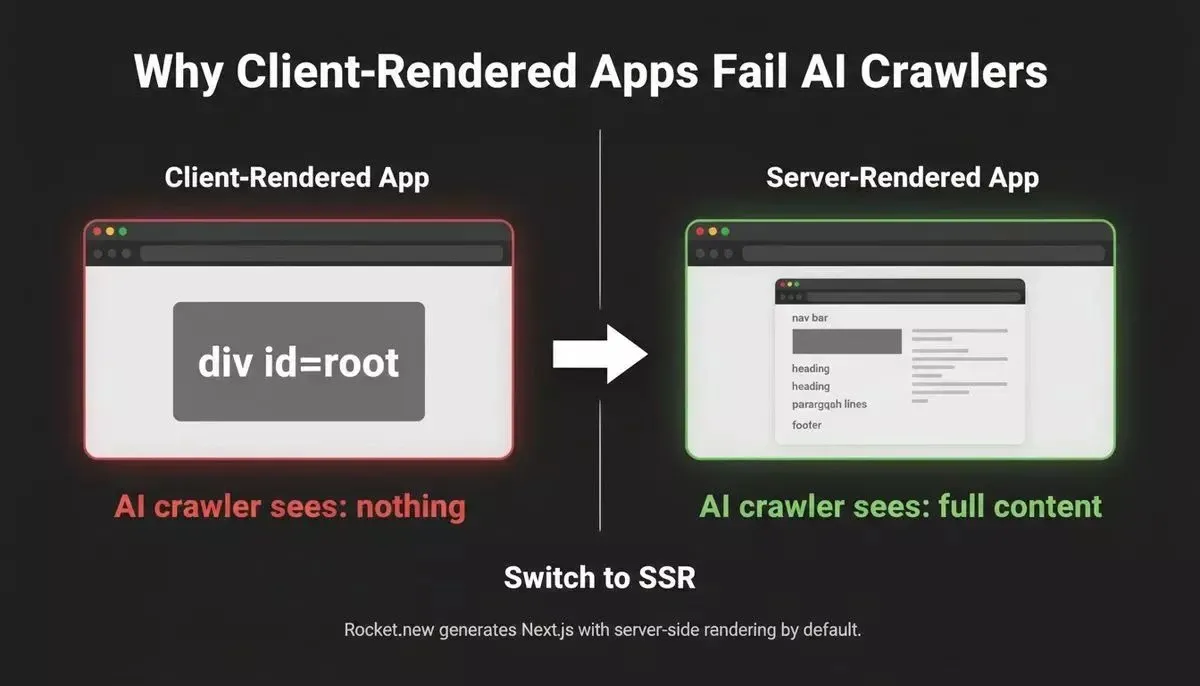
Client-rendered apps deliver an empty shell to AI crawlers. Server-rendered apps deliver full, parseable content.
-
AI crawlers see an empty page. When GPTBot or PerplexityBot requests your app and receives only
div id="root", there is literally nothing to index or cite. -
Natural language processing needs text to process. AI-powered search systems cannot summarize content that does not exist in the initial HTML response.
-
The rendering gap creates a visibility gap. Your app might look polished to users, but AI systems scanning it find zero relevant information to reference.
-
Traditional search faced this problem too. Google spent years building JavaScript rendering capabilities. Newer AI crawlers often skip this step entirely, making server-side rendering a requirement rather than a preference.
The UX Design Institute's 2026 guide on designing for AI search puts it directly: AI-powered search means designing for two audiences at once. The interface serves the human. The structure serves the machine.
This is why the choice of how apps ship SEO-ready structure from the first build determines whether AI systems can find and recommend your product. Builders who want to understand the full technical picture can explore how Rocket.new approaches SEO-optimized app generation as a baseline.
How Rocket.new Ships MX-Ready Apps
What Ships by Default
Every app built on Rocket.new starts with a documented MX baseline, confirmed in the official SEO and discoverability documentation and accessibility documentation.
-
Semantic HTML elements (
nav,main,section,article) on every page -
Basic heading hierarchy (H1 through H6) in generated output
-
Standard form labels and responsive layouts
-
Page titles and basic meta descriptions based on your content
-
Mobile-responsive layouts, which Google uses as a ranking factor
These defaults give every Rocket.new app a structural head start and support more consistent design decisions across the app. They are not a complete MX solution on their own, but they mean you are never starting from zero. The same semantic defaults are also easier for your team to maintain when everyone works from a shared component library.
What You Run With One Command
Rocket.new's editor includes a full suite of built-in slash commands for GEO, AEO, SEO, and accessibility, documented in the commands reference, with AI tools built into the product to speed up implementation inside the editor itself. No third-party plugins, no manual code.
| Goal | Command | What it does |
|---|---|---|
| SEO audit | /Generate SEO Report | Analyzes meta tags, schema, sitemap, and page structure |
| SEO fix | /Improve SEO | Auto-adds missing meta tags, structured data, and page structure optimizations |
| GEO + AEO audit | /Generate GEO And AEO Report | Analyzes AI search readiness across your codebase |
| GEO + AEO fix | /Improve GEO And AEO | Restructures content for better AI citation rates and adds FAQ schemas |
| Accessibility audit | /Generate Accessibility Report | Generates a WCAG 2.1 AA compliance report |
| Privacy compliance | /Implement Privacy Compliance | Adds GDPR, CCPA, and cookie consent flows |
These AI features help generate and refine implementation details without replacing human review.
GEO (Generative Engine Optimization) and AEO (Answer Engine Optimization) are Rocket.new's own named capabilities, not marketing terms. They are defined and documented in the product itself.
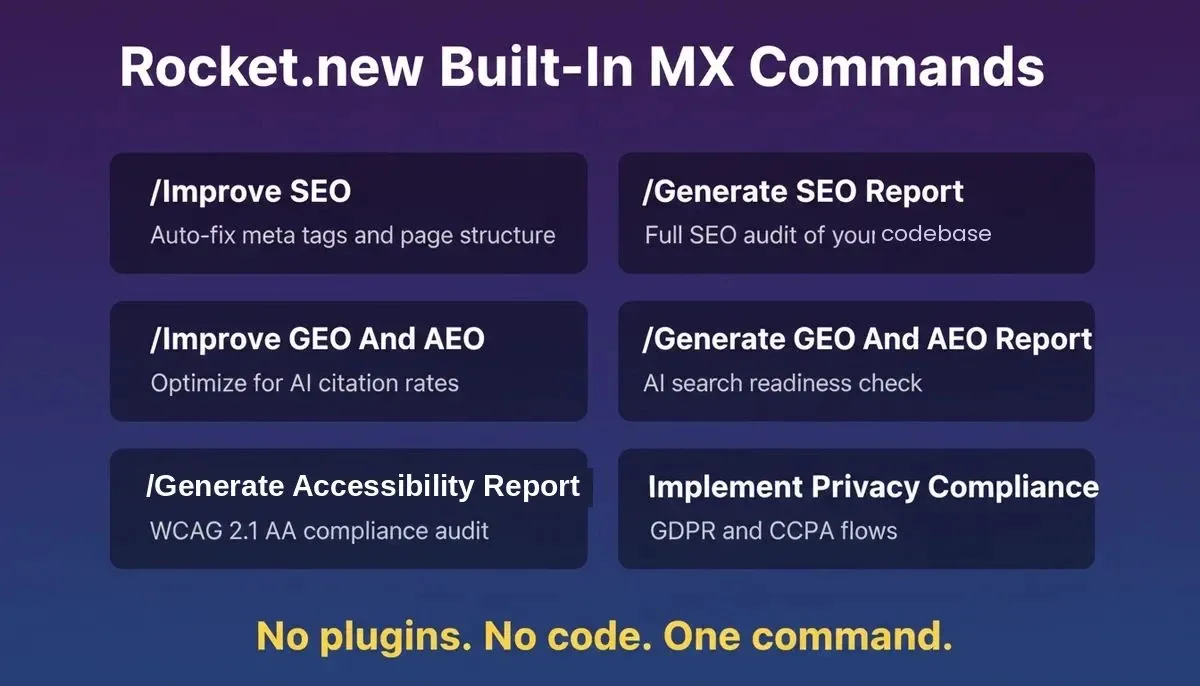
All six built-in MX commands are available directly in the Rocket.new editor
Other AI builders like Bolt generate client-rendered single-page applications. The output looks good in a browser, but AI crawlers scanning it find minimal HTML on the first request. That architectural choice makes the difference between being cited and being invisible.
Rocket.new is the only AI builder where MX-readiness ships as the baseline on every build, with dedicated GEO, AEO, SEO, and WCAG 2.1 AA commands built directly into the editor.
What Does a Complete MX Checklist Look Like?
This checklist is based on Google's structured data guidelines and documented AI crawler behavior. Every item contributes to whether AI systems can read and cite your app accurately.
-
Server-side rendering enabled. Verify that your pages deliver complete HTML on the first request without requiring JavaScript execution.
-
One H1 per page with descending heading levels. Never skip from H2 to H4. AI agents rely on heading hierarchy to understand content organization.
-
Landmark elements in place. Use
nav,main,article, andsectioninstead of genericdivwrappers. -
JSON-LD schema markup on every page. Match the schema type to your content type. Review with Google's Rich Results Test.
-
Descriptive alt text on all images. AI systems use alt text as a substitute for visual information they cannot process.
-
Meta descriptions and Open Graph tags are present. These provide direct answer material for AI recommendations.
-
Internal linking with descriptive anchor text. Helps AI models understand relationships between pages.
-
Clear, quotable statements early in each section. AI-powered search systems prefer content that gives a direct answer within the first two sentences, and cited sources make AI-generated answers easier to verify.
-
FAQ sections with JSON-LD FAQ schema. Formats question-answer pairs in a way AI crawlers can parse directly, and the interface should let users refine results by editing prompts or filtering outputs when needed. In Rocket.new, run /Improve GEO And AEO to implement this automatically.
-
Mobile-responsive and fast-loading. Core Web Vitals affect both traditional search engine ranking and AI citation likelihood. AI search experiences should visibly indicate uncertainty when confidence is low.
The complete MX readiness checklist. Run /Improve GEO and AEO in Rocket.new to automate most of these steps.
Founders and product teams who want to go deeper can explore Rocket.new's approach to WCAG, GDPR, and SEO compliance as defaults, which explains how the same structural decisions that serve accessibility also serve machine readability.
Your App Deserves Both Human and Machine Attention
The shift toward machine experience design reflects a fundamental change in how people find products, services, and information. AI search is the new front door, and your website needs to be legible to both people and the machines opening it.
Whether you are a founder shipping an MVP, a product manager planning a redesign, or a developer choosing a framework, the MX question is the same: can machines understand what you built well enough to recommend it?
According to Google's structured data documentation, pages with explicit schema markup are significantly more likely to appear in rich results and AI-generated summaries. The structural investment pays dividends across every discovery channel simultaneously, giving product teams a competitive edge as AI-powered discovery expands.
Build your next app on Rocket.new. Every product ships with semantic HTML, heading hierarchy, and responsive layouts from the first generation. Run /Improve GEO And AEO or /Improve SEO in the editor to go further, no plugins, no manual configuration, no code.
Start building for free on Rocket.new and ship an MX-ready app in minutes.
Table of contents
- -Why Are AI Systems Ignoring Most Web Applications?
- -How Does MX Differ From Traditional UX?
- -What the MX vs UX Comparison Looks Like
- -What Signals Do AI Crawlers Actually Read?
- -Why Client-Rendered Apps Fail the MX Test
- -How Rocket.new Ships MX-Ready Apps
- -What Ships by Default
- -What You Run With One Command
- -What Does a Complete MX Checklist Look Like?
- -Your App Deserves Both Human and Machine Attention