
Firebase Studio, Bolt.new, and Rocket.new take three different approaches to AI app building. This comparison breaks down their pricing, capabilities, code quality, and who each platform actually serves in 2026.
Which AI app builder ships production-ready apps in 2026?
The no-code AI platform market grew to $6.56 billion in 2025 and is projected to reach $75 billion by 2034, according to recent market data. That growth brought hundreds of tools into the space, each promising prompt-to-app results with different trade-offs underneath.
Here is what months of testing revealed about Firebase Studio, Bolt.new, and Rocket across approaches, limitations, and real outputs.
What Makes These Three AI App Builders Different?
-
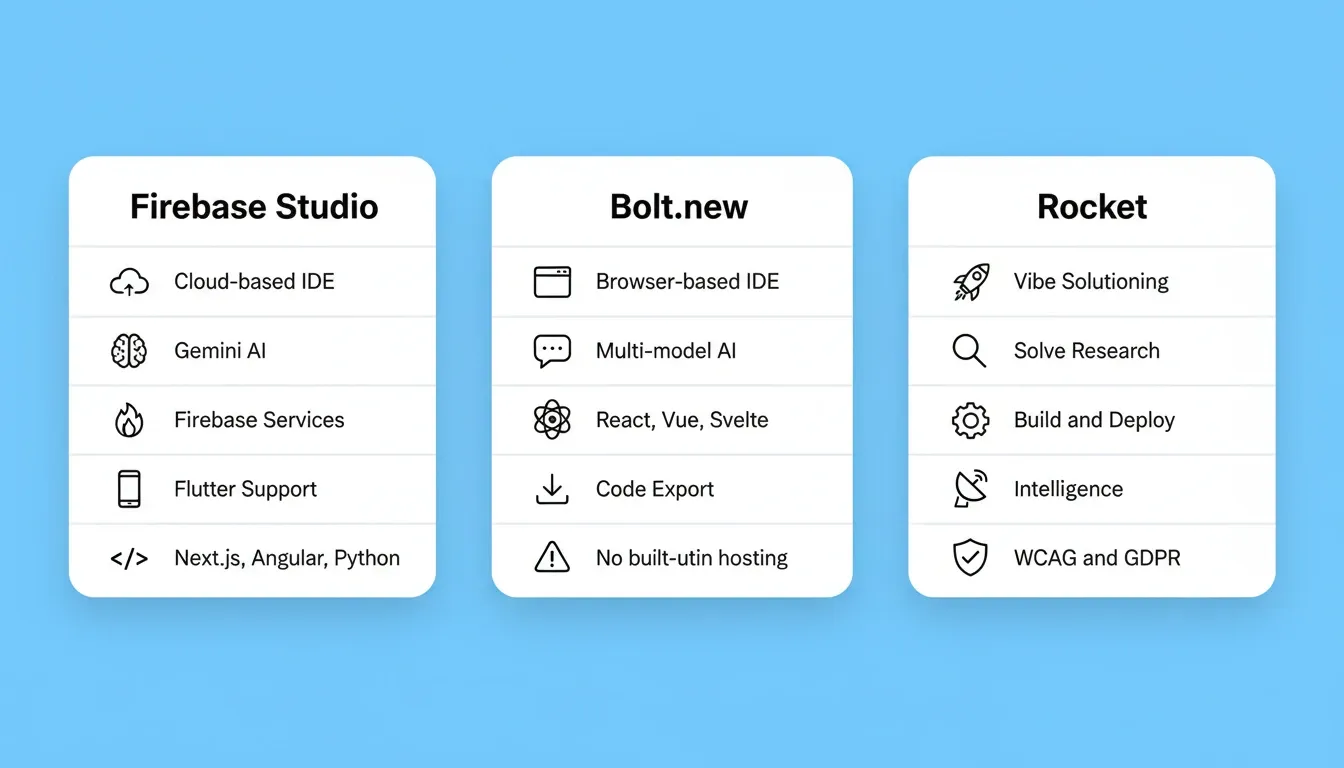
Firebase Studio is Google's cloud-based development environment powered by Gemini AI. It gives developers a full IDE with Code OSS (a VS Code fork), direct Firebase services connectivity, and support for multiple frameworks including Flutter and Next.js.
-
Bolt.new is StackBlitz's browser-based IDE that runs Node.js entirely in your browser. It focuses on frontend web apps with multi-model AI support and rapid prototyping for AI-driven development workflows.
-
Rocket is the world's first Vibe Solutioning platform. Rather than starting from a blank prompt, it combines strategic research (Solve), production-grade app generation (Build), and continuous competitive monitoring (Intelligence) into a single workspace with shared compound context. 1.5 million people have tried Rocket across 180 countries, from solopreneurs to enterprise teams.
The difference shows up immediately in what ships. Firebase Studio and Bolt.new give you tools. Rocket gives you a system where the thinking and the building happen in the same place. For a direct feature breakdown, see the Rocket vs Bolt comparison.
How Does Firebase Studio Handle App Creation?
Firebase Studio launched in preview during 2025 and became generally available in early 2026. It targets developers already inside the Google Cloud ecosystem.
-
The platform runs on a cloud-based VS Code fork (Code OSS) with Gemini AI built directly into the editor, allowing code generation through natural language prompts
-
Firebase services connect natively: Firestore database, Firebase hosting, authentication, cloud functions, and App Hosting all work without manual configuration
-
Developers describe what they want, and Gemini generates full stack apps including backend logic and frontend UI from a text prompt
-
The full development environment supports Flutter, Next.js, Angular, and Python with a real terminal and package management
-
A free tier permits up to 50,000 auth verifications per month and 1 GiB storage, making it viable for soft-launching apps entirely free
Firebase Studio works well for experienced developers already committed to Google's ecosystem. For non-developers or teams outside that stack, the learning curve is steep and setup requirements remain heavy.
What Can Bolt.new Actually Ship?
Bolt.new reached approximately $40M ARR within six months of its October 2024 launch, with over 1.5 million apps generated by late 2025, according to independent testing. The growth reflects real demand for browser-based app creation without local setup.
-
Bolt generates web apps from natural language prompts using WebContainer technology that runs Node.js entirely in the browser
-
The chat interface is accessible to less technical users, though coding knowledge helps significantly when debugging
-
Multi-model support (Claude, GPT-4o, Gemini) lets you switch AI models depending on the task
-
Framework flexibility covers React, Next.js, Vue, Svelte, and Astro for frontend development
-
Deployment requires manual setup, as Bolt does not include hosting, one-click deployment, or a built-in pipeline
-
The platform lacks a database, authentication system, or meaningful backend logic layer
What makes Bolt popular is speed for frontend prototypes and landing pages. What limits it is everything that comes after: backend, deployment, error handling, and scaling beyond simple web apps.
How Do Pricing and Free Tiers Compare?
Pricing determines not just monthly costs, but how predictably you can budget as projects grow from prototype to production.
| Plan | Firebase Studio | Bolt.new | Rocket |
|---|---|---|---|
| Free tier | Pay-as-you-go (Google Cloud) | 150K tokens/day | 20 credits (one-time) |
| Entry paid | Usage-based billing | $20/month (10M tokens) | $25/month — Pro (100 credits/mo) |
| Mid-tier | Usage-based billing | Higher token tiers | $50/month — Rocket plan (250 credits/mo) |
| Power plan | Usage-based billing | N/A | $250/month — Booster (1,500 credits/mo) |
| Built-in hosting | Firebase hosting included | Manual (Netlify/Vercel) | One-click deployment included |
| Mobile app support | Flutter only | Web only | Flutter and Next.js (iOS and Android) |
| Code export | Full access | Download/GitHub | Full source code download |
| Real-time collaboration | Limited | Individual focus | Team workspaces with roles |
| Competitive intelligence | None | None | Built-in (Intelligence pillar) |
| Pre-build research | None | None | Built-in (Solve pillar) |
Firebase Studio's costs scale with usage, making them unpredictable once apps reach real traffic. Bolt.new's token model can exhaust daily allowances in a single complex session, with heavy users reporting $40 to $100 per month for serious work.
Rocket runs on a credit system where one balance covers Solve research, Build generation, and Intelligence monitoring. Unused credits roll over month to month on paid plans. See the full breakdown on Rocket's pricing page.
For teams building real apps rather than prototypes, predictable costs matter more than a low entry price. Token-based pricing models punish the thing that makes good products: iteration.
Which Builder Gives You Real Code Ownership?
Code ownership determines whether your app can survive beyond the platform it was built on.
Firebase Studio gives full control over generated code in a standard development environment. You can push to GitHub, edit files directly, and deploy anywhere. The trade-off is managing everything yourself: hosting, scaling, security, and dependencies.
Bolt.new allows code export and GitHub downloads. However, generated code quality depends heavily on prompt specificity. Refactoring AI-generated code into maintainable architecture takes significant manual effort.
Rocket generates production-ready full stack code in Next.js for web apps and Flutter for native mobile apps. The output follows real design systems with proper component architecture. You can build full stack apps from a single prompt that include frontend, backend logic, and database layers. Every build ships with SEO-ready structure, WCAG 2.1 AA accessibility compliance, and GDPR coverage by default.
Rocket also supports Codebase Pickup. This feature imports any existing Next.js TypeScript repository from GitHub and continues it exactly where it left off. Figma designs import directly, preserving typography, spacing, visual hierarchy, and color systems.
Downloading AI-generated code is technically "code ownership." The real question is whether the code you own is worth owning.
The Vibe Solutioning Difference: What Bolt.new and Firebase Studio Don't Have
Firebase Studio and Bolt.new are build tools. Rocket is a three-pillar platform. Understanding the difference changes how you evaluate the choice.
Pillar 1: Solve — Validate Before You Build
Before Rocket generates a single line of code, its Solve pillar answers the question every other tool ignores: is this worth building?
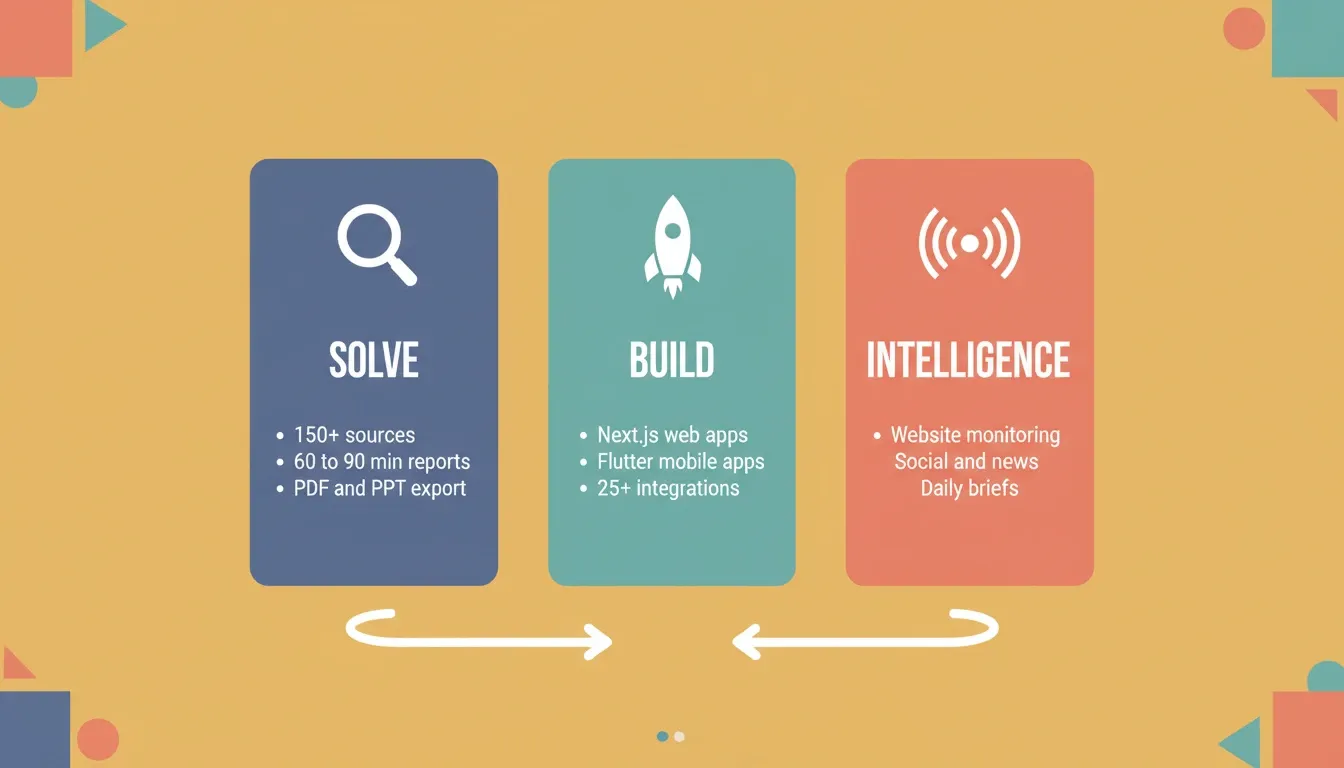
Describe your business situation in plain language. Solve runs thousands of queries across 150+ sources simultaneously. It identifies every relevant dimension, including market dynamics, competitive landscape, risks, and opportunities, then delivers a structured report in 60 to 90 minutes. The output covers 8 to 12 sections with findings tagged by signal strength. Conflicting signals are called out explicitly, and a direct recommendation sits at the top.
Solve addresses strategic decisions, product direction (PRD generation, feature scoping), competitive preparation, board and investor materials, and M&A assessment. Export as PDF or full presentation deck.
Pillar 2: Build — Production-Grade Generation
Build generates production-grade products from natural language descriptions, Figma files, or existing GitHub repositories. Six starting methods are available: plain language prompt, file attachment (images, PDFs, spreadsheets), Figma import, GitHub repository, template library (zero credits to start), or URL-based Redesign.
Every build ships with SEO-ready structure, WCAG 2.1 AA accessibility compliance, GDPR coverage, performance optimization, dark/light theming, and fluid navigation as the baseline. These are not optional extras. After launch, you get built-in analytics (visitors, conversions, Core Web Vitals), staging and production environments, full version history, and one-click rollback. 25+ integrations connect directly into generation. Stripe, Google Analytics, Supabase, Notion, Airtable, and more authenticate once and flow into every build.
For teams shipping native mobile apps, Rocket generates Flutter code for both iOS and Android from a single description. It produces signed AAB bundles for Google Play and builds ready for App Store Connect submission.
Pillar 3: Intelligence — Monitor What Matters
Intelligence is Rocket's continuous competitive monitoring system. No other AI app builder offers this. Set it up once per workspace and it runs automatically from that point.
Intelligence monitors four categories: website changes (pricing pages, feature lists, product updates), social and news activity (press releases, announcements), customer sentiment (reviews on G2, Trustpilot, App Store, Google Play), and advertising strategy (competitor ad copy and positioning shifts).
The dashboard delivers daily briefs with highlights, competitor-grouped signals, and interpretation of what changes mean. Each competitor profile covers six tabs: Overview, News, Website, Customers, People, and Social.
The Compound Context Architecture
All three pillars share context and feed into each other. The Solve output that validated your direction becomes the foundation of the Build. The Intelligence signal from last week informs this week's product decision. Nothing gets re-explained. Everything compounds.
Without this architecture, the typical workflow looks like this: the strategy team does research in one tool, produces a brief, hands it to product in a document, product reads 60% and writes a PRD from memory, then hands it to engineering in a ticket. The engineer misses two nuances. Three handoffs, three context compressions.
In Rocket, the market research, the strategy brief, the PRD, and the build task all live in the same project. The handoff is not improved. It is eliminated.
Rocket's compound context loop: Solve informs Build, Build feeds Intelligence, Intelligence triggers new Solve tasks.
Can Non-Developers Build Production Apps?
The real test of an AI app builder is whether someone without a coding background can ship something functional in production. Displaying it on a demo screen does not count.
63% of AI app builder users are non-developers building without prior coding experience. The demand is real, but results vary widely by platform.
Firebase Studio requires developer knowledge throughout. The code editor, terminal commands, and framework setup all assume familiarity with development workflows and debugging practices. Bolt.new's chat interface is more approachable. However, AI development landscape analysis shows users often hit walls when handling backend setup, error handling, or connecting external services.
Rocket serves non-developers and experienced developers equally. You describe what you want in natural language, Rocket asks clarifying questions when needed, and generates a working app with UI, navigation, backend logic, and production-ready deployment. Sign up in about 30 seconds with Google, Apple, or email. No credit card required.
The gap comes down to what happens when something breaks. On Firebase Studio and Bolt.new, non-developers are stuck. On Rocket, the AI handles error resolution in context. As a result, startups ship faster without code because nothing resets between sessions. When the AI reaches its limit, Rocket's Success team steps in inside the platform. No tickets, no email chains.
Who is Each Platform Built For?
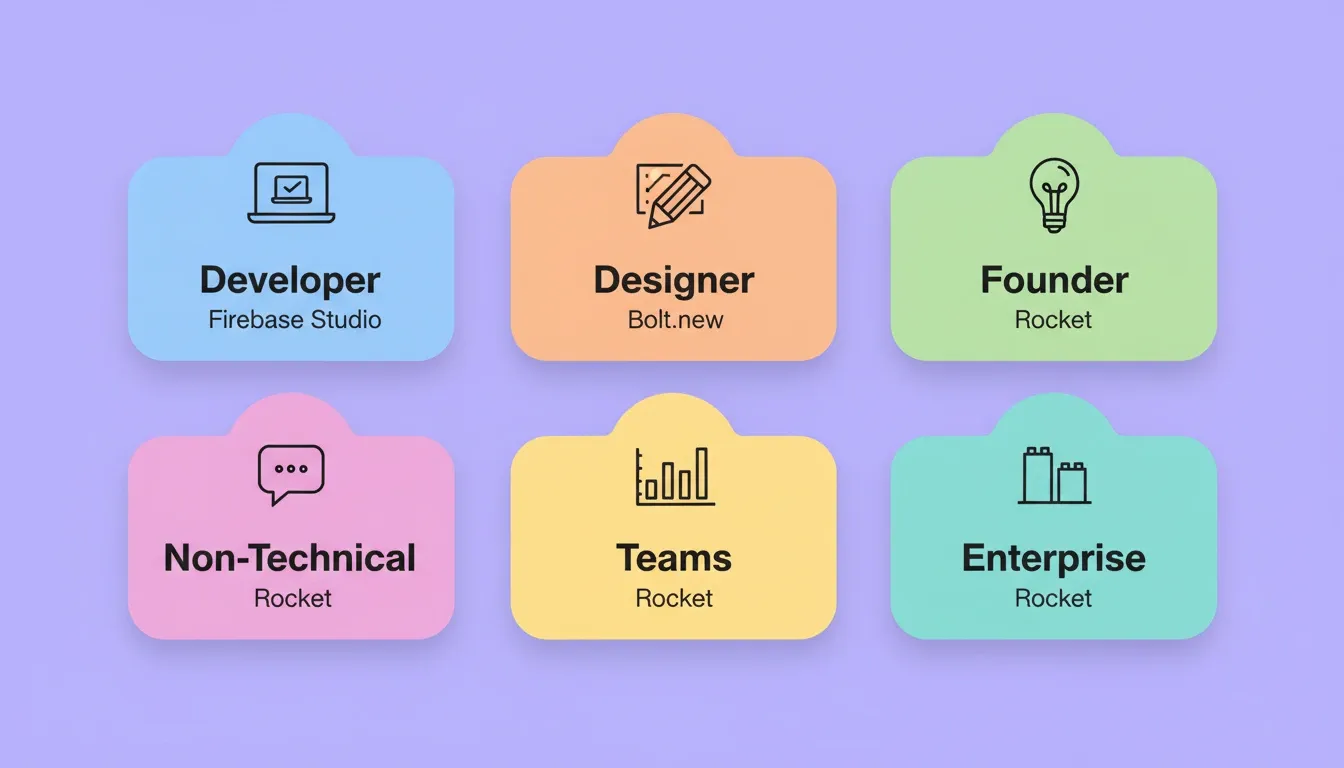
| User Type | Best Fit | Why |
|---|---|---|
| Developer in Google Cloud ecosystem | Firebase Studio | Native Firebase integration, familiar VS Code environment |
| Frontend designer prototyping | Bolt.new | Fast web UI generation, no local setup required |
| Founder validating a new idea | Rocket (Solve and Build) | Research and build in the same platform |
| Non-technical founder shipping a product | Rocket | No code required, full stack output, one-click deploy |
| Team needing competitive intelligence | Rocket (Intelligence) | Continuous monitoring without a separate tool |
| Agency building client products | Rocket | Figma import, Codebase Pickup, team collaboration |
| Enterprise replacing tool sprawl | Rocket | One workspace for research, build, and monitoring |
How Do These Tools Handle Errors and Debugging?
Every AI app builder produces bugs. The question is how each platform handles error resolution when AI-generated code goes wrong.
Firebase Studio gives full terminal access for debugging. This is powerful for developers but useless for non-developers. Error handling depends entirely on your own expertise with the underlying code and Google's documentation.
Bolt.new shows errors in the browser console. You can ask the AI to fix them through the chat interface. However, complex bugs often burn through token limits quickly. The AI sometimes introduces new bugs while fixing old ones.
Rocket's error handling is contextual. The AI understands the full project architecture. It catches dependency conflicts before they surface and resolves issues without writing code that breaks other things. Version history with one-click rollback means you never lose a working app state. For paid users, "Fix it" for Rocket-detected errors does not consume credits.
One Reddit user in r/GeminiAI noted about Firebase Studio: "The produce is still subpar compared to Lovable, Bolt.new" when testing it for Flutter app creation. This highlights output consistency challenges even from Google's own tool.
A platform that prevents errors through better architecture decisions saves more hours than one that merely helps fix them faster. That is why choosing the best AI app builder for your project matters so much for long-term project health.
Why Rocket Wins the Full Stack Race
The difference comes down to one architectural decision: thinking before building.
-
Pre-build intelligence: Solve researches whether what you are building is worth building before a single line of code is written. Firebase Studio and Bolt.new start from a blank prompt with zero opinion on direction.
-
Full stack apps from prompt to production: Rocket generates production-ready code in Next.js for web and Flutter for native mobile. Every app includes authentication, database connectivity, and responsive design across devices.
-
One-click deployment included: Your deployed app goes live instantly with a shareable URL. Staging and production environments, full version history, and one-click rollback are all included.
-
Shared context architecture: Every task inherits the accumulated intelligence from previous work. Context compounds instead of resetting every session.
-
25+ connected services baked in: Stripe, Supabase, Google Analytics, Notion, Airtable, Mailchimp, Mixpanel, and more authenticate once and flow into every build.
-
Real-time collaboration for teams: Shared workspaces with three-level role-based access (Admin, Creator, Viewer), inline comments, per-user credit allocation, and unified billing.
-
Redesign capability: Point Rocket at any live website URL and reimagine it via eight slash commands. Firebase Studio and Bolt.new generate from scratch only.
-
Human Help: When the AI reaches its limit, Rocket's Success team steps in inside the platform with user permission.
Firebase Studio is a development environment. Bolt.new is a code generator. Rocket is where the thinking and the building happen together.
The Right Platform Changes Everything
As AI app builders mature, the gap between tools and systems will only widen. Firebase Studio vs Bolt.new vs Rocket.new is not just a feature comparison. It is a question of where you want your thinking and your building to happen.
Firebase Studio serves developers inside Google's ecosystem. Bolt.new suits quick frontend prototypes when you handle deployment and backend yourself. Rocket is built for teams that want to go from validated idea to live product without stitching together separate services for research, code generation, hosting, and monitoring.
1.5 million people have tried Rocket across 180 countries. The platform that thinks before it builds, then builds at production quality, is already the choice for founders, teams, and developers who cannot afford to build the wrong thing. Start building on Rocket. No credit card required.
Table of contents
- -What Makes These Three AI App Builders Different?
- -How Does Firebase Studio Handle App Creation?
- -What Can Bolt.new Actually Ship?
- -How Do Pricing and Free Tiers Compare?
- -Which Builder Gives You Real Code Ownership?
- -The Vibe Solutioning Difference: What Bolt.new and Firebase Studio Don't Have
- -Pillar 1: Solve — Validate Before You Build
- -Pillar 2: Build — Production-Grade Generation
- -Pillar 3: Intelligence — Monitor What Matters
- -The Compound Context Architecture
- -Can Non-Developers Build Production Apps?
- -Who is Each Platform Built For?
- -How Do These Tools Handle Errors and Debugging?
- -Why Rocket Wins the Full Stack Race
- -The Right Platform Changes Everything