How fast can AI really build a website today? Learn realistic timelines for AI website creation, what affects build speed, and when human customization is still needed for better results.
How long does it take to build a website with AI today?
You can create a working website in just a few minutes, and then spend a few hours refining it. Modern AI website builder platforms use artificial intelligence to handle design, content, and structure automatically.
Recent data from Zippiashows that 75% of people judge a company’s credibility based on its website.
That demand is one reason AI tools and website builders are becoming so popular. Instead of writing a lot of code, you can create a website with AI, add images, choose layouts, and publish a site quickly.
So let’s talk about the full timeline, what the creation process looks like, and how modern AI builder platforms help people build websites faster than before.
The Old Way vs AI Website Builders
Not long ago, building a website required a lot of time. You needed developers, designers, and weeks of planning.
Traditional web design usually involved:
- Writing code
- Creating layouts
- Uploading images
- Setting up hosting
- Connecting a domain
- Optimizing for search engines
That process could take weeks or months.
Today, things look very different. A modern AI website builder uses artificial intelligence to automatically generate a full website.
The AI assistant asks for basic information like:
- Your business
- Your brand
- Your site's purpose
- Preferred design preferences
Then the AI website generator handles the heavy lifting. The platform can create pages, place images, generate text, and produce a fully functional AI website.
Many people can now create a website without any coding experience.
Typical Timeline for Building a Website With AI
Let’s break down how long the entire process usually takes.
| Step | What Happens | Time Needed |
|---|---|---|
| Idea and planning | Decide the site's purpose, choose your brand direction | 10–20 minutes |
| AI generation | The AI builder generates an initial site | just a few minutes |
| Editing and design | Adjust layouts, upload images, customize sections | 1–3 hours |
| SEO and domain setup | Connect domain, set SEO, choose hosting | 30–60 minutes |
| Publish the website | Review pages and publish the site | 10 minutes |
So the first version of an AI generated site can appear in just a few minutes. After that, most time goes into refining the AI website design.
What Happens During the AI Website Creation Process
So what exactly happens when you create a website with an AI website builder?
Let’s walk through it.
Step 1: Provide Basic Information
You begin by entering basic information about your business or project.
The AI assistant may ask:
- What type of website do you want?
- Is it a blog, online store, or personal portfolio?
- What is your brand style?
- What design preferences do you like?
These answers help the AI generator shape the design system.
Step 2: AI Generates the First Draft
Next, the AI builder gets to work.
Using artificial intelligence, it will:
- Create pages
- Choose layouts
- Generate text
- Add high quality images
- Organize navigation
Within minutes you receive a first draft of your AI website. This AI generated structure becomes your initial site.
Step 3: Customize the Website
Now comes the fun part. Most website builders provide a drag and drop interface, which lets you easily customize the site.
You can:
- Add more images
- Adjust layouts
- Update your brand colors
- Create more landing pages
- Edit text generated by AI tools
Many platforms allow you to fine tune content while keeping full control over the site.
Step 4: Add Business Features
If your website supports a business, you might add extra features.
For example:
- A booking system
- A blog
- An online store
- Contact forms
- Product pages
An AI website builder can generate product images, product descriptions, and store pages quickly. That makes launching an online store much faster.
Step 5: Connect Domain and Hosting
Next you connect your domain. Many website builders include reliable hosting. That means you do not need separate hosting services.
Steps usually include:
- Buy or connect a domain
- Activate hosting
- Check SEO settings
- Test the site on mobile devices
Once everything looks good, you can publish the website.
What AI Actually Creates Automatically
When you start using an AI website builder, you might ask what the AI actually creates for you. The answer is simple. Modern AI tools handle a large part of the creation process, so you can focus more on shaping the brand and improving the site experience.
Modern AI website builders are surprisingly capable.
They can automatically generate:
- Page layouts: structured layouts that organize sections, headings, and images across different pages
- Written content: basic copy for the website, including headings, introductions, and short descriptions
- Product descriptions: helpful text for products if your site includes an online store
- Navigation menus: menus that guide visitors across different pages of the site
- SEO tags: simple SEO titles and descriptions that help search engines understand the website
- Stock images: relevant images placed inside sections to match the site's purpose
- Page sections: ready-made blocks such as hero sections, testimonials, and landing pages
- Color palettes: visual styles that match your brand and overall web design
Some platforms even generate web design structures based on your brand.
Once the AI has finished generating the initial site, you can review the pages, replace images, adjust layouts, and customize the site until it matches your dream website. The AI handles the setup, while you retain control over the site's final look and feel.
Community Insight From Developers
Here is a LinkedIn insight from a discussion about AI website builders:
“Type a short prompt like ‘a clean portfolio for a UX designer’ and you can have a full website in minutes. AI handles the structure, layout, and even the content.”
This reflects what many developers experience today. The AI builder quickly generates the initial site with structured pages, basic layouts, and placeholder images. After that, creators customize the site, adjust images, and refine the brand before they publish the website.
Popular AI Website Builders Today
If you want to create a website with AI, the first step is choosing the right AI website builder. Many modern website builders now use artificial intelligence to simplify the creation process. These platforms guide users step by step and help build a website quickly, even without coding experience.
There are many website builders that use artificial intelligence.
A few popular options include:
- Rocket.new
- Wix ADI
- Durable
- Framer AI
- 10Web
- Hostinger AI
Platforms like Rocket.new and Wix ADI act as an AI website creator that can build a website based on a short questionnaire.
Some platforms even offer a free AI website builder option so users can test things before choosing paid plans..
Free vs Paid AI Website Builders
Many people who want to create a website start with a free AI website builder. It is a simple way to test how an AI builder works before committing to a paid plan.
These website builders let users try the creation process, experiment with layouts, and understand how an AI website comes together.
These plans usually allow you to:
- Generate an AI generated website quickly using an AI website generator
- Test AI tools and see how the AI assistant creates content and images
- Experiment with layouts and adjust sections across different pages
- Publish a temporary site to see how the website works online
Still, free plans often come with some limits:
- Platform domain instead of a custom domain
- Limited hosting resources for the site
- Ads on the site that promote the website builder
Paid plans usually provide more flexibility and control. They often include:
- Custom domain connected to your website
- More pages for your site
- Better SEO settings for search engines
- Full control over the AI website design and structure
- Access to other AI tools that help improve the site and brand presence
So, starting with a free plan is a good way to try an AI website builder and understand how it works. Once your site grows or your business needs more features, upgrading to a paid plan gives better hosting, a custom domain, stronger SEO, and more tools to improve the website.
A Rocket Powered Approach: Rocket.new
Rocket.new is an AI builder designed to help developers and creators quickly build websites using powerful AI. The platform focuses on rapid app and website creation while reducing the amount of manual code needed.
The idea is simple. Describe what you want, and the AI assistant generates a working site structure.
Key Features
- Prompt to App Creation: Builds apps directly from single prompts
- Figma Import: Converts design files into live, editable layouts
- AI-Powered Backend: Automatically handles logic, data, and workflows
- Custom Domain Support: Publishes projects with a branded domain
- Code Export: Allows developers to extend or customize later
- Live Preview: Shows instant updates while editing
This type of AI website generator reduces the time needed to create a website.
How Quickly You Can Build a Website With Rocket.new
Rocket.new focuses on speed and simplicity. The AI builder lets users start building a website with AI by simply typing a short prompt. The AI assistant then generates the initial site, including structured pages, clean layouts, and relevant images.
The process is very simple. You enter your basic information, describe your business or brand, and add a short prompt about the type of website you want.
For example, a prompt could look like this:
"Create a modern website for a fitness coaching business with a homepage, service pages, and a contact section. Use bold images, clean layouts, and a strong brand style.”
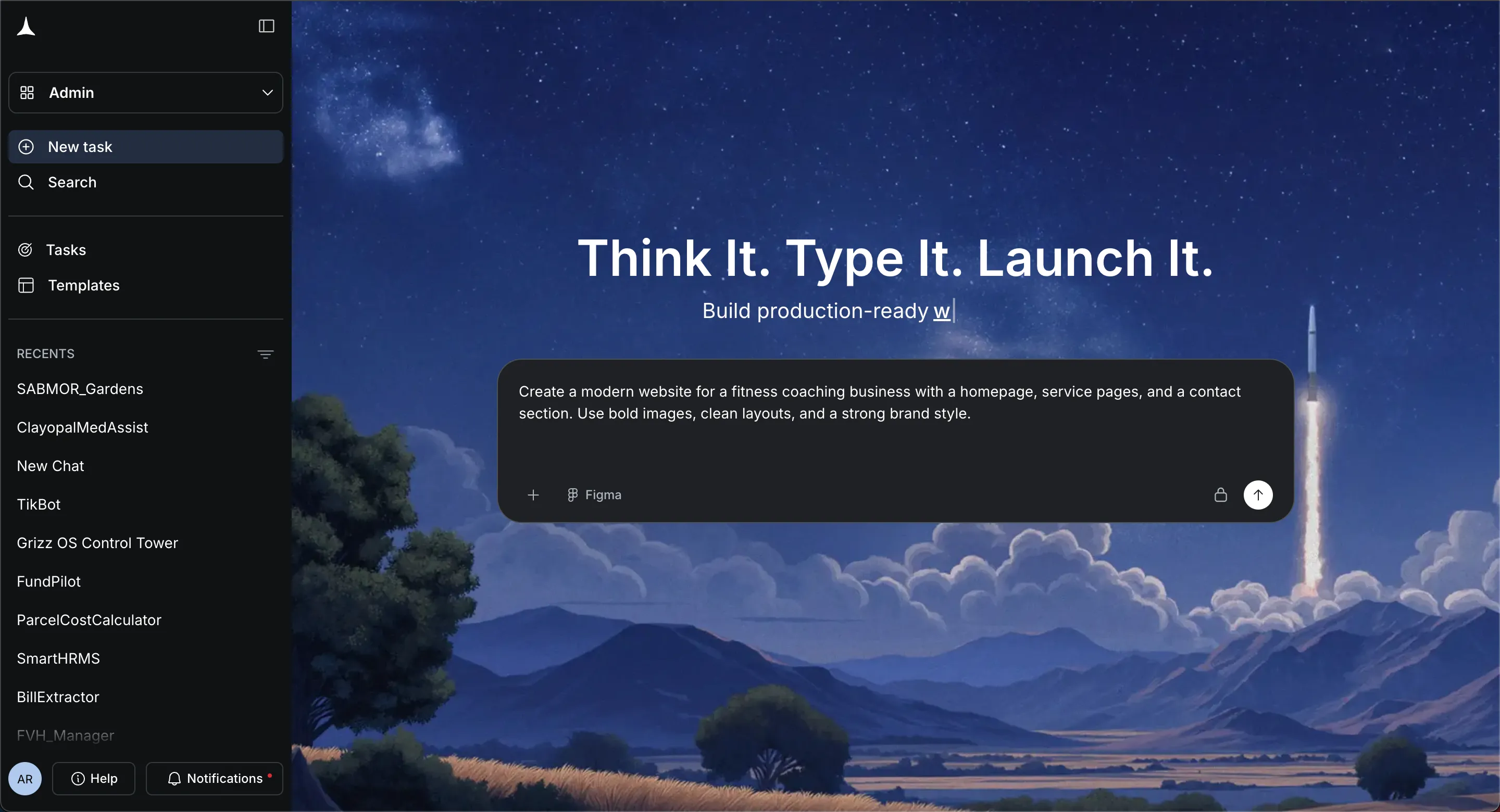
Once the prompt is submitted, the AI builder automatically starts generating the site.
Within minutes, the AI website generator creates an AI-generated website with multiple pages, structured layouts, placeholder images, and organized sections.
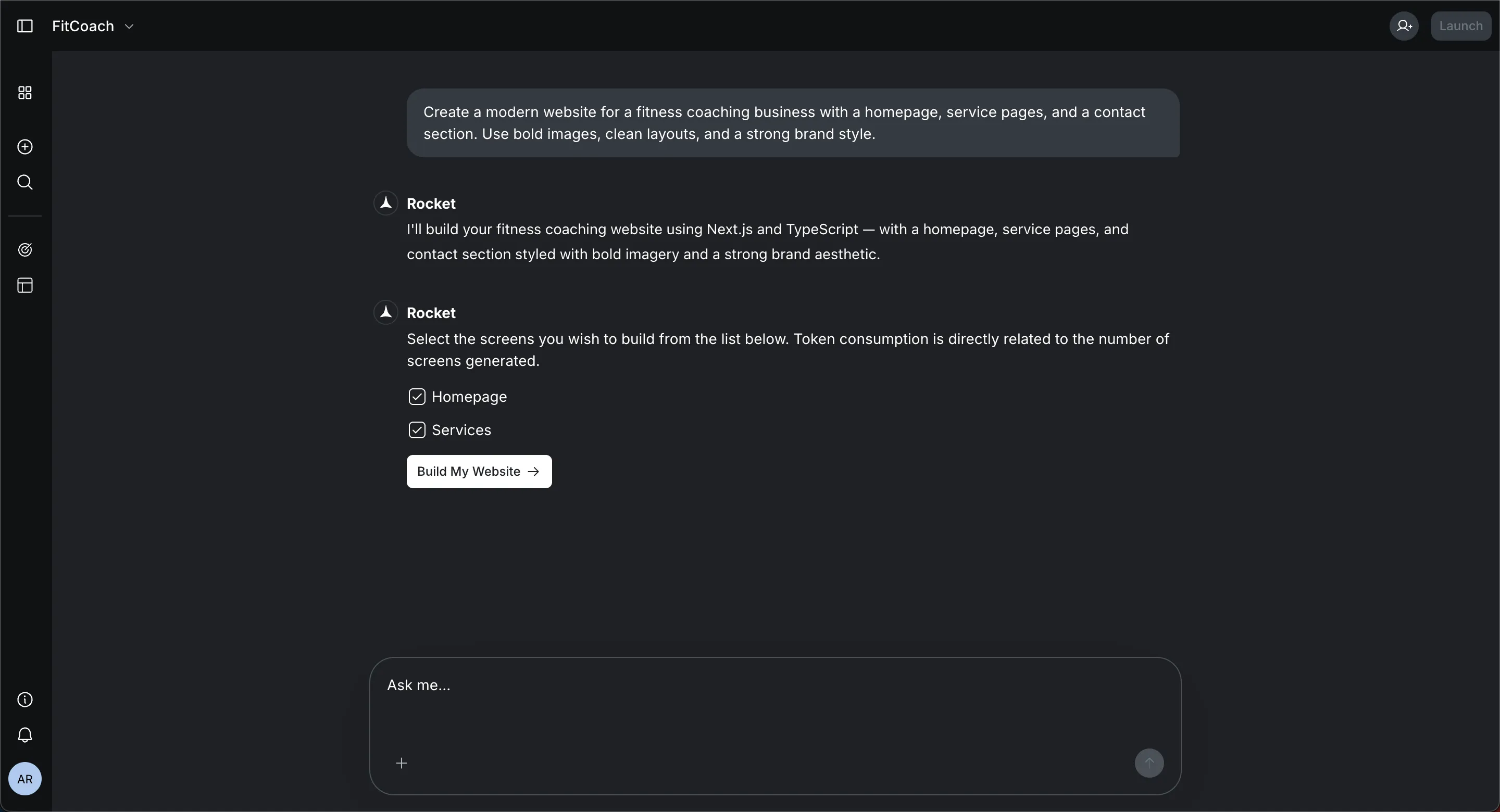
After that, you can customize the site by adjusting layouts, replacing images, editing text, and refining the brand look. Because the AI builder handles much of the setup and code, the entire process becomes much faster than traditional web design.
In many cases, users can go from idea to a fully functional, business ready AI website within a short time. Once satisfied, they connect their domain, activate hosting, and publish the site.
Tips for Building Better AI Generated Websites
An AI website builder can quickly create a website and generate an initial site with structured pages, layouts, and images. Still, a few small improvements can make the site look more polished and better represent your brand.
- Add Original Images: Replace some stock images with real images from your business. Mixing AI generated visuals with real photos makes the AI website feel more authentic.
- Adjust Layouts: Review the layouts created by the AI builder. Small changes in spacing or section order can improve the overall site flow across mobile devices and desktop screens.
- Improve SEO: Check the SEO tags created by the AI tools. Add better headings, keywords, and descriptions so search engines understand your website more clearly.
- Fine Tune the Content: Edit the first draft text generated by the AI assistant. A quick fine tune helps your brand voice stand out and makes the site more business ready.
The AI builder handles the heavy lifting when you build a website, but small edits like these help turn an
AI generated website into a clean, professional site that reflects your brand.
So, How Fast Can AI Build a Website Today?
Building a traditional website once required developers, designers, and weeks of effort. Many people without coding experience found the process confusing. Modern AI website builder platforms changed that approach. With artificial intelligence, you can build a website, add images, choose layouts, connect hosting, and publish a working site in a short amount of time. Platforms like Rocket.new make this even faster by letting users describe their idea and generate a structured AI website almost instantly.
The first version of a website with AI can appear within minutes. After that, you spend a little time adjusting the brand, adding pages, refining images, and polishing the design. So the real answer to how long does it take to build a website with ai is simple. A basic site can appear very quickly, while a polished business website may take a few hours of editing and customization.
Table of contents
- -The Old Way vs AI Website Builders
- -Typical Timeline for Building a Website With AI
- -What Happens During the AI Website Creation Process
- -Step 1: Provide Basic Information
- -Step 2: AI Generates the First Draft
- -Step 3: Customize the Website
- -Step 4: Add Business Features
- -Step 5: Connect Domain and Hosting
- -What AI Actually Creates Automatically
- -Community Insight From Developers
- -Popular AI Website Builders Today
- -Free vs Paid AI Website Builders
- -A Rocket Powered Approach: Rocket.new
- -Key Features
- -How Quickly You Can Build a Website With Rocket.new
- -Tips for Building Better AI Generated Websites
- -So, How Fast Can AI Build a Website Today?