Non-technical teams can now deploy intelligent business automation in days. This blog covers the complete framework, from validating the right process to configuring, testing, and shipping production-ready agents without writing a single line of code.
Why are businesses still handling repetitive tasks manually when AI agents can take over?
The global no-code AI platform market is growing at a 20.19% CAGR and will reach $12.25 billion by 2031, according to Mordor Intelligence.
The tools exist. The adoption gap is not technical. It is a decision gap.
This blog gives you the practical framework for building AI Agents Without Code: choosing the right platform, configuring workflows, and deploying agents that stay in production.
What Are No-Code AI Agents and Why Do They Matter?
No-code AI agents combine large language models with visual workflow builders. They let non-technical users create autonomous task-handling systems. These agents respond to triggers, make decisions based on rules or AI reasoning, and execute actions across connected tools, all without writing code.
The shift toward low-code and no-code development reflects a broader change across enterprise software. Business users closest to the problem can now build the solution directly.
-
Traditional agent development requires Python or JavaScript proficiency, manual API connections, and dedicated DevOps for deployment
-
Visual agent builders let you configure triggers, decision logic, and actions through drag-and-drop interfaces and natural language instructions
-
The practical difference is time-to-value: weeks versus days for a working prototype
No background in machine learning or software architecture is needed to get started.
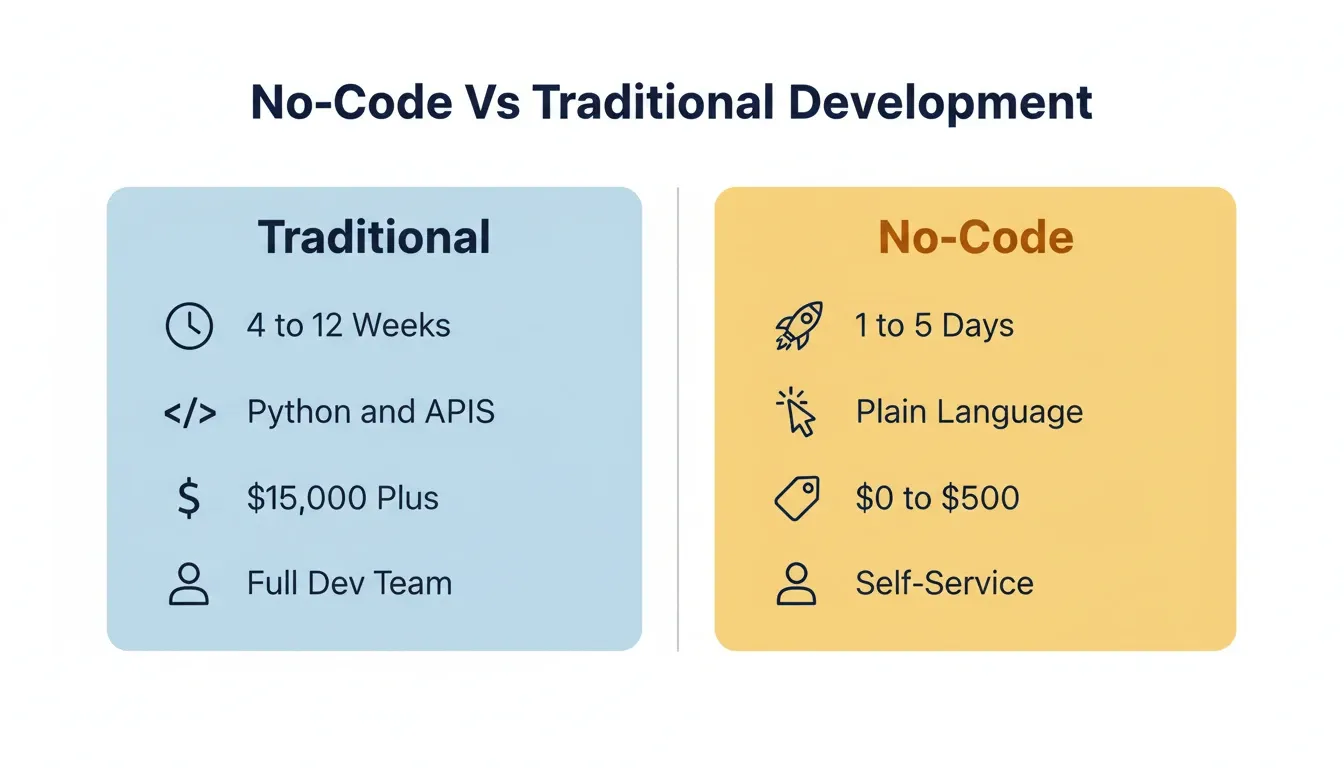
No-Code Vs Traditional Agent Development
| Factor | Traditional Coded Agents | No-Code Agent Builders |
|---|---|---|
| Time to deploy | 4 to 12 weeks | 1 to 5 days |
| Technical skill required | Python, APIs, ML ops | Natural language, visual logic |
| Cost for MVP | $15,000 to $80,000+ | $0 to $500/month |
| Maintenance burden | Dedicated engineers | Business user self-service |
| Connector options | Unlimited but manual | Pre-built integrations |
| First-version quality | Depends on team skill | Production-ready from prompt |
How Do Businesses Benefit From Codeless Agent Workflows?
The ROI data on agent deployments is hard to ignore. The specific advantages vary depending on your business model and where human hours are spent on repetitive tasks.
-
Average ROI of 171% reported by companies deploying AI agents, with U.S. enterprises averaging 192%. That is roughly 3x the return of traditional automation (RaftLabs, citing Futurum Research)
-
Knowledge workers recover 6.4 hours per week per seat when production agents handle routine tasks like data entry, scheduling, and report generation
-
Customer service teams save 40+ hours monthly when agents handle refunds, ticket routing, and initial responses
-
74% of executives achieved positive ROI within the first year of agent deployment
For startups and lean teams, the math is especially compelling. A single well-configured agent can replace tasks that previously required hiring a part-time employee or outsourcing to a contractor.
The real advantage is not just cost savings. It is speed of iteration. When your business process changes, you update the agent configuration in minutes. You do not need to file a ticket with engineering and wait three sprints.
Step-by-Step Process for Building Your First Codeless Agent
Building an agent without programming follows a predictable pattern. The sequence matters because skipping the scoping phase is the primary reason agent projects fail.
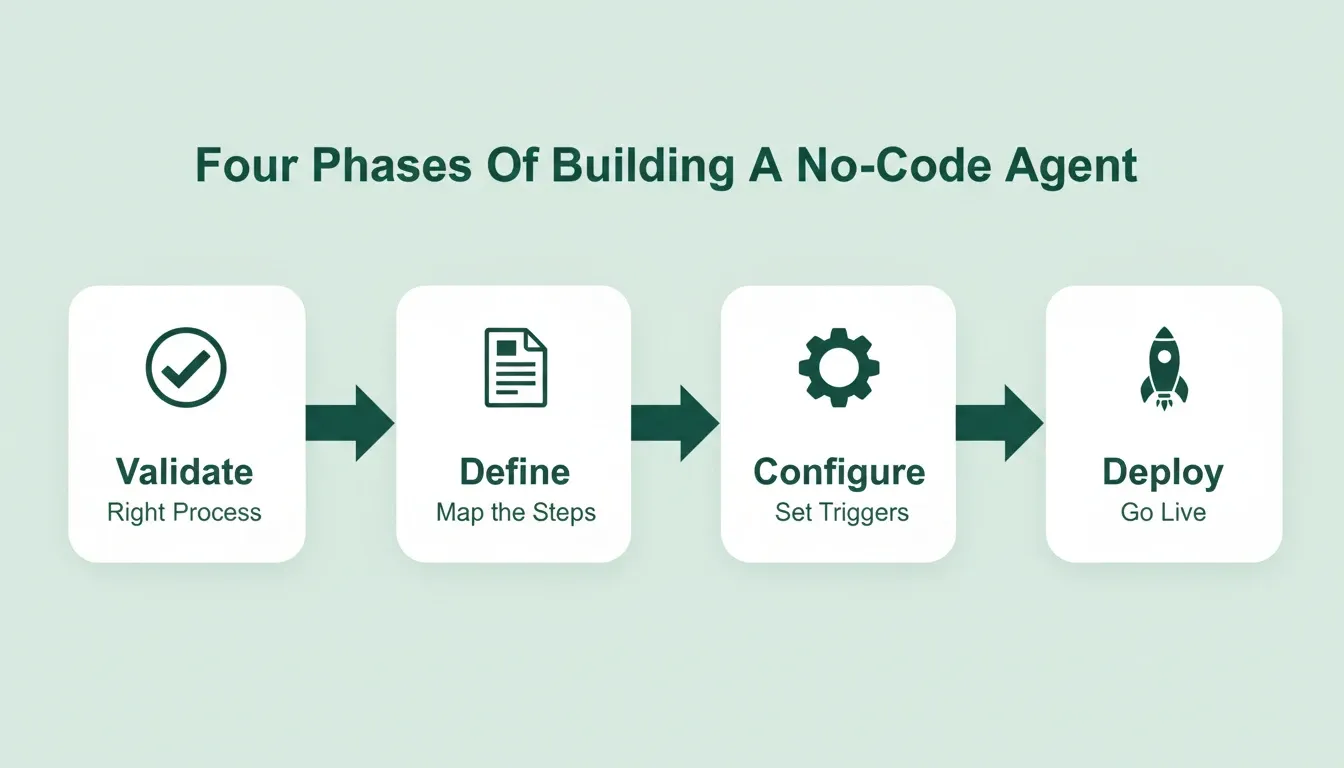
Phase 1: Validate Before You Build
The most common reason agent projects fail is building the wrong thing. Before configuring a single trigger, validate that the process you want to automate is actually the right one.
Effective validation answers three questions. Is this process high-volume enough to justify automation? Are the decision rules clear enough to encode? Do you have clean data to feed the agent?
Skipping this phase is the single most expensive mistake in agent projects. Teams that validate first ship agents that stay in production. Teams that skip validation build agents that get turned off.
Phase 2: Define the Problem and Map the Workflow
Start by identifying exactly which business process the agent will handle. Vague goals like "automate customer support" fail. Specific goals like "route incoming emails to the correct department and send an acknowledgment within 2 minutes" succeed.
-
Document the current manual steps from trigger to completion
-
Identify decision points where human judgment is currently needed
-
Mark which decisions can be rule-based versus which require AI reasoning
-
Set measurable success criteria before building: response time, accuracy rate, cost per task
Understanding the difference between agentic AI and task-specific agents helps teams pick the right level of autonomy. Agentic AI operates with broader autonomy across multi-step goals. Task-specific agents handle a single, well-defined workflow.
Phase 3: Choose the Right Platform and Configure Triggers
Platform selection depends on three factors: your existing tool stack, the complexity of decisions your agent needs to make, and whether you need the agent to operate autonomously or with human approval gates.
-
Look for pre-built integrations to your CRM, email, project management, and database tools
-
Evaluate whether the platform supports multi-step reasoning or only linear workflows
-
Check deployment options: cloud-hosted, self-hosted, or hybrid
-
Verify that the platform offers testing environments separate from production
Phase 4: Test, Iterate, and Deploy to Production
Testing is where most no-code agent projects either prove their value or reveal scope issues. Run the agent against real historical data before pointing it at live traffic.
-
Use 50 to 100 real past cases as your test set
-
Compare agent decisions against what a human actually did
-
Measure accuracy, response time, and edge case handling
-
Deploy with human-in-the-loop approval for the first two weeks, then gradually increase autonomy
How to Write Effective Prompts for No-Code AI Agents
The quality of your agent's behavior is directly proportional to the quality of your instructions. Most no-code platforms accept natural language prompts to define agent behavior. These patterns consistently produce better results.
Be specific about the trigger condition. Instead of "when I get an email," write "when I receive an email with the subject line containing 'invoice' or 'payment' from a domain not in my contacts list."
Define the decision tree explicitly. Agents do not infer intent. Write out: "If X, do Y. If not X, do Z. If neither, escalate to human."
Set boundaries. Tell the agent what it should never do. "Do not send any communication that includes pricing information without human approval" prevents costly mistakes.
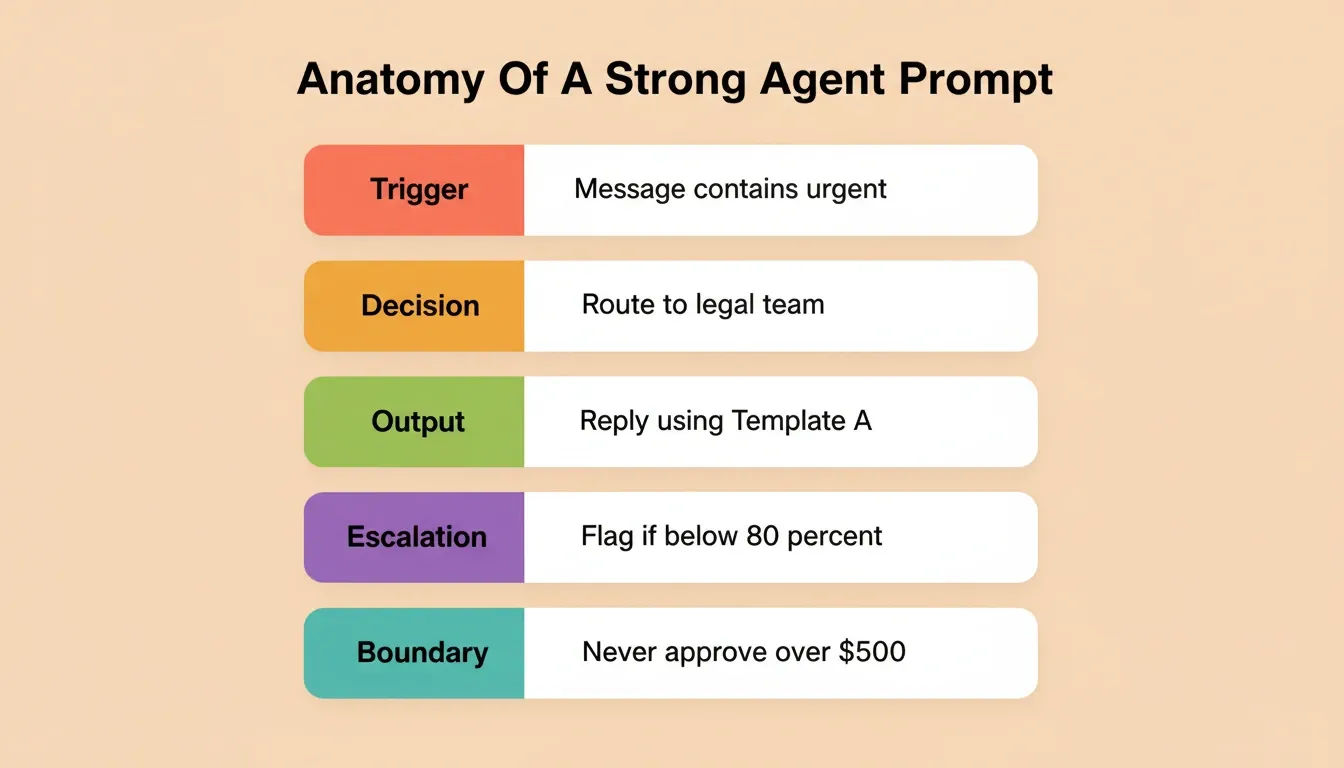
| Prompt Pattern | Weak Example | Strong Example |
|---|---|---|
| Trigger condition | "When I get a message" | "When a Slack message in #support contains 'urgent' or 'down'" |
| Decision rule | "Check if it's important" | "If sender is in VIP list AND subject contains 'contract', route to legal" |
| Output format | "Reply to them" | "Reply using Template A, insert first name and ticket ID from CRM" |
| Escalation path | "Ask me if unsure" | "If confidence score below 80%, flag for human review within 15 minutes" |
| Boundary | "Be careful with money" | "Never approve any transaction above $500 without two-factor human confirmation" |
Where Rocket Fits Into Your No-Code Agent Strategy
Rocket is a vibe solutioning platform. It combines strategic research, AI app building, and competitive intelligence into a single product. The platform is organized around three pillars that work independently or together.
Solve: Validate Before You Build
Before building any agent, Solve lets you validate the business case. Type a question in plain language, such as "Which of our customer support processes has the highest automation ROI?" Solve returns a structured, evidence-backed report with data, analysis, and recommendations.
Most agent projects fail not from poor execution but from automating the wrong process. Solve eliminates that risk. Research from Solve feeds directly into Build, so your agent starts with full context already in place. No re-explaining, no context lost between research and execution.
Build: Generate Production-Ready Agents and Apps
Build is Rocket's AI app builder. Describe what you want in plain English, and Rocket generates a fully functional application, complete with UI, navigation, logic, and production-ready code. Web applications are built in Next.js. Mobile applications are built in Flutter.
Starting points include: from an idea in plain language, from an attachment such as a screenshot or PDF spec, from a Figma design, from an existing GitHub repository, or from Launchpad. With Launchpad, you link a Notion doc, Linear ticket, or Google Sheet and Rocket reads the source directly.
Every build ships with SEO-ready structure, WCAG accessibility compliance, GDPR coverage, and performance optimization by default. Over 25 integrations connect directly into generation: Stripe, PayPal, OpenAI, Anthropic, Gemini, Supabase, Mailchimp, SendGrid, Notion, Linear, Airtable, Google Analytics, Mixpanel, Typeform, Cal.com, and more. Authenticate once and they flow into every build.
Intelligence: Monitor What Matters After You Ship
Intelligence watches competitors across nine signal pillars: website, social, news, GTM, traffic, product, people, business, and reviews. It tells you not just what changed, but what it means for your business specifically.
This closes the loop. Intelligence surfaces a competitor change. Solve analyzes the implications. Build implements the response. The three pillars share context and feed into each other. Nothing is re-explained. Everything compounds.
Which Industries Are Seeing the Fastest Adoption?
Adoption of intelligent agents varies significantly across sectors. The common thread is high-volume repetitive processes with clear decision rules.
-
Customer service leads adoption at 95% in telecom and 92% in banking. Agents handle tier-1 tickets, route escalations, and generate response drafts
-
Healthcare is projected as the fastest-growing vertical with a 35.12% CAGR through 2031. The focus is on clinical documentation and patient triage
-
Financial services use agents for fraud detection, with a 40% accuracy improvement, and for compliance workflows
-
Retail and e-commerce deploy recommendation engines and inventory management agents
According to Deloitte's 2026 State of AI report, 85% of companies expect to customize agents for their unique business needs. Worker access to AI rose by 50% in 2025. The number of companies with 40% or more AI projects in production is set to double within six months.
No-Code Agent Platform Comparison
Not every platform is right for every use case. Here is how the major categories compare:
| Platform Type | Best For | Limitations |
|---|---|---|
| Trigger-action builders | Simple linear automations, app integrations | No custom UI, limited reasoning |
| Visual workflow builders | Multi-step processes, conditional logic | No production app generation |
| AI app builders | Full applications with agent logic and UI | Requires clear product thinking |
| Code-first frameworks | Maximum flexibility, complex reasoning | Requires engineering team |
| Vertical-specific tools | Industry-specific workflows | Limited to one domain |
The right choice depends on whether you need background automation, a workflow with a UI, or a complete application where the agent logic, interface, and data layer are built together.
Common Pitfalls When Building Agents Without Programming
Not every agent project succeeds. Gartner predicts over 40% of agentic AI projects will be canceled by the end of 2027 due to escalating costs, unclear business value, or inadequate risk controls.
-
Scope creep is responsible for the largest share of project failures. Start with one specific task, prove value, then expand
-
Skipping governance creates security risks. Define what the agent can and cannot do before deployment, especially for agents that access sensitive data
-
Poor data quality feeds bad decisions. Agents are only as good as the information and rules they operate on
-
No success metrics means no way to know if the agent is working. Set clear KPIs on day one: response time, accuracy rate, cost per task
-
Over-automation happens when teams remove humans from processes that still need judgment. Build approval gates for high-stakes decisions
The projects that reach production are those with clear task boundaries, defined success metrics, and human oversight built into the workflow from the start.
AI Agents Without Code: The Competitive Advantage That Compounds
The gap between teams deploying AI Agents Without Code and those still running manual processes is widening every quarter. No-code platforms are mature enough today to handle real production workloads. As reasoning models improve, the scope of what agents can handle without human intervention will only expand.
Pick one repetitive process, scope it tightly, and ship your first agent this week. The compound advantage of early adoption means your second and third agents get faster and more valuable.
Rocket gives non-technical teams the complete system. Validate the business case with Solve, build the agent and its interface with Build, and monitor what matters with Intelligence. Start building your first AI agent today and deploy a working solution with no credit card required.
Table of contents
- -What Are No-Code AI Agents and Why Do They Matter?
- -How Do Businesses Benefit From Codeless Agent Workflows?
- -Step-by-Step Process for Building Your First Codeless Agent
- -Phase 1: Validate Before You Build
- -Phase 2: Define the Problem and Map the Workflow
- -Phase 3: Choose the Right Platform and Configure Triggers
- -Phase 4: Test, Iterate, and Deploy to Production
- -How to Write Effective Prompts for No-Code AI Agents
- -Where Rocket Fits Into Your No-Code Agent Strategy
- -Solve: Validate Before You Build
- -Build: Generate Production-Ready Agents and Apps
- -Intelligence: Monitor What Matters After You Ship
- -Which Industries Are Seeing the Fastest Adoption?
- -No-Code Agent Platform Comparison
- -Common Pitfalls When Building Agents Without Programming
- -AI Agents Without Code: The Competitive Advantage That Compounds