Property teams managing multiple locations need centralized intake, priority-based routing, and automated tenant updates. Without a shared system, duplicate tickets and missed follow-ups quietly drain retention and revenue.
How many repair tickets does your team process before someone asks, "Why is none of this connected?" For property teams running more than a handful of units, the answer usually arrives after the third duplicate work order in a single month.
The volume itself is not the problem. According to Hemlane's analysis of 193,000+ rental work orders, tenants submit an average of 3.3 requests per unit per year. That number is manageable. The real issue is routing those requests through texts, email chains, phone calls, and spreadsheets. Without a shared system, nothing connects.
This blog walks you through building a structured maintenance workflow across multiple properties. You will learn everything from setting up a single intake point to automating tenant communication and holding contractors accountable.
What is a Maintenance Request System?
A maintenance request system is a centralized platform. It captures, categorizes, routes, and tracks repair requests across rental units or commercial properties. Instead of fragmented phone calls and emails, your team works from a single source of truth for every open, in-progress, and completed work order.
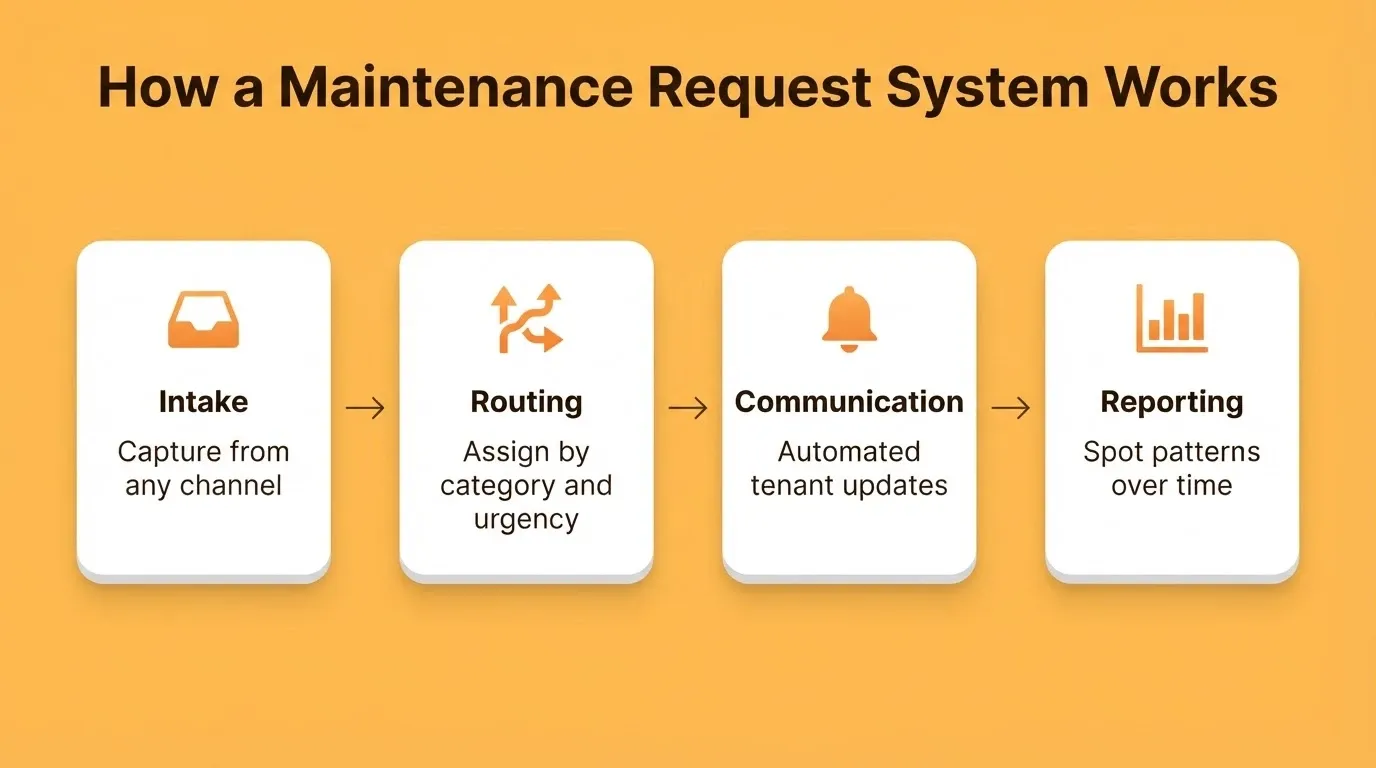
An effective system handles four core functions. First, intake collects requests from any channel. Next, routing assigns each request to the right vendor by category and urgency. Then, communication keeps tenants informed without manual follow-up. Finally, reporting surfaces patterns across units and contractors over time.
For teams managing a single property, a spreadsheet can cover the basics. For teams managing multiple properties, however, coordination overhead grows faster than the unit count. That is when a proper system becomes essential.
Why Multi-Property Maintenance Coordination Falls Apart
The breakdown is rarely about labor. It is about information moving through channels that were never designed to connect. Here is what typically goes wrong.
-
Requests arrive through too many doors. One tenant texts, another emails, a third calls the front desk. Each message starts a separate trail. A plumbing issue reported by phone on Monday gets re-submitted via email on Wednesday, and both land as new tickets.
-
Category concentration catches teams off guard. Hemlane's dataset shows plumbing alone at 25.4% of all work orders. HVAC follows at 12.3%, appliance repair at 12.2%, and electrical at 8.4%. Together, the top four categories cover roughly 70% of every call a property team will take.
-
No shared view across locations. When each building tracks repairs in its own spreadsheet or inbox, the portfolio picture disappears. A recurring leak in Building C gets handled three times as three separate issues.
-
Contractor status lives in someone's head. A vendor marks a job done on their end, but the tenant has not confirmed. The manager assumes it is closed.
Property teams that audit their workflows often find that most coordination failures trace back to intake fragmentation, not technician skill.
| Category | Share of Work Orders |
|---|---|
| Plumbing | 25.4% |
| HVAC | 12.3% |
| Appliance Repair | 12.2% |
| Electrical | 8.4% |
| Handywork | 5.8% |
Those five categories make up the bulk of every maintenance queue. Knowing the concentration shapes how you design intake forms and pre-qualify your vendor list.
Spreadsheets, Off-the-Shelf Software, or Custom-Built: What Fits Your Portfolio?
Before building anything, it helps to understand the real trade-offs. Most property teams cycle through all three options before landing on the right fit.
| Approach | Best For | Key Limitation |
|---|---|---|
| Spreadsheets | 1-10 units, single property | No automation, no tenant-facing intake, no routing logic |
| Off-the-shelf PM software | 200+ units, full-time coordinator | High cost, rigid workflows, data lock-in |
| Custom-built system | 10-200 units, specific portfolio structure | Historically required a developer, but no longer |
The middle tier is the most underserved segment in property management software. Most platforms were designed for large operators with full-time maintenance coordinators. If your portfolio sits between 10 and 200 units, you face a tough choice. You either overpay for features you never use, or you stitch together workarounds that break under volume.
How to Create a Single Intake Point for All Repair Requests
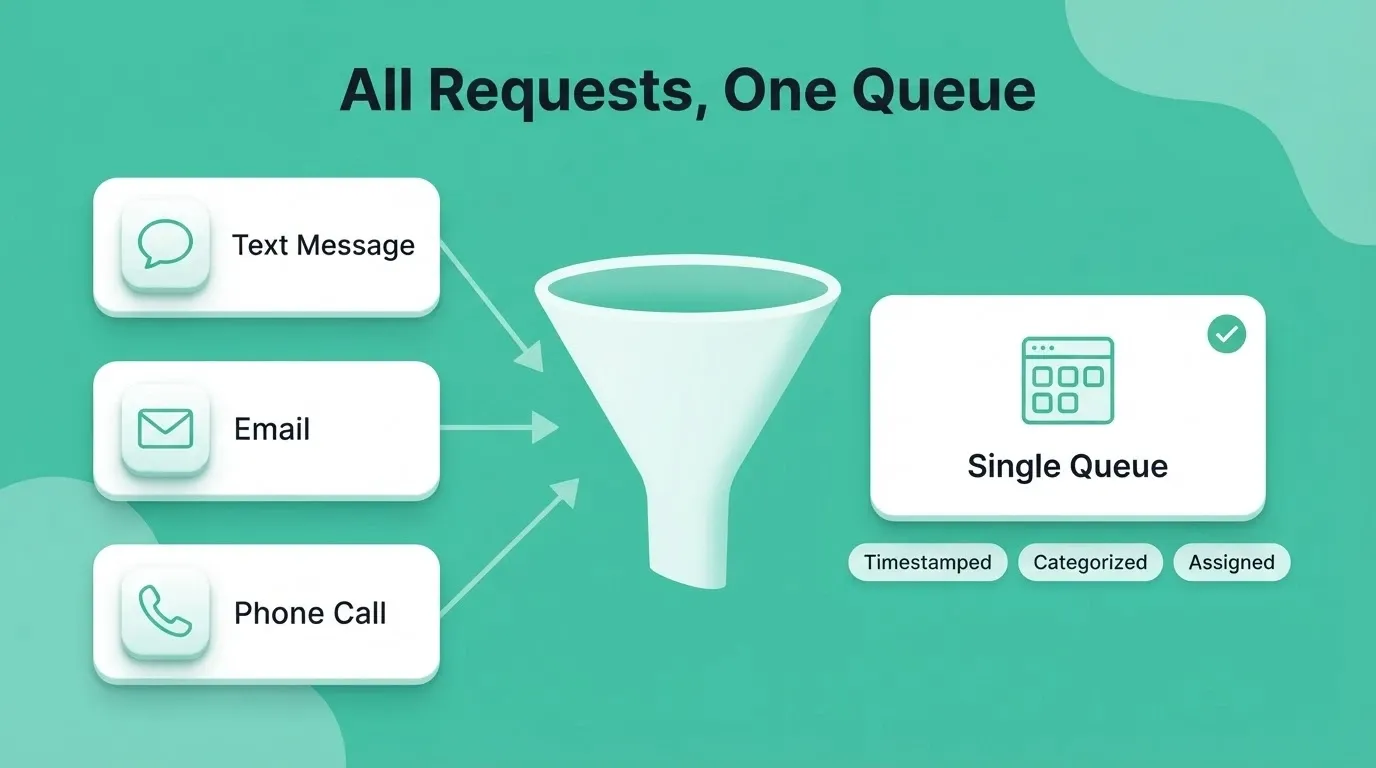
Consolidating intake is the highest-leverage change a multi-property team can make. Every request, regardless of source, needs to land in one place. Building a client intake portal tailored to your portfolio structure is the most direct path to achieving this.
-
One form per portfolio, not per building. A single digital form with a property selector field captures the unit, category, urgency, and photo evidence in under two minutes. Tenants get a confirmation number, and managers get a timestamped record.
-
Channel routing feeds the same queue. Text, email, and phone calls should all funnel into the same dashboard. If a tenant texts a photo of a broken faucet, the system creates a ticket with the image attached. It does not leave the message buried in someone's thread.
-
Category dropdowns reduce triage time. When the form forces tenants to pick from a predefined list, such as plumbing, HVAC, electrical, appliance, or pest control, the routing logic starts before a human touches the ticket.
-
Self-service cuts inbound volume. A short FAQ section on the intake form handles the most common questions. Think "Who handles lightbulb replacement?" or "What counts as an emergency?" The National Multifamily Housing Council reports 45.6 million renter households in the U.S. alone. Even a small reduction in unnecessary tickets compounds fast at that scale.
Building a custom intake form used to mean hiring a developer. Today, you describe what you need in plain language. The system generates a working form with backend logic, database connections, and a live URL.
What Should a Priority and Routing System Look Like?
Once requests land in a single queue, the next question is which ones move first. A well-designed priority routing system is the backbone of any multi-property maintenance workflow.
-
Three-tier priority works for most portfolios. Emergency (water, fire, gas, lockout) gets a sub-4-hour response window. Urgent (HVAC failure, appliance breakdown, electrical issues) targets 24 hours. Routine (cosmetic repairs, minor fixtures, non-critical items) schedules within 5 business days.
-
Auto-routing by category saves manual triage. Say the tenant selects "plumbing" and marks it as "water actively leaking." The system flags it as emergency and notifies the on-call vendor automatically. No manager needs to read the ticket first.
-
Property-specific rules prevent misfires. A priority system built for a 200-unit apartment complex may not fit a portfolio of 15 single-family rentals. The routing logic should adjust by property type, location, and vendor availability.
-
SLA tracking creates accountability. Every ticket should carry a timestamp and a target resolution time. When a ticket ages past its SLA, the system escalates automatically. It does not wait for a manager to notice.
For teams that also manage a central purchase approval system alongside maintenance operations, connecting vendor assignments to approval workflows cuts both response times and coordination overhead.
Maintenance Request Priority Routing: Emergency, Urgent, and Routine Paths
How Does Automated Communication Change Tenant Satisfaction?
Speed matters more than most property managers expect. In fact, communication speed matters even more than repair speed. The data backs this up clearly.
-
The 24-hour threshold is real. A study by Neiboroughly analyzed 86,000 requests across 280 properties. It found that residents whose requests were resolved within 24 hours rated satisfaction at 91% and renewed leases 16 points above building average. After 72 hours, satisfaction drops to 31%.
-
The number one complaint is silence, not slowness. In the same dataset, 62% of dissatisfied residents said their main frustration was not knowing when their request would be addressed. They were not angry about waiting. They were angry about waiting with no information.
-
Four automated messages change the curve. Acknowledgment within one hour ("We received your request"). Status at four hours ("Scheduled for tomorrow at 10 AM"). Completion confirmation ("Is everything working?"). A 48-hour satisfaction check. This sequence reduces dissatisfaction by 28% on the first message alone.
Automated messages are straightforward to build. A simple status-change trigger on each ticket sends pre-written texts or emails at the right moment. The real challenge is having a system where status changes are tracked consistently across every property in your portfolio.
Building Accountability Into Contractor Workflows
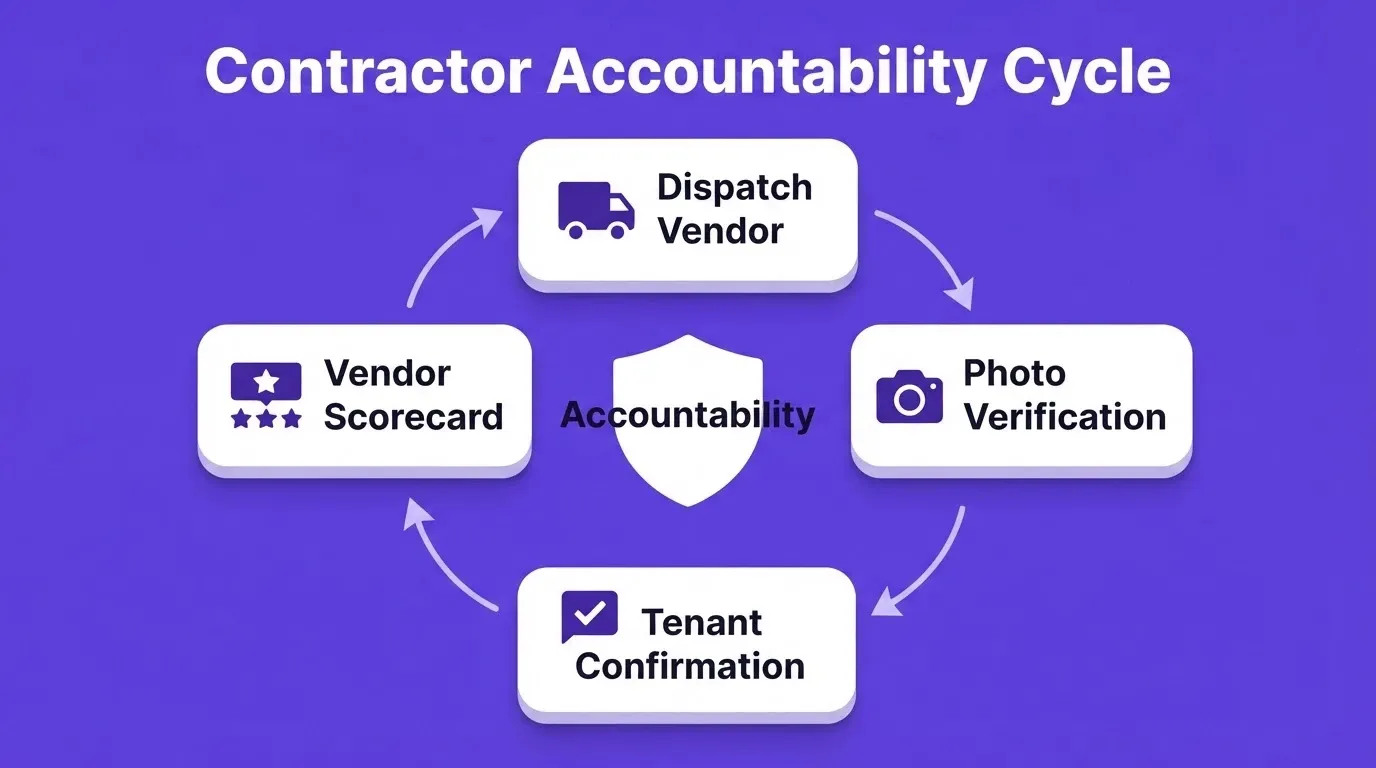
Dispatching a vendor is the easy part. Knowing whether the work actually got done is where most portfolios lose visibility. Fortunately, a well-structured system solves this problem at every stage.
-
Require photo verification at close-out. Before a vendor marks a ticket as complete, the system captures before-and-after photos. This creates an audit trail for the property manager and evidence for the tenant.
-
Track response time per vendor. Across your portfolio, which contractors consistently hit the SLA and which ones routinely miss? Vendor scorecards built from real ticket data replace subjective impressions with numbers.
-
Tie payment release to tenant confirmation. Send the tenant a simple "Is this resolved? Yes or No" prompt before the invoice clears. It adds one layer of quality control and catches incomplete work before payment goes out.
-
Monitor recurring issues by unit and vendor. If the same plumbing problem appears three times at the same unit, the system should flag it. If the same vendor keeps returning for follow-up visits, that pattern needs attention too.
Teams that already track performance data can apply the same discipline to vendor contract renewals. Use ticket history to negotiate better terms or replace underperforming contractors before the next season.
Why Property Teams Are Building Custom Maintenance Systems
Most property management software was designed for large operators with hundreds of units and full-time maintenance coordinators. If your portfolio sits between 10 and 200 units, you pay for features you do not use. Or you stitch together spreadsheets and email threads that eventually break.
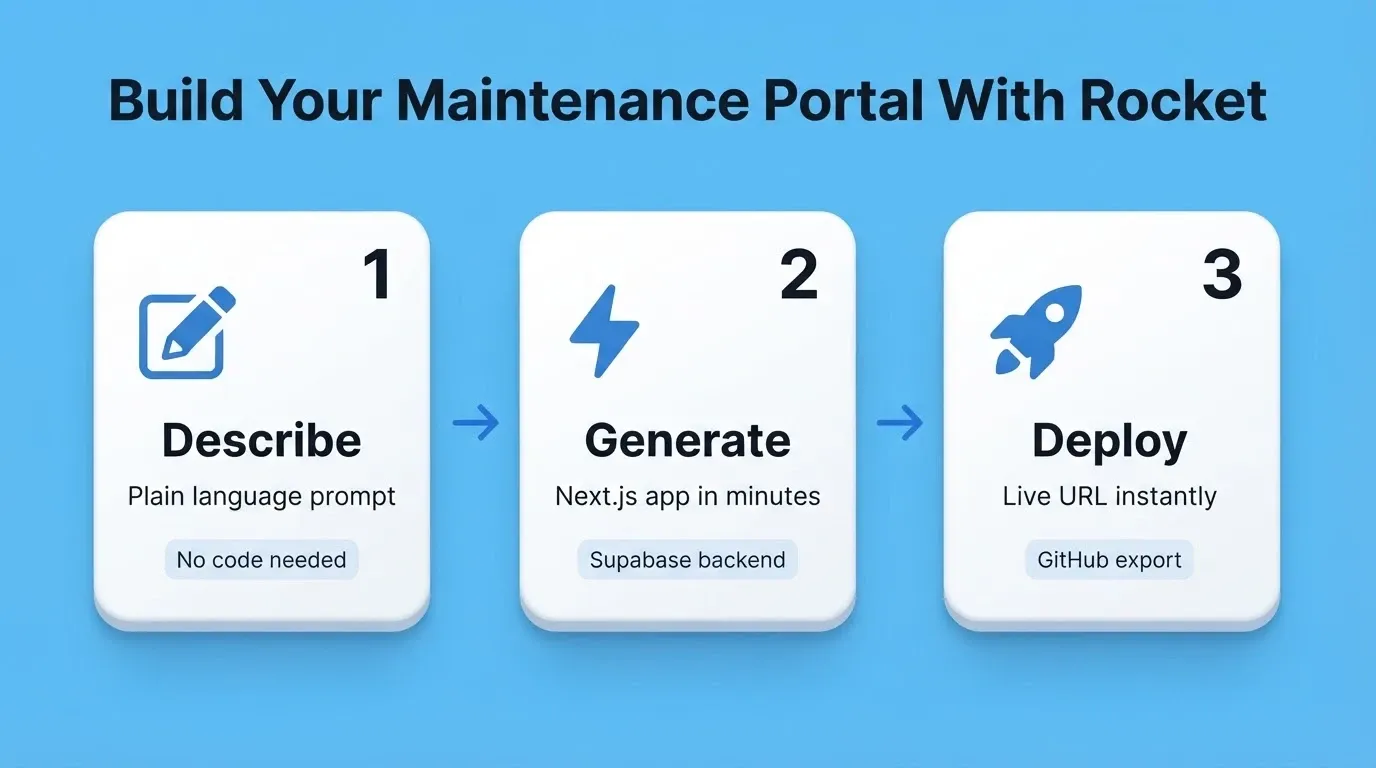
The good news is that building a custom system no longer requires a developer or months of work. You describe the system you need in plain language. Rocket then generates a working Next.js web application with a Supabase backend, authentication, and deployment from that single description. Most apps generate in under three minutes.
-
Your portfolio structure becomes the app structure. A property group with 40 single-family rentals across three cities needs a different interface than a team managing two 100-unit apartment complexes. Rocket adapts the data model, routing logic, and reporting views to fit the way your operations actually run.
-
No vendor lock-in. The code Rocket generates is clean Next.js that you own and can export to GitHub. If you outgrow the system or your needs shift, migration is not a project in itself.
-
Supabase handles the backend automatically. Postgres database, authentication, file storage, and real-time updates come pre-wired. You do not need a backend developer or a separate infrastructure contract.
-
Integrations connect in one step. Use Twilio for SMS tenant notifications, Stripe for contractor payment release, and Mailchimp for email campaigns. Authenticate once and they flow into every build.
-
Iterate through conversation. After the first build, describe the change you want in plain language. Adjust priority tiers, add a vendor scorecard view, or connect Stripe for contractor payments. There is no change limit.
A 500-unit property that improves response time from 72 hours to 24 hours prevents 15 to 20 move-outs per year. According to Neiboroughly's research, that saves between $92,000 and $123,000 in turnover costs annually.
What Recurring Patterns Tell You About Your Properties
Fixing individual requests is operational work. Spotting patterns across requests is strategic work that compounds over time. As your system matures, the data it collects becomes one of your most valuable portfolio management tools.
-
Frequency by unit reveals building-level problems. If Unit 4B submits plumbing requests every quarter, the underlying issue is probably a pipe, not a faucet. Tracking request volume by unit over time turns reactive fixes into proactive capital planning.
-
Seasonal spikes predict vendor demand. HVAC failures cluster in January for cold-climate markets and May through August for Sun Belt properties. Pre-booking vendor capacity two months before the peak season reduces response times during the surge.
-
Cost per unit per year becomes a portfolio KPI. The industry estimates roughly $200 per request. At 3.3 requests per unit per year, ongoing maintenance costs around $660 per unit annually before major repairs. Tracking this number by property identifies the buildings that drain disproportionate resources.
-
Repeat visit rates flag vendor quality issues. A 15% callback rate on a specific vendor's jobs is a signal. A 5% rate across the rest of your vendor list is the benchmark.
-
Preventive maintenance reduces reactive volume. Properties that schedule seasonal HVAC servicing, annual plumbing inspections, and appliance checks see 15-25% fewer emergency requests. A good system tracks both reactive tickets and scheduled preventive tasks in the same dashboard.
For teams ready to move beyond spreadsheets, building a proper internal tool and admin panel for maintenance operations is the next logical step. Start with the data you already have. The patterns will surface quickly.
The Future of Organized Maintenance Requests
Property management is becoming more data-driven. The teams that organize maintenance requests into a structured, trackable system today will have the retention numbers and vendor relationships to show for it tomorrow.
As portfolios grow and tenant expectations rise, the gap between teams running on shared dashboards and those running on email threads will only widen. The system you build now compounds over time. Every ticket closed cleanly, every pattern spotted early, and every vendor scorecard updated automatically adds up to a stronger operation.
You described the problem. Rocket builds the system. Start building at Rocket.new.
Table of contents
- -What is a Maintenance Request System?
- -Why Multi-Property Maintenance Coordination Falls Apart
- -Spreadsheets, Off-the-Shelf Software, or Custom-Built: What Fits Your Portfolio?
- -How to Create a Single Intake Point for All Repair Requests
- -What Should a Priority and Routing System Look Like?
- -How Does Automated Communication Change Tenant Satisfaction?
- -Building Accountability Into Contractor Workflows
- -Why Property Teams Are Building Custom Maintenance Systems
- -What Recurring Patterns Tell You About Your Properties
- -The Future of Organized Maintenance Requests