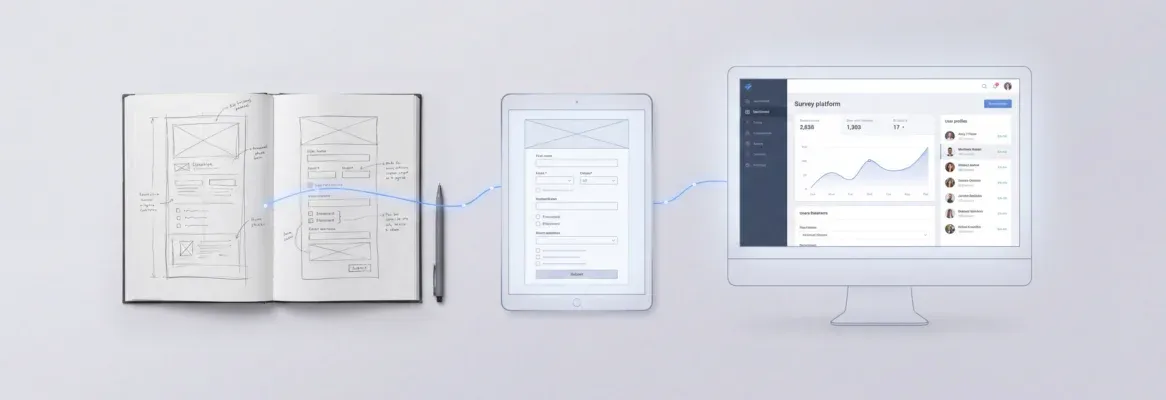
What makes building apps faster and simpler today? Vibe coding uses AI-driven prompts to generate code, enabling beginners to create apps, choose tools, and launch projects efficiently without deep technical expertise.
How do you build apps without writing hundreds of lines of code?
Well, that’s exactly what vibe coding is all about. In plain language, vibe coding lets anyone create apps using everyday descriptions and AI tools, even if you don’t have any coding experience.
The idea is simple: speak or write what you want the app to do, and the AI assistant generates the initial code for you so you can keep moving.
AI tools are everywhere in development now. According to Stack Overflow’s 2025 Developer Survey, about 84% of developers use or plan to use AI tools in their workflow, showing how mainstream these tools have become in helping people build software.
So, if you want to know how to start vibe coding with no experience, this blog will walk you through choosing tools, writing prompts, and shipping your first web app.
What is Vibe Coding?
If you’ve ever wanted to build apps but felt intimidated by coding, vibe coding is here to simplify things. It lets AI handle the hard work while you focus on your ideas.
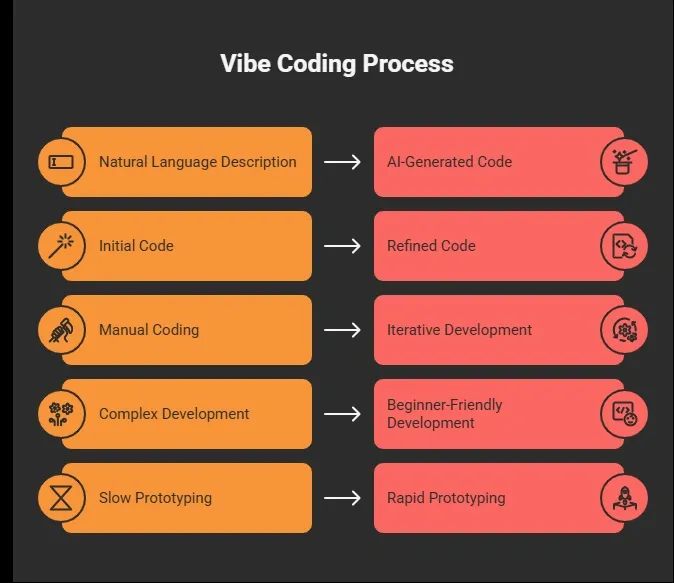
The takeaway? With vibe coding, you spend less time stressing over syntax and more time bringing your ideas to life.
👉Worth a Quick Read: What is Vibe Coding: A Simple Guide for Developers Today
Why Vibe Coding is Beginner-Friendly?
Starting with coding can feel overwhelming, but vibe coding makes it approachable for anyone. You don’t need prior experience to create something functional.
Here’s why beginners love it:
-
No prior coding required: AI handles most of the technical work.
-
Initial code generation: Your ideas turn into working code without writing everything manually.
-
Follow-up prompts: You can tweak and improve your app step by step.
-
Instant results: Run your app immediately without setting up a complicated development environment.
-
Quick wins: Even absolute beginners can build a simple habit tracker or small web app in just a few hours.
The takeaway? Vibe coding turns learning into doing, letting you see results fast while keeping it fun and stress-free.
Picking the Right Tools
Before you start vibe coding, choosing the right coding tools makes everything easier. Some popular options are Rocket.new, Replit Agent, VS Code with AI assistants, and Claude Code. Each has strengths depending on whether you want a full web app, rapid prototyping, or just AI-generated initial code.
Here’s a quick table for clarity:
| Tool | Best Use Case | Beginner-Friendly Level |
|---|---|---|
| Rocket.new | Web/Mobile, Ladning page, Dashboards, Tools from plain text | High |
| Replit Agent | Iterative code generation and running apps | Medium |
| VS Code + AI Assistant | Editing and debugging AI generated code | Medium |
| Claude Code | Generating initial code from natural language | High |
Choosing the right tool from the start can save you time and frustration. Pick one that matches your project type and comfort level, and you’ll find vibe coding much smoother and more enjoyable.
Setting Up Your First Project
Getting started with your first app can feel intimidating, but keeping it simple makes it manageable. A small project like a streak counter or habit tracker is perfect for beginners.
Here’s a step-by-step approach:
-
Create a project root folder: This keeps all your files organized.
-
Open your AI coding tool or VS Code: Choose the environment you’re most comfortable with.
-
Write an initial prompt in plain language: For example, “I want a habit tracker that shows streaks and sends reminders.”
-
Generate initial code: Let the AI assistant handle the coding.
-
Run and test your app: Look out for any error messages.
-
Use follow-up prompts: Tweak, fix, or add features to improve your app.
Starting small and iterating with AI makes the whole process less intimidating. Soon, you’ll have a working app without getting lost in complex code.
Writing Code With AI Tools
Even though AI handles most of the heavy lifting, having a little familiarity with code can make your experience smoother. You don’t need to be an expert just knowing how to tweak things helps.
Here’s what you’ll typically do:
-
Adjust variable names: Make the code more readable and meaningful.
-
Add UI elements: Buttons, text fields, or images to improve your app.
-
Change text and colors: Customize your app’s look and feel.
-
Handle error messages: If the AI code shows an error, ask it what went wrong or provide follow-up prompts.
Vibe coding is iterative the AI acts like a pair programmer. You suggest, it writes. You tweak, it adapts. This makes coding less intimidating and much faster than manually writing hundreds of lines of code.
Community Insight
It helps to see how real creators experience vibe coding and tools like Rocket.new. These insights show what beginners can realistically achieve.
LinkedIn creator Saurabh Giri shared: “Rocket.new transforms what would normally take hours of setup into a working app almost instantly from a clear prompt.”
Hearing from people like this reminds us that even non-developers can build functional apps quickly, and engaging with community tips can make the process easier and more enjoyable.
Rocket.new: Not a basic Vibe Coding Platform
Rocket.new is designed for creators who want to turn their ideas into real apps without drowning in code. Its not your regular Vibe coding platform its a vibe solutioning platform. Think of it as your AI-powered partner that understands plain language and helps you build apps fast. Even if you’ve never coded before, you can see your concepts come alive in a functional web app.
It’s not just about generating code, it’s about vibe coding in action. You describe your idea, the AI handles the structure, and you guide it with follow-up prompts. The process feels intuitive, fun, and surprisingly fast, making it perfect for beginners or anyone experimenting with new projects.
Top features:
-
Prompt to App Creation: Builds apps directly from single prompts
-
Figma Import: Converts design files into live, editable layouts
-
Reusable Components: Speeds up building with ready-to-use elements
-
Live Preview: Shows instant updates while editing
-
AI-Powered Backend: Automatically handles logic, data, and workflows
-
Custom Domain Support: Publishes projects with a branded domain
-
Code Export: Allows developers to extend or customize later
-
Command-based actions: Use / and @ to run actions and quickly scope edits.
Use cases:
-
Personal portfolio websites: Quickly showcase your work without coding headaches.
-
Habit trackers and streak counters: Build small tools to track your goals or routines.
-
Rapid business prototypes: Validate ideas quickly and share functional apps with others.
Rocket.new makes vibe coding tangible, it bridges your ideas to working apps using AI, helping beginners and creators focus on innovation rather than technical barriers.
Common Mistakes to Avoid
Even when vibe coding makes app building easier, beginners can stumble if they’re not careful. Knowing what to watch out for will save you time and frustration.
-
Vague prompts: AI struggles without clear instructions.
-
Skipping follow-ups: Small tweaks and refinements make your code work correctly.
-
Overcomplicating projects: Start simple small apps are easier to learn from.
-
Ignoring community advice: Forums, Discords, and LinkedIn threads can save hours of trial and error.
The takeaway? Stick to clear instructions, keep projects simple, and don’t hesitate to ask for help—these habits make vibe coding much smoother and more enjoyable.
How to Start Vibe Coding With No Experience
The problem is that many beginners want to build apps but feel overwhelmed by coding languages, syntax, and development environments. The solution is vibe coding, which lets AI coding tools handle the heavy lifting while you focus on your ideas. Platforms like Rocket.new make this process easier by converting plain language into functional web apps.
The main takeaway is simple: starting vibe coding with no experience is entirely possible. Begin with a clear idea, pick the right tools, and let AI assist you. Focus on learning through doing, and soon you’ll be building real apps with confidence.