
We built the same B2B SaaS dashboard in Lovable, Bolt, v0, and Rocket.new, then scored each across six dimensions. Rocket.new delivered a production-ready full-stack app on the first prompt, auth, Stripe, database, and deployment included. For teams that need to ship real products, not just prototypes, Rocket is the strongest choice in this Lovable vs Bolt vs v0 vs Rocket.new comparison.
Most AI builder comparisons are written by people who never actually built anything. We ran the same B2B SaaS dashboard through all four tools, logged every failure, and scored what came back.
Why AI Builder Comparisons Never Show Actual Output
Why do comparison articles about AI app builders never show the actual generated code and live preview? Most publish feature tables based on marketing pages. None run the same project brief through each tool and show what came back.
That gap matters. According to the Stack Overflow 2024 Developer Survey, 76% of developers now use AI tools in their development process, up from 44% the prior year (source). Developers want real results from these platforms, not spec sheets. They want to know which tool actually delivers production-ready code.
So we ran one identical brief through Lovable, Bolt, v0, and Rocket. One brief. Four tools. Four build sessions. Six scoring dimensions. Here is what happened.
What Was the Build Brief?
Every AI app builder handles complexity differently. To test them fairly, we needed a project that represents what non-technical founders and small development teams actually want to ship, not a landing page, but a real full-stack app.
-
App type: B2B SaaS dashboard for team project management, a full-stack application with frontend, backend, and database
-
Authentication: Multi-role user auth with Admin, Editor, and Viewer roles plus email-based sessions
-
Data layer: A database schema with users, projects, and tasks tables with proper relationships and data storage
-
Payments: Stripe subscription billing with plan management on the settings page
-
Frontend: Clean data table with sorting, filtering, pagination, and responsive layouts
-
Custom logic: Role-based access control that restricts what each user can view and edit
This brief tests backend logic, database integrations, authentication, payments, UI fidelity, and deployment, the full-stack capabilities that separate a prototype from a production app.
How Did We Score Each AI App Builder?
We graded each tool across six dimensions that map to what matters when building full-stack applications for production.
| Dimension | What We Tested |
|---|---|
| Prompt Quality | Does the tool ask clarifying questions or generate blindly from guesses? |
| Code Security | Are API keys, session tokens, and auth layers properly secured? |
| UI Fidelity | Do layouts feel production-ready or like a rapid prototype? |
| Integration Depth | Can it wire Stripe, Supabase, and external services without manual setup? |
| Build Speed | How fast from first prompt to a functional, testable result? |
| Developer Handoff | Is the code clean enough for a team to extend? GitHub sync, version control? |
Each dimension scored 1–5. A perfect tool would score 30/30.
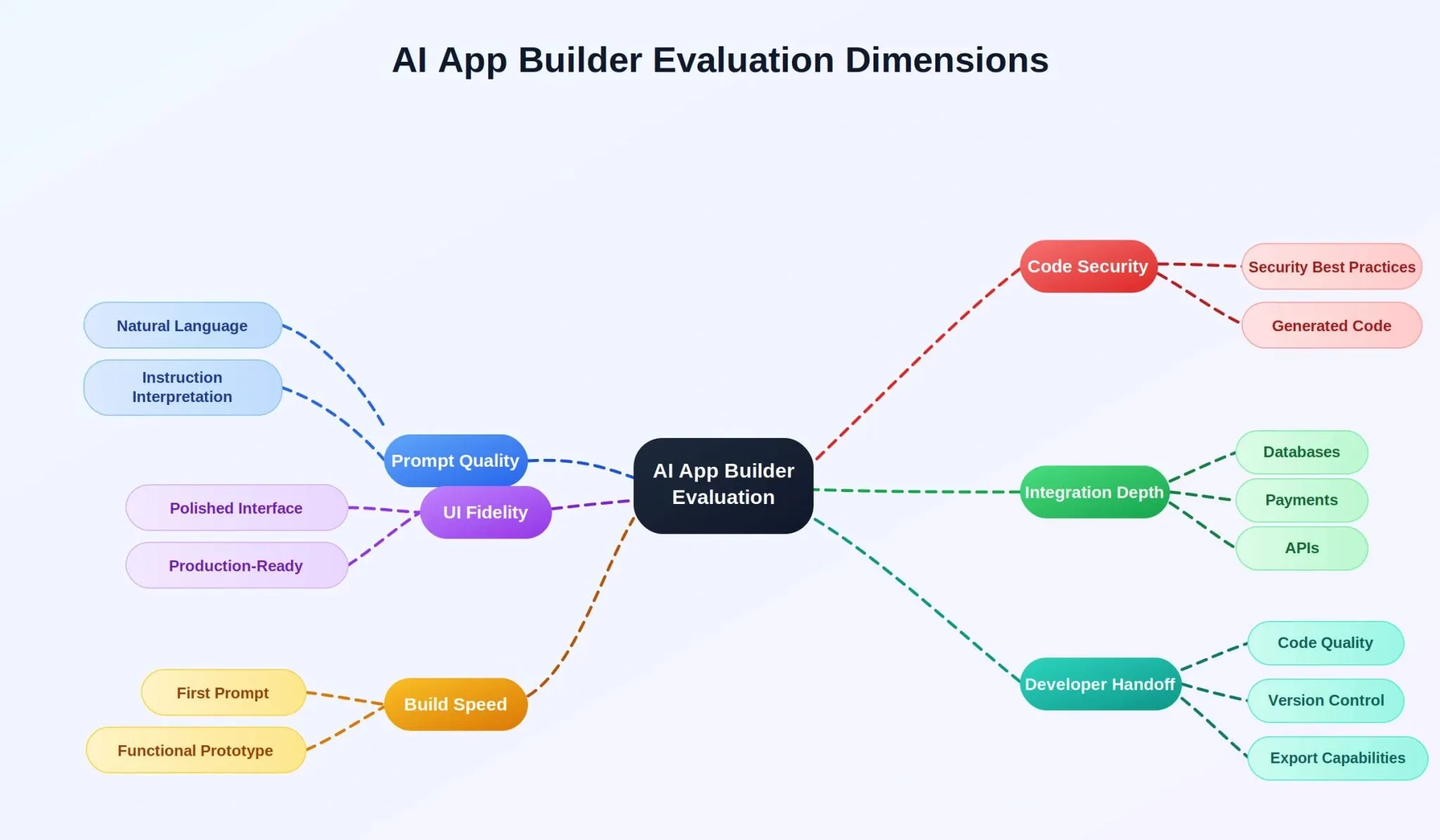
Six scoring dimensions used to evaluate each AI app builder across the same B2B SaaS brief.
What Happened When We Used Lovable?
Lovable leans heavily into visual-first platforms and it shows. The AI-assisted coding experience feels beginner-friendly and forgiving. You describe what you want in plain English, and Lovable generates a polished frontend within seconds using React components and Tailwind CSS.
- Prompt handling: Lovable accepted our full brief and generated a dashboard layout with navigation, sidebar, and card-based UI components. It asked zero clarifying questions before building. The chat mode interface is intuitive and accessible.
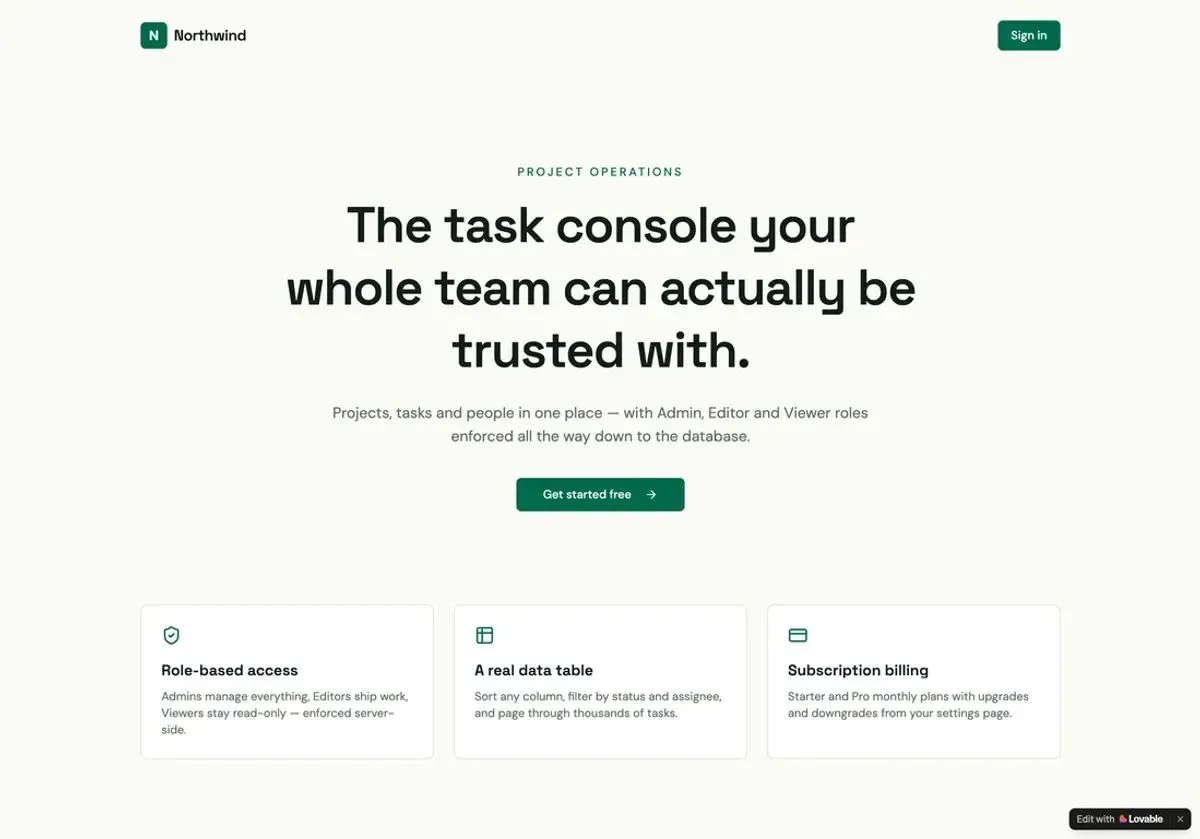
Lovable's first output: a clean marketing landing page with role-based access copy, but no working dashboard behind it yet.
- What worked: The UI components rendered cleanly. Lovable generates clean React code with good component structure. The version history feature tracked changes well, and the code editor gave full access to browse and edit generated files. The live preview updated fast.
Getting the role-based authentication working required a dedicated follow-up prompt. Here is what that exchange looked like:
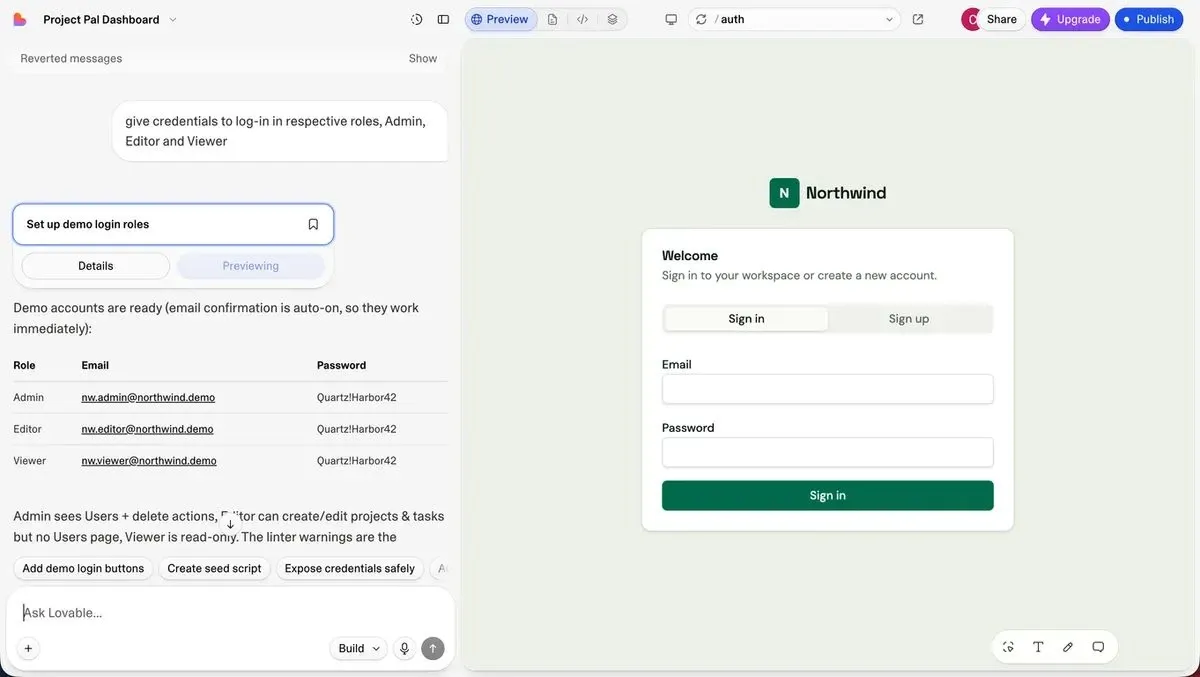
A separate prompt was needed just to set up demo login credentials for each role, Lovable did not handle this in the initial build.
- Where it broke: When we wanted Stripe billing, Lovable produced frontend placeholders with no real backend code. The database schema was shallow, no proper relationships. Authentication was visual only with no real session management. The Supabase integration required multiple follow-up prompts and manual wiring that burned through credits fast.
Lovable Cloud does expose a backend panel showing the database tables it created, but the frontend wiring to those tables was incomplete:
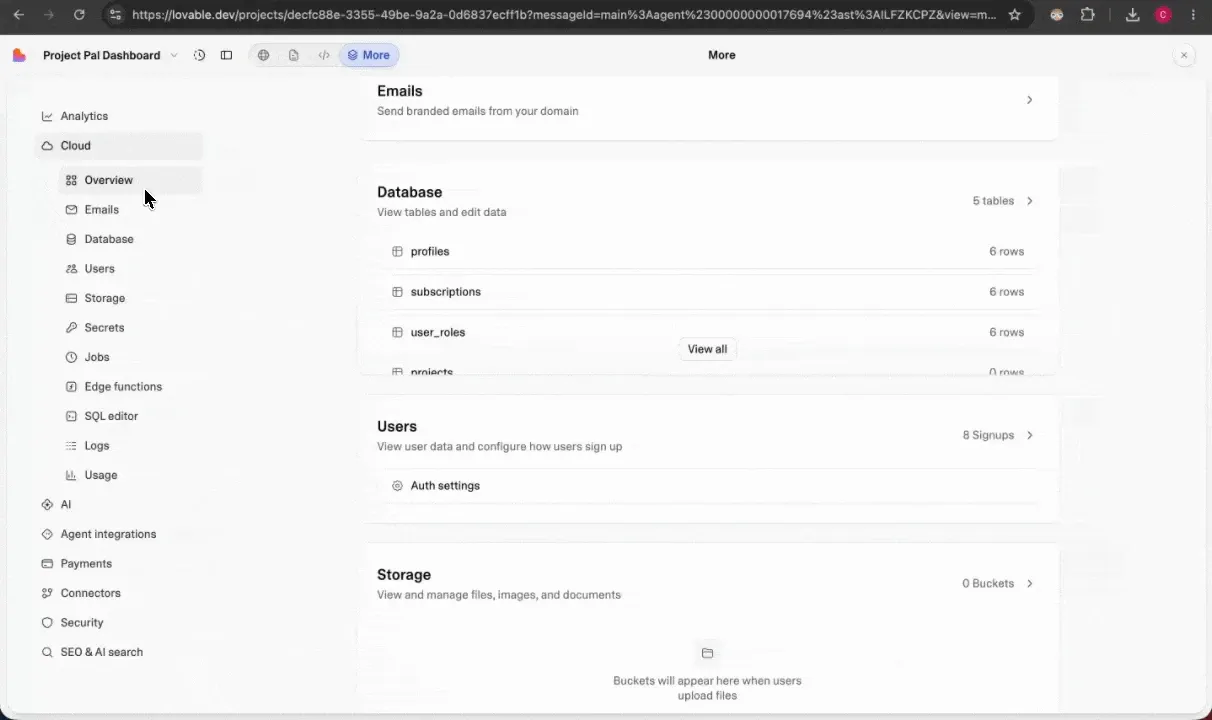
Lovable Cloud's backend: database tables exist (profiles, subscriptions, user_roles) but the frontend-to-database connection required significant manual follow-up work.
After multiple follow-up prompts, the three role views did render correctly:
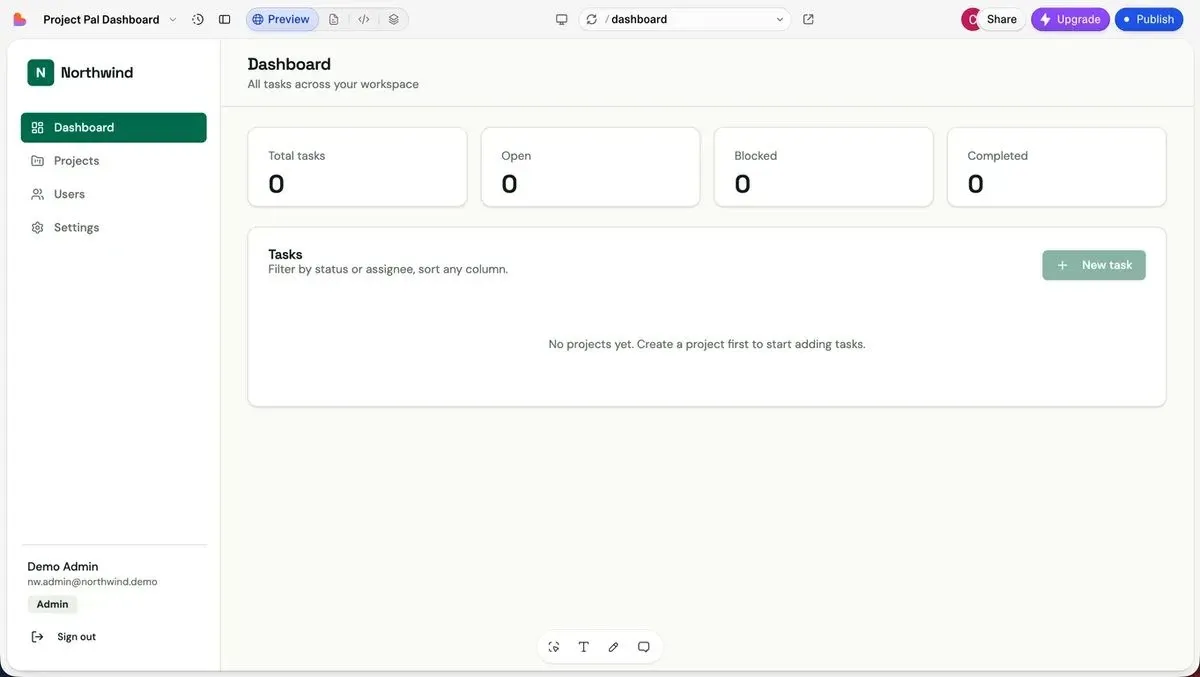
Admin role: full access with New Task, Users management, and Settings visible in the sidebar.
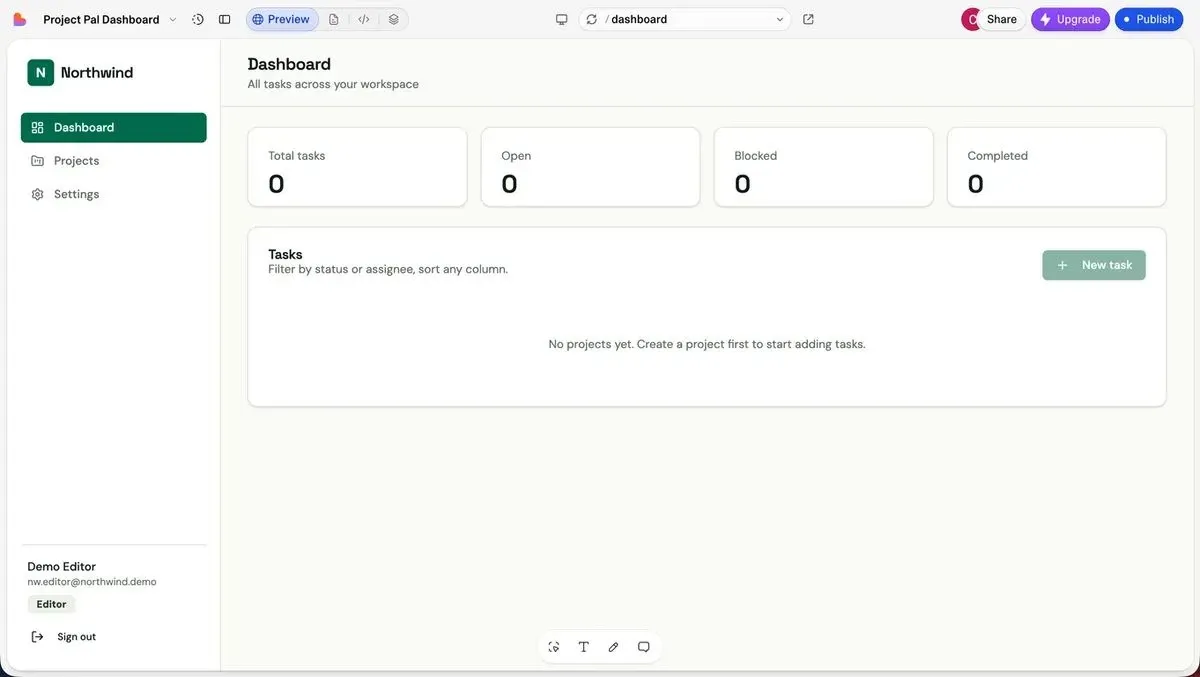
Editor role: New Task button present, but Users menu absent, partial role restriction working after follow-up prompts.
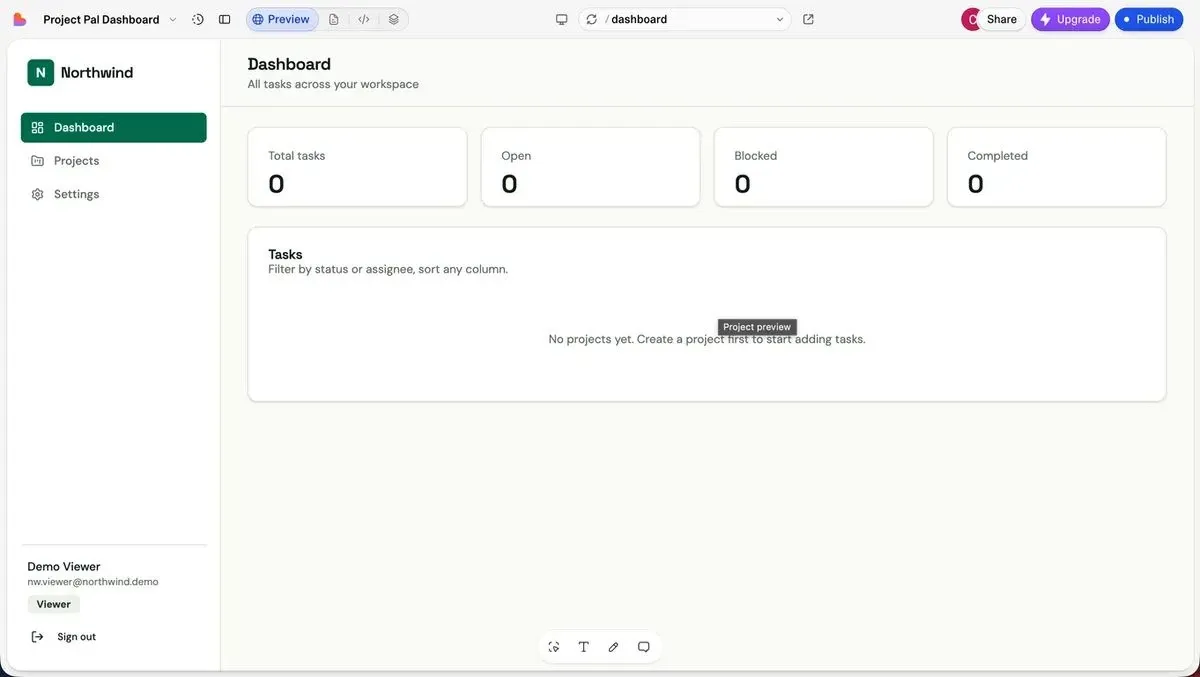
Viewer role: read-only dashboard with no New Task button and no management menus, visual role separation achieved after several iterations.
-
Code quality: The exportable code needed significant work. Lovable generated components in a flat file structure without reusable components or separation of business logic. Non-developers would struggle to extend this code.
-
Pricing and limits: The free tier gives limited generations. We hit usage limits before finishing the data table filtering. Lovable Cloud keeps your project on their hosting unless you explicitly export. Paid plans start at $20/month for more credits.
-
Live Deployment: Free-tier deployments display a persistent "Edit with Lovable" badge on the live site, a visible sign of platform dependency that paid plans remove.
Score: 17/30. Choose Lovable if you want a polished frontend prototype fast for demos or investor presentations. The low-code market is expanding rapidly, MarketsandMarkets projects it reaching $45.5 billion by 2025 at 28.1% CAGR, and Lovable captures the visual prototyping slice. It just covers less than half the full-stack.
What Happened When We Used Bolt?
Bolt positions itself as an AI-first development environment with more control over backend code through its browser IDE. Bolt and Lovable share a category, but Bolt leans more toward developers who want hands-on code access.
- Prompt handling: Bolt accepted the brief immediately and started generating a Next.js project with routing inside its browser IDE. No planning phase, no questions asked. Bolt generates code fast, the speed is honestly impressive for rapid prototyping.
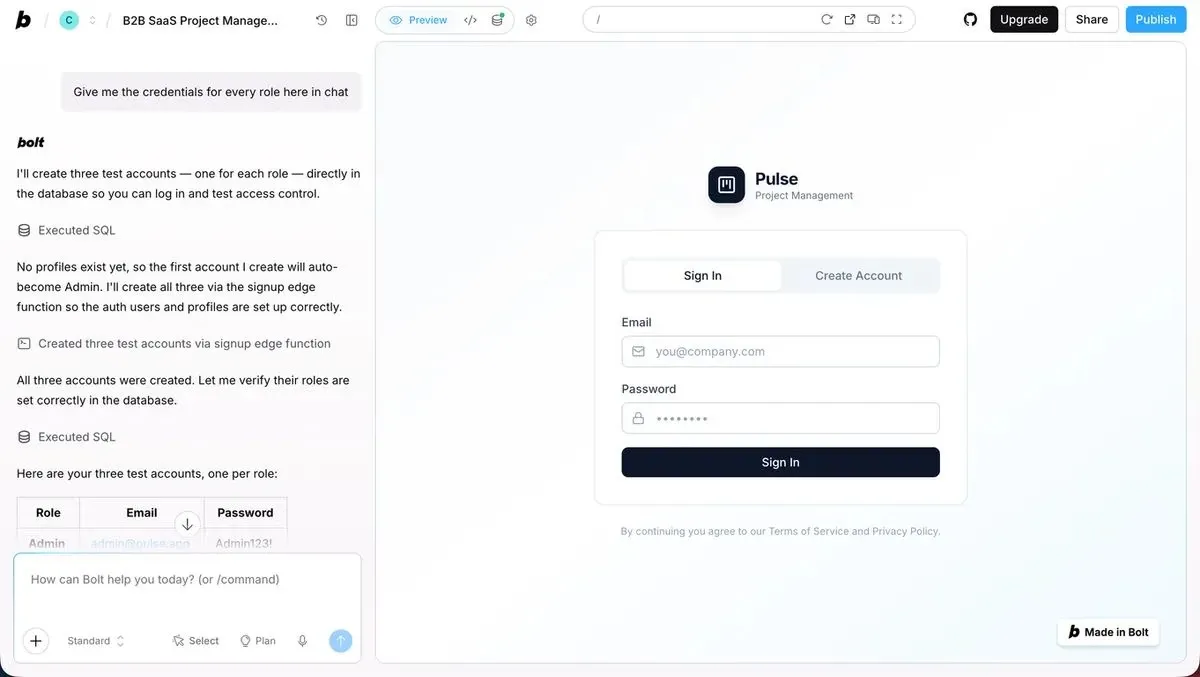
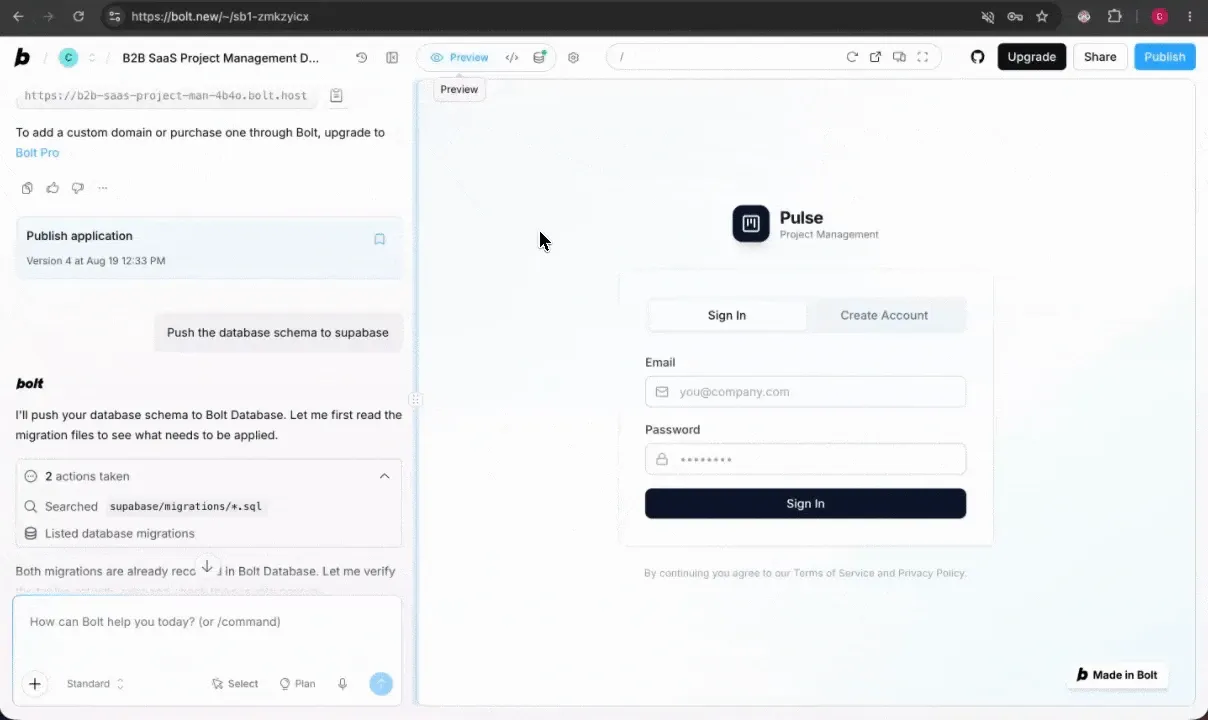
Bolt's first output: the browser IDE with the generated login screen and role credential setup in chat.
- What worked: Bolt generated a working data table with pagination faster than other platforms. The code editor inside Bolt feels comfortable for frontend developers who prefer more control over their project structure. Bolt handles rapid prototyping well, you can scaffold quick prototypes and internal tools in minutes. GitHub sync connected after configuration.
Bolt production database, real request metrics, and auth running, all from the initial build.
The role-based UI did render visually. Here are all three role views Bolt produced:
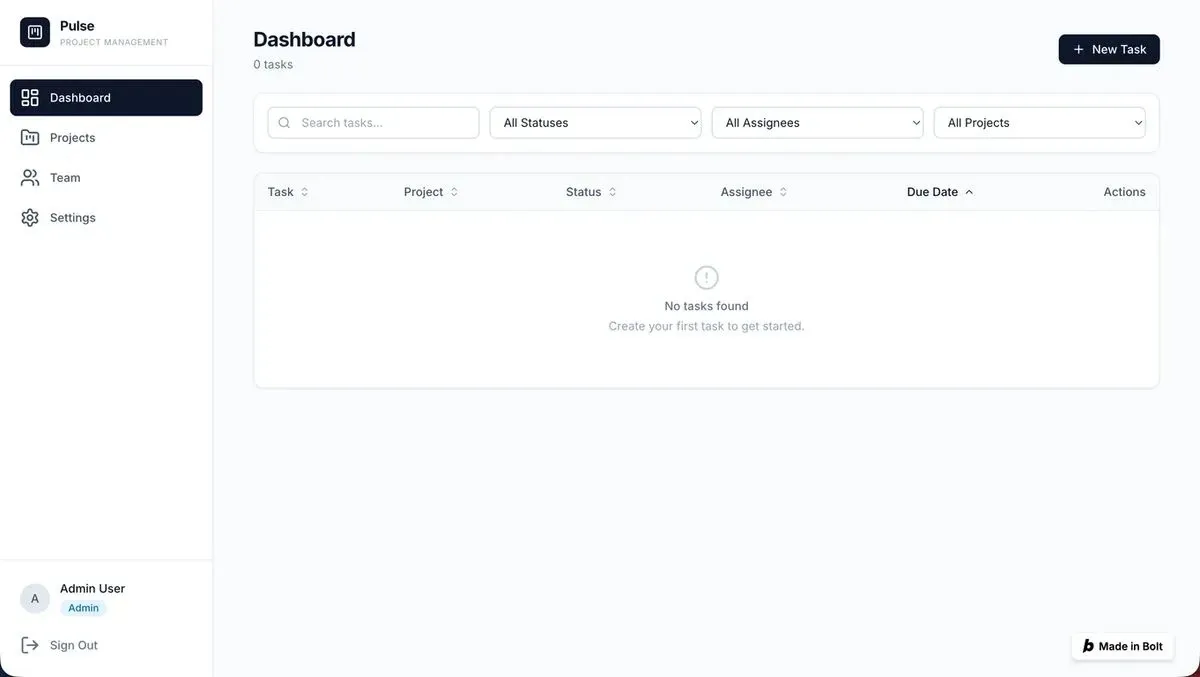
Admin role: full access with New Task creation and Team management visible in the sidebar.
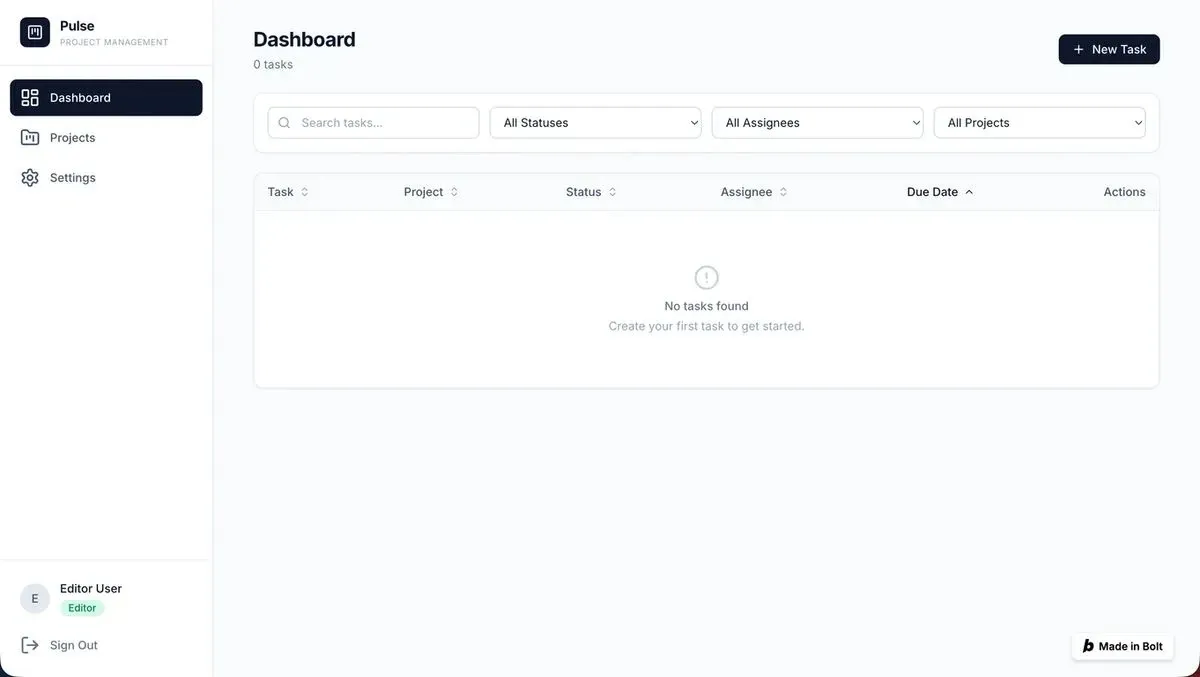
Editor role: New Task button present but Team menu absent, partial role restriction working visually.
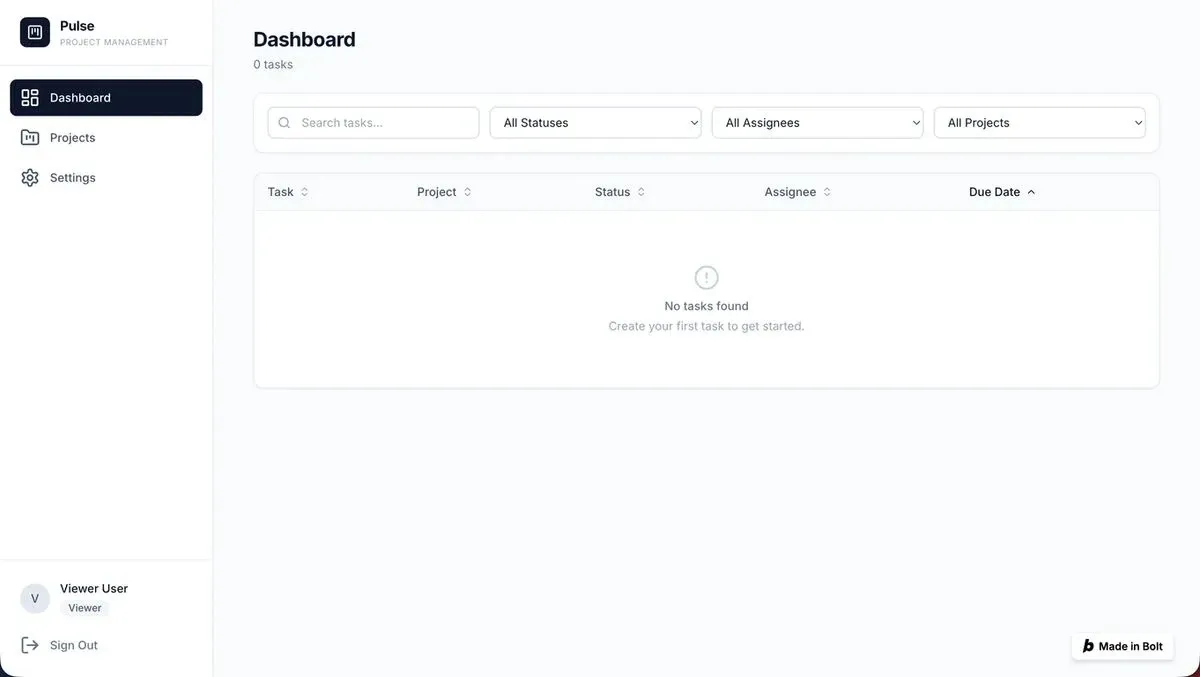
Viewer role: read-only dashboard with no New Task button, visual role separation rendered correctly.
-
Where it broke: The role UI looks correct in screenshots, but the authentication system had hard-coded session tokens, a serious security issue that would fail any security review. Stripe integration generated non-functional backend code. The database schema generated correctly but disconnected from the UI. We spent hours debugging backend logic that Bolt generated incorrectly.
-
Token costs and credits: Bolt burned through tokens and credits fast. Every prompt, every edit, every fix consumed tokens. The free tier is nearly unusable for building complex apps. Token costs compound when you are fixing generated code that Bolt produced with bugs.
-
Live Deployment: Bolt offers one-click deployment but the deployed version threw errors from misconfigured Stripe webhook API endpoints. The bolt.host deployment we tested rendered a completely blank page, confirming that deployment reliability is a real gap, not just a Stripe configuration issue. Hosting costs are separate from generation credits.
Score: 18/30. Choose Bolt if you are a developer comfortable working in a browser IDE who wants speed for prototyping. Bolt wins on generation speed but loses on production readiness. It handles the frontend layer well but leaves backend and database integrations as your problem. Bolt is fast, but speed without depth creates more work than it saves.
What Happened When We Used v0?
v0 from Vercel focuses almost exclusively on generating React components and frontend UI design. It is tightly integrated with the Vercel ecosystem, Vercel hosting, Next.js, and Tailwind CSS are the defaults. v0 does not pretend to be a full-stack app builder, and that honesty is refreshing.
- Prompt handling: v0 generated beautiful UI components from our brief. The design quality was strong, polished layouts, clean typography, and responsive screens. But v0 only generated the frontend code. No backend, no database, no auth, no payments.
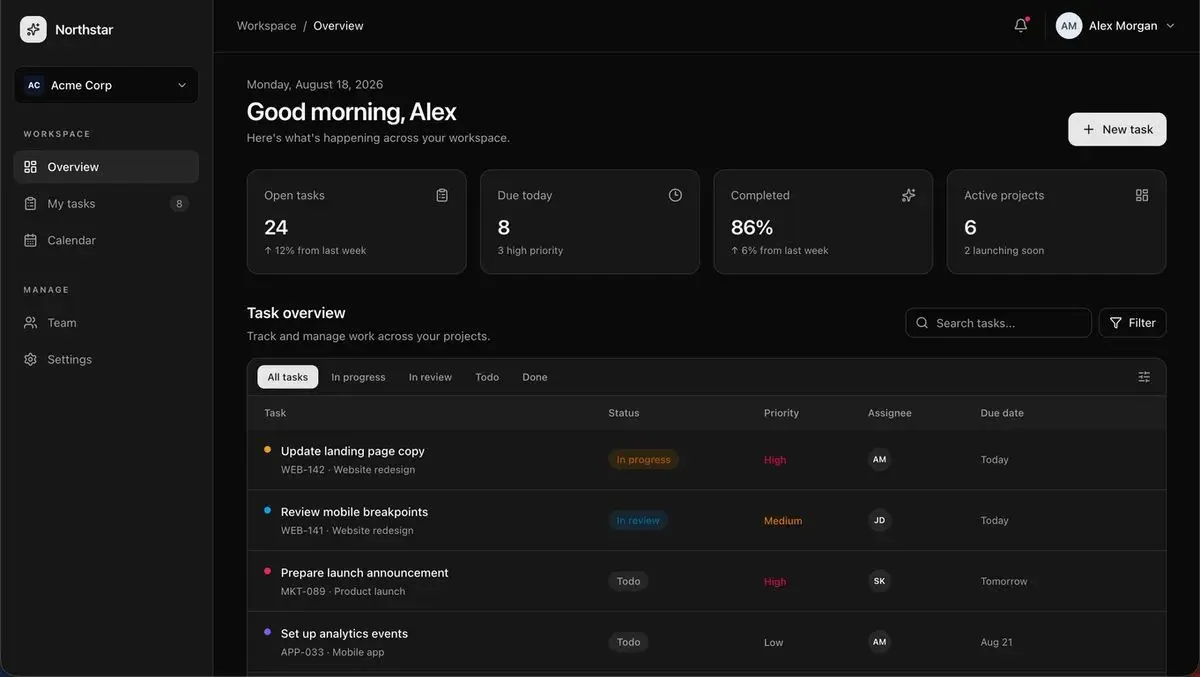
v0's output: genuinely the best-looking UI of the four tools, a polished dark-theme dashboard with real task data, metrics, and filtering. This was also the only screenshot we could take. A paid subscription is required to access the full database schema, and role-based credential iteration was not possible on the free plan.
-
What worked: If you need pixel-perfect React components and polished interface layouts, v0 delivers. The generated code quality is clean, well-structured, and ready to connect into existing codebases. Frontend developers will feel comfortable here. Vercel hosting deployment is one click from the v0 workspace.
-
Where it broke: The full database schema sits behind a paid subscription wall, a meaningful barrier for anyone evaluating v0 on a free plan. The live deployment itself requires a Vercel account login to access, adding another layer of platform dependency that other tools in this comparison do not impose.
-
Code ownership and lock-in: You get the complete codebase and can deploy to Vercel instantly. No vendor lock-in on the code itself, though Vercel ecosystem dependency creates platform lock-in. The GitHub export works cleanly.
-
Accessibility: Minimal learning curve for developers already in the React ecosystem. For non-technical users and non-developers, v0 offers less control because it produces code components, not working applications.
-
Live Build: Check out project link here.
Score: 14/30. v0 is for frontend developers who want AI-generated React components to drop into existing full-stack projects. According to GitHub's developer survey, 97% of enterprise developers have used AI coding tools at work (source), and most expect full-stack capabilities from these platforms, not just UI generation. Unlike Bolt, Lovable, and Rocket, all of which completed the full test on free plans, v0 required a paid upgrade to access core backend features.
Why Rocket Delivered a Production App on the First Try
While Lovable, Bolt, and v0 each generated partial output that required manual fixes, Rocket delivered a working production app from a single brief. The difference starts before a single line of code is written.
-
Planning before code: Rocket read our brief and asked clarifying questions about role permissions, billing intervals, and data relationships before writing a single line of code. This is the AI-first development environment difference, intelligence before execution. No other platform in this comparison does this.
-
Full-stack output: One prompt generated a complete full-stack application with Supabase integration for auth and data storage, real multi-role authentication, a paginated data table, Stripe subscription billing, and proper database schema relationships. All from natural language prompts, without local setup or manual configuration.
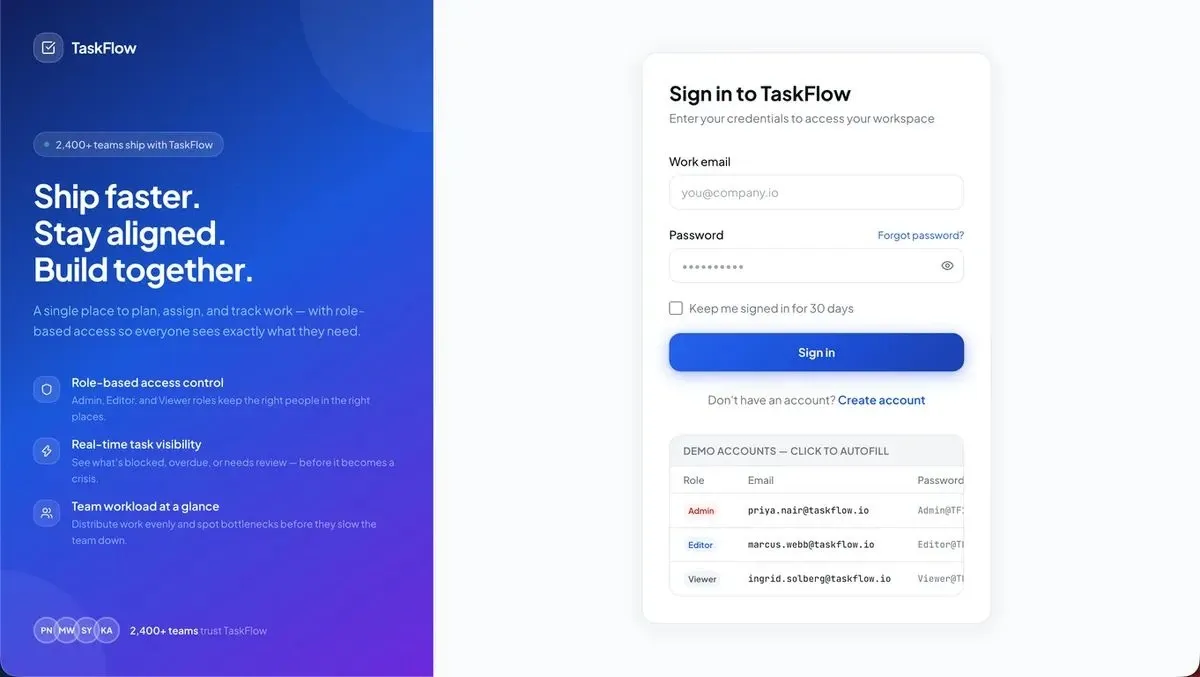
Rocket's first output: a production-grade login screen with demo accounts for all three roles, Admin, Editor, and Viewer, generated from one prompt, no follow-up required.
- Production-ready code: The generated code was clean, well-structured, and deployed with one-click deployment to a live URL with SSL certificates. No debugging. No manual setup. Complete code ownership from the start.
The Supabase backend was live and healthy immediately after generation, a real production database, not a mock:
Rocket auto-provisioned a live Supabase project with a healthy production database, real request metrics, and auth running, all from the initial build.
- AI-powered intelligence: Rocket researches your use case before generating. It considered user auth patterns, billing best practices, and role-based access patterns from its knowledge base. Other AI app builders generate what you describe. Rocket generates what you actually need because it understands the context.
Here are all three role dashboards Rocket produced, each with context-aware UI tailored to that role's permissions:
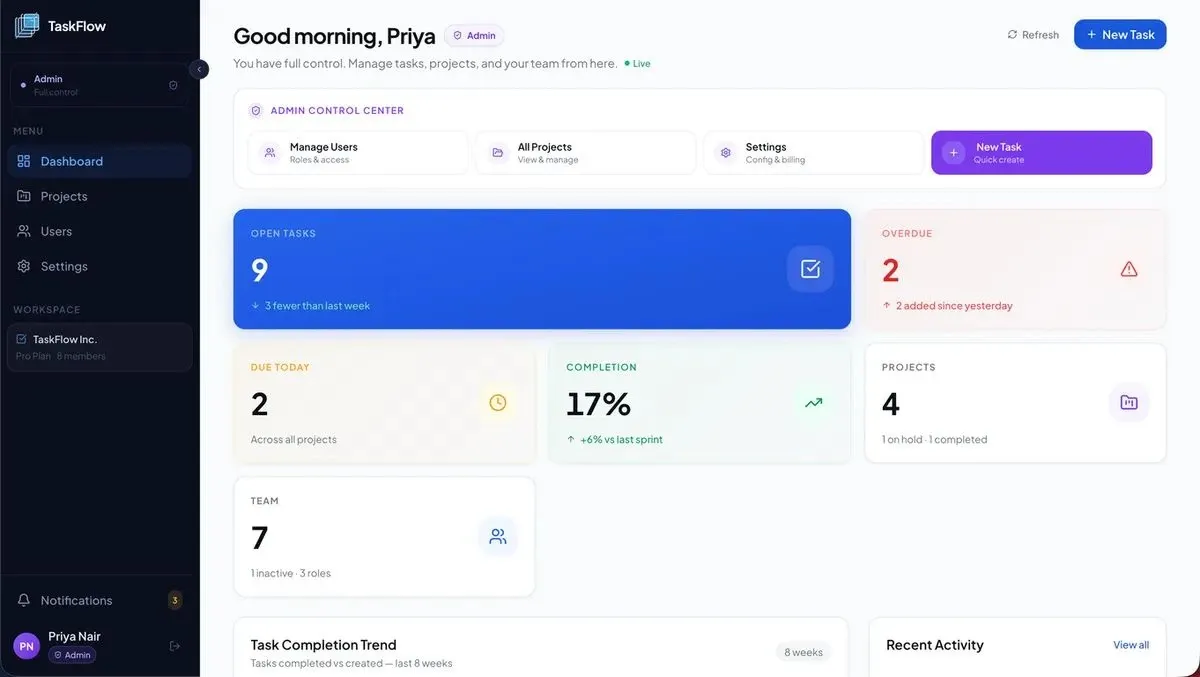
Admin role: full Admin Control Center with Manage Users (roles & access), All Projects, Settings (config & billing), and New Task quick create, all from the first prompt.
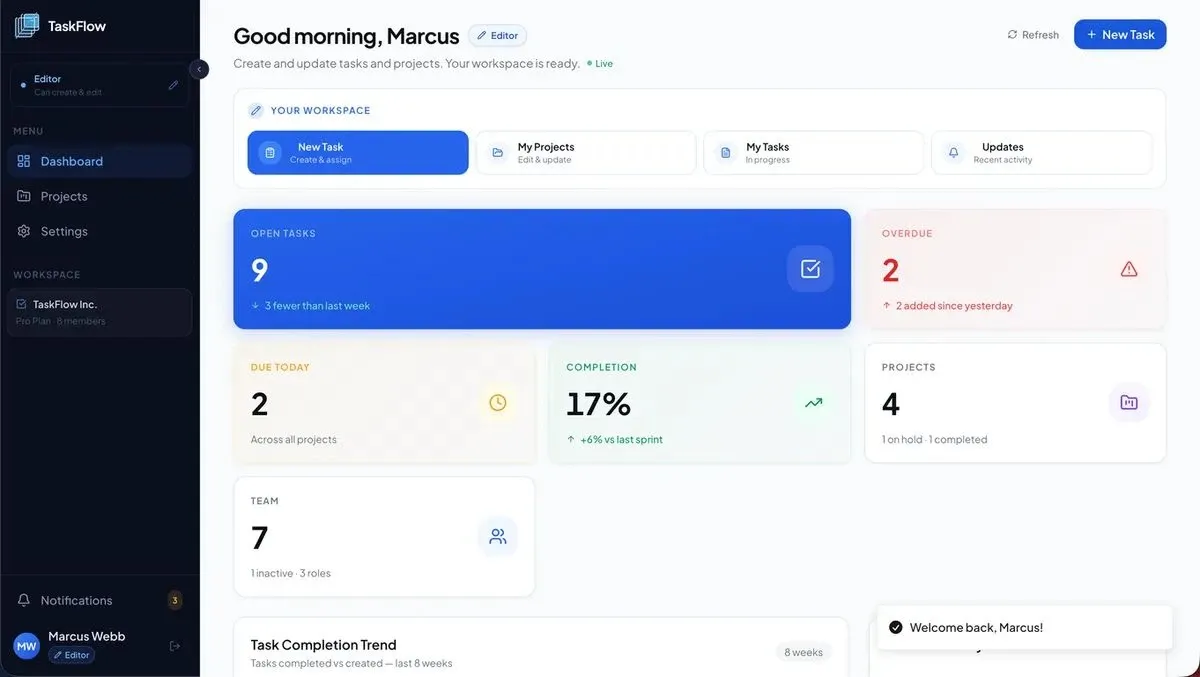
Editor role: scoped workspace showing New Task, My Projects, My Tasks, and Updates, no admin controls, no user management.
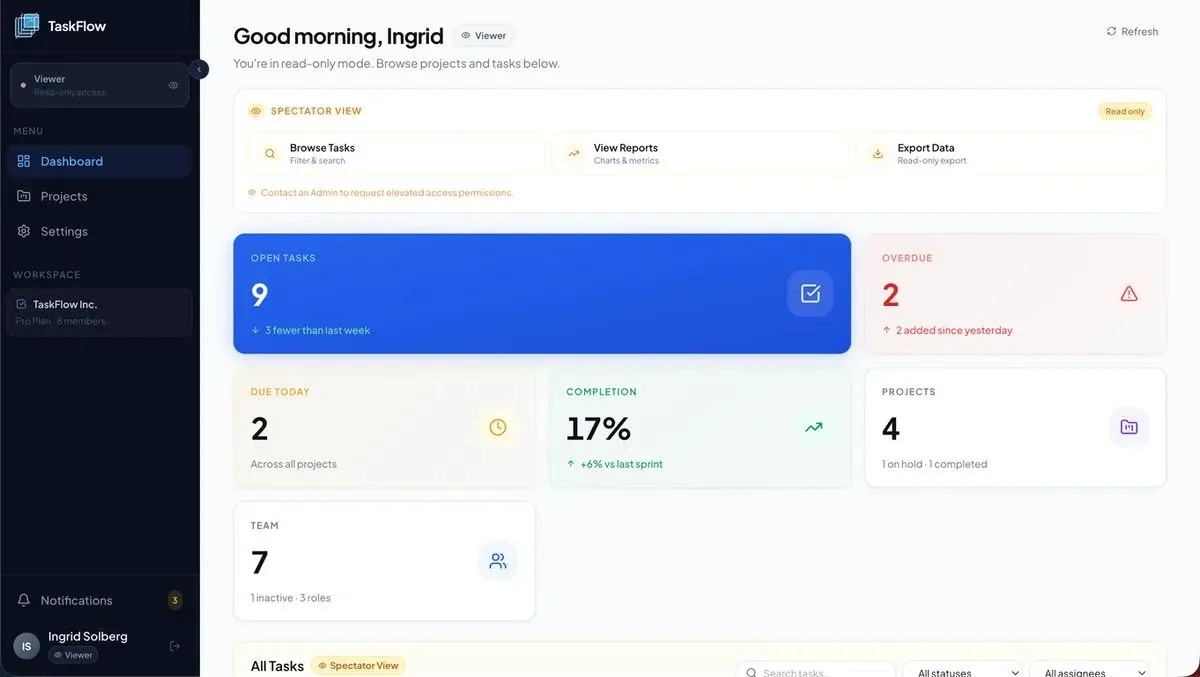
Viewer role: Spectator View with a read-only badge, limited to Browse Tasks, View Reports, and Export Data, zero edit access enforced at the UI level.
-
Developer handoff and team workflow: Full GitHub sync, version control, complete codebase with version history, and exportable code. Zero vendor lock-in. Connect to 25+ integrations including Stripe, Supabase, Notion, and Linear.
-
Live Build: Try Rocket.new live build yourself.
Score: 27/30. Rocket.new is not competing on the same terms as Lovable, Bolt, or v0. Those tools build what you tell them to build. Rocket figures out what is worth building, then builds it. For non-technical founders, solo builders, product managers, and teams who want to ship production apps without hiring a development team, it is the clear choice.
Side-by-Side: All Four Builders Scored
Here is the full feature comparison of all four AI app builders across the six dimensions.
| Dimension | Rocket | Bolt | Lovable | v0 |
|---|---|---|---|---|
| 5/5 | 3/5 | 3/5 | 3/5 | |
| 5/5 | 2/5 | 2/5 | 3/5 | |
| 4/5 | 3/5 | 4/5 | 5/5 | |
| 5/5 | 3/5 | 2/5 | 1/5 | |
| 4/5 | 4/5 | 3/5 | 2/5 | |
| 4/5 | 3/5 | 3/5 | 3/5 | |
| 27/30 | 18/30 | 17/30 | 14/30 |
The scoring tells a clear story. Rocket leads on everything that matters for shipping a real product to production. Bolt and Lovable are similar in total but differ in approach, Lovable leans visual, Bolt leans code. v0 leads on UI quality but covers the least ground, and was the only tool that required a paid upgrade to complete the full brief.
1graph TD
2 A[Which AI app builder should I pick?] --> B{Do you need full stack?}
3 B -->|No, frontend only| C[Choose v0]
4 B -->|Yes| D{Do you have a dev team?}
5 D -->|Yes, comfortable with code| E{Speed or production depth?}
6 D -->|No dev team| F[Choose Rocket]
7 E -->|Speed for prototypes| G[Choose Bolt]
8 E -->|Production depth| H[Choose Rocket]
9
10 style A fill:#111827,color:#fff
11 style F fill:#111827,color:#fff
12 style H fill:#111827,color:#fff
13 style C fill:#F97316,color:#fff
14 style G fill:#F97316,color:#fff
15 style B fill:#EEF2FF,stroke:#4F46E5,color:#111827
16 style D fill:#EEF2FF,stroke:#4F46E5,color:#111827
17 style E fill:#EEF2FF,stroke:#4F46E5,color:#111827Decision flowchart: which AI app builder fits your use case and team profile.
Which Builder Fits Which Founder Profile?
Different tools fit different builders. The choice in this Lovable vs Bolt vs v0 vs Rocket.new comparison depends entirely on who you are and what you need to ship.
-
Non-technical founders building an MVP: Choose Rocket. No technical knowledge required. It handles planning, building, and deployment in a single day. No other AI app builder goes from idea to live production app without coding or hiring developers.
-
Frontend developers who want quick prototypes: Choose Bolt or v0. If you already have backend infrastructure and want to generate UI code fast, these tools deliver. Bolt gives more control in its browser IDE. v0 produces more polished React components for the Vercel ecosystem.
-
Startups with a dev team wanting faster shipping: Choose Rocket or Bolt. Rocket gives you AI-powered full-stack generation with built-in backend and Supabase integration. Bolt works for developers who prefer staying in a code editor and handling deployment on their own terms.
-
Designers and product managers testing ideas: Choose Lovable. Its visual-first approach creates accessible, beautiful prototypes that non-technical users and designers can build without writing code. But you will need a developer to turn those prototypes into production apps with real backend logic.
-
Enterprise teams building internal tools: Choose Rocket. It offers advanced collaboration with workspace-level team features, role-based access, complete codebase export, staging and production environments, SOC 2 compliance, and zero vendor lock-in.
The market is evolving fast. All four tools continue shipping new features monthly. But the structural gap remains: Lovable, Bolt, and v0 start at code generation. Rocket starts at the thinking. That difference is what separates a functional prototype from a production app that real users depend on. Find micro SaaS ideas you can build and ship today.
The Builder That Thinks Before It Builds
We started this test expecting small differences between AI app builders. What we found was a structural gap. Three tools, Lovable, Bolt, and v0, generate code from prompts at different speeds and quality levels. One tool researches what to build, decides the architecture, and then generates production-grade full-stack applications with hosting, auth, payments, and collaboration in a single workflow.
If you are deciding which platform fits your next project, the fastest way to know is building the same brief yourself. Try your idea on Rocket for free and see what production-ready actually means when an AI app builder thinks before it generates. Connect 25+ integrations directly inside your Rocket workspace to handle everything from payments to analytics.
Ready to ship a full-stack app that actually works in production?
Rocket handles the planning, architecture, authentication, database schema, and deployment, all from a single natural language prompt. No dev team required. Start building on Rocket today and get your first 20 credits free.
Table of contents
- -Why AI Builder Comparisons Never Show Actual Output
- -What Was the Build Brief?
- -How Did We Score Each AI App Builder?
- -What Happened When We Used Lovable?
- -What Happened When We Used Bolt?
- -What Happened When We Used v0?
- -Why Rocket Delivered a Production App on the First Try
- -Side-by-Side: All Four Builders Scored
- -Which Builder Fits Which Founder Profile?
- -The Builder That Thinks Before It Builds