
Incremental static regeneration lets your AI-built app serve cached pages instantly while refreshing data in the background. Rocket.new ships every generated Next.js project with ISR already configured, so you skip the manual setup and go live faster.
Why Does Your AI-Built App Still Serve Yesterday's Data?
Here's something that catches most founders off guard.
According to production benchmarks from 2025 and 2026, ISR-enabled pages achieve Time to First Byte between 10ms and 50ms when served from edge cache, compared to 200ms-600ms for server-side rendering on every request (Smashing Magazine). That gap is the difference between a page that feels instant and one that makes users wait.
So why do so many AI-generated applications still default to rebuilding the entire site every time content changes?
The answer usually comes down to configuration complexity. Incremental static regeneration solves this problem at the framework level, but setting it up correctly requires understanding revalidation intervals, on-demand revalidation triggers, cache behavior, and route handlers.
For teams building content-heavy platforms, ecommerce stores, or data-driven dashboards, the rendering strategy you choose determines both page speed and content freshness.
The question isn't whether ISR works. It's whether your AI builder handles it for you.
What Is Incremental Static Regeneration and Why Does It Matter?
Incremental static regeneration (ISR) is a rendering strategy introduced in Next.js that combines the speed of static site generation with the freshness of server-side rendering. Instead of rebuilding your entire site when data changes, ISR regenerates individual pages in the background while continuing to serve the cached version to users.
-
Static pages load in milliseconds because they're served directly from the data cache without hitting your server on every request
-
Content stays fresh because Next.js triggers background regeneration after a configurable revalidation interval passes
-
Build time drops dramatically for large sites because you don't need to pre-render thousands of dynamic pages at deploy time
-
The cached version is served to visitors until a new version has been successfully generated, following a stale while revalidate pattern
Think of it this way. Traditional static site generation creates a snapshot of your page content at build time. That snapshot becomes stale the moment your database or CMS updates. Server-side rendering fixes staleness but adds latency to every single request.
ISR gives you both: static speed on the first request and fresh content on subsequent requests after regeneration completes.
ISR-enabled pages achieve 10-50ms TTFB from edge cache versus 200-600ms for SSR on every request
| Rendering Strategy | Page Speed | Content Freshness | Build Time Impact |
|---|---|---|---|
| Static Site Generation (SSG) | Instant (cached) | Stale until full rebuild | Grows linearly with page count |
| Server Side Rendering (SSR) | 200-600ms per request | Always fresh | No build required |
| Incremental Static Regeneration (ISR) | Instant (cached data) | Fresh after revalidation | Minimal, pages regenerated on demand |
For AI-built applications that pull from APIs, databases, or headless CMS platforms, this distinction matters. Your product listings, blog posts, and dashboard data need to stay up to date without sacrificing the performance that keeps users engaged.
According to Contentful's implementation guide, ISR was introduced in Next.js version 9.5 specifically to address this gap between static speed and dynamic content.
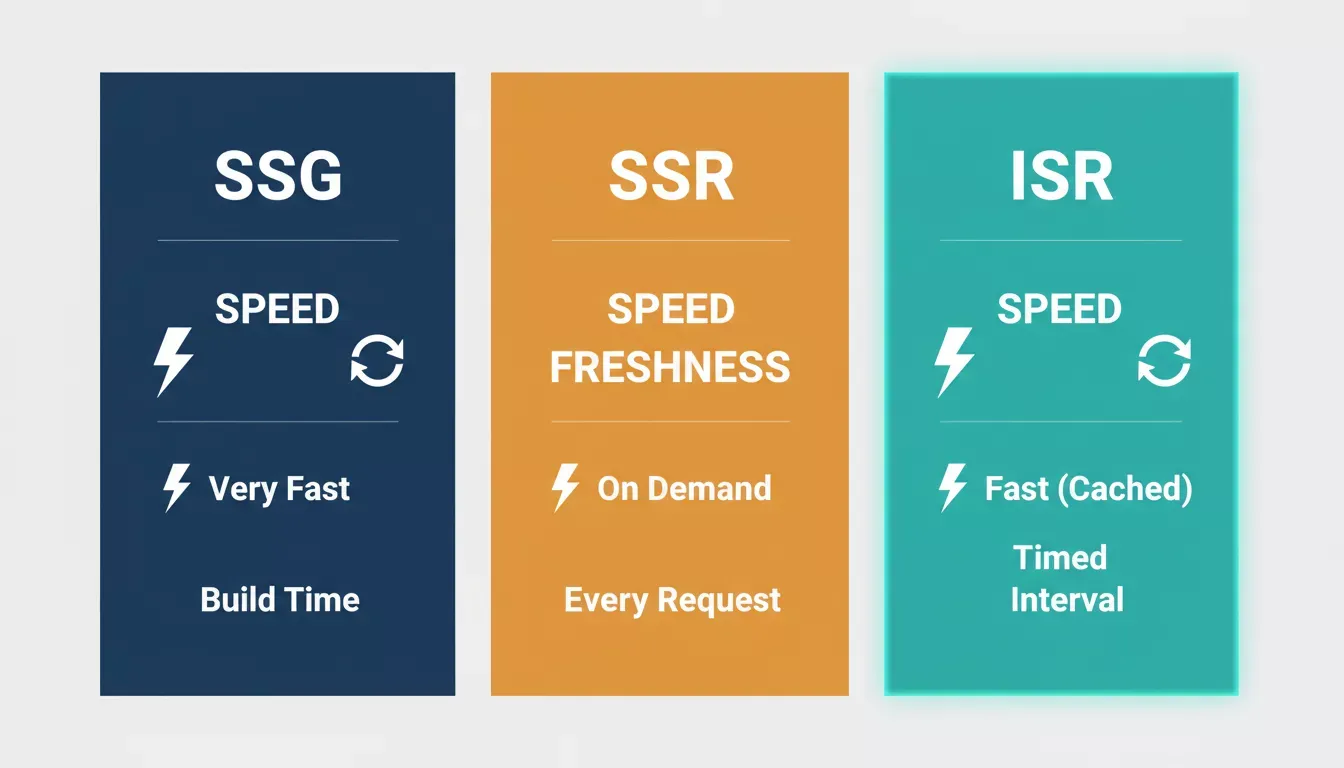
Three rendering strategies compared across speed and content freshness
How Does ISR Work Inside the App Router?
The Next.js app router makes implementing incremental static regeneration more intuitive than the older Pages Router approach. With the app router, you control ISR through fetch options and route segment configuration rather than separate data-fetching functions.
There are two main approaches to trigger revalidation in the app router:
Time-Based Revalidation
You set a revalidation interval on your fetch requests or at the route handler level. After that time passes, the next request triggers background regeneration while the cached version continues to be served.
1// app/products/[id]/page.tsx
2export const revalidate = 60
3
4export default async function ProductPage({ params }) {
5 const { id } = await params
6 const product = await fetch(`https://api.example.com/products/${id}`).then(res => res.json())
7 return (
8 <main>
9 <h1>{product.title}</h1>
10 <p>{product.description}</p>
11 </main>
12 )
13}
With time-based ISR, the page path receives a cached version on the first request. After 60 seconds pass, the next request still receives the stale page instantly, but Next.js regenerates a new version in the background. Once successfully generated, subsequent requests receive the updated content from the data cache.
On-Demand Revalidation with Tags and Paths
For situations where content changes are unpredictable, on-demand ISR lets you invalidate specific cached pages immediately. You can trigger this through an API route or route handler connected to a webhook from your CMS or database.
1// app/api/revalidate/route.ts
2import { revalidateTag } from 'next/cache'
3import { NextRequest } from 'next/server'
4
5export async function POST(req: NextRequest) {
6const { tag, secret } = await req.json()
7if (secret !== process.env.REVALIDATION_SECRET) {
8 return Response.json({ message: 'Invalid secret' }, { status: 401 })
9}
10revalidateTag(tag)
11return Response.json({ revalidated: true })
12}
On-demand revalidation with tags gives you surgical control. Tag your fetch requests with identifiers like 'products' or 'blog-posts', then invalidate all pages using that tag when content changes. The next request to any affected page path triggers regeneration and serves fresh data from that point forward.
ISR request flow: time-based revalidation combined with on-demand cache invalidation via webhooks
The app router also supports combining both methods. Set a time-based revalidation interval as a fallback, and use on-demand ISR for immediate updates when your webhook fires. The combination of time-based revalidation and on-demand revalidation gives you a safety net that keeps page content fresh regardless of which trigger fires first.
One detail worth noting: during local development, ISR behaves differently. Pages are always re-rendered on every request in dev mode. To test ISR behavior accurately, you need to run next build followed by next start in your environment variable configuration. Add NEXT\_PRIVATE\_DEBUG\_CACHE=1 to your env file to see cache hits and misses in the server console.
When Should You Choose ISR Over SSR or SSG?
Not every page needs incremental static regeneration. The rendering strategy should match how often your content changes and how many users are requesting it simultaneously.
-
Choose SSG when page content rarely changes, and you can afford a full rebuild on each deployment. Documentation sites, marketing pages with quarterly updates, and portfolio sites fit this pattern well.
-
Choose SSR when content is personalized per user or changes on every single request. Logged-in dashboards showing real-time data, personalized feeds, and checkout flows with live inventory typically need server-side rendering.
-
Choose ISR when content updates periodically and your site has hundreds or thousands of pages. Product listings on ecommerce platforms, blog posts published through a CMS, news websites with editorial schedules, and AI-generated content pages are prime candidates.
For most use cases involving Next.js ISR for AI-built apps, ISR is the sweet spot. Your app likely pulls from APIs or databases that update throughout the day, but not on every single page load. The cached pages get served instantly from static files while background work handles keeping things current.
According to GeekyAnts' technical analysis, ISR has become the standard rendering strategy for content-heavy sites that need both performance and freshness without the cost of constant server-side rendering.
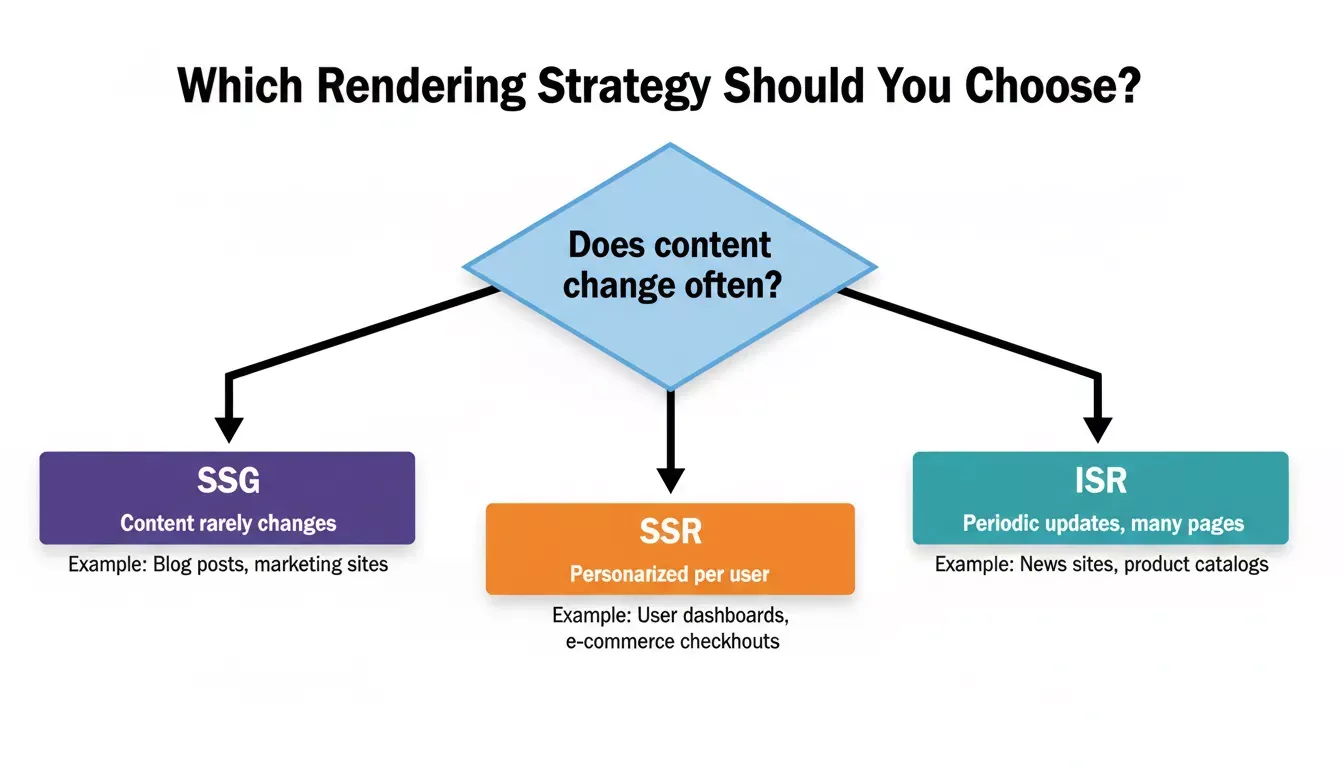
Use this decision framework to pick the right rendering strategy for each page type
A good litmus test: if you'd be comfortable showing content that's 60 seconds old (or even an hour old) to most visitors, ISR works. If every millisecond of staleness is unacceptable (think stock trading platforms), SSR with edge caching is the better fit.
And if your site literally never changes between deployments, pure static site generation still wins on simplicity.
Why Rocket.new Ships With ISR Already Configured
Here's where things get practical. Most AI app builders generate code but leave the infrastructure decisions to you. You get a working prototype, then spend hours configuring revalidation intervals, setting up webhook endpoints, managing cache tags, and debugging why your statically generated pages show stale content in production.
Rocket.new takes a different approach. Every web application built on the platform ships as a production-grade Next.js project with ISR configured as part of the production defaults.
-
ISR configured out of the box - Rocket.new generates your Next.js project with time-based ISR defaults already in place. Pages pulling from fast-changing APIs get shorter revalidation windows. Static-ish content gets longer ones.
-
Integration code auto-generated - When you connect a CMS, database, or API through Rocket.new's 26+ integrations, Rocket.new generates the API routes, webhook handlers, and revalidation logic needed for on-demand ISR as part of the build.
-
Edge-ready deployment - One-click deployment via Netlify pushes your app with proper cache headers and CDN configuration. Your cached pages are served from edge locations globally, keeping TTFB under 50ms for most visitors.
-
No route segment config guesswork - You don't need to manually configure revalidation intervals across dozens of route segments. Rocket.new generates a production-ready Next.js project with ISR defaults already in place.
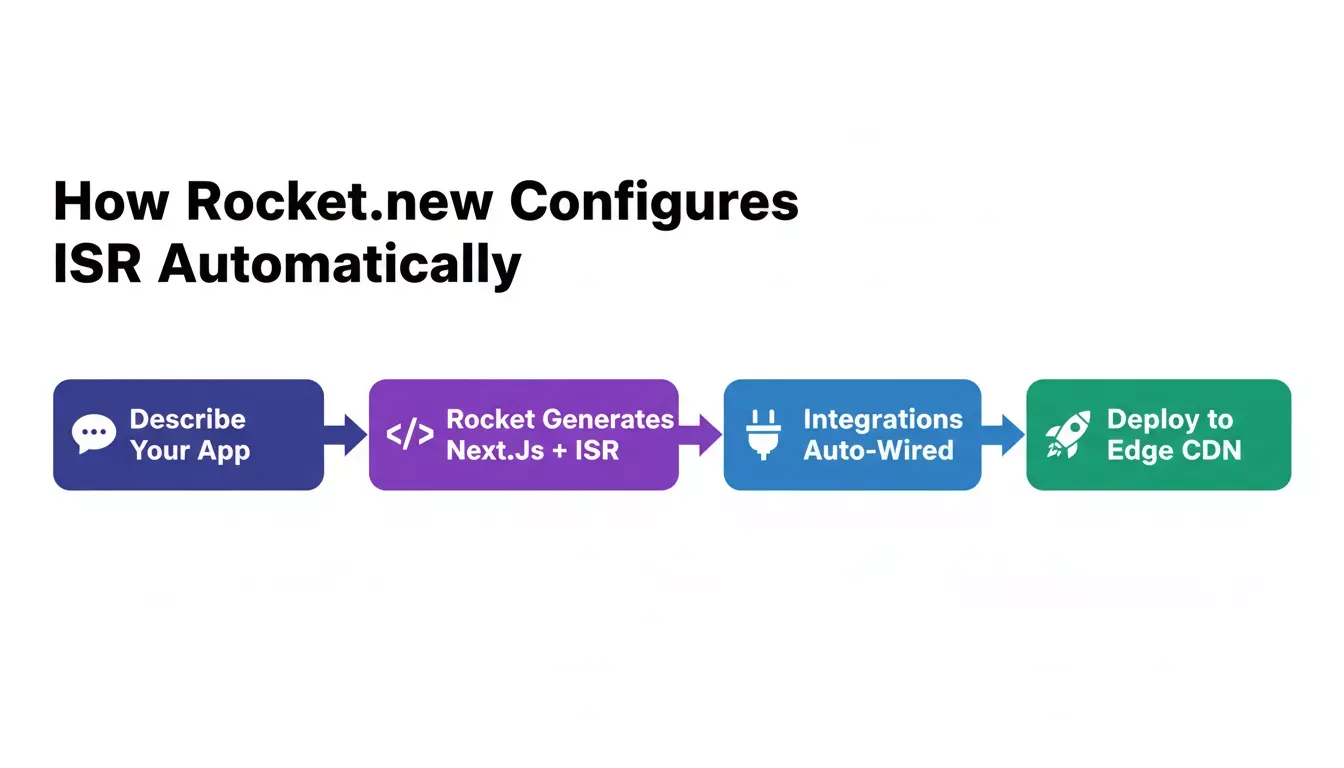
Rocket.new's four-step automated workflow: describe, generate, wire integrations, and deploy to edge CDN
The contrast with other AI builders is stark. Tools like Bolt, Lovable, and v0 generate UI components and application logic, but the caching layer, deployment configuration, and ISR setup remain your responsibility.
You still need to manually add route segment configs, build API routes for on-demand revalidation, configure your env file with revalidation secrets, and handle the deployment pipeline that supports ISR (since static exports don't work with it).
-
Rocket.new's production defaults include ISR alongside SEO structure, accessibility compliance, and performance optimization.
-
If you're comparing your options, it's worth looking at how Rocket.new stacks up against Lovable on production-readiness features. For self-hosting scenarios, ISR requires a Node.js server (not a static file host). Rocket.new handles this transparently.
-
Server actions and API routes work out of the box alongside ISR. Even existing Next.js codebases can be imported and benefit from Rocket.new's managed ISR infrastructure.
-
Founders who want to understand the full technical stack should also read about why Rocket.new generates Next.js and Flutter as its default frameworks.
This is the kind of operational pain Rocket.new eliminates.
The platform manages the hosting, caching, and ISR reads so you're not surprised by bills from unoptimized cache configurations. Teams building full-stack apps can explore how Rocket.new compares to Bolt and Replit on production defaults to understand the full stack that gets generated.
What Are the Common ISR Pitfalls and How Do You Fix Them?
ISR works well when configured correctly, but a few common mistakes trip up developers who implement it manually. Understanding these pitfalls helps you appreciate what a managed platform handles behind the scenes.
The five most common ISR configuration mistakes and how to avoid them
| Pitfall | Root Cause | Fix |
|---|---|---|
| Stale gap problem | The first visitor after interval expiry gets old page | Pair time-based with on-demand ISR via webhooks |
| Missing generateStaticParams | New dynamic paths trigger blocking server render | Pre-render known paths at build time |
| REVALIDATION_SECRET misconfigured | Webhook calls fail silently | Set the correct secret in the env file |
| CDN cache layering confusion | CDN serves old version after Next.js regenerates | Check both the Next.js data cache and CDN edge cache |
| Testing ISR in dev mode | ISR does not run in development | Run next build the,n next start locally |
-
The "stale gap" problem: The first visitor after the revalidation interval expires still sees the old cached version. Only the second visitor gets the fresh page. This is by design (stale while revalidate), not a bug. If your use case demands zero staleness, pair time-based revalidation with on-demand ISR triggered by webhooks.
-
Missing generateStaticParams: In the app router, if you don't predefine dynamic routes with
generateStaticParams , the first visitor to a new page path gets a blocking server render instead of an instant static response. Pre-render your known paths at build time and let ISR handle new ones.
- Environment variable misconfiguration: ISR requires the
REVALIDATION\_SECRET in your env file to secure your on-demand revalidation endpoint. Without it, anyone can purge your cache. With the wrong value, your CMS webhook calls fail silently.
-
CDN cache layering confusion: Your page might be cached in the Next.js data cache AND your CDN's edge cache. When debugging stale content, check both layers. The CDN might be serving an older version even after Next.js has regenerated the page.
-
Revalidation in local development: ISR doesn't work in dev mode. Pages always render fresh. To test cache behavior, run the
next build , then next start locally. Many developers think ISR is "broken" when they're just testing in the wrong environment.
When errors occur during background regeneration, Next.js keeps serving the last successfully generated version. This means a temporary API outage won't take your page down, but it also means you might not notice the error immediately. Monitoring your revalidation logs is important for catching these silent failures before they result in days of stale content.
For large sites with thousands of pages and multiple content sources, managing ISR across all route segments becomes its own operational burden. Each page might need different revalidation intervals depending on its data source. Getting this right manually requires touching configuration across dozens of files, which is exactly the kind of infrastructure overhead that a production-ready AI app builder is designed to eliminate.
The Right Rendering Strategy Starts Before the First Line of Code
Incremental static regeneration is one of those features that separates production-ready applications from prototypes.
It's not just about page speed or content freshness in isolation. It's about building an app that handles both gracefully as your traffic and content volume grow.
The teams that ship fastest aren't the ones who understand every caching nuance. They're the ones who pick tools that handle infrastructure decisions intelligently from the start, letting them focus on the product their users actually care about.
If you're evaluating AI builders for your next project, it's worth understanding how Rocket.new compares to Bolt and Replit on code quality and production defaults.
Build your next application on Rocket.new and ship with ISR, edge caching, and production deployment handled from day one. Describe what you want to build and get a production-grade Next.js project with ISR configured, revalidation wired to your integrations, and edge deployment ready to go.
Start building for free on Rocket.new and skip the infrastructure guesswork entirely.
Table of contents
- -Why Does Your AI-Built App Still Serve Yesterday's Data?
- -What Is Incremental Static Regeneration and Why Does It Matter?
- -How Does ISR Work Inside the App Router?
- -Time-Based Revalidation
- -On-Demand Revalidation with Tags and Paths
- -When Should You Choose ISR Over SSR or SSG?
- -Why Rocket.new Ships With ISR Already Configured
- -What Are the Common ISR Pitfalls and How Do You Fix Them?
- -The Right Rendering Strategy Starts Before the First Line of Code