
Want to turn scattered feedback into product improvements? Build a structured analyzer by collecting relevant input, organizing data, and using tools to extract insights, prioritize actions, and enhance customer experience.
How do you build a powerful user feedback analyzer?
You start by collecting the right feedback, organizing it well, and using smart tools to analyze it quickly. A structured approach helps teams turn raw input into clear actions that improve products and customer experience.
According to Statista, 47% of customers say they have a more favourable view of brands that respond to customer questions or complaints. That’s a strong signal. Listening matters. Acting on it matters even more.
This blog will guide you in building a practical system to collect feedback, analyze it, and turn it into real improvements using the right tools and structure.
Why Feedback Still Drives Everything?
Let’s be real for a second. Every app, product, or service lives and dies by how users feel. That’s where user feedback and customer feedback come in.
When customers share thoughts through surveys, user interviews, or even quick in-app surveys, they are telling you what works and what doesn’t. This feedback becomes your shortcut to better decision-making.
Still, many teams struggle. Feedback sits in different tools. Some comes from website feedback. Some from emails. Some from survey tools like Google Forms. It gets messy fast.
So, what’s the fix?
A solid feedback platform that can collect feedback, organize feedback data, and support deep feedback analysis.
What is a User Feedback Analyzer?
A user feedback analyzer is not just another feedback tool**. It’s a structured system that helps teams collect feedback, analyze patterns, and turn everything into actionable insights.**
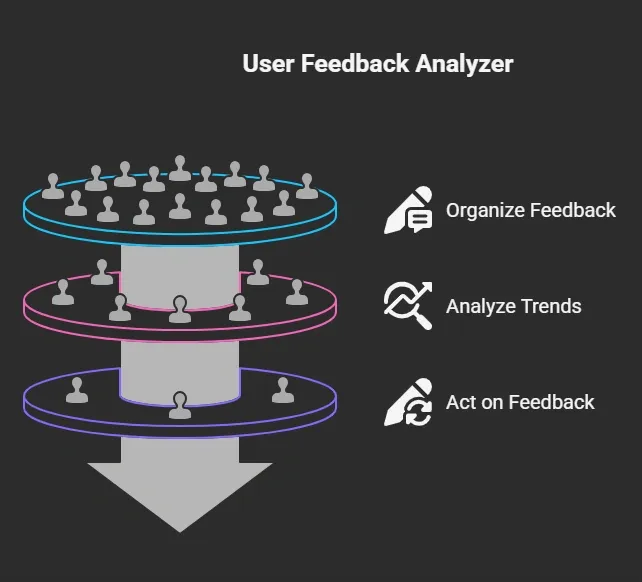
And that’s where the magic happens.
This process creates a strong feedback loop. Each cycle helps teams better understand users, fix issues faster, and improve the overall customer experience.
Over time, this loop keeps getting smarter. And your product keeps getting better.
The Problem With Scattered Feedback
Most businesses use multiple tools, such as survey tools, support dashboards, and analytics platforms. Sounds fine, right? Not really.
Here’s what usually happens:
- Feedback collection is spread across different feedback channels
- Product teams miss feature requests
- Support teams handle issues without deeper insights
- Feedback data stays unused
This breaks the feedback loop. And when the loop breaks, customer satisfaction drops.
What Makes a Good Feedback Platform?
So, what should you look for in a feedback platform?
Here are some key features that matter:
| Feature | Why It Matters |
|---|---|
| In-app surveys | Capture feedback during user interactions |
| Session recordings | See how users behave inside your app |
| Advanced analytics | Spot patterns and trends quickly |
| Feedback tracking | Keep all feedback items organized |
| Integration with tools like Google Analytics | Combine behavior and feedback data |
A good feedback platform helps teams manage feedback without stress. It also helps analyze data faster.
Types of Feedback You Should Collect
So, where does all this feedback actually come from? Well, not all feedback is the same, and that’s exactly why you need a mix.
When you use different feedback channels, you get a more complete picture of what users and customers are really experiencing.
1. In App Surveys
Quick and easy. Great for collecting feedback during user interactions.
2. User Interviews
Deeper insights. Helps you understand the root cause behind issues.
3. Website Feedback
Simple forms or popups. Useful for capturing instant thoughts.
4. Customer Support Feedback
Direct input from support teams. Great for spotting recurring problems.
5. CSAT Scores
Helps measure customer satisfaction quickly.
When you combine all these, your feedback collection becomes much stronger. You’re not guessing anymore, you’re seeing the full picture.
And that’s what builds a solid feedback loop, where every piece of feedback helps you improve your product step by step.
How to Build a User Feedback Analyzer Using Rocket.new ?
Alright, now let’s get practical.
You don’t just want to collect feedback, you want a system that actually works. This is where Rocket.new comes in. It helps you build a complete feedback platform without juggling multiple tools.
Rocket.new is a vibe solutioning platform that helps you turn ideas into working products quickly, without heavy coding. It combines smart automation, intuitive design, and AI-driven workflows, so you can quickly and efficiently build tools like feedback analyzers.
So, let’s break it down step by step.
Step 1: Set Up Your Feedback Collection
Start by deciding where your feedback will come from.
With Rocket.new, you can collect feedback through:
- In-app surveys during user interactions
- Website feedback forms
- Follow up emails after customer interactions
- Inputs from support teams
You can also connect survey tools, such as Google Forms, if needed. The goal here is simply to capture feedback from various channels so nothing gets missed.
Step 2: Organize Your Feedback Data
Once feedback starts coming in, things can get messy fast.
Rocket.new helps you manage feedback by:
- Grouping feedback items into categories
- Tagging feature requests
- Sorting feedback based on priority
This keeps your feedback data clean and easy to analyze.
Step 3: Analyze Feedback with Built-In Analytics
Now comes the real work feedback analysis.
Rocket.new offers advanced analytics that help you:
- Analyze trends across surveys
- Track patterns in feedback data
- Identify common issues
- Understand customer behavior
This step gives you deeper insights and helps teams move from guesswork to clarity.
Step 4: Use Session Replays for Context
Sometimes feedback alone isn’t enough. That’s why Rocket.new includes session recordings and session replays.
You can:
- Watch how users interact with your app
- Use annotated screenshots to highlight problems
- Connect behavior with feedback
This helps you find the root cause faster and resolve issues faster.
Step 5: Turn Feedback Into Action
Now it’s time to act.
With everything in one platform, teams can:
- Create actionable user feedback tasks
- Share insights with different teams
- Prioritize improvements
This is where feedback becomes real improvements in your product.
Step 6: Close the Feedback Loop
Don’t stop after fixing issues.
Rocket.new lets you:
- Send follow-up emails
- Update customers on changes
- Keep the feedback loop active
This builds trust and improves customer satisfaction over time.
Step 7: Scale with the Right Pricing Plan
As your team grows, your needs change.
Rocket.new supports:
- A free plan for small teams
- Flexible pricing plans based on team size
- Paid plans with advanced features for larger businesses
So whether you're just starting or scaling, the platform grows with you.
When you follow this system, you’re not just collecting feedback you’re building a complete feedback analyzer.
Rocket.new handles the heavy lifting, so your teams can focus on understanding users, improving customer experience, and making better decisions with confidence. And the best part? Everything stays connected in one place.
Community Insight
Here’s something that really hits home:
“Traditional analytics tell you what happened… but they don’t tell you why.” LinkedIn
That one line says a lot.
Most teams rely on analytics to track data, user interactions, and performance. But numbers alone don’t explain behavior. They don’t show frustration, confusion, or intent.
Pricing and Plans: How Rocket.new Fits Different Teams
Let’s talk about pricing for a second. Because no matter how good a feedback platform is, it still has to fit your team size and budget.
Rocket.new keeps things simple and practical.
It offers a free plan that works well if you’re just starting out. You can set up basic feedback collection, run in-app surveys, and start building your feedback loop without spending anything.
As your needs grow, you can move to paid plans. These plans give you access to more advanced features like:
- Advanced analytics for deeper insights
- More session recordings and session replays
- Better feedback tracking across multiple feedback channels
- More flexibility to manage feedback at scale
The flexible pricing plans are designed to grow with your team. So whether you’re a small startup or part of a larger team handling lots of customer interactions, you won’t feel stuck.
And that’s the key here, you’re not paying for things you don’t need early on, but you still have room to scale when your feedback system gets bigger.
In short, Rocket.new makes it easy to start small, stay organized, and expand your feedback platform as your product and customers grow.
Building a Strong User Feedback Analyzer
Teams often collect feedback but struggle to manage feedback properly. Feedback data gets scattered across different tools, important feedback items are missed, and insights don’t turn into action. This breaks the feedback loop and gradually affects customer satisfaction and the overall customer experience.
The solution is to use a structured feedback platform like Rocket.new that brings everything into one place. A well-built user feedback analyzer helps collect feedback, organize it, and run effective analyses so teams can act faster. Keep it simple, stay consistent, and let your feedback system turn raw feedback into actionable insights.
Table of contents
- -Why Feedback Still Drives Everything?
- -What is a User Feedback Analyzer?
- -The Problem With Scattered Feedback
- -What Makes a Good Feedback Platform?
- -Types of Feedback You Should Collect
- -1. In App Surveys
- -2. User Interviews
- -3. Website Feedback
- -4. Customer Support Feedback
- -5. CSAT Scores
- -How to Build a User Feedback Analyzer Using Rocket.new ?
- -Step 1: Set Up Your Feedback Collection
- -Step 2: Organize Your Feedback Data
- -Step 3: Analyze Feedback with Built-In Analytics
- -Step 4: Use Session Replays for Context
- -Step 5: Turn Feedback Into Action
- -Step 6: Close the Feedback Loop
- -Step 7: Scale with the Right Pricing Plan
- -Community Insight
- -Pricing and Plans: How Rocket.new Fits Different Teams
- -Building a Strong User Feedback Analyzer